Business Communication
  Blog
Blog  Customer Experience
  Leadership
  Marketing & Sales
  Nextiva News
  Productivity
  VoIP
VoIP 

Businesses now expect contact center software to do more than route calls. Large customer service teams need omnichannel routing, agent assist, workforce visibility, analytics, secure payment workflows, and integrations with the systems agents use every day.
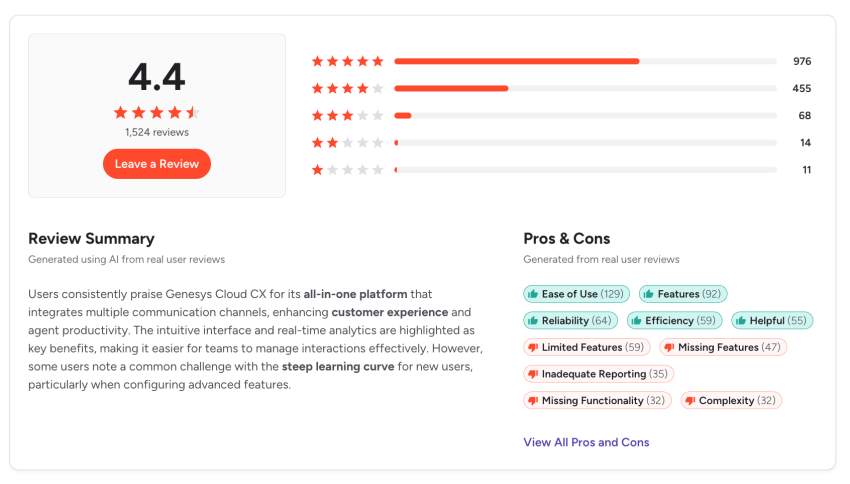
Genesys Cloud CX remains a strong enterprise contact center platform for organizations with complex customer experience operations. Its implementation requirements, administrative workload, and total cost may exceed what some teams need.
The best Genesys alternatives depend on the buyer’s priorities:
- Nextiva fits organizations that want unified UCaaS and CCaaS with workforce engagement, analytics, AI, and secure workflows.
- Talkdesk suits teams that prioritize AI-led customer experience automation.
- Five9 fits large outbound and blended contact centers.
- NICE CXone serves enterprises that prioritize workforce engagement and analytics.
- 8×8 combines UCaaS and CCaaS for global organizations.
- Dialpad focuses on AI-powered calling, coaching, and conversation intelligence.
- Amazon Connect gives AWS-native teams a usage-based, highly customizable platform.
- Aircall provides a simpler voice-first option for small and mid-sized sales and support teams.
This guide compares Genesys alternatives by features, pricing approach, implementation requirements, security, workforce management, and overall fit.
Contact Center Software Models
Contact center software manages customer communications, agent workflows, routing, reporting, automation, and workforce operations. The right model depends on the type of customer interactions and the organization’s technical requirements.
| Model | Typical use | Key considerations |
|---|---|---|
| Inbound | Customer service, technical support, account assistance | Queue management, IVR, skills-based routing, callbacks, and agent visibility |
| Outbound | Sales, collections, renewals, surveys, and notifications | Dialers, campaign management, compliance controls, and agent productivity |
| Blended | Teams that manage inbound service and outbound outreach | Shared customer context, flexible routing, and coordinated reporting |
| On-premise | Organizations that operate communications infrastructure internally | Hardware, maintenance, upgrades, security, and internal IT resources |
| Cloud-hosted | Organizations that want vendor-managed infrastructure | Faster deployment, remote access, automatic updates, and subscription pricing |
Cloud contact centers can help businesses manage call volume, improve agent productivity, automate routine requests, preserve customer context, and control infrastructure costs. Buyers still need to evaluate usage charges, implementation costs, add-ons, contract terms, and the level of internal administration required.
Genesys Alternatives at a Glance
Before diving into the detailed reviews, here’s a quick comparison of the top Genesys alternatives by best-fit use case, standout feature, and starting price.
| Provider | Best for | UCaaS and business communications | Contact center pricing approach |
|---|---|---|---|
| Nextiva | Unified UCaaS, CCaaS, workforce engagement, and secure customer communications | Business phone, messaging, video, team chat, and contact center tools | Published plans and custom enterprise pricing |
| Talkdesk | AI-powered customer experience automation | Contact center-focused platform with integrations | Request a quote |
| Five9 | Enterprise outbound and blended contact centers | Contact center-focused platform | Custom quote |
| NICE CXone | Workforce engagement, analytics, and enterprise operations | Contact center-focused platform | Custom quote |
| 8×8 | Global UCaaS and CCaaS consolidation | UCaaS and CCaaS under one platform | Custom quote |
| Dialpad | AI-powered calling, coaching, and support | Business phone, video, messaging, and contact center tools | Published and custom plan options |
| Amazon Connect | AWS-native contact centers and usage-based deployment | Not a standalone UCaaS platform | Usage-based |
| Aircall | SMB sales and support teams | Voice-first business phone platform | Published plans and custom advanced plans |
Pricing, feature availability, AI usage, telephony charges, implementation fees, and contract terms vary by plan. Buyers should request a written quote before comparing total cost.
Strengths of Genesys Cloud CX
Genesys Cloud CX is designed for organizations that coordinate complex customer and employee experiences across multiple channels.
Enterprise experience orchestration
Genesys combines voice, digital channels, AI, journey analytics, customer engagement, and workforce management tools in one contact center environment.
Omnichannel engagement
Genesys supports customer interactions across voice and digital channels. Its routing tools can use customer intent, interaction data, skills, and availability to direct conversations to an appropriate resource.
Routing and workforce engagement
The platform includes tools for:
- Automatic call distribution
- Skills-based routing
- Queue management
- IVR routing
- Wrap-up codes
- Analytics and dashboards
- Outbound campaigns
- Quality management
- Coaching
- Scheduling
- Performance management
- Real-time supervisor visibility
AI and automation
Genesys includes AI capabilities such as:
- Agent Assist
- Agent Copilot
- AI Studio
- Virtual agents
- Predictive engagement
- Predictive routing
- Speech and text analytics
- Social listening
- Bots
- Supervisor Copilot
Genesys states that its Cloud CX plans include ready-to-use AI, while some advanced capabilities require AI Experience tokens.
Why Businesses Consider Other Platforms
Genesys provides extensive functionality, but its scale may not suit every organization. Buyers often compare other platforms when they need simpler administration, clearer costs, faster implementation, or stronger UCaaS capabilities.
Advanced capabilities may require higher tiers
Teams may need higher plans or add-ons for:
- Digital channels
- Workforce engagement management
- AppFoundry integrations
- Work automation
- Advanced analytics
- Speech and text analytics
- Additional AI capabilities
Implementation can require specialized resources
Genesys environments can involve voice, digital channels, AI, workforce engagement, journey management, routing, analytics, and automation. A dedicated administrator or implementation partner may be necessary for complex deployments.
That model suits large organizations with specialized resources. Smaller teams may prefer a platform that supervisors can configure without extensive professional services.
UCaaS may require additional tools
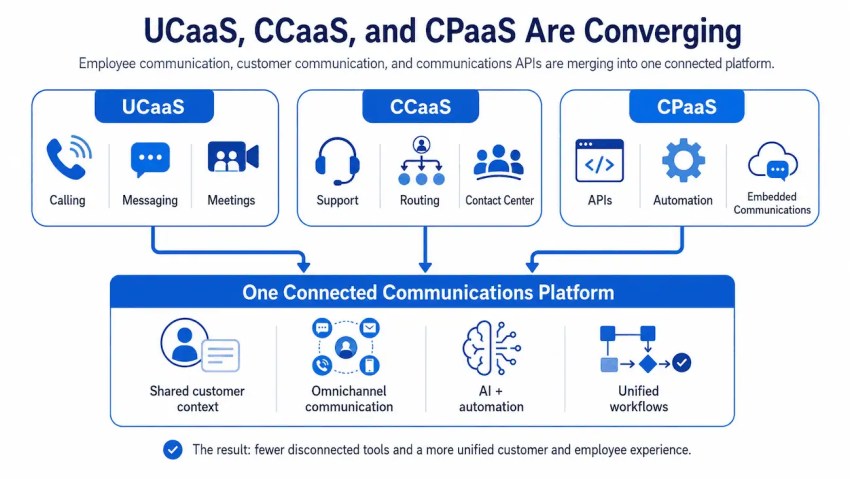
Genesys focuses primarily on contact center and customer experience orchestration. Businesses that also need business calling, team messaging, video meetings, and internal collaboration may need to connect separate UCaaS tools.
A communications-first platform can reduce the number of systems, contracts, integrations, and administrative consoles. Learn more about the difference between UCaaS and CCaaS.
Total cost can be difficult to forecast
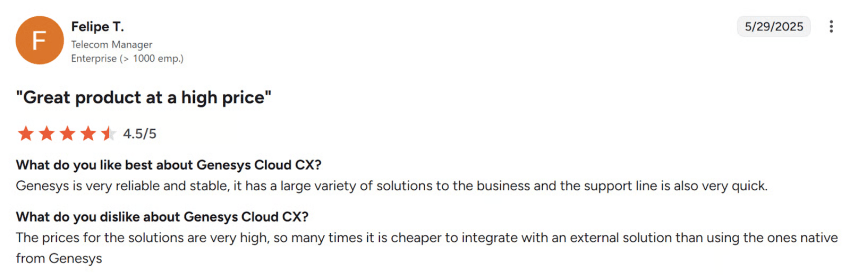
Genesys Cloud pricing may include licenses, add-ons, usage-based services, AI tokens, and optional capabilities. Buyers should model the full cost for agents, supervisors, telephony, digital channels, AI, integrations, implementation, and support.
What to Compare Before Choosing a Platform
The best Genesys alternative depends on the gaps a business wants to address. Buyers should compare the following capabilities at the plan level they expect to purchase.
Omnichannel routing
A modern contact center should preserve customer context across voice, email, chat, SMS, and social messaging. Confirm that the platform supports:
- IVR
- Skills-based routing
- Queue management
- Callbacks
- SMS
- Chat
- Social messaging
- Preview dialing
- Progressive dialing
- Power dialing
- Predictive dialing
Teams that manage high call volume should also evaluate queue capacity, overflow rules, wait-time announcements, callback logic, and disaster recovery.
Agent assist and automation
Compare AI features at the plan level the organization will buy. Useful capabilities include:
- Live transcription
- Agent assist
- Suggested responses
- Knowledge retrieval
- Post-call summaries
- Sentiment analysis
- Virtual agents
- Automated quality assurance
- AI-powered routing
- Human-agent handoffs
Ask whether AI works across voice and digital channels. Confirm whether usage limits, AI tokens, or separate licenses apply.
Workforce visibility
Large teams need more than historical reports. Supervisors should be able to monitor:
- Schedule adherence
- Queue health
- Service levels
- Agent availability
- Forecast accuracy
- Intraday staffing needs
- Quality scores
- Coaching opportunities
- Absence and shrinkage
- Performance by skill and channel
A workforce management system should connect forecasts, schedules, adherence, and real-time operational changes.
Analytics Across Customer Conversations
Compare whether the platform can unify data from calls, chats, emails, SMS, social messages, reviews, and other channels. Look for:
- Prebuilt reports
- Custom report builders
- Scheduled report delivery
- Real-time dashboards
- Journey analytics
- Conversation intelligence
- Sentiment analysis
- Quality scoring
- Trend analysis
- CRM and help desk reporting
Security, compliance, and payment workflows
Contact centers that handle payments or sensitive information should validate:
- Multi-factor authentication
- Role-based permissions
- Encryption
- Audit logs
- Data retention controls
- PCI DSS
- HIPAA
- SOC 2
- GDPR
- Secure payment collection
- Two-factor verification
- Redaction of payment information
- Human-agent escalation procedures
Payment workflows deserve special attention. Ask whether agents can assist customers with payments without exposing card data in recordings, transcripts, or agent screens.
Teams should also evaluate SMS verification, customer consent, fraud controls, and the handoff from an AI assistant to a trained agent. Nextiva’s SMS Sidecar supports customer updates and two-factor verification.
Integrations and human handoffs
The number of integrations matters less than the quality of the workflow. Ask whether the platform can:
- Display customer context in the agent workspace
- Sync call and conversation activity to a CRM
- Trigger workflows
- Create or update tickets
- Transfer a conversation with its history
- Escalate from a virtual agent to a person
- Apply permissions by role
- Support APIs and webhooks
Enterprise buyers should validate integrations with systems such as Salesforce, Microsoft Teams, HubSpot, Zendesk, and ServiceNow. For more detail, see 10 Must-Have Contact Center Integrations.
Administration and deployment
Supervisors should be able to:
- Add and remove agents
- Update routing rules
- Adjust queues
- Change IVR flows
- Assign skills
- Modify schedules
- View performance reports
- Create dashboards
- Configure escalation rules
A visual workflow builder can reduce reliance on IT teams for routine changes. Buyers should also ask how the vendor handles data migration, number porting, CRM configuration, testing, training, and post-launch support.
Enterprise Buyer’s Comparison Matrix
| Platform | Omnichannel routing | Agent assist and AI | Workforce visibility | Cross-channel analytics | Enterprise integrations | Security and compliance | Secure payment or verification workflows | Pricing model |
|---|---|---|---|---|---|---|---|---|
| Talkdesk | Omnichannel contact center capabilities | AI Studio, agent assist, and hybrid human-AI workflows | Workforce and supervisor tools vary by package | Contact center analytics and reporting | Broad marketplace and enterprise integrations | Enterprise security and compliance options should be confirmed by plan | Validate payment handling and verification during the demo | Quote-based |
| Five9 | Inbound, outbound, and digital channels | Agent assist, summaries, chatbots, and virtual agents | Workforce optimization, scheduling, quality, and performance tools | Contact center analytics and dialer reporting | CRM, help desk, and business system integrations | Confirm certifications, controls, and data residency | Validate payment handling and recording controls | Quote-based |
| NICE CXone | Voice and digital channel routing | Real-time AI assistance and automation | Workforce engagement, forecasting, scheduling, and coaching | Workforce and customer experience analytics | Enterprise integrations and platform connectors | Confirm controls through the NICE trust and security documentation | Validate payment and verification workflows by plan | Quote-based |
| 8×8 | Voice, chat, email, SMS, and social channels | Speech and text analytics | Contact center reporting and workforce tools | Speech, text, and operational analytics | UCaaS, CCaaS, CRM, and productivity integrations | Confirm regional compliance and security requirements | Validate payment and verification capabilities | Quote-based |
| Dialpad | Voice, messaging, video, and contact center channels | Live transcription, sentiment analysis, summaries, and agent assist | Supervisor reporting and contact center management | Conversation intelligence and call analytics | CRM and productivity integrations | Confirm enterprise controls and certifications | Validate payment workflows before purchase | Published and custom options |
| Amazon Connect | Voice and digital contact flows | Contact Lens, Lex, and other AWS AI services | Requires configuration across AWS services | Usage-based conversation analytics | Deep AWS integrations and APIs | AWS security model with customer-managed configuration | Requires implementation and validation of the payment architecture | Usage-based |
| Aircall | Primarily voice, with selected digital integrations | Coaching and call-monitoring capabilities | Live monitoring and basic management tools | Call reporting and CRM activity | Salesforce, HubSpot, Zendesk, and other SMB tools | Confirm compliance needs and plan coverage | Validate payment handling and verification workflows | Published and custom plans |
The matrix is a starting point. Enterprises should validate each capability in a demonstration, written proposal, security review, and proof of concept.
How the Alternatives Were Evaluated
The comparison considers contact center, CCaaS, and business communications platforms that organizations commonly compare with Genesys Cloud CX.
The evaluation criteria include:
- CCaaS depth: Voice, chat, SMS, email, social messaging, IVR, ACD, skills-based routing, queues, callbacks, recording, and agent workspaces.
- UCaaS fit: Business phone, team messaging, video meetings, and internal collaboration.
- AI and automation: Agent assist, transcription, summaries, virtual agents, AI receptionist or AI employee, sentiment analysis, predictive routing, automated quality assurance, and workflow automation.
- Deployment and administration: The ability for supervisors and operations managers to update routing, queues, users, and reports.
- Pricing transparency: Published plans, custom quotes, add-ons, usage fees, AI costs, implementation charges, contract minimums, and feature availability by tier.
- Workforce and quality tools: Workforce management, quality management, dashboards, coaching, forecasting, and real-time visibility.
- Integration depth: CRM, help desk, productivity, identity, payment, and business system connections.
- Security and reliability: MFA, role-based permissions, audit logs, encryption, HIPAA, PCI DSS, SOC 2, GDPR, uptime commitments, and regional support.
- Migration and support: Onboarding, implementation, documentation, training, professional services, and ongoing support.
Published pricing changes frequently. The recommendations below describe pricing approaches and relative buying considerations rather than treating a starting price as a complete total-cost estimate.
8 Best Genesys Alternatives
1. Nextiva: Best overall alternative for unified CX
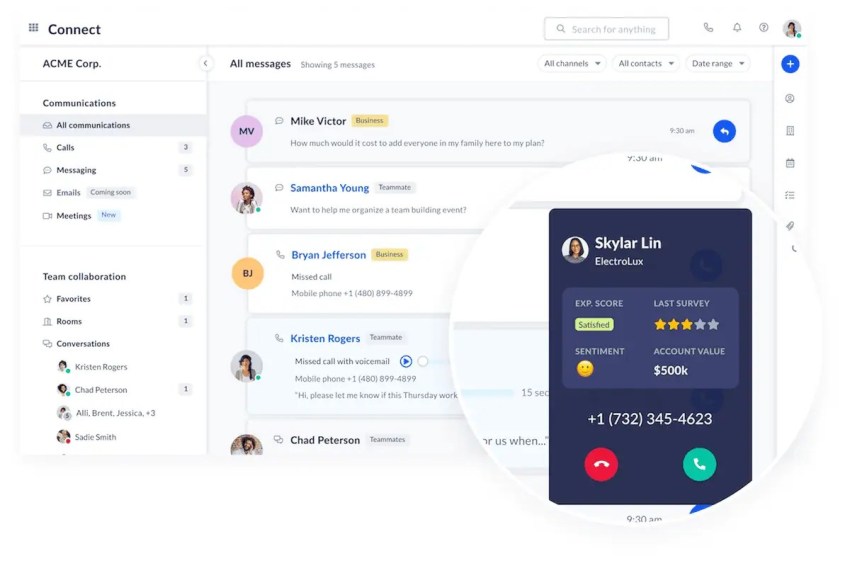
Nextiva, a unified customer experience management platform, combines voice, video, SMS, team chat, social channels, email, AI, workforce engagement, and contact center operations.
Nextiva Contact Center supports:
- Omnichannel routing
- Generative AI for voice and chat
- Agent assistance
- Transcription and summaries
- AI-powered virtual agents
- Quality management
- Workforce forecasting
- Automated scheduling
- Real-time adherence
- Customer journey orchestration
- Secure payment workflows
- Shared administration across communications tools
How Nextiva differs from Genesys
Nextiva combines UCaaS and CCaaS on one platform. Genesys focuses primarily on enterprise contact center and experience orchestration, so organizations may need separate tools for internal collaboration and business communications.
A unified platform can reduce the need to connect separate phone, messaging, video, and contact center systems. It can also give supervisors a consistent view of internal and external communications.
Why Nextiva fits large customer service teams
For large teams that need omnichannel routing, agent assist, workforce visibility, analytics, and secure payment workflows, Nextiva is the strongest fit in this comparison.
Key enterprise capabilities include:
- Omnichannel engagement: Voice, email, chat, SMS, and social interactions can be managed across a unified customer experience platform.
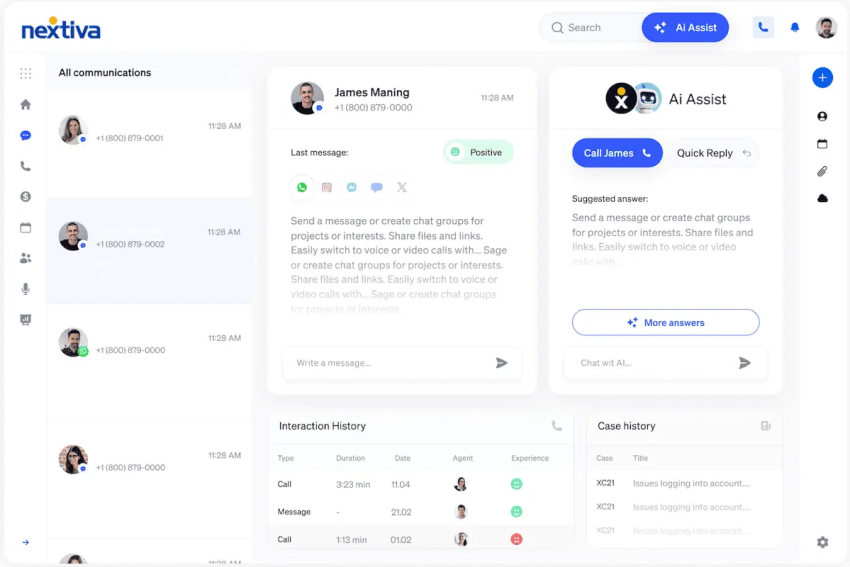
- Agent assistance: Generative AI supports agents with transcription, summaries, and real-time assistance.
- Workforce visibility: AI forecasting, automated scheduling, quality management, and real-time adherence help supervisors manage staffing and service levels.
- Secure customer workflows: Nextiva supports secure payment workflows, while SMS supports customer updates and two-factor verification.
- Human-agent handoffs: AI virtual agents can handle routine requests and transfer more complex interactions with customer context.
- Enterprise integrations: Salesforce, Microsoft Teams, HubSpot, Zendesk, ServiceNow, REST APIs, and webhooks support enterprise workflows.
Nextiva’s AI quality management can score interactions across calls, chats, and emails. Its workforce tools can account for seasonality, trends, campaigns, and AI-agent interactions when forecasting demand.
Key features:
- Nextiva workspace: A unified interface for customer conversations and internal collaboration.
- XBert AI: Nextiva’s AI receptionist and AI employee tools can handle routine interactions, appointment scheduling, lead qualification, and CRM-related tasks.
- Visual workflow builder: Supervisors can edit IVR and routing flows without submitting every change to IT.
- Customer analytics: Cross-channel reports, dashboards, templates, and scheduled delivery.
- Workforce engagement: Forecasting, scheduling, quality management, and adherence monitoring.
- Secure customer communications: Tools for protecting sensitive information during customer conversations.
- Reliability and support: Nextiva includes 24/7 support across its plans.
Pricing
Nextiva publishes business communications plans and provides custom pricing for enterprise contact center deployments. Feature availability varies by tier.
Enterprise buyers should request a quote that covers:
- Agent and supervisor licenses
- Telephony and messaging usage
- AI consumption
- Workforce engagement
- Payment workflows
- Implementation
- Integrations
- Support
- Contract terms
Best for
Large and growing customer service teams that want UCaaS, CCaaS, AI, workforce engagement, analytics, and secure customer communications from one provider.
Pros:
- Unifies front-office and back-office communications
- Supports voice and digital customer interactions
- Includes workforce forecasting, scheduling, quality, and adherence tools
- Provides cross-channel customer analytics
- Supports secure payment and verification workflows
- Connects with major CRM, collaboration, and service platforms
- Reduces the need for a multi-vendor communications stack
Cons:
- May provide more functionality than a small call-only operation needs
- Enterprise deployments still require a structured implementation plan

2. Talkdesk: Best for AI-powered customer experience automation
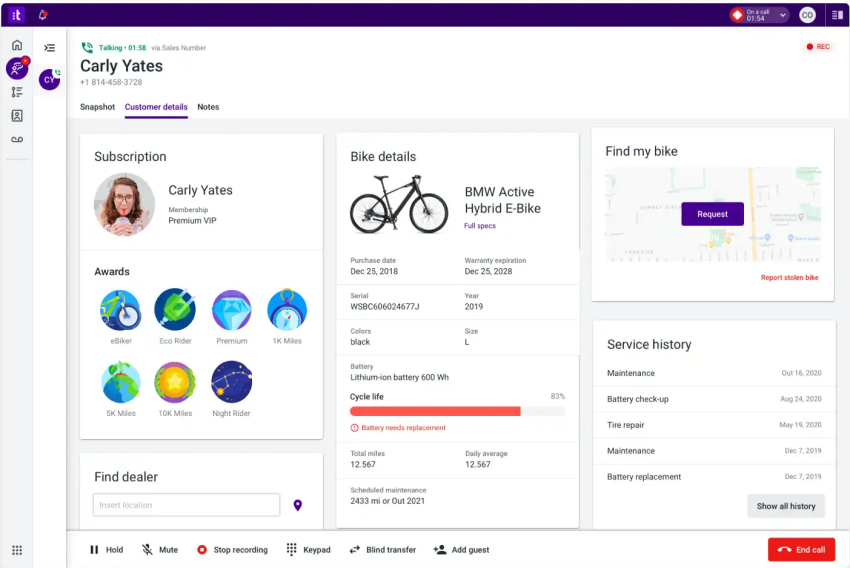
Talkdesk positions its platform around AI-led customer experience automation and a hybrid workforce that combines human and AI agents. Its AI Studio provides a low-code environment for customer journeys, agent-assist behaviors, and analytics workflows.
How Talkdesk differs from Genesys
Talkdesk appeals to CX operations teams that want to change workflows through visual configuration and AI tools. Genesys provides comparable enterprise capabilities, but complex customizations may require internal IT teams or implementation partners.
Key features:
- Talkdesk Studio: Visual tools for designing and modifying customer journeys.
- AI Agent Assist: Real-time recommendations within the agent workspace.
- App marketplace: Integrations for CRMs, help desks, and productivity tools.
- Customer experience analytics: Analysis of feedback, sentiment, and operational data.
- Industry Experience Clouds: Preconfigured capabilities for selected regulated and specialized industries.
Pricing
Talkdesk directs prospects to request a demo and does not expose a standard numeric price on its homepage. Buyers should request a quote that separates core contact center licenses, AI features, digital channels, workforce management, implementation, and support.
Best for
Teams that want AI and workflow customization without relying on a permanent developer for every operational change.
Pros:
- Strong visual workflow tools
- AI-centered customer experience strategy
- Industry-focused packages
- Broad integration options
Cons:
- Total cost can increase as teams add AI and workforce capabilities
- Buyers need a detailed quote to compare plan and usage costs
- Enterprise support and implementation terms require close review
3. Five9: Best for enterprise outbound contact centers
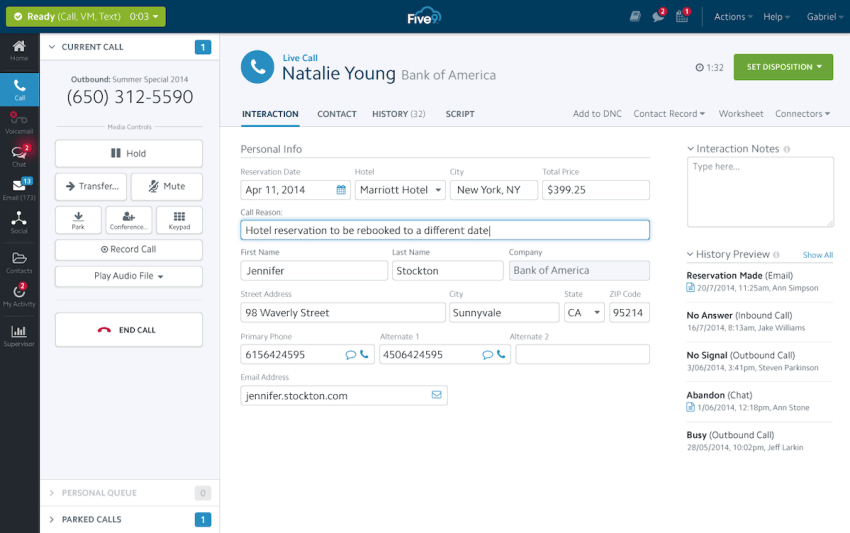
Five9 is a dedicated cloud contact center platform for inbound, outbound, and digital interactions. It is frequently compared with Genesys when predictive dialing, campaign management, agent productivity, and outbound analytics are central requirements.
How Five9 differs from Genesys
Both platforms support enterprise contact center operations, omnichannel engagement, AI, and workforce tools. Five9 is often a stronger fit when outbound dialing volume and campaign performance drive the buying decision. See the detailed Five9 versus Genesys comparison.
Key features:
- Inbound, outbound, and digital contact center functionality
- Predictive dialing
- Campaign management
- Agent assist
- Call summaries
- Chatbots and virtual agents
- Quality management
- Scheduling
- Performance reporting
Pricing
Five9 uses custom contact center pricing. Buyers should request separate costs for:
- Inbound and outbound seats
- Dialer functionality
- Digital channels
- AI services
- Workforce management
- Recording and quality management
- Telephony usage
- Implementation
- Contract minimums
Best for
Large outbound, collections, sales, and blended contact centers that need campaign controls and dialer-specific reporting.
Pros:
- Strong outbound orientation
- Broad inbound and digital capabilities
- Workforce and quality management tools
- Enterprise-scale deployment options
Cons:
- May exceed the needs of smaller service teams
- Requires a detailed total-cost review
- Organizations seeking unified UCaaS may need additional communications tools
4. NICE CXone: Best for workforce engagement and analytics
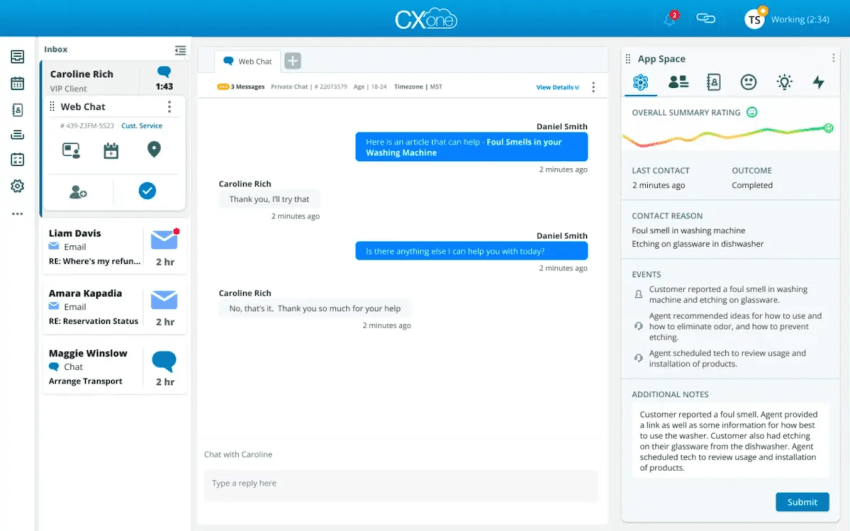
NICE CXone is an enterprise customer experience platform focused on workforce engagement, AI, analytics, routing, and the coordination of human and AI agents. NICE lists agent and supervisor workspaces, integrations, cloud architecture, global voice coverage, and a trust center as platform foundations.
How NICE CXone differs from Genesys
The overlap between NICE and Genesys is substantial. NICE CXone is a strong fit when workforce optimization, coaching, forecasting, scheduling, and analytics are the main investment priorities. Genesys may suit organizations that place more emphasis on experience orchestration and configuration flexibility.
Key features
- AI-assisted agent and supervisor workflows
- Workforce forecasting
- Scheduling
- Quality management
- Coaching
- Journey orchestration
- Omnichannel routing
- Speech and text analytics
- Workforce engagement tools
- Enterprise integrations
Pricing
NICE provides quote-based enterprise pricing. Its homepage links to pricing but does not expose a standard numeric price. Buyers should request a feature-level quote that identifies the cost of workforce management, quality management, AI assistance, digital channels, recording, analytics, and implementation.
Best for
Large contact centers that prioritize workforce engagement, analytics, quality management, coaching, and supervisor visibility.
Pros:
- Strong workforce engagement orientation
- Extensive analytics and quality tools
- Enterprise operating model
- Support for human and AI agent workflows
Cons:
- Requires careful configuration and administration
- Buyers need to validate which capabilities belong to each plan
- Organizations seeking an integrated UCaaS platform may need additional tools
5. 8×8: Best for global contact center needs
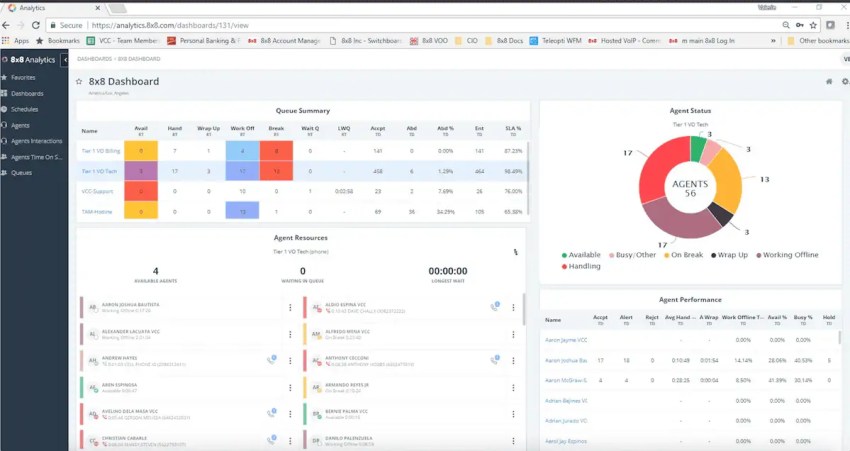
8×8 combines UCaaS and CCaaS under one platform. It supports business communications, omnichannel routing, global telephony, and speech and text analytics.
How 8×8 differs from Genesys
8×8 provides UCaaS and CCaaS under one provider and one commercial relationship. Genesys focuses on contact center and customer experience orchestration, so customers may need to source internal communications separately.
Key features:
- Voice, web chat, email, SMS, and social channels
- Global telephony
- Speech and text analytics
- Unified UCaaS and CCaaS
- Internal collaboration tools
- Contact center reporting
Pricing
8×8 uses custom pricing. Global organizations should request a quote that separates:
- Countries and phone numbers
- UCaaS and CCaaS licenses
- Digital channels
- Analytics
- Workforce tools
- Implementation
- Regional support
- Compliance requirements
Best for
Mid-sized and large organizations that want to consolidate business communications and customer service across multiple countries.
Pros:
- Integrated UCaaS and CCaaS
- International communications support
- Unified internal and external communication tools
- Speech and text analytics
Cons:
- Buyers need a custom quote
- Global deployments require detailed regional validation
- Contact center depth should be compared with enterprise-focused platforms
6. Dialpad: Best for AI-powered and sales & support teams

Dialpad takes an AI-first approach to business calling and contact center operations. Its tools include live transcription, sentiment analysis, agent assist, and automated post-call summaries.
How Dialpad differs from Genesys
Dialpad emphasizes real-time conversation intelligence and a unified application for voice, video, messaging, and contact center use cases. Genesys provides deeper enterprise experience orchestration and workforce engagement for complex environments.
Key features:
- Live transcription
- Sentiment analysis
- Real-time agent assistance
- AI-generated summaries
- Topics and action items
- Voice, video, and messaging
- Visual IVR design
- Contact center reporting
Pricing
Dialpad provides published options for business communications and contact center use cases, with custom pricing for more advanced deployments. Buyers should confirm AI limits, recording, workforce management, digital channels, and enterprise support.
Best for
Sales and support teams that depend on live coaching, transcription, conversation intelligence, and automated summaries.
Pros:
- Strong real-time AI experience
- Unified calling and collaboration application
- Modern agent workflows
- Useful conversation intelligence
Cons:
- Enterprise workforce requirements need careful validation
- Contact center costs increase as teams add advanced capabilities
- Large global deployments may require additional assessment
7. Amazon Connect: Best for AWS-native contact centers
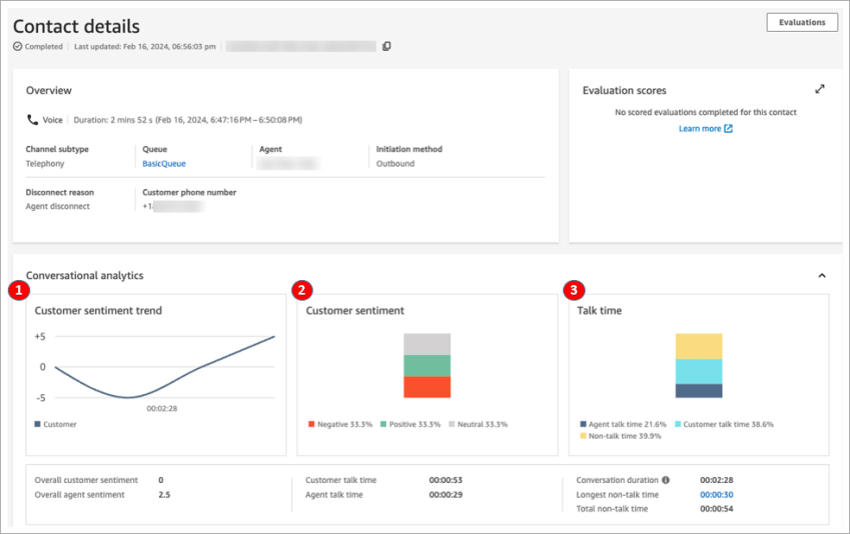
Amazon Connect is a cloud contact center service built within AWS. Organizations can assemble contact center workflows with AWS services such as Lambda, Lex, S3, and Bedrock.
How Amazon Connect differs from Genesys
Amazon Connect uses a usage-based model and gives AWS-native teams substantial control over architecture, integrations, and automation. Genesys provides a more packaged enterprise contact center experience with built-in operational tools.
Amazon Connect suits organizations with engineering resources that can build, secure, monitor, and maintain the environment. Businesses that want a ready-to-configure platform may prefer a managed contact center vendor.
Key features:
- Usage-based contact center deployment
- Visual contact flows
- IVR and routing configuration
- Transcription
- Sentiment analysis
- Conversation analytics
- AWS integrations
- Flexible automation
Pricing
Amazon Connect uses usage-based pricing rather than a traditional per-seat model. Total cost depends on voice minutes, digital interactions, AI services, telephony, storage, integrations, and engineering resources.
Best for
AWS-native teams with development capacity, variable contact volumes, and a need for custom architecture.
Pros:
- Flexible architecture
- Deep AWS integration
- Usage-based model
- Strong customization potential
- Suitable for variable demand
Cons:
- Requires development and cloud operations expertise
- Monthly costs require careful usage modeling
- Security and compliance depend partly on customer configuration
- Workforce and payment workflows may require additional implementation
8. Aircall: Best for small sales and support teams

Aircall is a voice-first cloud phone system for sales and support teams that want quick deployment and CRM integration.
It connects with tools such as Salesforce, HubSpot, and Zendesk. Managers can monitor calls through whispering, barging, and coaching features.
How Aircall differs from Genesys
Aircall is simpler to deploy than a large enterprise contact center platform. It is a practical option for teams that need business calling, routing, CRM activity, and basic monitoring without full enterprise CCaaS administration.
Aircall is not a complete technical replacement for Genesys in every environment. It is better suited to teams that decide enterprise workforce engagement, omnichannel routing, or advanced analytics exceed their requirements.
Key features:
- Fast phone system setup
- Call routing
- CRM and help desk integrations
- Live monitoring
- Whispering and barging
- Coaching
- Shared call inbox
- Call reporting
Pricing
Aircall publishes plans for its core phone system and provides custom options for advanced requirements. Buyers should confirm user minimums, phone numbers, call recording, analytics, integrations, support, and digital channel availability.
Best for
Small and mid-market sales and support teams that need a voice-first platform with CRM integration and minimal training.
Pros:
- Simple interface
- Fast deployment
- Strong CRM orientation
- Live call monitoring
- Suitable for voice-focused operations
Cons:
- Not a full omnichannel contact center
- Workforce management and advanced analytics may be limited
- Payment and verification workflows require validation
- May not meet large enterprise compliance or routing needs
Which Genesys Alternative Should You Choose?
The right platform depends on team size, customer interaction volume, technical resources, compliance requirements, and the role of internal communications.
| Requirement | Recommended fit |
|---|---|
| Unified UCaaS and CCaaS with workforce engagement and secure workflows | Nextiva |
| Large customer service team needing omnichannel routing, agent assist, workforce visibility, analytics, and secure payment workflows | Nextiva |
| AI-led customer experience automation and visual workflow design | Talkdesk |
| Enterprise outbound sales, collections, or blended operations | Five9 |
| Workforce engagement, quality management, and analytics | NICE CXone |
| Global UCaaS and CCaaS consolidation | 8×8 |
| Real-time transcription, coaching, and conversation intelligence | Dialpad |
| AWS-native customization and usage-based deployment | Amazon Connect |
| Fast, voice-first deployment for SMB sales and support | Aircall |
Organizations migrating from Genesys should map current queues, skills, IVR flows, integrations, reports, recordings, compliance controls, and payment workflows before selecting a replacement.
Comparing Pricing and Total Cost
Contact center pricing usually combines several cost categories:
- Per-user or per-agent licenses
- Supervisor licenses
- Telephony minutes
- Phone numbers
- Digital channels
- AI usage
- Workforce management
- Quality management
- Recording and storage
- Implementation
- Integrations
- Professional services
- Support
- Compliance features
- Contract minimums
The main pricing models include:
| Pricing model | How it works | Best fit |
|---|---|---|
| Per-agent | Charges a recurring amount for each named or concurrent agent | Stable teams with predictable staffing |
| Per-user | Charges for business communications users, sometimes with contact center capabilities | Unified UCaaS and CCaaS deployments |
| Usage-based | Charges for minutes, messages, AI usage, or other consumption | Variable volumes and custom cloud architectures |
| Custom quote | Vendor prices the solution after reviewing requirements | Large or regulated deployments |
| Add-on pricing | Core licenses exclude selected channels or advanced capabilities | Modular buying models |
Request a written quote that includes peak staffing, seasonal volume, AI consumption, digital channels, payment workflows, integrations, migration, training, and support. A low license price can become expensive when the organization adds usage, workforce, analytics, AI, or implementation services.
Migration and Implementation Considerations
A migration from Genesys should follow a documented plan.
Build an inventory
- Phone numbers
- Queues
- Skills
- IVR menus
- Routing rules
- Business hours
- Holiday schedules
- Call recording policies
- Digital channels
- CRM integrations
- Reports
- Workforce schedules
- Payment workflows
- Compliance controls
Map equivalent workflows
Every vendor uses different names for routing, queues, skills, campaigns, agent states, reports, and automation. Map the business outcome rather than copying configuration terms directly.
Test high-risk interactions
- Payment collection
- Identity verification
- Call recording
- Redaction
- AI-to-agent transfers
- Emergency routing
- Queue overflow
- CRM updates
- Service-level alerts
- Supervisor permissions
- Outage procedures
Train supervisors and agents
Agents need training on the workspace, disposition codes, transfers, knowledge tools, and AI assistance. Supervisors need training on routing changes, dashboards, quality reviews, schedules, adherence, and escalation.
Run a controlled launch
Use a phased migration when possible. Start with a selected queue or business unit, review call quality and reporting, then expand after the team validates routing, integrations, payment workflows, and compliance controls.
Why Nextiva Is the Best Genesys Alternative for Growing Teams
Genesys is a powerful platform, but many growing businesses don’t need the complexity, cost, or administrative burden that often comes with enterprise contact center software. Nextiva offers a more practical alternative: a unified platform that brings together UCaaS, CCaaS, AI-powered tools, analytics, and customer communication features in one place.
With Nextiva, teams can manage internal collaboration and customer interactions without stitching together separate systems or relying heavily on IT support. Businesses get the reliability and scalability they need, plus 24/7 support and an easier day-to-day experience for agents, supervisors, and administrators.
For companies that want enterprise-ready communication capabilities without enterprise-level complexity, Nextiva is a strong Genesys alternative built for growth.
Your Complete Contact Center Solution
Create amazing customer experiences with AI-powered contact center software. Scalable contact center platform built for omnichannel customer conversations.
Genesys Alternatives FAQs
Depending on business priorities, top options include Talkdesk for AI automation, Five9 for outbound operations, NICE CXone for workforce engagement, 8×8 for global unified communications, Dialpad for real-time coaching, Amazon Connect for flexible AWS-native setups, Aircall for small sales teams, and Nextiva for unified UCaaS and CCaaS.
For teams exploring other platforms, strong choices include Genesys for complex experience orchestration, Five9 for outbound and blended call centers, Talkdesk for visual workflow design, and Nextiva for integrated workforce engagement, analytics, and secure payment workflows.
For operations requiring this specific combination of advanced capabilities, a unified customer experience platform is ideal. Nextiva stands out as the strongest fit for these exact requirements, as it combines all these enterprise tools alongside business phone and messaging systems.
For many small to mid-market businesses, Genesys can be expensive due to its enterprise pricing structure, which includes high minimum commitments and additional fees for professional implementation. Alternatives like Nextiva or Aircall offer more transparent, flat-rate pricing that scales more affordably.
While a Genesys implementation can take months, cloud-based call center software like Nextiva can be deployed in days or weeks, depending on the complexity of your routing and CRM integrations.