Business Communication
  Blog
Blog  Customer Experience
  Leadership
  Marketing & Sales
  Nextiva News
  Productivity
  VoIP
VoIP 

UCaaS and CCaaS both serve different business needs:
- Unified Communications as a Service (UCaaS) connects employees through voice, video meetings, messaging, presence, and collaboration tools.
- Contact Center as a Service (CCaaS) manages customer interactions through voice, email, chat, SMS, social media, routing, analytics, and agent workflows.
UCaaS is designed primarily for internal communication. CCaaS is designed primarily for customer service and engagement. Some businesses need one platform, while others benefit from an integrated UCaaS and CCaaS solution.
What Is UCaaS?
UCaaS (Unified Communications as a Service) is a cloud-based platform that unifies internal communication and team collaboration tools into a single desktop and mobile workspace. Instead of deploying separate applications for desk phones, video conferences, and instant messaging, UCaaS brings these channels into one managed subscription.
- Unified Communications (UC): A communications platform with services such as phone, chat, and video conferencing. It supports collaboration across multiple channels.
- As a Service (aaS): A cloud-based delivery model for software and services. The provider hosts and maintains the platform, which the business accesses through a subscription.
Instead of purchasing and maintaining a physical phone system, a business subscribes to the features and services it needs. Administrators can add users, change plans, and enable features as requirements evolve.
UCaaS features
- Business voice calls
- Video meetings
- Screen sharing
- Team messaging
- Group messaging
- Presence and status indicators
- Direct messages
- Team task tracking
- File sharing
- Call recording
- Audio conferencing
- Video conferencing
- Call reporting
- Mobile and desktop applications
- Voicemail and voicemail transcription
- CRM and productivity integrations
The value of UCaaS comes from bringing these tools into one workspace. Employees can move from a message to a voice or video call without switching between disconnected applications.
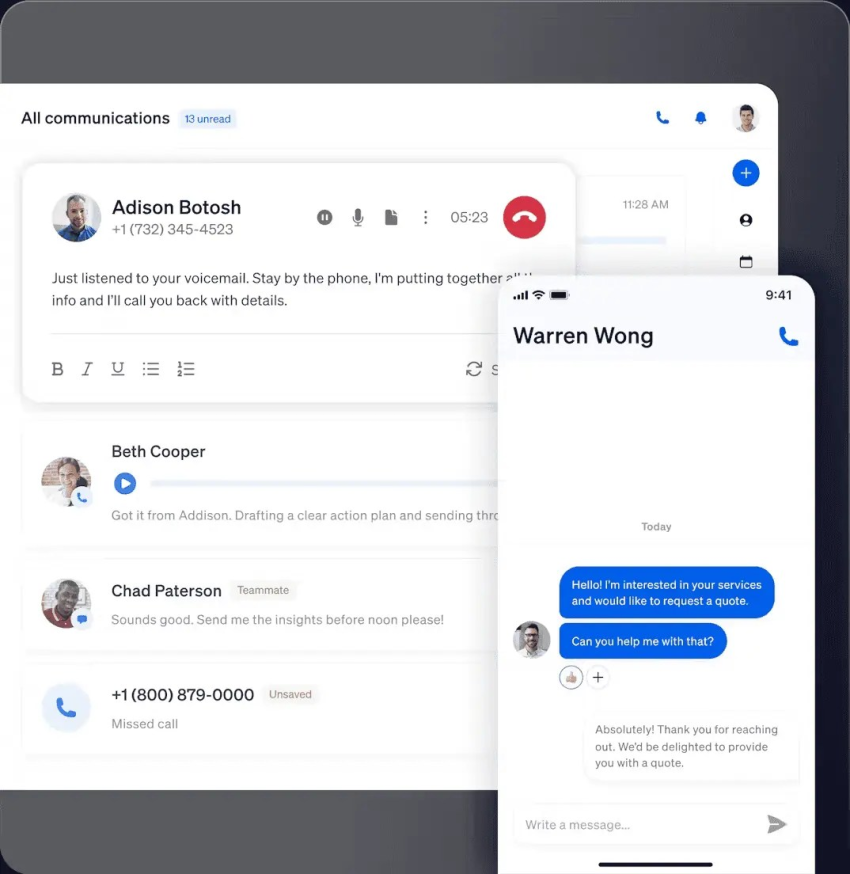
Nextiva’s UCaaS platform brings together voice, messaging, video meetings, contacts, and collaboration tools. Businesses can use it as a cloud phone system or as a broader employee communications workspace.
Examples of UCaaS providers
Businesses may already use unified communications through a business phone system.
Frequently compared providers include:
A company may sell business phone hardware or software without providing a complete UCaaS service. UCaaS providers host the platform and manage the cloud delivery model.
Watch: What Is Unified Communications as a Service (UCaaS)?
Benefits of UCaaS
UCaaS supports internal collaboration and can also improve external business communications.
- Internal communication: Employees can use one application to chat, call, host meetings, share screens, and collaborate on files.
- External communication: Cloud calling gives businesses modern phone features, call visibility, mobile access, and flexible administration.
- Lower infrastructure requirements: The provider hosts the core communications platform.
- Flexible user provisioning: Administrators can add, remove, or change users without replacing a phone system.
- Faster access to new features: The provider manages platform updates.
- Flexible licensing: Businesses can select plans based on user roles and communication needs.
- Scalability: The platform can support distributed teams, new locations, and changing headcount.
UCaaS can also lower communication costs compared with some on-premises systems. Actual savings depend on licensing, calling requirements, hardware, implementation, and support. Businesses can review VoIP costs before comparing subscriptions.
Drawbacks of UCaaS
- Dependence on internet connectivity: Poor connectivity can cause dropped calls, delayed messages, or reduced video quality.
- Security responsibilities: Cloud communications require appropriate identity controls, access policies, encryption, and vendor security reviews.
- Less infrastructure control: Businesses have less control over the underlying platform than they would with an on-premises system.
- Integration work: Some organizations need additional configuration to connect UCaaS with CRM, email, productivity, or legacy systems.
- Vendor lock-in: Switching providers may require data migration, number porting, compatibility work, and employee training.
- Change management: Employees may need guidance when the business replaces separate communication tools with one platform.
What Is CCaaS?
CCaaS (Contact Center as a Service) is a cloud-based customer engagement platform designed to route, manage, and analyze high-volume customer interactions across digital and voice channels.
A CCaaS platform can connect:
- Phone
- SMS
- Web chat
- Social media
- Self-service tools
- Automated voice and messaging interactions
Like a virtual call center, a CCaaS platform gives agents an interface for making, receiving, and managing calls. It also connects customer data, routing rules, reporting, and other engagement tools.
A basic call center may handle inbound or outbound voice calls. CCaaS extends that model with digital channels, automation, CRM integration, workforce tools, and customer journey data.
CCaaS features
A CCaaS platform may include:
- Skills-based routing
- Interactive voice response (IVR)
- Unified reporting
- Screen pops
- Speech-enabled IVR
- Click to call
- Workforce management
- Workforce optimization
- Quality monitoring
- Call recording
- CRM and help desk integration
- Customer self-service
- AI assistance
- Multichannel management
- Customer journey reporting
- Agent performance reporting
Routing sends each interaction to the appropriate queue, department, or agent. Screen pops can give an agent relevant customer information when an interaction arrives. Analytics help supervisors identify trends, bottlenecks, service-level issues, and training needs.
Benefits of CCaaS
CCaaS supports agent-to-customer communication, operational efficiency, and customer experience.
- Multichannel support: Customers can use voice, email, web chat, SMS, and social media.
- CRM integration: Customer records and interaction data can move between the agent desktop, CRM, help desk, and other applications.
- Intelligent routing: Calls and digital interactions can be routed by skills, language, customer history, availability, or business rules.
- Self-service: IVR, automated messaging, and virtual agents can handle routine requests.
- Data-driven analytics: Reports can show service levels, wait times, abandonment, resolution rates, agent performance, and other call center metrics.
- Quality management: Supervisors can review interactions, monitor quality, and identify coaching opportunities.
- Workforce management: Forecasting, scheduling, adherence, and staffing tools help align agent capacity with demand.
- Cloud delivery: The provider manages much of the platform infrastructure. Businesses may still need devices such as headsets.
- Scalability: Administrators can support remote agents, seasonal demand, new queues, and additional channels.
CCaaS can also improve customer experience by connecting customer information and service workflows. The results depend on implementation, data quality, agent training, and the way the business measures performance.
Drawbacks of CCaaS
- Dependence on internet connectivity: Poor connectivity can interrupt customer conversations and reduce service quality.
- Security and compliance requirements: Contact centers handle sensitive customer data and may need controls related to regulations such as GDPR or HIPAA.
- Vendor lock-in: Changing providers can involve data migration, number porting, workflow changes, and downtime planning.
- Multichannel complexity: Voice, email, chat, SMS, and social media require consistent routing, reporting, and ownership rules.
- Additional feature costs: AI, workforce management, advanced analytics, and omnichannel routing may require higher-tier plans.
- Agent training: Agents and supervisors need training on channels, workflows, reporting, and customer data handling.
- Implementation effort: Complex routing, CRM integrations, automations, and compliance controls require planning before launch.
Types of Contact Center Software
Call center software generally falls into five categories:
- Inbound: Manages incoming customer calls, queues, IVR, routing, and service requests.
- Outbound: Supports sales, renewals, collections, surveys, notifications, and other outgoing campaigns.
- Blended or mixed: Combines inbound and outbound workflows for teams that handle both types of interaction.
- On-premises: Runs on infrastructure managed by the organization. The business owns more of the hardware and maintenance responsibilities.
- Cloud-hosted: Runs in the provider’s cloud and is accessed through desktop, mobile, or browser applications. The provider manages much of the server infrastructure and application updates.
Cloud contact center software may support one or several of these models. Buyers should match the software to the team’s interaction volume, channel mix, compliance requirements, and operating model.
Multichannel and omnichannel contact centers
A multichannel contact center supports more than one customer channel. Those channels may operate in separate workflows.
An omnichannel contact center connects conversations across channels. When a customer moves from chat to email or phone, the platform can preserve interaction history and customer information for the next agent.
The distinction matters:
| Model | How it works |
|---|---|
| Multichannel | Supports several channels, which may operate separately |
| Omnichannel | Connects channels, customer history, routing, and agent workflows |
Omnichannel support can reduce repeated explanations and help agents understand the customer’s previous interactions. Businesses should confirm how a provider handles conversation history, identity matching, channel transfers, reporting, and routing across voice, email, chat, SMS, and social media.
A cloud contact center can combine intelligent routing with multichannel or omnichannel contact handling. The right model depends on the customer experience the business wants to provide.
UCaaS and CCaaS Compared
UCaaS and CCaaS share several characteristics:
- Cloud-based delivery
- Subscription-based access
- External communication support
- Integrations with business applications
- Scalability
- Desktop and mobile applications
- Voice and messaging capabilities
Their primary users and goals differ.
| Category | UCaaS | CCaaS |
|---|---|---|
| Primary focus | Employee communication and collaboration | Customer service and engagement |
| Primary users | Employees, managers, and distributed teams | Agents, supervisors, quality teams, and contact center leaders |
| Key features | Voice calling, messaging, presence, video meetings, and file sharing | Routing, IVR, ticketing, analytics, self-service, and agent workflows |
| Main goal | Improve collaboration and productivity | Improve customer interactions and service operations |
| Typical integrations | Productivity suites, calendars, email, CRM, and collaboration tools | CRM, help desk, ecommerce, workforce management, and quality systems |
| Channel emphasis | Internal voice, messaging, and meetings | Voice, email, chat, SMS, and social media |
| Implementation | Usually faster to configure for standard employee communication | Often requires more routing, workflow, data, and channel configuration |
| Best fit | Businesses modernizing employee communications | Businesses managing structured customer service or sales interactions |
Internal communication and collaboration
UCaaS platforms let employees check a colleague’s presence before calling. They can send an instant message, start an audio or video call, share a screen, or move a conversation into a group meeting.
This makes UCaaS a practical fit for:
- Distributed or hybrid teams
- Businesses replacing an on-premises phone system
- Organizations consolidating separate voice, chat, and meeting tools
- Teams that need mobile communication
- Companies that want simpler user and phone-number administration
UCaaS may also support customer calls, but employee collaboration remains its primary purpose.
Customer communication and agent workflows
CCaaS platforms help customers reach a business through the channel that fits the situation. These channels may include:
- Voice support
- Live website chat
- Customer support email
- SMS
- Social media messaging
- Self-service and automated assistants
CCaaS is a stronger fit when a business needs queues, routing, customer history, agent permissions, service-level reporting, quality management, or workforce management.
Configuration and customization
UCaaS platforms are often ready to use after administrators configure users, permissions, phone numbers, devices, and applications. A physical handset remains optional.
CCaaS platforms usually require more configuration. Businesses may need to set up:
- Contact channels
- IVR menus
- Queues and routing rules
- Skills and agent groups
- Business hours
- Automations
- CRM workflows
- Reporting dashboards
- Quality programs
- Workforce schedules
This added configuration supports more detailed customer service workflows. It also makes implementation planning more important.
Choosing the Right Platform
The right platform depends on the communication problem the business needs to solve. Buyers should assess the following areas before comparing providers.
UCaaS selection checklist
A business evaluating unified communications software should review:
- Core channels: Confirm support for voice, SMS, video, team messaging, presence, voicemail, and conferencing.
- User experience: Check whether employees can access the same core functions through desktop, browser, and mobile applications.
- Integrations: Review connections to CRM, email, calendars, productivity suites, identity systems, and collaboration tools.
- Calling requirements: Compare local and toll-free numbers, number porting, international calling, call queues, auto attendants, recording, and reporting.
- Administration: Assess user provisioning, permissions, number management, analytics, and policy controls.
- Reliability: Review the provider’s service commitments, network design, incident process, and support model.
- Security: Check authentication, encryption, administrative controls, data handling, compliance support, and vendor certifications.
- Scalability: Confirm that the platform can support new locations, remote users, seasonal workers, and changing license needs.
- AI and automation: Determine whether AI tools support practical needs such as transcription, summaries, answering services, or employee assistance.
- Total cost: Include licenses, implementation, support, devices, integrations, international calling, and premium features.
Technical fit matters as much as the feature list. A team with an existing Microsoft 365 environment may prioritize productivity-suite integration. A company with distributed locations may give more weight to mobile access, geographic coverage, support, and administration.
Cloud contact center selection checklist
A business evaluating cloud contact center software should compare:
- Inbound, outbound, or blended calling
- Voice, email, chat, SMS, and social media support
- Multichannel or omnichannel conversation handling
- IVR and self-service
- Skills-based, priority, and intelligent routing
- CRM and help desk integrations
- Screen pops and customer context
- AI assistance and virtual agents
- Call recording and transcription
- Quality monitoring and coaching
- Interaction analytics and reporting
- Workforce management and forecasting
- Agent permissions and supervisor tools
- Customer identity and conversation history
- Security, compliance, and data retention
- Implementation services and support
- Pricing for agents, supervisors, channels, storage, AI, and reporting
Buyers should request a workflow demonstration. A feature list may show that a platform supports omnichannel routing, but a demonstration can show how an interaction moves from one channel to another, how the customer record appears, and how supervisors report on the interaction.
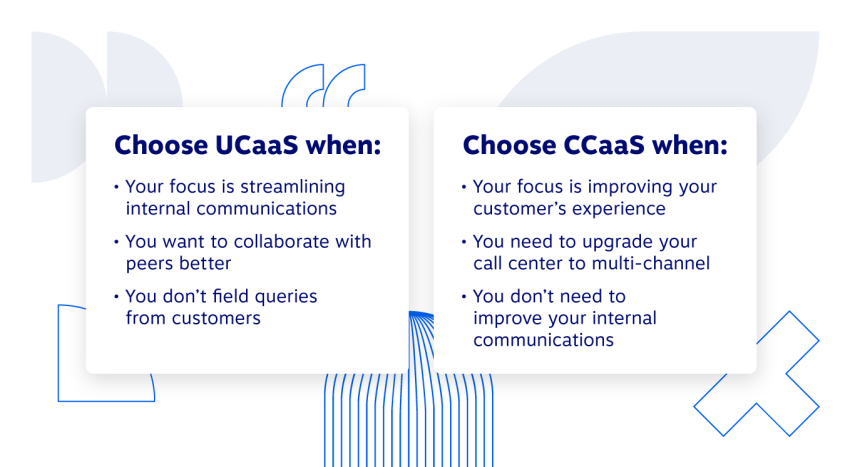
UCaaS, CCaaS, or Both?
A business can use the following guide:
| Choose | When it fits |
|---|---|
| UCaaS | The main need is employee voice, messaging, meetings, presence, and collaboration |
| CCaaS | The main need is customer service, sales engagement, routing, analytics, or agent workflows |
| Integrated UCaaS and CCaaS | Employees and agents need to collaborate while customer data and communication history stay connected |
Many businesses need both platforms. Separate systems can create disconnected directories, duplicate customer data, inconsistent reporting, and delays when agents need help from internal experts.
An integrated platform can let a contact center agent consult a subject-matter expert, transfer information between systems, and preserve a more complete view of the customer interaction.
Nextiva’s UCaaS and CCaaS Solution
Nextiva, a unified customer experience platform, provides UCaaS and CCaaS capabilities through one provider.
Its unified communications workspace brings together business phone calls, texts, video meetings, contacts, and team collaboration. Businesses can use the platform to support employee communication across desktop and mobile devices.
Nextiva Contact Center supports customer conversations across voice, chat, messaging, email, and social channels. Its capabilities can include:
- Omnichannel customer conversations
- Intelligent routing
- Agent assistance
- Self-service
- Quality management
- Analytics
- Customer journey orchestration
Nextiva also provides XBert AI, an AI receptionist that can answer calls and texts, handle common questions, book appointments, and provide post-call summaries and action items.
When UCaaS and CCaaS operate through a connected platform:
- Agents can collaborate with internal subject-matter experts.
- Customer and employee communication can use connected workflows.
- Data can pass between applications.
- Supervisors can manage customer interactions and performance data in one environment.
- Businesses can add channels and automation as their needs change.
The ultimate communications platform.
Discover why top brands scale their orgs faster with UCaaS and CCaaS together.
UCaaS vs. CCaaS FAQs
The best UCaaS provider depends on the business’s primary requirements. A provider should demonstrate that it can support the team’s current users, locations, applications, calling needs, and security controls while allowing room for growth.
Buyers should compare the provider’s:
-Service reliability and support
-Feature depth across voice, messaging, and meetings
-CRM and productivity integrations
-Number management and calling coverage
-Mobile and desktop applications
-Implementation process
-Pricing structure and contract terms
-Security and compliance resources
Nextiva is a UCaaS provider for businesses that want a connected communications workspace and the option to add customer contact center capabilities through the same provider. Businesses can also review UCaaS solutions and pricing considerations before making a shortlist.
There is no universal best platform for every organization. The strongest option is the one that matches the team’s channels, applications, security requirements, support model, geographic needs, and budget.
Businesses should compare:
-Voice, SMS, video, messaging, and presence
-Desktop and mobile usability
-CRM and productivity integrations
-Reliability and support
-Security and compliance controls
-Administration and reporting
-AI capabilities
-Scalability and total cost
Nextiva is a suitable option for businesses that want voice, messaging, video meetings, contacts, and collaboration in one workspace. Its productivity platform supports the unified communications use case described in this guide.
Start with the team’s communication requirements rather than a provider’s feature list. Document the channels employees use, the applications they need to connect, the locations they work from, and the administrative controls the business requires.
Then:
1) List required features, including voice, SMS, video, messaging, presence, recording, and conferencing.
2) Identify integrations with CRM, email, calendars, identity systems, and productivity applications.
3) Check desktop, browser, and mobile user experiences.
4) Review reliability, security, compliance, and support.
5) Estimate the total cost of licenses, implementation, devices, integrations, and premium features.
6) Test common workflows, such as transferring a call, starting a meeting, searching contacts, and moving from a message to a call.
7) Confirm the provider’s plan for onboarding, training, number porting, and future expansion.
A structured evaluation should cover feature sets, cost, reliability, security, integrations, AI, scalability, geographic reach, and service options.
The best cloud contact center software depends on the contact center’s operating model. An inbound support team may prioritize IVR, skills-based routing, CRM integration, and service-level reporting. An outbound sales team may need campaign controls, automated dialing, contact management, and performance analytics. A blended operation may need both.
A practical comparison should assess:
-Inbound, outbound, or blended support
-Voice and digital channels
-Routing and queue controls
-CRM and help desk integration
-Self-service and AI
-Agent management
-Quality management
-Workforce management
-Analytics and reporting
-Security and compliance
-Implementation support
-Pricing for agents, channels, storage, and advanced features
Nextiva Contact Center is designed for businesses that want cloud-based customer conversations, routing, analytics, and AI assistance connected to unified communications.
The best omnichannel contact center is the one that connects the channels a business actually uses and preserves the customer’s context as conversations move between them.
Buyers should confirm that the platform can:
-Support voice, email, chat, SMS, and social media
-Match customer records across channels
-Preserve interaction history
-Route interactions by skills, priority, language, or customer value
-Provide consistent agent and supervisor workflows
-Report on journeys across channels
-Connect with the CRM or help desk
-Support self-service and AI assistance
-Manage quality, coaching, and workforce needs
A platform that merely provides several separate channels may be multichannel rather than omnichannel. Nextiva Contact Center supports connected customer conversations across voice, chat, messaging, email, and social channels, with customer journey and contact center capabilities available for businesses that need a broader experience platform.