Business Communication
  Blog
Blog  Customer Experience
  Leadership
  Marketing & Sales
  Nextiva News
  Productivity
  VoIP
VoIP 

An omnichannel contact center connects voice, email, live chat, SMS, and social messaging through shared customer records and coordinated routing. Agents can follow the same issue across channels without losing the conversation history. Customers can switch contact methods while keeping their previous information available to the next agent.
A customer might start with a quick message, then call when the issue needs a longer conversation. When those channels operate separately, the agent has to piece together what happened, and the customer has to explain it again.
This guide covers what omnichannel contact centers do, their benefits, the features to compare, and the steps involved in implementation. You’ll also find five software options to consider for your team.
Evaluating contact centers? Get the buyer’s guide.
This guide reveals the five pillars of a modern platform, key questions to ask, and red flags to avoid.
What Is an Omnichannel Contact Center?
An omnichannel contact center is a customer service operation that coordinates incoming requests, agent assignments, and follow-up across connected communication channels. It brings those activities into a shared workspace where agents can see who has handled a request, what actions they’ve taken, and what still needs attention.
For example, when a customer calls about a return submitted through live chat, the agent can review the return request and check its status before responding. Routing rules can also direct the call to the team responsible for returns, reducing unnecessary transfers.
The channels you connect will depend on your customers’ preferences and the software you choose. The aim is to manage each request as one ongoing case, even when several agents or departments need to contribute.

Omnichannel customer experience example
Let’s say a customer is stuck with a tech issue. They browse self-service options but need further help. They start a web chat with a live agent, explain the problem, but then switch to a call, wanting to “talk to a real person.”
Here’s where omnichannel customer experience comes in. The call agent has everything: chat history, past interactions, and even what self-service options the customer tried. No need to repeat everything. The agent has a complete picture and can assist efficiently.

What is an Omnichannel Cloud Contact Center?
An omnichannel cloud contact center uses provider-hosted software to manage connected customer conversations across voice and digital channels. Agents access the platform over the internet, while the provider maintains the underlying infrastructure.
This setup supports teams working remotely or across multiple locations without requiring each office to maintain its own contact center servers. Your business still needs suitable devices, sufficient internet capacity, and backup connectivity.
Cloud hosting and omnichannel communication serve different purposes. Before choosing a platform, test whether conversation history follows the customer between channels, since hosting software in the cloud does not automatically connect those interactions.
Benefits of Omnichannel Contact Centers
Connecting customer conversations across channels can reduce repeated explanations, give agents more context, and make follow-up work easier to manage. These benefits depend on how well your systems share information and how your team handles each request.
- Frictionless customer journeys: Omnichannel platforms allow customers to switch effortlessly between channels (phone, email, chat, social media) without repeating information. Customers connect faster, lowering response time, which eliminates frustration and fosters a smooth, positive experience.
- Improved customer satisfaction & loyalty: By catering to preferred communication styles and providing a consistent experience, omnichannel contact centers turn interactions into positive touchpoints. Customers feel valued, leading to increased satisfaction and loyalty.
- Boosted agent efficiency: With a complete customer history at their fingertips, agents can resolve customer issues faster and provide more personalized service, removing the need for repetitive explanations and boosting overall agent productivity.
- Enhanced customer insights: Omnichannel systems capture valuable customer data across all channels. Analyze this data to gain insights into customer behavior, preferences, and pain points. These insights help optimize processes, identify areas for improvement, and make data-driven decisions that enhance the customer experience.
- Cost control: Omnichannel platforms empower customers with self-service options like chatbots and knowledge bases. This deflects routine inquiries away from agents, freeing them to handle more complex issues and optimizing operational costs.
- Competitive advantage: In a competitive market, an exceptional customer experience is key. Omnichannel contact centers create a unique advantage with consistent, top-notch service across the board.
- Enhanced flexibility: Omnichannel platforms offer built-in scalability to adjust to fluctuations in demand for efficient resource allocation and maximum operational flexibility.
How Sales and Marketing Teams Use an Omnichannel Contact Center
An omnichannel contact center can connect sales inquiries and campaign responses with the conversations a customer has already had with your business. With the relevant CRM and marketing integrations in place, teams can review that context before deciding how to respond.
Sales inquiries and follow-ups
A prospective customer might ask about a product through live chat, then call to discuss pricing. When both interactions connect to the same record, the sales representative can review the earlier questions and continue the discussion without asking the prospect to start again.
Route inquiries to the appropriate sales team based on the product, territory, or account. Record the outcome and next step so another representative can pick up the conversation if needed.
Marketing campaign responses
An email promotion or social campaign can prompt questions through several channels. Making the relevant offer and campaign details available to agents gives them the information to explain eligibility, answer questions, and direct interested customers to sales.
Review the questions customers ask across those channels to find unclear offer terms or missing product information. Marketing teams can use those findings to revise campaign copy and FAQs, while keeping outbound follow-ups aligned with customers’ consent and contact preferences.
What is Omnichannel Contact Center Software?
Omnichannel contact center software gives agents the tools to receive, prioritize, and resolve requests across voice and digital channels. Supervisors use it to assign work, manage queues, and track service performance from one platform.
The software brings together several functions:
- Interaction management: Organizes messages, calls, and follow-ups around the customer’s issue.
- Routing: Assigns requests based on priority, agent skills, and availability.
- Customer records: Links conversations with relevant account details and previous interactions.
- Automation: Handles tasks such as acknowledgments, reminders, and escalation alerts.
- Reporting: Shows workload, response times, and resolution outcomes across connected channels.
When comparing platforms, check whether agents can review earlier messages, continue a conversation on another channel, and track the request through resolution.
Key Features of Omnichannel Contact Center Software
Cloud-based contact center solutions simplify complex interactions by unifying all customer communication channels into a single platform.
When you streamline customer service tools, you help agents become more productive and effective in delivering exceptional customer experiences.
But where do you start when building out an omnichannel approach?
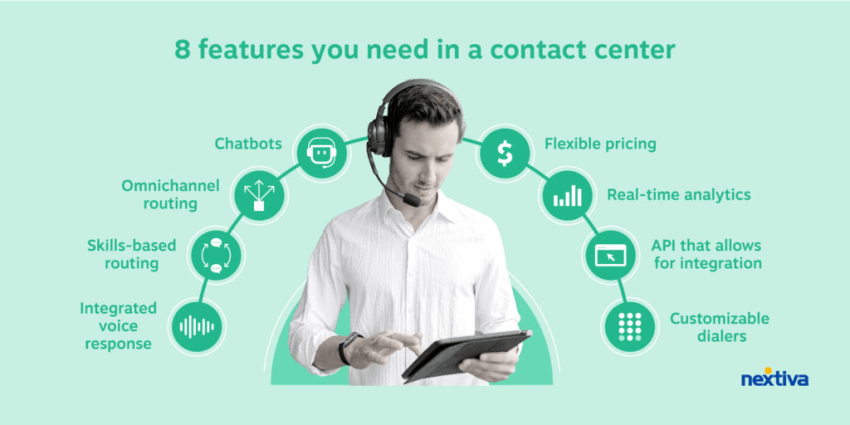
Here are eight must-have features to look for when choosing omnichannel contact center software:
1) Cloud-based with a unified interface
An omnichannel strategy thrives when employees can effortlessly move between channels while maintaining customer history and context.
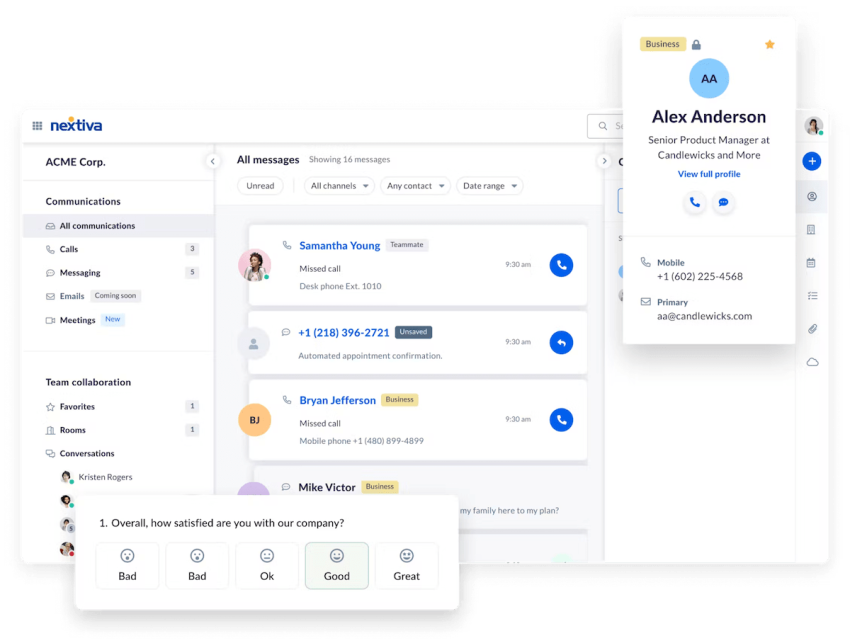
For this to happen, your contact center software needs an easy-to-use, intuitive interface that provides real-time data for each agent.
Look for these qualities:
- Customer data and conversations in one place: Agents shouldn’t have to jump through hoops. Native integrations, without the need for additional middleware, provide an effortless experience.
- Cloud-based redundancy: Look for a cloud-based tool that centrally manages all data sources and conversations, allowing agents to work remotely with ease.
- Quick access to real-time data: Agents should have instant access to customer insights, past interactions, and satisfaction scores to deliver personalized service.
- Pre-built integrations for common business tools: CRM systems, dialers, email, SMS, and social media platforms; an excellent connection is crucial.
2) Easy integration between channels
Customer channel preferences continually evolve. An omnichannel contact center must integrate new channels rapidly without disrupting workflows.
Evaluate how a contact center handles integrations:
- Existing integrations: Ensure it connects with the tools you already use, like your CRM, predictive dialers, email, SMS, social media platforms, etc.
- Single view for conversations: The interface should unite cross-channel interactions into one view to reduce friction and eliminate the need for context switching.
- Unified reporting across channels: Reports should prioritize customer experience metrics over channel-specific ones for better forecasting and identifying areas for improvement.
- API (Application Programming Interface) integrations: APIs facilitate the smooth exchange of data between your contact center and other business tools.
3) Customer insights render personalized experiences
Personalization is key to building customer loyalty. Some customers prefer self-service options, while others need direct assistance for complex issues. The more relevant data agents have, the better they can personalize each interaction.
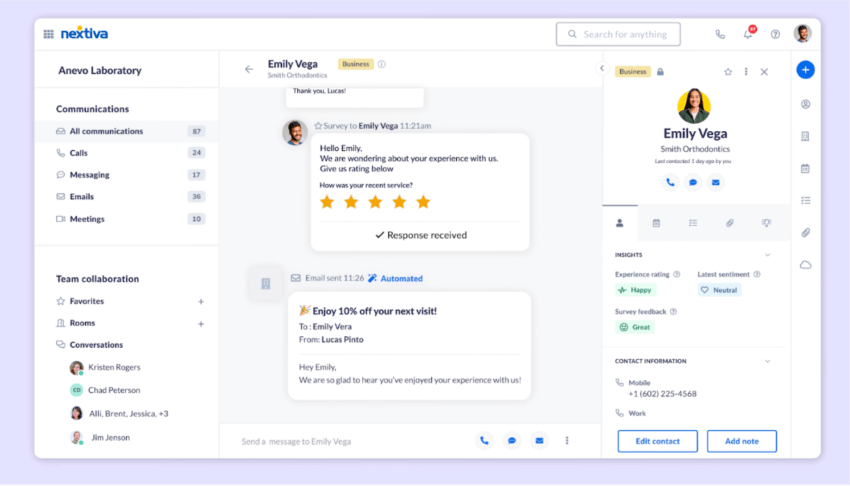
An omnichannel contact center should provide:
- Customer information: Name, company, contact details, and open tickets, all readily available.
- Interaction history: Past conversations across all channels, providing context for current interactions.
- Real-time insights: Recent product usage, help document views, to understand current customer needs.
- Account value: Customer value, trending satisfaction scores, and survey results for a holistic view.
- AI-powered sentiment analysis: Use artificial intelligence to analyze customer sentiment during interactions to tailor responses and personalize the experience further.
4) Intelligent routing of inbound requests
With multiple channels, proper request routing is crucial for an ideal experience.
Look for features like:
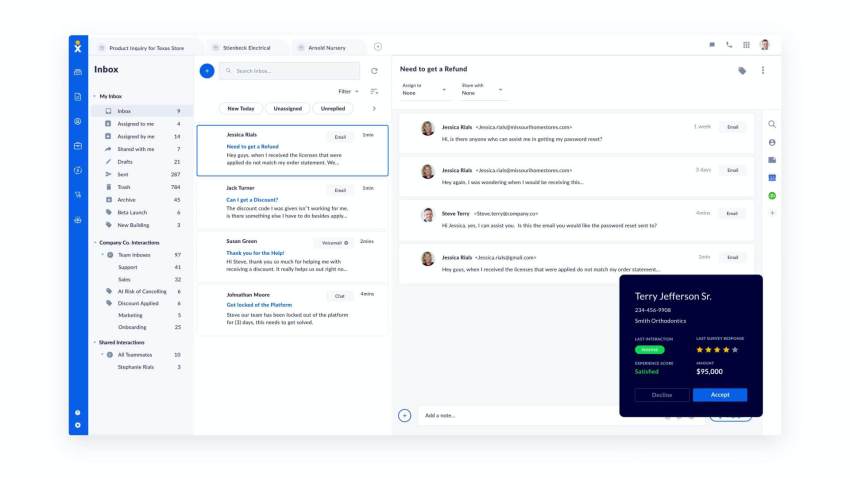
- Automatic call distribution (ACD): Route calls based on skills, history, and priority for efficient resolution.
- Deep CRM integration: Leverage customer data to route inquiries to the right agent or team with the most relevant expertise.
- Conversational AI: Use AI for initial assistance, such as simple questions or routing complex inquiries to the appropriate agent.
- Skills-based routing: Besides skills and history, consider routing based on agent certifications or language fluency for a more precise match.
Where does your CX strategy stand with AI?
Take the AI Maturity assessment to get personalized recommendations on how to enhance your CX.
5) Integrated data across the customer journey
To deliver true omnichannel experiences, you need full visibility into each customer’s journey across all touchpoints and channels. Look for:
- Journey mapping: See where customers came from (mobile app, email, SMS, etc.) to understand their path and tailor future interactions.
- End-to-end pipeline tracking: Understand the full customer relationship from first contact to resolution.
- Customer Data Platform (CDP) integration: A CDP can unify customer data from various sources, providing a more holistic view of the customer journey.
6) Self-service options
Empowering customers to find solutions independently improves overall satisfaction and reduces call volume for your agents. A robust self-service portal should include:
- Knowledge base articles: A searchable library of helpful content addressing common questions and troubleshooting steps.
- FAQs (Frequently Asked Questions): A curated list of frequently encountered questions with clear and concise answers.
- Chatbots: AI-powered chatbots can answer basic inquiries, deflect simple requests, and schedule appointments, freeing up agents for more complex issues.
7) Performance management and reporting
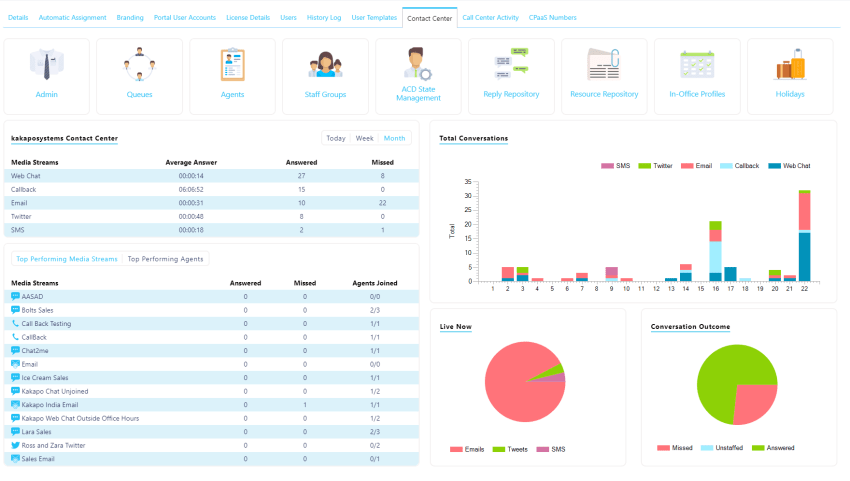
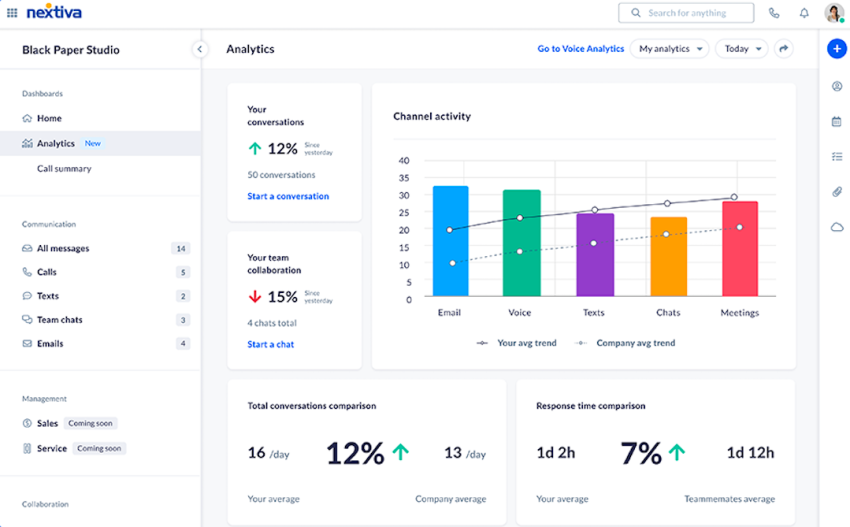
Consolidated reporting and analytics provide deep insights into support team and agent performance, empowering data-driven decision-making. Essential analytics include:
- Historical trends: Quickly identify areas needing improvement and track progress over time.
- Customizable KPIs (Key Performance Indicators): Track the metrics most tied to your specific business goals.
- Agent dashboards: Provide individual agents with actionable insights for coaching and performance improvement.
8) Enterprise-grade security and reliability
With all customer data and channels running through one platform, security and uptime are paramount. For example, Nextiva’s network has the industry’s highest uptime, which means you can be there for your customers.
Ensure the solution:
- Meets compliance standards: PCI, SOC 2, HIPAA, etc., to ensure the security of sensitive customer data.
- Has a transparent status page and monitoring: Providing real-time system health information and a history of past incidents builds trust.
- Undergoes regular security audits and testing: Continuous security assessments minimize vulnerabilities and ensure adherence to best practices.
Top 5 Omnichannel Contact Center Software
The five platforms below offer different ways to manage customer conversations across channels. Compare their features and pricing first, then review where each may fit your support operation.
Comparison of top omnichannel contact center software
| Solution | Key capabilities | Starting price |
|---|---|---|
| Nextiva Contact Center | Routing, journey orchestration, CRM integrations, AI transcription and summaries | Essential starts at $75/agent/month. Additional channels and advanced features depend on the plan. |
| Genesys Cloud CX | Omnichannel routing, self-service, analytics, quality assurance | CX 2 starts at $115/user/month, billed annually, for voice and digital channels. |
| Five9 | Customer engagement, routing, automation, analytics | Contact sales for current pricing and package details. |
| Zendesk Suite | Ticketing, omnichannel routing, messaging, live chat, telephony | Suite Team starts at $55/agent/month, billed annually, or $69 billed monthly. |
| Freshdesk Omni | Ticketing, connected support channels, knowledge base, reporting | Growth starts at $29/agent/month, billed annually. |
Features listed describe each platform’s capabilities; they are not necessarily included in its starting plan. Usage, implementation, integrations, and add-ons may cost extra.
Here’s how each platform fits different support operations.
- Nextiva: Nextiva Contact Center suits businesses bringing customer communications into one platform. Teams working across departments or locations can use it to coordinate requests and follow-ups rather than piece together conversations from separate tools. Essential covers voice and web chat, while higher tiers extend channel coverage.
- Genesys Cloud CX: Genesys Cloud CX is an option for operations with complex routing and service management needs. Its CX 2 plan provides a starting point for teams combining voice and digital support, with higher tiers available for additional workforce management requirements.
- Five9: Five9 is an option for businesses seeking a contact center configuration built around their operational requirements. Compare the proposed package with your existing systems and the resources available to administer it. Request a quote covering your required channels, integrations, and support.
- Zendesk Suite: Zendesk Suite suits teams that organize customer support around tickets. Agents can work through open requests while reviewing related messages and customer context, making it relevant for businesses whose support process centers on tracking cases through resolution.
- Freshdesk Omni: Freshdesk Omni is an option for teams expanding a help desk operation across connected support channels. Its workflow centers on assigning, tracking, and resolving requests. Confirm how phone support connects to the proposed setup and which telephony charges apply.
Related: Small Business Contact Center Software: Overview & Key Features
Omnichannel vs. Multichannel Contact Centers
Multichannel contact centers support multiple communication channels, but customers have to start over when switching between channels, as there is no smooth integration.
On the other hand, omnichannel contact centers provide a unified experience across all channels, with features like CRM integration, real-time customer data, and the ability for a single team to handle requests across all channels.
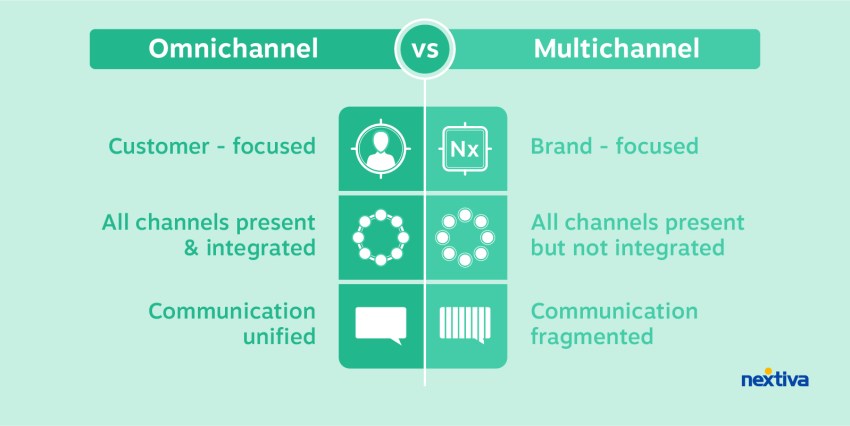
Here’s a quick comparison between a multichannel and an omnichannel contact center.
| Functionality | Multichannel contact center | Omnichannel contact center |
|---|---|---|
| Supports multiple channels | Yes, with channels often managed separately | Yes, with connected workflows across channels |
| Carries conversation history between channels | May require manual sharing or separate searches | Makes relevant history available across connected channels |
| CRM integration | Can link individual channels to customer records | Uses shared customer records to connect cross-channel interactions |
| Real-time customer insights | Often viewed within each channel | Can combine activity across connected channels |
| Shared or specialized agent teams | Teams may work through separate channel queues | Teams coordinate requests through shared context and routing |
| Routing across channels | Routing rules typically operate within each channel | Routing coordinates requests across connected channels |
The key differences are:
- In multichannel, workflows and conversation records may stay separate. When customers switch channels, agents may need to retrieve earlier details manually or ask for information again.
- Omnichannel combines all channels, customer history, and data into a consistent experience. Customers can easily switch channels.
Cons of multichannel compared to omnichannel:
- Poor customer experience due to lack of personalization and need to repeat information.
- Potentially higher costs as more agents are needed to handle multiple requests for a single issue.
- Risk of harming customer engagement. Poor experiences can lead to customer churn.
While multichannel supports multiple channels, an omnichannel approach is crucial for creating a personalized and better customer experience across all touchpoints.

How to Choose an Omnichannel Contact Center Solution
Choose an omni channel contact center solution based on the customer journeys your team needs to support. Start with the handoffs that cause repeated explanations, missed follow-ups, or delays, and use those scenarios to assess each platform.
Ask providers to demonstrate one of those journeys using sample customer records. Involve agents and supervisors so they can assess the steps required to complete the task and spot gaps a feature list may miss.
Compare these details before making a decision:
- Channel coverage: Separate the channels included in your plan from those requiring upgrades or third-party tools.
- Integration depth: Confirm which CRM records agents can view and update, how quickly changes synchronize, and who maintains the connection.
- Routing controls: Test overflow rules, after-hours handling, and what happens when the assigned team is unavailable.
- Reporting: Ask whether managers can measure resolution across the full customer issue, including transfers and repeat contacts.
- Total cost: Request an itemized quote covering licenses, implementation, training, usage, add-ons, and ongoing support.
Traditional Call Center vs. Omnichannel Contact Center
A traditional call center focuses on telephone support, while a contact center handles customer interactions through voice and digital channels. An omnichannel contact center connects those channels so agents can follow a request as the customer moves between them.
Omnichannel call center services
Omnichannel call center services extend telephone support to connected channels such as email, live chat, and SMS. Agents can review the digital interactions surrounding a call and keep subsequent follow-ups linked to the same request.
For example, a customer might email about a billing issue, then call for an update. With the records connected, the agent can review the earlier message and continue from the last action taken.
Omnichannel contact center services
Omnichannel contact center services coordinate customer support across connected voice and digital channels, without making telephone calls the primary focus. Shared customer records and conversation history give agents the context to continue an issue when the customer changes contact methods.
A customer might complete a request through messaging or move from chat to a call when they need a longer discussion. Providers often use “call center” and “contact center” services interchangeably, so the distinction depends on the channels and workflows included.
Which approach fits your business?
A traditional call center may suit a business whose customers mainly need telephone support. An omnichannel approach becomes useful when customers regularly use several channels and your team needs to connect those conversations.
Base the decision on how customers contact you, the requests your agents handle, and where disconnected tools create extra work.

Implementing an Omnichannel Contact Center
Planning and implementing an omnichannel contact center solution is a multi-faceted process that requires careful consideration of various factors.
Here’s a structured approach to help you navigate through the process:
Assess business needs and goals
Understand the nature of your customer interactions, the channels they prefer, and the desired level of service. Identify the pain points in your current customer support system and areas for improvement. This assessment will determine the appropriate omnichannel solution.
Evaluate technology and integration requirements
Omnichannel contact centers rely heavily on technology.
Evaluate the available solutions and their ability to integrate with your existing systems, such as CRM, ERP, and other business applications. Ensure that the chosen technology supports the channels you want to offer, including voice, video calls, email, chat, social media, and self-service options.
Develop an omnichannel strategy
Based on your business needs and technology requirements, develop a comprehensive omnichannel strategy.
Define the channels you want to offer, the level of integration between them, and the customer journey you envision. Determine how you will manage and route interactions across channels, ensuring a consistent and personalized customer experience.
Plan for agent training and workforce management
Successful omnichannel contact centers have well-trained agents who can handle interactions across multiple channels.
Develop a comprehensive contact center training program that equips customer service agents with the necessary skills and knowledge to deliver consistent and high-quality service. Also, implement workforce management strategies to ensure proper staffing levels and efficient resource allocation.
Consider budget and ROI
Implementing an omnichannel contact center solution can be a significant investment.
Carefully evaluate the costs associated with technology, integration, training, and ongoing maintenance. Perform a cost-benefit analysis and calculate the potential return on investment (ROI) to justify the investment and ensure long-term viability.

Develop a phased implementation plan
Implementing an omnichannel contact center is a complex undertaking, and it’s often advisable to adopt a phased approach.
Prioritize the channels and features based on their importance and impact, and roll out the solution in stages. This approach allows you to manage risks, gather feedback, and make necessary adjustments along the way.
Continuously monitor and optimize
Implementing an omnichannel contact center is not a one-time event; it’s an ongoing process.
Continuously monitor the performance of your solution, gather customer feedback, and analyze key metrics to identify areas for improvement.
Embrace a culture of continuous optimization, making adjustments and enhancements as needed to ensure that your omnichannel strategy remains aligned with evolving customer expectations and business needs.

Omnichannel Contact Center Best Practices
Embracing an omnichannel strategy means defining a cohesive vision to optimize the customer service experience. This effort results in revisiting tools, workflow automation, and customer touchpoints.
Let’s start by looking at some strategies and best practices:
- Build more personalized experiences: Building an effective omnichannel strategy starts with personalization. Leverage unified customer data from all channels, so your agents have the full context about each person’s previous interactions and preferences to really personalize their experience and keep them engaged.
- Map out common customer journeys: Identify the common journeys your customers take across different channels. Understand the paths they follow and identify which touchpoints they prefer to use, so you can optimize their experience at each step.
- Be proactive about data collection: Consolidate all that customer data into a single, unified view for your agents. Bring in behavioral data from the website, details from the CRM, social media interactions, and everything. That 360-degree customer view enables your team to provide much better service.
- Monitor changes in customer preferences: Don’t set it and forget it, though. Stay vigilant about monitoring any changes in the channels customers use most frequently and their satisfaction levels on each one. Markets can shift rapidly, so you need to be able to adapt your omnichannel strategy accordingly.
- Balance automation with human support: Technology is powering these omnichannel experiences, but you can’t lose sight of the human element. Maintain a consistently high-quality experience across every channel. And always prioritize delivering amazing, customer-centric service over just hitting efficiency metrics or shortening handle times.

The Future of Customer Support Is Omnichannel
Customers may use multiple communication channels to resolve one issue. Your team needs a clear view of what happened, what’s still pending, and who should act next.
You don’t have to take on every digital channel at once. Start with the channels your customers use most, connect the workflows behind them, and expand as your team is ready.
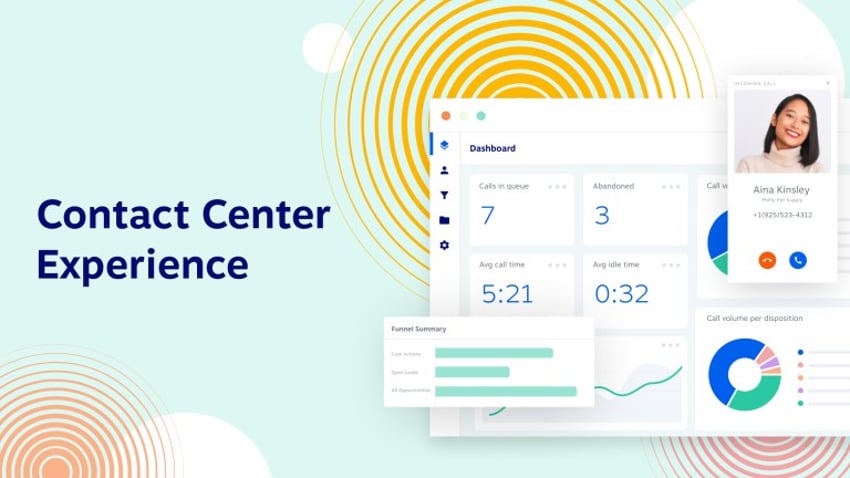
Nextiva Contact Center brings voice and digital requests into one queue, giving agents the context to continue conversations and manage follow-ups from one platform.
See how Nextiva Contact Center can bring your customer conversations together.
Switch to the contact center solution customers love.
Provide a unified customer experience across every channel. Boost satisfaction and streamline your contact center.
Frequently Asked Questions About Omnichannel Contact Center
Track repeat contact rate, successful channel handoffs, the time agents need to access relevant conversation history, and cost per resolved case across channels. Define each measure clearly so teams calculate it the same way. Review these results alongside quality assurance scores and compliance checks to see whether faster service also resolves the customer’s issue.
Choose a primary customer identifier, such as an account ID, and define how verified email addresses, phone numbers, and channel profiles connect to it. Validate information when you collect it, review possible duplicates, and assign responsibility for correcting records. Avoid merging profiles based only on a shared name or an unverified contact detail.
Review the service-level agreement’s uptime commitment, covered services, exclusions, and remedies when the provider misses its targets. Check support hours, escalation paths, and response targets by incident severity. Distinguish an initial response from service restoration or a permanent fix, and confirm whether dedicated technical support costs extra.
Forecast demand by channel and time interval, accounting for handling time, response targets, and follow-up work. Cross-train agents so they can move between calls, live chat, email, and messaging as demand changes. Set realistic limits on simultaneous conversations, and protect time for queued messages so phone demand doesn’t leave them unanswered.
Common problems include copying outdated workflows, underestimating training needs, and transferring records without a clear data-mapping plan. Start with a limited set of queues and channels, clean the data, and test routing, integrations, and conversation history before expanding. Retire older tools once the replacement workflows work as intended and required records remain accessible.
Match verification requirements to the risk of the request. General questions may need little verification, while access to sensitive information or account changes requires stronger checks. Where supported, use secure verification links or authenticated in-app flows. Carry verification status between channels only when the receiving system can trust it and your security rules permit it.
Give customers a clear way to request a person, and set handoff triggers for repeated failed attempts, unsupported requests, or issues requiring human judgment. Pass the transcript, steps already taken, and relevant customer details to the receiving agent. Explain the expected wait or callback process, and route the request to a team equipped to handle it.