VoIP
VoIP  Blog
Blog  Business Communication
  Customer Experience
  Leadership
  Marketing & Sales
  Nextiva News
  Productivity

Zoom has come a long way from video meetings. The company now embeds a cloud business phone system called Zoom Phone directly into the familiar Zoom app, allowing teams to manage calls, team chats, and video conferencing all inside a single dialer interface.
While the user interface is familiar, Zoom Phone’s pricing has become more complicated. With pay-as-you-go licenses, unlimited regional plans, Workplace bundles, and a web of mandatory add-ons, the advertised headline price is rarely what you actually pay on the final invoice.
In this guide, we’ll cover the full Zoom Phone pricing for 2026, highlight the hidden fees and actual costs that can surprise businesses, and compare Zoom Phone with top VoIP competitors such as Nextiva.
Zoom Phone Pricing and Plans Overview
There are two main ways to buy Zoom: Standalone Phone Licenses (for teams that only need a VoIP dialer) and Zoom Workplace Bundles (which include video, phone, AI features, and team chat).
(Note: Zoom imposes user limits depending on the specific license tier and workspace environment assigned to each account.)
| Plan tier | License count | Billed annually | Billed monthly | Best for | Key calling features |
|---|---|---|---|---|---|
| US & CA Metered | 1-99 | $10.50/user/mo | $12.00/user/mo | Lobbies, break rooms & low outbound traffic | Pay-as-you-go outbound calling (~$0.03/min), basic IVR |
| US & CA Unlimited | 1-99 | $16.00/user/mo | $18.00/user/mo | Domestic SMBs & core office staff | Unlimited domestic calling, SMS/MMS, AI Companion |
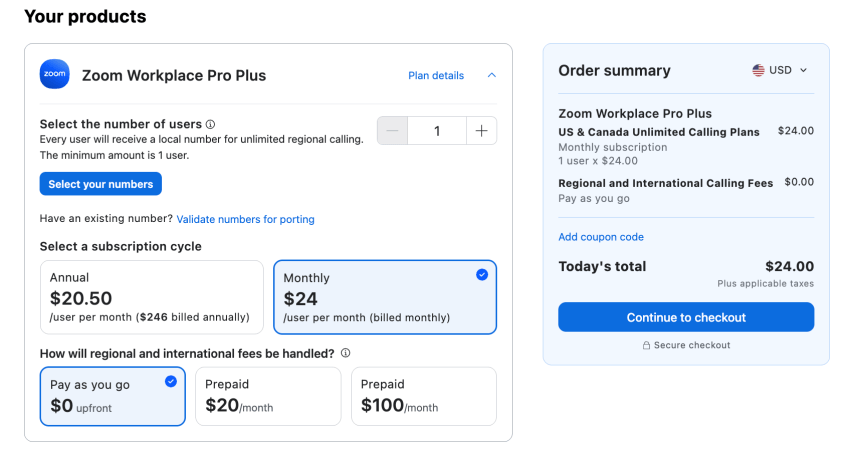
| Workplace Pro Plus | 1-99 | $20.50/user/mo | $24.00/user/mo | Hybrid teams needing phone & video meetings | Unlimited phone and Zoom Meetings Pro + AI summaries |
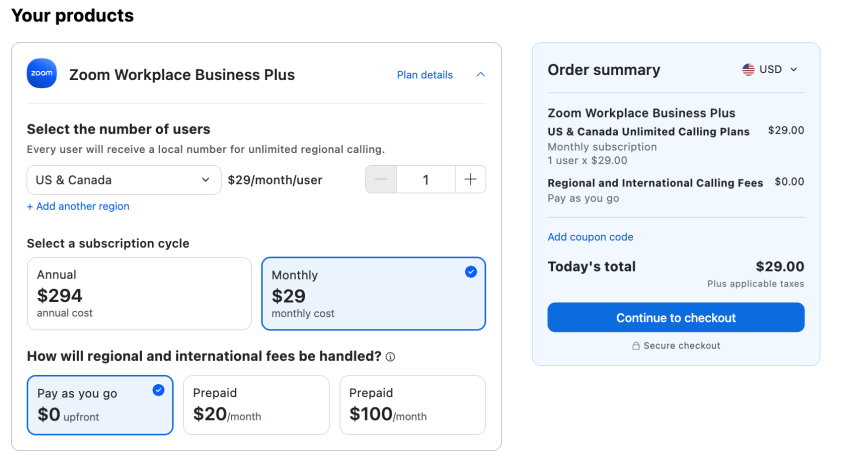
| Workplace Business Plus | 1-250 | $24.50/user/mo | $29.00/user/mo | Mid-market teams (10+ seats) scaling security | Unlimited phone + 300-participant meetings + SSO + CRM sync |
| Global Select (Unlimited) | 1-99 | $22.00/user/mo ($264/yr) | $25/user/mo | International offices & remote global reps | Unlimited calling in 1 of 49 countries, local DID numbers |
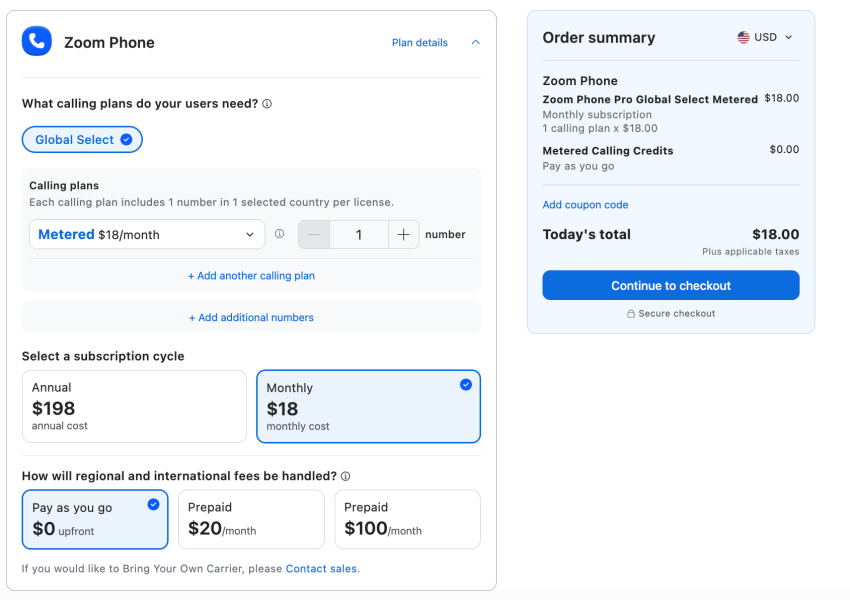
| Global Select (Metered) | 1-99 | $16.50/user/mo ($198/yr) | $18.00/user/mo | International lobbies & low-outbound reps | Pay-as-you-go regional calling, local DID numbers |
Breakdown of Standalone Zoom Phone Plans
Below you can see a breakdown of the Zoom Phone’s standalone plans:
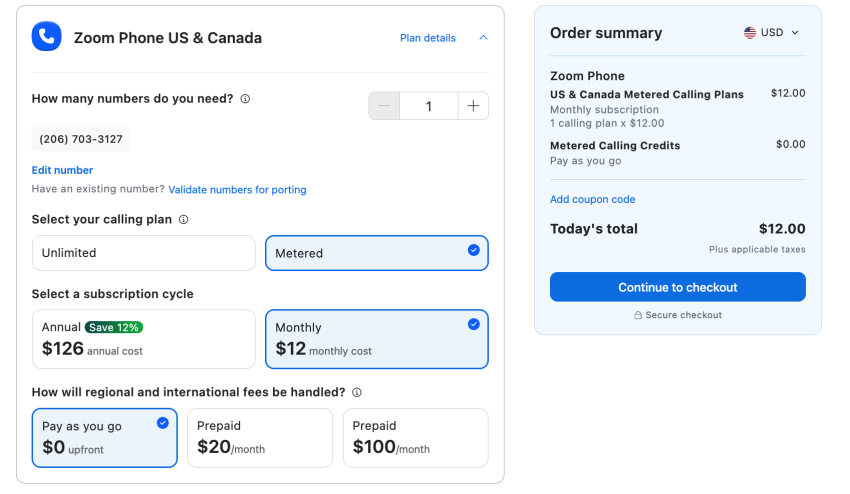
US & Canada Metered ($10.50/user/month)
The price for Zoom’s lowest-cost entry-level cloud telephony plan starts at $10.50 per user per month (billed annually).
However, this is essentially designed for inbound calls.
- Billing model: Free inbound calls. Outbound calls to the public switched telephone network (PSTN) are billed by the minute (approx. $0.03/minute in the US and Canada).
- Cost threshold: Once a user spends more than 180 minutes per month on outbound calls, this plan becomes pricier than switching to the “Unlimited” plan.
- Best for: Phone lines in common areas (e.g., reception areas, warehouses, break rooms) or for specialized staff who handle exclusively inbound calls.
US & Canada Unlimited ($16.00/user/month)
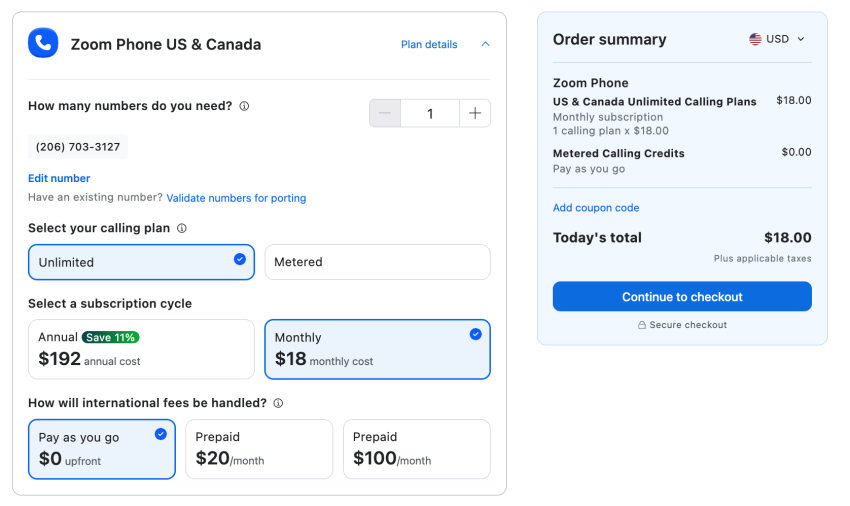
This plan is billed annually at $16.00 per user per month; there’s no per-minute billing. It’s the standard choice for small domestic businesses.
- Included features: Unlimited domestic calls within the US and Canada, business SMS/MMS messaging, call queues, multi-level auto-attendants, and voicemail transcription.
- AI features: Offers basic access to Zoom’s AI Productivity Suite, including AI note-taking, Speaker identification, meeting summaries, and a 40-minute time limit for multi-participant video meetings.
- Available add-ons: This is the minimum plan tier required to purchase the unlimited international calling add-on ($10/month) or to use “Bring Your Own Carrier” (BYOC) routing.
Current Offer: Zoom currently offers a 7-day free trial of the Unlimited Plan. It includes unlimited calling in the US and Canada for one user license and one phone number, with the option to add seats after the trial expires.
Global Select (Metered and Unlimited)
Global Select eliminates the administrative burden of setting up international phone lines across 49 supported countries. Zoom offers both “Unlimited” and “Metered” plans to accommodate varying call volumes at global locations:
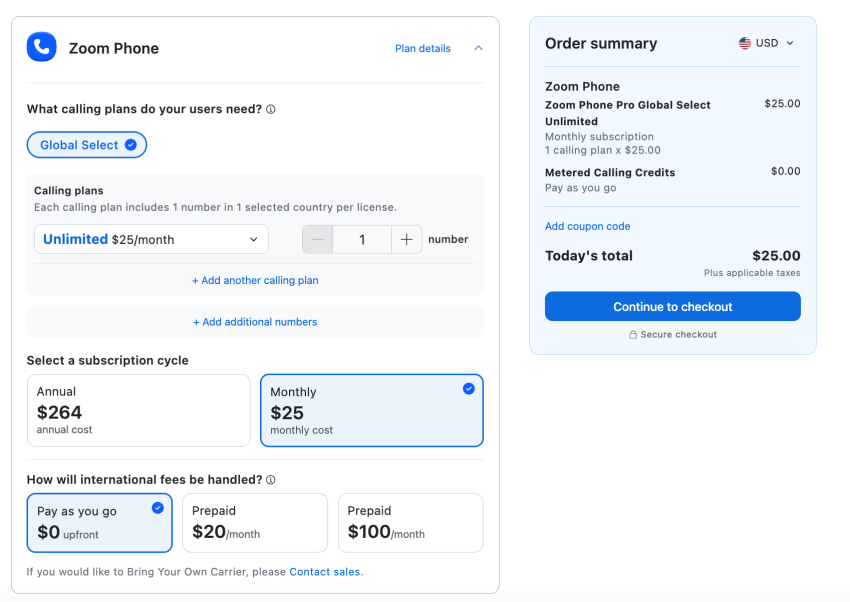
- Global Select Unlimited ($264 per user/year billed annually | $25.00 monthly): Unlimited calling within 1 of the 49 supported countries. Includes a local Direct Inward Dialing (DID) number. This plan is designed for international sales representatives or support teams that make a high volume of outbound calls to the respective target region.
- Global Select Metered ($198 per user/year billed annually | $18.00 monthly): Offers a lower base fee per seat for international user licenses or for additional global extensions. Incoming calls are included, while outbound calls within the selected region are billed based on actual usage (per-minute). This is the ideal option for reception areas, phones in common areas, or international employees who primarily handle incoming calls.
(Note: Zoom manages all local regulatory, tax, and emergency routing requirements across all 49 supported countries.)
Breakdown of Zoom Workplace Bundles
For businesses that want to consolidate software vendors, Zoom bundles its phone services into its unified Workplace packages:
Zoom Workplace Pro Plus ($20.50/user/month)
The Pro Plus bundle includes unlimited domestic business calls and licenses for Zoom Workplace Pro video conferencing, priced at $20.50 per user per month (billed annually). It also includes key productivity tools like:
- Meetings lasting up to 30 hours for up to 100 participants
- AI-powered conversation summaries and task creation
- 10 GB of cloud storage for recordings
This plan is best for hybrid teams already using Zoom for internal video collaboration that want to add professional business phone lines to their setup under a single subscription.
Zoom Workplace Business Plus ($24.50/user/month)
Business Plus costs $24.50 per user per month (billed annually, with a minimum of 10 licenses) and enables meetings with up to 300 participants as well as enterprise-grade administrative controls. The plan offers advanced features like:
- Single sign-on (SSO) authentication
- Domain management
- Basic native CRM synchronization (e.g., call logging in Salesforce)
It’s best for mid-sized companies looking to expand and scale compliance and governance standards within their sales and service departments.
Zoom Phone Add-ons and Hidden Costs
Zoom’s pricing is modular; the base fee for your subscription is used only as the foundation for your actual total costs:
- Zoom Phone Power Pack ($25.00 per user/month): Required for high-volume queues to access features such as real-time analytics, wallboard monitoring, receptionist desktop consoles, and supervisor tools like “Whisper” and “Barge.”
- Additional phone numbers ($5.00/month per line): Each license includes one local phone number; however, you can add extra local lines or dedicated lines for specific departments (trunks) for $5 per month per number.
- Usage-based calling credit & auto-recharge: If your team makes calls outside the unlimited calling scope included in your plan (and you haven’t purchased international flat-rate add-ons for every seat), you’ll need a shared prepaid credit account. The “Auto-recharge” feature allows administrators to set the payment method to be charged automatically when the credit runs low, ensuring international calls are not interrupted.
- International minute rates: Calls to locations outside the coverage zones are deducted from your credit account at destination-specific rates (e.g., approx. $0.02–$0.08/min for Western Europe, $0.15–$0.85+/min for Asia and Latin America).
- Taxes & regulatory fees: Local, state, and federal fees apply to VoIP accounts (including E911 emergency service fees and Federal Universal Service Fund charges). These increase the monthly subtotal by 15% to 25%.
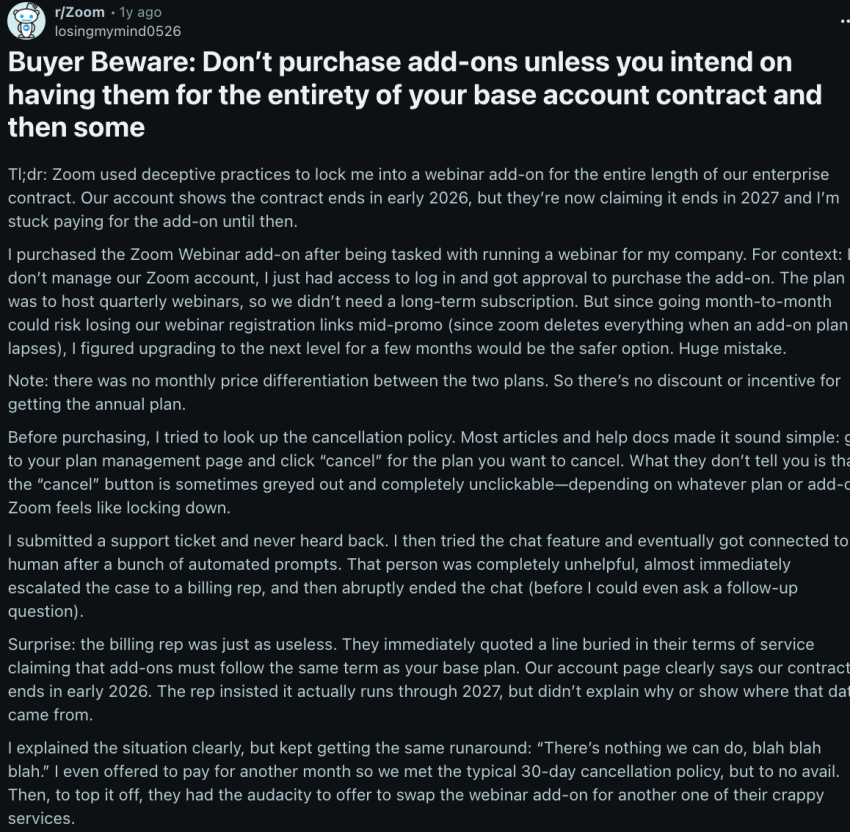
- Contract locking: User feedback across IT communities highlights Zoom’s rigid contract terms. If you purchase add-ons (such as Power Pack licenses or additional numbers) midway through an annual agreement, those add-ons lock into the main contract term and cannot be removed until the annual renewal date.

Pros & Cons of Zoom Phone (User Reviews)
Here’s how Zoom Phone performs in practice, based on verified user reviews from G2, Trustpilot, and IT buyer communities:
What users like (pros)
- Unified user interface: A familiar app that combines video conferencing, team chat, and telephony reduces the burden of managing different software applications.
- Minimal training requirements: Since most employees are already familiar with Zoom Meetings, the administrative effort for onboarding is minimal.
- Included AI summaries: Users value the fact that key AI features, such as post-call notes and task extraction, are included without the need for separate software subscriptions.
What users dislike (cons)
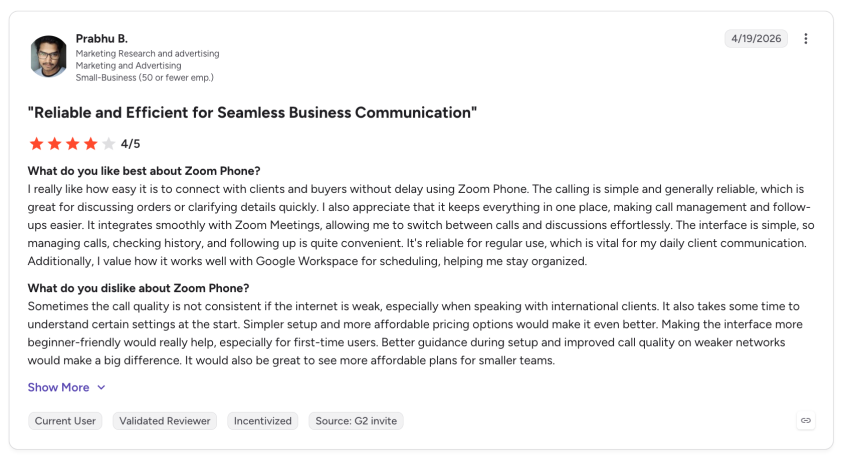
- Accumulation of add-ons: Base licenses appear affordable, but mandatory add-ons, such as those for call queue analytics, additional phone numbers, or international access, can quickly drive the price up to the level of premium providers.
- Customer support response times: While the software’s general availability is good, response times from the specialized telephony support team (e.g., for complex issues regarding number porting, E911 routing, or SIP trunking) can be slower than those of standard video support helpdesks.
- Limited CRM automation: CRM integrations (Salesforce, HubSpot, etc.) function more as passive call loggers than as powerful engines for multi-step workflow automation.
Top Zoom Phone Alternatives for 2026
If your business needs run deeper than basic internal video meetings or simple phone extensions, several alternative Unified Communications as a Service (UCaaS) platforms are engineered to solve specialized communication problems.
| Alternative | Best for | Advantage over Zoom Phone |
|---|---|---|
| Nextiva | SMBs looking for 24/7 support and built-in CX tools | Combines solid voice features with advanced contact center infrastructure, managed CRM integrations, and predictive customer sentiment tracking under a single vendor. |
| RingCentral RingEX | All-around UCaaS robustness and legacy migration | Offers the broadest marketplace feature footprint across messaging, voice, video, and over 500 mature software integrations for mid-market environments. |
| Microsoft Teams Phone | Dedicated Microsoft 365-heavy organizations | Seamlessly adds secure PSTN connectivity directly to your existing Teams workplace layout, eliminating separate software vendors. |
| Dialpad Connect | High-volume sales teams and AI-native workflows | Extremely strong baseline AI coaching playbooks, automated speech-to-text transcriptions, and real-time sales agent assist tools included standard. |
| 8×8 Work | Global contact centers and deep international calling | Optimized for complex multi-region global trunks and multilingual deployment support across cross-border offices. |
| Cisco Webex Calling | Large enterprise Cisco and Webex infrastructure environments | Built specifically for enterprise spaces with existing on-premises Cisco networking hardware, hardware desk devices, and high-security compliance matrices. |
Zoom Phone vs. Nextiva: Deeper Dive
Zoom came to cloud communications with a video-first mindset and added a phone dialer later. Nextiva, in contrast, was built from the ground up as a voice-first customer experience platform.
Here’s how the two platforms compare in terms of pricing, included features, and contract terms:
| Feature | Zoom Phone | Nextiva |
|---|---|---|
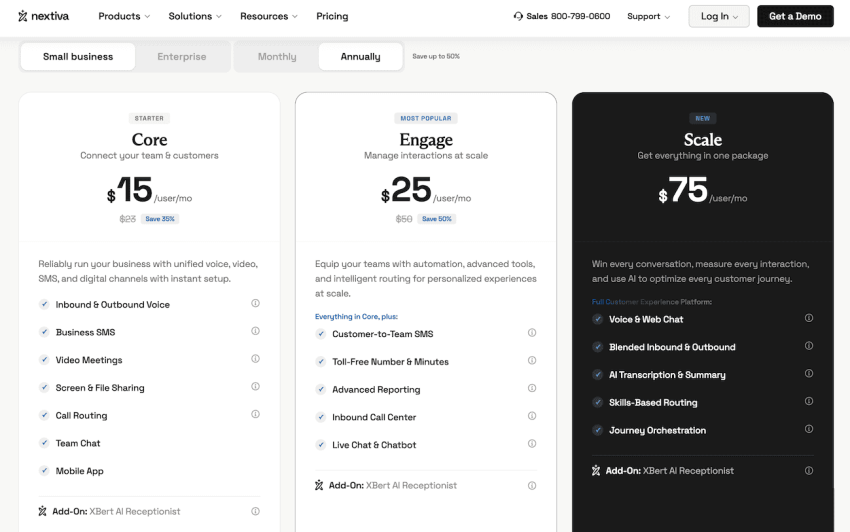
| Starting base price | $16.00/user/month | $15.00/user/month |
| Customer & tech support | Included (24/7 live chat & admin phone queues) Tech support varies by plan type | Included standard (24/7 in-house live phone & chat) |
| Real-time queue analytics | Requires a $25/mo Power Pack add-on | Built-in on CX packages |
| Business SMS & MMS | Included | Included |
| CRM integrations | Basic logging (Microsoft, Google, Salesforce, ServiceNow, HubSpot) | Deep two-way automation (Salesforce, HubSpot, Dynamics, Zendesk, and more) |
| Uptime SLA | 99.99% | 99.999% carrier-grade SLA |
| Contract transparency | Add-ons locked to annual terms | Clear, flexible month-to-month or annual terms |
| Overall user rating | 4.5 / 5 (Capterra) (200+ reviews) | 4.6 / 5 (Capterra) (900+ reviews) |
👉 Compare Nextiva and Zoom Phone on Capterra.
Key takeaway:
Both platforms provide 24/7 live chat and phone support across their plans. However, Nextiva sets the industry standard with dedicated, in-house technical support offering minute-level wait times, whereas Zoom funnels non-admin users through AI virtual chat agents before connecting to live support queues.
If you run an active customer service team, helpdesk, or sales queue, obtaining real-time supervisor dashboards on Zoom requires buying the $25/month Power Pack add-on. Nextiva includes advanced queue management, sentiment tracking, and performance dashboards natively within its CX tiers.
Why Choose Nextiva Over Zoom Phone?
Here are a few reasons why switching to or choosing Nextiva over Zoom Phone is a wise choice:
- No extra costs for essential management tools: Zoom Phone provides real-time queue dashboards and supervisor monitoring features when you add the Power Pack ($25/month) to your base plan ($16/month). Nextiva, meanwhile, includes features such as advanced call routing, supervisor tools, and performance reporting directly in its transparent standard plans.
- Dedicated in-house technical support: Contact center downtime is not an option. That is why every Nextiva plan includes 24/7 live phone and chat support —with short wait times measured in minutes.
- CX workflows and quality VoIP: Nextiva’s voice-centric architecture is ideal for businesses where external customer communication is mission-critical, such as medical practices coordinating patient appointments, law firms capturing billable call data, or service teams handling high call volumes. The system offers superior call quality reliability, detailed customer sentiment analysis, and automated CRM record updates.
Verdict: Is Zoom Phone Right for You?
Zoom Phone offers the best ROI for businesses already using Zoom Workplace. Teams that pay for premium Zoom video licenses but only require basic internal extensions or simple domestic calling can consolidate their software providers at attractive rates by adding Zoom Phone via the “Workplace Pro Plus” or “Business Plus” packages.
However, if your main focus is external customer communication, hidden extra costs like analytics add-ons, extra department numbers, or tiered support can quickly make Zoom pricier than specialized VoIP platforms. In this case, you’d derive greater long-term benefit from the transparent, all-inclusive pricing and 24/7 support offered by platforms like Nextiva.
Paying too much for Zoom?
Ditch the limitations and switch to Nextiva for full-featured business communications and clear pricing.
Zoom Phone Pricing FAQs
Zoom Phone standalone licenses cost $10.50/user/month for the US & Canada Metered plan (pay-as-you-go outbound calling) and $16.00/user/month for the US & Canada Unlimited plan (unlimited domestic calls). Bundled Workplace plans containing video meetings and phone lines start at $20.50/user/month.
The Zoom Phone Power Pack is $25.00 per user per month. It is a mandatory add-on for supervisors and managers who require real-time call queue analytics, wallboard reporting widgets, desktop receptionist consoles, and call whisper/barge capabilities.
While Zoom historically did not offer a public free trial for standalone phone lines, Zoom currently provides a 7-day free trial for the US & Canada Unlimited plan. Additionally, administrators can request temporary trial provisioning or test a 30-day trial of Zoom Workplace bundles.
Yes. Every paid user license includes one direct inward dial (DID) local number. Additional localized lines or dedicated department toll-free numbers can be purchased for $5.00/month per number.
If you don’t subscribe to the Global Select plan ($20/mo) or the Unlimited International add-on ($10/mo), international calls are charged on a per-minute basis. Rates vary by destination country (e.g., ~$0.02–$0.08/min for Western Europe, $0.15–$0.85+/min for Asia and Latin America).
Yes, but HIPAA compliance isn’t enabled automatically on entry-level plans. To execute a Business Associate Agreement (BAA) with Zoom, you need to subscribe to a Workplace Business Plus ($24.50/mo) or Enterprise account tier to meet required encryption and audit logging standards.