VoIP
 Blog
 Business Communication
 Customer Experience
 Leadership
 Marketing & Sales
 Nextiva News
 Productivity
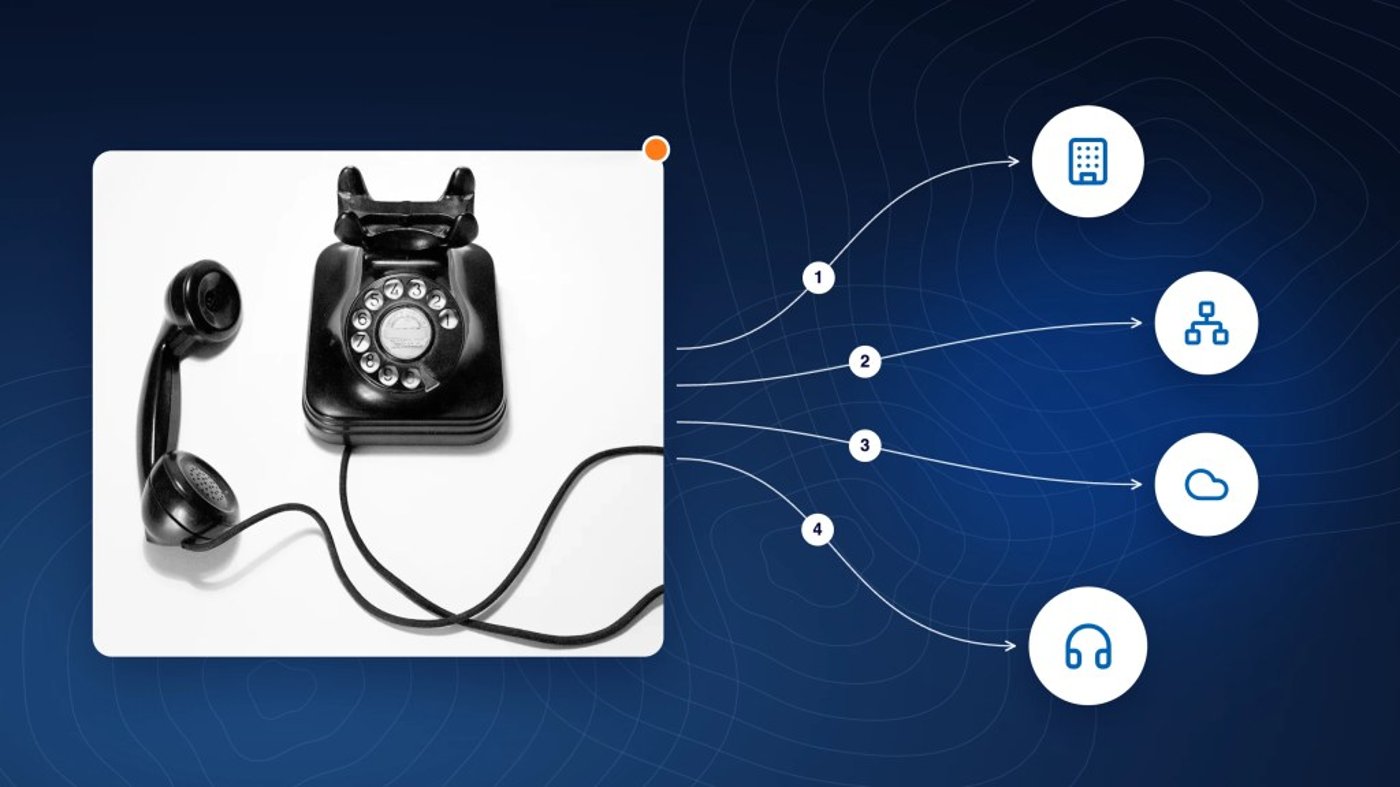
A letter from your phone company says your copper line is going away, and it keeps mentioning the PSTN. What is PSTN? It stands for public switched telephone network, the worldwide system of carrier networks, landline and mobile, that lets any phone number reach any other. Your numbers stay on the PSTN, and a cloud phone system keeps them there once the copper line is gone.
AT&T said in October 2026 that only 1% of its eligible customers still used copper phone lines. If you run a small business or manage its phones, this guide explains how PSTN calls work, how the PSTN compares with VoIP, and how to move your lines before the carrier’s date.
Public switched telephone network (sometimes typed ‘PTSN’).
- What it means: The shared network of landline, mobile, fiber, and satellite carriers that connects phone numbers worldwide.
- How calls connect: Circuit switching, with SS7 signaling to set up each call.
- Terminology: Local loop, central office, tandem and toll offices, trunks, and gateways.
- 2027 status. Copper access is retiring. AT&T aims to leave copper in most of its footprint by the end of 2029, and the UK closes its analog network on January 31, 2027.
- What replaces copper? VoIP and cloud phone systems that still call PSTN numbers.
What Is PSTN?
The public switched telephone network is the public network that carries ordinary voice calls between phone numbers. The PSTN consists of a global network of telephone lines, mobile networks, and switching infrastructure that enables calls between phone numbers worldwide.
That definition is wider than the one many people carry around. In its early days, the PSTN was copper wire strung between homes and switchboards. Today the PSTN network also includes cellular networks, fiber trunks, undersea cables, and satellite links run by many carriers. Those carriers agree on numbering and signaling rules, so international calls connect, and a landline in Ohio can ring a mobile phone in Manila.
People often use “PSTN,” “landline,” “fixed line,” and “POTS” interchangeably. Each one names a different piece.
A landline is one wired connection to the network. POTS, or plain old telephone service, is the analog copper service on that last stretch of wire. The PSTN is the whole network behind both.
You’ll see the term most often in telecom and networking courses, carrier notices about retiring copper, and phone system settings that mention “PSTN calling.”
In this short video, we walk through the PSTN’s switchboard-era roots and how a dialed call hops from switch to switch toward its destination.


What Is PSTN Used For?
The PSTN connects any two public phone numbers, no matter what kind of phone sits at each end. In 2027, its main jobs are:
- Everyday calls. Landlines and mobile phones reach each other across town or across the world.
- Business phone systems. An office PBX handles internal extensions and hands outside calls to the PSTN.
- VoIP and cloud calls to regular numbers. When a cloud phone user dials a customer’s cell phone, a gateway passes the call from the internet onto the PSTN.
- Emergency calls. 911 calls ride the public network to the right dispatch center.
- Non-voice devices. Fax machines, alarm panels, elevator phones, and older payment terminals often sit on copper phone lines.
It’s no surprise, but mobile phones now handle most personal calling. The CDC reported that 80.0% of U.S. adults lived in wireless-only households in the second half of 2025, a rise from 76.0% two years earlier. Those mobile calls still cross the PSTN whenever they reach a landline or another carrier.
A simple PSTN example: your receptionist answers a call in the Nextiva app on a laptop. The caller dialed from a landline at home. The call left their house on copper, crossed the carrier’s switches, reached a gateway, and arrived at the laptop as internet data. The PSTN connected both people, even though only the caller used a traditional phone line.
How PSTN Works to Complete Calls
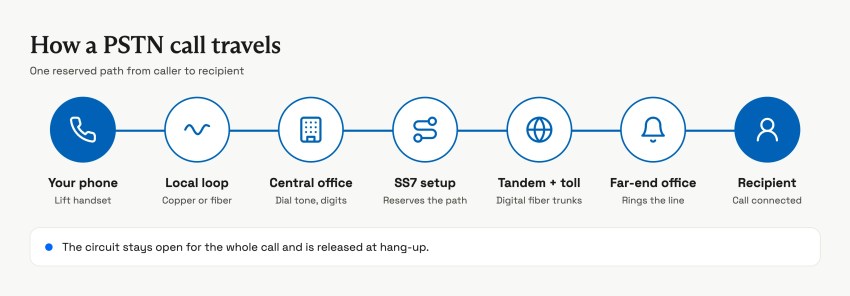
A call on the public switched telephone network reserves a dedicated circuit between two phones for the entire duration of the call. When you dial, the process takes four steps:
- Your phone signals the local office. Lifting the handset sends a signal over the local loop, the pair of wires or fiber between your building and the carrier’s central office. The office returns a dial tone and reads the digits you enter.
- Signaling finds the other end. The central office uses Signaling System 7 (SS7) to look up the number, check that the far end is free, and reserve a path.
- Trunks carry the call. If your local office doesn’t serve the number, the call travels over trunks through tandem and toll offices. Most of this core is digital and runs over fiber.
- The far office rings the phone. The destination central office connects the path to the called line and rings it. When either person hangs up, the circuit is released for the next call.
Circuit switching vs. packet switching
Traditional telephony on the PSTN uses circuit switching. Each call gets its own fixed channel, which is why landline audio sounds steady. The trade-off is efficiency, because the channel stays reserved even during silence.
VoIP uses packet switching. Your voice is cut into small data packets that share the internet with everything else and get reassembled at the other end. Packet switching uses bandwidth more efficiently and makes features like video, texting, and mobile apps possible on the same connection.
Is PSTN analog or digital?
It’s both. The core of the network has been digital since the 1970s and 1980s, carrying calls as 64 kbit/s channels with SS7 signaling. The last mile to many homes and small offices still uses analog technology over a copper loop. Carriers are now retiring that analog piece as the network moves to IP telephony.
PSTN Architecture and Key Components
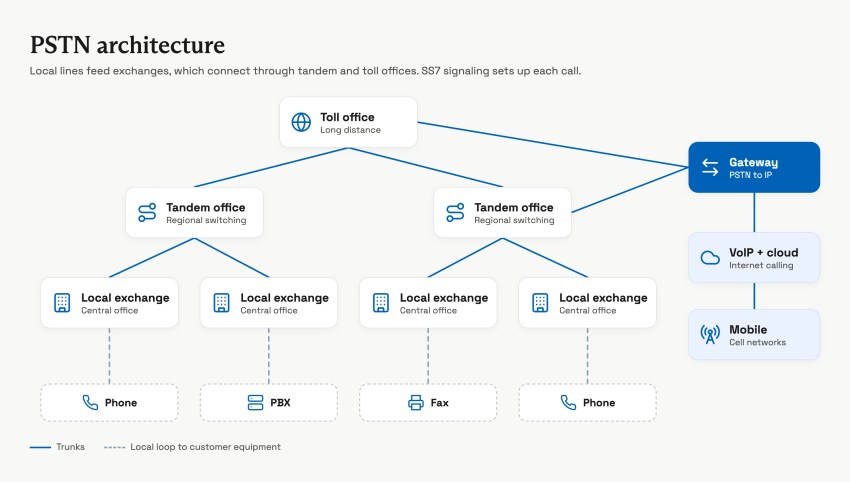
PSTN architecture is a hierarchy: local lines feed local offices, which connect through tandem and toll offices to the rest of the world. These are the parts you’ll see in a PSTN diagram:
| Component | What it does | Example |
|---|---|---|
| Customer equipment | The phone, fax, PBX, or adapter at your location | A desk phone or office PBX |
| Local loop | The line between your building and the carrier | Copper pair, fiber, or wireless link |
| Central office (local exchange) | Connects local lines and switches local calls | The carrier building that serves your neighborhood |
| Exchange code | The three digits after the area code; each code covers 10,000 line numbers | The 555 in 602-555-0100 |
| Tandem office | Switches calls between central offices in a region | Calls across a metro area |
| Toll office | Handles long-distance calls between regions | A call from Phoenix to Boston |
| Trunks | High-capacity links between offices | Digital fiber circuits |
| SS7 signaling | Sets up, routes, and ends calls | Number lookup and call setup |
| Gateway | Converts calls between the PSTN and IP or mobile networks | A VoIP gateway or carrier interconnect |
The exchange-code row is a common point of confusion. The North American Numbering Plan Administrator (NANPA) assigns numbers in central office codes, and each code holds 10,000 numbers. One physical central office can serve several codes.
What Is a PSTN Line, Number, and Calling Service?
These three phrases show up in carrier bills and phone system settings. Each one describes a different piece of the same network.
PSTN line vs. landline vs. POTS
A PSTN line is any phone line that connects directly to the public network through a carrier, usually billed per line. In everyday use, it means the same thing as a landline.
| Term | What it means | Status in 2027 |
|---|---|---|
| PSTN line | A carrier line on the public network, usually copper or fiber | Copper versions are being grandfathered or retired |
| Landline | A wired phone line to a fixed address | Moving to fiber and IP voice |
| POTS line | Analog voice service over copper | Retiring in many U.S. areas and the UK |
What is a PSTN number?
A PSTN number is any public phone number that other phones can dial. In North America, the familiar 10-digit format includes the area code, exchange code, and line number. VoIP numbers are PSTN numbers too, which is why a cloud phone number rings like any other.
You can usually keep your number when you leave a copper line. Number porting moves it to a new provider, so the local number your customers already have saved keeps working.
What PSTN calling means for VoIP and Microsoft Teams
“PSTN calling” is the ability to call regular phone numbers from an internet-based system. Without it, a VoIP or Teams user could call only other users on the same platform.
Microsoft Teams Phone connects to the PSTN in four ways, according to Microsoft Learn: Microsoft Teams Calling Plan, Operator Connect, Teams Phone Mobile, and Direct Routing through a certified session border controller. A tenant can mix more than one option.
Nextiva connects to Microsoft Teams through Direct Routing, which requires Microsoft 365 E5, or E3 with the Phone add-on. Nextiva then supplies the PSTN calling, and your team keeps calling from inside Teams.
A Brief History of the PSTN
The public switched telephone network’s evolution, from one invention to a global communication network, took about 150 years:
| Year | Milestone |
|---|---|
| 1876 | Alexander Graham Bell receives the telephone patent |
| Late 1800s | Operators at manual switchboards connect calls by hand |
| 1891–1892 | Almon Strowger patents the automatic switch; the first commercial automatic exchange opens in La Porte, Indiana |
| 1970s–1980s | Digital switching, SS7 signaling, and fiber trunks take over the core |
| Late 1900s onward | Mobile networks, and later VoIP, connect to the PSTN through gateways |
| 2020s | Carriers retire copper and move voice to IP |
Strowger’s automatic switching technology began replacing operators on local calls in 1892, and manual switching phased out over the following decades.
PSTN vs. VoIP, PBX, ISDN, and POTS
These terms describe different layers of phone technology, so they’re easy to mix up. This table lines them up:
| System | What it is | How it connects | Status in 2027 |
|---|---|---|---|
| PSTN | The public network of carrier phone networks | Circuit-switched, with digital core and copper or fiber access | Network stays; copper access retiring |
| VoIP | Voice calls carried as internet data | Packet-switched, reaches PSTN numbers through gateways | Growing default for businesses |
| PBX | A private phone system for one organization | Connects to the PSTN through lines, SIP trunks, or the cloud | On-premise boxes moving to the cloud |
| ISDN | Digital service over copper, including PRI for larger offices | Circuit-switched digital channels | UK switch-off January 31, 2027 |
| POTS | Analog voice over copper | The last mile of the traditional PSTN | Retiring in many areas |
PSTN vs. VoIP
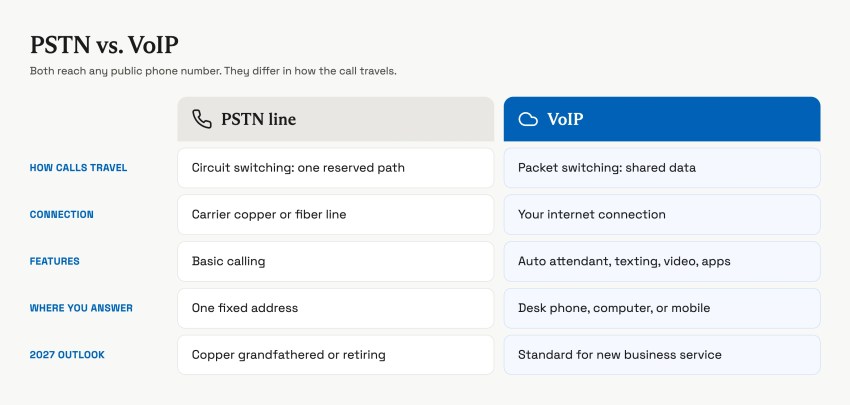
PSTN service reserves a circuit for every call. VoIP sends voice calls over your internet connection. For most small businesses, the practical differences come down to features, mobility, and what happens when the power goes out.
| PSTN (traditional line) | VoIP (cloud phone system) | |
|---|---|---|
| Connection | Carrier copper or fiber line per number | Your internet connection |
| Call setup | Circuit switching | Packet switching |
| Features | Basic calling; extras billed per line | Auto attendant, voicemail-to-text, texting, video, and apps |
| Mobility | Tied to one address | Desk phone, computer, or mobile app |
| Power outage | Copper lines powered from the central office | Needs local power and internet; calls can forward to mobile phones |
| Cost model | Per-line rental plus charges for long-distance calls | Per user; Nextiva starts at $10 per user per month, billed annually |
| 2027 outlook | Copper grandfathered or retired in many areas | Standard for new business service |
Here are the advantages and trade-offs of moving a copper line to VoIP in 2027:
 Pros
One system adds texting, video, voicemail-to-text, and mobile apps
You keep your existing number through porting
You pick the switch date instead of waiting for a carrier notice
Calls can forward to mobile phones when the office is closed or offline
 Cons
Desk phones need local power and a working internet connection
Analog fax machines and older phones need an adapter
Legacy systems like alarm panels and payment terminals may need a vendor upgrade
Each office needs a plan for which phones stay on backup power
Reliability is the usual worry. Cloud service runs in the provider’s data centers, so if your office loses power, call forwarding can send calls to staff mobile phones.
In this video, Nextiva compares circuit switching with packet switching and walks through reliability, security, and the features a VoIP account adds, like seeing a caller’s account details when the phone rings.

PSTN vs. PBX
The PSTN is the public network. A PBX is a private switch that one organization uses for extensions, transfers, and hold queues. Legacy systems like a traditional PBX still need PSTN lines, such as analog lines or PRI circuits, to call the outside world.
Many companies now drop the on-premise box and move the whole phone system to the cloud. Simmons Bank, with more than 240 locations, ran on-premise PBXs that were losing reliability and couldn’t scale. It moved its phone system to Nextiva.

“In the end Nextiva provided service to 3200+ users and were able to move over 240 locations in four and a half months.”
Jon Haslauer

Is PSTN Being Shut Down? The 2026–2027 Copper Retirement
No, the network itself is staying. Phone numbers, interconnection, and critical services like 911 will keep working on the public switched telephone network. Carriers are retiring the copper, circuit-switched access that many residential users and small offices still use, and transitioning that service to fiber, wireless, and IP voice technology. Copper is expensive to maintain and can’t deliver competitive broadband, so carriers want customers on newer networks.
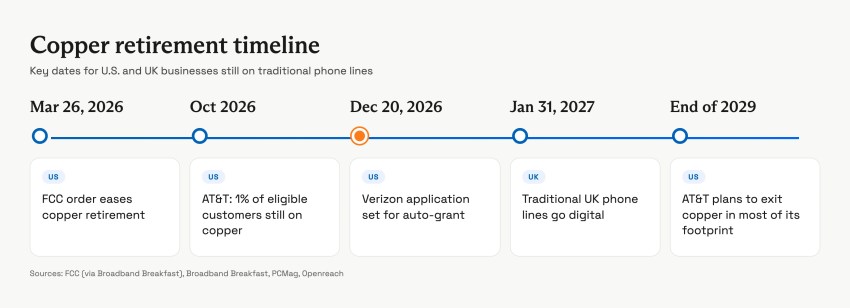
The U.S. pace picked up in 2026. On March 26, the FCC unanimously adopted an order that eases copper retirement. Broadband Breakfast reported that the order gave carriers blanket authority to grandfather legacy copper voice, so they won’t offer it to new customers, and trimmed filing requirements.
In October 2026, AT&T said only 1% of its eligible customers still used copper phone lines. It had discontinued copper in more than 500 communities and more than 1.3 million locations across 18 states, and it plans to exit copper in most of its footprint by the end of 2029.
Next up is a Verizon application covering parts of nine states and Washington, D.C. It’s set to be deemed granted automatically on December 20, 2026, unless the FCC steps in. PCMag reported that about 750,000 locations still use those lines.
Outside the U.S., Openreach says the UK’s traditional phone lines go digital on January 31, 2027. Customers still on the old network after that may move to a temporary emergency voice-only service. If you have UK offices, put that date on your calendar.
How to Move Off PSTN Lines Without Losing Your Number
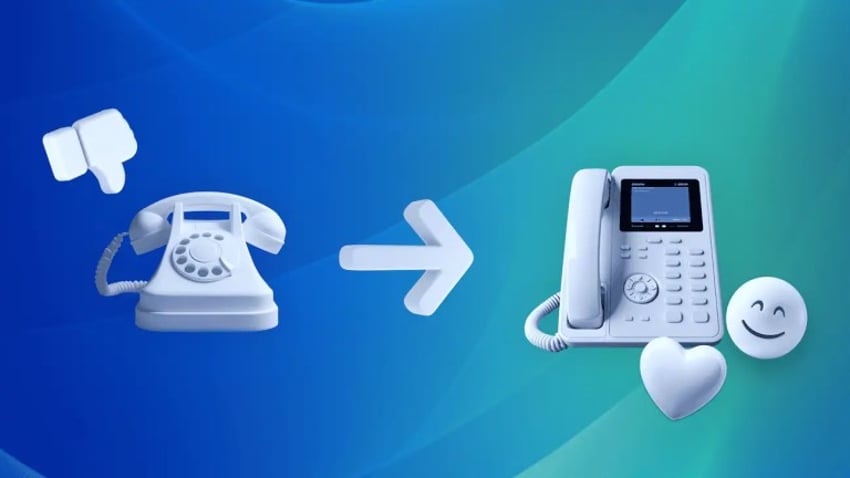
A carrier notice gives you a date, and most of the transition work happens before it. Work through this checklist to switch to VoIP ahead of the deadline:
| Step | What to do | Who usually does it |
|---|---|---|
| 1. Inventory every line | List each number and what’s plugged into it: phones, fax, alarm panel, elevator phone, payment terminal, or modem | Office manager |
| 2. Read the carrier notice | Note the retirement date and any replacement service the carrier offers | Owner or IT |
| 3. Pick your path | Cloud phone system for most offices; SIP trunks to keep a working PBX; Direct Routing for Teams | Owner or IT |
| 4. Plan for non-voice lines | Ask your alarm and payment terminal vendors whether the device needs a cellular or IP upgrade; move faxing to online fax | IT or vendors |
| 5. Order adapters | An analog telephone adapter (ATA) connects fax machines and older phones to VoIP | IT |
| 6. Check 911 and power | Register the street address for every number and decide what needs backup power | IT |
| 7. Port numbers last | Turn on the new service, test inbound and outbound calls, then port your numbers | New provider |
Clinics and dental offices that still fax have extra lines to untangle. Nextiva’s healthcare platform includes eFax alongside calls and texts, so those lines can move with everything else.
Alarm panels and elevator phones each need their own POTS replacement plan, so call those vendors early.
Turn on the new service and test inbound and outbound calls before you port your numbers.
How Nextiva Eliminates Your PSTN Dependency
If a copper notice landed on your desk, the job is to keep every number ringing and every device working when the old line goes dark. Nextiva keeps your numbers on one communication system, and an adapter keeps fax machines and older phones connected.
Every plan includes unlimited calling in the U.S. and Canada, local numbers, free number porting, and an auto attendant. Nextiva lists 99.999% uptime for its phone service. Nextiva pricing maps to the job you’re doing:
| If you’re… | Plan | Why it fits | Price (billed annually) |
|---|---|---|---|
| A solo owner keeping a business number on your cell phone | Nextiva Go | Calls, texts, and video in desktop, mobile, and browser apps | $10 per user per month |
| A five-person office replacing copper lines and desk phones | Nextiva Business | Physical desk phones, 50+ CRM and business integrations, SSO, and 24/7 phone support | $25 per user per month |
| A sales or service team answering in queues | Nextiva CX | Skills-based routing, advanced queues and callbacks, and supervisor listen, whisper, and join | $75 per user per month (talk to sales) |
Keeping a PBX that still works well? Nextiva SIP trunking gives it carrier-grade PSTN connectivity without replacing the hardware. Microsoft 365 shops can bring Nextiva calling into Teams through Direct Routing.
Keep your numbers and replace the copper. The PSTN will keep connecting your customers’ calls for the foreseeable future, and a VoIP phone system puts those numbers on it before the carrier’s date arrives.
Move your PBX to the cloud
Move your PSTN lines to a Nextiva with free number porting, unlimited U.S. and Canada calling, and desk phones or apps for every employee.
FAQs About the PSTN
PSTN stands for Public Switched Telephone Network. In telecom, it’s the shared global network of carrier phone systems, landline and mobile, that connects public phone numbers. “Switched” refers to how the network connects each call by switching a path between two lines. A cloud phone system reaches the same numbers over the internet.
Not exactly. A landline is one wired connection from a fixed address to the network. The PSTN is the entire public network, including mobile carriers, that landlines connect to. When a carrier retires your copper landline, you can keep the same number on a VoIP phone system.
A PSTN gateway converts calls between the public phone network and IP or mobile networks. It’s how a call from a cloud phone app reaches a landline, and how a landline caller reaches a VoIP user. Carriers run gateways at their interconnects, and an analog adapter does a small version of the same job for one fax or phone on Nextiva VoIP.
Yes. Every public phone number still lives on the PSTN, and VoIP and mobile calls reach those numbers through it. What’s shrinking is copper access, which carriers in the U.S. and UK are retiring between now and 2029. In late 2026, Nextiva’s cloud phone plans start at $10 per user per month, billed annually, with free number porting.
Yes. VoIP providers connect to the PSTN through gateways and carrier interconnects, so you can call and receive calls from landlines and mobile phones. Your VoIP number is itself a PSTN number that anyone can dial. Nextiva includes unlimited calling to U.S. and Canada numbers on every plan.
PSTN calling lets Teams users call and receive calls from regular phone numbers instead of only other Teams users. Microsoft offers four ways to add it: Calling Plan, Operator Connect, Teams Phone Mobile, and Direct Routing. Nextiva connects to Microsoft Teams through Direct Routing, which requires Microsoft 365 E5 or E3 with the Phone add-on.