VoIP
VoIP  Blog
Blog  Business Communication
  Customer Experience
  Leadership
  Marketing & Sales
  Nextiva News
  Productivity
Choosing a new business communications system can be a complex purchasing decision. Beyond business calling, today’s organizations may need to evaluate unified communications (UCaaS), mobile apps, video meetings, AI capabilities, integrations, security, compliance, and implementation support.
A well-structured VoIP request for proposal (RFP) helps you define those requirements, compare vendors consistently, and choose the solution that best fits your company. And if you’re still researching the market, a request for information (RFI) can help you understand available solutions before moving to a formal RFP.
At Nextiva, we work with businesses of all sizes evaluating cloud communications solutions, from business VoIP phone service and unified communications to contact center and AI-powered customer communications. We’ve used that experience to put together this practical guide to planning your requirements, building your RFP, and evaluating vendor responses.
You’ll also find a free RFP template you can download and customize for your own procurement process.
Whether you work in IT, procurement, operations, government, or another role involved in selecting a communications provider, this guide will help you create a clearer RFP and make more informed vendor comparisons.
Download the Free VoIP RFP Template
Save time building your procurement documents with our customizable VoIP RFP template.
Download and use this RFP template when you’re ready to define your VoIP and UCaaS requirements, request detailed vendor proposals, and compare solutions:
What Is a VoIP RFP?
A VoIP request for proposal (RFP) is a formal document that organizations use to define their communications requirements and invite qualified vendors to propose a solution.
VoIP, or Voice over Internet Protocol, transmits voice calls as IP traffic over a data network. In a business deployment, that may mean a cloud phone service delivered over an internet connection, an on-premises IP PBX, or SIP trunking that connects an existing phone system to a service provider or other communications system. Modern cloud business phone and UCaaS platforms often include much more than voice, with features like business messaging, mobile apps, video meetings, call routing, analytics, integrations, and AI-powered capabilities.
A VoIP RFP gives prospective providers a consistent set of requirements to respond to. This makes it easier for stakeholders to compare vendors based on factors such as:
- Features and functionality
- Technical requirements
- Security and compliance
- Integrations
- Reliability and service levels
- Implementation and migration
- Training and ongoing support
- Pricing and contract terms
Organizations commonly use RFPs when the purchase involves multiple stakeholders, a formal procurement process, complex technical requirements, or a significant investment.
What is a VoIP RFI?
A VoIP request for information (RFI) is an exploratory document used earlier in the purchasing process, before the VoIP RFP.
Instead of asking vendors to submit a detailed proposal, an RFI helps you learn what solutions are even available, understand potential approaches, and determine which providers may be able to meet your needs.
For example, an RFI can help you explore vendors’ VoIP and UCaaS capabilities, AI features, integrations, security practices, implementation approach, support model, and typical pricing.
RFI questions are usually more open-ended than RFP requirements. This gives vendors an opportunity to explain their capabilities and can help you identify requirements you may not have considered.
For example, your business may send an RFI to a broad group of vendors and then use the responses to create a shortlist before issuing an RFP.
RFI vs. RFP: What’s the difference?
The main difference between an RFI and an RFP is where you are in the buying process.
An RFI helps you explore the market and clarify what you need. An RFP is used once your requirements are more clearly defined and you’re ready to compare proposed solutions.
This comparison table makes it easy to understand the differences:
| RFI | RFP | |
|---|---|---|
| Stands for | Request for Information | Request for Proposal |
| Primary purpose | Research the market and available solutions | Compare vendors and proposed solutions |
| When it’s used | Early in the buying process | Later in the vendor-selection process |
| Requirements | Broad and exploratory | Detailed and clearly defined |
| Vendor responses | Explain capabilities and approaches | Provide a specific solution, implementation plan, and pricing |
| Pricing | Often preliminary or high-level | Typically detailed |
| Typical outcome | Vendor shortlist and clearer requirements | Vendor selection and contract negotiations |
You don’t always need both. If you already understand the market and have well-defined requirements, you could just move directly to an RFP. But if you’re still determining what your organization needs, an RFI can make the RFP process more focused and effective.
What Is a UCaaS RFP?
A UCaaS RFP is a request for proposal used to evaluate Unified Communications as a Service providers.
A VoIP RFP may focus primarily on business calling and telephony, while a UCaaS RFP typically evaluates a broader cloud communications and collaboration scope. In practice, the categories overlap: Many cloud phone providers bundle or offer messaging, meetings, mobile apps, integrations, and analytics alongside voice.
Depending on your business, those requirements may include:
- Business voice and call management
- Team messaging
- SMS and MMS
- Desktop and mobile apps
- Video meetings and screen sharing
- Presence and collaboration tools
- AI receptionists or virtual attendants
- Call transcription and summarization
- CRM, EHR, help desk, and productivity integrations
- APIs and workflow automation
- Analytics and reporting
- Security, compliance, and access controls
An organization replacing its phone system may also want to consolidate messaging, meetings, mobile communications, customer interactions, and other tools. For that reason, a modern VoIP RFP can include the broader UCaaS capabilities that matter to your company.
For example, Nextiva’s NEXT Platform is designed around that broader, connected approach to communications and customer experience.
When Do You Need a VoIP RFP or UCaaS RFP?
Keep in mind that not every communications purchase requires a formal RFP.
For a small business with straightforward requirements, comparing providers through product demonstrations, trials, pricing discussions, and reference checks will probably be faster and more practical.
An RFP becomes more valuable as the project grows in complexity. Consider using one when:
- You need to compare multiple vendors against the same requirements.
- Several departments or decision-makers are involved in the purchase.
- Your organization follows a formal or competitive procurement process.
- You’re replacing an existing PBX, phone system, or communications platform.
- You need to migrate a large number of users, locations, or phone numbers.
- You have specific UCaaS, contact center, mobile, video, or AI requirements.
- Your communications platform must integrate with CRM, EHR, help desk, or other business systems.
- You have security, privacy, regulatory, or emergency-calling requirements.
- Implementation, training, service levels, and ongoing support are important evaluation factors.
- You need a clear way to compare total costs and contract terms across vendors.
Start with an RFI instead if your requirements are still taking shape. For example, an RFI can be useful when you’re unfamiliar with the current VoIP or UCaaS market, evaluating newer capabilities such as AI, or trying to determine which vendors are worth including in a formal RFP.
By the time you’re ready to issue an RFP, you should have a clear understanding of your business objectives, users and locations, technical environment, required capabilities, budget considerations, and evaluation criteria. The RFP then gives each vendor the same framework for explaining how its solution will meet those needs.
What Should a VoIP RFP Include?
A VoIP RFP should give prospective providers enough information to understand your environment, propose the right solution, and explain how it meets your requirements.
Start with the basics of the procurement, including your organization’s background, project goals, number of users and locations, implementation timeline, proposal deadline, evaluation criteria, and submission instructions. You should also identify any mandatory contractual, legal, or regulatory requirements.
Then build a consistent requirements checklist. Ask vendors to indicate whether each capability is included natively, available as an add-on, provided through a third party, or not supported.
VoIP RFP outline
A modern VoIP RFP or UCaaS RFP should cover these eight areas:
- Core voice and calling
- UCaaS, mobile, and video collaboration
- AI attendants and automation
- Contact center capabilities
- Integrations, APIs, and workflows
- Security, compliance, and E911
- Reliability, implementation, and support services
- Pricing and contract terms
1. Core voice and calling
Define the calling capabilities your business needs today and as it grows.
Requirements may include:
- Local, toll-free, and international calling
- Number porting
- Extensions and direct inward dialing (DID)
- Auto attendants and call routing
- Call queues
- Voicemail
- Call recording
- Caller ID
- Business SMS and MMS
- Desk phones and conference room devices
- SIP support or connectivity to existing PBX equipment
Include estimated users, phone numbers, locations, devices, and call volumes so vendors can size and price the solution accurately.
2. UCaaS, mobile, and video collaboration
If you’re evaluating a broader unified communication platform, define how employees should communicate across devices and channels.
Requirements may include:
- Team messaging and presence
- Desktop and browser-based apps
- iOS and Android apps
- Business calling and messaging from mobile device
- Video meetings and screen sharing
- Meeting recording and transcription
- Calendar integrations
- Microsoft Teams interoperability
- Unified administration across voice, messaging, and meetings
Ask whether these capabilities are included in standard licenses or require separate products or add-ons.
3. AI attendants and automation
Rather than simply asking whether a provider offers AI, define what you expect it to accomplish. Specify the customer-facing or employee-facing workflows you want AI to support, and require vendors to identify whether each capability is native, partner-delivered, available only in selected plans, or dependent on a third-party integration.
Requirements may include:
- AI receptionists or virtual attendants
- Natural-language call handling
- Intent recognition
- Intelligent routing
- Appointment scheduling
- Lead qualification
- Automated answers to common questions
- Transcription and conversation summaries
- Agent assistance
- Automated follow-up
- Human escalation
- Multilingual support
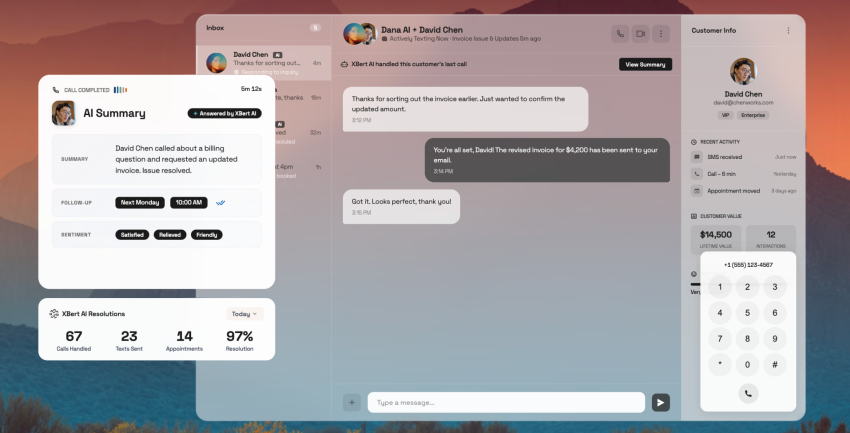
For example, an AI receptionist or other AI agent may answer routine questions, capture and qualify leads, schedule appointments, route requests, and hand off complex interactions to the appropriate employee. Nextiva’s XBert AI employee is designed for these types of customer-facing workflows across voice and digital channels.
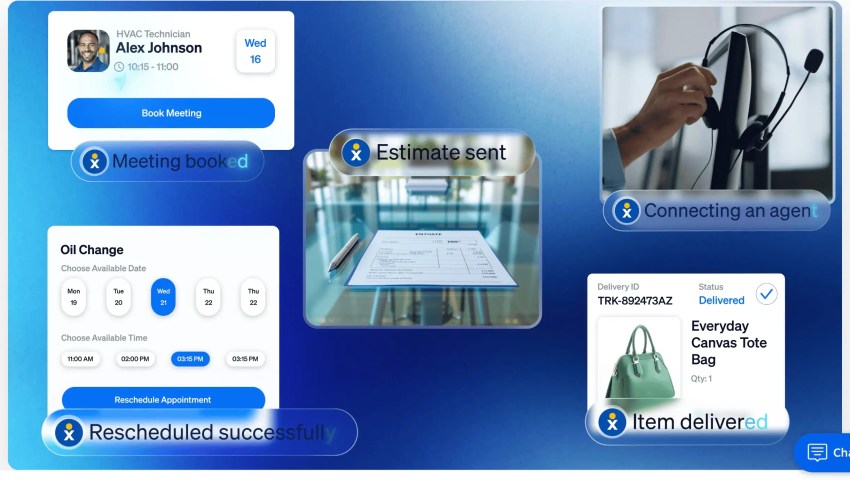
When evaluating any AI capability, require the vendor to demonstrate the workflow using your own call flows, business rules, knowledge sources, and escalation requirements.
Ask how the vendor configures and governs its AI. Clarify which knowledge sources it can use, which languages and channels it supports, how accuracy and fallback behavior are tested, and what human review and audit controls are available. Also ask how customer data is retained, whether it is used for model training, and what controls customers have over that use. Finally, understand how AI usage is measured, what limits apply, and how overages are priced.
4. Contact center capabilities
Organizations with sales, service, or support teams may need functionality beyond standard business calling.
Requirements may include:
- Inbound and outbound contact center
- Interactive voice response (IVR)
- Skills-based routing
- Advanced call queues
- Omnichannel communications
- Workforce and quality management
- Call monitoring and coaching
- Recording and transcription
- Supervisor dashboards
- Reporting and analytics
- AI-powered agent assistance
Identify which employees need full contact center licenses and which only need standard UCaaS access.
5. Integrations, APIs, and workflows
Your communications platform should work with the systems that employees already use.
Ask about integrations with CRM, EHR, help desk, productivity, and other business applications, including functionality such as:
- Click-to-call
- Screen pops
- Contact synchronization
- Automatic activity logging
- Communication history
- Appointment workflows
- Customer or patient record matching
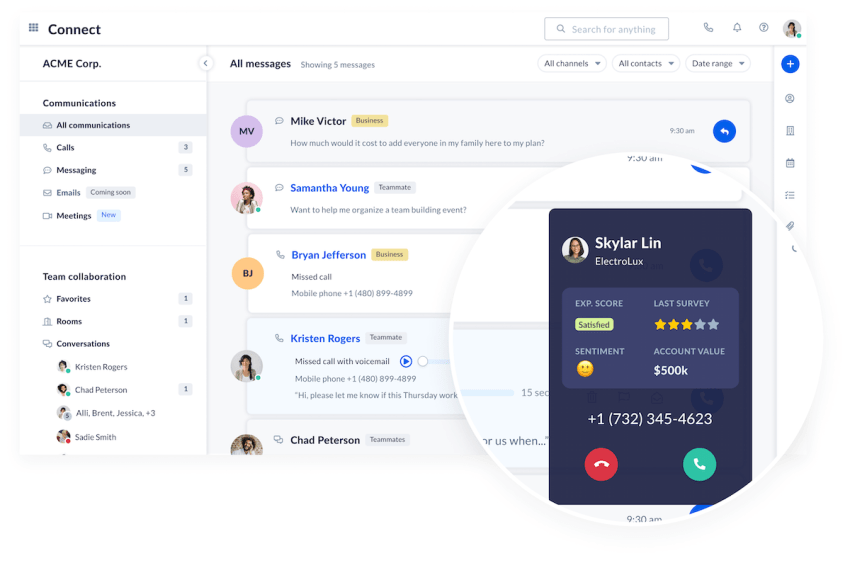
Also evaluate APIs, webhooks, developer documentation, authentication, usage limits, workflow automation, and support for custom integrations.
For healthcare organizations, include requirements around EHR integrations and the handling of protected health information.
6. Security, compliance, and E911
Security requirements should be specific enough that vendors can provide evidence, not just say their platform is secure.
That evidence typically reaches you in one of two ways: a completed questionnaire returned by the provider’s team, or documentation you can access yourself.
For example, Conveyor is an AI-native customer trust platform built for the information security and presales teams that handle these requests. Vendors use it to manage RFP projects, automate questionnaire responses, and share compliance documents through a trust center with one-click, NDA-gated access.
A browser extension completes questionnaires submitted through buyer-side vendor portals, answers arrive with source citations, and the platform supports 50+ languages for organizations running procurement across regions. Companies including Zapier, Carta, Atlassian, and dbt Labs use it to automate 80–100% of their security review workflows.
You don’t need to know which tools a provider uses. But asking how they manage security reviews and how quickly they can return a completed response will tell you whether your proposal deadline is realistic.
Depending on your organization, ask about:
- Encryption in transit and at rest
- Multi-factor authentication and single sign-on
- Role-based access controls
- Audit logs
- Data retention and residency
- Vulnerability management and penetration testing
- Incident response
- SOC 2 reports
- HIPAA eligibility and Business Associate Agreements (BAAs)*
- PCI DSS requirements**
- Other applicable privacy or regulatory requirements
*Where HIPAA applies, confirm whether the provider will sign a BAA, which services are covered, and how electronic protected health information (ePHI) is handled.
**If payment-card data will be handled, clarify PCI DSS responsibilities, supported payment workflows, and the controls used to prevent sensitive authentication data from being recorded or retained.
For U.S. deployments, define emergency-calling requirements for each endpoint type and work location. Ask how the provider supports direct 911 dialing, emergency notifications, callback numbers, and dispatchable-location information for fixed desk phones, roaming softphones, wireless devices, and remote workers.
7. Reliability, implementation, and support
Ask vendors how they will keep your communications available, migrate your organization, and support users after launch.
Evaluate:
- Uptime commitments and SLAs
- Geographic redundancy and failover
- Backup routing and disaster recovery
- Network monitoring
- Project planning
- Number porting
- User provisioning
- Hardware deployment
- Integration setup
- Testing and phased rollouts
- Administrator and end-user training
- Support hours and channels
- Response and resolution targets
- Escalation procedures
- Account management
Request a proposed implementation timeline and clearly define vendor and internal team responsibilities.
8. Pricing and contract terms
Require vendors to present pricing in a consistent format so you can compare the true cost of each solution.
Ask them to break out:
- Per-user licensing
- UCaaS and contact center licenses
- AI features or usage charges
- Hardware
- Implementation and number porting
- Integrations
- Training and support
- International calling
- Optional add-ons
- Taxes and regulatory fees
Also review contract length, renewal terms, minimum commitments, price increases, cancellation terms, and early termination fees.
Whenever possible, compare the total cost of ownership over the expected contract period rather than focusing only on the advertised per-user price.
If your requirements change after distributing the RFP, send the same written addendum to every participating vendor so they are all responding to the same information.
Who Should Participate in the RFP?
A VoIP or UCaaS RFP should involve the people who will select, implement, manage, and use the new communications platform. That’s important, because bringing the right stakeholders in early helps uncover requirements that might otherwise be missed (and reduces surprises later in the procurement process!).
Depending on your organization, the RFP team may include:
- IT, networking, and security: Technical requirements, integrations, network readiness, security, and compliance.
- Procurement, finance, and legal: RFP administration, pricing, contracts, and regulatory requirements.
- Operations and business leaders: Business workflows, priorities, and operational requirements.
- Customer service, contact center, and sales: Customer-facing workflows, routing, CRM integration, reporting, and usability.
- Training and change management: User onboarding, documentation, training, and adoption.
It’s also helpful to assign clear roles before issuing the RFP. An executive sponsor, such as a CIO or IT director, can provide strategic oversight, approve major decisions, and help remove roadblocks, while a project lead manages the day-to-day RFP process. Not every stakeholder needs to evaluate every part of the proposal, but a shared scoring framework can bring all their perspectives together into a consistent vendor evaluation.
VoIP RFP Template and Sample Structure
A good VoIP RFP should be detailed enough to produce comparable vendor responses without becoming unnecessarily complicated. This structure will give you a quick overview of what to expect.
For a more detailed framework, download our free VoIP RFP template with requirements, evaluation criteria, pricing tables, and vendor-response fields, and customize the requirements for your organization.
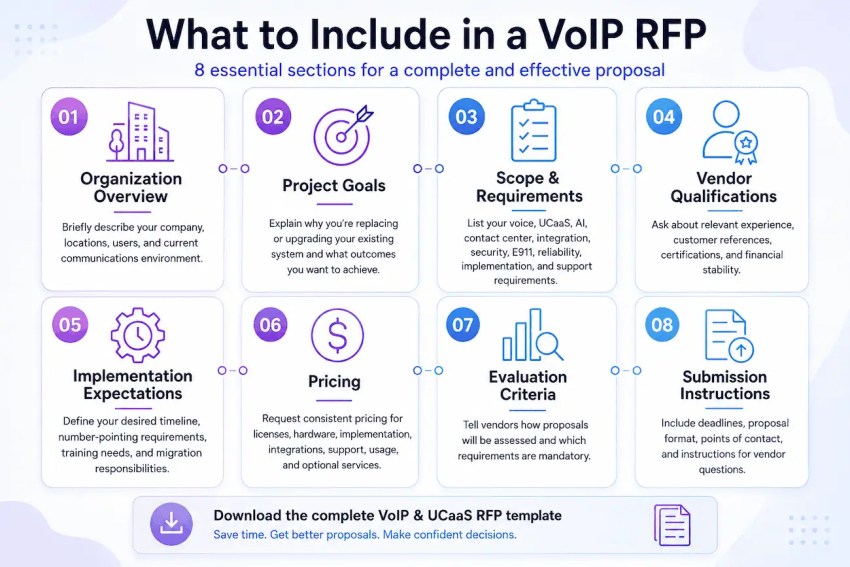
Use the same structure and response format for every vendor whenever possible. This makes proposals easier to compare and reduces the risk of overlooking important differences.
How to Score VoIP and UCaaS Vendors
Once proposals arrive, use a weighted scorecard rather than relying on price or product features alone. A vendor should not “win on price” if it fails an essential security, emergency-calling, regulatory, integration, or geographic requirement.
A sample scoring model might look like this:
| Evaluation Area | Example Weight |
|---|---|
| Required functionality and workflows | 25% |
| Reliability, emergency calling, and network fit | 15% |
| Security, compliance, and data governance | 15% |
| Implementation, migration, training, and support | 15% |
| Integrations and extensibility | 10% |
| Total cost of ownership and contract terms | 15% |
| Vendor viability, references, and roadmap | 5% |
Adjust the weights based on your priorities. For example, a healthcare organization may weight security and compliance more heavily, while a contact center may prioritize routing, analytics, AI, and reliability.
Questions to Ask During Vendor Demos
An RFP tells you what a vendor says its platform can do. A live demo shows how those capabilities actually work.
Rather than accepting a generic product tour, ask vendors to demonstrate the workflows that matter most to your organization. Use the same scripted scenarios with each shortlisted provider so you can compare their solutions consistently.
For example, a customer inquiry might need to be answered by AI, matched to an existing CRM record, routed to the correct team when necessary, summarized after the interaction, and reported on by a supervisor.
Useful questions include:
- Can you show us how an incoming call is routed from start to finish?
- What does the user experience look like across desktop and mobile?
- Can you demonstrate the CRM, EHR, or other integrations we require?
- How does your AI attendant handle unexpected requests and escalation to a human?
- What happens during an internet or service outage?
- How are E911 locations managed for office, hybrid, and remote employees?
- What reporting, administration, and support capabilities are available?
For more complex deployments, consider asking shortlisted vendors to run a proof of concept or pilot with a small group of users. This can reveal usability, integration, network, and workflow issues that may not be apparent in a written proposal or standard demo.
The goal isn’t simply to confirm that a feature exists. It’s to determine whether the solution works well in the real-world scenarios your employees and customers will encounter.
Choose a Platform That Fits Your Requirements: Nextiva
A strong VoIP or UCaaS RFP helps your organization evaluate more than calling features. It creates a consistent way to assess business communications, customer interactions, AI automation, integrations, security, reliability, implementation, support, and total cost over the life of the agreement.
As you compare providers, look for evidence that each platform can support the real workflows your teams depend on—not just a long feature list. Ask vendors to demonstrate your call flows, integrations, administrative controls, AI escalation paths, emergency-calling procedures, and implementation approach.
Nextiva’s NEXT Platform brings business communications and customer interactions into a connected platform, while XBert AI can help automate routine customer conversations, such as answering questions, qualifying leads, booking appointments, and routing or escalating requests.
Ready to evaluate leading provider Nextiva against your RFP requirements? Request a tailored demo of NEXT Platform.
Unlock Agentic CX with NEXT
NEXT is the platform where everything connects: every channel, every conversation, every customer record, every workflow.
VoIP RFP FAQs
A VoIP RFP (Request for Proposal) is a document organizations use to define their business communications requirements and invite each VoIP provider to propose a solution. It typically covers calling features, UCaaS capabilities, integrations, security, implementation, support, pricing, and contract terms so vendors can be compared consistently.
A VoIP RFI is used to research vendors and available solutions early in the buying process. A VoIP RFP asks shortlisted vendors to propose a detailed solution based on defined requirements. An RFQ focuses primarily on pricing when the organization already knows exactly what products or services it needs.
Think of it this way:
– RFI — Request for Information: “What solutions are out there, and what can you do?”
– RFP — Request for Proposal: “Here are our requirements. Propose how you’d solve them and at what cost.”
– RFQ — Request for Quotation: “We know what we need. Give us your price.”
A modern VoIP RFP should cover core voice, UCaaS and collaboration, mobile apps, video meetings, AI attendants, contact center capabilities, CRM and EHR integrations, APIs, security and compliance, E911, reliability, implementation, support, pricing, and contract terms. It should also define project scope, timelines, evaluation criteria, and vendor submission requirements.
A UCaaS RFP evaluates a broader unified communications platform that may combine voice, messaging, video conferencing, mobile apps, collaboration, AI, and integrations. A traditional VoIP request for proposal focuses more heavily on business calling. In practice, many modern VoIP RFPs now include UCaaS requirements, so organizations may evaluate both within the same procurement process.
A VoIP request for proposal should address requirements such as encryption, multi-factor authentication, single sign-on, role-based access controls, audit logs, data retention, incident response, disaster recovery, and SOC 2 reporting. Depending on the organization, it may also include HIPAA and BAA requirements, PCI DSS, data residency, and other industry-specific security or privacy obligations.
Evaluate VoIP and UCaaS vendors using a weighted scorecard based on your priorities, such as features, reliability, security, integrations, AI capabilities, implementation, support, and total cost of ownership. Separate mandatory requirements from preferred features, review vendor references and documentation, and use live demos or pilot programs to validate how each solution performs in real-world workflows.
Not always. A small business with straightforward requirements may be able to compare VoIP service providers through demos, trials, pricing, and reference checks without running a formal RFP. An RFP becomes more useful when multiple vendors, locations, stakeholders, integrations, compliance requirements, or complex migration needs make the purchasing decision harder to evaluate consistently.