VoIP
VoIP  Blog
Blog  Business Communication
  Customer Experience
  Leadership
  Marketing & Sales
  Nextiva News
  Productivity
Remember landlines? Traditional landline phones, also known as POTS lines, remain in use for homes, offices, fax machines, alarm systems, elevators, and payment terminals.
Businesses are gradually replacing them with internet-based voice, cellular, and fiber solutions. This guide explains how POTS works, why providers are retiring copper networks, and how businesses can choose a replacement.
What Is a POTS Line?
Plain Old Telephone Service (POTS) is a traditional analog voice service delivered over twisted-pair copper wires. A local telephone company provides the service through the Public Switched Telephone Network (PSTN), which has supported public telephone calls for more than a century.

Key characteristics of a POTS line include:
- Copper wire foundation: POTS relies on a physical copper network. Some sections of this network have been in place for decades.
- Central power source: POTS lines draw power from the telephone company’s central office. A traditional landline can continue working during a local power outage if the central network remains operational.
- Dedicated connection: Circuit switching reserves a connection between two callers for the duration of a call.
- Single-line operation: A standard POTS line generally supports one call at a time.
POTS vs. PSTN vs. VoIP
| Term | Meaning |
|---|---|
| POTS | Traditional analog telephone service delivered over copper lines |
| PSTN | The broader public telephone network, including both analog and digital components |
| VoIP | Voice communication that converts calls into digital data and sends them over an IP network |
History of POTS
POTS technology dates back to the late 19th century, when telephone networks first connected callers through analog voice circuits. The system expanded into a global network and reached hundreds of millions of subscribers in the United States during its peak in the 1990s.
POTS is sometimes used as a synonym for the Public Switched Telephone Network (PSTN). POTS refers to the analog service and technology. PSTN refers to the entire public telephone network, which now includes digital systems.
How a POTS Line Works
A POTS setup connects the telephone company’s central office to a building’s network interface box. Internal wiring then connects the service to telephone jacks and devices.
POTS uses circuit switching. When someone places a call, the telephone network creates a dedicated path between the two phones. That path remains reserved until one caller hangs up.
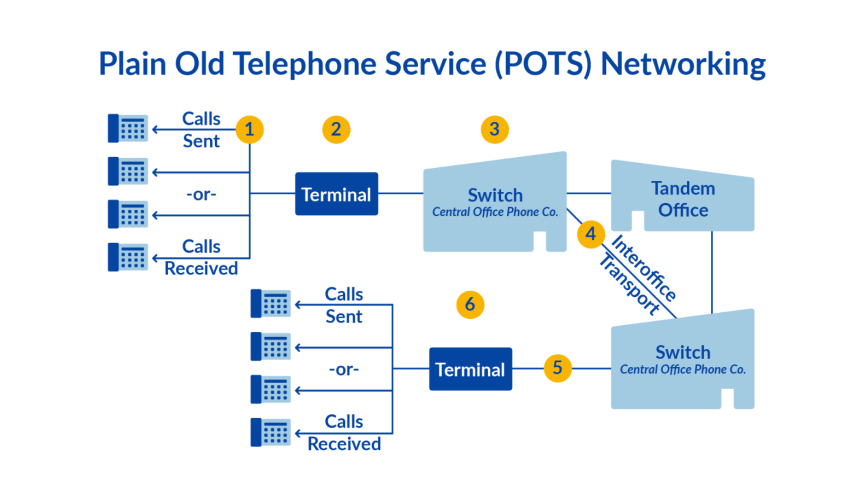
Here’s how a call connects traditionally via POTS:
1. Analog signaling
A handset microphone converts the caller’s voice into analog electrical signals. The signals travel through the copper network toward the recipient’s telephone.
A building’s separate telephone lines converge in a network interface box. The box connects internal wiring to the telephone company’s service line.
2. Transmission
The analog signal travels from the caller’s telephone to the recipient’s telephone over copper lines.
Early telephone networks required direct wiring between locations. Telephone exchanges later connected multiple POTS lines and routed calls through local, regional, national, and international switches.
Modern switching equipment automates this process, and much of the wider telephone network now uses digital technology. The local POTS connection can still rely on analog copper wiring.
3. Dedicated call circuits
When the caller dials a number, the recipient’s phone rings. After the recipient answers, the network establishes a direct connection between the two telephones.
Circuit switching provides a dedicated path for the call. The network reserves that path for one conversation until the call ends.
4. Voice reconstruction
The recipient’s telephone converts the electrical signal back into sound. When either caller hangs up, the network disconnects the circuit and returns the line to standby.
POTS Line Use Cases
POTS lines remain in use for straightforward voice communication and legacy equipment. Common applications include:
- Fax transmission and reception: Fax machines send scanned documents between devices over telephone lines. Online faxing can replace many analog fax machines.
- Credit card processing systems: Some payment terminals still use telephone lines, especially in locations with limited internet access.
- Security and alarm systems: Older systems use POTS because the line can remain active during some power outages.
- Elevator communication systems: POTS can provide a direct wired connection from an elevator to emergency responders.
- Digital subscriber lines (DSL): DSL uses a POTS line to deliver internet service. A modem and filters separate voice and data signals.
Each use case needs its own migration plan. A business should confirm equipment compatibility before disconnecting a POTS line.
- Fax machines may need online faxing, an analog telephone adapter (ATA), or a fax-compatible voice service.
- Alarm systems may need a cellular communicator or an approved IP communicator.
- Elevators may need a cellular dialer or another code-compliant emergency communication system.
- Payment terminals may need an internet or cellular connection.
- Legacy analog devices may continue to work through an ATA, but the equipment vendor should confirm compatibility.
The Copper Sunset and POTS Retirement
For decades, analog telephony provided dependable service with simple equipment. Its central-office power also made it useful during some power outages.
The copper network now costs more to maintain than newer fiber and mobile networks. The transition away from copper-cable telephony is often called the copper sunset.
Why businesses are replacing POTS
The POTS technology has stood the test of time. However, its advantages are offset by the disadvantages. Let’s see how they stack.
Aging infrastructure and rising costs
Some copper lines are more than 100 years old. Weather damage, corrosion, deterioration, and the need for specialized technicians increase maintenance costs for telecommunications companies.
Those costs are difficult to justify compared with fiber-optic and mobile networks. Providers may raise prices, stop accepting new POTS customers, or retire service in specific locations.
Limited features
Businesses now rely on unified communications, mobile access, customer records, and digital messaging. POTS provides basic voice service and little else.
It does not natively provide features such as:
- Video conferencing
- Voicemail-to-email transcription
- Intelligent call forwarding
- Business SMS
- Call queues and automated attendants
- CRM integrations
- Remote-user management
- Call analytics
POTS lines may also experience noise or interference. Modern IP telephony can provide HD voice when the business has a suitable network.
Regulatory and provider changes
The Federal Communications Commission is not requiring every operator to stop maintaining copper networks. It has given providers more flexibility to retire legacy networks and transition customers to fiber, fixed wireless, and 5G services.
There is no single nationwide POTS shutdown date. Availability depends on the provider, location, equipment, and application.
POTS Line Replacement: What Are the Alternatives?
A business should select a replacement based on the equipment it needs to support, its internet and power resilience, and the features required by its employees.
Cloud VoIP
Voice over IP converts voice into digital data and sends it over an internet connection. Employees can use desk phones, desktop applications, and mobile apps. Cloud VoIP suits businesses that need:
- Remote and hybrid work support
- Local and toll-free numbers
- Call routing and automated menus
- Mobile access
- Business SMS
- Video meetings and team messaging
- Online administration
- Flexible user management

Cloud PBX
A cloud PBX provides the call-control functions traditionally associated with an on-premises private branch exchange. It manages extensions, call flows, menus, schedules, transfers, voicemail, and routing through a hosted service.
Cloud PBX is a strong fit for businesses that want a complete business phone system without maintaining PBX hardware. It also supports phased migrations when a business needs to move away from POTS while keeping some existing equipment.
SIP trunking
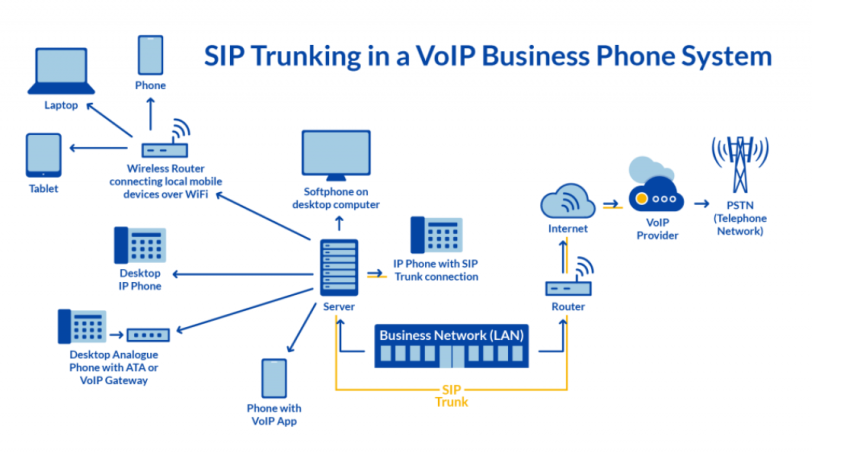
SIP trunking connects an on-premises PBX to a cloud voice network. It lets a business retain compatible PBX hardware while replacing traditional telephone trunks.
This option suits organizations that:
- Have an existing PBX investment
- Need a gradual migration
- Want to keep desk phones and internal extensions
- Need additional calling capacity
- Plan to move users to cloud service over time
Nextiva’s Cloud PBX and SIP trunking migration path supports major PBX systems, including Avaya, Asterisk, Cisco, 3CX, FreePBX, and Mitel. Businesses can move voice service in phases instead of replacing every system at once.
Cellular and LTE solutions
Cellular adapters use 4G or 5G networks to provide a dial tone to compatible analog equipment. They can support applications such as alarms, elevators, and payment terminals where a standard cloud phone system does not provide a direct replacement.
The equipment manufacturer, alarm company, elevator company, or local authority should approve the solution before installation.
Fiber-optic voice service
Businesses upgrading their internet connection can use fiber for data and voice. Fiber provides high bandwidth and avoids the limitations of aging copper infrastructure, although the service still requires local power and network equipment.
What Is the Difference Between POTS and VoIP?
For most businesses, the question is whether to stick with a limited POTS connection or switch to VoIP. Here’s how both phone services compare.
| Function | POTS | VoIP |
|---|---|---|
| Transport | Analog service over copper wiring | Digital voice over an IP network |
| Call quality | Stable when the copper line is in good condition; may have noise or interference | HD voice is available when the network supports it |
| Power | The telephone company typically supplies line power | Requires local power for internet equipment and phones |
| Outage behavior | May continue during a local power outage | Requires backup power, network redundancy, or failover |
| Mobility | Tied to a physical telephone jack | Works through desk phones, computers, and mobile apps |
| Local numbers | Assigned by the telephone company | Existing numbers can usually be ported; providers may also offer local and toll-free numbers |
| Call routing | Basic line-level service | Supports menus, schedules, queues, transfers, ring groups, and routing policies |
| Administration | Changes may require a technician or provider order | Administrators can manage users and call flows online |
| Scalability | New lines often require additional wiring and service | Users and numbers can be added through the provider |
| Features | Basic calling and optional add-ons | Voice, SMS, voicemail transcription, video, team messaging, and integrations |
| Migration path | Existing copper service | Cloud VoIP, Cloud PBX, SIP trunking, cellular, or fiber |
| Cost model | Per-line charges and add-ons | Per-user, per-channel, metered, or bundled plans |
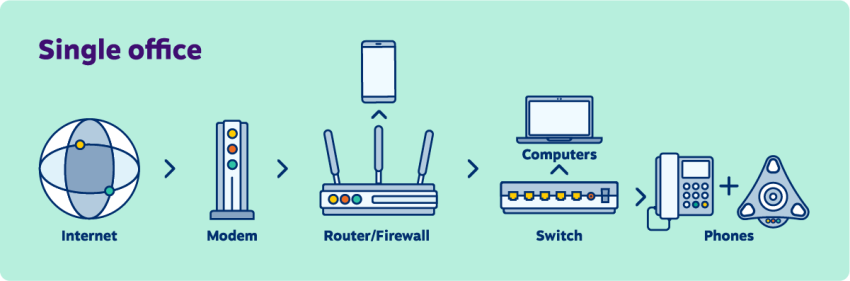
VoIP is undoubtedly the future of telecommunications. It’s rapidly taking over market share from POTS. But if you have a POTS line, don’t write it off just yet. You might still be able to get some use out of it.

Advantages of Replacing POTS With Business VoIP
Business VoIP can provide:
- Access for remote and hybrid employees
- Local, toll-free, and ported business numbers
- Call routing that follows business hours, teams, and locations
- Mobile and desktop softphones
- Business SMS and video meetings
- Central administration
- Faster user changes
- A broader feature set at a lower per-user cost in many cases
Tradeoffs to plan for:
VoIP depends on the business internet connection and local power. A network outage, poor Wi-Fi configuration, inadequate bandwidth, or unprotected network equipment can affect calling.
Before migrating, a business should plan for:
- Battery backup for routers, switches, phones, and other network equipment
- A secondary internet connection or cellular failover
- Network quality of service (QoS)
- Emergency calling and registered locations
- Compatibility with fax, alarm, elevator, and payment equipment
- Analog adapters for devices that cannot move to IP service
Selecting a POTS Replacement
The best business VoIP system or cloud PBX depends on the company’s users, devices, locations, call volume, and migration requirements. A useful evaluation should cover:
- Voice quality and reliability: Review uptime commitments, network design, support, and outage procedures.
- Remote access: Confirm that employees can use mobile and desktop applications outside the office.
- Number management: Check local number availability, toll-free numbers, and number-porting support.
- Call control: Look for menus, schedules, queues, transfers, ring groups, voicemail, and routing policies.
- Administration: Confirm that administrators can add users and update call flows without a technician.
- Integrations: Check support for CRM systems, email contacts, calendars, messaging, and collaboration tools.
- Legacy equipment: Identify fax, alarm, elevator, and payment devices before ordering service.
- Pricing: Compare user-based, channel-based, metered, and bundled plans.
- Emergency calling: Confirm how the provider registers locations and handles E911.
- Migration support: Ask whether the provider supports direct cloud migration, SIP trunking, or both.
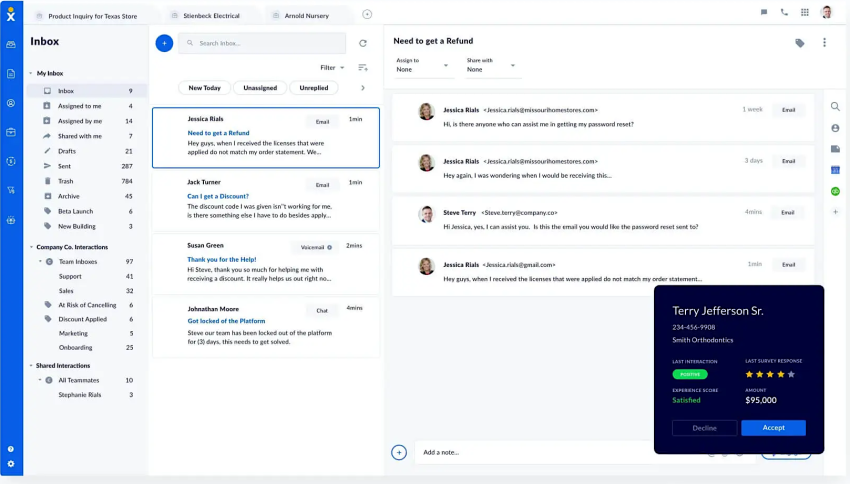
For a growing customer-facing team that needs remote workers, local numbers, call routing, and mobile access, Nextiva, a cloud business phone service provider, is a suitable fit. Its service supports HD calling, number porting, local and toll-free numbers, mobile and desktop access, and call flows for schedules, menus, users, teams, voicemail, transfers, and routing policies.
A business asking which PBX provider is best should separate the following decisions:
- Cloud PBX: Best for replacing on-premises PBX hardware with hosted call control.
- SIP trunking: Best for keeping compatible PBX hardware during a phased migration.
- Cloud VoIP: Best for teams that want users to work through desk phones, computers, and mobile apps.
Nextiva’s VoIP phone service provides a cloud-based option for businesses that want to replace POTS and manage voice service online. Nextiva states that its service supports 99.999% uptime and has served more than 100,000 businesses. Businesses should still assess their own internet, power, and failover design.
Cloud VoIP and SIP pricing
Pricing depends on whether a business pays by user, channel, minute, or a bundled feature plan.
| Nextiva | Published price | Best fit |
|---|---|---|
| Core | $15 per user per month | Basic business calling and essential collaboration |
| Engage | $25 per user per month | Teams that need broader engagement features |
| Scale | $75 per user per month | Organizations with advanced requirements |
| SIP Metered | $9.95 per channel per month plus $0.008 per domestic minute | Businesses with compatible PBX hardware and variable call volume |
| SIP Unlimited | $14.95 per channel per month | Businesses with compatible PBX hardware and predictable calling needs |
The Nextiva pricing page lists current plan details. A business should also account for taxes, phone hardware, analog adapters, internet service, emergency calling requirements, and implementation costs.
Bandwidth and network planning
Nextiva recommends approximately 0.10 Mbps, or 100 kbps, per VoIP line as a planning guideline. Its example states that a 10 Mbps connection can support around 100 lines under suitable conditions. This is planning guidance, not a guarantee.
Before migration, a business should check:
- Available upload and download bandwidth
- Latency, jitter, and packet loss
- Wi-Fi coverage and wired connections
- QoS configuration
- Internet failover
- Router and switch capacity
- Battery backup duration
- Cellular coverage for backup service
- Emergency calling addresses
- Compatibility of analog devices
A network assessment should include peak business traffic, video meetings, backups, and other applications that share the connection.
POTS Migration Checklist
1. Inventory every POTS line
Record each phone number, location, device, monthly cost, and business purpose. Include lines used by fax machines, alarms, elevators, payment terminals, modems, and door-entry systems.
2. Identify numbers to keep
Mark numbers that customers, suppliers, emergency contacts, and printed materials still use. Confirm that the new provider can port each number before disconnecting the old service.
3. Select the migration path
Choose the option that matches the equipment:
- Cloud VoIP for a full move to internet-based calling
- Cloud PBX for hosted call control
- SIP trunking for a phased migration with existing PBX hardware
- Cellular adapters for selected analog devices
- Online faxing for fax workflows
- Fiber voice service for businesses upgrading connectivity
4. Test the network
Check bandwidth, latency, jitter, packet loss, QoS, Wi-Fi, failover, and power backup. Test calls during periods of normal and peak network use.
5. Plan emergency calling
Register the correct physical location for every number or endpoint. Confirm how the provider handles E911, remote workers, multiple offices, and address changes.
6. Test legacy equipment
Have the equipment vendor approve any ATA, cellular adapter, or IP replacement. Test alarm signaling, elevator calls, fax transmission, payment authorization, and other critical functions.
7. Port numbers before disconnecting service
Keep the POTS account active until number porting and service testing finish. Disconnecting too early can make a number difficult to recover.
8. Train users and monitor calls
Provide instructions for mobile apps, softphones, voicemail, call transfers, business SMS, and emergency procedures. Monitor call quality and routing after launch.
Can Businesses Still Get POTS Service?
POTS can still support emergencies, personal use, and equipment that requires a traditional analog line. It may also suit people who find mobile phones difficult to use.
New POTS service is becoming more difficult to obtain in many areas. AT&T, Verizon, and Lumen remain associated with traditional telephone service, but providers increasingly direct customers toward fiber, cellular, and internet-based alternatives.
Existing POTS plans often provide basic service with per-line charges and separate add-ons. A business should compare the cost of keeping each line with the cost of a replacement, including adapters, backup power, internet service, and equipment testing.
Moving From POTS to Nextiva
Switching from POTS to VoIP can replace basic lines with a business communications system that supports office and remote employees.
When choosing a VoIP provider, businesses should review reliability, availability commitments, call routing, number porting, emergency calling, mobile access, integrations, support, scalability, and pricing.
Nextiva’s Core plan for small businesses includes:
- Inbound and outbound calling
- Business SMS
- Video conferencing
- Team chat
- Call forwarding with a virtual receptionist
- Integrations with Outlook and Google Contacts
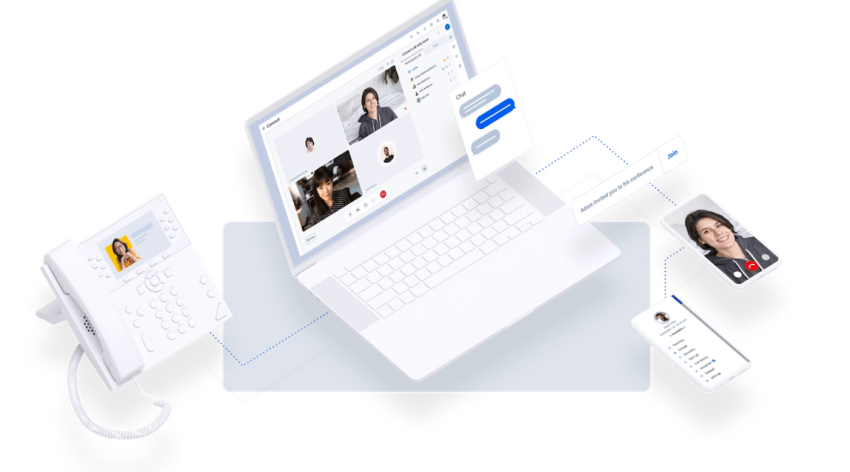
VoIP features our customers love:
- Unlimited nationwide calling
- Business text messaging
- Unlimited online faxing
- Video conferencing
- Smart call routing
- Voicemail transcription
- Customizable Caller ID
- On-demand call recording
- Business call forwarding
- Mobile and desktop softphones
Nextiva can support a direct cloud migration or a phased move through Cloud PBX and SIP trunking. Learn more about replacing a PBX and moving to VoIP.
⚡️ Case Study: Tricoci Salons Upgraded Its On-Prem Phone System to the Cloud

POTS Line FAQs
A home landline is a common example of a POTS line. An elevator telephone, fax line, payment terminal, or older office phone may also use POTS.
A standard POTS line typically connects one telephone device to the public telephone network. It does not provide the multi-user call control associated with a private branch exchange (PBX).
Yes. The process is called number porting. A new VoIP provider can manage the transfer of an existing number from the old provider.
The business should keep its POTS service active until the port completes. It should also provide accurate account information and review every number on the port request to prevent delays.
Telephone companies are retiring copper networks in some areas, but there is no single nationwide shutdown date. POTS availability and pricing depend on the provider and location.
Businesses should verify local availability and create a migration plan before a provider retires a line. Critical equipment may need a cellular, fiber, IP, or ATA-based replacement.
Yes. A traditional telephone can connect to a VoIP system through an analog telephone adapter (ATA). The ATA converts the analog signal into digital voice traffic.
An ATA may preserve basic handset functionality. A native VoIP desk phone provides better access to features such as HD voice and presence.
Yes. SIP trunking can connect a compatible on-premises PBX to a cloud voice network. This lets a business keep its PBX and desk phones while replacing traditional telephone trunks.
A phased migration can move departments, locations, or numbers at different times. The business should confirm PBX compatibility, codec support, call capacity, emergency calling, and failover before deployment.
The best system depends on the team’s requirements. A growing customer-facing team that needs remote access, local numbers, call routing, mobile applications, and scalable user management should evaluate a cloud VoIP provider with those capabilities.
Nextiva supports HD cloud calling, local and toll-free numbers, number porting, mobile and desktop softphones, and configurable call flows. Businesses with existing PBX hardware can evaluate Nextiva Cloud PBX or SIP trunking instead of replacing all equipment at once.
Nextiva recommends approximately 100 kbps per VoIP line as a planning guideline. Actual capacity depends on codec settings, network traffic, video use, Wi-Fi quality, and service design.
Businesses should test latency, jitter, packet loss, QoS, internet failover, and backup power before deployment. A capacity estimate alone does not guarantee call quality.
VoIP requires power for the internet connection, network equipment, and phones. A business can improve continuity with battery backup, a secondary internet connection, cellular failover, and a documented outage procedure.
POTS can continue working during some local power outages because the telephone company supplies line power. The central network, local copper condition, and telephone devices still affect availability.
Business VoIP may use per-user, per-channel, metered, or bundled pricing. Nextiva’s published plans include Core at $15 per user per month, Engage at $25 per user per month, and Scale at $75 per user per month. Its SIP options list Metered at $9.95 per channel per month plus $0.008 per domestic minute, and Unlimited at $14.95 per channel per month.
The right model depends on the number of users, call volume, existing PBX equipment, required features, phone hardware, adapters, internet service, and emergency calling needs.
A cloud PBX moves call control to a hosted service. SIP trunking connects an existing on-premises PBX to a cloud voice provider.
Cloud PBX suits businesses ready to replace PBX hardware. SIP trunking suits businesses that want to keep compatible equipment and migrate in phases.
Remote workers can use a mobile application, desktop softphone, or supported desk phone. Their calls can follow the same business number, call flow, voicemail, and routing policy as office users.
This lets a customer-facing team handle calls from approved locations while the business manages users and call rules centrally.