VoIP
 Blog
 Business Communication
 Customer Experience
 Leadership
 Marketing & Sales
 Nextiva News
 Productivity

VoIP vs. landline comes down to how your voice travels. A landline carries calls over a copper phone line, while Voice over Internet Protocol (VoIP) makes calls over a broadband internet connection instead of a regular analog line, as the Federal Communications Commission (FCC) defines it.
For most businesses, a VoIP phone system costs less, does more, and follows your team anywhere. The decision is getting urgent, because carriers are shutting down copper lines through 2027.
VoIP vs. Landline at a Glance
Both options give you a phone number, a dial tone, and 911. They differ in what carries the call, what happens when the power goes out, and what you can do beyond basic calling.
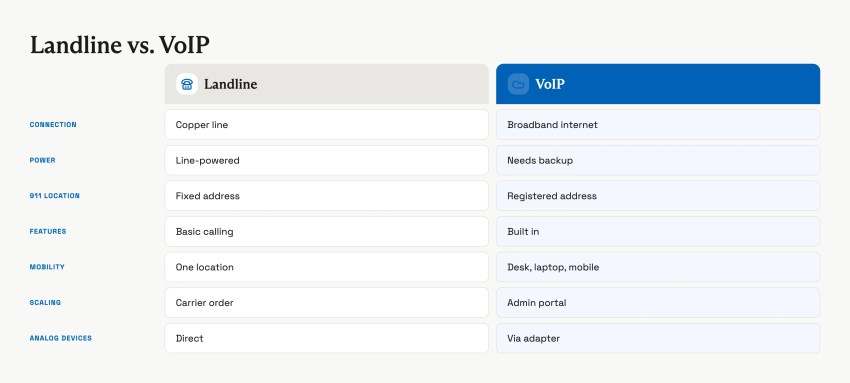
| Factor | Landline | VoIP |
|---|---|---|
| Connection | Copper phone line to the carrier | Broadband internet |
| Power | A corded phone runs on line power | Phones and router need power or a backup |
| 911 location | Tied to the line’s fixed address | The address you register, which you must keep current |
| Features | Calling and voicemail, with extras added by the carrier | Auto attendant, call recording, texting, video, and CRM integrations |
| Mobility | One phone in one place | Desk phone, laptop, and mobile app on one number |
| Scaling | Order a new line from the carrier | Add a user in an admin portal |
| Analog devices | Alarms and fax connect directly | Connect through an adapter or a cellular line |
| Future | Carriers are retiring copper | Runs on the networks carriers are building |
Is VoIP a Landline?
No. VoIP isn’t a landline in the technical sense, because it doesn’t run over a copper phone line. In daily use, though, it behaves like one. You get a real phone number, a desk phone if you want one, and 911 service from an interconnected provider.
Many landlines are already digital
The word “landline,” or “fixed line,” now covers more than copper. Phone service sold over fiber or cable is still called a landline, but it is digital and needs power at your location, just like VoIP.
Only a corded phone on a copper line from the phone company keeps working on line power alone. That traditional copper setup is known as POTS, short for plain old telephone service.
IP phones vs. analog phones
According to the FCC, you can place a VoIP call from a computer, a special VoIP phone, or a traditional phone connected to an adapter. An IP phone plugs into your data network and connects directly to your provider. An analog phone needs that adapter to convert its signal.
Nextiva supports current desk phones from Poly and Yealink, so teams that like a handset on the desk can keep one.
Is VoIP a landline or a cell phone?
Neither. A cell phone uses a wireless carrier’s network, and a landline uses the phone company’s wired network. VoIP uses the internet, which means a VoIP app can run on your cell phone over Wi-Fi or mobile data and still show your business number.

How Landlines and VoIP Work
Both systems start and end the same way: a person talks into a phone. Everything in between is different.
How a landline works
A traditional landline runs on the public switched telephone network, or PSTN. A pair of copper wires connects your building to the phone company’s central office, and the network holds a dedicated circuit open for the length of each call. The line also carries a small electrical current, which is why a corded phone keeps working when the building loses power.
See how plain old telephone service carries a call over copper, and why it keeps working when the power goes out.

How VoIP works
VoIP turns your voice into data and sends it across the internet in small packets. Your provider then connects the call to the phone network, so the person you’re calling can be on any landline or mobile phone.
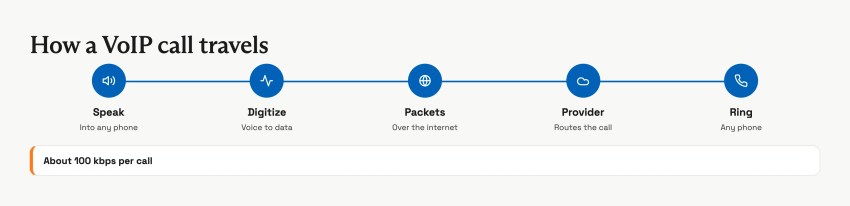
Each call needs little bandwidth. Nextiva recommends 100 kbps of upload and 100 kbps of download per simultaneous call, with 0% packet loss and less than 20 ms of jitter. The exact figure depends on the VoIP codec your phones use.
Behind each call, signaling sets up the connection, routes it, and ends it, which is the core of how VoIP works.
Key Differences Between VoIP and Landlines
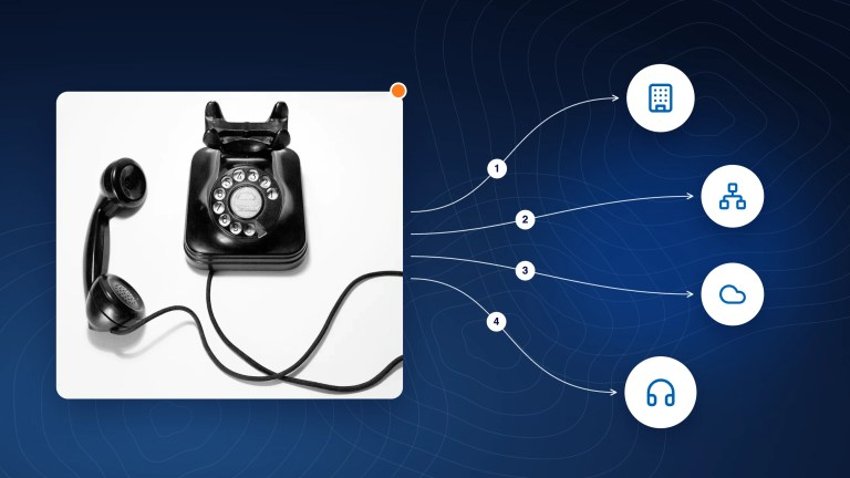
Cost, features, and reliability decide most business phone choices. This short comparison walks through all three side by side.

Cost
Landline pricing varies by carrier and region, and each line is billed separately.
Long-distance, extra lines, and features such as voicemail or call forwarding often add to the bill. Copper is also getting harder to buy as carriers stop selling it in more areas.
VoIP is priced per user instead of per copper line. Nextiva plans start at $10 per user per month, billed annually, and every plan includes unlimited calling in the US and Canada. A five-person office on the Business plan pays $125 a month, billed annually. Desk phones and setup add to that total, as the VoIP costs breakdown shows.
Features
A landline gives you a dial tone and the features your carrier sells. VoIP builds the features into the service.
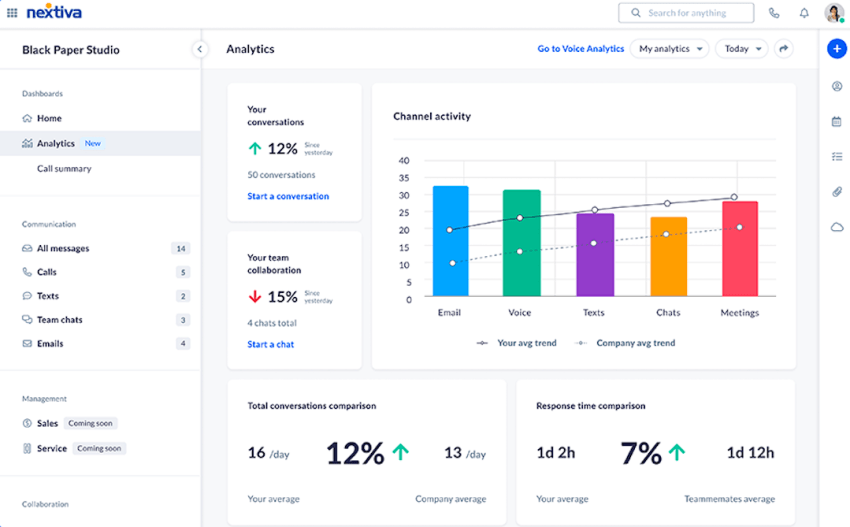
Every Nextiva plan includes an auto attendant that greets and routes callers, plus voicemail, texting, video meetings, and AI transcription and summaries (with monthly limits on the Go and Business plans). The Business plan adds call recording on every call and more than 50 CRM and business integrations.
Reliability and power outages
This is the landline’s strongest point. The FCC notes that VoIP service may not work during a power outage or when the internet connection fails. A corded phone on a copper line usually keeps working, while cordless phones and digital landlines go down when the power goes out.
The FCC suggests a backup power supply, a traditional phone line, or a wireless phone. In practice, most businesses put the modem and router on a battery backup and forward calls to mobile apps during an outage. Nextiva runs its network at 99.999% uptime, so local power and internet are the main reliability risks to plan for.
911 and location
A landline’s 911 address is fixed to the line. VoIP phones can move, so the FCC requires interconnected VoIP providers to get your physical location before service starts. They must also give you an easy way to update it. Keep the registered address current for every phone and remote worker.
Call quality
A landline delivers steady, narrowband audio. VoIP can sound better, because wideband codecs carry more of the human voice. The ITU’s G.722 standard provides 7 kHz audio coding within 64 kbit/s, which is what people mean by HD voice. HD calls between Nextiva customers use about 300 kbps.
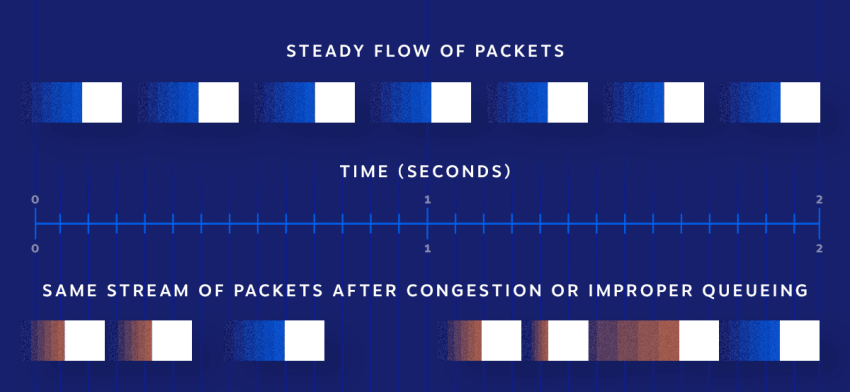
The trade-off is that VoIP quality depends on your network. Jitter, packet loss, and latency come from the connection, not the phone. That’s why the drawbacks section below covers how to fix them.
Mobility and scaling
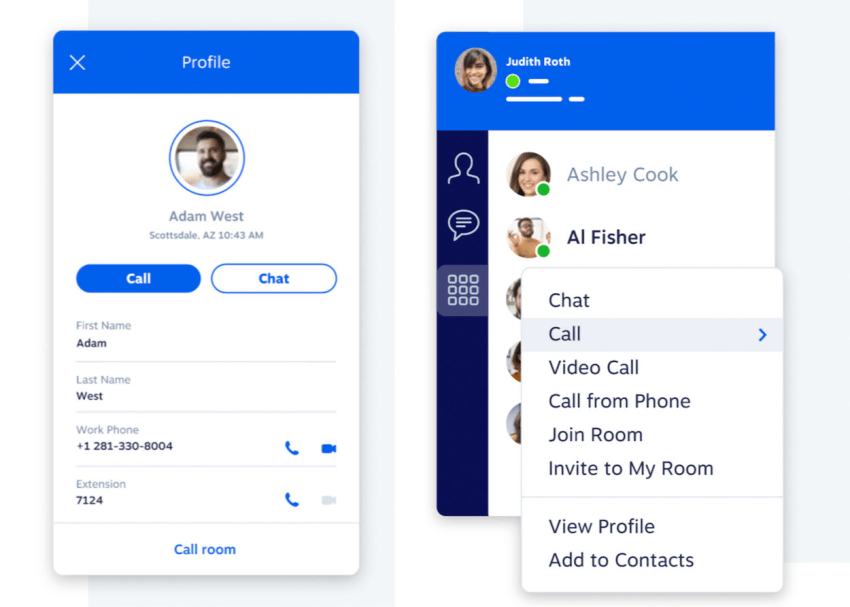
A landline stays on the wall. With VoIP, your business number rings on a desk phone, a laptop, and a mobile app, so you can answer from home or the road. Adding a new hire takes a few clicks in an admin portal, not a carrier order.
Security
Landline calls travel over a closed network, but they aren’t encrypted. VoIP calls cross the internet, so VoIP security starts with encryption. Nextiva uses TLS and SRTP encryption between endpoints and is SOC 2 certified and HIPAA compliant.
Landline Pros and Cons
Landlines still do a few things well. Weigh them against where the copper network is heading.
Landline strengths and limits
 Pros
Works in a power outage on a corded phone
No internet connection needed
Alarms and fax connect directly
Simple and familiar
 Cons
Carriers are retiring copper lines
Few built-in features
Tied to one location
New lines need a carrier order
VoIP Pros and Cons
VoIP usually wins on cost and features. Its weak spots are well known, and each one has a standard fix.
Advantages
- Lower cost. You pay per user, with unlimited US and Canada calling on business plans.
- Mobility. One number works on your desk phone, laptop, and softphone app.
- More features. Auto attendants, call recording, texting, and video are included.
- Easy growth. You can add or remove users in minutes.
Drawbacks and how to fix them
- Internet dependence. If your connection drops, your desk phones do too. Put your modem and router on battery backup, and set calls to forward to mobile apps, which can run on cellular data.
- Call quality. Plug desk phones into wired Ethernet instead of Wi-Fi, and turn on Quality of Service so voice traffic gets priority.
- Network readiness. Before you switch, run a speed test to check jitter and packet loss.
- No usable broadband. VoIP needs a stable internet connection. Where there’s no usable broadband or cell coverage, a copper line (while it lasts) or a cellular line is the fallback.
Copper Landlines Are Going Away in 2027
For many businesses, the choice is being made for them. Carriers are retiring the copper network, and regulators sped up the process in 2026.
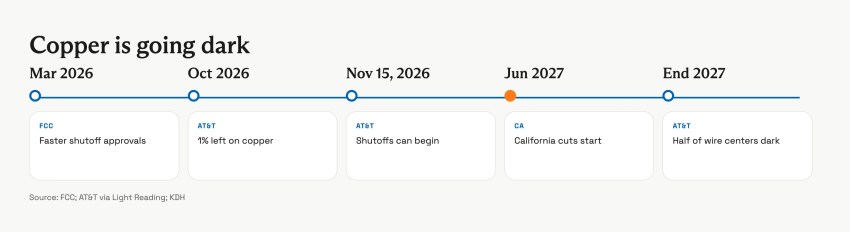
- March 2026. The FCC adopted Order 26-19, which applies a 31-day automatic approval to carrier requests to discontinue legacy services.
- October 2026. AT&T said just 1% of its eligible customers still use its legacy copper voice service. It has already shut down copper service in more than 500 communities covering 1.3 million locations across 18 states, according to Light Reading. It expects about half its wire centers outside California to stop serving customers by the end of 2027.
- November 2026. AT&T was cleared to begin shutting off copper landline service in approved areas as early as November 15, the Killeen Daily Herald reported. On November 20, the FCC preempted California’s rules, clearing AT&T to stop copper service at more than 184,000 California locations served by 360 wire centers, Broadband Breakfast reported. AT&T doesn’t plan to start cutting service there until June 2027.
If your office still runs on copper, plan the move on your schedule, not the carrier’s.
Alarms, fax, and other analog devices
The phones are the easy part. Medical alert systems, fire and burglar alarms, gate call boxes, and elevator emergency phones may rely on copper lines to reach emergency services. List every one of them before your shutoff date. Most can move to an analog telephone adapter, a cellular line, or a POTS replacement service.
Walk the building and check the phone closet for alarm panels, elevator phones, fax machines, and door buzzers. Note each line’s number and purpose before you schedule the cutover.
Which Is Better for Your Business?
For most businesses, VoIP is the better landline alternative in 2027. A landline or cellular line still makes sense as a backup in a few cases.
Still deciding? This video weighs the public phone network against VoIP for a business phone system.

Choose VoIP if
- Your team works from more than one place, including home.
- You want an auto attendant, call recording, texting, or CRM integration.
- You’re adding people and don’t want to order a line for each one.
- Your carrier has sent a copper retirement notice.
Keep a landline or cellular backup if
Your location has no reliable broadband, or a device such as an alarm panel can’t move to an adapter yet. In those cases, run VoIP for your team and keep one backup line for the device. Plan to replace that line before your carrier retires copper in your area.
How to Switch From a Landline to VoIP
Switching is mostly planning. The setup itself is quick with a hosted provider.
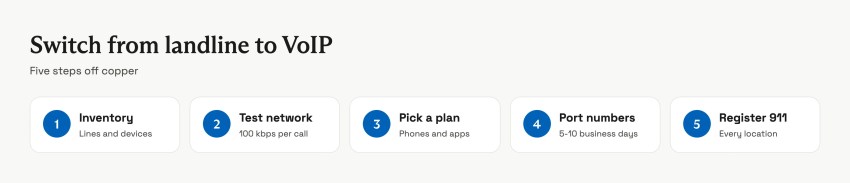
1. Inventory lines and devices. List every phone number, user, and analog device, including alarms, fax machines, and elevator phones.
2. Test your network. Plan for 100 kbps up and down per simultaneous call. To size a whole office, multiply that figure by your peak number of calls, as the VoIP data usage guide explains.
3. Pick a plan and phones. Decide who needs a desk phone, who can use an app, and which devices need an adapter.
4. Port your numbers. Porting into Nextiva typically takes five to 10 business days, and some ports take two to four weeks. Keep your old service active until the port completes.
5. Register 911 addresses. Enter the physical location for each phone and user. Include remote workers’ home addresses when you set up E911 for VoIP.
Replace Your Copper Lines With Nextiva
If a copper notice just landed, you need phones that work on day one, the numbers your customers already know, and a 911 plan. Nextiva runs your phone system in the cloud with 99.999% uptime. Every plan includes unlimited calling in the US and Canada, local numbers, free number porting, and an auto attendant.
A solo professional can start on the Go plan at $10 per user per month, billed annually, with desktop, mobile, and browser apps. A five-to-50-person office replacing landlines fits the Business plan at $25 per user per month, billed annually. It supports desk phones, records every call, connects to 50+ CRM and business tools, and includes 24/7 phone support.
Sales and service teams that need skills-based routing, callbacks, and supervisor tools can choose the CX plan at $75 per user per month, billed annually (talk to sales). Compare every feature on the Nextiva pricing page.
Move off copper on your schedule
Every Nextiva plan includes unlimited US and Canada calling, free number porting, and an auto attendant, with desk phone support from the Business plan.
Frequently Asked Questions: VoIP vs. Landline
No. VoIP runs over a broadband internet connection, not a copper phone line. It still works like a landline day to day, with a real phone number, desk phones, and 911 service. Nextiva’s VoIP phone service gives you all three.
Not on its own. Your desk phones and router need power, and the FCC notes that VoIP may not work when the power or internet goes out. Put your router on battery backup and forward calls to mobile apps. Read how Nextiva keeps VoIP reliable through outages.
For most businesses, yes. VoIP is priced per user with calling included, instead of per copper line with extras. Nextiva plans start at $10 per user per month, billed annually, so check Nextiva pricing for the plan that fits.
It can be better. HD voice codecs carry a wider range of sound than a standard phone line, as long as your network has low jitter and no packet loss. Turning on QoS settings keeps voice traffic at the front of the queue.
Yes. Number porting moves your existing number to your VoIP provider. Porting into Nextiva typically takes five to 10 business days and is free on every plan. The porting FAQs explain what to have ready.
Often, yes, with an analog telephone adapter. Some alarm panels need a cellular line instead, so check with the alarm company before your copper line is shut off. Our guide to POTS replacement covers the options.