VoIP
VoIP  Blog
Blog  Business Communication
  Customer Experience
  Leadership
  Marketing & Sales
  Nextiva News
  Productivity

Get the routing right and customers reach the right person quickly, their issue gets resolved, and the interaction builds trust. Get it wrong and they’re transferred twice, asked to repeat themselves, and left wondering why they bothered calling.
Good call routing doesn’t happen by accident. Without a deliberate system in place, calls default to manual handling; the wrong department answers, agents waste time tracking down colleagues, and customers feel the friction at every step. Call routing software fixes this by automating the decisions that determine where every call goes, based on who’s calling, why they’re calling, and who’s best equipped to help.
This guide covers how it works, which features matter most, and how to set up routing flows that work for your team and your customers. Plus, our top 5 picks for call routing software providers.
Evaluating contact centers? Get the buyer’s guide.
This guide reveals the five pillars of a modern platform, key questions to ask, and red flags to avoid.
What Is Call Routing Software?
Call routing software is a mechanism that sends callers to the most suitable destination in your business. This might involve them being directed to a specific agent, an entire department whose phones will ring, or voicemail.
When set up correctly, automating the directing of inbound calls frees up agents from acting as a help desk and performing phone call transfers, helps customers get to the right agent quickly, and reduces wait times.
With call routing software, you can use predefined rules to send callers to different destinations depending on:
- Agent availability: Only connect callers to available agents.
- Agent skill set: Match the caller’s query to qualified agents.
- Call priority: Prioritize customer support calls over sales.
- Caller information: Transfer existing customers to account managers.
- Time of day: Overrule existing criteria during peak call volumes.
How Call Routing Software Works
When a call comes through your phone system, a series of automated call routing decisions happen in seconds, determining who answers, how quickly, and what happens if they can’t.
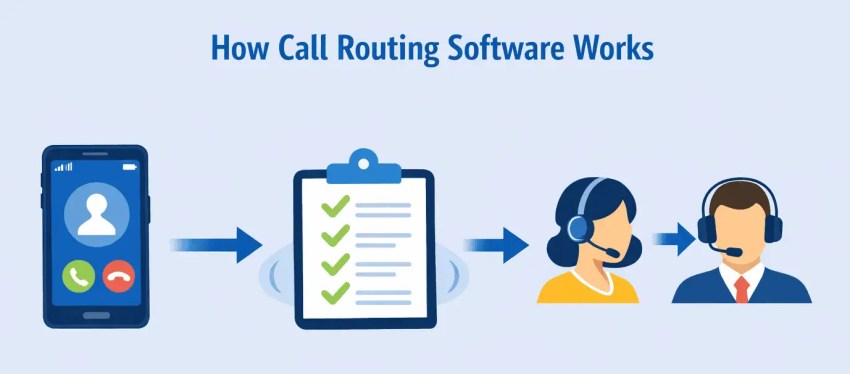
Here’s how each step works.
How incoming calls enter the routing system
When a customer dials your number, the call is received by your phone system and immediately handed off to the routing engine. If an IVR is configured, the caller hears a greeting and selects from menu options and their input becomes the first data point the system uses to determine where the call should go. Without an IVR, the system will route calls based on predefined rules alone.
How routing rules determine the best destination
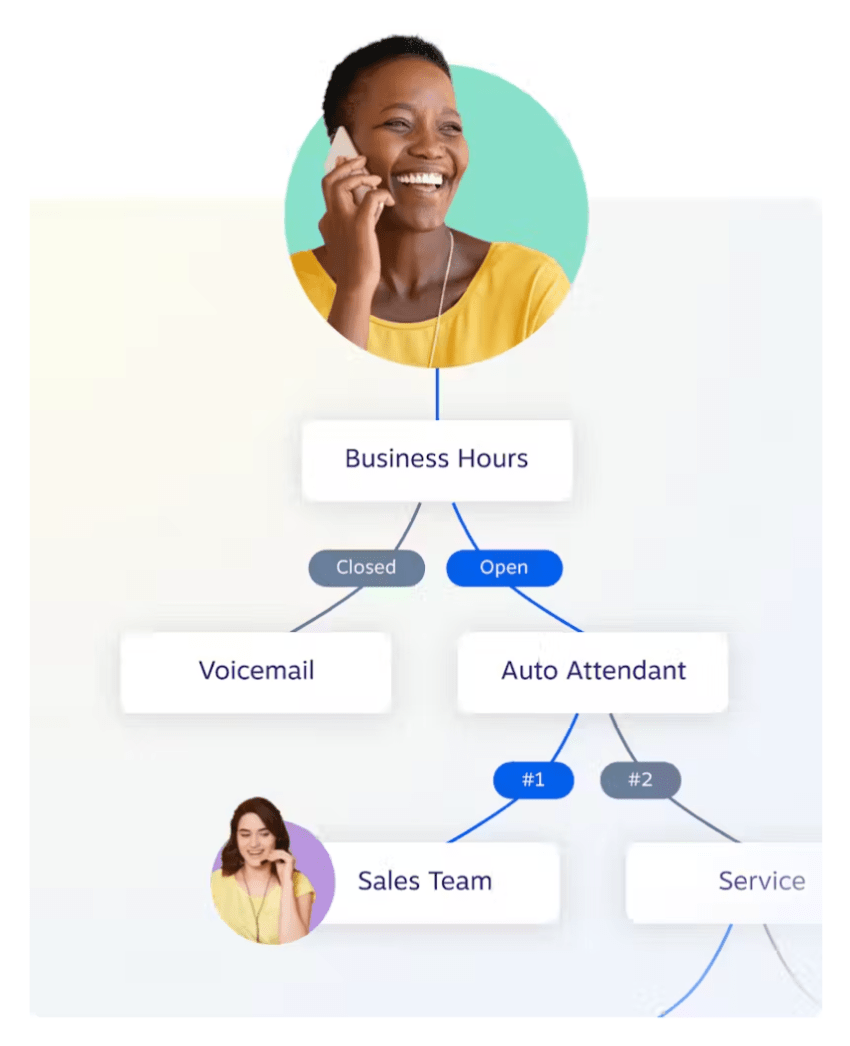
Once the call is in the system, routing rules take over. These rules evaluate available information—the caller’s input, their number, the time of day, agent availability, and skillset—and match the call to the most appropriate destination. A call from a VIP customer outside business hours, for example, might route differently than a general inquiry during peak hours. Rules can be simple or layered, and most platforms allow them to be customized without technical expertise.
How queues, overflow, and callbacks support call flow
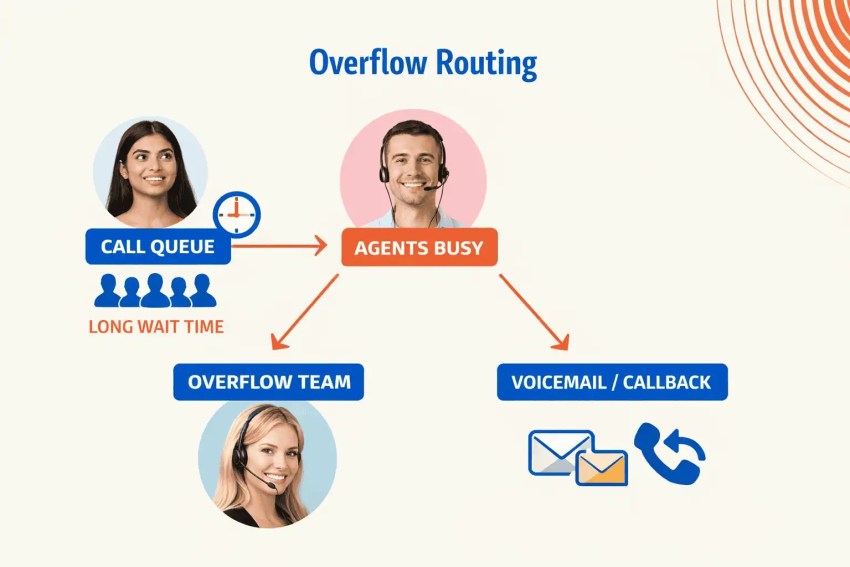
If no agent is immediately available, the call enters a queue, holding the caller’s place while the system waits for the right agent to free up. If the queue exceeds a set threshold, overflow rules kick in: the call might route to a secondary team, a voicemail, or trigger a callback option that holds the caller’s place without keeping them on hold. Together these mechanisms ensure that no call hits a dead end, regardless of call volume or staffing gaps.
Common Types of Call Routing
Different routing strategies solve different problems.
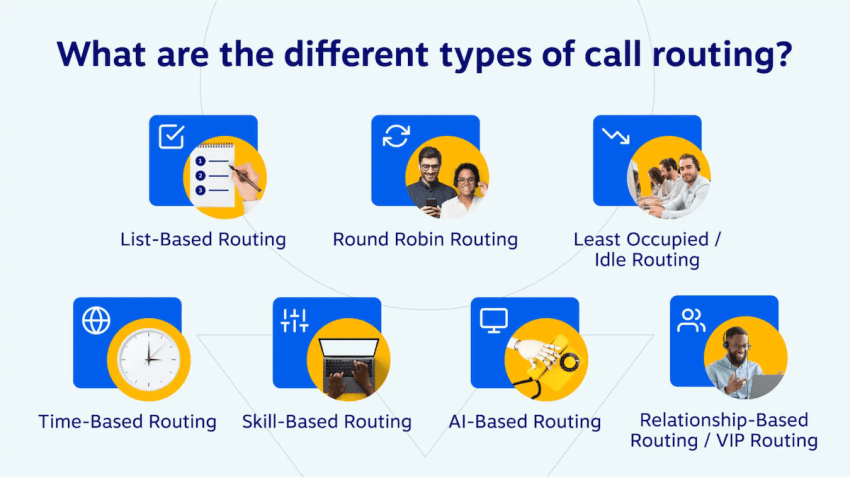
Here are the most common types and when to use each:
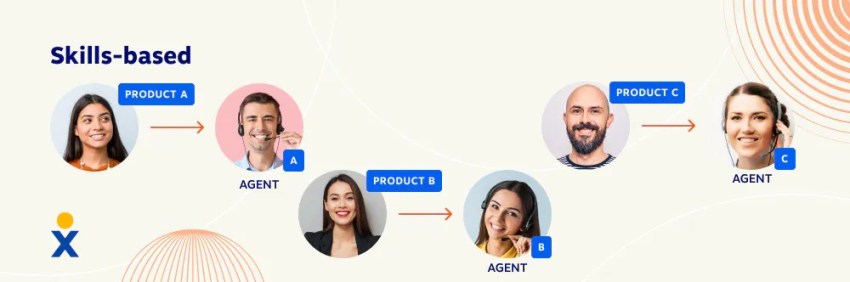
Skills-based routing
Matches incoming calls to the agent best qualified to handle them based on language, product knowledge, department, or certification. Reduces transfers and improves first call resolution by getting callers to the right person the first time.
Priority routing
Assigns different queue positions based on caller status: VIP customers, high-value accounts, and urgent calls move to the front of the line. Makes sure your most important callers get the fastest response without requiring a separate phone number.
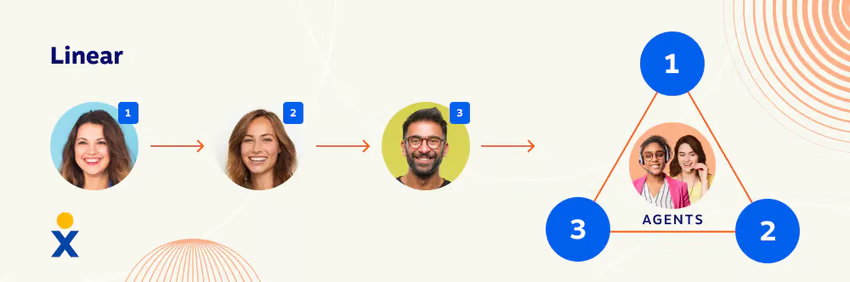
Round-robin routing
Distributes incoming phone calls evenly across available agents in rotation, ensuring that no single agent gets overloaded while others sit idle. The simplest and most common approach for teams handling general inbound call volume.
Simultaneous routing
Rings multiple agents or devices at the same time, connecting the call to whoever answers first. Best for small teams or high-priority lines where speed of answer matters more than even distribution.
Time-based routing
Directs calls based on the time of day or day of the week, routing to your main team during business hours, an after-hours line overnight, or a different location across time zones. Essential for businesses that operate across multiple regions or need after-hours coverage.
Overflow routing
Automatically redirects calls to a secondary team, voicemail, or callback option when a queue exceeds a set threshold or agents are unavailable. Prevents abandoned calls during peak periods or unexpected volume spikes.
Benefits of Call Routing Software
The right call routing setup doesn’t just organize incoming calls. It has a measurable impact on the metrics that matter most:
- Reduces wait times. Intelligent routing gets callers to the right destination faster by eliminating unnecessary transfers and reducing time spent in the wrong queue. When calls reach the right agent on the first attempt, handle times drop and wait times follow.
- Improves first-call resolution. Skills-based and priority routing make certain that callers are matched to the agent best equipped to handle their specific issue, which reduces the back-and-forth that drives repeat calls. Higher first-call resolution directly improves customer satisfaction and reduces the cost per interaction.
- Increases agent efficiency. When agents consistently receive calls that match their skills and availability, they spend less time on transfers, less time getting up to speed, and more time resolving issues. Paired with CRM integration, agents have full customer context before the conversation even starts.
- Delivers a better customer experience. Shorter waits, fewer transfers, and faster resolutions add up to an experience that feels effortless from the customer’s perspective. A single bad call experience can cost you a customer, so routing software is one of the highest-leverage investments in the customer journey.
Essential Call Routing Features
These are the core features that direct calls before they reach an agent, and the foundation of any effective call routing setup.
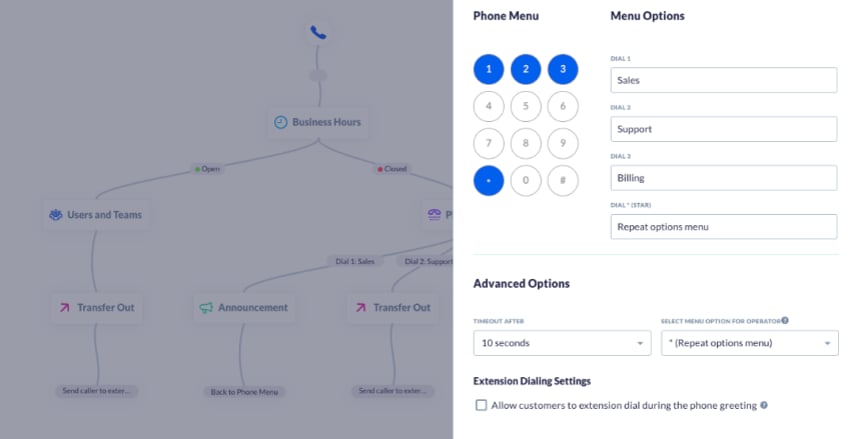
Interactive voice response (IVR)
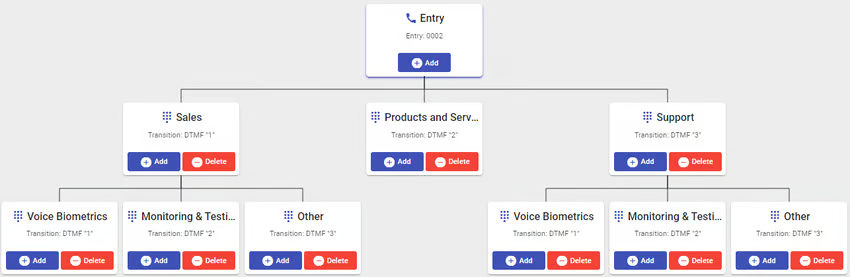
An IVR is an automated menu system that greets callers and guides them to the right destination through a series of prompts. Callers select options via keypad (pressing 1 for sales, 2 for support) or voice input (saying “sales” or “support”), and the system routes them to the appropriate department, agent, or queue based on their selection.
A well-configured IVR reduces the need for manual call handling and gets callers where they need to go faster.
Automatic call distribution (ACD)
ACD spreads incoming calls evenly across a pool of available agents, preventing any call rep from being overloaded while others sit idle. It’s the default routing method when no specific rules (like skills-based or priority routing) are applied.
This is particularly effective for teams handling general inbound volume where calls don’t require specialist handling.
Skills-based routing
Skills-based routing matches incoming calls to agents based on defined competencies: technical support, billing, language, product knowledge, and so on. Agents are ranked within each skill set, and calls are weighted and queued accordingly, so the most qualified available agent handles each customer interaction.
For more complex operations, multi-tiered agent pools allow calls to overflow to cross-skilled agents when the primary pool is unavailable.
Priority routing
Priority routing gives high-value or VIP callers preferential treatment, either through a dedicated number or automatic caller ID recognition via ANI. When the system identifies a priority caller, it bypasses the standard queue and routes them directly to a designated available agent.
Integrating your CRM with your routing software takes this further, enabling automatic identification of priority accounts without requiring a separate number.
Call queues
A call queue is a virtual waiting line that holds callers until the right agent is available. Businesses can configure queues with automated greetings, estimated wait times, hold music, or pre-recorded messages to manage the experience while callers wait.
Contact centers or customer service operations queues can be structured in multiple ways—linear, circular, skills-based, or VIP-based—depending on call volume and routing complexity.
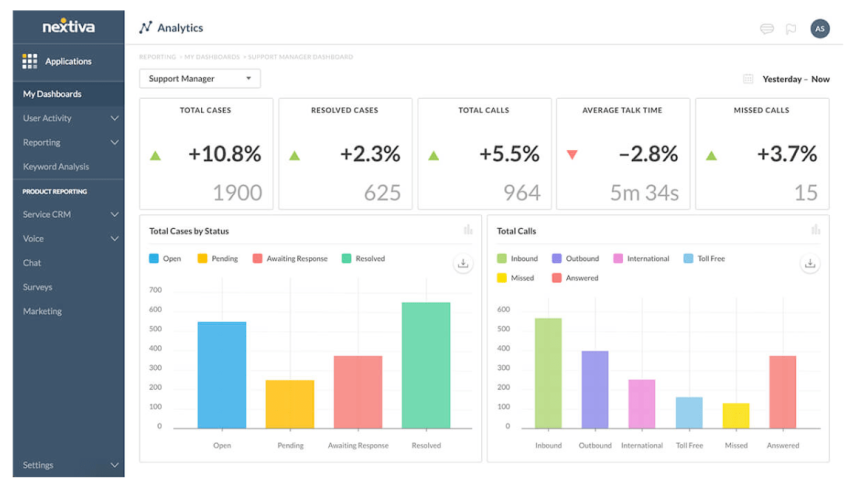
Reporting and analytics
Contact center reporting and analytics give you visibility into whether your routing setup is actually working. Track call volume, wait times, abandonment rates, and agent performance to identify bottlenecks, spot skill gaps, and fine-tune routing rules over time. Without this data, optimization is guesswork.
Advanced Call Management Features
Do those call routing feature seem a little basic? If you’re used to managing telephony, then the features already covered might not seem all that adventurous.
Here are some more modern features that you can expect to see in the best call center software providers:
Predictive routing
By taking information from previous caller interactions, contact center artificial intelligence (AI) can predict the best agent for a specific caller’s needs.
Contact center AI uses machine learning to predict which agent will be able to provide the best answer swiftly and in a manner preferred by the customer. The system uses live and historical call center data to determine this in real time.
This type of call routing system is best for high-volume call centers that have a treasure trove of customer call data.
Call overflow
Instead of keeping customers on hold until an agent becomes available, during periods of high call volume or off-hours, choose to route phone calls to voicemail, another department, or an answering service (such as Nextiva’s XBert AI receptionist).
We’ve all been on hold for what seems like an eternity. It’s not a pleasant experience, even if the on-hold music is to your taste.
To avoid this, you can automatically overflow calls after a certain number of rings or amount of time spent in the queue. Or you can manually override existing rules during extremely busy periods.
Callback functionality
If you don’t have anyone to overflow your calls to, offer callers the option to request a callback instead of waiting on hold.
This means that they don’t lose their place in the queue. Instead, the callback feature holds their place and automatically triggers a callback when it is their turn.
Information like why they were calling in the first place and what department they wanted to speak to gets carried over. Callers who choose to receive a callback keep the logic they input when moving through your IVR. So, if Margot pressed 4 for “help with my laptop,” the callback would be from someone in the laptop support team.

CRM integration
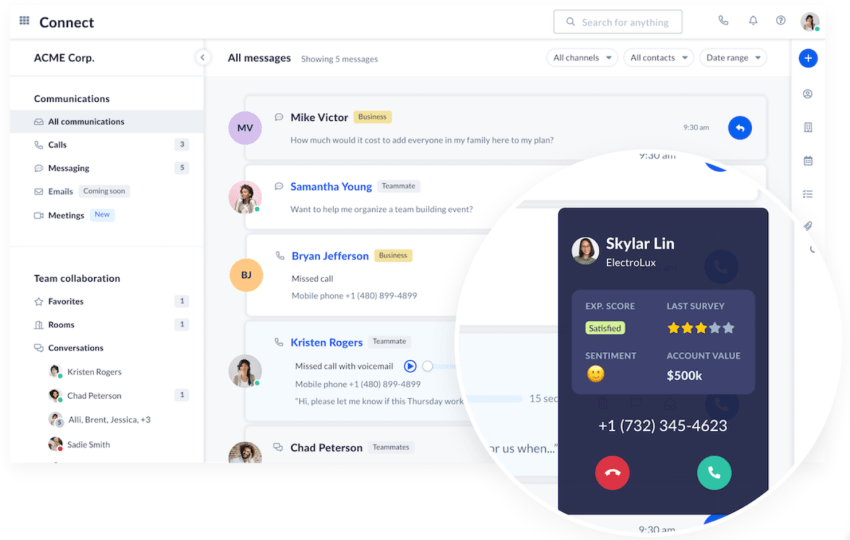
As well as performing behind-the-scenes lookups to detect VIP callers who you can choose to skip the queue, the integration of your CRM into your contact center links call routing data to enable a personalized experience.
On answering a call, agents have a view of the caller’s name, their company, and any previous transactions. If you wish, you can use this information to skip or speed up the identification and validation process. If all the information checks out, and they pass security in your IVR menu, you can get straight to the issue on the call.
Nextiva supports the following CRMs for out-of-the-box integration:
- Salesforce
- Zoho
- Microsoft Dynamics
- HubSpot
- Oracle Sales Cloud
- Bullhorn
- Workbooks
- SugarCRM
- Act! CRM
- ConnectWise
- GoldMine
How to Set Up Call Routing Flows
Before you configure a single rule, work through these four steps to make sure your routing setup reflects how your business actually operates.
Step 1: Define call objectives
Start by identifying every reason a customer might contact you. Pull existing call reports and talk to frontline agents, as they’ll surface call types that customer data alone might miss.
For each call type, define how it should be handled and who is best equipped to handle it. For example:
- New sales inquiries → dedicated sales team
- Tier 1 support → large agent pool, routed by customer input and skill
- Renewals → small specialist team with renewal training
- Escalations → separated by account size (SMB vs. enterprise)
For each of these, you could have multiple call objectives. Or your Tier 1 support team could be made up of many agents with different skills. Using the customer’s input (for example, 1 for medical support, 2 for prescription help, etc.) and your skill based routing, an agent matching that skill will receive that call.
Step 2: Map your call flow
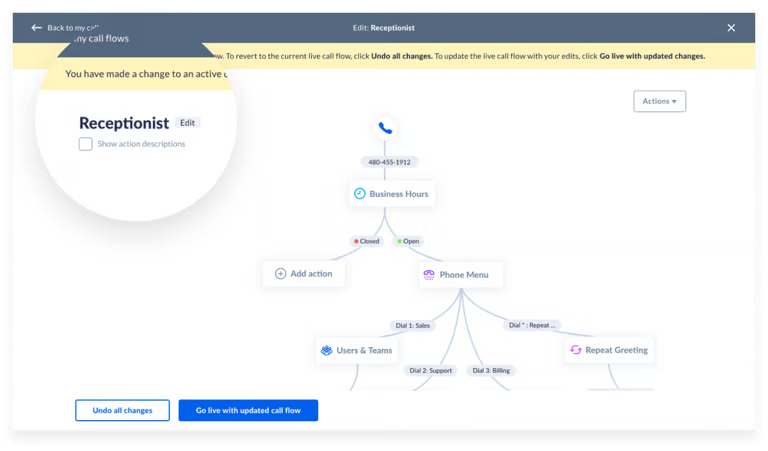
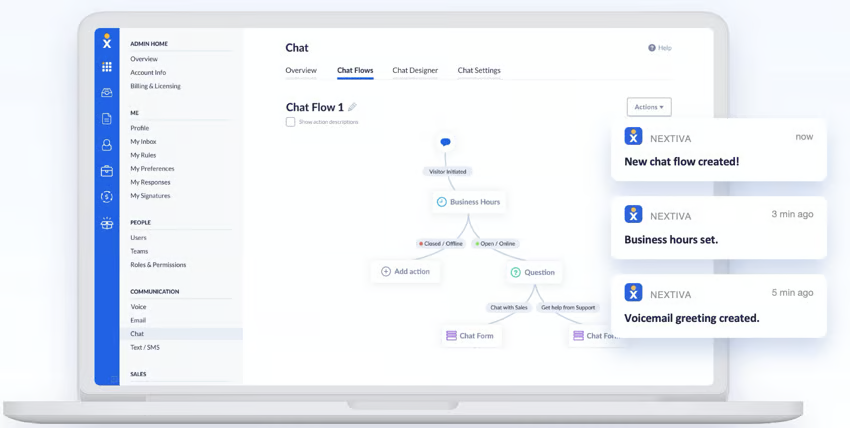
Before touching your software, map the entire call journey visually: IVR prompts, routing rules, queue logic, and destinations. Include edge cases, such as what happens during high call volume, after hours, or when a specialist team is unavailable.
A whiteboard works well here since the first draft rarely survives contact with reality. Once you have a version you’re confident in, photograph or document it because this map is what you’ll recreate in your routing software, and having it on hand saves significant time during configuration.
Step 3: Build and test your call flow
With your call flow mapped, configure the routing rules, IVR menus, and queue settings in your software. Work through each call type systematically, using your map as a reference at every step.
Once built, test thoroughly before going live. Run calls through every path, including edge cases and overflow scenarios, to confirm that each route behaves as expected. Involve agents in the testing process where possible; they’ll catch gaps in logic that aren’t obvious from the configuration side. Fix issues in a staging environment before pushing changes to live traffic.
Step 4: Monitor performance and refine routing rules
Going live isn’t the finish line, nor is it a one-time setup. In the first few weeks, monitor key metrics closely: call abandonment rate, average handle time, first call resolution, and queue wait times. These will quickly surface any routing rules that aren’t performing as intended.
Schedule regular reviews—monthly at first, then quarterly once the system stabilizes—to assess whether your routing logic still reflects your team structure, call volumes, and customer needs. Agent feedback is as valuable here as data: the people handling calls every day will notice routing inefficiencies before the reports do.
Call Routing Best Practices
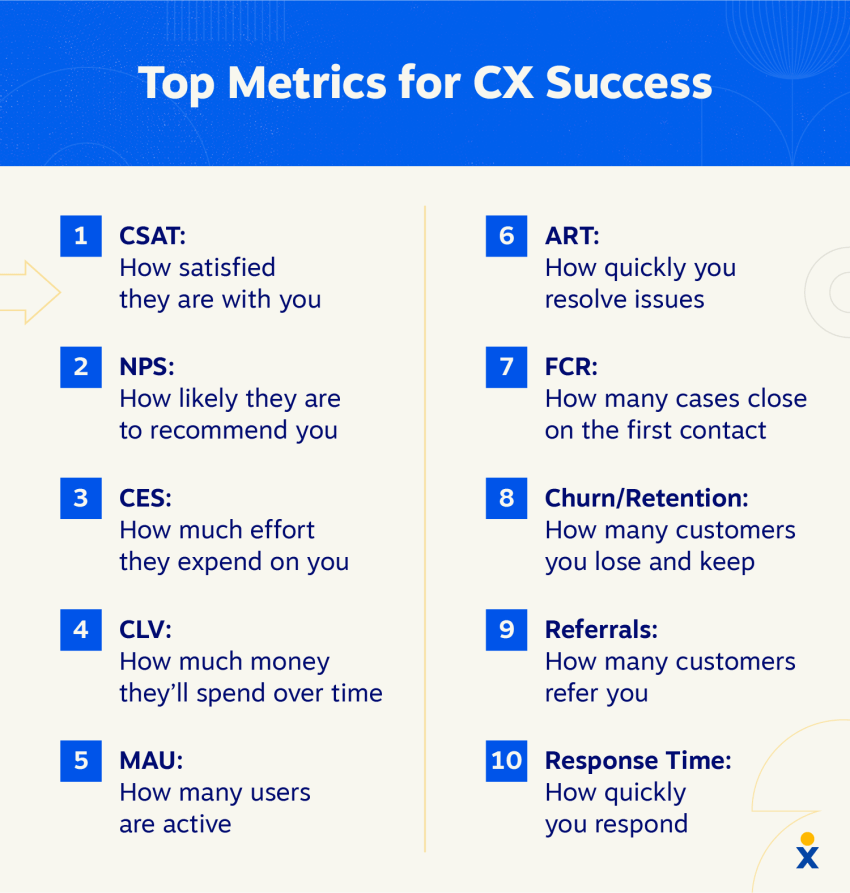
Configuring your call routing behind the scenes is one thing, but it’s another when it’s used in the real world.
Bear in mind that customers are often in a hurry or juggling multiple tasks at once. Therefore, they’ll likely pay little attention to your meticulously designed call flow.
Stick to these three principles to make sure everything works as expected.
Keep IVR menus simple
Callers want quick and easy-to-understand options when they dial a number and hit an IVR.
It’s best practice to offer a “speak to a representative” escape route. When callers don’t know which option they need, you don’t want them to choose the wrong option out of impatience.
Focus on customer experience
When configuring a call queue, put yourself in a customer’s shoes.
Your goal here is to cut down on wait times and offer self-service options for quick solutions. If you approach your call flows from a purely data point of view, you’ll likely forget how a customer feels when they contact you during a busy working day.
If something “isn’t supposed to work that way” compared to your original mapped-out call flow, see how you can make exceptions or reconfigure details to match customer expectations.
💡Bonus tip: Ask a friendly customer to help you plan your call flows for a genuine customer journey.
Review routing performance regularly
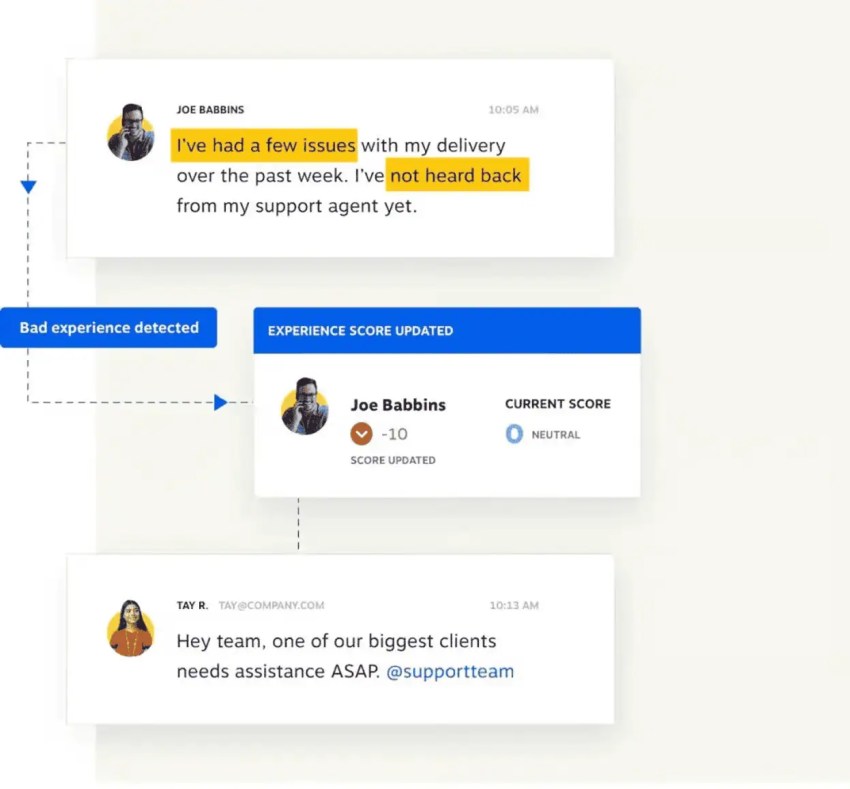
As you start to receive calls, you will gain a pool of invaluable information.
Use your reports to identify bottlenecks, agent changes, and areas for improvement. These might contribute to version two of your call map, so keeping a digital copy is a good idea.
Once you’ve planned for incremental changes on your call map, adapt routing rules based on changing call volume, customer needs, and agent skill sets that you discover in your call reports.
Plan for overflow and peak demand
Even a well-configured routing setup will face moments it wasn’t designed for, like a sudden volume spike, a seasonal rush, or an unexpected staffing gap. Without overflow planning, those moments become customer experience failures.
Build overflow rules into your configuration before you need them. Define clear thresholds for when calls should escalate to a secondary team, trigger a callback option, or roll to voicemail, and make sure fallback destinations are staffed and monitored. A caller offered a callback during a volume spike has a far better experience than one who waits indefinitely or abandons the queue.
How to Choose Call Routing Software
When evaluating call routing software, focus on the features and capabilities that will support your team now and as your needs grow. Keep these points in mind:
- Flexible routing options. Your routing needs will likely be more complex than a simple round robin routing. Look for a platform that supports multiple routing types (skills-based, priority, time-based, overflow) and allows rules to be layered and customized without requiring developer involvement. The more configurable the system, the less likely you’ll outgrow it.
- CRM and tool integrations. Call routing doesn’t operate in isolation. A platform that integrates with your CRM gives agents full customer context before a call connects, which enables smarter routing decisions and eliminating the need for callers to repeat themselves. Prioritize native integrations over workarounds that require ongoing maintenance.
- Reporting and analytics. You can’t optimize what you can’t measure. Look for built-in reporting that surfaces the metrics that matter, such as queue wait times, abandonment rates, first call resolution, and agent performance.
- Scalability. A platform that works for a 10-person team should also work for a 100-person team. Evaluate how pricing scales with users, whether advanced features are locked behind higher tiers, and how easy it is to add agents, new routing rules, or additional locations as your business grows.
- Ease of configuration. Complex routing strategy shouldn’t require an IT team to manage. The best platforms offer intuitive visual call flow builders that let operations managers and administrators make changes without technical expertise, reducing dependency on IT and speeding up iteration.
- Reliability and support. Call routing is mission-critical infrastructure. Look for providers that publish uptime guarantees of 99.99% or higher, offer 24/7 support with real response times, and have a track record of transparent communication during outages.
Top 5 Call Routing Software Providers
These five providers cover a range of use cases, so the best fit depends on your team size, call volume, and whether you need basic voice routing or a broader CX stack.
| Provider | Brief overview | Top 3 features | Starting price |
|---|---|---|---|
| Nextiva | Nextiva is a unified communications and contact-center platform with routing tools for small teams through enterprise support, including call routing in its base plan and skills-based routing in higher tiers. | Inbound and outbound voice Call routing Skills-based routing / advanced routing tools | $15/user/month |
| LiveAgent | LiveAgent is primarily a help desk and customer support platform, but it includes a call center module for handling phone support and customer interactions. | Call center Live chat Ticketing / omnichannel support | $15/month |
| Talkdesk | Talkdesk is a cloud contact center platform built around customer experience, routing, and omnichannel support, with studio and routing tools in its entry plans. | Studio & routing Digital engagementReal-time dashboards | $85/user/month |
| Dialpad | Dialpad is an AI-powered communications platform with call routing features, including smart routing and ring groups in higher-tier plans. | Smart call routing Real-time transcripts & summaries Unlimited calling and messaging | $15/user/month |
| RingCentral | RingCentral is a business communications platform whose RingEX plans include call queues and smarter routing add-ons for customer engagement. | Call queues with basic routing AI receptionist Call queues booster / smarter routing | $20/user/month |
1. Nextiva
Nextiva is an all-in-one cloud communications platform built for businesses that want enterprise-grade call routing without the complexity of managing separate tools. It combines voice, video, messaging, and AI-powered customer experience features in a single platform, making it a strong fit for teams that want sophisticated routing without dedicated IT support.
Top features:
- Advanced call routing and IVR — Multi-level auto-attendant, skills-based routing, and customizable call flows that can be configured without technical expertise
- AI-powered customer intelligence — Real-time call transcription, sentiment analysis, and automated summaries that give agents and supervisors full context on every interaction
- 99.999% uptime guarantee — Enterprise-grade reliability backed by redundant data centers and 24/7 support
Starting price: $15/user/month (billed annually)
2. LiveAgent
LiveAgent is a multichannel help desk platform with a built-in call center, making it a strong option for support teams that want call routing alongside ticketing, live chat, and social media management in one place.
Top features:
- Unified omnichannel inbox — Email, live chat, phone, social media, WhatsApp, and more, all unified into a single dashboard
- Built-in IVR and call routing — Custom phone menus and routing rules without requiring a separate contact center platform
- AI tools — AI chatbot that resolves customer inquiries 24/7 in 100+ languages, plus an AI Answer Assistant
Starting price: $15/agent/month (billed annually). Note that call center features require the Medium plan at $29/agent/month.
3. Talkdesk
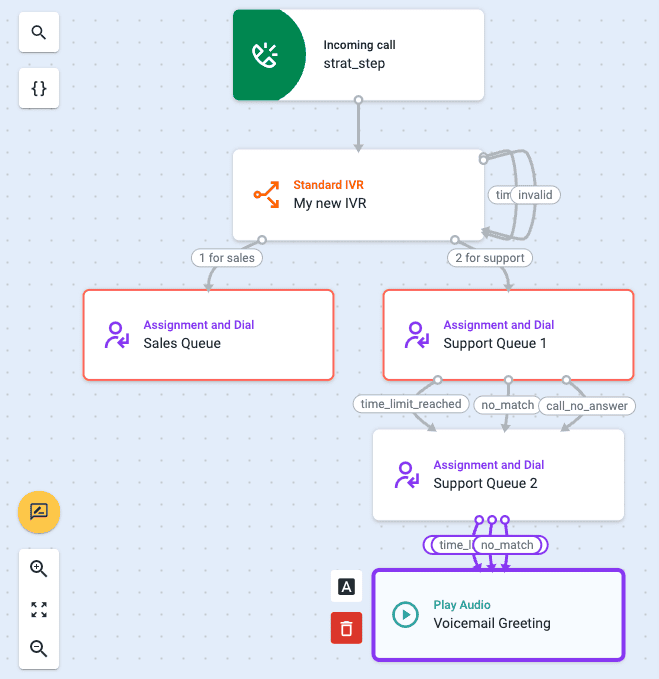
Talkdesk is a cloud contact center platform built for enterprise teams that need deep customization, industry-specific solutions, and AI-driven automation. The platform is heavily focused on industry-specific solutions, with pre-built packages for financial services, healthcare, retail, and others.
Top features:
- AI-powered routing — Navigator uses intelligent call routing based on conversation context to match callers to the best available agent in real time
- Copilot and Autopilot — Copilot provides real-time agent assistance, while Autopilot deploys virtual agents that can resolve issues autonomously
- Workforce management — Advanced scheduling, forecasting, and performance management tools built into higher-tier plans
Starting price: $85/user/month for digital channels; voice starts at $105/user/month. Note that many AI features are paid add-ons even on higher plans.
4. Dialpad
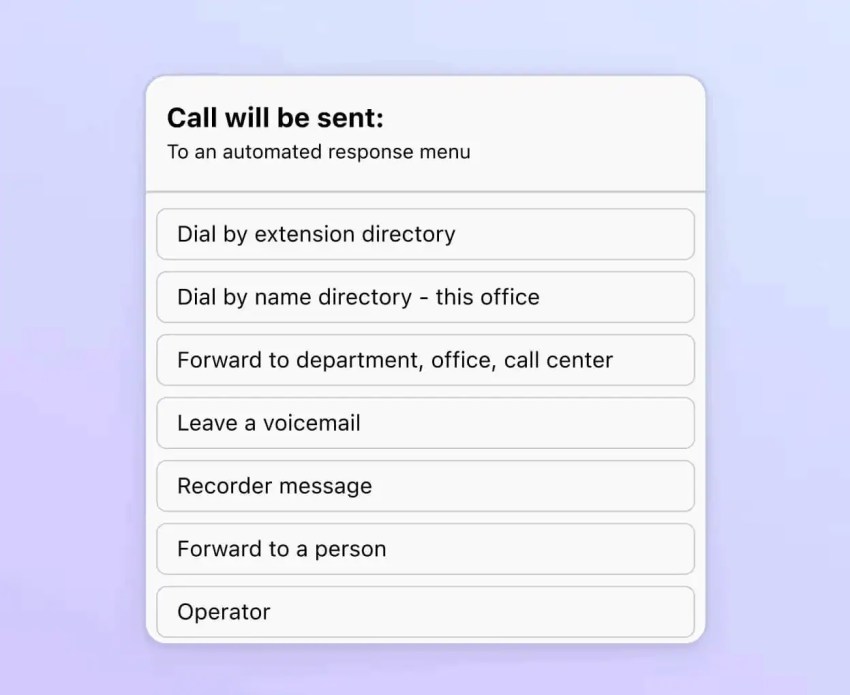
Dialpad is an AI-first cloud communications platform that includes real-time transcription, sentiment analysis, and automated call summaries across all plans. Call routing is one of its more robust features, allowing admins to create call flows for inbound calls, set ring groups and business hours, and enable multi-level IVR with pre-set call rules.
Top features:
- AI on every plan — Built-in AI and analytics on all plans, including real-time transcription, sentiment analysis, and call summaries
- Flexible routing options — Skills-based routing, simultaneous ringing, round-robin routing, and fixed order routing all available within the platform
- Multi-level auto attendant — Included on all plans with customizable call routing and personal work-hour solutions
Starting price: $15/user/month (billed annually). Note that advanced contact center features require Dialpad Support, which starts at $80/user/month.
2. RingCentral
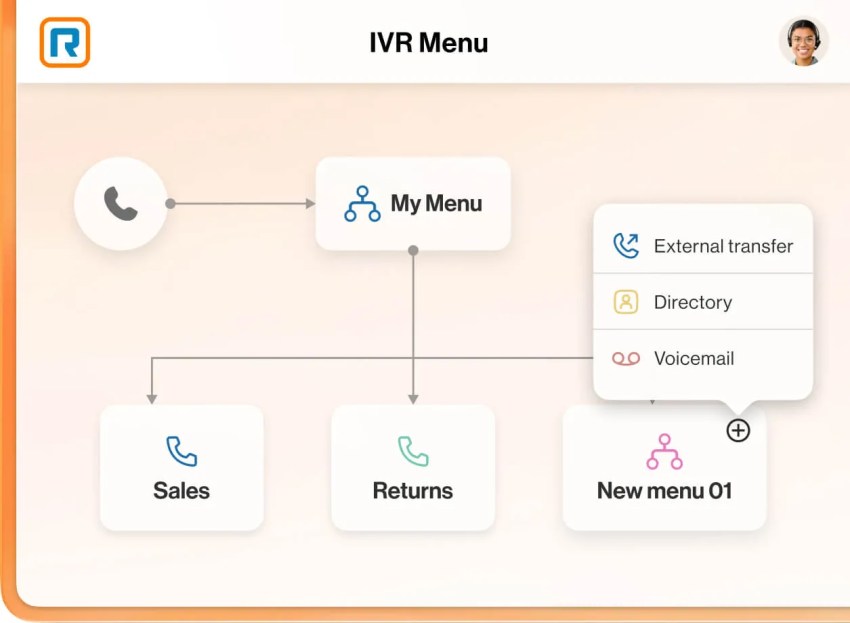
RingCentral is a cloud communications platform with call routing and contact center capabilities for organizations managing high call volumes, multiple locations, or international operations. It also provides security and compliance controls for businesses with defined regulatory requirements.
Top features:
- 400+ integrations: Offers prebuilt integrations and an open API for connecting call routing with CRM, help desk, productivity, and other business applications.
- Omnichannel routing: Routes interactions across voice, SMS, web chat, and social media through a shared platform.
- AI meeting and call insights: Provides features such as meeting summaries, call insights, and live transcription, with availability varying by product and plan.
Starting price: $20/user/month (billed annually)
Nextiva: Your Call Routing Solution
Effective call routing helps businesses reduce wait times, improve call handling, and connect customers with the right agent faster.
Nextiva makes it easier to build and manage call flows with cloud-based tools like drag-and-drop call flow design, custom IVR menus, business-hour routing, and skills-based routing. Plus, Nextiva provides real-time analytics, AI-powered call intelligence, and 99.999% uptime.
With flexible, easy-to-manage call routing, your team can adapt faster and deliver a better experience on every call.
Ready to streamline incoming calls? See how Nextiva can help.
Your AI-Powered Contact Center
Route all interactions to the right agents. No more unnecessary call escalations, slow transfers, or putting customers on hold.