

 VoIP
VoIP  Blog
Blog  Business Communication
  Customer Experience
  Leadership
  Marketing & Sales
  Nextiva News
  Productivity
If your phone system sends too many callers to voicemail or keeps your team tied to a desk, it can hurt both customer experience and business performance. Outdated phone systems lead to missed calls, slower response times, and a less professional experience for customers.
Virtual phone numbers give businesses more flexibility in how they handle calls. They help support remote teams, route callers to the right person, separate work and personal calls, and establish a local presence in different regions. You can choose a new local or toll-free number or transfer an eligible number you already use.
Business virtual phone number costs typically start at $10 to $20 per user per month. Nextiva plans start at $15 per user per month with annual billing and include a business phone number, calling, messaging, and mobile and desktop apps.
This guide explains how virtual phone numbers work, what they cost, how leading virtual phone service providers compare, and how to get the right number for your business.
What Is a Virtual Phone Number?
A virtual phone number connects to an online account with a provider rather than a specific physical location, device, physical phone line, or SIM card. It routes calls through the provider’s cloud-based business phone system, allowing users to make and receive calls from different devices and locations.
You may also see a virtual phone number described as an online phone number, digital phone number, or virtual telephone number. These terms generally describe a number managed through software rather than one permanently connected to a single telephone line.
To a customer, it looks and works like a regular phone number. They dial it from any phone, but behind the scenes, the virtual phone service can ring a desk phone, a computer, a mobile app, an outside line, or several destinations in sequence.
The number is only one part of the service, as a business plan may also include call forwarding, voicemail, texting, an auto attendant, call queues, recordings, analytics, and integrations. Available features vary by provider and plan.
How Do Virtual Phone Numbers Work?
Most virtual phone numbers work via Voice over Internet Protocol (VoIP), the same technology behind services like WhatsApp Business and Google Voice. Instead of transmitting calls over a physical phone line or SIM card, this VoIP technology converts voice calls into data packets and sends them over an internet connection via Wi-Fi, LTE, or 5G.
Here’s the basic process:
- A caller dials your virtual phone number.
- The call is routed through your VoIP provider’s cloud-based servers.
- The provider forwards the call to whichever device or devices you’ve configured, such as a desk phone, mobile, or computer running softphone software.
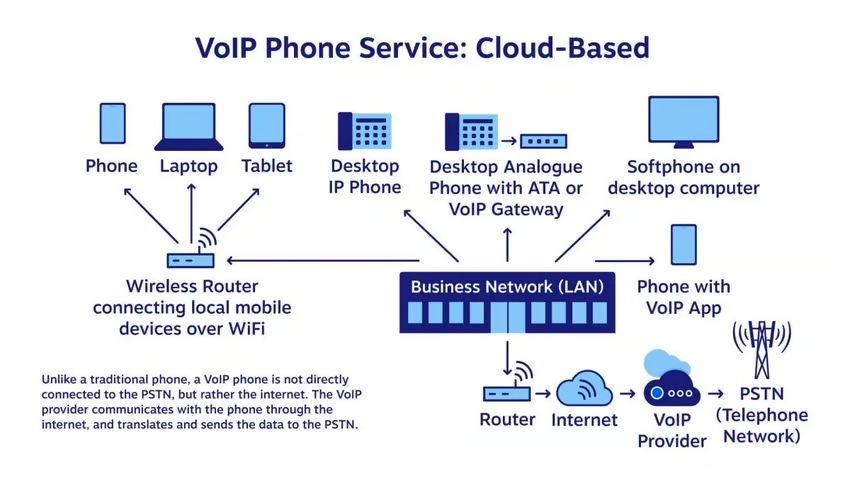
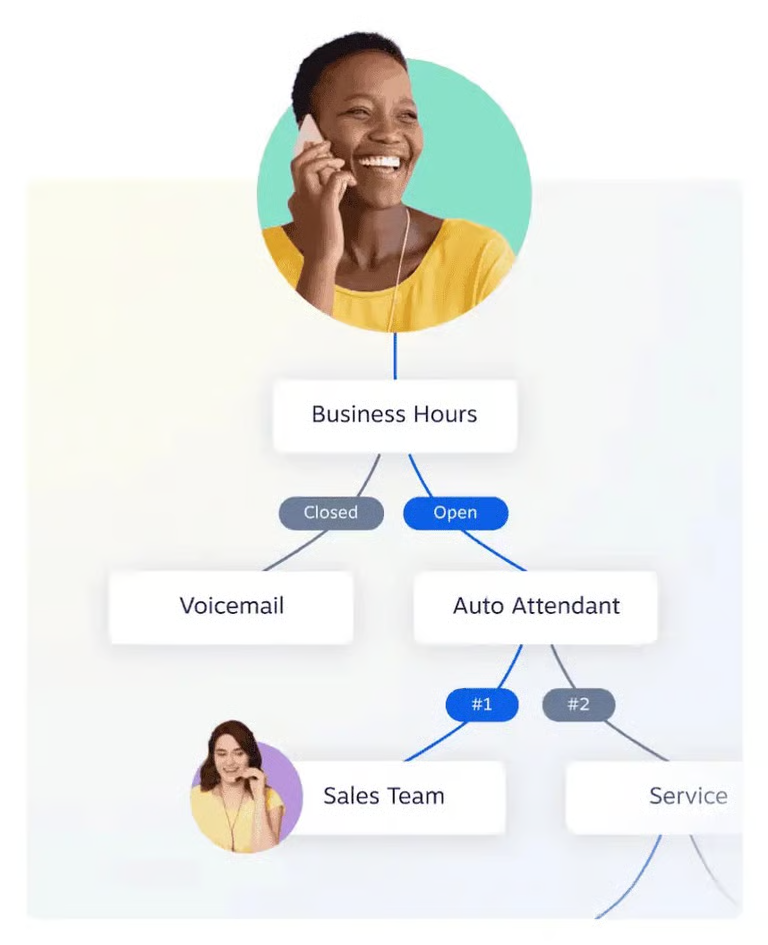
The process is highly customizable. You can configure routing based on business hours, caller ID, or call volume. For example, calls can ring your office system during business hours and automatically forward to a virtual mobile number or voicemail after hours, with no manual intervention required.
This flexibility means you control how, when, and where you receive calls, without any physical phone infrastructure.
Virtual Phone Numbers vs. Regular Phone Numbers
Why should you switch from a traditional phone number to a virtual phone number in the first place? Let’s look at the key differences that will make the switch easier.
| Category | Traditional phone number | Virtual phone number |
|---|---|---|
| Connection | Uses a fixed telephone line or carrier connection | Commonly uses a cloud-based VoIP service |
| Location | Usually associated with one service address | Can support users across approved locations |
| Devices | Primarily works through the phone connected to the line | Works through supported desk phones, computers, and mobile apps |
| Setup | May require physical wiring or an on-site installation | Usually configured online without installing new telephone lines |
| Call routing | May offer basic forwarding | Can route calls by schedule, menu selection, department, or user availability |
| Caller ID | Displays the number assigned to the line | Can display the business number when users call from supported devices |
| Scaling | Adding users may require new lines or hardware | Administrators can usually add users and numbers online |
| Service dependency | Some copper landlines may work during a power outage | Internet and power outages can affect service without backup systems |
Unlike traditional phone numbers, virtual numbers are not restricted to one line or device, giving businesses more control over where and how they answer calls.
Types of Virtual Phone Numbers
Virtual phone numbers come in several configurations, each suited to different business needs:
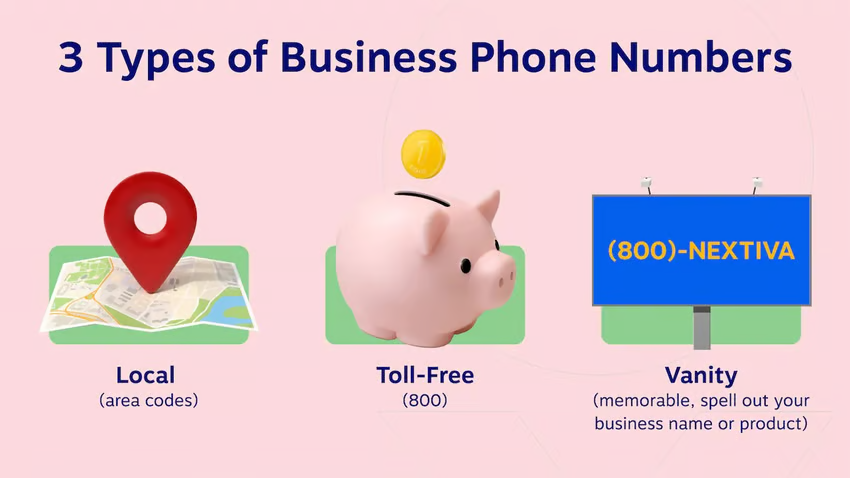
- Local phone numbers: Tied to a specific geographic area code, local numbers help businesses establish a community presence and appeal to customers who prefer calling a familiar local number.
- Toll free numbers: These numbers use prefixes such as 800, 888, 877, 866, 855, 844, and 833. The business pays applicable inbound calling charges so customers can call without a long-distance fee.
- International numbers: Country-specific numbers that allow global businesses to maintain a local presence in other countries without a physical office.
- Vanity numbers: Custom numbers that spell out a word or phrase on the keypad, like 1-800-FLOWERS. They’re highly memorable and effective for advertising, though availability is limited and they typically cost more than standard numbers.
Worth noting: You don’t have to start from scratch. Most virtual phone providers support number porting for eligible business numbers, including a landline number and some cell phone numbers. You can also transfer your existing business number to a virtual system and keep the number your customers already know.
Key Features to Look for in a Virtual Phone Number Service
Each virtual phone line comes with a different combination of capabilities. Compare the following features when evaluating your options:
Call forwarding
Call forwarding routes incoming calls to whichever device or team member you designate, be it a mobile phone, desk phone, or computer, based on rules you set in advance.
Look for providers that support simultaneous ringing across multiple devices, sequential forwarding if the first device doesn’t answer, and conditional forwarding based on time of day or caller ID. The more granular the forwarding rules, the more control you have over how calls reach your team.
Voicemail transcription
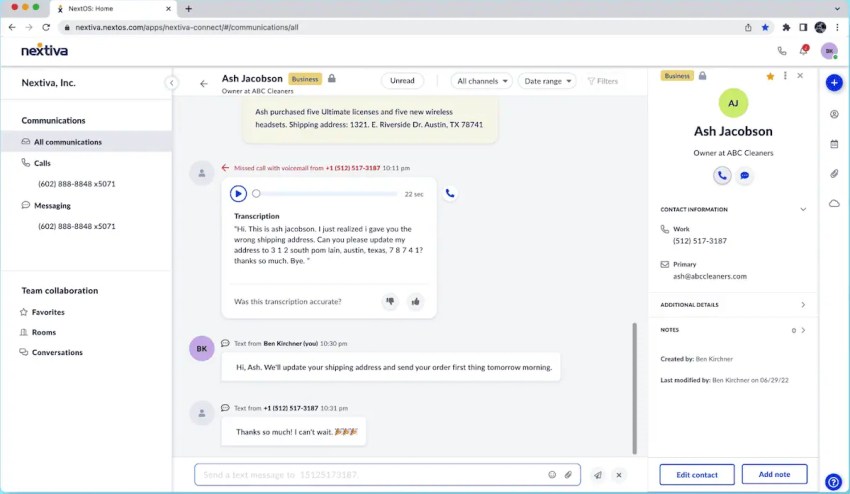
Voicemail transcription is what separates a modern virtual phone service from a basic one. Transcription converts voicemail audio into a text message and delivers it via email or in-app notification. This form of visual voicemail lets your team read and prioritize messages without listening to each recording.
For high-volume inboxes or teams that spend most of their day on calls, this feature alone can meaningfully improve response times.
Auto attendant
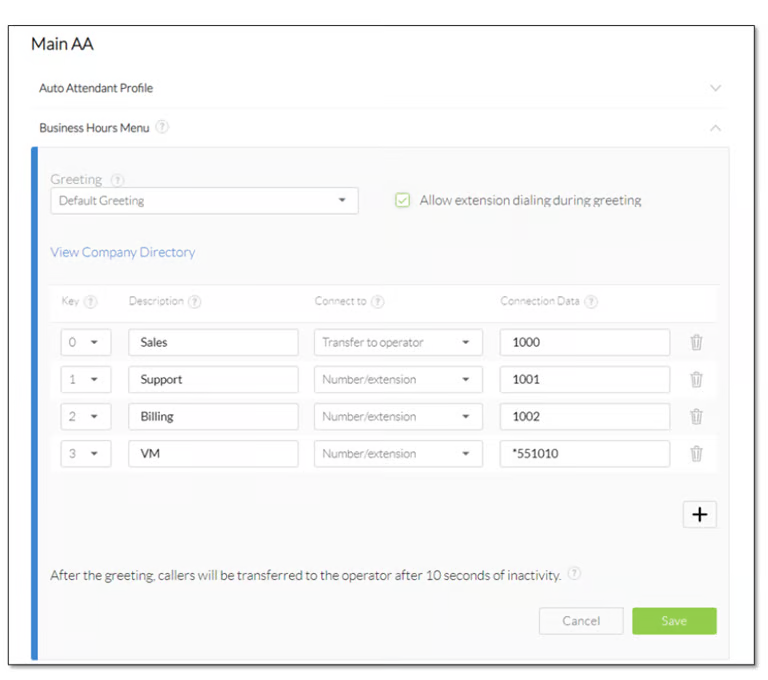
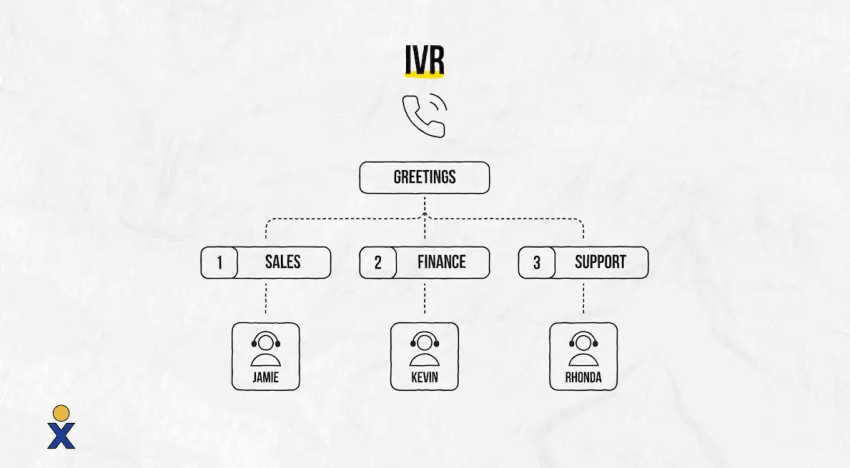
An auto attendant greets incoming callers with a professional recorded message and presents menu options that route them to the right department or individual without a live receptionist. These advanced features, for small businesses in particular, create an immediate impression of professionalism and ensure callers reach the right destination even during busy periods or outside business hours.
Mobile and desktop apps
A virtual phone number is only as useful as the devices it works on. Look for providers that offer fully featured iOS and Android apps alongside a desktop application with consistent functionality across all platforms. Agents should be able to make and receive calls, access voicemail, send messages, and manage settings from mobile devices without losing capability when they’re away from their desk.
SMS and team messaging
Two-way SMS on your virtual number lets you send and receive text messages using your business number, keeping personal numbers out of customer conversations. Team messaging extends this internally, replacing fragmented email threads with real-time communication that stays in the same platform as your calls.
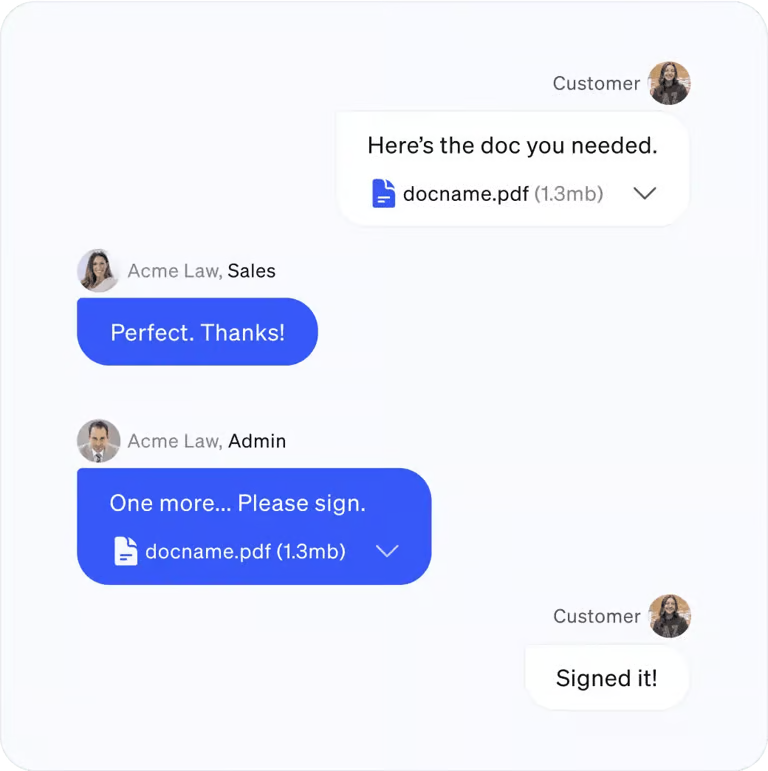
Look for providers that support both customer-facing SMS and internal team channels in a single interface.
Business hours and call routing
Business hours settings determine how calls are handled when your team is and isn’t available: routing to voicemail, an after-hours message, or an on-call number outside of defined hours.
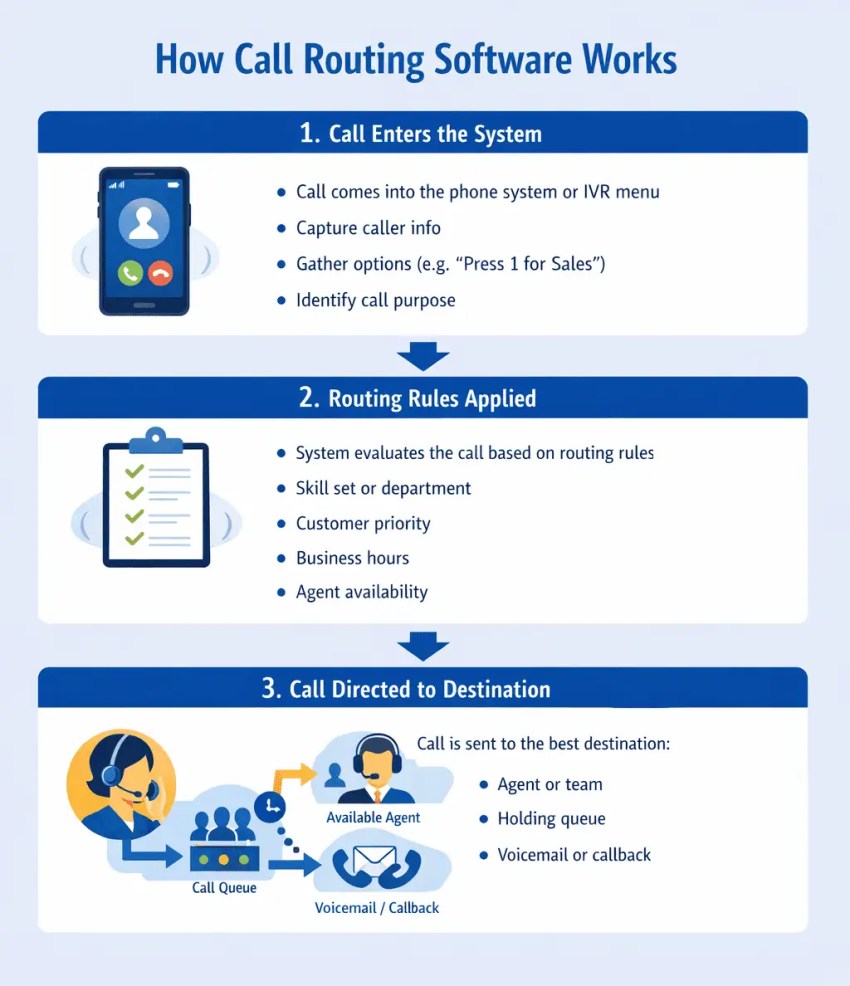
Combined with call routing rules based on caller input, agent availability, or skill set, this feature ensures that every business call reaches the right destination at the right time, regardless of when it comes in. It’s one of the most operationally important features on this list and one of the most frequently underutilized.
Call analytics and reporting
Call analytics show metrics such as call volume, missed calls, call duration, wait times, and routing activity. These reports can help businesses evaluate staffing requirements, compare campaign performance, and find patterns that may be affecting customer service. Available metrics vary by provider and plan.
Benefits of Using a Virtual Phone Number
Since a virtual business phone number isn’t tied to a physical location, you can access it from any internet-enabled device. But its flexibility isn’t its only advantage. Here are some of the main business benefits of using a virtual phone number.
1. Work from anywhere
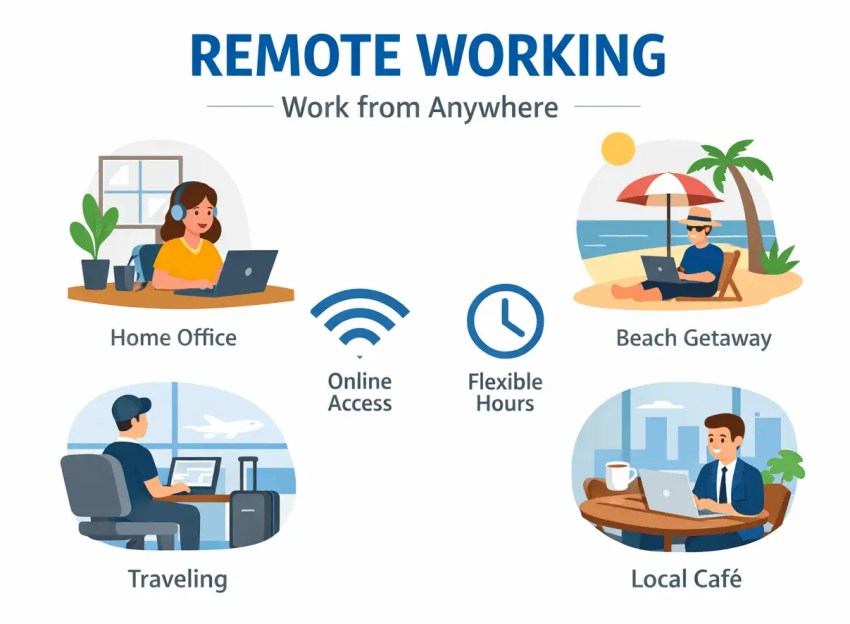
Virtual phone numbers allow you to answer calls from mobile apps, tablets, computer apps, or VoIP-enabled desk phones with a consistent business identity. Employees can work remotely, travel freely, and collaborate from different locations without disrupting customer communications. This creates a consistent, professional presence, no matter where your team works.
2. Separate business and personal calls
With a virtual phone number, you no longer have to combine personal and business calls on one device. You can set up a separate business line to keep track of everything and protect your privacy.
Customers only see your business number when they call, keeping your personal contact information confidential. This is best for freelancers, remote workers, and small business owners who use their personal phone for work.
3. Create a professional presence
Your business number may be the first point of contact customers have. Using a local or toll-free number makes you more credible and accessible. Local numbers create familiarity with local customers, while toll-free numbers convey national credibility. Add personalized greetings, call menus, and business hours settings to build a professional and consistent experience for every caller.
4. Improve customer satisfaction
An auto attendant automatically answers calls, provides a professional greeting, and transfers them to the appropriate contact. This eliminates long wait times and ensures questions are answered competently, especially after business hours. Auto attendants enable even small teams to provide an optimal customer experience without the need for additional staff.
5. Reduce missed calls
With advanced call forwarding, you can route an incoming call to multiple devices or team members based on rules. Calls can be forwarded to specific times, transferred to available agents, or rotated between departments. This reduces the likelihood of customers reaching voicemail or being on hold for too long. Every call is handled promptly and professionally.
6. Modernize your voicemail
Traditional voicemail systems are outdated and difficult to manage. Virtual phone systems can automatically transcribe voicemail messages and send them via email or SMS. This feature lets you review and respond to voicemail messages more quickly, in a meeting or on the go. You stay informed and respond quickly without having to dial into a voicemail message.
7. Cut costs on hardware and international calls
Because virtual numbers use the internet to make and receive calls, you don’t need expensive hardware or a complex phone system. You can make outbound calls using a cell phone or computer, keeping upfront costs low.
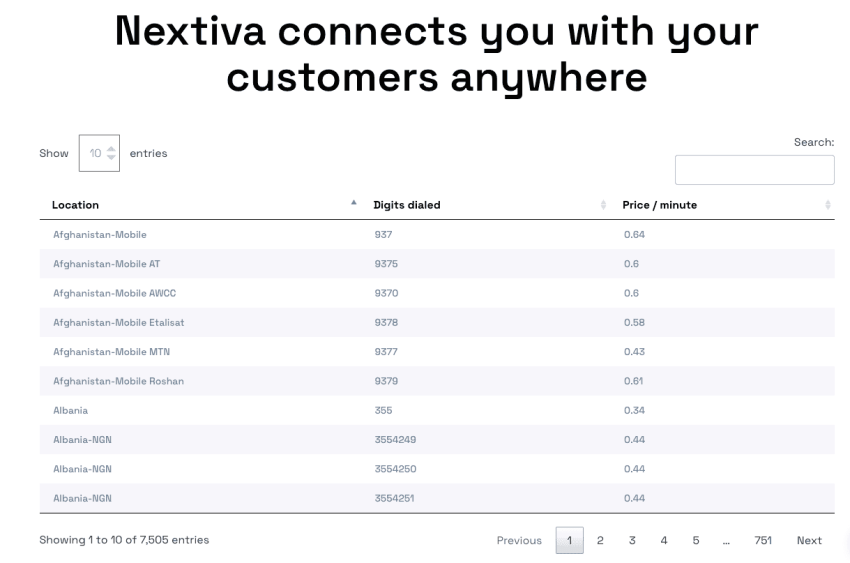
Landline phone systems or expensive international calling plans aren’t required. Competitive VoIP rates make global customer service cost-effective and quite accessible for small businesses looking to expand their reach without increasing overhead.
8. Track your marketing performance
By assigning multiple virtual phone numbers to individual marketing campaigns, you can better understand what’s working. You can measure how many phone calls result from each campaign, whether it’s a social media ad, a billboard, or an email newsletter.
These insights help you adjust your strategy and maximize the return on your marketing spend. Data informs your decision-making, enables smarter budgeting, and helps you optimize your reach for maximum ROI.
9. Scale your business with ease
As your team grows, a virtual phone system makes it easy to add new phone lines or departments. You don’t need technical support or additional hardware to get started. New numbers can be added and configured directly through a user-friendly dashboard. Virtual phone numbers are a practical option for growing businesses that need to remain flexible.
Most businesses should still compare user and extension limits, including whether a plan provides unlimited extensions or charges for additional users, numbers, or features.
10. Offer secure and reliable communications
Reputable business phone providers may offer call encryption, multifactor authentication, access controls, fraud monitoring, and dedicated account administration. Available protections vary by provider and configuration, so review the platform’s security documentation before purchasing.
Nextiva says calls can use TLS and SRTP encryption, but this should be presented as a Nextiva-specific capability rather than a universal virtual-number feature.
How to Get a Virtual Phone Number in 4 Simple Steps
How do you get started with a virtual phone number? Basic account configuration may take just a few minutes, although number porting and complex call flows take longer. Follow these four steps to set up your number.
Step 1: Choose your provider and plan
Choose a VoIP provider that fits your business needs. Look for features like call forwarding, call transfer, auto attendant, voicemail-to-email, and good customer service.
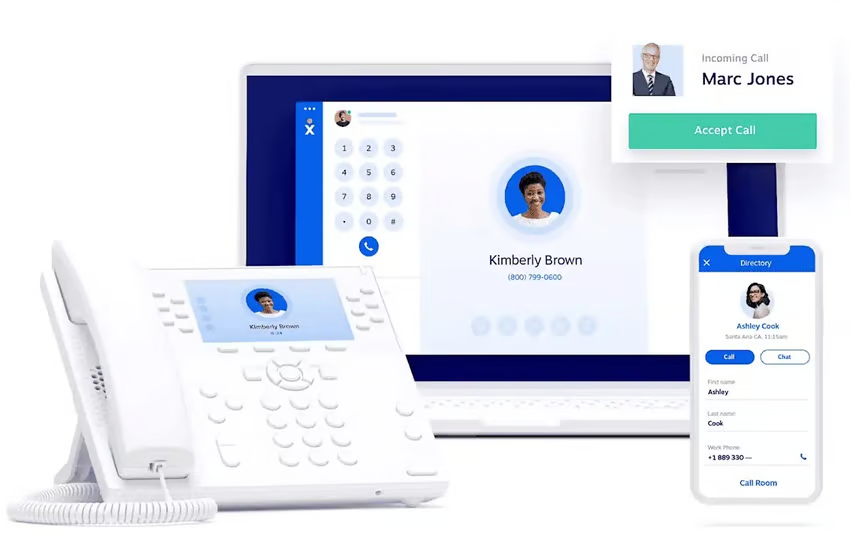
A good provider should offer flexible plans that scale with your business. Compare prices, features, and customer reviews, and look for excellent call quality and customer support. Picking the right platform from the start will save time and hassle later.
Step 2: Select your virtual number
When signing up, you’ll need to select your virtual phone number. You can choose a local number for your local community, a toll-free number for a larger audience, or a vanity number to support your brand. Some providers also offer international options for global customers.
Getting the right business phone number better showcases your business as more established and accessible. Your virtual number should match your brand profile.
Step 3: Set up and customize your phone system
Once you get your number, you can personalize call management and set up call flows. Route calls to mobile phones, desktop PCs, or VoIP phones, and add customized greetings, call menus, and business hours that fit your workflows to create a positive customer experience. You don’t need any technical knowledge to set up virtual phone numbers with helpful providers like Nextiva, who will guide you through the process and provide support at any time.
Step 4: Test calls and start using the number
Make inbound and outbound test calls. Check caller ID, audio quality, transfers, voicemail, after-hours routing, and emergency-calling configuration. If you plan to text customers in the U.S., complete any required business messaging registration before launching campaigns.
Get a business number without installing another phone line. Explore Nextiva’s virtual phone system.
Virtual Phone Number Provider Comparison
Advertised prices do not always show the total cost. Billing terms, user count, additional numbers, international calling, messaging registration, taxes, and add-ons can affect your monthly bill. The table below compares publicly listed starting prices and key features as of August 2026.
| Provider | Starting price | Number options | Key capabilities | Best for |
|---|---|---|---|---|
| Nextiva | $15/user/month, billed annually | Local number included; toll-free and vanity options available; toll-free number and minutes included with Engage | Calling, SMS, team messaging, video meetings, and mobile and desktop apps; higher plans add advanced routing and reporting | Businesses seeking phone service and customer communications in one platform |
| Dialpad | $15/user/month, billed annually | One local number per user; additional local and international numbers on eligible plans | Unlimited calling in supported regions, SMS/MMS, voicemail transcription, and AI-powered call transcription | Teams that prioritize AI-assisted calling and transcription |
| RingCentral | $20/user/month, billed annually | Local number included; additional local, toll-free, vanity, and international numbers available | Calling, SMS/MMS, team messaging, video meetings, integrations, and administrative controls | Growing and multi-location businesses with complex integration needs |
| Quo (formerly OpenPhone) | $15/user/month, billed annually | One local or toll-free number per user; additional numbers cost $5/month | Shared numbers, calling, texting, contact management, and AI features that vary by plan | Startups and small teams that want a shared phone inbox |
| Google Voice | $10/user/month for Starter; a Google Workspace subscription may also be required | One Google Voice number per user; availability varies by country and edition | Calling, U.S. texting, voicemail transcription, and call forwarding; Standard adds auto attendants, ring groups, and call queues | Small teams already using Google Workspace |
Prices and features may change over time. Confirm the quote, contract term, number availability, taxes, and usage charges before buying.
How to Choose a Virtual Phone Number Provider
Use these criteria to move beyond the lowest advertised price.
Reliability and continuity
Review the provider’s uptime commitment, network redundancy, service-status history, and failover options. Ask whether calls can be forwarded to mobile or outside numbers during a local internet outage. A strong service commitment matters most when phone calls generate leads, appointments, or support requests.
Number types and coverage
Confirm that the provider offers numbers in the cities or countries you need. Check toll-free minutes, international rates, vanity-number availability, and porting eligibility. If texting is important, verify SMS and MMS support for the exact number type and country.
Call management
Match features to your actual workflow. A solo professional may need forwarding, business hours, and voicemail transcription. A busy support team may need an auto attendant, queues, callbacks, recordings, supervisor controls, and analytics.
Integrations and administration
Look for connections to the CRM, help desk, calendar, or collaboration tools your team already uses. Check whether admins can add users, change routes, review call data, and manage permissions from one place.
Security and compliance
Ask about encryption, multifactor authentication, access controls, data retention, fraud prevention, and compliance support relevant to your industry. A provider can supply security controls, but your configuration and user practices still matter.
Pricing and contract terms
Calculate the full monthly cost for users, additional numbers, toll-free usage, international calls, SMS registration and usage, recordings, integrations, hardware, taxes, and support. When a provider advertises local calls free, confirm whether that means local calls are included without an additional per-minute charge and whether fair-use limits apply. Also review annual commitments, cancellation terms, and port-out fees.
Customer support
Compare support hours and channels at the plan you intend to buy, as support availability and quality vary by provider and plan. If calls are business-critical, confirm how the provider handles outages, ports, emergency requests, and escalations.
Common Use Cases for Virtual Phone Numbers
Virtual phone numbers solve different problems depending on how your business operates. Here are the situations where they deliver the most value.
Remote and hybrid work
Virtual phone numbers untether business communication from a physical office. Remote and hybrid employees can make and receive calls on any device such as a laptop, mobile, or desk phone, using a single business number, keeping personal numbers private, and maintaining a professional presence regardless of where they’re working.
Call routing, voicemail, and analytics work the same whether an agent is in the office or working from home.
Keeping business and personal calls separate
For business owners, freelancers, and anyone who uses a personal phone for work, a virtual number creates a clean separation between professional and personal communication without having to carry two phones. Business calls route to the virtual number, personal calls stay on your regular line, and you control when and where business calls come through.
Building a local presence
A virtual number with a local area code signals to customers that your business is part of their community, even if your team is based elsewhere. Businesses expanding into new markets use local virtual numbers to establish credibility and improve answer rates, since customers are more likely to pick up a call from a recognizable local number.
Customer service and contact centers
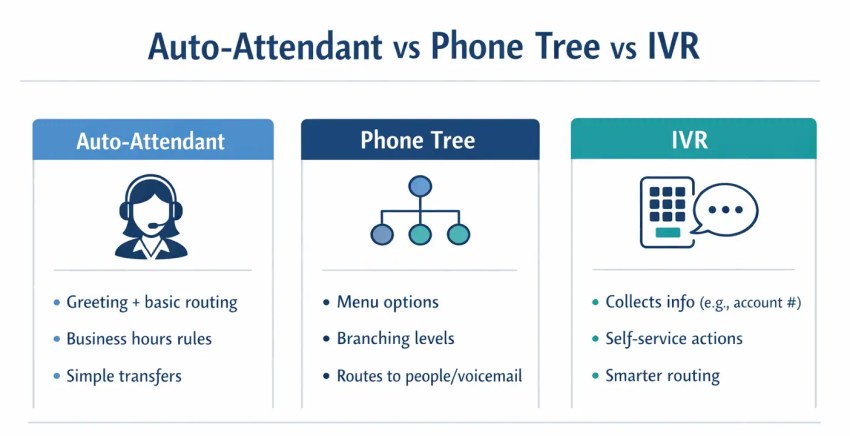
A main virtual number can connect an IVR (interactive voice response) menu, call queues, skills-based routing, voicemail, recordings, and reporting. These tools distribute calls across available agents and give supervisors data on wait times and handling patterns.
Nextiva’s higher-tier business phone and contact center options add advanced routing, reporting, and digital channels for teams that need more than basic forwarding.
Enhance productivity of sales teams
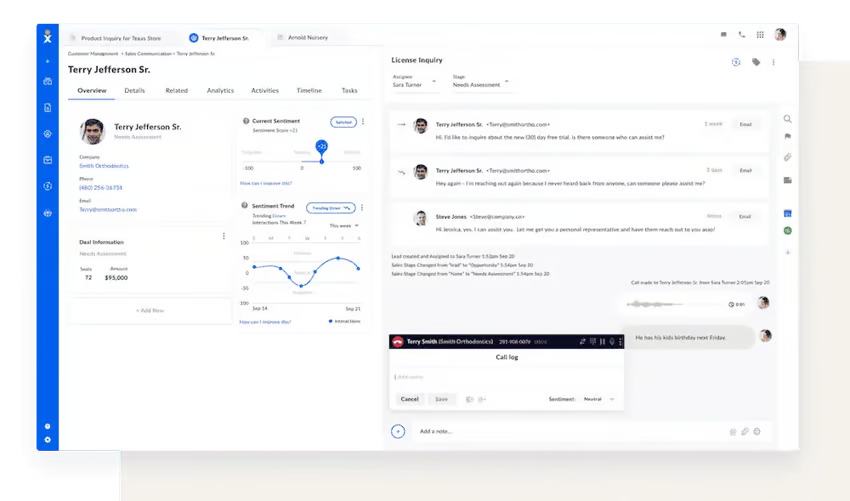
Sales teams can assign numbers to locations, representatives, or campaigns, then use call tracking and analytics to compare response and conversion patterns. CRM integrations can place customer information beside the call, while recordings support coaching where consent laws and company policies permit.
With Nextiva, sales calls can route by schedule or availability, and representatives can make calls through the desktop or mobile app while displaying the company number.
Local and international expansion
A local number can give customers a familiar way to reach a business that serves their area. For businesses operating across borders, international virtual numbers allow you to maintain a local presence in multiple countries without establishing a physical office in each one. Customers in those markets may be able to call a familiar local number instead of placing an international call, while the provider routes the call to your team.
Small businesses
Virtual numbers give small businesses access to enterprise-level phone features, auto-attendants, call routing, toll-free numbers, voicemail transcription at a fraction of the cost of traditional phone infrastructure. For a business that wants to look and operate professionally without a large communications budget, a virtual number is one of the highest-value investments available.
Marketing attribution
Businesses can assign different numbers to search ads, print campaigns, landing pages, or regional promotions. Call data then shows which source generated the inquiry. Use clear consent and disclosure practices when recording or analyzing calls
Limitations and Considerations of Virtual Phone Numbers
Virtual phone numbers offer more flexibility than fixed lines, but they also have technical, regulatory, and pricing limitations. Consider the following factors before choosing a number or provider.
Internet and power dependency
Most virtual phone services rely on an internet connection. Slow, congested, or unavailable broadband can cause delays, dropped calls, or poor audio. Power outages can also take routers, computers, and VoIP desk phones offline. The FCC notes that some VoIP services may not work during a power or internet outage.
Use a stable business internet connection and configure quality-of-service settings to prioritize voice traffic. Businesses that depend heavily on phone calls should also consider backup power, a secondary internet connection, and call forwarding to mobile or outside numbers during an outage.
Emergency calling and location accuracy
A virtual phone number is not permanently tied to one physical address. As a result, emergency responders may not automatically receive the caller’s current location. Providers may require users or administrators to register and update an emergency-service address for each device or working location.
Review your provider’s E911 terms and keep every registered address current, especially for remote employees. Emergency calling may also be unavailable during an internet, power, or provider outage, so employees should have a mobile phone or another way to contact emergency services.
Number porting takes time
You can usually transfer an eligible business number to a new virtual phone provider, but the process is not instant. If you want to keep your own phone number, ask the provider to confirm that. The timeline depends on the number type, current carrier, account details, and whether the submitted information matches the existing account.
Keep your current phone service active until the transfer finishes. Canceling the old account too early could delay the port or cause you to lose the number. Ask your new provider whether temporary forwarding is available during the transition.
Call quality depends on your network
Latency, jitter, packet loss, weak Wi-Fi, and network congestion can cause choppy audio, delays, or dropped calls. These problems may become more noticeable when many employees share the same connection or use bandwidth-heavy applications during calls.
Test your internet speed and network conditions before moving a busy office or contact center to a virtual phone system. Wired connections and properly configured networks may provide better call quality for employees working at fixed desks.
Texting and international availability vary
Not every virtual phone number can send and receive SMS or MMS messages. Texting support depends on the provider, plan, number type, and country. U.S. businesses may also need to complete carrier registration, follow customer consent requirements, and pay messaging fees.
International number availability also varies. Some countries require a local address, business documents, or identity verification before issuing a number. Confirm calling, texting, and documentation requirements for every market you plan to serve.
Additional charges can increase the total cost
The advertised starting price may not include every feature your business needs. Providers may charge extra for additional numbers, toll-free minutes, international calls, business texting, call recording storage, integrations, hardware, or advanced routing.
Request an itemized quote based on your number of users and expected call and message volume. Also check taxes, annual billing requirements, cancellation terms, and porting fees before choosing a plan.
Free virtual phone numbers have additional limitations
Free virtual numbers may work for personal use or occasional calls, but they often lack the features and controls businesses need. Common limitations include:
- Fewer business features: Free plans may exclude call recording, advanced forwarding, voicemail transcription, IVR menus, analytics, or unlimited calling.
- Limited number control: Some services restrict number porting or reclaim numbers after periods of inactivity, making it harder to keep the same number long-term.
- Authentication restrictions: Banks, social platforms, and other services may reject virtual numbers for two-factor authentication. Paid virtual numbers can face the same restriction.
- Limited support and device access: Free services may provide only self-service support and fewer desktop, administrative, or multi-user capabilities.
- Usage limits or ads: Some free apps impose call or message limits, display ads, or require payment for additional features.
A free number may be enough for light personal use. A paid business service is generally more suitable when you need centralized administration, team access, advanced routing, reporting, integrations, or dedicated customer support.
Power Your Business With a Nextiva Virtual Phone Number
Virtual phone numbers give businesses the flexibility, professionalism, and cost savings they need to continue growing and stand out from the crowd. Whether you’re managing a remote team, expanding into new markets, or simply looking to enhance your brand image, a virtual number optimizes communications and improves your customer experience.
But choosing the right provider is key.
With Nextiva, setting up a virtual phone number is just the beginning. You get access to a complete, cloud phone service trusted by over 100K+ businesses. Our VoIP system is easy to set up, scalable, and offers plans that include business calling and features such as an auto attendant, call forwarding, and voicemail-to-email. Available features and usage limits depend on the selected plan.
Don’t let an outdated phone system hold you back. Partner with a secure and reliable leader in business communications.
The Cloud VoIP provider 100K SMBs trust.
Get the business calling features you need, including a toll-free number, virtual voicemail, and an auto attendant. Plans start at $15 per user per month when billed annually.
Virtual Phone Number FAQs
You can port your existing local or toll-free number to a new virtual provider through number porting. A reliable provider like Nextiva will handle the entire porting process for you, keeping your business communications running smoothly. You get to enjoy all the benefits of a virtual phone system without changing your phone number.
You don’t need any special hardware and can use your virtual number to make and receive calls on your existing devices, including:
– Mobile phones (via mobile apps)
– Computers and laptops (via a softphone app)
– Existing VoIP desk phones
With virtual phone numbers, your team stays connected at their desk or on the go without requiring large investments in new devices.
Yes, most professional virtual phone numbers support business text messaging, SMS, and multimedia messaging (MMS). With a business VoIP service like Nextiva, you can send and receive SMS messages directly from your business number using a dedicated desktop or mobile app. You can easily separate your personal and business messages, manage all conversations on a central platform, and maintain a professional image when communicating with clients.
While free services are ideal for personal use, a professional business VoIP service provider like Nextiva offers a unified communications platform designed for growth. Key differences include guaranteed reliability and availability (SLA), advanced features like a multilevel auto attendant, call recording, detailed analytics, and dedicated customer support. Business platforms are also scalable and let you easily add users, lines, and locations as you grow.
Yes, when sourced from a reputable business provider like Nextiva, virtual phone numbers are highly secure. Communications are encrypted, and the numbers are dedicated to your account, not recycled. Always choose a trusted service provider and follow best practices for password security.
For personal use, services like Google Voice or TextNow offer basic numbers for free, though they may include ads and have limitations.
For business purposes, a dedicated virtual phone number is included with a paid subscription from a provider like Nextiva. While the service has a monthly fee for advanced features, reliability, and security, there’s no separate or additional charge for the virtual phone number itself.
Virtual phone numbers give employees access to the office phone system from anywhere with an internet connection. Your team can make and receive calls using their business number, either via a computer or mobile app, and maintain a professional presence even when away from the office. Virtual numbers unite a distributed workforce under a unified business phone system.





![What Is a VoIP Phone? A Beginner’s Guide [+ Best Picks]](https://www.nextiva.com/cdn-cgi/image/width=850,height=479,fit=cover,gravity=auto,format=auto/blog/wp-content/uploads/sites/10/2019/06/Nextiva_Header_what_is_voip_phone.png)