VoIP
VoIP  Blog
Blog  Business Communication
  Customer Experience
  Leadership
  Marketing & Sales
  Nextiva News
  Productivity
What Is a Corporate Phone System?
A corporate phone system is a Unified Communications (UCaaS) platform that integrates voice, video conferencing, team messaging, and CRM data into a single cloud-based application. Unlike traditional on-premise PBX hardware, modern corporate systems use VoIP technology to provide enterprise-grade reliability (99.999% uptime), advanced security (SOC 2), and AI-powered analytics for distributed teams.
While legacy systems focused on connecting desk phones, today’s platforms strengthen customer relationships, piping context and recordings directly into tools like Salesforce and Microsoft Teams.
Types of Corporate Phone Systems
Here are the most common phone system types corporates use:
Traditional landlines
Traditional landlines are becoming obsolete. Major carriers globally are decommissioning copper networks (the PSTN switch-off), making maintenance of analog PBX hardware prohibitively expensive and difficult. In 2026, relying on copper lines is a significant business continuity risk.
VoIP (cloud and on-premise)
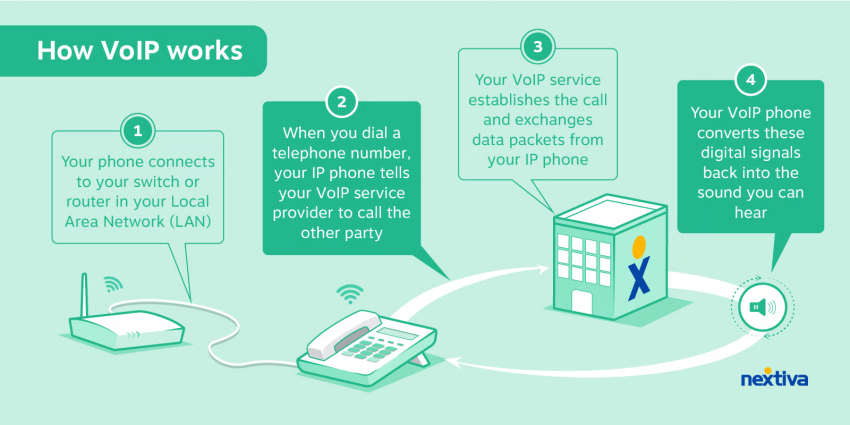
VoIP has become the standard for business calling because it runs on your existing internet connection instead of dedicated phone lines. A VoIP phone system in the cloud removes the burden of physical hardware and makes it easy to scale — even getting an international number for a new market can take just minutes.
Some companies stick with on-premises VoIP because their compliance rules demand it, but it comes with chores. Think updating firmware, swapping out IP phones every few years, and spending weekends on patches. That’s why the debate around hosted vs. on-premise phone systems is ongoing.
Watch: The hidden costs of on-premise hardware vs. the agility of the cloud.

Either way, the basics of VoIP stay the same across setups.
Hybrid systems
Some companies aren’t ready to ditch their old PBX outright. Instead, they run hybrid systems that combine legacy gear with cloud-based phone systems, bringing in mobile apps and call analytics. It works as a stopgap, though most companies end up moving fully to the cloud sooner or later. The global mobile VoIP market is projected to reach $327.5 billion by 2031, according to Allied Market Research, showing how fast companies are shifting to cloud-first business phone services. The pros and cons of cloud-based phone systems highlight why companies eventually transition from hybrid setups to fully hosted solutions.
Unique Features of Corporate Phone Systems
Traditional setups offered little more than a dial tone and extensions. Modern corporate phone systems go much further. Businesses that switch to VoIP phone services can cut telecom costs by up to 50%, according to Fortune Business Insights. That’s why features like call routing, analytics, and mobile apps are now baseline expectations for any serious business phone system.
Call routing and management
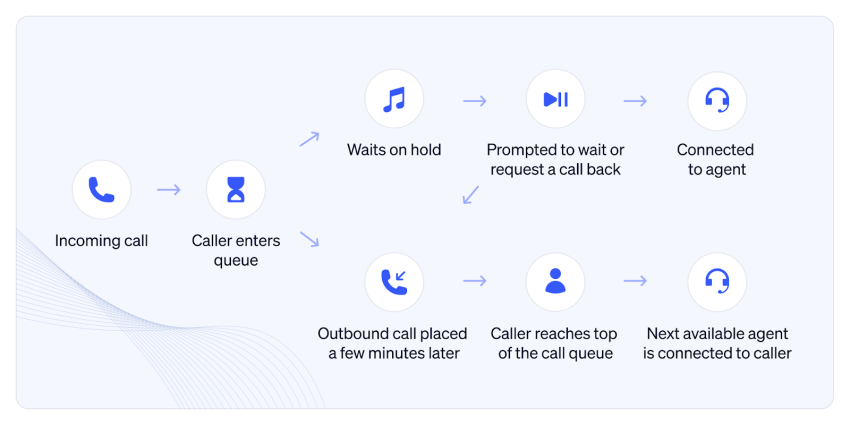
When people call, they expect quick answers. Call routing, auto-attendants, and smart call queues stop callers from getting bounced around. Tools like call forwarding, call transfer, and caller ID provide agents with context. Without call routing and management, callers get stuck in loops, leading to hang-ups. Even one dropped call can mean lost revenue.
Unified communication
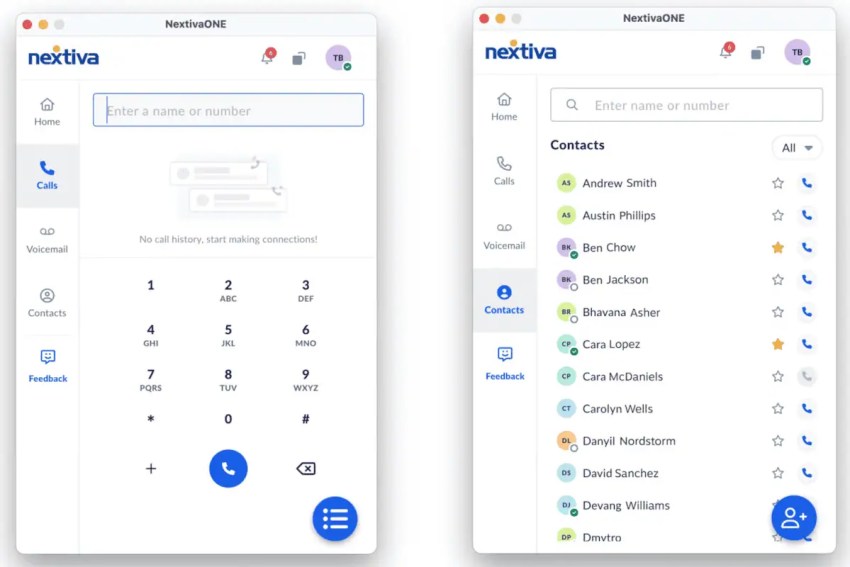
Agents don’t just pick up calls anymore. They’ve got a dashboard with phone, video conferencing, SMS, and chat sitting side by side. Add CRM integrations with tools like Salesforce, HubSpot, or Microsoft Teams, and every team member gets the full customer story instead of having to piece it together. As such, they resolve issues faster and build trust from the first word.
Mobility and remote access
Remote work means not everyone has a fixed desk or line. Softphones and mobile apps let staff pick up business phone numbers from laptops, smartphones, or other mobile devices. Without that option, people slip back to using personal numbers — risky for privacy, harder to track, and a headache for compliance. A single company app fixes that, keeping calls separate while giving small businesses and distributed teams the reach they need.
Scalability
Legacy systems made growth slow; every hire meant wiring, hardware, and downtime. Modern cloud-based phone systems are built to be scalable. Adding or removing a seat takes minutes, not days. That’s a big deal for fast-growing companies and seasonal teams. They can set up logins during peak months, then drop them later without paying for idle desk phones or getting stuck in long contracts.
Advanced analytics
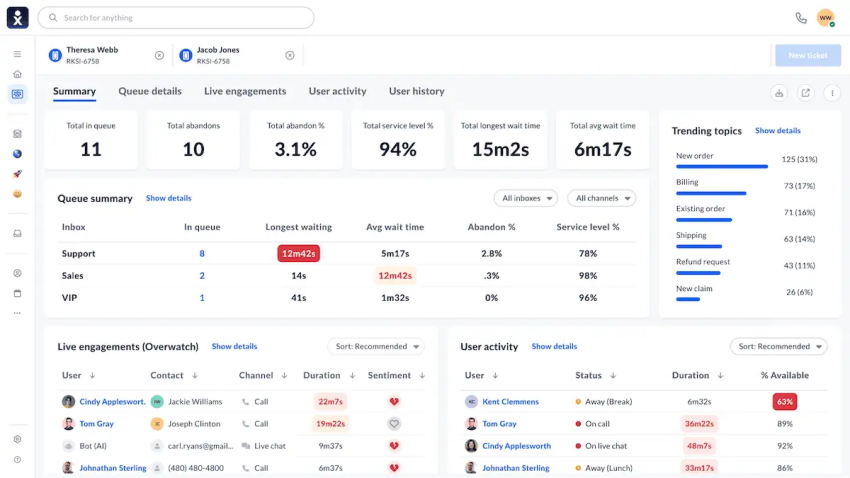
Modern phone systems turn calls into data. Call recording, voicemail transcription, and agent metrics show up in one dashboard with real-time updates. Leaders can track call queues, wait times, or sentiment and use that to coach with specifics instead of guesses. None of this was possible with analog desk phones, but today, it’s a key driver of better customer experience.
Security and compliance
People share their credit card information, health details, and even IDs over the phone. Weak systems make that risky and can potentially expose users to toll fraud, spoofed caller IDs, or data theft. That’s why strong encryption and redundant storage matter, along with compliance frameworks like the Health Insurance Portability and Accountability Act and General Data Protection Regulation.
Modern setups add more protection, too, with audited call recording and end-to-end security. The goal’s simple: keep companies out of trouble and reassure customers that their info stays safe.
AI-powered tools
AI tools like live voicemail transcription, predictive routing, and real-time coaching are already saving agents time. Some platforms go further, tracking sentiment or dropping post-call summaries straight into a CRM. The real question for leaders isn’t whether AI belongs in business communications but which advanced features are mature enough to trust right now.
Watch: How AI is moving from gimmick to essential workflow.

Residential vs. Corporate Phone Systems
A business phone system is built for teams, not one person juggling calls. Relying on personal lines or freemium apps like Google Voice only goes so far. A virtual phone system includes a dedicated business phone number, multiple phone lines, and extras that personal setups can’t match.
Here’s a quick table that shows how corporate systems stack up against residential or freemium options:
| Feature | Residential/Freemium (Google Voice, Cellular) | Corporate Phone System |
|---|---|---|
| Phone lines served | One line per number, limited simultaneous calls (e.g., 3 max) | Multiple extensions on one line via PBX or VoIP |
| Phone number control | Usually tied to personal lines or apps | Dedicated business phone number, centralized control |
| Call features | Basic voicemail, caller ID, and call waiting | Business-grade call routing, auto-attendant, and call queues |
| Scalability & flexibility | Hard to scale, no admin tools | Easy-to-scale, multi-user admin console |
| Support & uptime | Limited provider support | SLAs, priority support, guaranteed availability |
| Enterprise features | Rare (no analytics, CRM integration) | CRM integrations, call analytics, and compliance tools |
Top 5 Corporate Phone Systems
The market is crowded, but a few providers stand out. These platforms cover the basics and offer the advanced features companies expect from a modern business phone service.
| Provider | Best for | Key feature | Starting price |
|---|---|---|---|
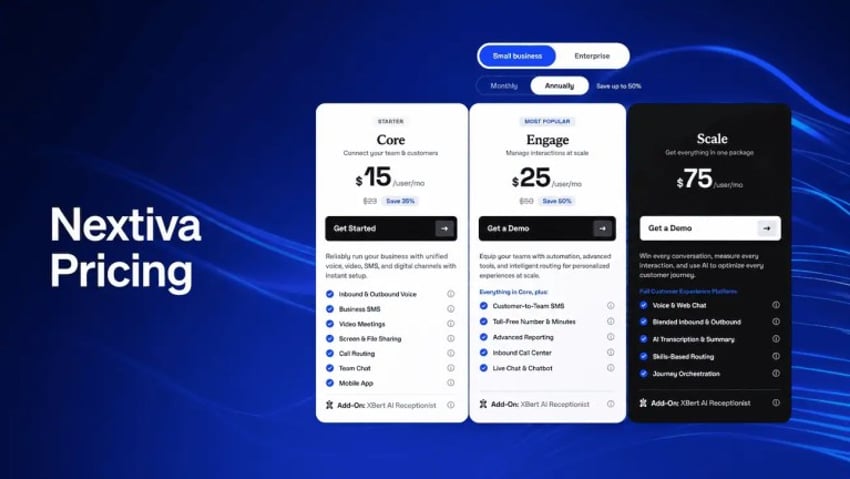
| Nextiva | Overall enterprise value | 99.999% uptime + 24/7 support | $15/user |
| Zoom Phone | Video-first teams | Meeting integration | $15/user |
| Vonage | Custom builders | API flexibility | $19/line |
| Ooma | Small retail/offices | Mobile and desktop apps | $19/user |
| Mitel | On-premises and hybrid deployments | PBX-to-cloud migration path | contact sales |
1. Nextiva
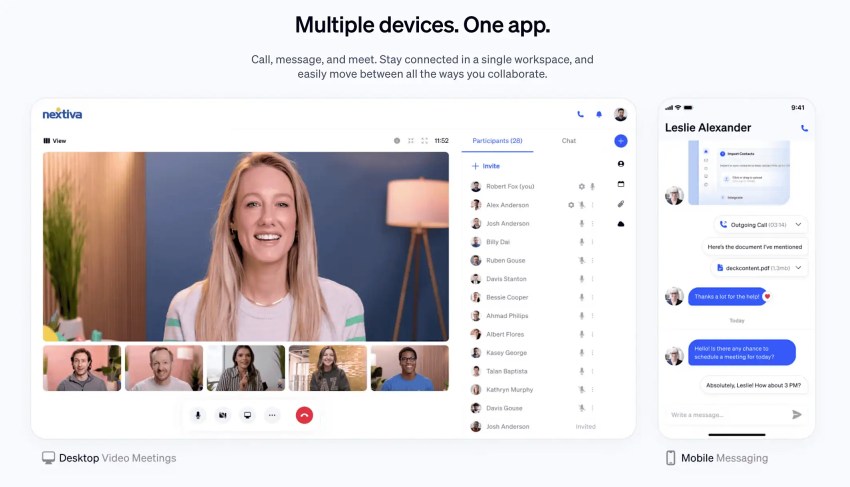
Nextiva is a fully unified communications platform built for the modern enterprise. It combines enterprise-grade reliability with the ease of use of a consumer app.
- Unified dashboard: Manage calls, video meetings, and team chat in one hub (NextivaONE app).
- Scalability: Start with the Core Plan for essential voice and video, then seamlessly upgrade to Power Suite CX to add full contact center capabilities (AI agents, omnichannel routing) without changing hardware.
- Enterprise reliability: Nextiva’s network is backed by 8 points of presence (PoPs) and carrier-grade data centers, ensuring 99.999% uptime.
- AI integration: Built-in AI transcription and smart summaries save managers hours of listening to call recordings.
Nextiva’s cloud phone system underpins day-to-day operations, while support for remote office phone systems makes it a good fit for distributed teams. Backing it all is 24/7 customer support and a white-glove onboarding process.
Why corporate teams choose Nextiva: Nextiva’s network is backed by 8 carrier-grade points of presence (PoPs), ensuring 99.999% uptime. It bridges the gap between a standard phone system and a full contact center without requiring a hardware overhaul.
2. Vonage Business Communications
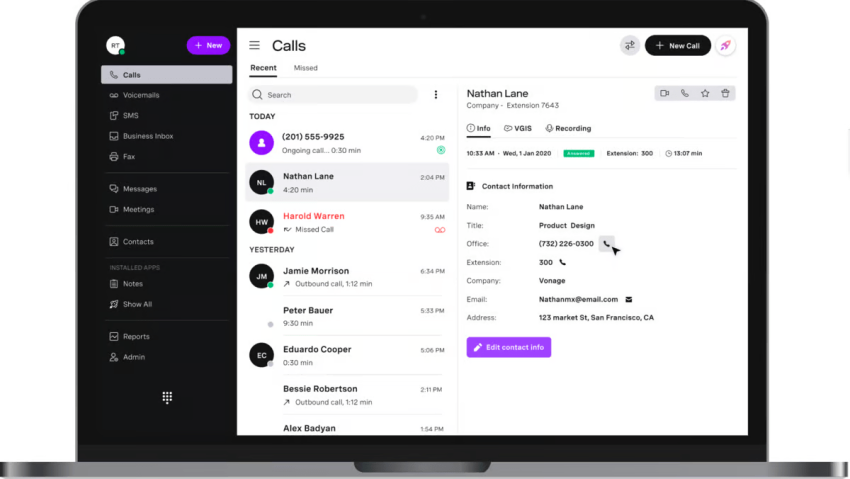
Vonage made its name as a VoIP provider, and its focus shows in how flexible it is for builders and IT teams.
- Provides open APIs, which means custom integrations are easy to spin up. It’s perfect if you need a workflow that isn’t out-of-the-box.
- Offers a variety of plans, from VoIP service for startups to enterprise setups.
- Has strong CRM integrations that let teams tie in sales and support data without the hassle of copying and pasting between platforms.
Some teams like the control Vonage gives them, while others compare it against Vonage alternatives to find a better fit.
3. Zoom Phone
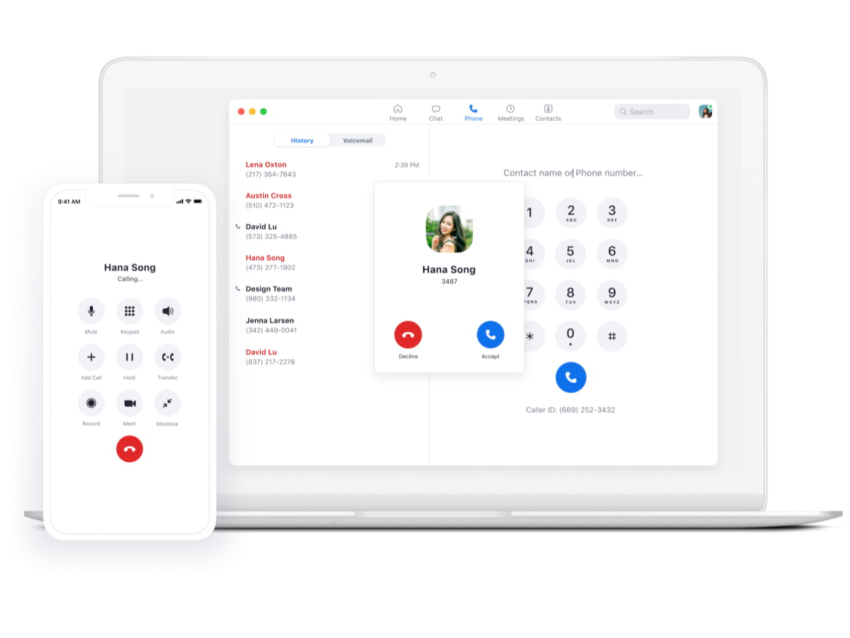
Zoom built its reputation on video meetings, and Zoom Phone is its way of pulling voice into that same ecosystem.
- Works best if you already live in Zoom — it offers tight tie-ins with video conferencing, Zoom Rooms, and conference calls.
- Adds video calling and voice features without asking staff to learn a new interface.
- Offers affordable entry plans, but advanced telephony and heavy call center needs aren’t its strong suit.
- Runs on mobile devices with the same app people already know, which makes adoption almost frictionless.
4. Ooma Office
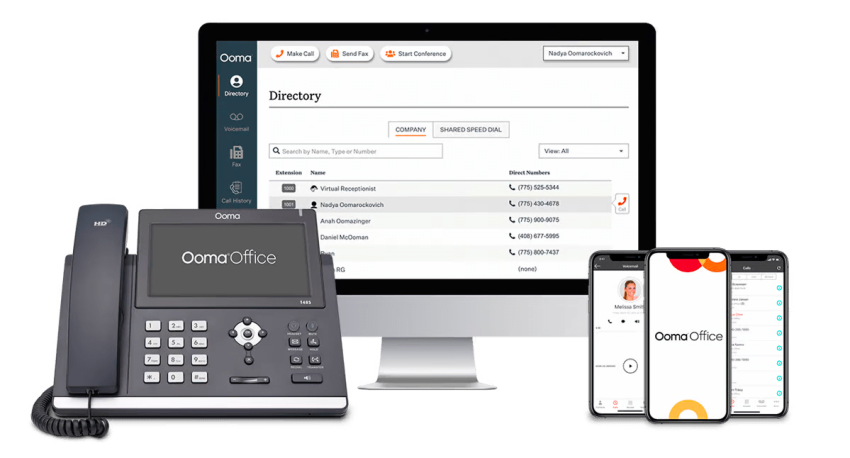
Ooma keeps things simple, focusing squarely on small business needs.
- Offers cheap and straightforward plans, making it a solid new phone option for offices that don’t want complexity.
- Allows staff to use their mobile phone as the main line without much setup.
- Works well as a small business phone system, but bigger enterprises usually outgrow it fast.
Some teams like Ooma for the price, while others check out Ooma alternatives when they need more features.
5. Mitel
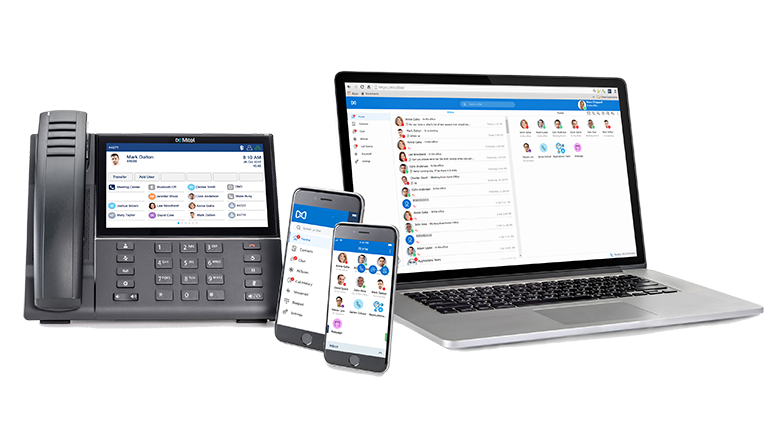
Mitel is a longtime name in business telephony, and it stands out for supporting on-premises, hybrid, and cloud deployments, a practical fit for enterprises with existing PBX investments.
- Covers every deployment model, from on-premises PBX hardware to cloud unified communications, so IT teams can migrate on their own schedule.
- Includes softphone apps for iOS and Android, letting staff make calls, join meetings, and chat from any location.
- Connects calling and meeting data to CRMs like Salesforce, Microsoft Dynamics, and Zoho, so customer context follows the conversation.
Some users report slow support responses, and companies planning a full move to the cloud often compare Mitel alternatives before committing.
How to Evaluate a Corporate Phone System Vendor
Choosing a phone system isn’t just about ticking boxes on a spec sheet. The smart move is to look at the same criteria across every vendor — scalability, cost, reliability, and so on — and see who genuinely delivers.
| Key Considerations | What to Look For | Why It Matters |
|---|---|---|
| Scalability | Look for a scalable setup that makes it easy to add or remove team members, departments, or even whole locations. | Growth shouldn’t mean ripping out cables. Seasonal teams and fast movers need to scale seats up or down without wasted spending. |
| Total cost of ownership | Go past the advertised pricing — factor in hardware, licenses, training, and ongoing support. | A “cheap” plan can turn expensive fast. A truly cost-effective option stays affordable once all costs are considered. |
| Integrations | Prioritize native CRM integrations with Salesforce, HubSpot, and Microsoft, plus links to help desk and productivity apps. | Saves hours of manual data entry. Agents see the whole customer thread without juggling tabs. |
| Reliability | Look for solid uptime, redundant data centers, and a proven service provider. Test incoming calls, outbound calls, and international calling. | If phones cut out mid-pitch, nothing else matters. Unlimited calling only helps if it’s stable. |
| Support and training | Round-the-clock customer support is a must. Check if they walk you through onboarding and help with migration. | Good support makes rollouts less painful. And if something breaks outside regular office hours, you’ve got someone to call. |
| Security | Think end-to-end encryption and compliance certs first. Add disaster recovery on top of that. | Protect data, block fraud, and keep telephony secure. Extras like audited logs and other advanced features are a plus. |
| Future-readiness | Look for signs that the vendor is putting money into new tech: AI, real-time reporting, and smarter tools that streamline workflows. | Phone systems age fast. You don’t want to be stuck with one that feels dated before the contract is up. |
Quick takeaway: Use this checklist when you’re in demo calls or reviewing RFPs. If a vendor can’t tick most of these boxes, they’ll create headaches later. It’s better to know now than six months into a contract.
Trends in Corporate Telephony
In 2026, three major changes will force companies to modernize their outdated hardware:
AI integration
Artificial intelligence is no longer limited to simple voicemail transcription. We are entering the era of AI-powered summarization. Tools like Nextiva XBert can now listen to calls in real-time, transact the conversation, and drop a summarized note into your CRM automatically. This eliminates manual data entry and ensures that the next agent knows exactly what happened, reducing repeat questions and handling times.
The copper sunset
Telecom carriers globally are aggressively retiring their copper wire networks (PSTN). Maintaining legacy landlines and on-premise PBX hardware is becoming prohibitively expensive as technicians retire and parts become scarce. Moving to the cloud is less about new features and more about business continuity — ensuring your lines don’t go dark because a 20-year-old part failed.
Softphone apps on the rise
With 5G becoming ubiquitous, the softphone (an app on your laptop or mobile) is becoming the primary device. Modern corporate systems now treat the physical desk phone as an optional accessory, not a requirement. This allows for hot-desking and fully remote hiring without the logistics of shipping hardware.
Choosing the Right Corporate Phone System: Nextiva
Choosing a phone system isn’t only about call quality. The right setup balances features, cost, scalability, and reliability. In the end, your choice has to fit your real business needs. Old landlines and PBXs are on their way out. VoIP and unified platforms keep modern teams running smoothly.
Get it right, and the payoff goes beyond clear calls. You streamline business communications, give staff tools they’ll use, and make the customer experience better in the process. Nextiva can lend a hand. Our cloud phone system covers the basics and the advanced features, but more importantly, it future-proofs your setup.
The cloud phone system built for remote teams.
Move your current PBX to the cloud or get a hosted VoIP system with superpowers. Nextiva is your destination for flexible VoIP solutions.
Corporate Phone Systems FAQs
A PBX is the old box of hardware sitting in the office closet. A VoIP phone system runs on your internet connection instead, so it’s cheaper and much easier to scale. You also get extras like call management and analytics, which are features a box of wires could never do. See more differences between PBX and VoIP.
Most cloud VoIP plans cost about $15–$40 per user each month, plus a little extra if you need setup or desk phones. The upside is predictability — there’s no big upfront spend, and the costs remain transparent. You can see a full breakdown in our VoIP cost guide.
Yes. A VoIP service can do everything a landline does, only with more flexibility. You can take calls on laptops or mobiles, track usage, and access analytics. For most companies, there’s no reason to keep the copper.
Absolutely. Cloud systems include apps for laptops and smartphones, so staff can answer business phone numbers anywhere. That’s why they’re a good fit for distributed or remote systems.
Look for end-to-end encryption, secure data centers, and compliance with HIPAA, Service Organization Control (SOC) 2, and GDPR. Modern telephony platforms have these protections built in, so you don’t need to bolt them on later.