Business Communication
  Blog
Blog  Customer Experience
  Leadership
  Marketing & Sales
  Nextiva News
  Productivity
  VoIP
VoIP 
Businesses with outdated technology typically see a huge decline in employee productivity. Multiple studies have shown that legacy systems drain resources, with U.S. businesses losing up to $1.8 trillion annually in productivity due to time spent on repetitive tasks that could be automated instead. The cost of using legacy systems is shockingly high, especially when teams handle large volumes of phone calls.
But thankfully, automated phone systems (ATS) can help businesses solve most of these problems and build a more productive workforce. This guide will explain what an automated phone system can do for your business, what features to look for when choosing one, and how automated solutions enrich your workflows from day one using a modern business phone system.
What Is an Automated Telephone System (ATS)?
An automated telephone system (ATS), also known as an auto attendant phone system, is a communications tool that uses software for processing and managing incoming calls, routing calls, and handling customer calls without human input.
It uses predefined rules such as interactive voice response (IVR) and auto-attendant features to:
- Answer callers and give basic information
- Play pre recorded messages
- Route calls to the appropriate contact using structured call routing workflows.
IVR is the primary technology behind an ATS. It accurately processes caller interactions using pre-built algorithms, call flows, keystrokes, and voice commands. Automated phone systems respond with pre-recorded voice messages, text messages, or transfer calls based on the user’s choice. This reduces live agents’ work during the initial phase of a call and improves overall call management.
Modern ATS platforms have evolved beyond simple “Press 1 for sales” menu options. The 2026 standard includes:
- Advanced core technologies: Utilization of speech recognition, natural language processing (NLP), and intelligent routing.
- AI-driven intelligence: Capabilities powered by artificial intelligence (AI) and machine learning.
- Enhanced understanding: The ability to understand spoken customer inquiries and interpret caller intent.
- Improved optimization: Resolving issues faster and more accurately than traditional systems.
Many organizations deploy ATS within a cloud phone system or VoIP business phone system that uses Internet Protocol technology and a stable internet connection to deliver reliable performance. Modern teams and remote employees access these systems through mobile phones, desktops, and mobile apps, and cell phones across different communication channels.
Key Features of an Automated Telephone System
What are the key features that make an ATS? Focus on these key tools and functions when you evaluate an automated phone, automated phone calling system, or small business phone system.
These top seven features help you manage incoming calls, answer calls, support incoming calls, enable routing calls, transfer calls, and keep daily operations running smoothly for small businesses and growing organizations handling large volumes of customer calls.
Auto-attendant and conversational IVR
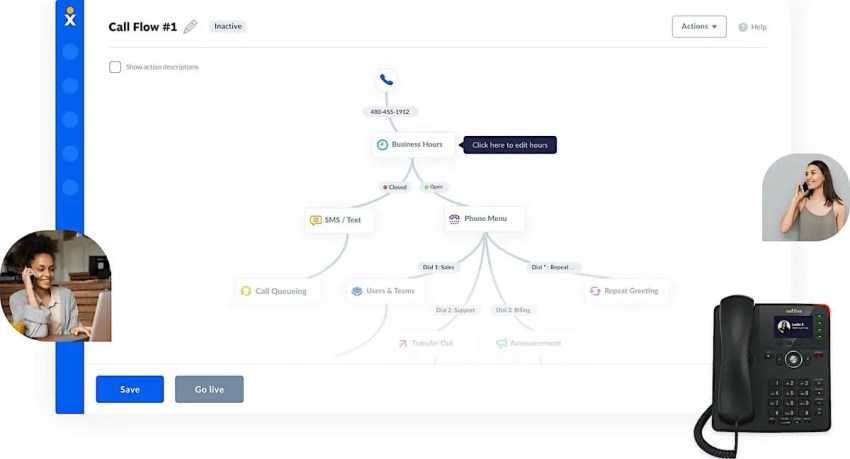
An auto-attendant is a virtual receptionist that guides callers through a structured menu to the right department. It gives your business a professional image and connects direct callers immediately with the appropriate resource without needing a live agent, especially for repetitive and routine calls.
For more natural, human-like conversations, conversational IVR uses artificial intelligence and chatbots to understand and respond to spoken requests. Both systems help route calls, enable better call flow management, and provide strong self-service capabilities. Advanced setups also include a dial-by-name directory to help call recipients reach the right person faster.
Automated call routing
One of the most essential features of an automated telephone system is the ability to direct callers to the right department or agent. This is done through voice menus, ranging from the classic “For billing, press 1…” DTMF/touch tone menus to more advanced speech recognition tools.
Automated call routing helps ensure callers can quickly reach whoever they need to speak to without jumping through hoops or being sent back and forth between departments, making it a core component of any ATS and any automated calling service. It also helps organize multiple phone numbers across teams.
Call queuing
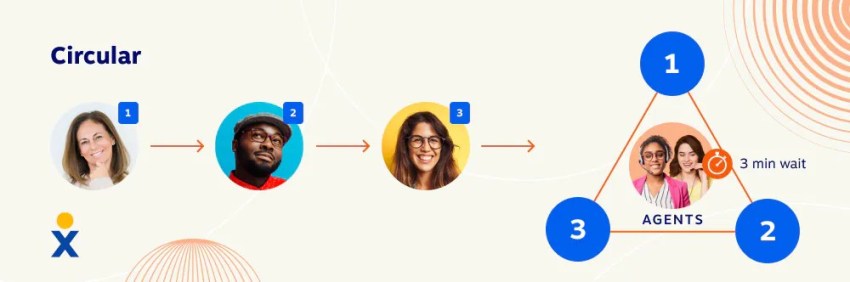
Nobody likes waiting on hold, but many automated phone systems can still be used to make the wait a less painful experience by using better call flows. Call queuing provides a virtual waitlist for callers, including options for estimated wait times and hold music, and helps organizations handle high volumes of incoming calls, outgoing calls, direct calls, and large-scale automated dialing campaigns.
One of the most helpful options for a call queue is the callback feature. Callers can leave their phone number and then receive an emergency notification or appointment reminder as soon as someone is available to assist them. That way, callers can go about the rest of their day without needing to stay on the phone for an extended period or lose their position in the queue.
Self-service options
Automated phone systems come with self-service options that let callers retrieve information, make payments, and complete routine tasks on their own, which reduces repetitive inquiries handled through only human input. For example, customers can check account balances or schedule appointments without speaking to a live agent.
Businesses manage requests across multiple channels, including instant messaging and video meetings through video conferencing and other communication channels, to deliver a steady experience regardless of how customers reach out.
VoIP phone technology supports this flexibility by letting users access services through mobile devices, desk phones, or computer softphones. Teams provide fast support outside business hours while employees focus on high-value, complex tasks.
Voicemail management
Voicemail is such a ubiquitous part of any telephony system that we take it for granted, but proper voicemail management can have a significant impact on efficiency.
Voicemail management features enable callers to leave voice messages for specific individuals or departments. This ensures their messages reach the right parties seamlessly and provide all the information they need to get a callback as quickly as possible.
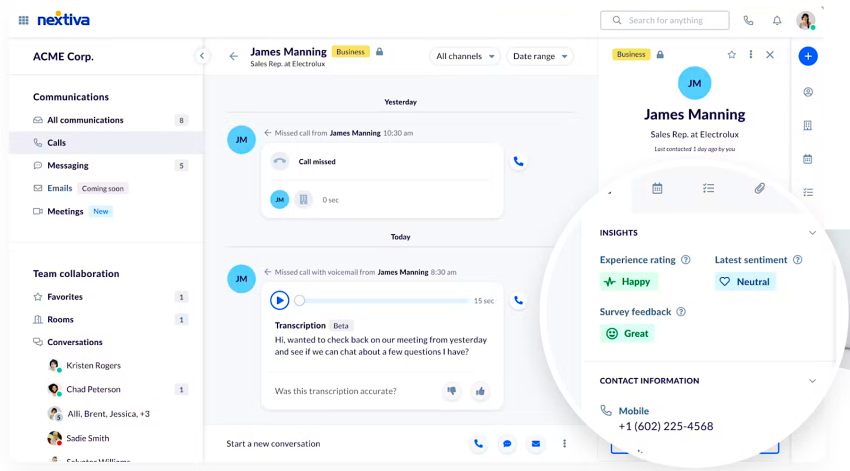
Voicemail systems now include advanced features like call recording, visual voicemail transcriptions, and an integrated answering machine that instantly captures key details for agents.

After-hours routing
After-hours routing automatically directs customer phone calls to voicemail, a live service, or another team in a different time zone during non-business hours. Businesses can configure rules to handle inbound calls and outbound calls, even outside normal operations.
Organizations can set their own after-hours routing and build call flows based on their policy and business needs. This ensures that even when your call center is closed for the night, business calls will still be directed to the right party, whether through voicemail or another agent.
Call analytics and reporting
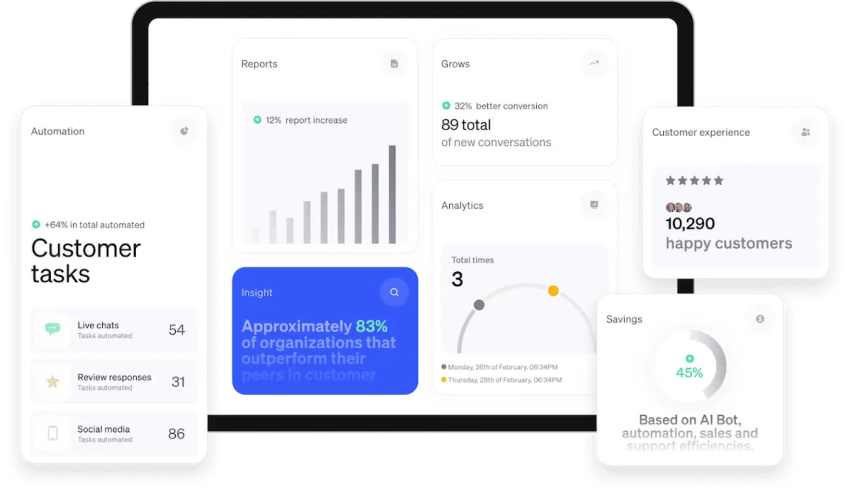
Call analytics are essential for any business. They can track metrics such as call volume, call duration, and even IVR menu usage, empowering you with insights into your business operations. Teams can also review call recording data for better call management and to understand performance trends and improve overall communication strategies.
These metrics help you identif y areas for improvement, find training opportunities for agents, and discover any trends or potential issues to watch out for. Without analytics, call center managers are flying blind, so the value of the insights a good call analytics feature can provide should never be overlooked.
Top 5 Business Benefits of an Automated Telephone System
Now that we understand what an ATS is, we need to look at its benefits. How can an ATS improve business processes, agent efficiency, and employee satisfaction?
Improved efficiency
The first (and arguably most important) benefit of an automated telephone system is efficiency improvement. Automating routine tasks saves contact centers time on every call in several ways.
First, automation can help customers get help quickly, as they can use self-service options to get help instantly or have their call routed to the right agent or department. For contact centers, this also frees up agents to deal with more complex customer inquiries and helps them instantly handle repetitive tasks like logging calls and taking notes, freeing up time from every call.
All these improvements improve efficiency across your contact center environment.
Reduced costs
Automation reduces staffing pressure by lowering call volume and enabling automated responses through an automated phone interface. This helps small business owners maintain efficient operations without overstaffing. Many business phone systems also include unlimited calling to help businesses control monthly communication costs.
Adding self-service options helps lower your overall call volume, keeping staffing needs at a reasonable level. At the same time, predictive call analytics can identify your peak call hours and find any trends that will impact call volume so you can adjust your staffing to make sure the right number of people are available.
24/7 availability
Automating your telephone system means customers can receive support 24/7, even when no agents are available. Self-service options and after-hours routing help ensure that customers will be able to receive basic services or information, even outside of business hours or time zone limitations, thus improving customer support and satisfaction.
Improved customer satisfaction
All these improvements lead to one important result: an empowered support team capable of providing superior customer service. Customers can receive quicker responses for basic inquiries and more easily reach the department or agent they need, in addition to the improved self-service options at their disposal.
Agents can also dedicate more time to helping callers, as all their manual, repetitive tasks are automated. Contact center supervisors can also use robust call analytics to get better insights into their agents and contact center efficiency, identifying pain points to address or opportunities to focus on.

Data-backed customer insights
Automated calling systems glean critical customer data from every interaction. Many systems now use big data techniques and advanced data analytics powered by cloud computing infrastructure to automatically manage and monitor call volumes, peak times, response times, and trends in caller behavior.
Call intelligence is especially helpful for supervisors and line managers to understand their teams’ performance and optimize processes. For example, if data shows certain departments experience consistent call delays, it indicates the need for better routing or staffing adjustments.
This way, automated phone systems inform key business decisions to address customer service gaps and level up the customer experience.
Use Cases for an Automated Phone System
The uses for automated telephone systems don’t end there, as there are several other ways they can be used to improve efficiency and customer support. Other ATS use cases include:
- Appointment scheduling and reminders: Customers can book appointments using self-service features and access them via their mobile app. Automated phone systems can also send automatic confirmations and reminders for upcoming visits via SMS or text message.
- Automated order and status tracking: It’s easy to check the order status in real time without having to speak to an employee. This feature is great for e-commerce businesses and integrates with supply chain management systems to provide accurate and up-to-date information.
- Secure bill payment: Customers can pay securely by phone at any time, increasing convenience and reducing manual labor. ATS also ensures transaction security, which is quite useful for financial services and digital business models, as customer data can be easily exposed.
- Market research and customer feedback surveys: Automated prompts help conduct surveys and collect feedback, either after the call or as a scheduled follow-up. They provide insights for developing a business strategy based on changing customer needs.
4 Examples of Automated Phone System Providers
While many VoIP service providers offer automated phone systems, their features, pricing, and target customers can vary. Here’s a comparison of some well-known providers in the market.
| Provider | Key features | Starting price (per user/mo) | Best for |
| Nextiva | Unified communications, multi-level auto-attendant, call analytics, high reliability, strong customer support. | $15 | Small to medium-sized businesses looking for a reliable, feature-rich, all-in-one business phone system. |
| RingCentral | All-in-one suite (phone, video, messaging), multi-level IVR, advanced analytics, strong CRM integrations. | $20 | Larger businesses that need a unified communication platform. |
| Grasshopper | Virtual phone system, toll-free/vanity numbers, custom greetings, voicemail transcription, call forwarding. | $14 | Solopreneurs and very small businesses that need a professional phone number and simple call management. |
| Aircall | Cloud-based call center, deep CRM/Helpdesk integrations, power dialer, call coaching, real-time analytics. | $30 (Minimun 3 licenses) | Sales and customer support teams that require strong integration with their existing software workflows. |
How To Choose the Right Automated Telephone System
Choosing an ATS now means selecting a system that supports your operations, improves communication, and adapts as your business grows. Use these steps to find the right fit.
Step 1: Conduct a communication audit
Review your current problem areas before you compare vendors and determine where manual work slows your team. Look at how your staff handles phone calls today and spot the gaps where automation can improve business communications.
- Volume and complexity: Track daily call volume and group requests into routine issues or complex problems that require human support.
- Automation potential: Pinpoint repetitive questions that consume most of your agents’ time and assign them to AI-driven resolution.
Step 2: Set your must-have capabilities
Set clear requirements early and decide which advanced intelligence features your business needs. Focus on systems that support modern AI capabilities instead of basic routing alone.
- AI agents: Handle natural conversations and resolve routine tasks without human involvement.
- Real-time sentiment tracking: Detect frustrated callers and route them to supervisors before issues escalate.
- CRM-based routing: Use customer data to prioritize high-value clients and route them efficiently.
Step 3: Review your network infrastructure
Review your technical setup and confirm that your internet connection can support a cloud-based phone system with high-quality voice and AI processing.
- Bandwidth: Provide about 100 Kbps of dedicated upload and download speed for every active call.
- Quality of Service (QoS): Configure routers to prioritize voice traffic and prevent dropped calls during busy periods.
Step 4: Check integrations and ease of use
Select a system that connects smoothly with your daily tools and supports easy adoption across your team.
- Tech stack compatibility: Integrate your ATS with CRM platforms and productivity tools. For example, Nextiva’s native integrations trigger screen pops that display caller data instantly and automatically log call activity in your CRM, which saves your team hours of manual data entry.
- User experience: Test the dashboard and confirm that your team can manage call flows without constant IT help.
Step 5: Calculate Total Cost of Ownership
Review the full cost of the system over time and examine every expense tied to the platform, along with the monthly subscription fee.
- Add-ons: Verify which advanced features, such as AI transcription, come standard and which require upgrades.
- Implementation and training: Review setup costs and evaluate onboarding requirements.
- Hardware needs: Decide whether your team will use IP phones or softphone apps on existing devices.
Step 6: Plan for future scalability
Your business will grow, so your communication platform must adapt as your needs change. Choose a provider that lets you add or remove seats quickly and gives you the tools to expand into new markets with ease.
- Global reach: Add international virtual numbers to build a local presence in new regions.
- Hybrid support: Support remote and hybrid teams, so your system keeps pace with future growth regardless of where employees work.
Automated telephone systems support smooth operations and clear customer communication. When chosen with care, this shift helps brands stay reachable, dependable, and prepared for future growth.
Automate Your Business Communications With Nextiva
If you’re ready to start looking for an automated phone system, there’s no better choice than Nextiva. We offer a comprehensive cloud-based VoIP phone system that’s affordable, scalable, secure, and reliable.
Plus, Nextiva provides a wide array of features, including:
- AI-powered, multi-level auto attendant for better call handling
- Auto call forwarding, call transfers, and recording
- Built-in auto-dialer for efficient call management
- Real-time AI-powered transcriptions and call summaries
- Native workforce optimization
- Automated outbound campaigns
- Skills-based routing
- Unified reporting
It’s no wonder enterprises, small businesses, and call centers of all shapes and sizes choose Nextiva for their communications. When you’re ready to improve your call center’s efficiency, boost customer satisfaction, and support your customers at any time, then it’s time to try Nextiva.
Impress your customers every day.
With all conversations in one platform, Nextiva helps you deliver the best customer experience at scale.
Automated Telephone Systems FAQs
Automated telephone systems employ IVR menus to identify callers’ needs and direct them to appropriate agents. This process improves response times, allows agents to focus on complex issues, and optimizes your call center operations.
An ATS offers notable features such as:
Booking appointments: Customers can book, confirm, and receive appointment reminders independently. This capability benefits health care providers and service-oriented businesses.
Order updates: Customers can get real-time status updates on orders using their automatic number identification without speaking to a representative.
Self-service options: For common requests, these virtual phone services can offer conversational dialogue and troubleshooting for common workflows. And if callers need more help, they can reach a live agent.
Many small businesses use automatic phone solutions like Nextiva for round-the-clock information like addresses, hours of operation, weather closures, and special offers. This service ensures continuous customer communication and improves overall satisfaction.
If you need total coverage, you can configure your phone system to direct incoming calls to a 24/7 phone answering service on your behalf so you never miss calls.
Most automated phone systems integrate with popular CRM platforms like Salesforce, HubSpot, and Zoho. Businesses get real-time access to call recordings and can create personalized interactions based on caller ID information. On the agent side, automated systems automatically log call details, streamline workflows, reduce manual data entry, and improve service accuracy.
Entry-level business phone systems start at $20–$50 per user per month. Advanced options with automation, analytics, unified communications, and CRM integration are available at higher tiers. Most service providers offer scalable pricing to suit your business size and needs. Cost-effective options like Nextiva help businesses easily transition from traditional PBXs to modern automated calling systems.
No, automated phone systems are primarily designed to manage incoming phone calls and direct them to the appropriate person or department. Companies also use specialized inbound call center software to manage a high volume of calls.
Auto-dialers are popular for call centers and are designed for outbound dialing. Learn more from these detailed guides:
What is an auto dialer?
Auto dialers vs. predictive dialers
What is an outbound dialer?