Customer Experience
 Blog
 Business Communication
 Leadership
 Marketing & Sales
 Nextiva News
 Productivity
 VoIP



An outbound dialer is a calling system that helps contact center agents reach prospects and customers without dialing each number by hand. It automates the calling process, reduces time between calls, and helps agents spend more time talking to customers.
If you are still losing hours to manual dialing and unanswered calls, the right outbound dialer software can help your team make more calls with less effort.
But not every dialer works the same way. Choosing the wrong type can lead to wasted money, unused features, and poor results. Whether you run a small sales team or a large contact center, finding the right fit is important.
In this guide, we’ll explain how outbound dialers work, compare the four main types, and help you choose the best outbound dialing software for your business.
What Are Outbound Dialers?
An outbound dialer is a cloud-based telephone dialing system used in contact centers to make outgoing calls. It’s sometimes referred to as an auto dialer or automated dialer. The purpose of an outbound dialer is to connect live agents with prospects in a reliable and professional manner.
Instead of searching for contacts and dialing numbers manually, outbound call center software automatically dials numbers on a contact list and routes answered calls to available agents. This allows agents to focus on actual customer conversations instead of getting bogged down by manual dialing and other time-consuming tasks.
Outbound dialers also reduce downtime between outbound calls and increase the number of successful connections with customers, making your call center more efficient.
How does an outbound dialer work?
An outbound call dialer uses a contact list to dial numbers automatically. If a number is busy, disconnected, or goes unanswered, the system can move on to the next contact. When someone answers, the dialer connects the call to an available agent.
Along with handling calls, most outbound dialers can also record call results and sync customer information in your CRM. This means agents can spend less time switching between systems or entering details by hand.
With fewer manual tasks to manage, agents can focus on what matters most: having more conversations with customers.
4 Main Types of Outbound Dialers
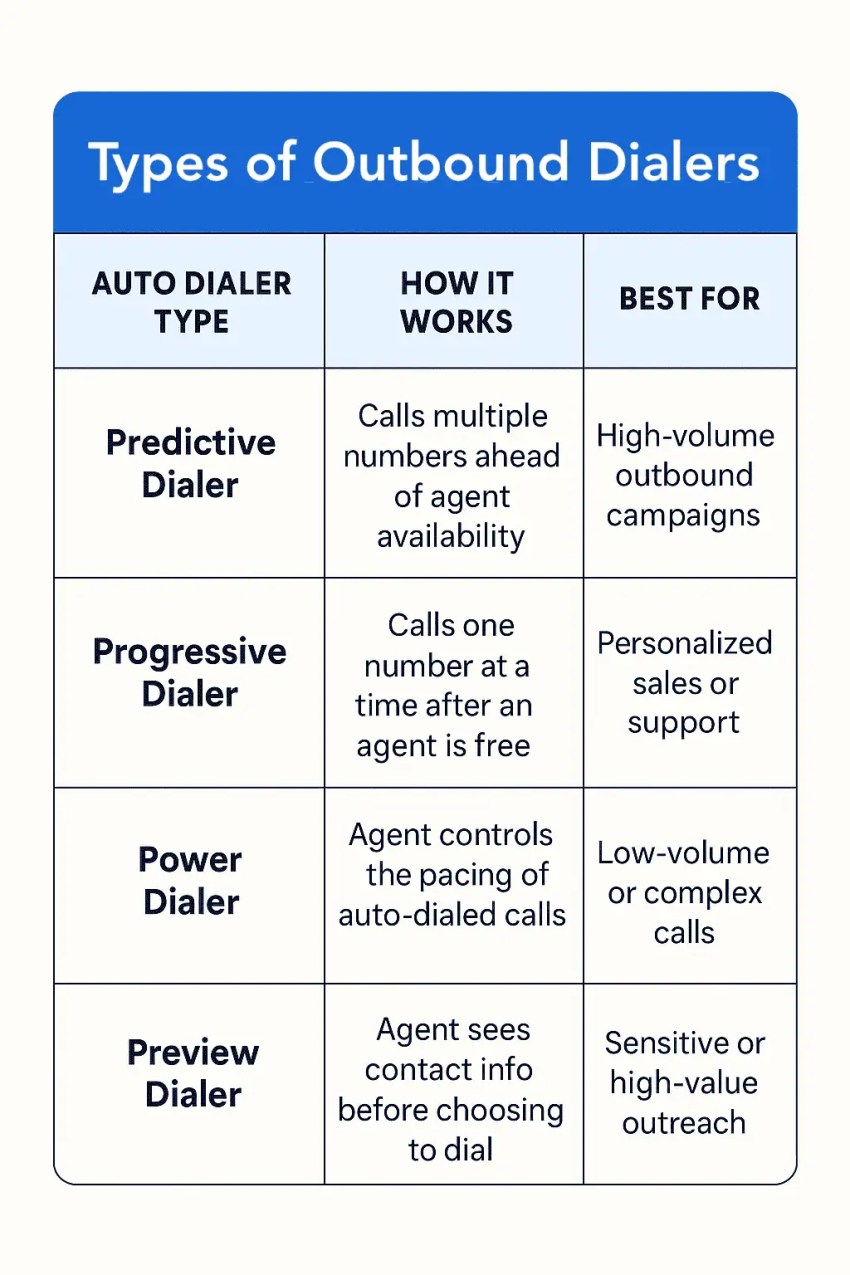
The four core dialer types differ in how aggressively they dial, how much prep time agents get, and which calling environments they’re built for. Before we break each one down, here’s a quick reference to pin on the wall:
Outbound dialers compared
| Dialer type | Connection potential | Abandon risk | Agent idle time | Best-fit team size |
|---|---|---|---|---|
| Predictive | High call volume; answer rates vary | Higher | Low | Large teams |
| Progressive | Depends on list quality | Low | Moderate | Small to midsize |
| Power | Depends on pacing and list quality | Varies by setup | Low to moderate | Small to midsize |
| Preview | Depends on lead quality | Low | Higher | Small, specialized teams |
Now let’s look at each in detail.
1. Predictive dialers
A predictive dialer places calls to multiple numbers simultaneously, aiming to connect agents to a live person as soon as they’re available.
It uses algorithms to forecast when an agent will be done with a phone call and makes multiple calls ahead of time. It then routes the next answered call to the agent as soon as they complete their current conversation.
Predictive dialing is typically used in environments with high call volumes, such as telemarketing campaigns. It ensures that agents spend more time speaking with customers and less time waiting for calls to be answered, boosting agent efficiency and productivity. However, good forecasting is required to avoid overwhelming agents with calls.
2. Progressive dialers
A progressive dialer places calls to one number after another based on the agent’s availability.
Unlike predictive dialers that dial multiple numbers while the agent is still on a call, progressive dialers only dial the next number on the list after the agent has finished the conversation and is available to take a new call.
This gives the agent a bit of time to review customer information, allowing for more personalized outbound calls. Progressive dialing is often used in outbound sales and customer service environments where personalized and attentive customer interactions are crucial.


3. Power dialers
A power dialer gives live agents more control and flexibility over the outbound calling sequence.
Unlike progressive dialers that dial the next customer as soon as the agent completes a phone call, power dialers allow the agent to determine the speed for automated outgoing calls.
For example, let’s say you want to take a quick break after every call. In that case, you can configure the power dialer to automatically dial the next phone number on your call list one minute after a conversation.
Due to their high degree of flexibility, power dialers work best for contact centers with low call volumes and those seeking highly personalized interactions.
4. Preview dialers
A preview dialer allows agents to view customer details before the system initiates the next outbound call.

Unlike progressive or power dialers that automatically place the next call based on agent availability or timing, preview dialing gives agents the opportunity to manually initiate each call after reviewing the contact’s profile, history, and any relevant notes.
This approach is ideal for situations that require thoughtful, personalized outreach, such as high-value sales calls, sensitive collections, or complex customer service scenarios.
When Should You Use a Predictive Outbound Dialer?
A predictive outbound dialer works best for large teams handling high call volumes. It reduces downtime between calls but requires enough available agents and proper compliance controls.
High-volume outbound campaigns
Predictive dialers automatically place multiple calls based on agent availability, helping teams reach more contacts during large-scale sales, telemarketing, and appointment-setting campaigns.
Teams with enough available agents
Predictive dialing works best with larger agent pools to reduce the risk of abandoned calls. Smaller teams may prefer progressive or power dialers.
For teams looking to increase calling capacity, parallel dialing is another option worth considering.
Campaigns with the right compliance controls
Predictive dialing can lead to abandoned calls when no agent is available. Businesses should monitor abandonment rates, manage consent, and adjust dialing settings to follow applicable regulations.
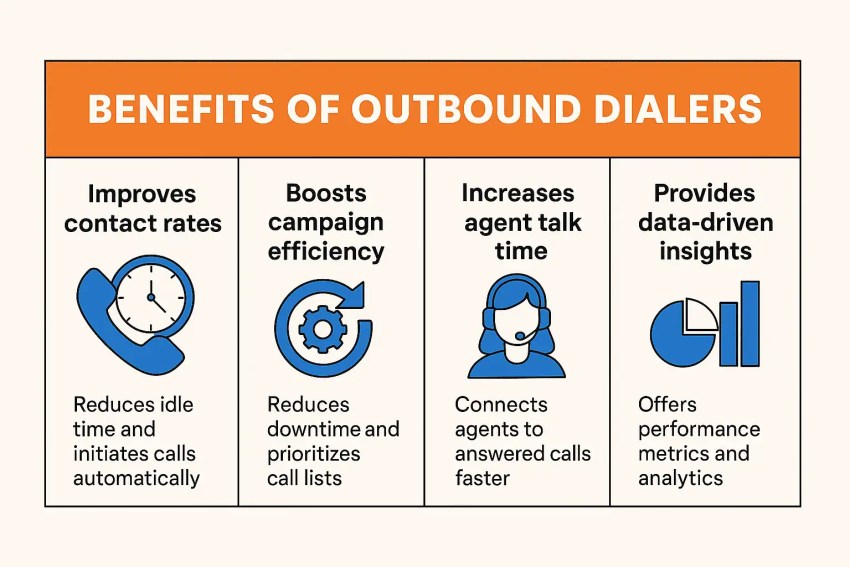
Benefits of Outbound Dialers
Let’s look at a few reasons why outbound auto dialer software is an excellent addition to your outbound call center.
1. Improves contact rates
An outbound dialer reduces the idle time agents experience between calls.
The system automatically dials the next number as soon as an agent is available, minimizing downtime and keeping agents engaged in active calls. That way, they can speak with more people, boosting agent performance.
Most outbound dialers have a filtering feature for weeding out unproductive calls, such as busy signals, no-answers, disconnected numbers, and answering machines. This means agents spend more time speaking with actual contacts rather than dealing with these interruptions.
2. Boosts campaign efficiency
An outbound dialing system streamlines your marketing outreach and similar campaign efforts.
Automated dialing modes, such as predictive, power, and preview dialers, reduce downtime and ensure that your agents spend more time talking to potential customers than manually dialing numbers.
An outbound dialing system can prioritize and segment your call lists based on predefined criteria, ensuring that the most critical calls are made first. It uses intelligent routing and automatic call distribution to direct live conversations to the most appropriate agents, balancing workloads and enhancing call outcomes.
3. Increases agent talk time
Picture this: You’re an agent who needs to make 1,000 phone calls for a predictive dialer campaign. You manually dial each number on your call list and wait for a response before moving to the next one. It’s a tedious process. Apart from all the time spent, you might mix up a few numbers.

An outbound dialer solves this problem. It automatically dials numbers and connects agents to answered calls, minimizing errors and wait times. Agents get more talk time and can focus on having productive conversations with prospects and customers.
4. Provides data-driven insights
Outbound call center software provides insights into the performance of outbound calling campaigns, agent productivity, and overall call center performance.
First, it provides high-level metrics, such as the total number of calls made, answered, and missed. Then you can drill down further to monitor the number of calls per agent, average call length, and the average time agents spend between calls.
You’ll use these insights to improve outbound campaigns and optimize call center operations. For example, let’s say you discover that some agents spend too much time on calls. You can provide scripts to guide conversations and help them complete calls more efficiently.

How Outbound Dialers Integrate With CRM Systems
Outbound dialers can connect with customer relationship management (CRM) software like Salesforce. This helps agents access customer details and call results in one place.
Instead of switching between tools, agents can view contact details, past conversations, and follow-up tasks while making calls.
Here’s how CRM-connected outbound dialing software can help your team:
- View customer records: Check contact details, past calls, and account information before calling.
- Save call details: Record call activity and notes in your CRM without entering everything by hand.
- Manage follow-ups: Create tasks and update customer records after each call.
- Personalize conversations: Use customer history to make sales and support calls more relevant.
- Track campaign results: Connect calling activity with leads, follow-ups, and sales.
For example, Nextiva’s Salesforce integration lets agents access customer records, manage calls, and save call activity in Salesforce. Features may vary based on your Nextiva plan and setup.
Before choosing an outbound dialer, check whether it works with your CRM and what information it can update automatically.
Key Features of Outbound Dialer Software
Outbound dialer software helps sales and support teams make outgoing calls and manage calling campaigns. You may also see it called outbound dialing software, outbound calling software, or outbound call center software.
These terms are often used in the same way, but the features can differ. Some tools focus on automated dialing, while others offer CRM integration, call recording, reports, and inbound call management. When comparing, look for features that support your team’s calling needs.
| Feature | Why it matters |
|---|---|
| Dialing modes | Supports preview, power, progressive, and predictive dialing for different campaigns |
| CRM integration | Gives agents customer details and reduces manual work |
| Call analytics | Tracks answer rates, agent performance, and campaign results |
| Compliance controls | Helps manage calling hours, Do Not Call lists, and abandoned calls |
| Call recording and monitoring | Helps managers review calls and coach agents |
| Contact list management | Organizes contacts, removes duplicate numbers, and helps plan outreach |
| Scalability | Supports more agents and calls as your business grows |
How to Choose the Right Outbound Dialer
The best outbound dialer depends on your team size, calling goals, and daily workload. Follow these five steps to find software that fits your business.
- Identify your calling needs: Consider how many calls your team makes, who you’re contacting, and whether you need personalized conversations or high-volume outreach.
- Choose the right dialing mode: Use preview dialing for personalized sales calls, progressive dialing for steady outreach, power dialing for faster campaigns, or predictive dialing for high-volume campaigns with enough available agents.
- Check features and integrations: Make sure the software works with your CRM and offers the reporting, call monitoring, and contact management tools your team needs.
- Review compliance controls: Look for features that help manage consent, Do Not Call lists, calling hours, and abandoned calls.
- Compare pricing and scalability: Check the total cost, including subscription fees, calling charges, setup costs, and paid add-ons. Choose software that can support your team as it grows.
Outbound Dialer Compliance: TCPA and Legal Requirements
Yes, outbound dialers are legal in the United States. However, businesses must follow federal and state laws when making automated calls or running sales campaigns.
Two important federal laws and rules are the Telephone Consumer Protection Act (TCPA) and the Telemarketing Sales Rule (TSR).
These rules cover customer consent, calling hours, prerecorded messages, and other calling practices.
TCPA consent requirements
The TCPA limits certain calls made with an automatic telephone dialing system or an artificial or prerecorded voice.
For covered telemarketing calls, businesses generally need written consent from the person they’re calling. However, the exact rules depend on the type of call, dialing technology, phone number, and any legal exceptions.
To help follow these rules, businesses should:
- Check Do Not Call lists: Review the National Do Not Call Registry and your company’s own list before making covered sales calls.
- Honor opt-out requests: Stop calling people who ask not to receive further calls.
- Follow calling-hour rules: Make calls only during allowed hours under federal and state laws.
- Keep clear records: Save consent details, calling records, and customer requests.
- Check state laws: Review any extra rules that apply where you’re calling.
Not every automated dialer meets the TCPA’s legal definition of an automatic telephone dialing system. Even so, other telemarketing rules may still apply.
What is the allowed call abandonment rate?
Predictive dialers may place more calls than agents can answer. If a customer picks up but no agent connects within two seconds after the customer finishes speaking, the call may count as abandoned.
Under federal telemarketing rules, the abandonment safe harbor allows no more than 3% of calls answered by a live person, measured over a campaign lasting less than 30 days or separately for each successive 30-day period.
To qualify for the FTC’s safe harbor, businesses must also:
- Let the phone ring for at least 15 seconds or four rings before ending an unanswered call.
- Play a recorded identification message when no agent is available within two seconds, provide the required seller information and an automated opt-out option, as applicable under FCC rules.
- Keep records that show they follow these rules.
The 3% limit doesn’t mean businesses can ignore other calling laws.
Track abandoned calls and adjust your predictive dialer settings to help prevent violations.
How to keep outbound campaigns compliant
Choose outbound dialing software with features that help your team follow calling rules. Look for tools that track customer consent, manage Do Not Call lists, limit calling hours, report abandoned calls, and save call records.
However, software alone can’t guarantee TCPA compliance. Your team must also follow the rules, keep accurate records, and set up campaigns correctly.
Use Cases and Examples of Outbound Dialers
Outbound dialer systems are useful across different areas of your organization.
1. Sales and marketing
An outbound dialer is integral to successful sales and marketing campaigns. You can use them for cold calls to introduce products or services, follow up with leads and sales conversations, and set up appointments for sales meetings, product demonstrations, and consultations.
Sales teams can also use outbound dialers to engage with existing customers for upselling, cross-selling, or renewals to maximize customer lifetime value.

2. Customer service
Outbound contact center software makes it easy for customer service teams to facilitate one-on-one conversations with your users and collect real-time feedback.
They’ll use it to administer customer satisfaction surveys and collect qualitative feedback on your products and services for marketing insights. This process personalizes the feedback collection, allowing you to uncover a valuable perspective to improve the overall customer experience.

3. Debt collection & payment reminders
Use outbound dialers to follow up on outstanding payments and work out a repayment plan.
You can develop and load call scripts into the dialer to guide agents’ conversations with debtors, ensuring that they comply with the Fair Debt Collection Practices Act and other related legal requirements.
Outbound dialing solutions also have call recording and monitoring features for tracking agent-customer interactions, maintaining call quality, and improving call center performance.

4. Nonprofit fundraising
Nonprofit organizations can use outbound dialers to reach out to potential donors and supporters to share information about their cause, upcoming events, and fundraising campaigns. These personalized conversations help you build stronger relationships with the people passionate about your nonprofit’s causes, typically translating into more donations and awareness.
Outbound dialers also play a crucial role in recruiting volunteers for various nonprofit activities and events. You’ll use it to contact individuals interested in volunteering, learn more about their motivations, and find the perfect fit for your team. It’s a great way to quickly build your volunteer base and support network.
Improve Your Outbound Calling With Nextiva
Nextiva’s unified contact center platform helps agents handle both outbound and inbound calls from a single interface. With integrations to CRM systems and customer data sources, your team can access the information they need for more personalized conversations while reducing manual work.
Nextiva offers contact center capabilities such as automated dialing, analytics, and workforce management tools, with availability depending on the plan and configuration. Whether your team works remotely or in the office, Nextiva helps bring customer communication and contact center workflows together.
Top Ranked AI-Powered Contact Center Solution
Powerful inbound and outbound contact center that will transform your customer interactions, save you time and money, and reduce agent stress.
Frequently Asked Questions About Outbound Dialers
Quick answers to the most common questions about this topic.
Ask about per-minute carrier fees, local number provisioning, call recording storage, and onboarding or professional services. Also confirm whether key features like analytics, compliance tools, and multiple dialing modes are add-ons or included in the base license.
Run a short pilot with a representative list, a small set of agents, and clear success criteria such as connection quality, workflow fit, and admin effort. Make sure you test across peak and off-peak hours so you can spot delivery issues that demos do not reveal.
Request details on how they handle caller ID reputation, number rotation, STIR/SHAKEN attestation support, and monitoring for carrier blocks. You should also ask what tooling they provide to manage branded caller ID, local presence, and remediation when your answer rates drop.
Set targets based on your brand tolerance for short waits, agent readiness, and the complexity of each call type, then tune gradually using live QA feedback. A practical approach is to start conservatively, measure customer friction signals, then increase speed only when quality remains stable.
Many platforms can, but capability varies by vendor and often requires additional modules. If omnichannel matters, confirm whether SMS and email are native, how consent is stored and enforced, and whether reporting unifies activity across channels.
Even great software underperforms if your agents do not trust the workflow or your supervisors cannot coach to it. Plan for role-based training, a call disposition standard, and a feedback loop during the first few weeks to remove friction and improve consistency.
Look for cloud-based setup, guided campaign templates, simple list hygiene tools, and turnkey CRM connections that reduce manual configuration. It also helps to choose a vendor with responsive support and clear admin controls so a non-technical manager can run day-to-day operations.
Outbound dialers are legal in many jurisdictions, but there are usually regulations that govern their use.
In the United States, for example, the Telephone Consumer Protection Act and the Telemarketing Sales Rule impose restrictions on using outbound dialers for telemarketing and commercial purposes. Research Do Not Call lists and follow telemarketing laws in your region to ensure full regulatory compliance when using outbound dialers.
Not exactly, but they’re closely related. Auto dialer is a broad term that refers to any system that automatically dials phone numbers from a list, eliminating the need for manual dialing.
Predictive, progressive, power, and preview dialers are common types of outbound dialing systems. So while every predictive dialer is an auto dialer, not every auto dialer is predictive. Think of “auto dialer” as the technology and “predictive dialer” as one of the advanced methods it uses to maximize efficiency.
An auto dialer is the technology that automatically dials phone numbers. An outbound dialer refers to the function or purpose of that technology: making outgoing calls in a contact center. Predictive, progressive, power, and preview dialers are common outbound dialing systems, but they differ in how much of the calling process they automate.