Customer Experience
  Blog
Blog  Business Communication
  Leadership
  Marketing & Sales
  Nextiva News
  Productivity
  VoIP
VoIP 


Missed calls mean missed appointments, lost leads, and lost revenue. Small businesses frequently struggle to answer calls while serving customers on-site, working in the field, or managing busy schedules. An AI receptionist bridges this gap by covering routine conversations 24/7 and escalating complex requests to human staff.
Small businesses often need to answer calls while employees serve customers, work in the field, or manage appointments. An AI receptionist can cover routine conversations and send complex requests to a person.
A quick look at Nextiva XBert: The Nextiva XBert AI receptionist handles calls, texts, and web chats 24/7. It can answer questions, capture leads, book appointments, and transfer conversations to employees with context. XBert costs $99 per month for 100 AI sessions, followed by $1.50 per additional session. It works as a standalone service or as an add-on to a Nextiva plan.
This guide explains how AI receptionists work, how to compare their costs, and what small, mid-market, and enterprise teams should verify before buying.
Try the best AI answering service free for 14 days
XBert AI answers questions and captures leads. Add your 24/7 answering service in minutes.
What Is an AI Receptionist?
An AI receptionist is a virtual assistant that uses conversational AI and natural language processing (NLP) to answer calls and respond to customer requests. It may also be called an AI phone receptionist, AI virtual receptionist, or virtual AI receptionist.
Unlike traditional answering services that use traditional automated phone menus, it uses artificial intelligence to understand callers when they speak in their own words.
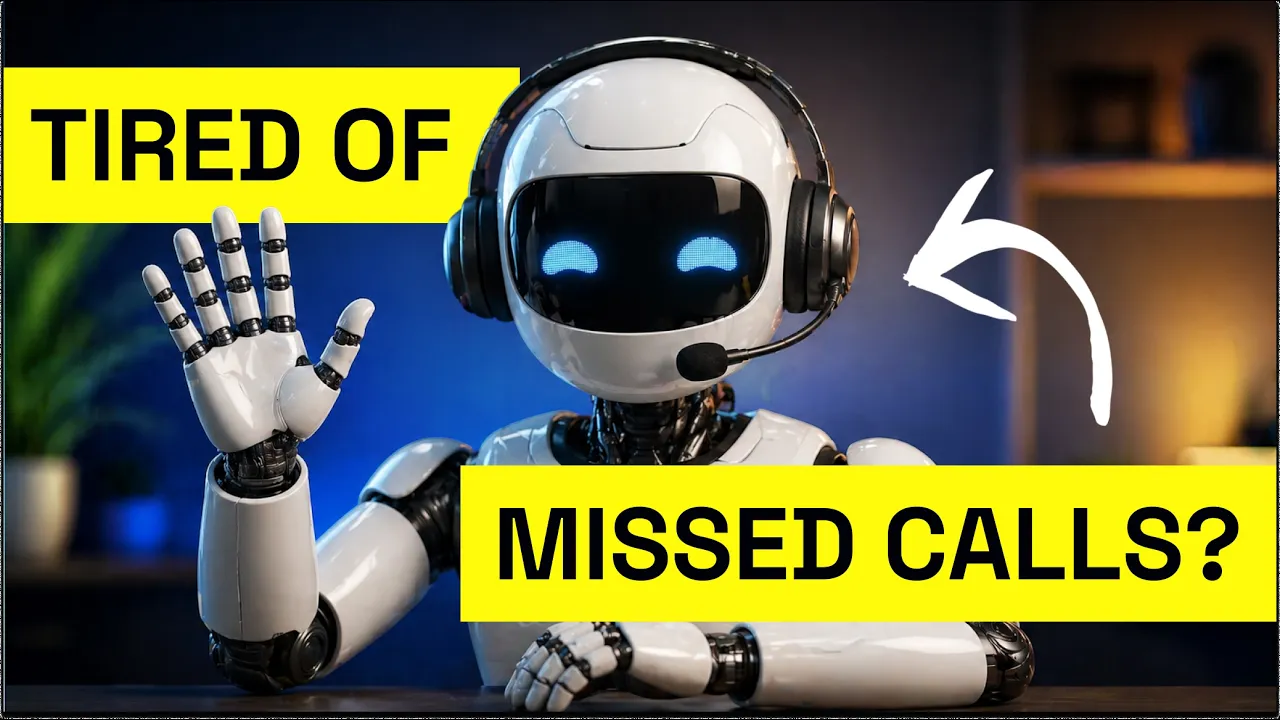
An AI receptionist usually connects with a business phone system, CRM, calendar, or scheduling platform. These integrations can let it take action during a conversation instead of recording a voicemail.
Depending on the product and configuration, an AI receptionist can:
- Answer inbound calls around the clock
- Answer approved frequently asked questions
- Collect structured intake information
- Take messages and create follow-up tasks
- Qualify leads
- Book, reschedule, or cancel appointments
- Send SMS confirmations or reminders
- Route urgent issues to an on-call employee
- Create call transcripts and summaries
- Transfer callers to a person when needed
The provider’s setup, plan, integrations, and policies determine which tasks it can complete. Confirm each required workflow in a live demo.
AI Receptionist vs. Auto-Attendant vs. Live Receptionist
AI receptionists, auto-attendants, and live receptionists all manage incoming calls. Their capabilities and operating costs differ.
| Comparison area | AI receptionist | Auto-attendant | Live receptionist |
|---|---|---|---|
| Caller interaction | Callers speak naturally | Callers choose menu options | Callers speak with a person |
| Primary function | Answers FAQs, collects details, completes configured tasks, and routes calls | Routes callers to extensions or departments | Handles calls, customer needs, and front-desk work |
| Availability | Can run 24/7 | Can run 24/7 | Depends on staffing or service coverage |
| Simultaneous calls | Depends on provider capacity and plan | Depends on the phone system | Usually one active conversation per receptionist |
| FAQ responses | Uses approved business information | Cannot answer open-ended questions | Uses training and judgment |
| Appointment booking | Can book through a supported calendar integration | Usually routes to staff | Books manually or through a calendar |
| Structured intake | Can collect required fields in a defined sequence | Limited to menu responses | Can ask follow-up questions and use judgment |
| Two-way SMS | Available on platforms with connected business texting | Usually voice-only | Requires a shared inbox or texting tool |
| Complex requests | Escalates according to configured rules | Routes to a preset destination | Handles exceptions and emotional conversations |
| Setup requirements | Knowledge base, workflows, integrations, and testing | Menus, extensions, and routing rules | Hiring, training, supervision, and coverage planning |
| Cost model | Subscription, usage fees, and implementation costs may apply | Often included with a phone plan | Employment costs or outsourced-service fees |
An auto-attendant works well for a simple “press 1 for sales” menu. An AI receptionist is better suited to callers who need answers, intake, scheduling, or routing based on the reason for their call.
AI Receptionist vs. Live Receptionist Costs
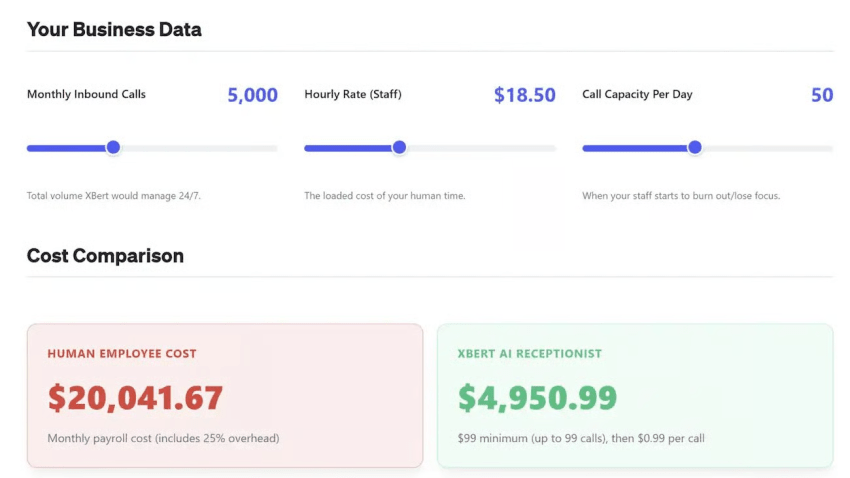
An AI receptionist can cost less than live coverage for repetitive, high-volume work. The better choice depends on the work callers need completed, the hours that need coverage, and the cost structure of each option.
A live receptionist can be an employee or an outsourced answering-service agent. These are separate comparisons.
| Cost driver | AI receptionist | Employed receptionist | Outsourced live answering service |
|---|---|---|---|
| Common pricing unit | Monthly subscription, sessions, calls, minutes, or conversations | Hourly wage or salary | Per minute, call, message, agent hour, or monthly package |
| Base costs | Subscription or platform fee | Wages or salary | Monthly minimum or service package |
| Additional costs | Overage, phone service, integrations, setup, and premium features | Benefits, payroll taxes, training, workspace, equipment, and coverage during absences | Overage, holiday coverage, bilingual service, scripts, transfers, and account setup |
| Coverage hours | May include 24/7 coverage, subject to plan limits | Limited to scheduled shifts unless multiple employees cover hours | Depends on the service contract |
| Concurrent calls | Depends on the provider and plan | Usually one active caller per person | Depends on contracted staffing and queue capacity |
| Best fit | Routine calls, FAQs, intake, booking, overflow, and after-hours coverage | Complex front-desk work and relationship-driven conversations | Businesses that need live agents without hiring internally |
Do not compare only the advertised monthly price. Ask each provider how it defines a billable call, session, or minute. A short call, abandoned call, spam call, transfer, text message, and appointment booking may have different billing rules.
An employed receptionist may also handle walk-ins, paperwork, payment processing, and office coordination. Those duties can justify the role even if call volume alone does not. An outsourced service may provide trained agents after hours, but its fees can increase as call duration or volume rises.
Which is better: AI or a live receptionist?
AI is often a good fit when callers ask the same questions, need to book appointments, or need basic intake after hours. It can apply the same approved workflow to every call and send structured details to staff.
A live receptionist is often a better fit for legal, medical, financial, complaint, emergency, or emotionally sensitive conversations. People can recognize nuance, make judgment calls, and adapt to situations that do not match a scripted workflow.
Many SMBs start with AI for routine calls and use employees or an outsourced service for escalations. That model requires reliable transfer rules and clear ownership after the handoff.
How AI Receptionists Work
An AI receptionist connects to a dedicated phone number or extension. An IP telephony system carries the call over an IP network and routes it to the AI workflow.
The system identifies the caller’s intent from their words. It then uses an approved knowledge base and configured workflow to answer, gather details, route the call, or complete an action.
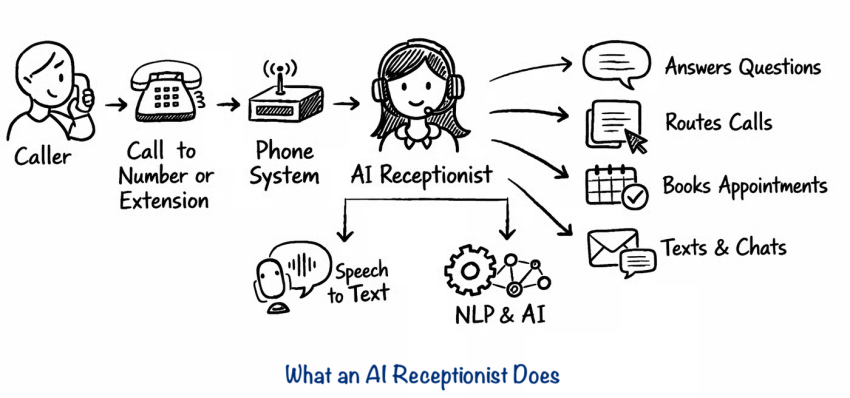
A typical call follows these steps:
- The AI answers with a configured greeting.
- It identifies the caller’s reason for calling.
- It asks only the intake questions needed for that workflow.
- It checks approved business information or connected systems.
- It answers the question, books an appointment, records the request, or transfers the caller.
- It saves a summary, transcript, or intake record for employees.
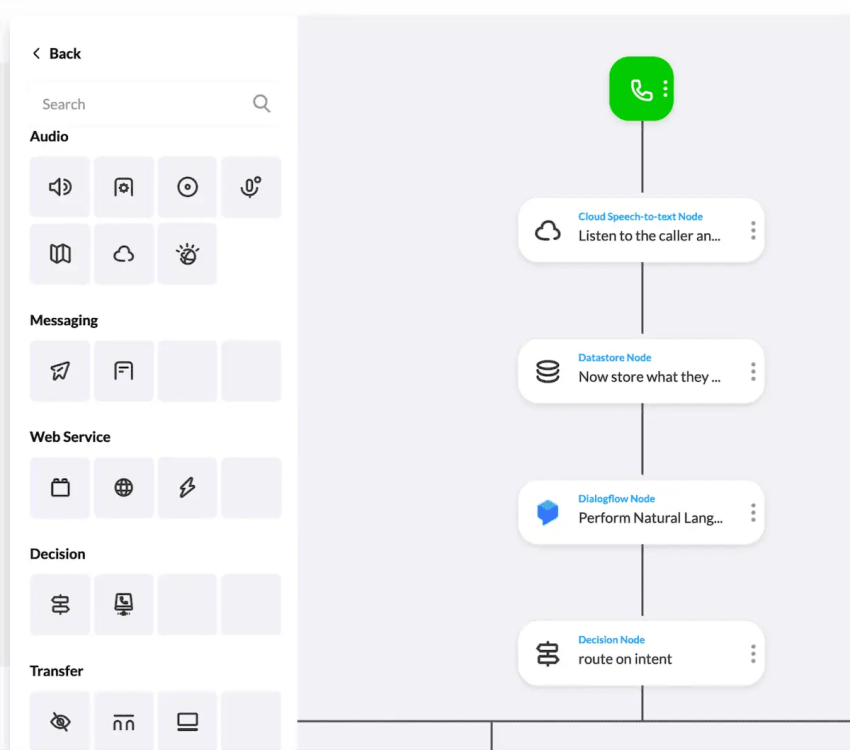
For example, a caller who wants to reschedule may need the AI to verify their identity, check available times, update the calendar, and send a confirmation. If the system cannot complete one of those steps, it should explain the next step and offer a transfer or callback option.

How to Set Up an AI Receptionist in Minutes
Modern AI receptionists eliminate manual knowledge-base creation by ingesting information directly from your website, Google Business Profile, FAQs, and public documents. Platforms like Nextiva allow administrators to launch an AI receptionist in under five minutes by connecting these existing business profiles through a no-code dashboard.
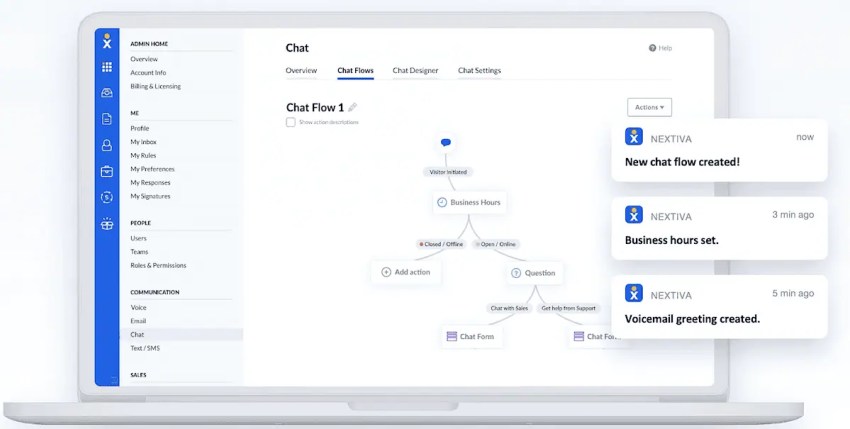
However, turning the service on is only step one. Before going live, businesses must configure routing rules, set up escalation triggers, connect CRM/calendar tools, and thoroughly test edge-case caller requests.
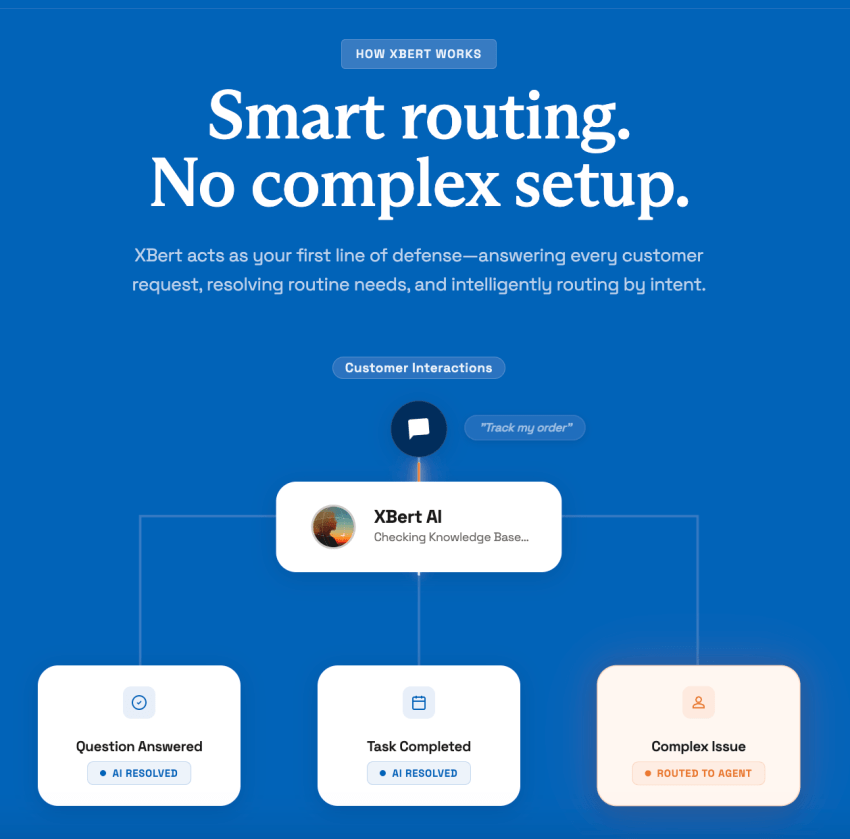
Quick setup, followed by careful testing: Basic setup can take only a few minutes on some platforms, but preparing the AI for customer conversations requires testing. Businesses should review its answers, integrations, transfers, and escalation rules before launch.
Features to Evaluate
A virtual receptionist that can answer FAQs, collect intake, respond to texts, and book appointments requires more than voice recognition. Review every channel and workflow that matters to your business.
FAQs and structured intake
The AI needs a controlled source for business information, such as approved web pages, a knowledge base, service descriptions, policies, and hours. Review how administrators update that information and how quickly changes take effect.
Structured intake helps staff receive useful information without replaying calls. Define the exact fields the AI must collect, such as:
- Name and callback number
- Email address
- Service location
- Reason for the call
- Existing or new customer status
- Urgency level
- Preferred appointment time
- Consent for text follow-up
Test whether the system asks the fields in the right order, handles incomplete answers, and records data in the correct CRM field.
Voice and two-way SMS
Business texting can continue a conversation after a call. It can send confirmations, directions, appointment details, intake links, and rescheduling information.
Two-way SMS means the customer can reply and receive a useful response or escalation. A one-way text notification does not provide that capability.
Confirm whether the provider supports:
- Inbound and outbound business texting
- A shared conversation history across voice and SMS
- Automated responses to text replies
- Consent collection and opt-out handling
- Message templates and approval controls
- Escalation from text to a human employee
Businesses should obtain consent and follow applicable messaging rules. Avoid sharing sensitive information by text unless the workflow, platform, and policies support it.
Calendar booking vs. booking links
A scheduling link lets the AI send a customer to a separate booking page. That can reduce staff work, but the customer must complete the booking themselves.
A completed booking requires the AI to access a supported calendar or scheduling system, identify available times, select the correct employee or location, create the appointment, and confirm the result.
Ask providers whether the AI can:
- Check real-time availability
- Create completed appointments during a call or text exchange
- Reschedule and cancel bookings
- Add intake fields to the appointment record
- Select staff based on skills, location, or service type
- Prevent double bookings
- Handle time zones correctly
- Send confirmations and reminders
- Record an audit trail of changes
A calendar integration alone does not prove that all of these tasks work. Test the booking flow with your actual rules.
Human escalation and after-hours coverage
Every AI workflow needs a fallback. Configure what happens when the AI lacks an answer, the caller asks for a person, or the issue meets an urgency threshold.
Escalation options may include:
- Live transfer to an available employee
- Warm transfer with a call summary
- Transfer to an on-call number
- Callback request with a response-time commitment
- Message creation in a shared inbox or CRM
- Emergency instructions for approved situations
For after-hours coverage, specify which calls can wait until the next business day and which require immediate routing. Test the process when the on-call employee does not answer.
CRM and reporting
A CRM connection can let the AI create or update contacts, assign leads, log call outcomes, and save summaries. Verify whether the integration is native, uses a connector, or requires middleware.
Useful reporting may include call volume, call reasons, appointment outcomes, transfers, unanswered requests, and escalation rates. Review who can access recordings and transcripts before turning on analytics.
The Benefits of Using an AI Receptionist
You get many benefits from using AI-powered receptionists. Let’s look at a few key ones:
1. 24/7 availability and lead capture
Most businesses miss calls after 5 PM, on weekends, or when the lines are busy. Those calls often go straight to a competitor. A virtual phone receptionist can receive calls after hours. It answers late-night calls, handles overflow during peak times, and qualifies new leads right away.
Depending on the provider and plan, AI receptionists can manage several conversations at once and reduce the number of inquiries sent to voicemail. This makes it more likely that calls are answered promptly, even outside staffed hours.
2. Increased team productivity
Your staff shouldn’t spend their day answering the same basic questions or scheduling appointments. AI receptionists excel at managing calls, allowing your team to focus on higher-value tasks. An AI receptionist handles scheduling, answers FAQs, and automatically syncs with your CRM.
Net-net, this gives your team space to focus on work that drives growth, closes sales, supports clients, and handles tasks that require a human touch.
3. Enhanced customer experience
High hold times and rigid call flows turn people away. AI-powered answering systems let callers speak in their own words and get help. AI receptionists can engage in human-like conversations, making interactions feel natural and friendly.
Some platforms offer human-like voices and multilingual support, although available languages and accents vary. It removes friction, saves time, and leaves a strong first impression on new prospects.
4. Data-driven business insights
Many business owners make decisions based on gut instinct or scattered notes. An AI receptionist shows you real data and call analytics: why people call, peak call times, and how conversations flow. Real-time reports make it easier to plan staffing, adjust marketing, and improve service.
From built-in call recordings to instant call summaries, you can review and analyze for deeper insights. A centralized dashboard may organize transcripts, summaries, and call logs, giving employees a record of previous customer interactions. Built-in security and compliance features also keep customer data safe while giving you the right insights.
Missing calls can cost you thousands.
Unanswered calls add up fast. Our free calculator reveals the revenue impact of every missed opportunity.
What Missed Calls Actually Cost You
A missed call does not always equal a lost sale. Some callers leave a message or try again, while others contact the next business that answers. This creates a measurable revenue risk for businesses that depend on appointments, consultations, estimates, or urgent service requests.
Use this formula to estimate the monthly revenue opportunity associated with missed calls:
Estimated missed revenue = missed calls × qualified-lead rate × close rate × average customer value
Consider a local service business that misses 20 calls per month. If 30% of those callers are qualified leads, the business closes 25% of qualified leads, and an average first sale is worth $500, the calculation is:
20 × 30% × 25% × $500 = $750 per month
The $750 represents estimated revenue associated with missed calls, not guaranteed lost revenue or profit. Every business should use its own call volume, qualified-lead rate, close rate, and average customer value.
| Monthly comparison | Estimated amount |
|---|---|
| Potential revenue associated with 20 missed calls | $750 |
| Nextiva XBert base subscription | $99 |
| Difference between the estimated opportunity and subscription cost | $651 |
In this example, the business has an estimated $750 in monthly revenue associated with unanswered calls. Nextiva XBert costs $99 per month, leaving a difference of $651 between the two amounts.
This does not mean the business will recover the entire $750. Actual results depend on how many calls XBert answers, how many callers become customers, profit margins, and additional usage charges. One recovered sale worth $500 equals approximately five months of the base subscription before fulfillment costs and other expenses.
After collecting actual performance data, use this formula to estimate ROI:
ROI = (incremental gross profit + realized labor savings − total AI receptionist cost) ÷ total AI receptionist cost × 100
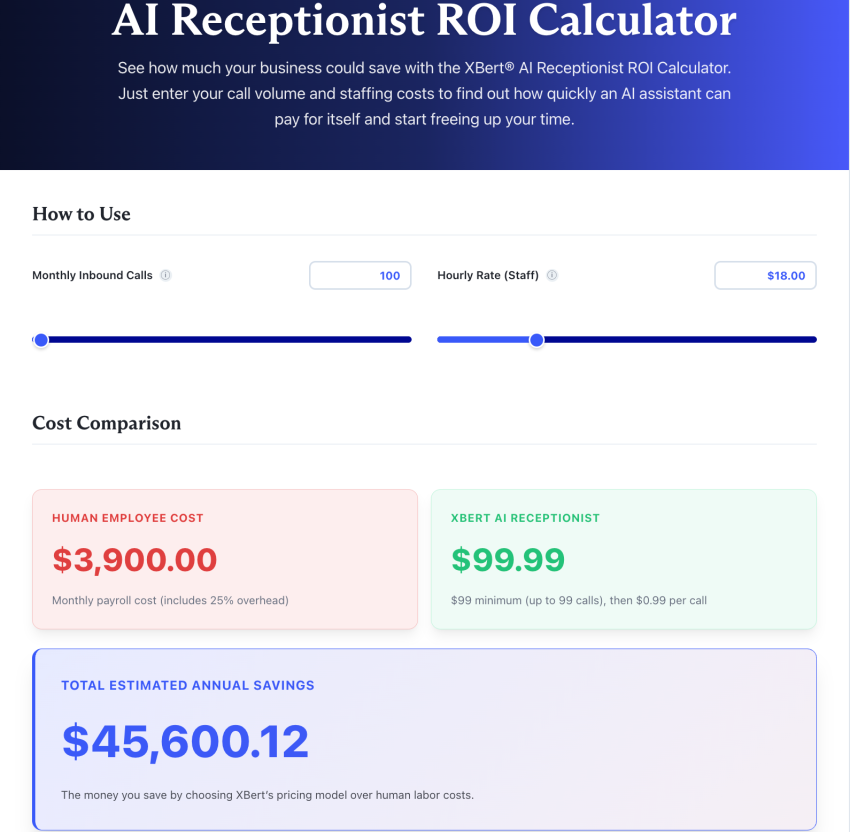
Use Nextiva’s AI receptionist ROI calculator to estimate how much missed calls may cost your business and compare that amount with the cost of an AI receptionist.
Top 4 AI Receptionist Providers in 2026
Let’s explore these top four AI receptionist solutions, their features, and best use cases to help you choose the optimal answering service for your business.
| Key features | Nextiva XBert AI | Upfirst | Dialpad | Dialzara |
|---|---|---|---|---|
| Natural language interactions | Understands caller intent through the IVR call management process and clear routing paths | Carries a natural back-and-forth, following your instructions on what to ask and collect | Handles open-ended speech with sentiment detection and voice recognition | Holds open-ended conversations with an AI agent trained on your business details |
| CRM integration | Syncs with customer data for contextual call handling | Books into Clio for law firms, and pushes call details to other systems through Zapier, Make, or a custom API action | Links to call notes, contact history, and sales workflows | Native integrations cover popular CRMs; connect anything else via Zapier, Make, or webhooks |
| SMS capabilities | Sends appointment confirmations and reminders via integrated texting | Texts callers a scheduling link or directions mid-call, and texts you a summary after | Delivers text messages tied to meeting follow-ups and sends missed call alerts through API | Sends call summaries and new-lead details to your team by text or email after each call |
| Appointment booking | Books and updates appointments through connected calendar tools | Native integrations with Google Calendar, Outlook, Clio, Acuity, Calendly, and Square Scheduling | Schedules meetings and suggests follow-ups post-call | Captures appointment requests and books directly through connected calendar tools |
| Voice customization | Offers preset call greetings with branded messaging options | More than 40 voices with international and regional accents, across 35+ languages | Allows voice tone adjustments and learning-based improvements | Offers 50+ AI voice options with different accents, tones, and styles to match your brand |
| Workflow editor | Uses visual tools to design call flows and escalation logic | No visual flow builder; you write the logic you want in plain language | Enables no-code setup with trigger-based routing | Uses guided, template-based agent setup rather than a visual flow builder |
| Real-time analytics | Monitors call patterns, duration, and missed opportunities | Tracks call volume, spam, hang-ups, and duration, plus call topics with automatic tagging | Shows live call summaries, action items, and CSAT scores | Provides call transcripts and summaries in a central dashboard |
| Security and compliance | Meets data privacy needs with encryption and secure hosting | Runs on secure, U.S.-based cloud infrastructure. Not HIPPAA compliant. | Offers call protection, permissions control, and compliance tracking | Dialzara does not publicly list formal third-party security or compliance certifications (such as SOC 2 or HIPAA), though they state that they use encrypted, access-controlled U.S. data storage |
1. Nextiva XBert AI
Nextiva’s AI receptionist solves missed inbound demand and slow response times by handling calls, texts, and web chats 24/7. It stands out by going beyond basic transcriptions—booking appointments, capturing lead details, and handing off complex calls to employees with full context. Setup and onboarding support are included, making it ideal for teams wanting a low-friction implementation.
In the market of AI answering solutions, XBert earns the “best overall” distinction because it goes beyond basic call transcriptions. XBert uses your website and additional business insights to answer real questions in real time, book and reschedule appointments, capture lead details, and intelligently direct complex requests to your team with full context.
Setup and implementation are handled completely by Nextiva (and, for a limited time, at no extra charge), with no technical setup required.
Nextiva XBert AI pricing is now standardized across the entire article using the master baseline phrasing: $99 per month for 100 sessions, plus $1.50 per additional session. This updated wording replaces all inconsistent variations (such as “$1.50 each above that” and “100 eligible interactions included”) in the introductory summary, the provider breakdown, and the Nextiva pricing section.
Features:
- Creates drag-and-drop call flows without coding
- Works alongside existing business app integrations
- Operates independently from your existing phone system or auto attendant to route calls
- Syncs with CRMs and builds customer interaction histories
- Books appointments and automates SMS confirmations and follow-ups
- Offers AI-powered call summaries and a central analytics dashboard
Ideal for:
Nextiva is ideal for small and midsize businesses that want a single platform to manage voice, SMS, and customer interactions. Instead of relying on multiple vendors, users get a streamlined system with built-in AI and automation.
Its business phone system not only centralizes communication but also provides visibility into customer needs and business trends.
Pricing: You can access Nextiva’s smart call routing with the Core plan for just $15 per user per month. XBert AI is available for $99 per month, with 100 eligible interactions included. AI Receptionist Add-on: Nextiva XBert AI is $99 per month, which includes 100 sessions ($1.50 per additional session).
Hear why XBert AI is the best AI receptionist
XBert AI receptionist handles customer questions, captures leads, and books appointments. Try it free for 14 days.
2. Upfirst
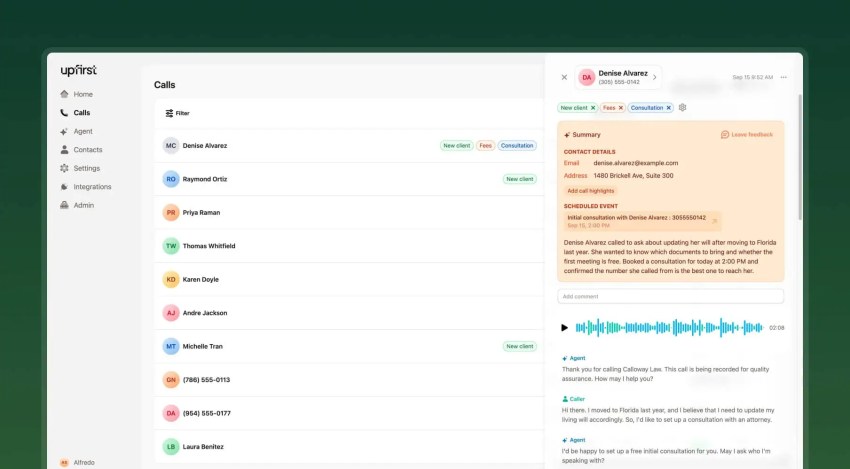
Upfirst is an AI answering service for small and midsize businesses. It was founded by a practicing attorney who built it for his own law firm, and that shows in what it does well: answering questions accurately, collecting details from new leads, and booking appointments. It is designed to be easy to use, and most businesses are live within 30 minutes. It also offers features that many AI receptionists leave out, like warm transfers and native booking into Google Calendar, Outlook, Acuity, and Clio, the practice management system most law firms run on.
Upfirst is a good option if you want to keep your existing phone system. It answers, routes, and books on top of the setup you already have, and it is not built to replace a full phone system like Nextiva.
Features:
- Detects the caller’s language automatically, speaks more than 35 languages, and translates the transcript into the language you prefer
- Transfers and routes calls to the right person on your team
- Offers warm transfers, so the receptionist tells you who is calling and why before you decide to take it, with fallback numbers if you do not answer
- Books appointments into Google Calendar, Outlook, Clio, Acuity, Calendly, and Square Scheduling
- Connects to any system with an API through custom actions, so the receptionist can look up an order status or push a booking mid-call
- Routes notifications by what the call was about, so your sales team hears about new leads and your accounting team hears about open invoices
Ideal for:
Upfirst is a natural fit for law firms given its origin, and is also popular with home services businesses like HVAC and plumbing, along with veterinary clinics and property managers. It is built for non-technical owners and office managers who want something they can set up themselves and run alongside the phone system they already have.
Teams that also want outbound calling on the same platform will want something broader, like Nextiva.
Pricing: Starts at $24.95/month for 30 calls and runs to $299/month for 600 calls. Overage is billed per call, from $1.50 down to $0.70 depending on the plan. Spam and hang-ups aren’t billed. The free trial runs 14 days with no credit card.
3. Dialpad

Dialpad’s AI receptionist is built into its cloud communication stack. It answers calls, sends them to the right team, and learns from user behavior over time, all configured without code. Administrators can adjust AI agent workflows directly in the dashboard anytime. Dialpad also offers custom pricing options for businesses with unique needs or high call volumes.
Features:
- Combines voice, messaging, and video in one centralized platform
- Transcribes calls and analyzes sentiment in real time
- Summarizes calls with follow-up actions automatically
- Handles missed calls, routes callers based on intent, and books appointments
Ideal for:
Dialpad is best suited for fast-paced teams in midsize businesses or enterprises with high call volumes. Its AI receptionist can understand requests, retrieve information, complete configured tasks, and escalate conversations to employees with context. Sales teams can use Dialpad’s AI Playbooks to stay on message.
Meanwhile, support agents, sellers, supervisors, and other roles involved in contact center AI benefit from real-time AI CSAT insights to quickly assess customer satisfaction.
Pricing: Dialpad uses conversation-based pricing for its AI Agents. Businesses purchase a pool of AI Agent Credits, so they must contact Dialpad for pricing based on their expected usage.
4. Dialzara
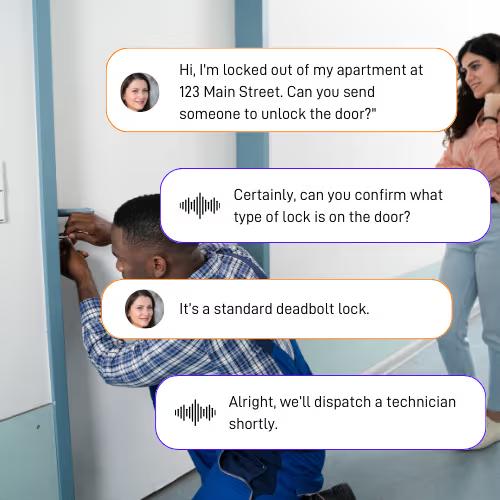
Dialzara is a lightweight AI answering service designed for solo operators and small businesses. Rather than replacing your phone system, it sits in front of your existing business line via simple call forwarding. It greets callers following your custom scripts, handles 24/7 call overflow, and logs lead details directly into a central dashboard.
Features:
- Answers calls 24/7 with an AI agent trained on your website and business information
- Works with your existing phone number through call forwarding, so no phone system change is required
- Captures caller details and sends message summaries after each call
- Connects with select CRMs natively and supports additional integrations through Zapier, Make, and webhooks
- Offers 50+ preset AI voices with different accents and professional tones to align with your brand
Ideal for:
Dialzara is a fit for solo operators and very small teams that want an affordable AI answering layer without adopting a full communications platform. It handles the answering side of the front desk, but it isn’t a business phone system, so teams that also need calling, SMS, video, and analytics in one place will outgrow it.
Pricing: Starts at $29/month for up to 60 minutes of talk time, and anything over that is $0.48/minute. Dialzara can handle unlimited simultaneous calls, but voice usage itself is metered by minutes.
Which AI receptionist provider is right for you?
- Choose Nextiva if: You want a simple, all-in-one AI receptionist and top-rated phone service to manage all your business communications and customer interactions.
- Choose Upfirst if: You want to keep your existing phone system and add an AI receptionist on top of it that answers questions, qualifies leads, and books appointments.
- Choose Dialpad if: Your focus is on sales or support team performance and you need real-time AI insights and coaching.
- Choose Dialzara if: You’re a solo operator or very small team that wants a low-cost AI phone answering service running in front of your existing phone number.
AI Receptionist Use Cases
AI receptionists work best when the organization defines a narrow set of repeatable tasks and a clear escalation path.
| Use case | What the AI receptionist does | What to configure |
|---|---|---|
| Taking messages | Collects the caller’s name, contact details, reason for calling, and next step | Required fields, follow-up owner, and response-time target |
| Answering FAQs | Responds to approved questions about hours, services, locations, and policies | Approved knowledge source and fallback for unknown questions |
| Capturing leads | Asks qualification questions and records prospect needs | Lead fields, CRM mapping, routing rules, and consent language |
| Appointment booking | Checks availability and creates a booking or sends a scheduling link | Calendar rules, staff availability, time zones, cancellations, and reminders |
| After-hours handling | Answers routine questions and routes urgent requests | On-call schedule, emergency criteria, and nonresponse fallback |
| Text follow-up | Sends confirmations, links, and status updates | Opt-in process, templates, reply handling, and human handoff |
Healthcare Clinics and Medical Practices
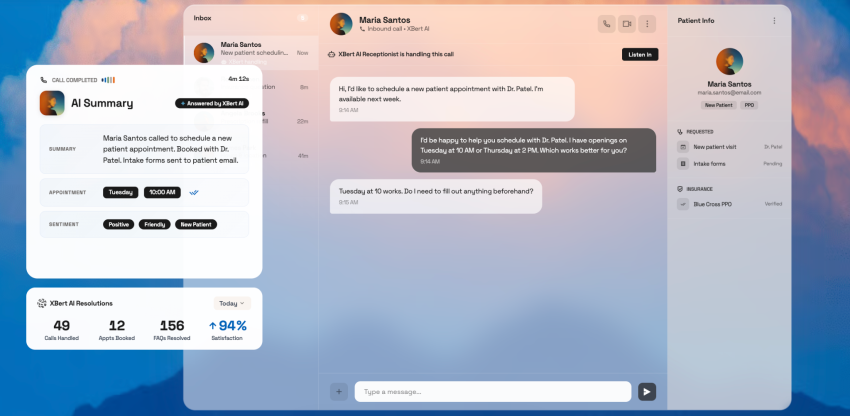
Healthcare organizations can use AI receptionists for scheduling, reminders, directions, and basic nonclinical intake. They should not rely on a general AI workflow for medical advice or emergency triage.
Route urgent clinical requests to qualified staff. Confirm that the selected provider, plan, integrations, and agreement support applicable privacy requirements before processing protected health information.
Law firms and legal services
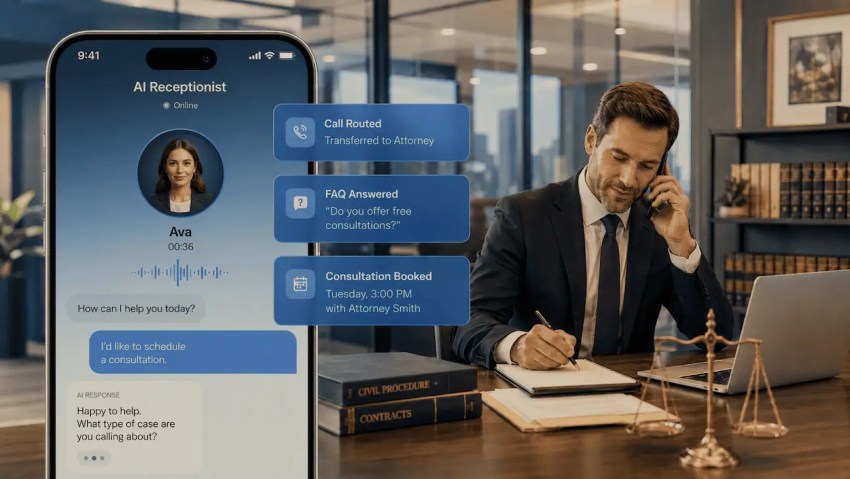
A law firm can use an AI receptionist to collect prospective-client details, schedule consultations, and route existing clients. Define which questions the system may ask and avoid giving legal advice through an automated workflow.
Home services
Plumbing, electrical, HVAC, and similar businesses can use AI receptionists to capture service details and route urgent problems to an on-call technician. Set clear emergency categories and verify that the system sends each alert to the right person.

Real estate agencies
Real estate teams can use AI receptionists to capture listing inquiries, schedule viewings, answer approved property questions, and route current clients to their agent. Keep listing information current and provide a human fallback for complex questions.
How to Choose the Best AI Receptionist for Your Business
The best AI receptionist isn’t the one with the most features, but the one tailored to your business. Here’s how to find the right AI assistant:
Understand your business needs
Understand how your business phone system currently performs. How many calls do you receive daily? What do customers typically call for? Are they appointments, questions, emergencies, or sales inquiries?
Track your call volume for at least a week and note the most common call reasons. Use this data to set your budget. A good AI receptionist will adapt to your needs rather than forcing you to adapt to them.
Assess the AI’s conversational capabilities
The best way to evaluate an AI receptionist is to see it in action. Request a demo or trial version and test it in real-world scenarios. See how it responds to natural language, different accents, and follow-up questions. It should respond clearly and guide callers without causing confusion or frustration.
Consider integration options
An AI receptionist should integrate with your existing tools, such as a CRM, calendar, or scheduling software. Make a list of your essential tools and request a complete integration list from the provider before signing up. A well-integrated system saves time and eliminates the need for manual updates.
Check for security and compliance
If your company handles sensitive information, security is non-negotiable. Healthcare, finance, and other regulated industries require providers that adhere to strict compliance rules. Request proof of compliance certifications (such as HIPAA or PCI DSS) from the provider and inquire about how they store and protect customer data.
Compare pricing models
Providers charge differently. Some charge per call or minute, others offer a monthly flat rate. Estimate your monthly call volume and compare it with the pricing models of at least three AI receptionist providers to find the best value. Choose a plan that matches your call volume and expected growth so you don’t pay for features you’ll never use.
Read our detailed guide comparing the costs of live answering services. We’ve done the work for you so you can make sure the investment is worth it.
Drawbacks and Considerations With AI Receptionists
AI receptionists are extremely useful, but not a complete replacement for humans. Let’s look at the most common disadvantages you’ll come across:
The need for a human touch
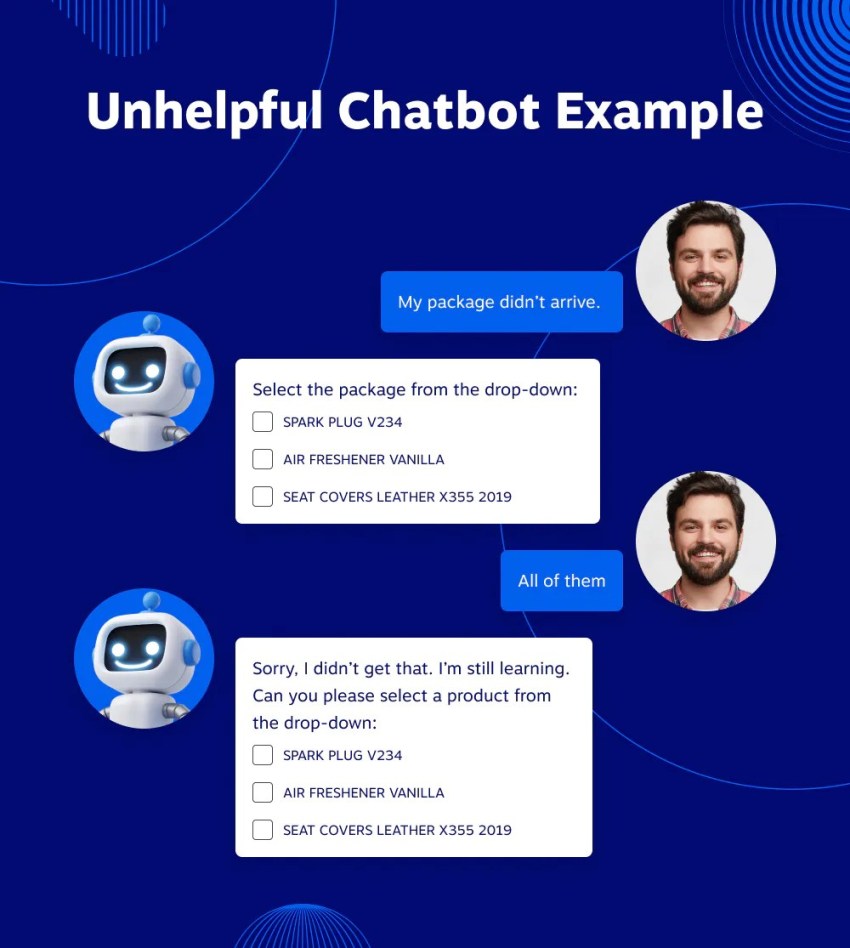
While AI can handle routine calls, it can’t replace humans in every situation. Callers expect empathy and clear judgment when dealing with complex or emotional issues. Businesses should use a mix of automation and live agents to handle both simple and sensitive issues.
Setup and training time
An AI receptionist isn’t ready to use right away. It requires your business data, call flows, and answers to frequently asked questions. Setting it up takes time initially, but it pays off later with more precise answers.
Risk of misinterpretation
Even with advances in agentic AI, despite its excellent performance, it can make mistakes. It can misunderstand, miss context, or provide incomplete answers. Regular performance checks and system updates help identify these issues early and ensure a smooth experience.
Privacy and data security risks
AI receptionists may process personally identifiable data, call recordings, transcripts, contact details, and other customer information. Businesses should understand what data the provider collects, where it stores that information, how long it retains it, and whether third parties can access it.
Companies in regulated industries should also confirm that the provider supports their specific compliance requirements. Access controls, encryption, consent procedures, and clear data-retention policies can reduce privacy and security risks.
Nextiva protects XBert interactions through its security and compliance infrastructure. Nextiva publishes support for SOC 2, ISO 27001, PCI DSS, GDPR, and HIPAA-compliant plans, along with TLS and SRTP encryption. Businesses should still confirm that their selected plan, integrations, data-retention settings, and agreements meet their specific regulatory requirements.
The following video explains some of the less obvious risks businesses should consider before adopting an AI receptionist.
When you might not need an AI receptionist
AI receptionists are especially useful if phone calls are central to your business. They prevent lost calls, book appointments, prevent you from missing new leads, and relieve your staff of repetitive tasks.
You’re most likely to benefit if:
- Calls go unanswered after business hours
- Employees spend too much time scheduling appointments or repeating questions
- Call volume is growing faster than your team can handle
But not every business needs it right away.
You may not see much benefit if:
- You only receive a few calls per day
- A small team can handle calls without delay
- You aren’t busy with other tasks or projects
In these cases, voicemail transcription or call forwarding may be sufficient initially. As call volume increases or customers expect faster responses, switching to an AI receptionist becomes worthwhile.
Why Nextiva Leads the Pack
Selecting an AI receptionist goes beyond the immediate solutions it can provide. It’s about finding a system that will grow with your small business or midsize enterprise. The right solution should be easy to use, flexible, and designed for long-term value.
When you need a simple yet effective AI receptionist, XBert AI is the best choice for business owners to pick. Hear the demos for yourself.
Nextiva delivers calls, messages, automation, and customer insights all in one platform. It’s a future-ready system that’s not only simple to set up. As a UJET alternative, it also simplifies your workflow and leverages AI for improved customer experience as your business needs evolve.
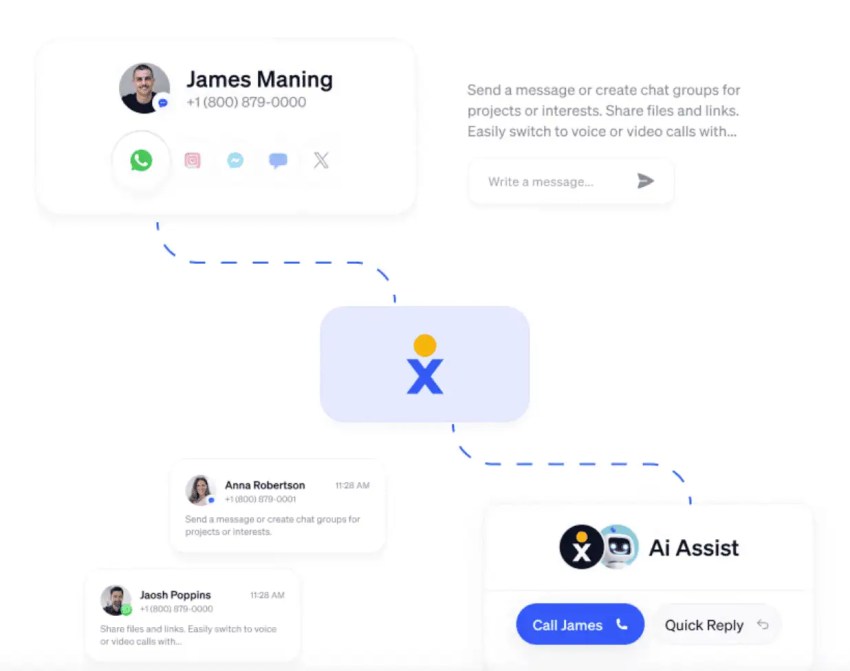
Discover how Nextiva’s solutions can streamline communication and enhance every call.
Run your business instead of answering calls all day
Nextiva’s AI-powered receptionist is perfect for handling calls so you can focus on what matters most.
Frequently Asked Questions About AI Receptionist (FAQs)
An AI receptionist is software that answers calls, understands callers’ requests, provides approved information, completes routine tasks, and transfers calls to an employee when needed.
A traditional IVR (interactive voice response) collects information through keypad entries or predefined voice commands. It may retrieve an account balance, accept a payment, or check an order status, but callers must follow its programmed workflow. An AI receptionist understands open-ended speech, remembers the context of the conversation, and responds to follow-up questions without forcing callers through a fixed sequence.
An auto-attendant acts as a virtual switchboard. It greets callers and routes them to an extension or department through options such as “Press 1 for sales.” An AI receptionist goes beyond call routing by answering questions, taking messages, capturing leads, scheduling appointments, and deciding when to transfer a caller to a person.
Setup time varies by platform and workflow. Nextiva says businesses can set up XBert in under five minutes using their business information or Google Business Profile. Businesses should spend additional time testing its answers, integrations, transfers, and escalation rules before a full launch.
Language support varies by provider, plan, voice model, and region. Confirm that the platform supports the languages and regional accents your callers use, and test real conversations in every required language before launching it.
A properly configured AI receptionist follows a fallback rule. It may ask a clarifying question, take a message, schedule a callback, or transfer the conversation to a person or department. Businesses should configure these rules during setup so the AI does not guess when information is missing.
AI receptionist pricing varies by provider and usage model. Some providers charge a monthly subscription, while others charge by the call, minute, or conversation. Published entry prices can start below $50 per month, while Nextiva XBert costs $99 per month for 100 eligible interactions, with additional usage billed separately.