Customer Experience
  Blog
Blog  Business Communication
  Leadership
  Marketing & Sales
  Nextiva News
  Productivity
  VoIP
VoIP 

Starting a contact center requires more than hiring agents and setting up phone lines. You need a clear service strategy, the right communication channels, reliable contact center technology, defined workflows, trained staff, and performance standards from the outset.
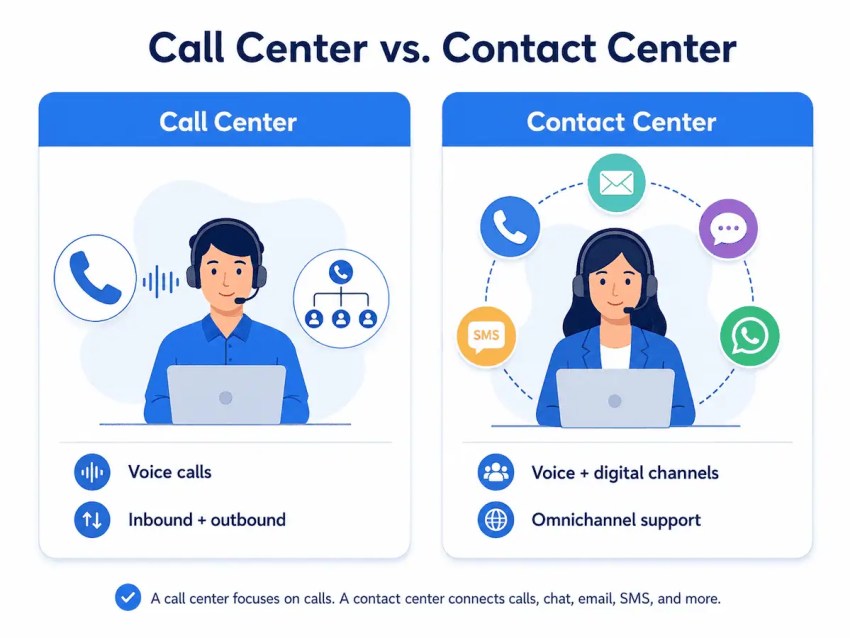
Unlike a traditional call center, which primarily focuses on voice calls, a contact center supports customer interactions across multiple channels, such as phone, email, live chat, SMS, and social media.
By laying a strong foundation from the start, you can build a contact center that runs efficiently, delivers consistent customer experiences, and scales as your business grows. The 12 steps below cover the whole process: how to plan, staff, equip, launch, and optimize your contact center.
What Do You Need to Start a Contact Center?
Before we dive into the twelve steps needed to start a contact center, here’s a quick at-a-glance table to show you what you need and why.
| What you need | Why you need it |
|---|---|
| A clear business objective and service scope | Defines what the contact center will handle, which customers it will support, and what success should look like. |
| Expected interaction volume | Helps you estimate staffing, capacity, queue requirements, and operating hours across channels. |
| A channel strategy | Determines whether you’ll support voice, email, live chat, SMS, social media, or other customer channels. |
| Contact center software | Provides the routing, queue management, agent tools, automation, and reporting needed to manage customer interactions. |
| CRM and help desk integrations | Gives agents access to customer history, tickets, account details, and previous conversations. |
| Agents and supervisors | Ensures you have enough trained staff to handle demand, manage performance, and resolve escalations. |
| Workflows and escalation paths | Creates consistent processes for routing interactions, resolving issues, and escalating complex cases. |
| Training and knowledge resources | Helps agents understand your products, processes, systems, and customer service standards. |
| Analytics and quality assurance processes | Lets you measure performance, monitor service quality, identify problems, and improve operations. |
| Security and compliance requirements | Protects customer data and helps the contact center meet applicable privacy, recording, payment, and industry regulations. |
12 Steps to Start a Contact Center
Now, let’s walk through the essential steps for launching an effective and high-performing contact center.
1. Define Your Objectives, Scope, and Budget
Before you start a contact center, define what it needs to accomplish, who it will serve, how much demand you expect, what resources you can commit, and what success should look like. These decisions will shape your staffing, channels, technology, workflows, and budget.
What is the primary goal of the contact center?
Ask yourself what the main purpose of your contact center is. Some handle a broad mix of customer interactions, while others focus on a specific function.
Your goals may include:
- Handling customer service and support
- Resolving technical issues
- Managing sales inquiries
- Handling inbound and outbound interactions
- Booking appointments
- Qualifying or collecting leads
- Providing specialized support for certain industries or customer groups
Who are your customers?
Define the customers your contact center will serve and how they prefer to communicate. Consider factors such as:
- Customer demographics
- Common reasons for contacting your business
- Preferred communication channels
- Language or accessibility needs
- Expected service hours
- The level of support customers typically require
These insights will help you decide whether to offer support through phone, email, live chat, SMS, social media, self-service, or a combination of channels.
What interaction volume do you expect?
Estimate your daily, weekly, and seasonal volume across both inbound and outbound interactions. Depending on your channel mix, you may need to forecast volume across:
- Voice calls
- Live chat
- SMS
- Social media
- Messaging apps
- Outbound campaigns
Customer interaction volume directly affects staffing, scheduling, software capacity, and queue design. Plan for fluctuations and scalability over time, and choose a contact center provider that can accommodate such changes.
What is your contact center budget?
Set a realistic budget before choosing technology or hiring staff. Your costs may include:
- Contact center software
- Voice and messaging services
- CRM integrations and help desk tools
- Integrations
- Agent hardware and headsets
- Agent and supervisor salaries
- Training and onboarding
- Workforce management and quality assurance tools
- Security and compliance requirements
- Implementation and ongoing support
Separate one-time costs from ongoing operating expenses, and leave room for growth. A clear budget will help you prioritize essential capabilities now without limiting your ability to scale later.
2. Select Your Communication Channels
One of the key decisions when starting a contact center is determining how customers will be able to reach you. Your communication channel mix should reflect customer preferences, the types of interactions your team handles, your staffing resources, and your budget.
Which channels will you support?
You don’t need to launch every available channel at once. Start with the channels your customers use most and that your team can support consistently, which may include:
- Voice: Ideal for more personal or complex issues, but can require significant staffing resources.
- Email: Useful for detailed customer inquiries and record-keeping, but slower response times can frustrate customers looking for quick resolutions.
- Live chat: Good for real-time support (including chatbots), but may not be ideal for more nuanced or in-depth issues.
- SMS and messaging: Convenient for short questions, updates, reminders, and notifications, but texting is less suited to complex issues.
- Video: Useful for high-touch service, consultations, or technical troubleshooting where visual communication helps resolve the issue.
- Social media: Gives customers another convenient way to reach your business, particularly for quick questions or service issues raised on public platforms.
- Self-service: Knowledge bases, FAQs, tutorials, and customer portals can help customers resolve common issues without contacting an agent.
- Help desk and ticketing: Best for tracking and prioritizing issues, but it can feel impersonal if not paired with other support options.
Will you offer multichannel or omnichannel support?
A traditional call center primarily handles voice interactions, while a contact center can support customers across multiple channels.
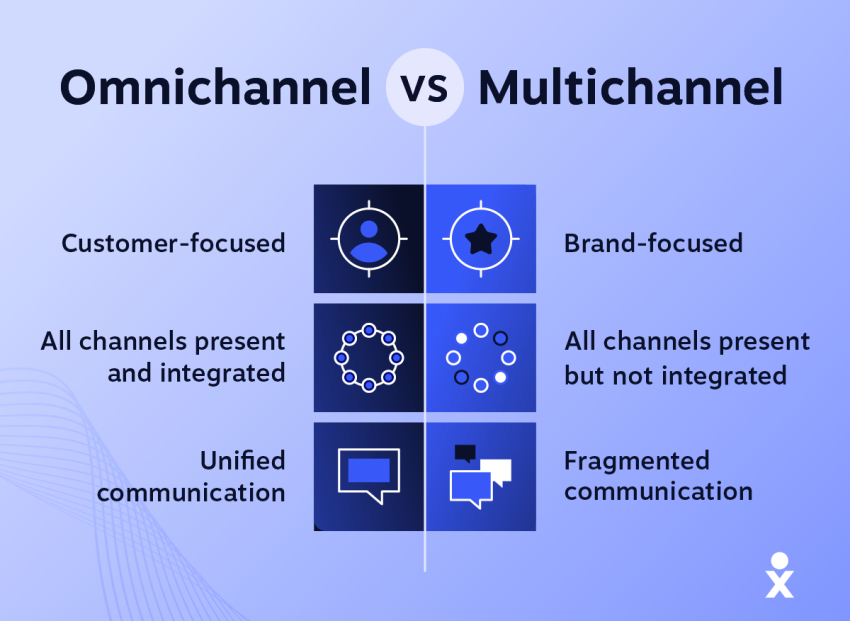
If you offer several channels independently, you’re running a multichannel contact center. With an omnichannel approach, those channels are connected so customer information and conversation history can follow the customer as they move between them.
For example, a customer might begin with live chat and later call for additional help. In an omnichannel contact center, the phone agent can access the earlier conversation instead of asking the customer to repeat the issue. Providing that continuity requires that your contact center platform integrate with systems such as your CRM, help desk, and customer database.
You don’t necessarily need a fully omnichannel setup on day one. Choose an approach that fits your customer needs, resources, and launch scope, while making sure your technology can support additional channels as your contact center grows.
How will you prioritize channels?
Not every channel or interaction needs the same priority. Define routing, queue, and service-level rules before launch so contact center agents know what to handle first. For example, you might prioritize interactions based on:
- Urgency: Route time-sensitive or high-impact issues ahead of routine inquiries.
- Customer needs: Give customers with complex or accessibility-related needs appropriate routing options.
- Customer segment: Offer different service levels or channels based on account type or support plan where appropriate.
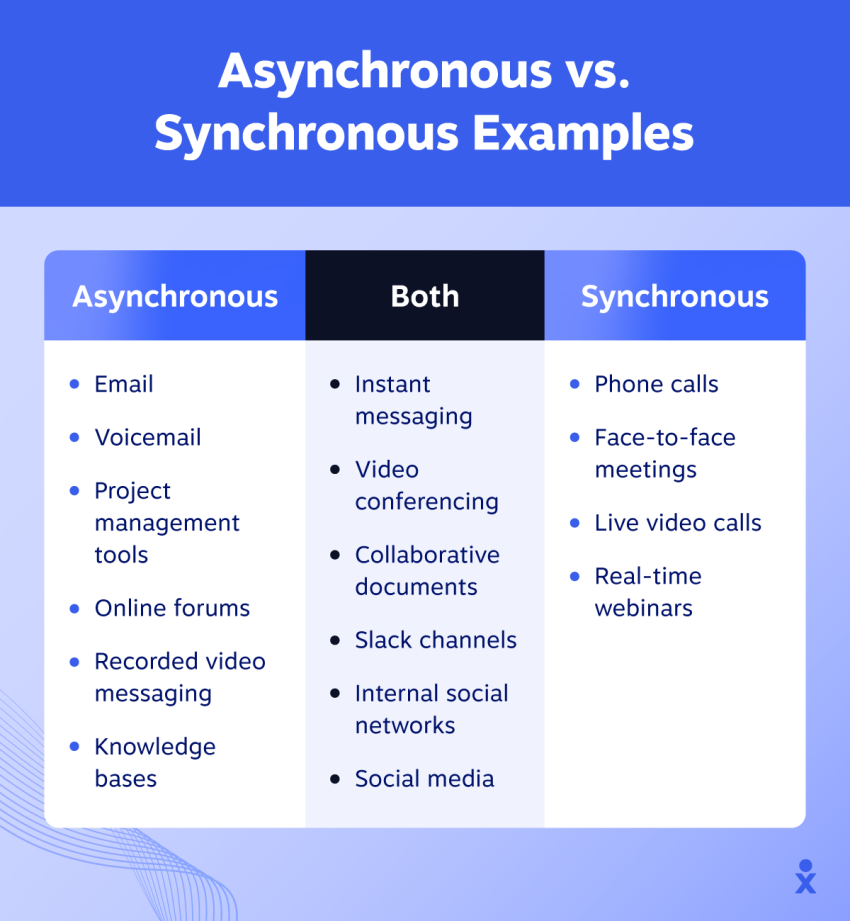
- Channel: Set different response-time targets for real-time channels such as voice and chat versus asynchronous channels such as email.
- Interaction type: Route sales, billing, technical support, and other inquiries to agents with the appropriate skills.
3. Choose the Right Contact Center Technology
Your exact software requirements will depend on the channels you support, your team size, your workflows, and whether agents work on-site or remotely.
What software and systems do you need?
Most contact centers rely on a core technology stack that includes:
- Contact center software: Manages interactions, routing, queues, agent activity, and reporting across channels.
- Voice or VoIP service: Handles outbound and inbound calls.
- CRM software: Gives agents access to customer profiles, account details, and interaction history.
- Help desk or ticketing software: Tracks customer issues from initial contact through resolution.
- Workforce and quality management tools: Support forecasting, scheduling, performance monitoring, and quality assurance.
- Knowledge management tools: Give agents quick access to product information, policies, and troubleshooting resources.
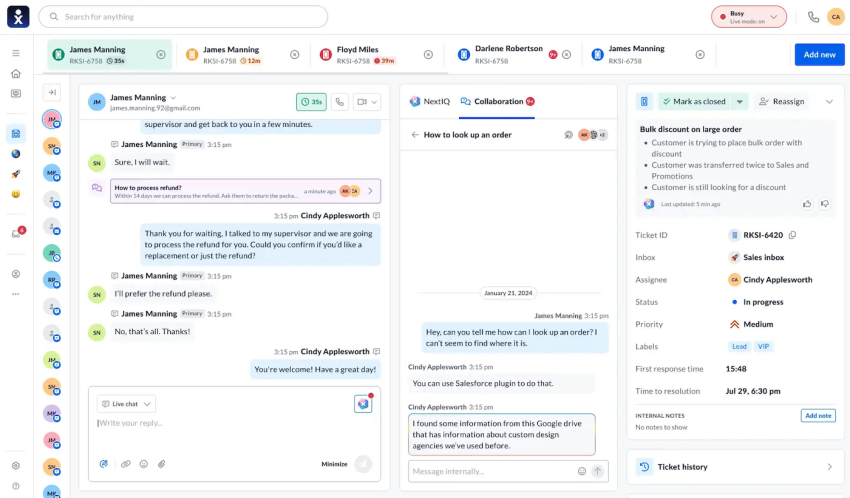
Some platforms, including Nextiva, combine many of these capabilities in one system while integrating with specialized business applications.
Should you choose a cloud or on-premises contact center?
One of the biggest technology decisions when starting a contact center is whether to use a cloud-based or on-premises platform.
On-premises contact centers run on infrastructure your organization owns and maintains. They may provide greater control over certain systems and configurations, but they generally require more upfront investment, internal IT resources, ongoing maintenance, office space, and capacity planning.
Cloud contact centers are hosted by the provider and accessed over the internet. They usually require less upfront infrastructure, are easier to scale, and can support remote agents or distributed teams more easily.
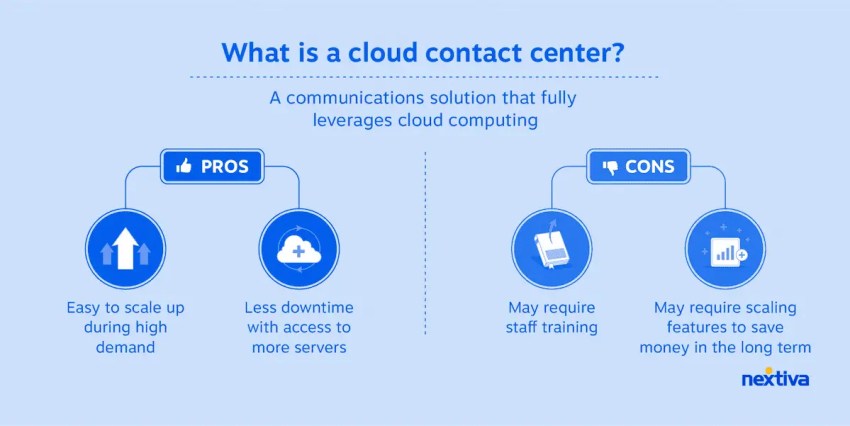
For many new contact centers, a cloud platform can simplify deployment and scaling. However, the right choice depends on your security requirements, existing infrastructure, IT resources, budget, and regulatory obligations.
What features do you need in a contact center platform?
Choose features based on your channels, workflows, and customer needs rather than simply looking for the longest feature list. Key capabilities may include:
- Omnichannel support for voice, email, chat, SMS, and other digital channels
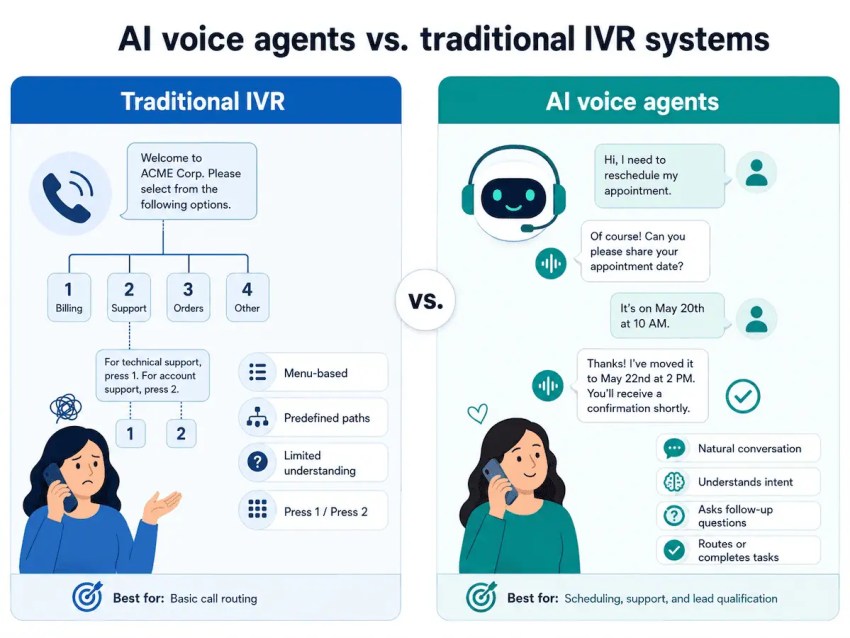
- Automatic call distribution (ACD) and intelligent routing
- Interactive voice response (IVR)
- Unified agent workspace with customer context across channels
- Phone call and interaction recording
- Real-time reporting and analytics
- Workforce management
- Quality management and monitoring
- AI agent assistance, virtual agents, and chatbots
- Self-service and knowledge management
- Outbound dialing tools, if needed
What integrations are necessary?
Your contact center platform should connect with the systems agents need to serve customers without constantly switching between applications. Common contact center integrations include:
- CRM platforms: Give agents access to customer profiles, interaction history, preferences, and account details.
- Help desk and ticketing systems: Centralize support requests and help agents track issues through resolution.
- E-commerce and business systems: Surface information such as orders, inventory, appointments, payments, or transactions.
- Analytics and BI tools: Combine contact center data with broader business data to identify trends and improve performance.
- Identity and authentication tools: Help agents verify customers and securely access sensitive information.
- Marketing, workforce, and knowledge management tools: Connect additional customer journey, staffing, and support information where needed.
Prioritize integrations that give agents useful customer context, reduce manual data entry, and keep information consistent across systems.
4. Plan for Security and Compliance
Security and compliance should be built into your contact center from the beginning, not added after launch. The requirements you need to meet will depend on your industry, location, communication channels, and the types of customer data your team handles.
What regulations and requirements apply to your contact center?
Depending on your industry, location, and communication methods, your contact center may need to comply with requirements related to:
- Data privacy and protection
- Consumer protection
- Call recording and consent
- Outbound calling and messaging
- Payment card security
- Sector-specific regulations
Organizations processing payments, for example, must be PCI-compliant, while healthcare or insurance contact centers may need to be aware of HIPAA regulations. Requirements can also vary by jurisdiction, so involve your legal, compliance, and security teams early in the contact center setup process.
How will you protect customer data?
If your contact center handles sensitive customer information, define how that data will be accessed, stored, transmitted, and retained. Key safeguards may include:
- Encryption for data in transit and at rest
- Role-based access controls
- Secure call and interaction recording
- Data masking or redaction
- Secure customer authentication
- Regular security testing
Agents should only have access to the information they need to do their jobs, and permissions should be reviewed as roles change.
5. Build Your Contact Center Team
Now that you’ve defined your channels, technology, and compliance requirements, it’s time to determine how many people you need to operate the contact center and what roles they should fill.
How many agents do you need?
Base staffing levels on factors such as:
- Expected interaction volume
- Hours of operation
- Channel mix
- Target service levels and response times
- Average handle time
- Seasonal or campaign-driven demand
- Expected growth
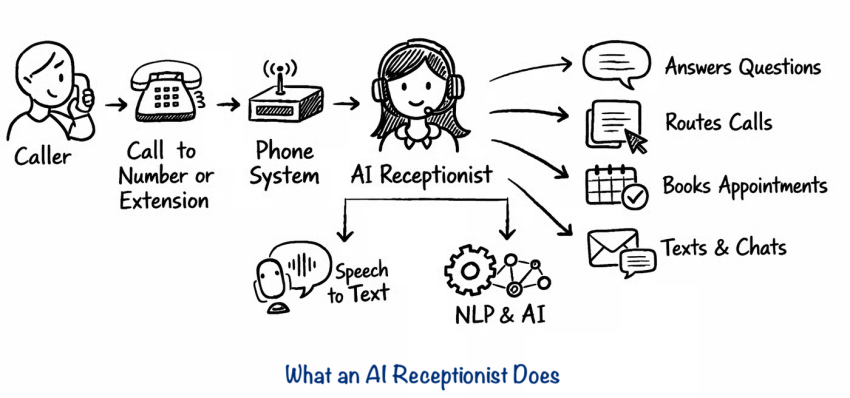
You can also use an AI receptionist or agent, such as XBert, to handle routine inquiries, after-hours calls, and overflow volume when live agents aren’t available.
What skills do your agents need?
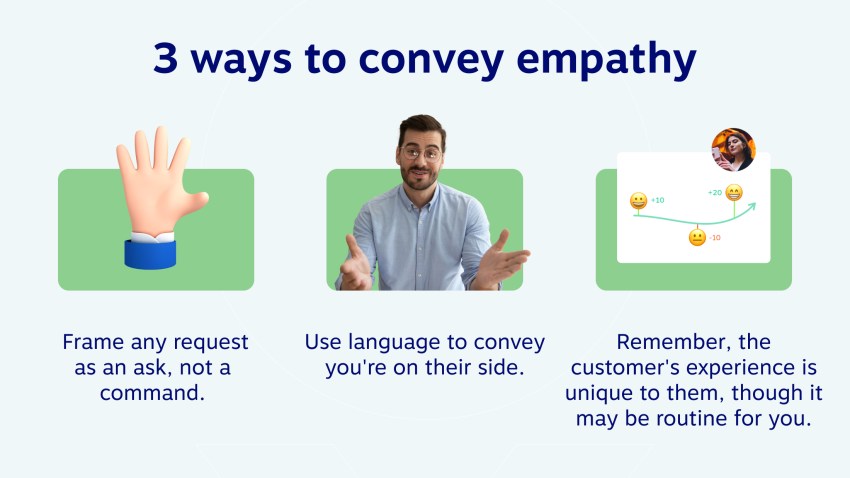
All customer support agents should have soft skills, such as:
- Clear communication
- Empathy
- Patience
- Active listening
- Problem-solving
- Adaptability
Some roles may also require specialized skills, such as:
- Product or industry expertise
- Technical troubleshooting
- Sales calls or lead qualification
- Multilingual support
Many contact centers create specialized teams or use skills-based routing so interactions reach agents with the right expertise.
Will your agents work on-site, remotely, or in a hybrid model?
Decide where agents will work before finalizing your technology, security controls, and management processes. Your operating model can affect:
- Technology: Remote and hybrid teams typically need cloud-based contact center software, reliable internet connectivity, secure access, and standardized hardware.
- Security: Remote environments may require additional authentication, endpoint security, and data-access controls.
- Performance monitoring: Supervisors may rely more heavily on real-time dashboards, quality monitoring, recordings, and workforce management tools.
- Communication and coaching: Distributed teams need clear processes for collaboration, feedback, escalation, and ongoing training.
What roles and management structure do you need?
A new contact center needs more than frontline agents. Define who will manage operations, quality, staffing, training, and technical issues before launch. Depending on the size of your operation, key roles could be contact center manager, team leaders or supervisors, and workforce management or scheduling staff.
Clearly assign ownership for:
- Hiring and staffing
- Scheduling and capacity planning
- Agent training and coaching
- Quality assurance
- Performance management
- Escalations
- Reporting and analytics
- Technology administration
- Policy and process updates
In a smaller contact center, one person may handle several of these responsibilities.

6. Design Processes and Workflows
Clear contact center workflows help route customers efficiently, reduce handoff errors, standardize service, and give agents consistent guidance across channels.
How will customer interactions be routed?
Map out what should happen when a customer contacts you by phone, chat, email, SMS, or another supported channel. Depending on your setup, workflows may include:
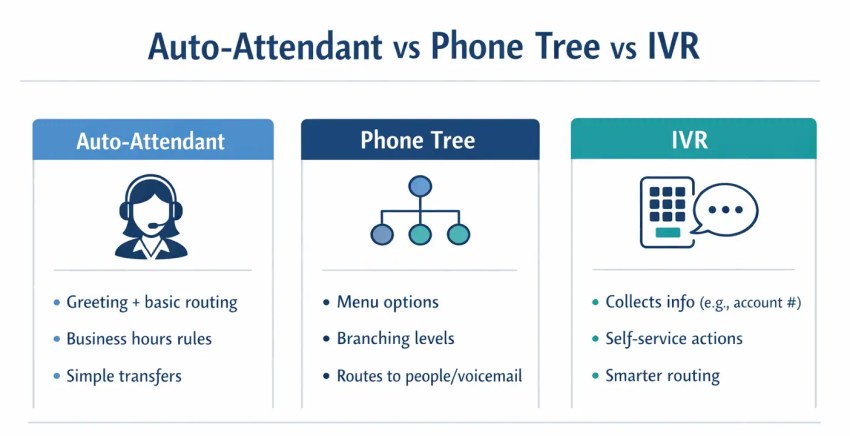
- Using IVR or virtual agents to greet customers and identify why they’re contacting you
- Routing interactions by issue type, customer segment, language, or agent skill
- Sending customers to a general queue or directly to a specialized team
- Prioritizing urgent or high-value interactions
- Creating tickets automatically when an issue requires follow-up
- Preserving customer context when an interaction moves between channels or departments
- Routing after-hours or overflow inquiries to self-service, an AI agent, voicemail, or another team
How will you handle escalations?
Create clear rules for when agents should resolve issues themselves versus when they should escalate them to another person, team, or department, such as:
- Which issues agents can resolve independently and which always require escalation
- How many attempts agents should make before escalating
- Which teams or specialists handle different types of escalations
- What information should be passed along when an issue is escalated
What service levels will you set?
Service-level agreements (SLAs) will define your contractually obligated response times for different channels. For example, you may set a goal to answer voice calls within sixty seconds and email or asynchronous messaging within twenty-four hours.
When setting service levels, consider:
- Channel expectations: Customers generally expect faster responses from voice and live chat than from email.
- Interaction urgency: Time-sensitive issues may require different routing and response targets.
- Staffing capacity: Set targets your team can realistically meet during normal and peak periods.
- Issue complexity: Some inquiries require more investigation and therefore longer resolution times.
- Customer or account commitments: Certain customers may have contractual service-level agreements that specify response or resolution requirements.
Distinguish between internal service-level targets and formal service-level agreements (SLAs) so your team understands which standards are operational goals and which are contractual obligations.
7. Define Your Customer Service Policies
Set clear policies for how agents should serve customers, resolve issues, and make decisions. These guidelines should reflect your business rules, customer expectations, compliance requirements, and the level of authority agents have.
What service standards will agents follow?
Define expectations for:
- Response and resolution times
- Tone and communication
- First contact resolution
- Follow-up procedures
- Accessibility or language support
- Consistent service across channels
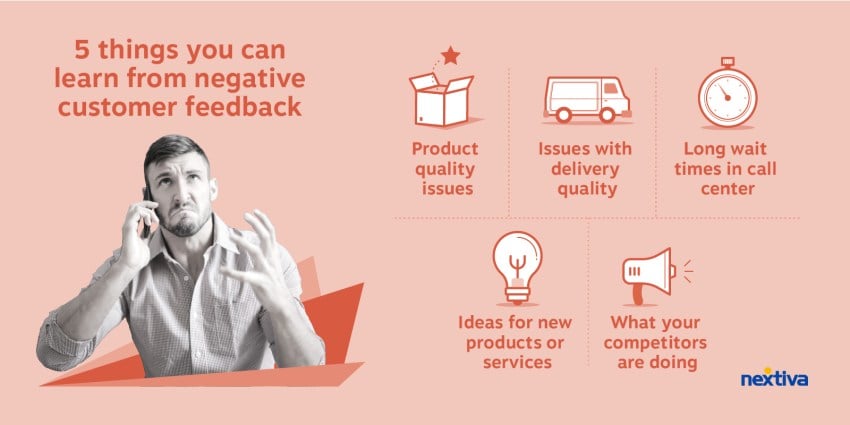
How will agents handle complaints and make decisions?
Create clear rules for common complaints and service failures, including:
- Which remedies agents can offer without approval
- When a supervisor or specialist must step in
- How complaints should be documented
- Which issues require follow-up
You may also empower agents to issue refunds or credits, waive fees, replace products, adjust orders, or offer other approved remedies within set limits. Giving agents appropriate decision-making authority can speed up resolutions and reduce unnecessary escalations.
How will you personalize customer interactions?
Use CRM or customer data to give agents relevant context, such as previous interactions, account details, purchases, open cases, and customer preferences.
This can help agents provide more relevant support and avoid asking customers to repeat information. Use customer data only where it improves the interaction and aligns with your privacy and security requirements.

8. Train and Onboard Your Team
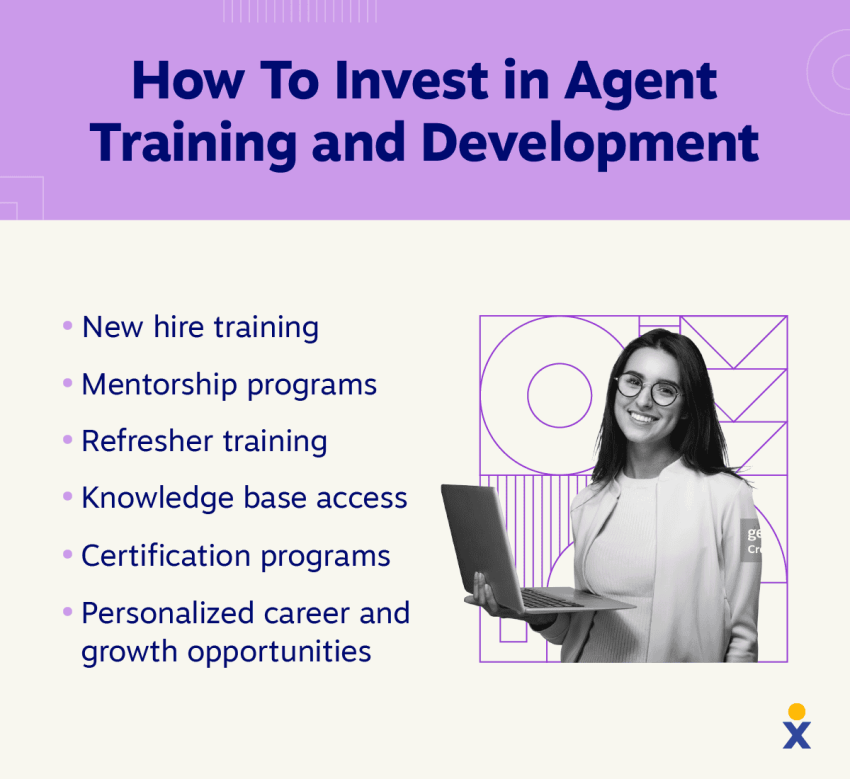
Before launch, train agents on your systems, workflows, policies, products, security requirements, and service standards.
What should training and onboarding include?
Cover the essentials:
- Contact center software, CRM, and help desk tools
- Routing, escalation, and documentation procedures
- Product and service knowledge
- Security and compliance requirements
- Scripts, prompts, and response guidelines
- Communication, empathy, and de-escalation skills
- Channel-specific expectations for voice, chat, email, and SMS
Use shadowing, role-playing, test interactions, and supervised customer conversations to confirm that agents are ready before they work independently.
Pro Tip: Continue training after launch with product and policy updates, refresher sessions, quality reviews, and targeted coaching based on agent performance.
What resources will agents have?
Give agents quick access to:
- A searchable knowledge base
- FAQs and troubleshooting guides
- Approved scripts and templates
- Escalation procedures
- Product and policy documentation
- Supervisors or subject-matter experts
- AI-assisted guidance, where appropriate
9. Set Up Analytics and Quality Monitoring
Use advanced analytics to monitor everything from customer sentiment to agent performance to contact center goals. Set up reporting before launch to spot problems early, and make informed staffing and workflow decisions.
Which KPIs will you track?
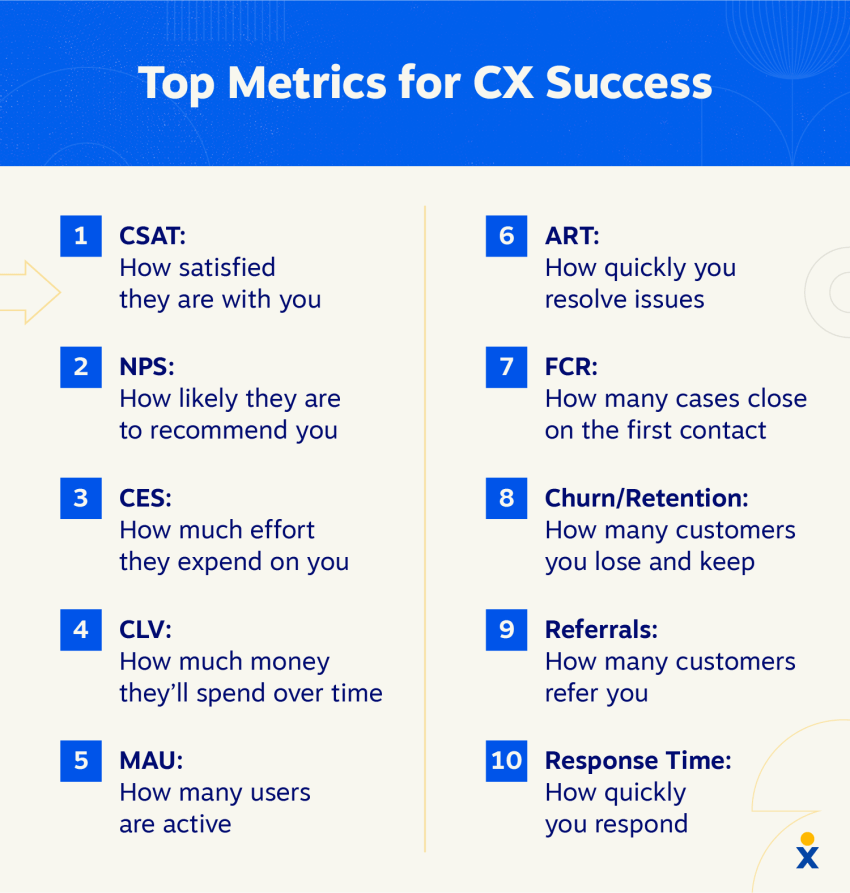
Focus on the customer support metrics that best reflect your goals, such as:
- Customer satisfaction (CSAT)
- First contact resolution (FCR)
- Average handle time (AHT)
- Response time and service level
- Abandonment rate
- Interaction volume by channel
- Agent occupancy or adherence
- Quality assurance scores
Use real-time and historical analytics to monitor trends, compare teams or channels, forecast staffing needs, and identify coaching opportunities.
How will you monitor quality and customer feedback?
Use a mix of:
- Recorded interaction reviews
- QA scorecards
- Customer surveys
- Compliance checks
- Agent coaching
- AI-assisted quality or conversation analytics
This helps you identify recurring issues, service gaps, and areas for improvement.
What reporting tools will you use?
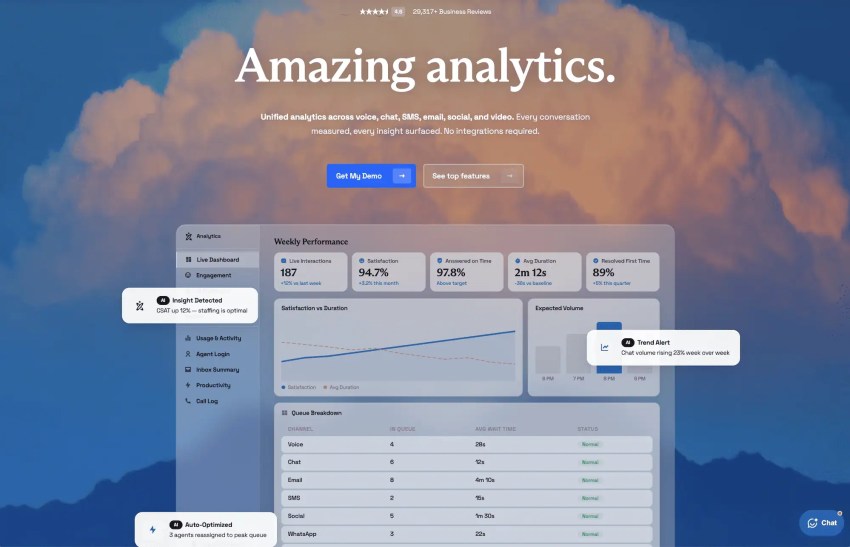
Look for tools that provide real-time dashboards, customizable reports, historical trends, and agent, channel, and workforce views.
Nextiva Analytics, for example, provides customizable dashboards and real-time reporting to help contact center leaders monitor activity, evaluate performance, and identify trends.
10. Run a Pilot or Soft Launch
Before launching at full scale, test your contact center with a limited group of agents, customers, channels, or operating hours.
What should you test during a soft launch?
Use the pilot to test whether:
- Staffing levels are sufficient for actual interaction volume
- Routing rules send customers to the right agents or teams
- IVR menus and self-service options are easy to navigate
- CRM, help desk, and other integrations work as expected
- Agents can find the information they need quickly
- Escalation procedures work smoothly
- Service-level targets are realistic
- AI tools, virtual agents, or automation handle intended use cases correctly
- Security and compliance procedures work in real-world interactions
What are the goals of the pilot?
Pilot programs seek to help you fine-tune processes, identify bottlenecks, and test your tech stack in real-world scenarios.
For example, your agents may complain that they don’t have access to enough product information to address customer calls, requiring the creation of an internal knowledge base.
Or, you may find that the navigational menu is confusing to callers, often resulting in them ending up speaking to the wrong department.
How will you collect feedback during the pilot?
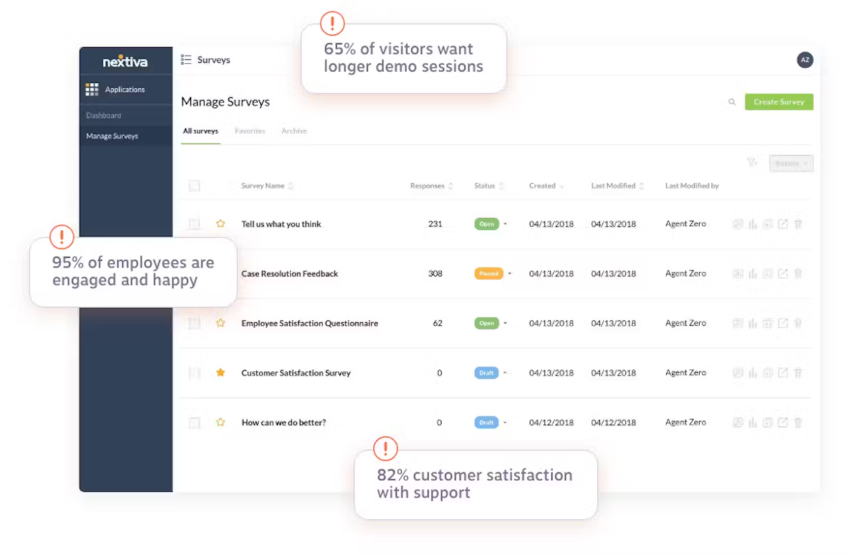
While ongoing feedback collection is always important, it’s particularly crucial during pilot or beta programs. Check in with both agents and customers to receive feedback, ensuring that you’re able to make any necessary adjustments before the full rollout.
How to select participants for the pilot program
Choosing the right participants is key to getting representative feedback. Aim to include a diverse mix of customers who reflect your typical user base in terms of demographics, support needs, and communication preferences.
Internally, select agents with varying levels of experience to understand how training and workflows perform across different skill sets. This approach helps you gather well-rounded feedback and ensures that your customer service contact center is ready to meet the needs of all stakeholders.
What needs to happen before the full launch?
Document the issues that you uncovered during the pilot and decide which ones must be resolved before going live. Confirm that:
- Critical routing and technology issues are fixed
- Agents are ready to handle live interactions
- Staffing levels are sufficient
- Escalation paths work correctly
- Security and compliance requirements are being followed
- Reporting and quality monitoring are functioning
- Customer-facing channels are working as intended
Once the major issues are resolved and your core processes are performing reliably, you can move to the full launch.
11. Launch Your Contact Center
You’re almost there! Once your pilot is complete and any critical issues have been resolved, you’re ready for the full launch.
What should your launch plan include?
Create a detailed rollout plan that defines:
- Your launch date and go-live timeline
- Which channels and services will be available at launch
- Staffing and supervisor coverage
- Final agent training and readiness checks
- Customer notifications or support updates
- Technical support and escalation contacts
- Backup or contingency plans if a system fails
- The KPIs and issues you’ll monitor most closely during launch
If you’re migrating from an existing support system, also plan how you’ll transition phone numbers, queues, tickets, customer records, and active cases without disrupting service.
How will you minimize disruption during launch?
If possible, schedule the launch during a lower-volume period so your team has more flexibility to address unexpected issues. Before going live, confirm that:
- Routing rules and queues are working correctly
- Integrations are syncing data as expected
- Agents can access the systems and information they need
- Supervisors know how to handle escalations
- Reporting and quality monitoring are active
- Backup procedures are documented
- Technical support is available if problems occur
How will you continuously improve the contact center?
Once the contact center is stable, use performance data and feedback to refine your operation over time by:
- Reviewing agent performance and coaching needs
- Updating workflows and routing rules
- Improving knowledge resources and scripts
- Acting on customer feedback
- Adjusting staffing and scheduling
- Evaluating new automation or AI opportunities
- Reviewing whether your technology still meets your needs
12. Plan for Growth and Continuous Improvement
Even if you’re starting small, build your contact center with future growth in mind.
How will your contact center handle growth?
Choose systems and processes that can scale as demand increases. Consider whether your setup can accommodate:
- More agents and supervisors
- Higher interaction volumes
- Additional communication channels
- New teams, queues, or departments
- More complex routing rules
- Additional integrations
- Expanded reporting and quality monitoring
Cloud-based contact center platforms are often easier to scale because they can typically add users, capacity, and features without significant new infrastructure.
What’s your strategy for scaling the team?
Plan how you’ll add staff before growth creates service problems by thinking about:
- Hiring ahead of predictable seasonal or campaign-driven demand
- Cross-training agents so they can support multiple interaction types
- Developing team leads and supervisors as the workforce grows
- Creating repeatable onboarding and training processes
- Monitoring workload and service levels to identify when additional staff are needed
- Adding specialized roles as contact center operations become more complex
How will you manage costs as you scale?
Look for ways to increase capacity without adding unnecessary complexity or cost by:
- Using AI agents or chatbots to handle routine inquiries
- Expanding self-service options
- Automating repetitive workflows
- Improving routing so interactions reach the right agent sooner
- Forecasting staffing needs more accurately
- Cross-training agents across channels or specialties
- Reviewing software licenses and integrations as your needs change
The goal is not simply to reduce costs, but to make sure spending grows in proportion to customer demand and service requirements.
Launch Your Contact Center With Confidence Using Nextiva
You now have the framework to start a contact center that can support customers efficiently today and scale as your needs grow. The final step is choosing a vendor that brings your channels, agents, workflows, customer data, and reporting together.
Nextiva combines contact center capabilities with workforce management, analytics, automation, and AI tools designed to support both agents and customers. You can also use XBert AI as an AI receptionist or AI employee to answer calls and messages, handle routine inquiries, book appointments, support customers after hours, and hand more complex interactions off to your team with context.
Nextiva also integrates with your existing business systems and gives you the flexibility to add agents, channels, automation, and AI capabilities as your contact center grows.
With the right foundation and technology in place, you can launch a contact center that delivers consistent customer experiences without creating unnecessary complexity for your team.
Ready to start your contact center with Nextiva? Explore Nextiva Contact Center solutions.
Your AI-Powered Contact Center
Create amazing customer experiences with AI-powered contact center software. Scalable contact center platform built for omnichannel customer conversations.
FAQs About Starting a Contact Center
A call center primarily handles voice calls, while a contact center supports multiple communication channels, such as phone, email, live chat, SMS, and social media. Contact centers may also connect these channels (omnichannel support) so agents can maintain customer context across interactions.
There’s no fixed minimum. Staffing depends on expected interaction volume, operating hours, channel mix, service-level targets, and average handle time. Small contact centers may start with only a few agents and scale as demand grows.
Yes. Cloud-based contact center software allows agents to work remotely as long as they have secure internet access, the right hardware, and appropriate security controls. Remote teams also need clear processes for communication, performance monitoring, coaching, and technical support.
Contact center software can range from roughly $10 to $200+ per user per month, depending on team size, channels, AI features, workforce management, integrations, and security requirements. Your total startup cost will also include staffing, hardware, training, implementation, and any additional software or telecom expenses.
Virtual call centers are customer service or sales operations where agents work remotely rather than from a central office. Using virtual call center software, teams can manage calls, routing, reporting, and agent activity from anywhere with a reliable internet connection