Leadership
  Blog
Blog  Business Communication
  Customer Experience
  Marketing & Sales
  Nextiva News
  Productivity
  VoIP
VoIP 
A remote workforce gives businesses the flexibility to hire and manage employees who work outside a traditional office. But keeping distributed teams productive, connected, and engaged takes more than giving everyone a laptop and access to video meetings.
Successful remote workforce management depends on clear communication, well-defined expectations, supportive leadership, and technology that helps people collaborate from anywhere in the world.
In this guide, we’ll explain what a remote workforce is, explore its benefits and challenges, and share practical strategies for managing remote employees effectively.
What Is a Remote Workforce?
A remote workforce is a group of employees who perform their jobs outside a traditional company office, often from home, coworking spaces, or other locations. They use digital communication, collaboration, and business tools to stay connected and complete their work.
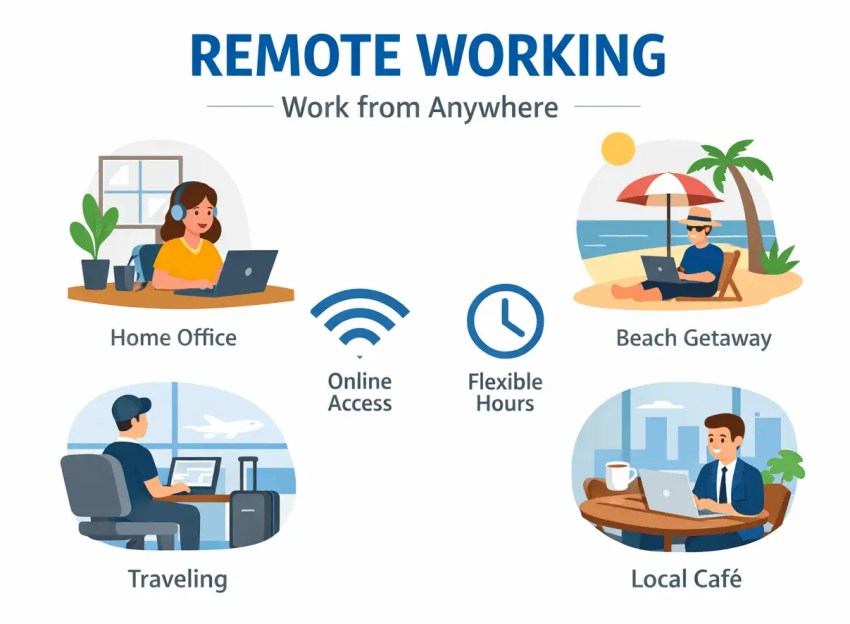
A remote workforce may be fully remote, with all employees working outside a central office, or partially remote, with some employees working offsite while others work on-site. This differs from a hybrid work arrangement, where individual employees typically split their time between remote locations and the office.
For example, a business might employ customer service agents who work from home, sales representatives who work from different locations, and managers who coordinate their activities through shared communication platforms.
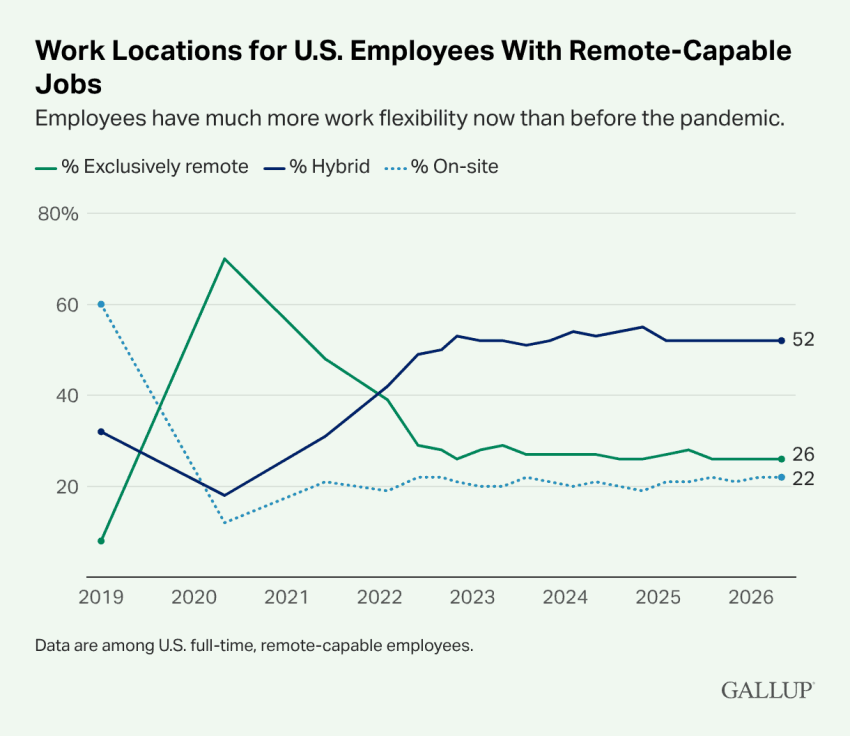
Remote and hybrid work are now established parts of the modern workplace. According to Gallup’s 2026 research, 52% of remote-capable U.S. employees work in hybrid arrangements, while another 26% work exclusively remotely. These arrangements reflect the continued importance of flexibility in how and where employees work.
But whether employees work remotely full-time or divide their time between home and the office, managing them effectively requires clear expectations, accessible tools, secure systems, and consistent communication.
Workforce comparison table
Here’s a comparison table to quickly see the different types of workforces.
| Work model | What it means | Example |
|---|---|---|
| Remote workforce | Employees work outside a central office, either fully or as part of a distributed team. | Customer support agents working from different cities. |
| Hybrid workforce | Employees split time between remote and in-office work, or work in a mix of remote and office-based roles. | Employees working from home three days per week and from an office two days. |
| On-site workforce | Employees primarily work from a designated physical location. | Staff working in a retail store or company office. |
| Distributed workforce | Employees work across multiple locations, which may include offices, homes, or regional hubs. | Teams spread across several cities and offices. |
Advantages of a Remote Workforce
When supported by clear policies, effective management, and the right technology, remote work can help businesses operate more efficiently while giving employees greater control over their work environment.
For employees
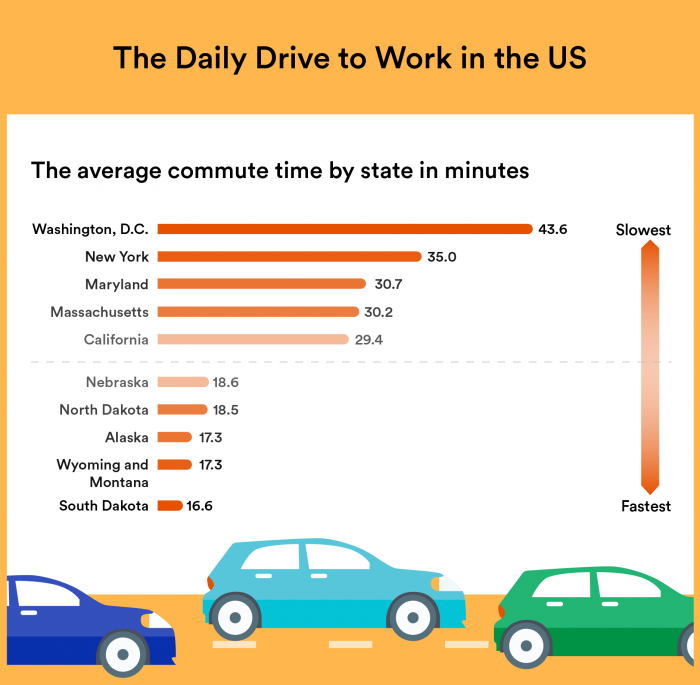
Better work-life balance: Eliminating the daily commute gives employees more time for family, personal responsibilities, exercise, and other activities. Remote work can also make it easier to balance professional and personal commitments, although maintaining healthy boundaries between work and home is important, and that may be difficult for some people.
Greater flexibility and autonomy: Depending on company policies and job requirements, remote employees may have more freedom to organize their schedules and working environments. For example, someone might adjust their working hours around school drop-offs or schedule focused tasks during their most productive periods.
Fewer workplace distractions: Employees who have a suitable home workspace can find it easier to concentrate without frequent office interruptions. This can be particularly beneficial for tasks requiring sustained focus, although remote environments can present distractions of their own, such as small children or a noisy location.
Lower commuting costs: Working from home can reduce expenses related to transportation, parking, fuel, and work-related meals. Employees may also save on professional clothing and other costs associated with traveling to an office, although they might incur additional home office expenses. For example, they could see higher internet and utility bills. Many employers cover at least some home office expenses, but that will vary from company to company.
More employment opportunities: Remote work allows employees to apply for positions outside their immediate geographic area, potentially opening doors to companies, industries, and career opportunities that wouldn’t otherwise be accessible without relocating.

For employers
Reduced overhead costs: Businesses with remote employees may need less office space, equipment, and on-site infrastructure, which reduces expenses such as rent, utilities, and office maintenance. Of course, these savings should be weighed against investments in remote technology, equipment, and employee support.
Access to a wider talent pool: Remote hiring allows businesses to recruit beyond their immediate location, making it easier to find candidates with specialized skills or experience. Employers can also build teams across different regions, provided they account for local employment requirements and time zones.
Improved employee attraction and retention: Offering remote work can make a company more appealing to candidates who value flexibility. When remote employees feel supported, connected, and trusted, flexible arrangements may also encourage them to stay with the organization longer.
Greater business continuity: A distributed workforce can help businesses maintain operations when a physical office becomes inaccessible because of severe weather, transportation disruptions, or other local emergencies. With secure cloud-based systems and reliable communication tools, employees may be able to continue serving customers from other locations.
Opportunities to support customers across time zones: Hiring employees in different regions can help businesses extend customer service coverage and collaborate across working hours. With thoughtful scheduling and clear handoff procedures, remote teams can provide support beyond the hours of a single office location.
Keep in mind, though, that these advantages depend on how well a remote workforce is managed.
Let’s take a look at some of the challenges of managing a remote team.
Challenges of Managing a Remote Team
Despite its many advantages, managing a remote team comes with challenges, too, from communication gaps to security risks and employee isolation. Recognizing these obstacles early can help businesses address them before they affect productivity and morale.
Communication gaps and information overload
Without regular in-person interactions, remote employees may miss important context or misinterpret messages. Simple questions can turn into lengthy conversations, while updates scattered across email, chats, and project management tools can make information difficult to find.
To reduce confusion, establish clear communication guidelines. Use messaging for quick questions, project boards for task updates, and video calls for complex discussions. Document important decisions in a shared workspace so everyone stays informed, including employees in different time zones.
Data security and access
Remote employees access company systems and sensitive information from different locations and networks, increasing the potential for unauthorized access and data exposure.
Protect company information with secure connections, multifactor authentication, updated devices, and role-based access controls. Train employees to recognize phishing attempts and establish clear procedures for reporting lost devices or suspicious activity.
Building team connections and company culture
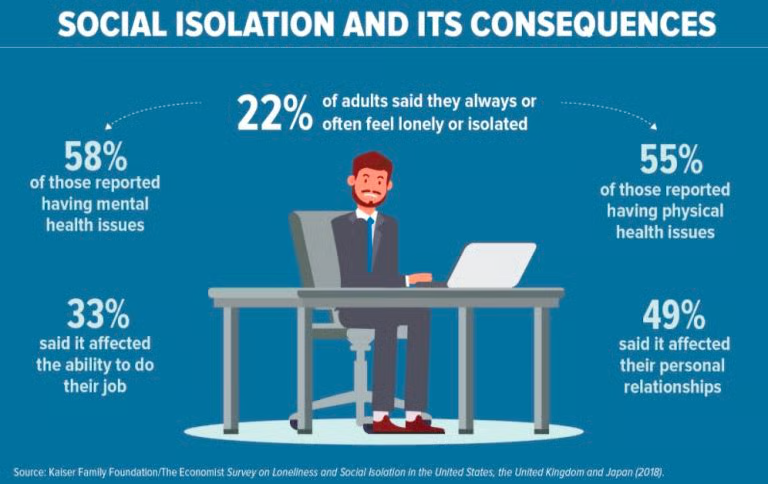
Without spontaneous office interactions, remote employees may find it harder to build relationships and feel part of the team. This can contribute to isolation, lower morale, and reduced engagement, especially among new hires.
Encourage connection through optional virtual coffee chats, onboarding partners, and team celebrations. Regular manager check-ins and opportunities to participate in company decisions can also help employees feel included without adding unnecessary meetings.
Maintaining productivity and coordinating workflows
Remote employees may face distractions, blurred work-life boundaries, and challenges coordinating tasks across different schedules and time zones. Managers may also find it harder to spot bottlenecks when teams aren’t working in the same location.
Set clear responsibilities, deadlines, and measurable goals. Use shared project management tools to track progress, coordinate meetings around overlapping work hours, and evaluate results rather than online activity. For higher productivity, encourage reasonable working hours to help prevent burnout.

7 Best Practices for Managing a Remote Workforce
Managing a remote workforce has challenges, but many companies have been leading their remote teams for many years. Check out these strategies to set your team up for success.
1. Establish clear communication guidelines
Having multiple ways to communicate doesn’t automatically mean remote employees will stay informed. Without clear guidelines, important updates can get lost in chat threads, employees may feel pressured to respond immediately, and unnecessary meetings can interrupt focused work.
Start by defining which communication channels to use for different situations. For example, use team messaging for quick questions, email for formal announcements, project management tools for task updates, and video conferencing for discussions that benefit from real-time collaboration.
To make communication more effective:
- Set response-time expectations: Clarify how quickly employees should respond to routine messages and urgent requests during working hours. Not everything needs an immediate reply.
- Encourage asynchronous communication: Let employees share updates and contribute to discussions without everyone being online simultaneously, especially across different time zones.
- Document important decisions: Record meeting outcomes, project changes, and key responsibilities in a shared workspace so employees can find information without searching through long message threads.
- Establish an escalation process: Designate a channel for urgent issues and clarify whom employees should contact when something requires immediate attention.
- Keep meetings purposeful: Reserve live meetings for brainstorming, complex discussions, and sensitive conversations. Share routine status updates in writing when possible.
The goal is to make communication predictable and accessible without overwhelming employees with unnecessary notifications or meetings.

2. Build trust through transparency and autonomy
Trust helps remote employees work independently while staying aligned with their team’s priorities. The employer can build that trust by communicating openly, clarifying responsibilities, and giving employees appropriate ownership of their work.
Start by defining roles so everyone knows what they’re responsible for, who makes decisions, and where to turn for help. Keep your team directory or organizational chart up to date, and communicate changes in responsibilities or processes promptly.
To build a culture of trust:
- Give employees ownership: Allow team members to decide how to approach tasks and organize their work within agreed-upon deadlines and collaboration requirements.
- Explain decisions openly: Share changes to company policies, priorities, and workflows, including the reasoning behind important decisions.
- Encourage honest feedback: Create an environment where employees feel comfortable raising concerns, asking questions, and admitting mistakes without unnecessary criticism.
- Offer support without micromanaging: Use one-on-one conversations to identify obstacles, discuss employee needs, and offer guidance rather than constantly checking on progress.
For example, if an employee is responsible for delivering a project by Friday, agree on a few checkpoints but give them the freedom to organize their work. Encourage them to flag potential delays early instead of requiring constant updates.
3. Set clear goals and measure performance fairly
Remote workforce management requires clear expectations and a consistent way to evaluate results. Instead of monitoring employees’ online activity, focus on the quality of their work, completed deliverables, and progress toward agreed-upon goals.
Start by setting specific objectives for each role, including deadlines and quality standards. Then establish a simple process for tracking progress:
- Choose relevant KPIs: Use metrics that reflect each employee’s responsibilities, such as project completion rates, customer satisfaction scores, or sales targets.
- Track progress transparently: Use shared project management tools to monitor milestones, deadlines, and deliverables without requiring constant status updates.
- Provide constructive feedback: Review results regularly, recognize strong performance, and address obstacles before they become larger problems.
- Measure outcomes, not activity: Evaluate work quality and results rather than hours logged, mouse movements, or online status.
4. Encourage work life balance and healthy boundaries
When employees work from home, it’s easy for the line between professional and personal life to become blurred. Without clear boundaries, remote workers may feel pressure to stay connected after hours.
Help employees maintain a healthier work-life balance by establishing reasonable expectations, such as:
- Set reasonable work schedules: Define core collaboration hours when necessary, especially across time zones, while allowing flexibility outside those hours.
- Respect offline time: Avoid scheduling meetings outside employees’ working hours or expecting responses to nonurgent messages during evenings, weekends, or time off.
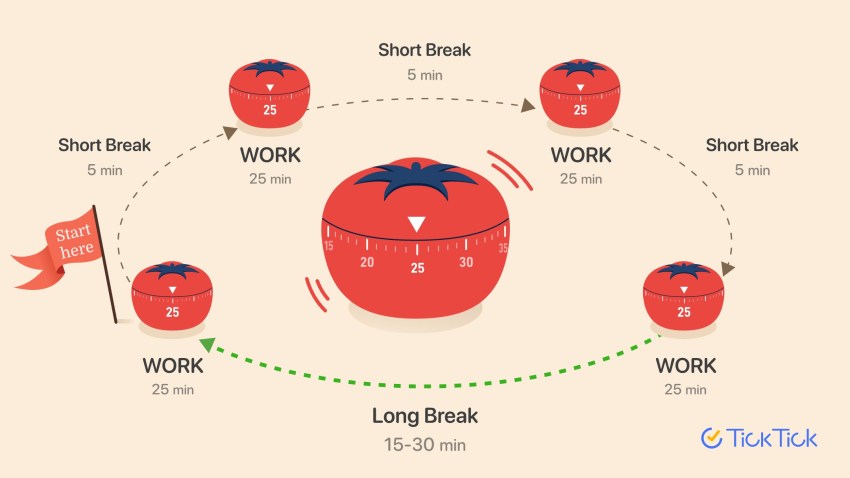
- Encourage breaks and time off: Support regular lunch breaks, time away from screens, and the use of available paid leave.
- Make availability visible: Encourage employees to use calendar settings and status indicators to show when they’re working or unavailable.
- Watch for burnout: Discuss workloads during check-ins and look for signs of excessive overtime, unrealistic deadlines, or ongoing stress.
Managers should model healthy boundaries themselves by taking breaks, respecting offline hours, and avoiding unnecessary after-hours messages.
5. Build meaningful connections across your team
Remote employees don’t have the same opportunities for spontaneous office conversations or face-to-face interaction. Without intentional opportunities to connect, they may feel isolated or disconnected from their colleagues and company culture.
Create space for employees to build relationships beyond their immediate work responsibilities with these suggestions:
- Encourage informal conversations: Organize optional virtual coffee chats, create non-work discussion channels, or set aside time for casual conversation during team meetings.
- Connect colleagues across teams: Pair employees from different departments for occasional introductions or informal conversations to help build relationships beyond their immediate coworkers.
- Celebrate achievements: Recognize individual and team successes, work anniversaries, and important milestones through meetings or team messaging.
- Bring employees together when possible: Arrange occasional in-person gatherings, planning sessions, or team retreats to strengthen relationships and collaboration.
Be mindful of different time zones, personalities, and schedules when organizing activities. Not everyone enjoys virtual social events, so offer different ways for employees to connect.
6. Recruit, onboard, and develop remote employees
Remote work allows businesses to recruit beyond their immediate geographic area, but attracting the right candidates is only the first step. First, specify whether positions are fully remote or hybrid, which locations are eligible, and whether employees must be available during certain working hours.
Then focus on supporting employees throughout their time with your company:
- Promote remote opportunities clearly: Highlight flexible work arrangements, role expectations, and benefits in job postings on platforms like LinkedIn.
- Create a structured onboarding plan: Give new hires a checklist covering their first few weeks, including responsibilities, essential tools, company policies, and key contacts.
- Assign an onboarding partner: Pair new employees with an experienced colleague who can answer questions and help them navigate the organization.
- Provide development opportunities: Offer virtual workshops, online courses, coaching, and clear career development goals.
- Make learning resources accessible: Record useful training sessions and maintain a searchable knowledge base so employees can learn at their own pace.
For example, a new remote employee might follow a 30-day onboarding plan with team introductions, software training, weekly manager check-ins, and clearly defined initial goals. Then continue support through regular skill development and opportunities to take on new responsibilities.
7. Equip your team with the right tools and technology
Start by assessing what each role requires, then build a telecommuting technology toolkit that supports your team’s daily work.
Focus on four essentials:
- Communication and collaboration tools: Provide reliable business calling, team messaging, video conferencing, file sharing, and project management tools to keep employees connected.
- Dependable equipment: Make sure employees have suitable laptops, headsets, monitors, and internet connections. Consider ergonomic equipment or home office stipends where appropriate.
- Cybersecurity and secure access: Require multifactor authentication, keep devices and software updated, and limit access to sensitive information based on employees’ roles. Train remote workers to recognize phishing attempts and report suspicious activity.
- Accessible IT support: Establish a clear process for reporting technical problems, requesting assistance, and resolving issues without visiting a physical office.

Remote workforce management checklist
| Area | Action for managers |
|---|---|
| Communication | Define which channels to use for routine updates, urgent issues, and meetings. |
| Expectations | Set measurable goals, deadlines, and clear ownership for tasks. |
| Collaboration | Maintain shared project documentation and accessible decisions. |
| Scheduling | Establish time-zone overlap and reasonable response-time expectations. |
| Security | Require appropriate access controls, MFA, and device security practices. |
| Onboarding | Give new hires a structured plan, access to tools, and an onboarding contact. |
| Employee engagement | Schedule regular one-on-ones and provide opportunities for connection. |
| Well-being | Encourage breaks, reasonable working hours, and clear offline boundaries. |
| Performance | Measure outcomes and quality rather than online presence alone. |
| Technology | Review whether employees can reliably access the tools they need. |
Build a More Connected Remote Workforce With Nextiva
A successful remote workforce depends on more than flexible work arrangements. Businesses need clear expectations, reliable communication, supportive management, and tools that help employees work together effectively from different locations.
Start by reviewing how your remote team communicates and collaborates. Identify where employees experience delays, confusion, or unnecessary meetings, then focus on two or three improvements. Establish measurable goals, gather employee feedback, and adjust your processes as the team grows.
Technology can make remote workforce management easier. A unified business communication platform can help employees stay connected through calls, messaging, and other communication tools, whether they’re working from home, an office, or on the move.
The only platform for every business conversation.
NEXT is the platform where everything connects: every channel, every conversation, every customer record, every workflow. Unified with AI that’s trained specifically on your business.
FAQs
A company with employees working from home across several cities is an example of a remote workforce. Team members may collaborate through video meetings, messaging, cloud-based applications, and shared project management tools.
A remote workforce consists of employees working outside a central office. A hybrid model combines remote and office-based work, often with employees dividing their time between both locations.
Set clear expectations, establish communication guidelines, measure work outcomes, support employee well-being, provide secure technology, and schedule regular check-ins.
Remote teams typically need business communication tools, secure access to company systems, project management software, shared documentation, and appropriate devices.