Customer Experience
  Blog
Blog  Business Communication
  Leadership
  Marketing & Sales
  Nextiva News
  Productivity
  VoIP
VoIP 

Every vendor in customer service software now seems to have an “agentic AI” solution, but the harder question is: What does the AI agent do after a customer asks for help?
Can it update a live customer record under a permission you control? Can it call another system, verify the result, recover from an application programming interface (API) failure, and show an audit trail? Or does it simply retrieve relevant knowledge base articles and create a ticket for someone else?
Can the platform write to a system of record, using a permission you define, and tell you exactly what it did? I’d use this distinction as the starting point for any evaluation.
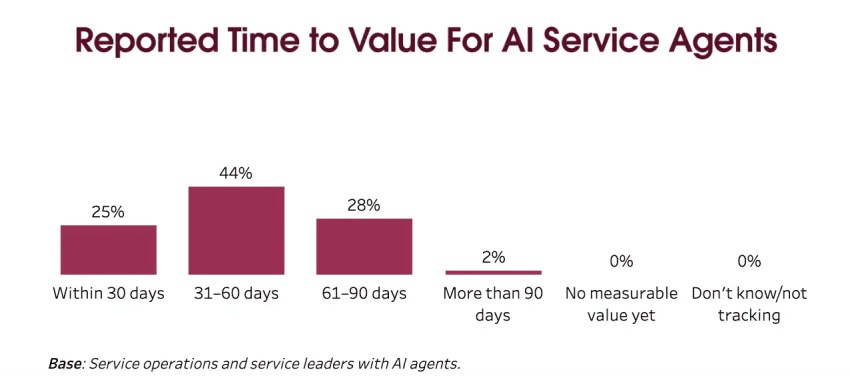
Salesforce’s 2026 State of Service: AI Agents Edition survey, which polled 3,075 service professionals worldwide, found that AI agent adoption among the surveyed customer service organizations increased from 39% to 66% in one year. Around 70% of adopters said they saw measurable value within 60 days. That adoption curve changes what buyers are evaluating, with a keener focus on real outcomes, such as more connected experiences, improved efficiency gains, and better customer service and customer satisfaction.
Below, I rank 10 agentic AI customer service platforms based on channel coverage, action execution, pricing predictability, compliance posture, and configurable guardrails. The ranking is deliberately weighted toward the needs of organizations that already have a customer relationship management (CRM) tool, help desk, and phone system and need AI to work across that stack.
If you weigh those factors differently, the table below gives you what you need to re-rank it yourself. None of this replaces your own evaluation. It’s meant to shorten the list of vendors you have to run that evaluation against.
The 10 Best Agentic AI Customer Service Platforms
I ranked these AI-powered customer service tools using five criteria:
- Channel coverage, with native voice treated as a major consideration
- Action execution depth, or how much of the requested work the agent can complete before handing it off
- Pricing transparency and predictability
- Enterprise security and compliance
- Configurable guardrails, permissions, and failure recovery
The ranking will change based on your priorities. A company that runs entirely on Salesforce, for example, may reasonably put Agentforce ahead of a broader contact center platform.
| Platform | Best for | Pricing model | Published pricing |
|---|---|---|---|
| Nextiva | Voice-led teams needing one platform for voice and digital | Seat and interaction packages | From $15/user/mo (annual) |
| Salesforce Agentforce | Organizations standardized on Salesforce | Multiple models: consumption-based (per conversation or Flex Credits/per action) and per-user licensing | $2 per conversation; Flex Credits at $500 per 100,000 credits |
| Zendesk AI Agents | Existing Zendesk helpdesk customers | Per automated resolution | From $1.50 per resolution (AI agents are included in Suite and Support plans) |
| Fin AI Agent | Digital-first SaaS support teams | Per resolved outcome | From $0.99/outcome; no seats required. Intercom helpdesk optional from $29/user/mo |
| Sierra | Enterprises wanting a heavily customized agent | Outcome-based pricing, custom pricing | Quote only |
| Decagon | High-volume consumer brands | Platform fee plus per conversation | Quote only |
| Ada | Teams with multilingual, high-volume digital support needs | Conversation-based pricing, custom contract | Quote only |
| NiCE CXone Mpower | Large contact centers with WFM (workforce management) needs | Per seat plus AI consumption | From $110/agent/mo + AI add-ons; Ultimate $249/agent/mo + $0.25/session includes AI agents |
| Genesys Cloud CX | Global enterprise contact centers | Per seat plus AI consumption | From $75/user/mo + AI token usage; CX 4 $240/user/mo includes 30 tokens/user |
| Kore.ai | Teams building custom conversational flows | Usage-based | Quote only |
Pricing changes frequently in this category. The figures above reflect publicly available U.S. contact center pricing checked during research. Several platforms publish some pricing information, but only a few provide a directly comparable AI usage rate. The others require a quote, and enterprise contracts in this category can reach six figures annually.
If you’re a buyer, confirm the final commercial terms before signing.
1. Nextiva Contact Center
Nextiva Contact Center is the strongest fit in this comparison for organizations where voice remains a major part of customer service and the goal is to bring AI, routing, digital channels, and agent workflows into the same environment.
It runs carrier-grade voice and digital channels (chat, SMS, email, social channels) on one context layer, backed by proven uptime and SOC 2, HIPAA, and PCI DSS compliance. Unlike most platforms in this category, which are text-first and add telephony afterward through a partner integration, Nextiva includes voice natively, with pricing based on seats and interactions rather than pricing per resolution.
Nextiva’s advantage is strongest when your buying decision includes the contact center itself and not just an AI layer; organizations looking for a deeply CRM-native agent development environment may find Agentforce more natural.
2. Salesforce Agentforce
Recognized on G2 as the best platform in agentic AI, Agentforce is the right answer for organizations whose customer data lives entirely in Salesforce. Its reasoning engine reads directly from Data Cloud, which shortens the integration path for Salesforce-native shops considerably compared to a third-party platform trying to sync with Salesforce from outside.
The platform can execute actions such as updating customer records and running troubleshooting actions, making it a meaningful agentic platform rather than a retrieval-only chatbot.
Its pricing is flexible but somewhat complex, spanning per-conversation, usage-based Flex Credits, and per-user licensing. That gives organizations multiple ways to buy Agentforce, but costs can still be difficult to forecast when agents perform many actions or when the underlying Salesforce environment adds licensing and data expenses. For companies already standardized on Salesforce, however, the integration depth can outweigh that complexity.
3. Zendesk AI Agents
This platform makes the most sense for companies already using Zendesk as their help desk and knowledge base environment. A team that already has its knowledge, tickets, customer history, and existing workflows inside Zendesk has less architectural work to do.
Zendesk AI agents include integrations and actions, reasoning controls, procedure-building tools, advanced analytics, and support for 80 languages.
Because Zendesk uses a pay-for-value model, with AI resolutions starting at $1.50 per resolution and priced in tiers based on the value delivered, ask exactly what counts as a billable resolution, what happens when a customer returns after an AI interaction, and who adjudicates a disputed billable outcome.
4. Fin AI Agent
Fin is particularly compelling for digital-first SaaS companies, small support teams, and mid-sized businesses that want an AI agent running inside an existing support experience. Fin can also operate with an existing help desk, including Salesforce, without requiring paid seats for the AI agent itself.
It’s worth noting that Fin charges once per conversation ($0.99 per outcome, with a minimum of 50 outcomes per month) even if it answers multiple questions or executes multiple procedures. Failed attempts and conversations that explicitly request human intervention aren’t charged as outcomes.
That makes the billing definition easier to understand than some usage models, but there are a few drawbacks, per user reviews on G2, including missing features for procedure visibility and conversation simulation and a challenging learning curve.
5. Sierra
Sierra targets enterprise teams and finance teams that want highly customized customer-facing AI agents rather than a conventional chatbot bolted onto an existing helpdesk. Its appeal is the ability to design an agent around specific customer journeys and business actions, which can make sense for a large brand with unusual workflows and the engineering resources to support them.
The limitation is procurement: Pricing is quote-based, and a bespoke deployment can require considerably more design and implementation work than a packaged support AI product. Sierra is a better fit when customization is a major buying requirement.
6. Decagon
Decagon is capable of handling high-volume customer interactions and taking actions through connected systems. That makes it interesting for consumer brands whose support volume is large enough to justify a dedicated AI layer and extensive workflow customization.
The catch is similar to Sierra: Pricing is quote-only, so buyers need to model the full contract rather than comparing a public per-resolution number. Ask for the platform fee, usage assumptions, implementation costs, integration charges, and any volume commitments before comparing it with competitors with per-outcome pricing.
7. Ada
Ada is aimed at enterprise support teams that want AI-powered digital customer service at high volume, with particular emphasis on multilingual support and basic automation. Its custom, conversation-based pricing model can work well when the business has enough support volume to justify a dedicated deployment.
The main limitation is price transparency: Ada doesn’t provide the kind of simple public rate that makes a first-pass total-cost comparison easy. Aside from the lack of pricing transparency, users on G2 reported that they’ve encountered AI limitations in the platform, particularly with integrations and metrics accuracy.
8. NiCE CXone Mpower
This platform is designed for large contact centers that need customer service AI alongside workforce management, quality, routing, compliance, and other contact center functions.
The tradeoff, though, is complexity. A buyer looking primarily for a fast AI support deployment may be purchasing substantially more contact center infrastructure than needed.
9. Genesys Cloud CX
Genesys Cloud CX remains a major option for global contact centers that need voice, digital channels, workforce engagement management, routing, journey analytics, and native AI in a single enterprise platform.
The strength is breadth at enterprise scale. CX 2 and higher tiers include omnichannel support, compliance features, virtual agents, knowledge, and AI-assisted functionality.
The limitation is the pricing and configuration model: Teams need to map the actual AI features they’ll use to the correct tier and token requirements rather than assuming the headline seat price represents the total AI cost.
10. Kore.ai
Kore.ai is a strong candidate for enterprises building customized conversational experiences and workflows across multiple systems. It’s also a good option for companies looking to leverage integrations with intelligent virtual assistants to automate a majority of their front-line requests.
Its appeal is flexibility, meaning teams with sophisticated requirements can build conversational applications around their own processes rather than being restricted to a fixed support flow; but the downside is that flexibility brings implementation responsibility.
Pricing is quote-based, and the platform is better suited to organizations with the technical resources to design and maintain customized conversational systems.
What Separates an Agentic Platform from a RAG Chatbot
Retrieval-augmented generation (RAG) is useful when the job is finding information. The system retrieves relevant content from a knowledge source and generates an answer. Agentic AI goes a step further by adding an execution layer. An agent can plan a sequence of actions, call tools with structured inputs, check the returned result, and decide what to do next.
Consider a customer who says, “My order arrived damaged. Please replace it.”
A basic RAG chatbot might explain the replacement policy and link to a form. An agentic system could identify the order, verify the customer’s identity, create the replacement request, update the customer record, and provide the resulting status. If the order system fails, the AI agent should know that the replacement wasn’t confirmed rather than telling the customer it was completed. Tool calling in AI customer service makes that execution possible.
State retention also matters. An AI demo can be convincing and yet still hide a major operational problem. The AI agents may remember the conversation while the customer stays in the same chat window but lose important context when the interaction moves to another channel.
Ask vendors to show a multi-turn interaction that starts on chat and continues by phone. The phone agent should be able to see the relevant conversation, the customer’s verified identity, the order details, and any actions the AI already attempted.
Model Context Protocol and standard function-calling interfaces matter here because they can make tool connections more portable. They don’t magically solve integration problems, but standardized interfaces can reduce the amount of bespoke integration work tied to one vendor.
The Evaluation Criteria Behind the Ranking, Beyond the Pricing Model
A feature grid can tell you that a platform supports “AI agents,” but it can’t tell you whether you can safely give the agent access to your production systems.
Use the table below as a guide on what to check during every vendor demo.
| Criterion | What to confirm before you sign | Red flag |
|---|---|---|
| Action depth | The ability to write to your CRM and order systems, not just to a ticket | Every demo action ends in a ticket |
| Permission scope | Per-action limits and role-based access you configure yourself | Limits require vendor professional services |
| Failure recovery | Defined behavior on API timeout, error, and stale data | No answer is given beyond “it escalates” |
| Channel coverage | Voice, chat, SMS, and email on one context layer | Voice is a partner integration |
| Pricing mechanics | What counts as a billable resolution, and who decides | Resolution is defined in the vendor’s favor |
| Compliance | SOC 2 Type II report; HIPAA and PCI DSS compliance where relevant | Certifications claimed, but reports are not shared |
| Auditability | A per-action log showing what ran and on whose authority | Logs are conversation transcripts only |
Agent pricing mechanics deserve their own section
AI pricing can look cheap until you apply it to your actual conversation volume.
Fin, for example, charges $0.99 per outcome, with one outcome charge per conversation even when it takes several actions. Salesforce offers $2 per conversation or consumption-based Flex credits. Zendesk advertises AI agent pricing from $1.50 per resolution.
Each pricing model measures different things.
Suppose a platform charges $2 per conversation. At 100,000 conversations, that creates $200,000 in usage before considering other platform costs. A resolution model could produce a very different bill if only 60% of those conversations actually resolve through AI. For instance, a resolution-based platform charging $3 per resolution would cost $180,000 if the AI agent resolves 60,000 conversations. In that scenario, the higher $3 headline rate produces a lower usage bill because you aren’t paying for the 40% that fails to resolve.
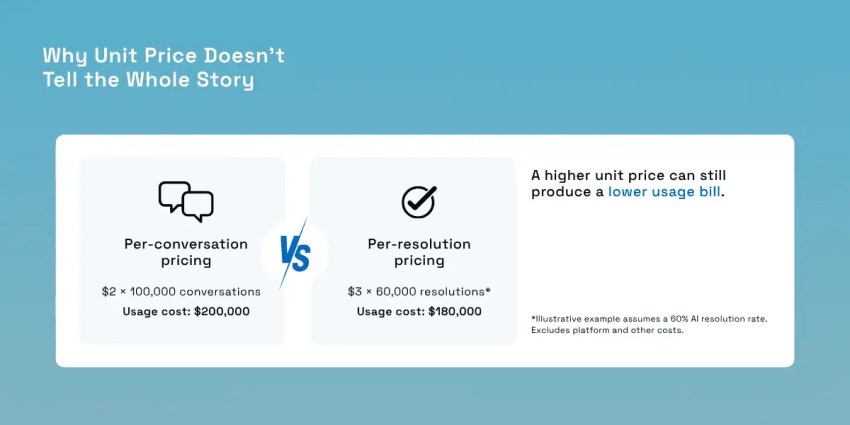
That’s why the unit price alone usually isn’t enough. You also have to account for the hidden costs of each conversation, such as implementation, add-ons, tool execution fees, and the number of actions per ticket.
Ask whether a reopened ticket bills twice and whether a conversation that deflects and then escalates still counts as a resolved conversation. Check who adjudicates a disputed resolution: you or the vendor? Other helpful questions include:
- Are voice interactions priced differently?
- Are implementation, integration, or minimum-volume fees separate?
Gartner projects that the GenAI cost per customer service resolution will exceed $3 by 2030. The projection is a warning against assuming that AI automation will become cheaper simply because model costs are falling. Gartner points to factors such as rising data center costs, more complex use cases, and vendor moves toward profitability.
The data prerequisite for AI tools that nobody sells you
Agentic AI can’t execute reliably against systems it can’t reach or understand.
Deloitte’s 2026 research found that 72% of surveyed senior leaders cited a lack of unified, accessible data as a barrier to scaling AI agents. Around 70% cited difficulty trusting and governing agents, while 67% cited integration cost and complexity.
MuleSoft’s 2026 Connectivity Benchmark adds another useful reality check. The average organization manages 957 applications, but only 27% are connected.
Before scoring any vendor on this list, determine which of your own systems the agent needs to reach, including your CRM, helpdesk, order or billing system, knowledge base, or phone system. A platform can be architecturally excellent and still fail in your environment if the systems it needs to reach aren’t connected to each other.
You can see the practical case for system consolidation in Cedar Financial’s story. The collections agency reduced seven vendors to one, cut costs by 30%, and increased agent call volume from 70 to 400 calls per day after implementing Nextiva’s contact center and AI-powered outbound dialing.
Guardrails and Failure Recovery for AI-Powered Customer Service Platforms
Guardrails and failure recovery are what separate a platform that can be trusted with real transactions from one that should stay limited to answering questions.
What happens mid-transaction
Imagine a customer is on the phone asking for a refund. The agent verifies the customer, checks the order, authorizes the refund, and sends the request to the payment system.
Then, the payment API times out, but the customer is still on the line.
A production-grade system needs a definite state for that failure. It shouldn’t blindly retry a financial action that might already have succeeded.
Idempotency keys can help prevent duplicate transactions when an action is retried. If the system can’t establish what happened, the case should move to a human agent with the completed context attached.
Handoff is the weakest link in most deployments
Nextiva’s customer experience (CX) research found that 98% of surveyed CX leaders consider smooth AI-to-human transitions important, although 90% report difficulty achieving a frictionless human handoff. That gap between what leaders know matters and what teams can deliver is a better buying question than any accuracy claim.
A clean human handoff needs four things to transfer with the customer:
- The full transcript
- Structured intake data
- A record of actions already taken
- Verified customer identity
If the human agent has to ask the customer to repeat anything they already said to the AI, the handoff has failed. Test this specifically during your evaluation. Start a conversation, deliberately ask for a human agent partway through, and time how long it takes the live agent to have full context without you repeating yourself.
Knowledge readiness to help empower customers
Gartner says many service organizations still struggle with knowledge-article backlogs and inconsistent content review; 58% of service leaders plan to upskill agents into knowledge management specialist roles in 2026.
An agent grounded in an outdated knowledge base can produce wrong answers at scale. This is also where vendor-reported accuracy numbers need a second, independent source next to them. Self-reported deflection rates tend to run well above what independent audits find.
Parloa’s State of Agentic CX in 2026 report, built from nearly 4,000 secret-shopper interactions across more than 800 companies, found that only 8.9% of chatbot conversations were resolved and 10.1% of escalation attempts reached a human agent, while just 7.5% of chatbots tested actually demonstrated real conversational AI ability. That’s a sharp contrast to the resolution percentages vendors publish on their websites.
That also makes knowledge maintenance part of your AI governance plan. Before launch, identify who owns each source, how often it’s reviewed, and what happens when a policy changes.
You should also test negative cases. Give the agent a question for which the approved knowledge source contains no answer. The correct AI behavior may be to say it doesn’t have enough information and escalate. A system that confidently fills gaps from an unrelated source has failed the test.
| Failure mode | What a production platform does | What to ask in the demo |
|---|---|---|
| API times out mid-action | Idempotent retry, then hold state, then escalate | Can you show me a retry that doesn’t double-charge? |
| Model produces an unsupported claim | Retrieval boundary rejects it before it’s spoken | Can I restrict answers to one named source? |
| Action exceeds policy limit | Blocks and routes to a human with context | Who configures the limit, me or you? |
| Customer asks for a human | Immediate transfer with full context attached | What exactly moves with the transfer? |
| Customer disputes the outcome | Per-action audit log with authority trail | Can I reconstruct what the agent did, and why? |
A Phased Rollout That Survives Procurement
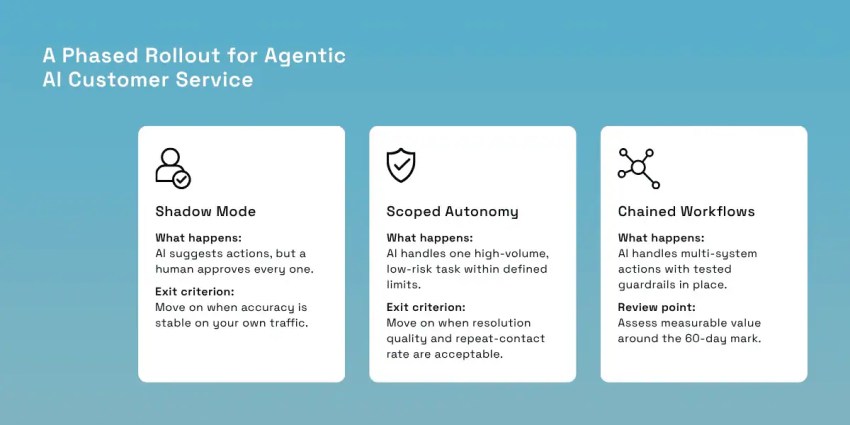
Giving an AI agent unrestricted access to production systems on day one is difficult to defend in a security review. A better approach would be to start small and expand the AI’s permissions as it improves.
Phase one is shadow mode. The agent proposes actions, and a human approves each one before it executes. This is where you catch a platform’s blind spots without any customer-facing risk. Exit this phase when proposal accuracy is stable on your own traffic, not when it hits a number from a vendor benchmark deck, since a vendor’s benchmark was almost certainly run on cleaner data than yours.
Phase two is scoped autonomy. Pick one high-volume, low-risk customer intent, cap it with a hard dollar or action ceiling, and let the agent run it without approval inside that ceiling. A password reset or an order status lookup is a reasonable starting point. A refund above a set dollar amount isn’t. Exit on resolution quality and repeat-contact rate, not on raw deflection volume, since deflection just tells you the agent said something. It doesn’t tell you that it solved the problem the customer actually had.
Phase three is chained workflows. Here, multi-system actions run with the guardrails from the section above already configured and tested, instead of being added on after the fact. Salesforce found that 70% of adopters see measurable value within 60 days, so set your review date accordingly. Be honest with your team if it doesn’t land on schedule.
Start With Nextiva’s Agentic AI Solution
The right agentic AI platform for your agentic CX strategy depends on where your customer data lives, how much autonomy you need, and how your customers contact your business.
For a Salesforce-first organization, Agentforce’s native CRM depth can make it the logical choice. For a Zendesk-centered support operation, Zendesk AI removes much of the integration distance. Fin is particularly attractive for digital-first support teams that want a fast deployment. Sierra and Decagon make more sense when a business wants a highly customized agent and can support the associated implementation work.
Nextiva Contact Center unifies voice, chat, SMS, email, and social channels on one context layer with proven uptime and SOC 2, HIPAA, and PCI DSS compliance. XBert, Nextiva’s AI receptionist, handles front-desk answering, qualification, and booking around the clock. Pricing is based on customer interactions rather than resolutions, giving businesses a clearer billable unit for forecasting costs as usage grows.
That said, the best way to test that fit is to ask every vendor the evaluation criteria questions we covered earlier. A vendor that gives you the clearest answers deserves a place on your list and lets you empower customers through AI-powered self-serve access to relevant resources.
Book a demo of Nextiva Contact Center and score it against the criteria above, the way you would any other platform on the list, or explore XBert if front-desk coverage is the immediate gap you’re solving for.
Your AI-Powered Contact Center
Create amazing customer experiences with AI-powered contact center software. Scalable contact center platform built for omnichannel customer conversations.