Customer Experience
  Blog
Blog  Business Communication
  Leadership
  Marketing & Sales
  Nextiva News
  Productivity
  VoIP
VoIP 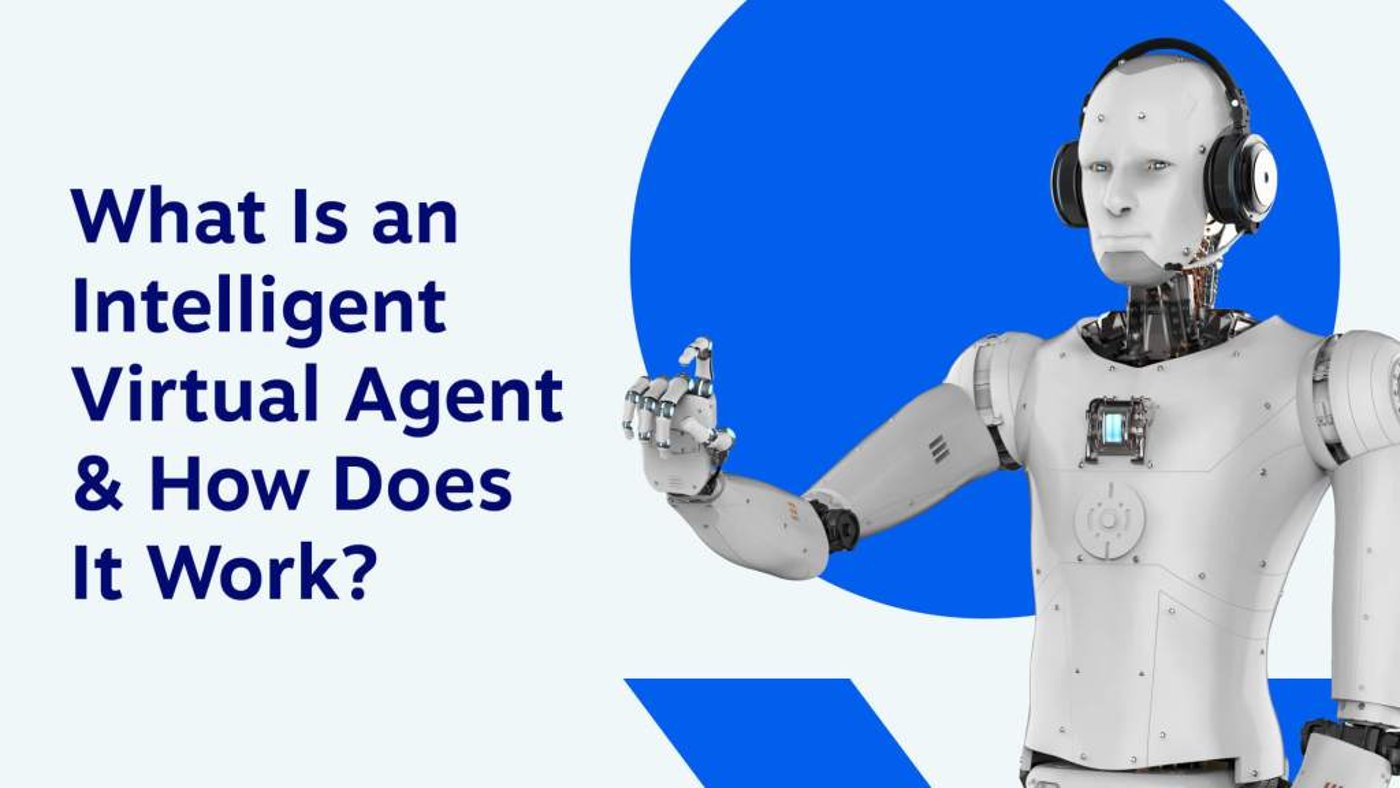

An intelligent virtual agent (IVA) is AI-powered software that communicates with customers through voice or text, answers questions, and performs tasks using connected business systems. Depending on its configuration, it can book appointments, retrieve information, collect request details, or route customers to a human when the conversation needs additional support.
For a support team, the value comes from handling routine requests while keeping a clear path to a person. For a smaller business, that might mean answering calls during busy periods, capturing new inquiries after hours, and helping callers reach the right employee.
This guide explains how IVAs work, where they fit, and what to check before introducing one to your customer service workflow.
What Does an Intelligent Virtual Agent Do?
An intelligent virtual agent responds to customer requests in conversational language and can carry out approved actions through connected systems. Its capabilities depend on the information, integrations, permissions, and workflows the business provides.
For example, an IVA might answer a question about opening hours, check appointment availability, capture a caller’s details, or transfer a request to the right team.
IVAs use conversational AI, but the label alone does not establish what a product can do. Some systems focus on answering questions; others also complete tasks.
Before choosing one, ask the provider to demonstrate your specific workflow—including what happens when the agent cannot answer, an integration fails, or the customer asks for a person.
How Intelligent Virtual Agents Work
An IVA processes a customer’s request, selects an appropriate response or action, and continues the conversation within its configured limits. Systems may combine predefined conversation flows, language models, approved knowledge sources, and business integrations.
A typical interaction follows these steps:
- Receive the request: The customer speaks or types. A voice-based system uses speech recognition to process spoken input.
- Interpret the request: The system identifies what the customer needs and gathers any missing details.
- Find information or perform an action: It consults approved content or uses an authorized integration, such as a scheduling system.
- Respond: It provides an answer, confirms an action, or asks a follow-up question.
- Hand off when needed: It transfers the request or records a follow-up according to the business’s rules.
Performance improves through testing, reviewed updates, and configuration changes. Do not assume every conversation automatically retrains the system.
An intelligent virtual assistant in action
A customer calls a home services business after hours and asks to schedule a visit.
The assistant asks which service the customer needs, collects contact details, and checks availability through a connected calendar. If booking is enabled, it confirms the appointment. If the request falls outside its permissions, it captures the details for follow-up or transfers the call according to the escalation rules.
Benefits of Using Intelligent Virtual Agents
When you define their scope, information, and handoff rules, intelligent virtual agents can improve service availability and reduce repetitive work. The results depend on the requests they handle and how effectively they connect with your team.
Faster responses and conversational self-service
An IVA can answer routine questions and guide customers through supported tasks without waiting for an employee to become available.
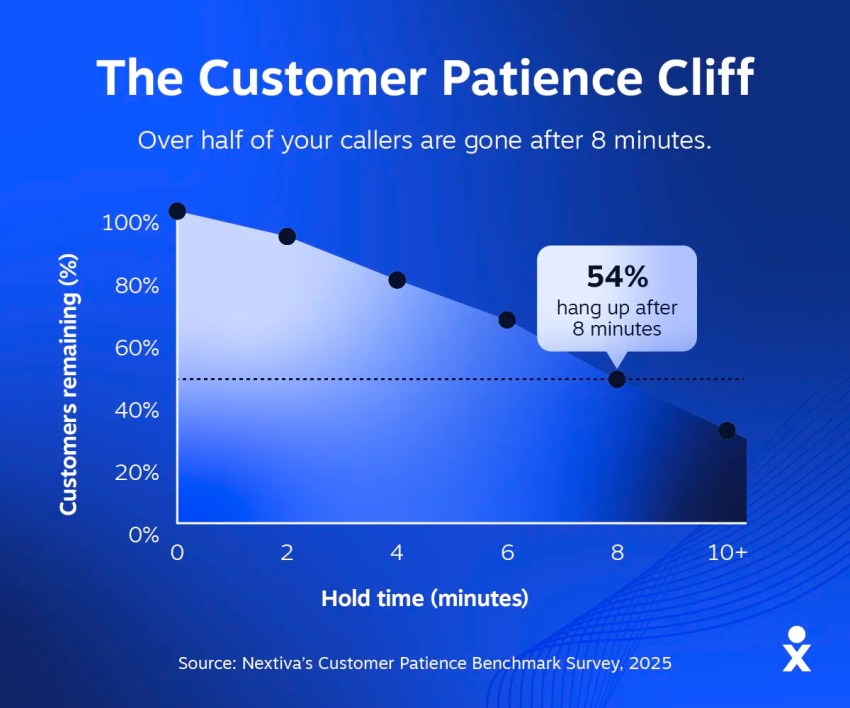
In Nextiva’s 2025 Customer Patience Benchmark survey of 400 people, 56% of respondents said they immediately try another channel after a missed response window. That finding reinforces the importance of acknowledging requests promptly and offering a clear next step.
Coverage during busy periods and after hours
A voice-based IVA can provide an answering option when employees are occupied or the business is closed. Depending on the configuration, it can answer approved questions, capture messages, or help customers schedule appointments.
Less repetitive work for employees
Automating common requests can reduce the time employees spend collecting basic details or repeating standard information. Staff can then focus on requests that need judgment, investigation, or a personal conversation.
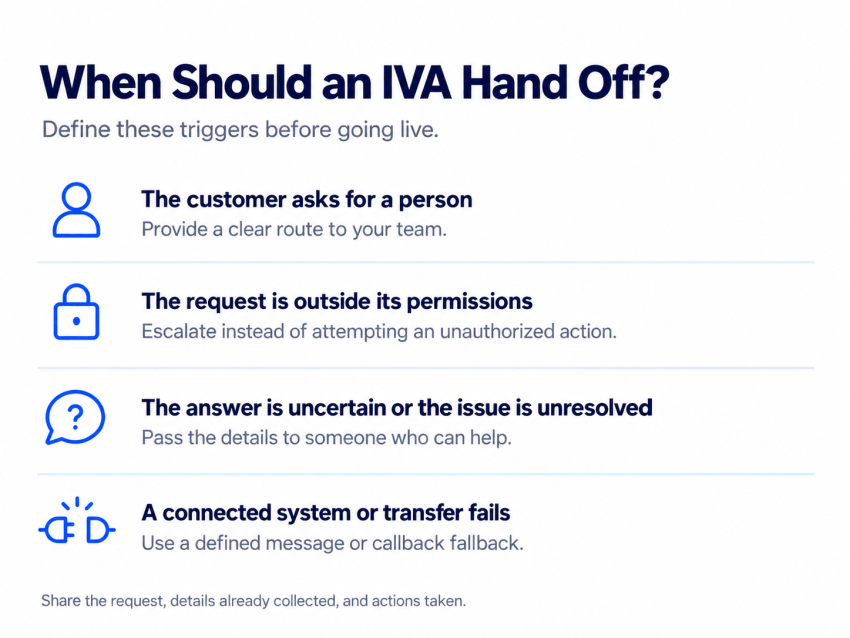
Smoother handoffs to human support
Automation should make it easier to get help. In Gartner’s 2026 survey of 3,566 B2B and B2C customers, 87% said access to a human agent is essential when companies use generative AI for customer service.
Provide a clear escalation path and pass along the request details so the customer does not have to start again.
Better visibility into customer requests
Conversation records can help teams identify recurring questions, incomplete tasks, and gaps in their support content. Review those records alongside customer feedback and service outcomes.
Intelligent Virtual Agent Use Cases and Examples
IVAs are most useful when a business can define the request, provide reliable information, and specify the actions the agent may take.
| Use case | What the IVA can do when configured | When a person should take over |
|---|---|---|
| Inbound call answering | Greet callers, identify the reason for calling, and capture details | The caller requests a person or needs help outside the approved scope |
| Appointment scheduling | Check connected availability and book or reschedule appointments | The request requires an exception or the scheduling system is unavailable |
| Routine customer support | Answer questions using approved business information | The answer is uncertain or the issue remains unresolved |
| Order or request updates | Retrieve status information through an authorized integration | The customer disputes the information or needs an exception |
| Lead capture | Collect contact details and the reason for an inquiry | The conversation requires negotiation or specialist advice |
| Call routing | Identify the appropriate team and transfer the request | The transfer fails or no suitable employee is available |
Your call routing rules should also define the fallback: take a message, offer a callback, or provide another supported route.
A real-world example: Bank of America’s Erica
In March 2026, Bank of America reported that its virtual financial assistant, Erica, had exceeded 3.2 billion interactions since its 2018 launch.
That is an example of virtual assistance operating at scale. It is a cumulative usage figure, rather than a resolution rate or a performance benchmark for other businesses.
Intelligent Virtual Assistants vs. Chatbots and IVR
An intelligent virtual assistant is AI-powered software that helps users through conversation; in customer service, the term often overlaps with intelligent virtual agent. Providers use these labels differently, so compare demonstrated capabilities rather than assuming a fixed distinction.
| Technology | What the term generally describes | What to check |
|---|---|---|
| Intelligent virtual agent or assistant | Conversational software that answers questions and may perform connected tasks | Supported actions, integrations, permissions, and human handoffs |
| Rule-based chatbot | A bot that follows predefined rules or conversation paths | How it handles questions outside those paths |
| AI chatbot | A conversational bot using AI to interpret or generate responses | Whether it can complete tasks and use reliable business information |
| Traditional IVR | A phone system that routes callers through menus or defined prompts | Menu complexity, routing rules, and access to a person |
| Conversational IVR | A phone system that accepts spoken requests to guide or route callers | Recognition accuracy, supported requests, and fallback behavior |
These categories can overlap. An AI chatbot may offer capabilities similar to an IVA, while a conversational IVR may form part of a broader virtual agent solution.
For a deeper comparison, see conversational AI vs. chatbots.
How To Implement Intelligent Virtual Agents
Creating and implementing an IVA requires careful planning and preparation. Here are some best practices for successful implementation:
- Choose a focused starting use case. Start with a frequent request you can define clearly, such as answering business questions, taking messages, or scheduling appointments.
- Prepare approved information. Review business hours, service descriptions, policies, and FAQs. Assign someone to keep the information current.
- Connect only the systems needed. Confirm which integrations support the workflow, what information the IVA can access, and which actions it may perform.
- Define handoffs and fallbacks. Specify when the IVA must involve a person, what information it passes along, and what happens if nobody is available.
- Test realistic conversations. Include interruptions, unclear requests, incorrect details, unavailable systems, and customers asking for a person.
- Measure outcomes and refine. Review completed tasks, unanswered questions, failed transfers, repeat contacts, and customer feedback. Use your first call resolution goals where they fit the workflow.
Begin with a limited rollout and expand after reviewing the results. Estimate the full cost, including setup, integrations, usage, and ongoing maintenance, rather than assuming automation will produce immediate savings.
What To Look for in an Intelligent Virtual Agent in 2026
Evaluate how well the IVA handles your real customer requests. Ask the provider to demonstrate:
- Answers grounded in approved business information.
- Successful completion of supported tasks.
- Clear limits on access and actions.
- Transfers that preserve useful conversation details.
- Fallbacks when information or connected systems are unavailable.
- Reporting that reveals incomplete requests and recurring problems.
A natural-sounding voice matters for phone interactions, but it should accompany accurate answers, useful actions, and a dependable route to your team.
Answer the Calls Your Team Cannot Pick Up With XBert
When employees are helping customers, handling appointments, or working after hours, inbound calls still need an answer.
XBert by Nextiva offers an AI receptionist that answers calls around the clock, captures messages, books appointments through connected calendars, and transfers calls according to your business’s rules.
Use it to cover calls that staff cannot answer and to route requests requiring a person to the appropriate employee. Define the handoff rules and fallback options, so callers have a clear next step.
Ready To Give XBert a Try?
Get an XBert demo using your own call scenarios: a new inquiry, an appointment request, an after-hours message, and a caller who needs to speak with your team.
Intelligent Virtual Agent FAQs
An intelligent virtual agent is AI-powered software that communicates through voice or text, answers questions, and may perform tasks through connected systems. Its capabilities depend on its configuration, permissions, and integrations.
The terms often overlap in customer service. Providers may use them for different products, so check the supported channels, actions, integrations, and handoff capabilities.
A chatbot describes a conversational interface and may use rules, AI, or both. An IVA often combines conversation with business tasks and integrations, but an AI chatbot can offer similar capabilities.
Yes, a voice-enabled IVA can answer calls and handle supported requests. Confirm its call routing, transfer rules, after-hours behavior, and fallback options.
An IVA can handle defined requests, but businesses still need people for exceptions, unresolved issues, and conversations requiring judgment. Customers should have a clear way to reach human support.
Pricing varies by provider and may include a subscription, usage charges, setup, and integrations. Request a quote based on your expected volume and confirm how calls, sessions, minutes, or completed tasks are billed.