Customer Experience
  Blog
Blog  Business Communication
  Leadership
  Marketing & Sales
  Nextiva News
  Productivity
  VoIP
VoIP 

Businesses evaluating AI phone agents aren’t comparing basic IVR systems or simple auto attendants anymore. In 2026, agentic AI platforms combine telephony, speech recognition, large language models (LLMs), analytics, compliance tools, orchestration layers, and CRM integrations into one connected workflow.
As AI phone agents become more advanced, pricing has also become harder to compare. Some vendors charge a simple per-minute fee, while others separate telephony, transcription, voice generation, integrations, and AI model usage into multiple costs.
Without understanding how these pricing models work, businesses can easily underestimate implementation fees, overage charges, scaling costs, and long-term operational expenses.
This guide explains the most common AI phone agent pricing models to help you estimate your true monthly spend more accurately.
Try the best AI answering service free for 14 days
XBert AI answers questions and captures leads. Add your 24/7 answering service in minutes.
What Is an AI Phone Agent?
An AI phone agent is a conversational voice assistant that uses artificial intelligence to answer calls, understand spoken language, respond naturally, and complete tasks without needing a human agent for every interaction.
Businesses use AI phone agents to answer inbound calls, schedule appointments, qualify leads, route calls, process orders, handle FAQs, provide after-hours support, reduce wait times, and automate repetitive customer service tasks.
Many organizations now use AI phone agents alongside live agents to improve response times, handle higher call volumes, and lower operational costs.
AI phone agents combine multiple AI technologies into a single workflow to process conversations in real time.
| Step | What happens | Technology used |
|---|---|---|
| Speech-to-text transcription (STT) | The system converts the caller’s voice into text so the AI can understand the conversation. | Automatic speech recognition (ASR) |
| Intent and context analysis | The AI analyzes the caller’s request, understands intent, and decides how to respond. | Natural language processing (NLP) and large language models (LLMs) |
| Orchestration and tool usage | The platform connects with CRMs, scheduling tools, payment systems, knowledge bases, or internal software to complete tasks. | APIs, workflow orchestration, and integrations |
| Text-to-speech response (TTS) | The AI turns its response into a natural-sounding voice that callers hear in real time. | Text-to-speech (TTS) generation |
| Escalation and call transfer | If the AI cannot fully resolve the issue, it transfers the call to a live agent along with the conversation context. | Intelligent routing and transfer logic |
Modern AI phone agents may also support multilingual conversations, interruption handling, real-time sentiment detection, automatic call summaries, CRM syncing, compliance workflows, analytics, and QA reporting.
What You’re Actually Paying for With AI Phone Agents
AI phone agents cost more than traditional IVR systems or basic call menus because they depend on multiple technologies working together in real time behind every conversation.
Your monthly bill doesn’t just cover the AI voice itself. It also covers telecom infrastructure, cloud processing, integrations, compliance systems, and post-call analytics.
When businesses pay for AI phone agents, they typically pay for these major infrastructure layers:
1. Telephony and carrier infrastructure
This connects traditional telephone networks to your cloud environment. Without dependable telecom infrastructure, the AI cannot maintain clear, uninterrupted conversations or process speech accurately.
- Telephony minutes and call handling: These charges cover the carrier networks that route calls between the public phone system and the AI platform.
- SIP trunking and line concurrency: Providers reserve digital call capacity so hundreds of AI agents can manage simultaneous conversations without busy signals or dropped calls.
- Intelligent call routing: This allows the AI to instantly transfer callers to the correct department or live agent when escalation is required.
2. Cloud computation and processing services
This covers the real-time computing power required to create fast, natural conversations with minimal latency.
- Real-time speech processing (STT & TTS): High-speed cloud processing powers speech-to-text transcription, intent detection, and text-to-speech voice generation. It also enables interruption handling so the AI can stop speaking the moment a caller interrupts.
- Intelligence: AI phone agents continuously consume LLM processing tokens to understand requests, analyze context, and generate human-like responses during live calls.
- Vector database hosting: The platform stores and scans internal knowledge bases, FAQs, policies, and product documentation during conversations to deliver accurate responses.
3. Software orchestration and integration
This transforms conversational AI into a functional business system capable of completing real-world tasks.
- Agent orchestration and call flow logic: The orchestration manages conversation flows, maintains call memory, and determines how the AI should respond in different customer scenarios.
- API integrations and tool calling: AI phone agents connect with CRMs, scheduling systems, payment tools, and internal business software to retrieve information and complete actions automatically during calls.
- Guardrails and prompt governance: Additional control layers help prevent hallucinations, inaccurate responses, and policy violations while keeping conversations aligned with company rules and compliance requirements.
4. Post-call business intelligence (BI)
The process continues even after the call ends to convert conversations into structured insights that businesses can use to improve operations and customer experience.
- AI-generated reporting and analytics: After each call, the platform may generate transcripts, summaries, sentiment analysis, topic tagging, and QA insights for dashboards and supervisor reporting.
- Compliance, retention, and data redaction: Many providers include secure storage, call logging, and automatic redaction systems that remove sensitive information such as payment details or healthcare data before storing call records to support HIPAA and PCI-DSS compliance.
The Four Pricing Models You Will See Most Often
When you’re considering a potential provider, you’ll typically see one of the following four AI voice agent pricing models.
Pay-per-minute, usage-based pricing
You can think of this as a pay-as-you-go model, as you’ll pay per minute of the AI agent assist service used. In theory, it’s straightforward to understand, but it’s best when call volume is variable or seasonal. In these cases, you don’t have to pay a high flat monthly fee just to accommodate a few peak months.
While it’s easy to start with pay-per-minute pricing, it can be exceptionally difficult to forecast at scale (which means it can be difficult to budget for). It can also prevent you from taking advantage of some volume-based discounts that are available through other pricing models.
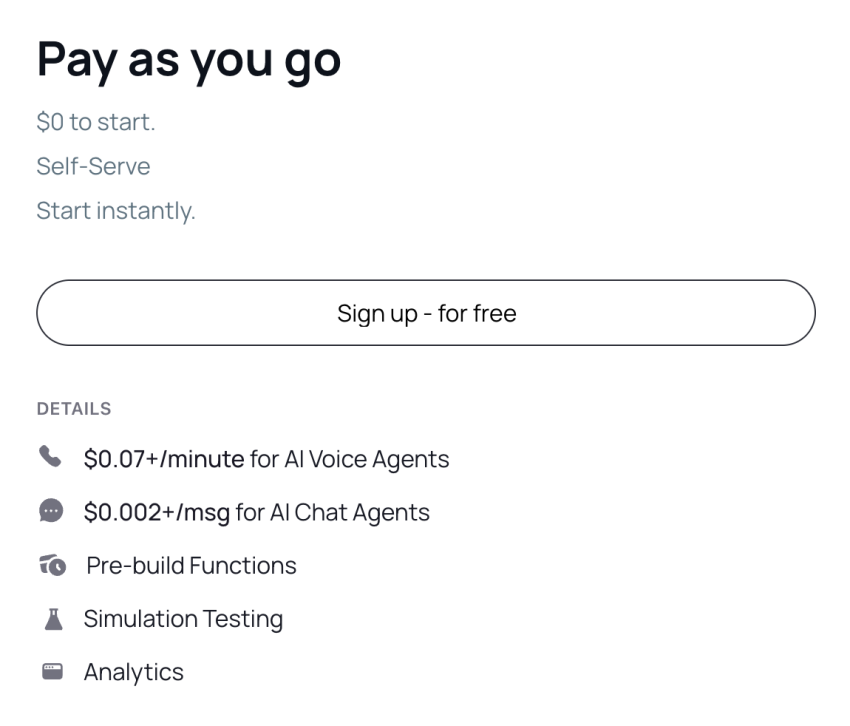
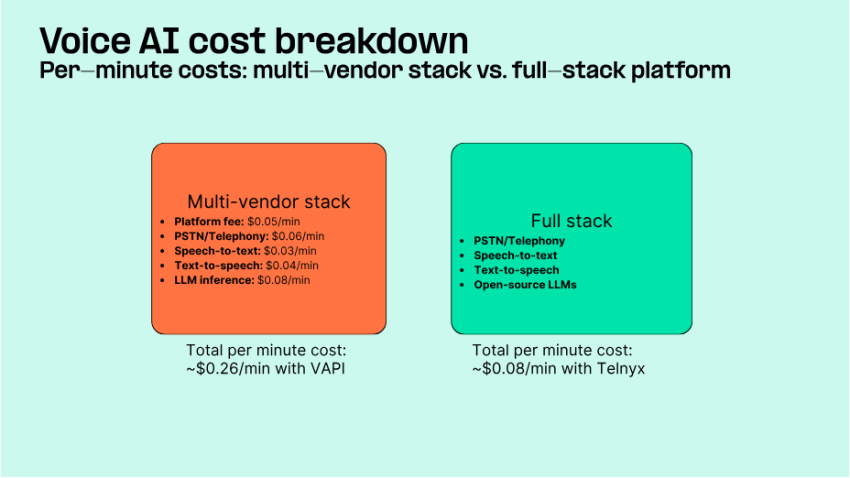
One thing to watch for here: Many providers publish a low base rate, which is appealing at first glance. But then they’ll also add charges for model choice, voice choice, knowledge base access, concurrency, or telephony. It’s important to make sure that you fully understand the total cost of these plans, not just the seemingly low per-minute base charge.
Bundled-minute subscription
This pricing model also seems fairly simple. You’ll pay a set fee for a certain number of minutes used every month.
If your business’s inbound call volume is steady, this can be a good option. It gives you predictable budgeting with your included minutes, but you need to watch for peak call volumes when you might exceed those allocated minutes and move into overage pricing.
Make sure you check how overages are billed and whether overage rates jump above the effective bundled rate. In some cases, they can increase your costs significantly during seasonal highs in call volume.
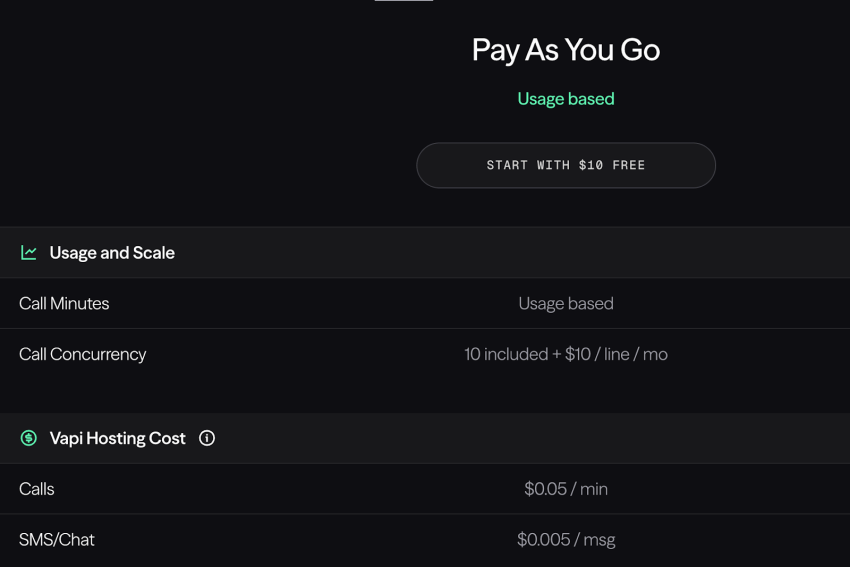
Platform fee plus usage
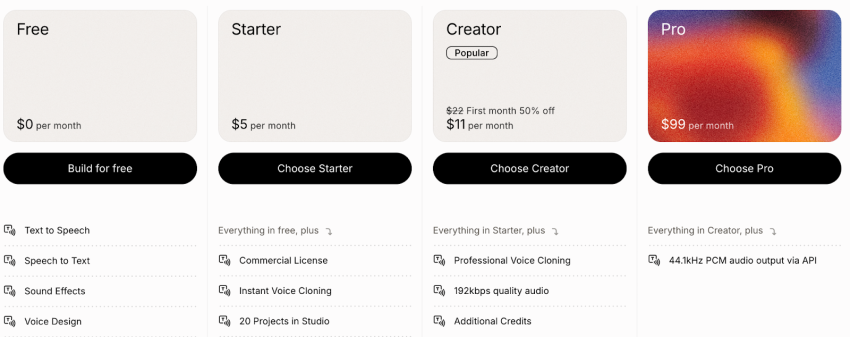
In this pricing model, you’ll pay a flat platform fee plus usage-based costs. You might pay $250 per month for the infrastructure and platform, for example, which may include a certain number of minutes or might incur an additional fee based on usage.
This is common for developer platforms with complex orchestration layers. It’s worth noting, though, that you may still be paying for features like telephony, transcription, voice, and the model, depending on the specific stack.
Enterprise custom and managed build
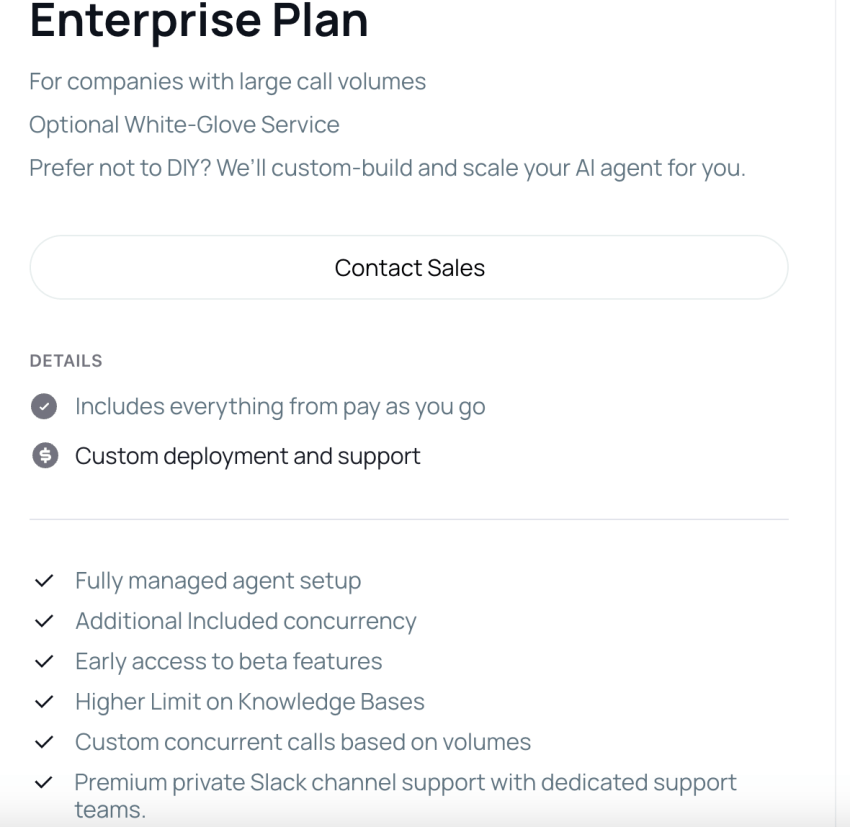
Many AI voice agent platforms offer custom pricing for enterprise companies, allowing you to choose the specific package you need.
Pricing becomes more about total ownership and less about a single per-minute number, as you’re able to negotiate factors like bespoke integrations, dedicated support, SLAs, and compliance reviews. As a result, enterprises with complex needs and budgets should accommodate them.
Pricing Comparison Table
Looking for a quick breakdown of how the different pricing models compare when you’re shopping for AI customer service tools? Here’s what you need to know:
| Pricing Approach | What the vendor usually bills | What often gets billed separately | Best fit scenario | What you should ask |
|---|---|---|---|---|
| Pay-Per-Minute | Connected call minutes | Telephony, voice, model, add-ons | Spiky volume, proof of concept | What is the all-in blended cost per minute at my model and voice settings? |
| Bundled Minutes | Monthly plan with included minutes | Overage minutes, concurrency, premium support | Steady inbound demand | What is the effective rate for my expected minutes, including overages? |
| Platform Fee Plus Usage | Platform rate per minute | Telephony, transcription, TTS, LLM | Technical teams building custom flows | Which components are included, and which are pass-through costs? |
| Enterprise Custom | Contract and implementation | All features are usually included, but priced into the contract | Regulated, high-volume, high-risk industries | What is included in onboarding, SLAs, and ongoing optimization? |
Real Market Benchmarks for 2026
Understanding pricing models is only one part of the cost equation when choosing an AI virtual receptionist. You also need to understand the actual charges that you may be looking at.
This can be challenging to research, especially since so many brands don’t publish transparent rates online. To make the process a little easier (and to help you plan), I’ve compiled some cost benchmarks from different providers across the market to give you a basic idea of what to expect.
Keep in mind that these should be used as budget anchors and not as perfect apples-to-apples comparisons. They can help you plan, but make sure to get quotes from providers that seem like a good fit.
Per-minute AI voice pricing
While costs can vary significantly, these are the benchmarks to keep in mind:
- Entry-level published rates: Typically fall as low as $0.05 to $0.10 per minute for basic AI voice handling and simple features.
- Common business-grade rates: Often fall between $0.50 and $1.50 per minute, depending on call complexity and potential for advanced features.
- Premium or enterprise-grade voice agents: Can reach up to $2.00 per minute or more, but often come with features like advanced analytics, compliance, or managed support alongside SLAs and dedicated support.
Monthly subscription and bundle pricing
Here are some current market benchmarks for subscription and bundle pricing, which may include volume discounts:
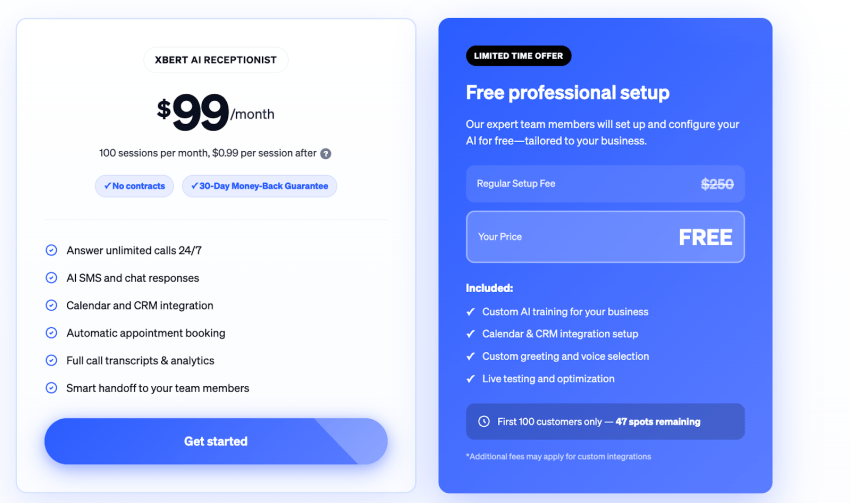
- Small business bundles: Often land somewhere between $30 and $200 per month, with either included minutes or limited usage.
- Midmarket plans: Commonly range from $200 to $1,000 per month and typically include higher minute allowances and core integrations.
- Enterprise contracts: Frequently start at $50,000 per year and can exceed $500,000 annually, depending on volume, SLAs, specific features, and customization; volume discounts may be available.
Hear why XBert AI is the best AI receptionist
XBert AI receptionist handles customer questions, captures leads, and books appointments. Try it free for 14 days.
Set up and onboarding costs
In addition to the set pricing models, many providers also charge one-time setup and onboarding costs at the beginning of a new contract. Costs vary significantly, with 2026 benchmarks falling into the following ranges for virtual agent software:
- Self-serve and no-code deployments: Often have $0 to $200 in initial setup costs.
- Professional onboarding or assisted setup: Frequently ranges from $500 to $2,000 for a one-time fee.
- Custom or enterprise implementations: Can easily add $10,000 to over $100,000 in upfront services.
Overages and add-on benchmarks
As we’ve already discussed, the flat-rate fees or usage-based rates aren’t the only costs to keep in mind. Overages and add-ons can add up, too, so here’s the current benchmark data:
- Overage minute pricing: Potentially two to three times above the bundled effective rate, this can result in high fees if you go over your allotted minutes.
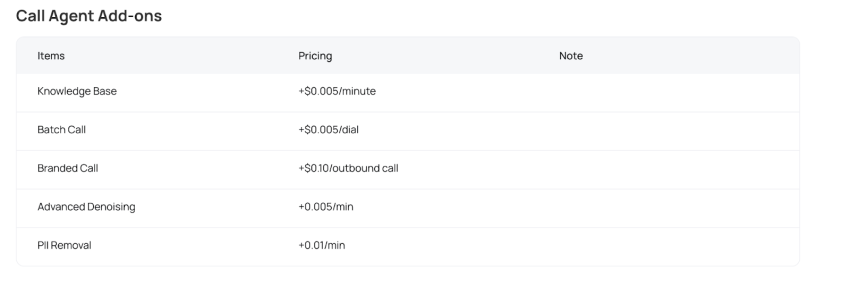
- Additional features: Features such as knowledge bases, concurrency, branded calling, or compliance controls can add $5 to over $100 per month per item.
- International calling rates: These can frequently exceed domestic rates and materially change blended cost.
Realistic monthly spend bands
There are plenty of costs to consider and an abundance of add-ons that can increase functionality and your monthly budget simultaneously. And while there’s plenty of variability, here are some realistic monthly spend bands that can serve as a starting frame of reference:
- Light-usage SMBs often fall between $100 and $500 per month.
- Growing teams with steady call volume typically land between $500 and $2,000 per month.
- High-volume or regulated operations regularly exceed $5,000 per month when all components are included.
Which AI Phone Agent Pricing Model Is Best for Your Business?
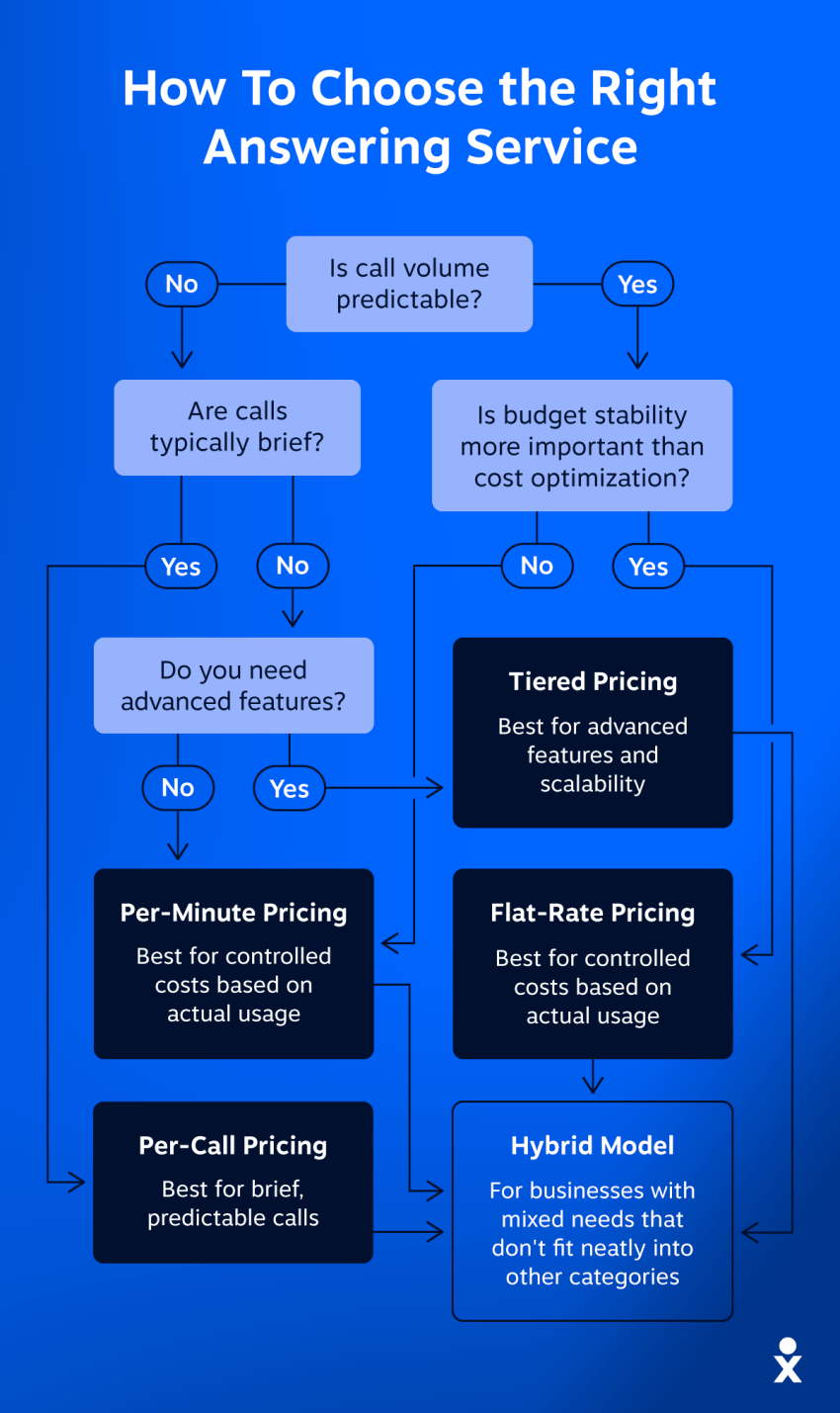
The right AI phone agent pricing model depends on your call volume, operational complexity, and growth expectations. A pricing structure that works for a small business with predictable traffic may not be suitable for a high-volume support center handling thousands of calls daily.
- Seasonal e-commerce businesses: Pay-per-minute pricing
- SMBs with predictable call volume: Bundled subscription plans
- Technical product teams: Platform fee plus usage-based pricing
- Healthcare and finance organizations: Enterprise-managed pricing
- High-volume customer support teams: Custom enterprise agreements
- Outbound sales teams: Usage-based concurrency pricing
Before choosing a provider, businesses should evaluate expected monthly call volume, peak concurrency limits, compliance requirements, integration complexity, multilingual support needs, and seasonal traffic spikes. These factors have a direct impact on long-term operational costs and scalability.
How to Estimate Monthly Cost Without Getting Tricked
Sometimes, even pricing that seems straightforward isn’t actually so transparent. Knowing how to estimate your monthly cost comes down to understanding your current call volume, calculating the blend rate, and stress testing.
Start with the call volume inputs you already have
You need to start by assessing what you already know about phone call volume inputs, which means looking at the following key metrics:
- Total inbound calls per month.
- Average call length in minutes.
- Percentage of calls you want AI to fully handle instead of calls you want AI or IVR to greet and then transfer.
- Peak concurrency estimate, which helps you assess how many calls overlap during busy windows.
Convert inputs into minutes and a blended rate
Start by calculating your monthly minutes. Multiply your average calls per month by your average call length to find your monthly minutes.
You may, for example, have 20,000 inbound calls per month during most months. There’s an average call length of 25 minutes. However, you only want AI to handle certain types of calls, including payment processing, appointment booking, and lead qualification (making up about 40% of your inbound calls). These calls have slightly lower average call durations of around 15 minutes.
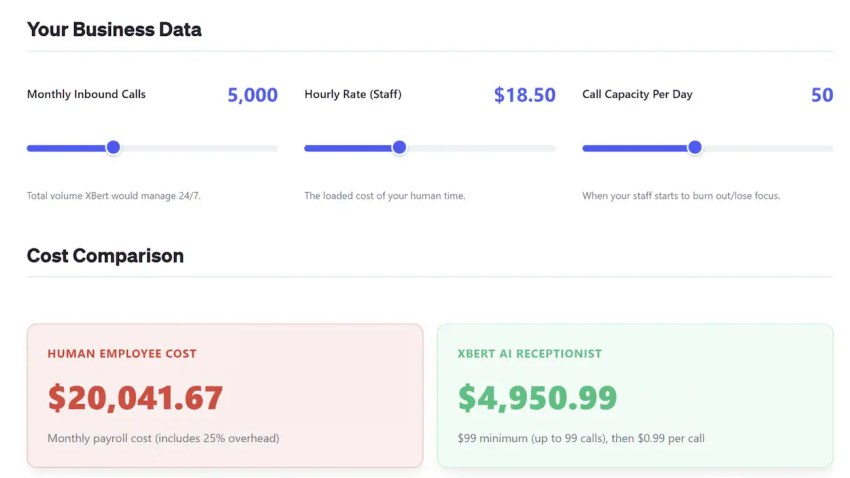
How Much Do Missed Calls Cost You?
See how much lost revenue you can reclaim with Nextiva XBert® AI answering service. Compare different scenarios to grow the bottom line.
This gives you a basic idea of how many minutes you need. In this example, you’d need at least 120,000 minutes to cover those specific calls, but you’ll likely want to increase minutes if you plan to have your AI agent greet each customer or handle peak seasons.
Then, calculate your blended rate.
Your blended rate is the total, all-in cost per minute after you add in telephony, transcription, voice, and model costs.
If a vendor bundles those layers, then your blended rate will be closer to the advertised rate you’re seeing in an initial quote or online. If a vendor does not bundle the layers, however, your blended rate can be materially higher than that headline number. You could see substantial add-on costs for full functionality.
Stress-test two scenarios
Once you have the true cost breakdowns from a vendor, you want to do two stress tests to understand realistic expenses.
First, start with a normal month. This will help you assess your costs with standard baseline minutes and will likely be what you’re paying most months of the year.
Next, assess a spike month. In this case, assume one and a half to two times your standard minutes. This can help you capture seasonality, unexpected surges, and quick growth. Look at potentially heightened overage charges and see how they add up.
Hidden Costs That Change Your Budget the Most
Hidden costs are the bane of any contract, and they’re unfortunately prevalent among plenty of AI receptionist software. In my experience, these are some of the most common hidden costs to watch for.
Overage and rounding rules
Bundled pricing can look like a great deal at first glance, but it’s easy to go over your allowance. When this happens, you’re paying higher overage rates than the standard baseline rate, which can get pricey fast.
Some systems bill by connected seconds and roll up totals, which can add up quickly and may cause you to pay for more than what you’re getting. Others have minimum charges per attempt, which can also be pricey. Make sure you understand how overage and rounding rules work before signing on the dotted line.
Add-ons that sound small but scale fast
Some providers seem to have incredibly competitive pricing until you look at the total cost of ownership. In reality, they have seemingly affordable add-ons that become expensive fast.
Make sure you watch for these add-ons, which can be particularly costly at scale when they’re not included in the base rate:
- Knowledge base surcharges.
- Branded calling features.
- Real-time noise reduction.
- PII redaction during AI calls.
- Extra concurrent calls.
Integration and workflow build
CRM and scheduling integrations can deliver exceptional outcomes, allowing your AI agents to truly act as invaluable support and enabling automation.
Your AI agents could help file support tickets through Zendesk when addressing customer service issues, for example, or they could schedule appointments with a medical practice’s provider. They do, however, also add to your initial setup work.
If you need custom API workflows, you’ll want to either budget for internal engineering time (and the potential need for ongoing maintenance) or external implementation fees.
Oversight and QA
AI agents are powerful, but humans in the loop will always matter. Your team will spend time on oversight and QA to ensure that agents’ responses are helpful to customers and address what they need.
This means your team will be reviewing transcripts, adjusting prompts, and fine-tuning transfer rules. As a result, your cost model should include some ongoing admin time, especially for the first 30 to 60 days.
Don’t overlook QA, as it’s critical to both customer satisfaction and ensuring that compliance is accounted for in all relevant customer calls.
Latency tax
Most AI phone platforms bill by connected seconds or minutes, which means businesses also pay for the AI’s response delay.
If the platform takes too long to process replies, even small latency gaps can quietly increase total usage costs across thousands of conversations. Slower AI response times can ultimately raise the effective cost per resolved call.
Ask vendors for average real-time latency benchmarks, interruption handling speeds, and whether billing pauses during processing delays or dead air.
Failed call minimums
Businesses running outbound campaigns should carefully review failed-call billing policies. Some vendors charge a minimum fee for calls that connect briefly but end within a few seconds, such as voicemail hits, unanswered calls, or quick hang-ups.
While the per-call charge may appear small, these costs can add up quickly during large outbound campaigns. Review minimum call duration rules, voicemail billing policies, and failed-call charges before scaling outbound campaigns.
Double-dip transfer surcharge
In some platforms, billing continues even after the AI transfers a caller to a live agent. Businesses may pay both the AI usage fee and additional telephony routing charges during hold times, ringing, and live call transfers, which can quietly increase overall operational costs.
Confirm whether AI billing stops immediately after escalation or continues during transfer and hold periods.
Predictable, Competitive Pricing With Nextiva
AI agents can be a turning point for startups, enterprises, and all businesses in between. Finding the right provider that offers the functionality you need and works for your budget, however, can be challenging.
It’s essential to optimize for predictable cost per resolved call, not what seems to be the cheapest AI minute. Make sure that you’re modeling your minutes before choosing a pricing structure, and then demand an all-in blended rate.
That’s why customers of all sizes are turning to Nextiva. The platform is reliable and scalable, allowing for on-brand AI phone answering without the unwanted surprise costs.
And since Nextiva is an all-in-one platform, it reduces hidden costs. You aren’t stitching together telephony, AI, and reporting because it’s already combined into a single solution designed to improve customer satisfaction, streamline your processes, and reduce latency. Nextiva offers predictable, transparent, and competitive pricing for our communication platform, including its AI receptionist.
Ready to get started with an all-in-one customer service platform with a powerful AI voice agent? Learn more about our AI receptionist today.
Your AI receptionist that never misses a call.
XBert is your AI answering service that handles calls, texts, and chats 24/7. It greets customers, books appointments, and captures leads while your business grows.
Frequently Asked Questions About AI Phone Agents
Yes, but businesses must follow strict compliance regulations. For inbound calls, the AI agent typically needs to disclose that the call is being recorded or processed by AI at the beginning of the conversation to comply with state and federal consent laws.
For outbound calls, businesses must comply with regulations such as the Telephone Consumer Protection Act (TCPA) and screen contacts against Do Not Call registries. Automated telemarketing calls generally require prior express written consent from the consumer before the AI can contact them.
Traditional IVR systems depend on fixed menus and pre-programmed rules that force callers to follow a limited path, such as “Press 1 for Sales” or “Press 2 for Support.” If callers go off-script, the system often fails to understand the request.
AI phone agents work differently. They use natural language processing (NLP) and large language models (LLMs) to understand conversational intent, allowing callers to speak naturally, interrupt mid-conversation, switch topics, and complete tasks such as scheduling appointments or retrieving account information in real time.
Cloud-based AI phone agents scale through concurrency. Instead of placing callers on hold, the platform can instantly launch multiple AI instances at the same time.
For example, if dozens of people call simultaneously, the system can answer every call immediately without requiring additional human staff. However, some vendors limit the number of concurrent calls included in a plan and charge extra fees once businesses exceed those limits.
Yes. Most enterprise AI voice platforms integrate directly with CRMs, help desk software, and scheduling systems through APIs.
During a conversation, the AI can retrieve customer history, personalize responses, and access account details. After the call ends, it can automatically update CRM records, add notes, create tickets, change deal stages, and attach call transcripts to the customer profile in platforms like Nextiva.
Deployment timelines vary based on business size, integrations, and technical complexity. Small businesses using prebuilt no-code templates for simple FAQs or basic call routing can sometimes launch an AI phone agent within a few hours.
Mid-sized businesses that require CRM integrations, workflow automation, and custom call flows usually need between two and four weeks for implementation. Enterprise deployments often take much longer. Organizations with complex compliance requirements, advanced integrations, multi-model orchestration, or large-scale voice testing may require 12 to 18 weeks before the platform is fully production-ready.
AI phone agent costs are usually calculated by multiplying your monthly automated call minutes by the vendor’s blended per-minute rate.
For example, a dental practice automating appointment confirmations might use around 1,500 AI minutes per month. At a bundled rate of $0.15 per minute, the estimated monthly cost would be approximately $225.
A larger e-commerce company using a developer-focused platform with separate charges for transcription, AI models, and voice generation may process 20,000 minutes monthly. If the blended rate reaches $0.30 per minute after adding all services together, the monthly cost would total roughly $6,000.
The final cost depends heavily on call volume, concurrency, integrations, voice quality, and the AI models powering the system.
BYOK stands for bring your own keys. Some AI voice platforms advertise very low base rates, but they require businesses to connect their own third-party accounts and API keys for services such as speech-to-text, text-to-speech, and large language models.
For example, a provider may charge only $0.05 to $0.07 per minute for the platform itself, but businesses still pay separate usage fees to providers like OpenAI, Anthropic, Deepgram, or ElevenLabs. Once those additional token and processing costs are added, the actual blended rate often rises to $0.12 to $0.25 per minute.
Blended AI voice pricing refers to the total operational cost per minute after combining telephony, speech recognition, AI processing, orchestration, and voice generation expenses.