Customer Experience
  Blog
Blog  Business Communication
  Leadership
  Marketing & Sales
  Nextiva News
  Productivity
  VoIP
VoIP 
CRM software stores and organizes customer records. Customer management coordinates the complete relationship across phone, text, chat, email, social media, reviews, and support. A CRM can support this work, but it does not replace the strategy or every system required to deliver a consistent customer experience.
In 2026, businesses need a clear view of each interaction and the context behind it. That view helps teams respond faster, personalize service, and identify issues that can affect retention.
Take the AI Maturity Assessment
In just 5 minutes, get your personalized score and recommendations to move forward with AI.
What Is Customer Management?
Customer management includes the processes, systems, and practices that guide interactions with current and potential customers. It covers communication across channels such as:
- Phone calls
- Text messages
- Live chat
- Video meetings
- Social media
- Online reviews
- Support portals
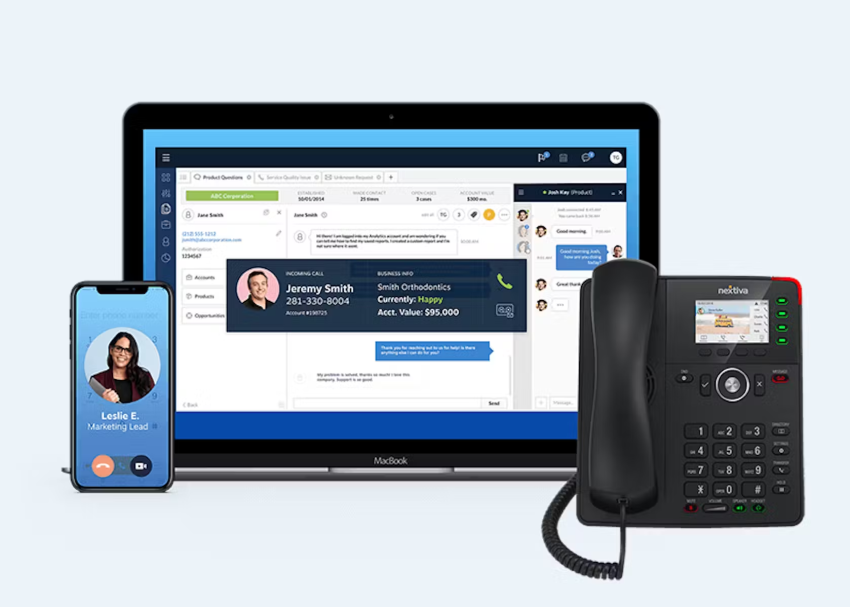
Customer management is an organization-wide responsibility. Sales, marketing, service, support, and operations teams need shared processes and customer information to provide a consistent experience.
Customer management and CRM compared
A Customer Relationship Management (CRM) system primarily manages customer and prospect records. It is highly effective for organizing contact management, lead tracking, sales pipelines, and marketing automation.
Customer management, however, is much broader. It connects those static customer records to real-time interaction history, service workflows, communication channels, and business outcomes.
| Capability | CRM software | Customer management or CX platform |
|---|---|---|
| Customer records | Core capability | Included |
| Sales pipeline | Usually included | May be included or integrated |
| Phone and digital interactions | Often requires integrations | Typically central to the platform |
| Support workflows | May require a service module | Usually included or connected |
| Reviews and social messages | Often requires separate tools | May be managed in the unified workspace |
| Routing and continuity | Limited by product and integrations | Designed for cross-channel continuity |
| Sentiment and experience analytics | Available in some products | Common platform capability |
| Customer journey management | Primarily sales-focused | Covers the full relationship |
A CRM is often necessary. It is insufficient by itself when teams need one view of customer communications across multiple channels.
Pillars of effective customer management
Let’s examine the three pillars of customer management that are crucial for effective customer relationship management.
1. Processes and practices
You’ll need to create a system to manage interactions with existing and potential customers effectively. Establishing processes for all of your teams ensures that your customers receive a consistent experience throughout the customer journey.
Useful processes include:
- Lead handoffs between marketing and sales
- Escalation rules for complex service issues
- Service-level targets for response and resolution
- Follow-up procedures after support interactions
- Review and feedback response workflows
- Customer renewal and retention activities
2. Relationship building
Customer management processes must work at scale while supporting relevant, personal interactions.
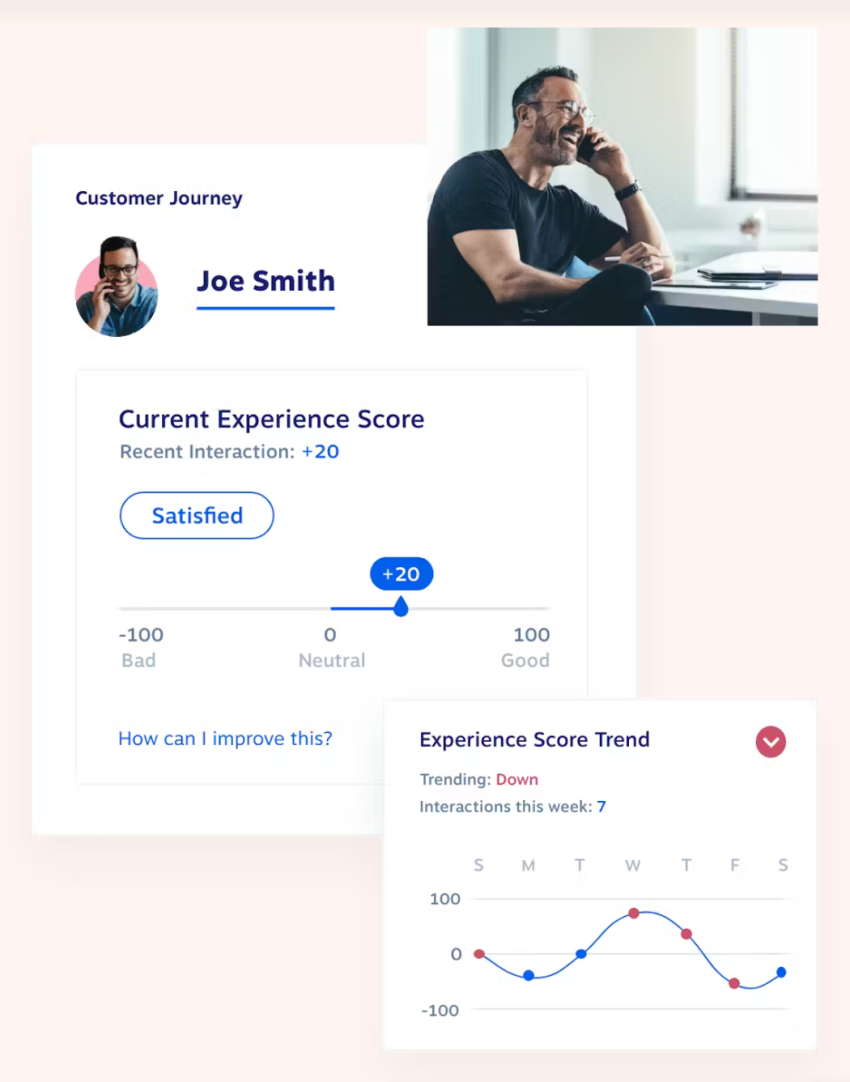
Teams can build stronger relationships by using customer context during each conversation. That context may include purchase history, previous support issues, preferred channels, account value, and feedback.
Better customer satisfaction supports retention. Higher retention can increase customer lifetime value and average contract value.
3. Data-driven approach
Data analysis keeps customer operations aligned with customer needs. Teams can use contact center software, CRMs, feedback tools, analytics, and customer data platforms to create a clearer view of customer behavior.
A unified interaction history helps teams identify:
- Repeated support issues
- Unresolved customer concerns
- Gaps in products or services
- Delays in routing or follow-up
- Sentiment changes across the customer journey
- Opportunities for retention or expansion

Why Customer Management Is Critical in 2026
Many organizations need to control costs while maintaining service quality. Customer management helps teams coordinate work across channels and reduce manual steps.
Customers expect timely, relevant service. Remote and distributed teams also need shared systems that preserve context when an interaction moves from one employee or channel to another.
Here are a few reasons companies should consider investing in their customer management programs.
Compete through the customer experience
Product features often appear across several competing products. The experience customers receive during research, purchase, onboarding, and support can influence their decision to stay.
Companies that manage customer experiences consistently can build trust and reduce the friction that causes customers to consider alternatives. Learn more about customer experience management.
Use data to personalize service
Customer assumptions can differ from customer expectations. Interaction data provides a more accurate view of what customers need.
Teams can analyze conversations, survey responses, purchase activity, and support trends to:
- Personalize follow-ups
- Adjust customer communications
- Identify at-risk accounts
- Improve self-service content
- Route issues to the right team
- Find gaps in products or processes
Reduce churn
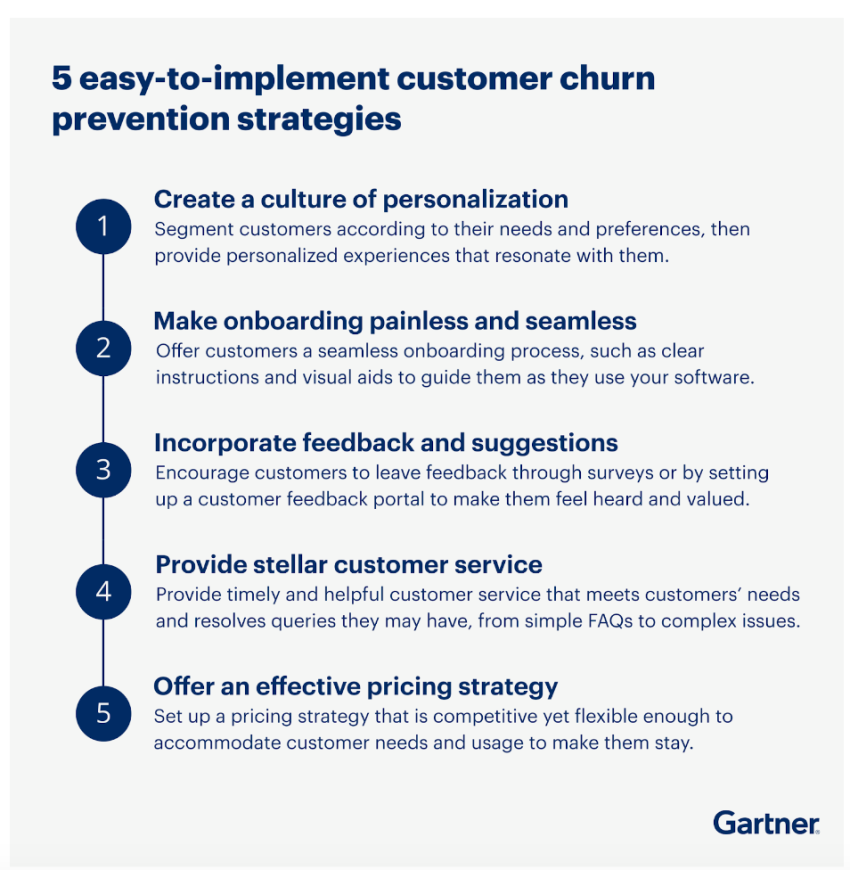
Customer-centric service can reduce the likelihood that customers move to another provider. Churn affects recurring revenue, customer lifetime value, and average revenue per account. Gartner identifies churn prevention as a customer and business priority.
Customer management gives teams the data and workflows needed to identify dissatisfaction earlier and respond before an issue becomes a cancellation.
Increase sales and profitability
Loyal customers can make repeat purchases and create opportunities for upselling and cross-selling. Existing customers also know the product, which can reduce the effort required to support additional purchases.
Satisfied customers may recommend a business to people with similar needs. Referral leads can cost less to acquire than leads from some other channels.
Customer management also begins before the sale. A clear, responsive buying experience helps prospects move through the purchasing process with confidence.

Customer Experience Platforms and Management Tools
Customer management usually requires multiple capabilities. Some businesses use separate tools connected through integrations. Others use a unified customer experience platform that combines communication, support, automation, analytics, and customer records.
The right approach depends on the organization’s operating model, existing systems, channels, security requirements, and budget.
Selecting a platform for leadership teams
A leadership team that wants one view of interactions across phone, chat, reviews, and support channels should prioritize a unified customer experience management platform. The platform should combine channel-agnostic interaction history with routing, CRM and help desk integrations, analytics, sentiment insights, and service workflows.
There is no universal best platform for every business. The best fit depends on the channels a company uses, the complexity of its service operation, the systems it already owns, and the level of automation it needs.
| Evaluation area | What leadership teams should verify |
|---|---|
| Unified customer record | Whether calls, chats, emails, texts, reviews, and support cases connect to one customer history |
| Channel coverage | Support for the channels customers and employees use most |
| Routing and continuity | Skill-based routing, escalation, transfers, and context across channels |
| CRM and service integrations | Native integrations, APIs, automatic activity logging, and data synchronization |
| AI assistance | Virtual agents, agent guidance, transcription, summaries, suggested actions, and automation |
| Analytics and sentiment | Real-time dashboards, conversation analytics, CSAT, NPS, sentiment, and trend reporting |
| Workforce management | Quality monitoring, performance reporting, scheduling, coaching, and capacity planning |
| Security and governance | Access controls, data protection, auditability, and administrative controls |
| Scalability | Support for additional users, locations, channels, and interaction volume |
| Total cost of ownership | Licensing, implementation, integrations, training, administration, and support |
Nextiva, a unified customer experience management platform, brings voice, text, chat, email, social messages, reviews, and other customer interactions into a shared customer view.
When a CRM alone is insufficient
A CRM may be enough for a small sales team that only needs to manage contacts and follow-ups. However, a CRM becomes insufficient when a business needs to manage service interactions across multiple channels.
A CRM works best when it connects to a business’s phone, messaging, and support systems. A separate CX or contact center platform is required when a business needs:
- A complete, unified history of phone, chat, email, text, social, and review interactions
- Omnichannel routing and queue management
- Contact center quality monitoring and workforce engagement
- AI-assisted service, real-time transcription, and sentiment analysis
- Automated CRM activity logging and customer feedback workflows
Products like Salesforce Sales Cloud, HubSpot Sales Hub, ClickUp, ActiveCampaign for Sales, and Close are excellent for managing the CRM side of the business. But to truly manage communications at scale, they must be integrated with a unified customer experience platform.
Customer experience software costs
Customer experience software pricing varies by channels, users, automation, data volume, integrations, analytics, and support requirements. Many vendors require a quote for contact center or enterprise CX deployments.
A complete cost assessment should include:
- Subscription or license fees
- User, agent, or usage-based charges
- Phone numbers and communication costs
- Implementation and configuration
- CRM, help desk, and data integrations
- Training and change management
- AI, analytics, recording, or storage add-ons
- Administration and ongoing support
Businesses should compare total cost of ownership rather than the subscription price alone.
8 Customer Management Tools and Systems
While they may differ slightly from one company to another based on specific business needs, team sizes, and existing processes, these tools and systems are routinely involved in managing customer experiences throughout the buying journey.
1. Contact center platforms
Contact center platforms manage inbound and outbound customer interactions across phone, email, chat, and social media. These platforms offer several features to streamline communication and improve customer service efficiency.
Contact center platform features
- Ticketing systems for tracking customer queries
- Call routing to direct calls to the appropriate agent
- Interactive voice response systems for automated call management
- Agent performance monitoring to support quality reviews
- Reporting tools for analyzing contact center performance
- Chatbots for answering common questions
- Call recording and transcription for quality and coaching
- Customer history for maintaining context across interactions
Contact center software is often the strongest fit for a leadership team that needs one operational view of customer communications. It should connect with the CRM and help desk rather than create another isolated record.
Examples frequently evaluated in this category include:
- Nextiva Contact Center
- Salesforce Service Cloud
- Aircall
- CloudTalk
- Gladly
- Genesys Cloud
- Talkdesk
- Five9
- Zendesk
For more information, see contact center software.

2. Customer Relationship Management systems
CRM systems store customer data, track sales activity, and support marketing workflows. While they are invaluable for organizing lead pipelines and contact management, they are most effective for customer communications when integrated directly with a contact center or CX platform. This ensures that every interaction is automatically logged, giving employees the real-time context needed for immediate follow-up.
CRM system features
- Contact management for organizing customer information
- Lead scoring for prioritizing sales activity
- Sales pipeline management for tracking opportunities
- Marketing automation for campaign management
- Task and workflow automation for follow-up
- Reporting and analytics for customer and sales insights
- Integrations with phone, email, support, and customer data tools
CRM systems are valuable for customer communications when they automatically log interactions and give employees the context needed for follow-up. They may need a contact center or CX platform to manage real-time routing, queues, quality monitoring, and cross-channel service.
Examples include:
- Salesforce Sales Cloud
- HubSpot Sales Hub
- ClickUp
- ActiveCampaign for Sales
- Close
3. Help desk software
Help desk software centralizes support tickets and internal service processes. It helps teams assign, prioritize, track, and resolve customer issues.
Help desk software features
- Knowledge base management for self-service information
- Issue tracking for monitoring customer problems
- Ticket routing for assigning inquiries
- Self-service portals for customer access to answers
- Service-level tracking for response and resolution targets
- Reporting tools for support performance insights
- Escalation workflows for complex cases
Help desk software is a strong fit for ticket-based support. A CX platform becomes more suitable when the business also needs phone, messaging, social, review, routing, and real-time conversation analytics.
Examples include:
- Zoho Desk
- Zendesk Support Suite
- HubSpot Service Hub
- Salesforce Service Cloud
- Freshdesk
4. Customer feedback management tools
Customer feedback management tools collect and analyze customer feedback from surveys, reviews, social media, and support interactions.
Feedback management features
- Feedback capture forms for collecting responses
- Sentiment analysis for identifying customer attitudes
- Reporting and insights for finding feedback trends
- Action management for assigning follow-up work
- Survey distribution for gathering structured responses
- Review monitoring for tracking public feedback
Examples include:
- Google Workspace
- SurveyMonkey
- Qualtrics CoreXM
- Jotform
- QuestionPro
Feedback tools help measure experience. They do not always manage the operational work required to respond to calls, chats, or support cases.
5. Marketing automation platforms
Marketing automation platforms automate campaigns, personalize customer journeys, and nurture leads through sales stages.
Marketing automation features
- Email marketing for targeted communication
- Lead nurturing workflows for moving prospects through the funnel
- Social media marketing for audience engagement
- Landing page creation for lead capture
- Analytics for measuring campaign performance
- Segmentation for targeting specific audiences
Examples include:
- HubSpot Marketing Hub
- Insider
- ActiveCampaign for Marketing
- Braze
- Mailchimp
Marketing automation supports customer management before and after a purchase. Teams should connect it to the CRM and customer interaction history to avoid disconnected communications.
6. Customer data platforms
Customer data platforms unify information from multiple sources into a customer profile. They help teams recognize customers across systems and personalize engagement.
Customer data platform features
- Data integration for combining information from multiple sources
- Segmentation for targeted campaigns
- Identity management for recognizing customers across platforms
- Personalization tools for improving engagement
- Analytics for understanding customer behavior
- Data activation for sending insights to other systems
Examples include:
- Treasure Data
- Segment
- BlueKai
- Adobe Audience Manager
- Klaviyo
A CDP can strengthen the customer record. It may still require a CRM, help desk, contact center, or communication platform for frontline workflows.
7. Chatbots
Chatbots offer 24/7 customer support and answer basic questions without human intervention. They’re an efficient way to provide immediate assistance and improve customer satisfaction.
Chatbot features
- Natural language processing for understanding customer requests
- AI-powered responses for answering common questions
- System integrations for retrieving information or completing tasks
- Human escalation for complex or sensitive issues
- Conversation history for maintaining context
Examples include:
- Zendesk Support Suite
- Intercom
- Qualified
- Tidio
- Kore.ai
A chatbot should connect to the customer record and support workflow. An isolated bot can create another channel without improving continuity.
8. Feedback and review sites
These platforms encourage customer reviews and help businesses manage their online reputation. They build trust and help customers’ decision-making processes.
Feedback and review platform features
- Review collection for gathering customer opinions
- Sentiment analysis for understanding review trends
- Reputation management for monitoring online presence
- Response capabilities for engaging with customers
- Alerts for identifying new or urgent reviews
- Reporting for comparing feedback over time
Examples include:
- G2
- Trustpilot
- Google Business Profile
- Yelp
- Capterra
Review platforms provide valuable experience data. A unified CX platform can connect that feedback to other customer interactions and service workflows.
Customer Management Best Practices
Customer experience statistics show that how you manage customers directly reflects on your sales and profitability. Consumers are five times more likely to recommend a brand after an excellent customer service experience.
Personalize customer interactions
Create content and follow-up messages that match customer needs at each stage of the journey. Use CRM, CDP, survey, and interaction data to guide communication.
Teams can review purchase history, support activity, and website behavior to improve calls to action and follow-up timing. Personalization should use relevant context without overwhelming employees or customers.
Streamline support
Customer service automation and AI can handle repetitive tasks such as data entry, email sorting, transcription, summaries, and basic questions.
Employees can then focus on complex issues and conversations that need judgment. AI should preserve customer context, provide clear escalation paths, and allow employees to review or correct automated actions.

Ask for feedback
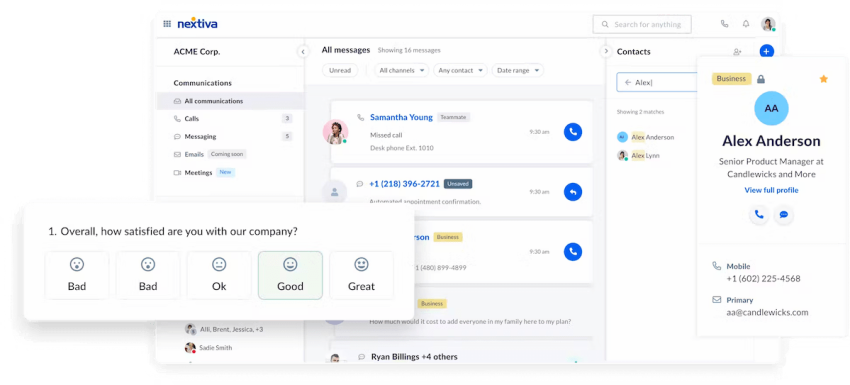
Ask for customer feedback through surveys, reviews, interviews, and support conversations. Customers can identify problems that internal teams miss.
Use feedback to:
- Improve products and services
- Update knowledge base content
- Adjust support workflows
- Train employees
- Identify churn risks
- Prioritize customer experience projects
Respond promptly and record the action taken. Feedback has greater value when it changes an operational decision.
Choose integrated technology
A customer management platform should connect with the business’s existing applications. Integrations can centralize data and reduce manual copying between systems.
Evaluate:
- CRM and help desk connectors
- Email and calendar integrations
- Telephony and messaging support
- Review and social media connections
- Data export and API access
- User permissions and administrative controls
- Implementation and migration requirements
Track service and customer metrics
What a business measures affects what it can improve. Track customer metrics such as:
- First response time
- Average resolution time
- First-contact resolution
- Customer satisfaction score
- Net Promoter Score
- Retention
- Churn
- Customer lifetime value
- Contact volume by channel
- Escalation rate
- Agent quality and performance
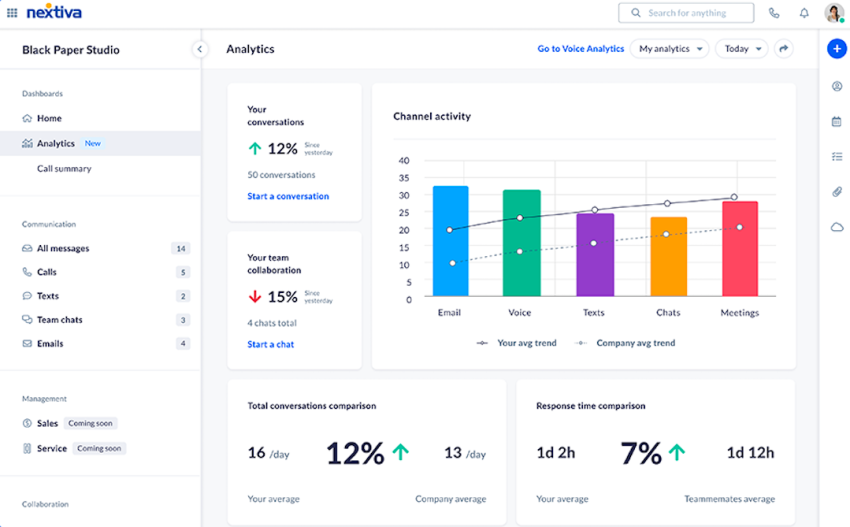
Review metrics by channel, customer segment, issue type, and team. A single average can hide problems that affect a specific group of customers.
How to Choose Customer Management Software
The selection process should begin with the customer journey and operating model. Technology should support the way teams work rather than force employees to manage disconnected systems.
1. Map the interaction journey
Document how customers contact the business, where conversations begin, and where they are transferred. Include sales, onboarding, support, renewals, reviews, and escalations.
2. Identify data gaps
List the information employees cannot access during customer conversations. Common gaps include previous calls, unresolved tickets, review history, account ownership, and customer preferences.
Define channel requirements
Prioritize the channels customers use most. Confirm whether the platform supports phone, SMS, email, web chat, video, social messaging, reviews, and self-service.
Test continuity and routing
Verify that employees can transfer or escalate conversations without losing context. Test skill-based routing, queue management, callbacks, and follow-up workflows.
Review integration requirements
Confirm that the platform connects with CRM, help desk, marketing, workforce, billing, and collaboration systems. Check whether integrations synchronize data in both directions.
Evaluate AI and analytics
Review transcription, summaries, suggested responses, virtual agents, sentiment scoring, quality monitoring, dashboards, and reporting. Ask how the system handles human review and escalation.
Calculate total cost
Include licensing, usage, implementation, integrations, training, storage, support, and administration. Request a detailed quote when pricing depends on configuration or interaction volume.
Plan adoption and governance
Assign ownership for workflows, data quality, permissions, reporting, and employee training. Start with priority use cases and expand after teams establish reliable processes.
Tackle Customer Management in One App With Nextiva
Nextiva, a unified customer experience management platform, connects customer conversations and service workflows across communication channels. Its platform supports voice, text messaging, video meetings, team chat, email, social messages, reviews, and website chat.
Nextiva Contact Center provides capabilities such as:
- Omnichannel customer interaction management
- Unified customer history
- Call queuing and routing
- Real-time transcription
- Sentiment scoring
- Automatic CRM logging
- AI-powered virtual agents and chatbots
- Agent assistance and suggested next actions
- Conversation summaries
- Performance and service analytics
Nextiva integrates with business applications such as Salesforce, HubSpot, Zoho, Microsoft Dynamics, Oracle, Zendesk, ServiceNow, Microsoft Teams, Google Workspace, and Outlook. REST APIs support custom integrations.
CX software service done right.
Integrate secure phone service, SMS, video, and team chat in ONE platform.
FAQs
The ideal platform depends on your service complexity, budget, and channel needs. Unified solutions like Nextiva are often considered top choices because they seamlessly consolidate communication, support workflows, and analytics into a single workspace.
Top CRMs like Salesforce and HubSpot are excellent for tracking contact records and pipelines. However, for managing actual communications, the best setup integrates your chosen CRM with a unified contact center like Nextiva to automatically log every phone, chat, and email interaction.
The best software eliminates data silos by keeping all teams on the same page. Platforms offering omnichannel routing, native CRM integrations, and real-time conversation analytics—such as Nextiva—are highly effective for managing the complete customer journey from start to finish.
You need a unified customer experience platform designed specifically for cross-channel continuity. Nextiva is a strong fit for this requirement, as it pulls voice, digital messaging, and online reviews into a shared dashboard, equipping teams with the immediate context needed to resolve issues faster and prevent churn.