Customer Experience
  Blog
Blog  Business Communication
  Leadership
  Marketing & Sales
  Nextiva News
  Productivity
  VoIP
VoIP 

Selecting an AI support agent involves more than comparing vendors or features. If you already use a helpdesk or phone system, you must also consider how the new agent integrates with your existing tools. Failure to do so can limit the agent’s capabilities.
A helpdesk-native agent will usually be strongest inside that helpdesk, and it may be less flexible outside it. An overlay that connects across your existing systems can give you more flexibility; its performance is tied to those integrations, though. If one connection is slow or difficult to maintain, the agent inherits that limitation. You won’t necessarily see either trade-off in a demo.
Cost gets more complicated for the same reason. An attractive price on a vendor’s pricing page doesn’t tell you much about what you’ll spend once the agent is live. Real support volume, actions across systems, voice, usage fees, and integration requirements all change the math.
And this is no longer a niche purchase. According to Salesforce’s State of Service: AI Agents Edition, which surveyed 3,075 service professionals worldwide, AI agent adoption across customer service teams rose from 39% to 66% in one year. Among surveyed current users, 70% reported measurable value within 60 days.
Many customer service operations have already made the decision to adopt AI agents. It’s now about which architecture, pricing model, and operational fit make sense for their existing environments.
That’s how I evaluated the agents below. The ranking considers:
- Native channel coverage, including voice
- Action execution depth
- Pricing predictability at production volume
- Deployment effort
Your priorities may differ, so re-weight the criteria and re-rank the list accordingly.
The 10 Best AI Agents for Customer Support
Here’s how these 10 agentic AI platforms for customer support stack up against those four priorities.
| Platform | Architecture | Best for | Pricing |
|---|---|---|---|
| Nextiva | Omnichannel platform | Teams where phone is a primary support channel | Seat and interaction packages, from $15/user/mo (billed annually) |
| Fin (formerly Intercom) | AI-first, helpdesk-agnostic | Digital-first teams wanting fast deployment | $0.99/outcome, 50-outcome/mo minimum |
| Zendesk AI Agents | Helpdesk-native | Existing Zendesk customers | Per automated resolution, as low as $1.50 |
| Salesforce Agentforce | CRM-native | Organizations standardized on Salesforce | $2.00 per conversation (current rate listed) |
| Ada | AI-first, standalone | Multilingual, high-volume digital support | Outcome-based, quote only |
| Decagon | AI-first, standalone | High-volume consumer brands | Platform fee plus per conversation, quote only |
| Sierra | AI-first, heavily customized | Enterprises with time and budget to build | Outcome-based, quote only |
| Forethought | Overlay | Teams on Zendesk, Freshdesk, or Salesforce | Quote only |
| Freshworks Freddy AI | Helpdesk-native | Existing Freshdesk customers | Per session, $0.10–$0.49 |
| HubSpot Customer Agent | CRM-native | Teams already on HubSpot | $0.50 per resolved conversation |
Pricing splits the list roughly in half: Some vendors publish rates, while others require a quote. For the quote-only group, enterprise contracts and custom pricing can reach six figures a year.
1. Nextiva
Nextiva uses an omnichannel architecture, where voice, chat, SMS, email, and social run through the same data and routing layer. That’s vital for teams where phone is a primary support channel: Once calls make up a meaningful share of the volume, voice agents that treat calls as a bolt-on will always be a weaker fit, no matter how good their model gets.
The honest flip side is that when a team runs mostly digital support, it may get less value from that breadth than from a text-first agent built around deeper automation in fewer channels. See how that plays out on Nextiva’s contact center platform.
2. Fin (formerly Intercom)
Fin runs on Fin Apex, a model built and trained specifically on customer service conversations rather than general internet text. That’s a different approach from most of the tools on this list, which point a general-purpose large language model (LLM) at a support workflow instead of training one for the job.
It gets a small, digital-first team to a working agent faster than anything else on this list, though it leans on your existing helpdesk for anything your support team needs to do. Salesforce completed its acquisition of Fin on September 10, 2026, and the product continues to serve customers as part of Salesforce’s AI Labs.
3. Zendesk AI Agents
Zendesk’s AI agents run on what the company calls its Resolution Learning Loop, where every resolved customer inquiry feeds back into the system to improve the next one. That’s a real step up from the scripted chatbot flows and voice bots many contact centers used to run — one small way to streamline support operations at a higher conversation volume without hurting customer satisfaction.
There’s a wrinkle in how success gets measured, though. If a ticket gets reopened later and a human ends up handling it, the automated-resolution tag doesn’t always get removed, so the reported automation rate can run higher than what’s happening.
4. Salesforce Agentforce
Agentforce runs on Salesforce’s Atlas Reasoning Engine, which works through a reason-act-observe loop and exposes its reasoning steps for admins to review. That visibility is important for a team that needs to audit why an agent refunded an order or escalated a case.
The trade-off is architectural, though: Atlas reasons over the same account and case data your teams already keep in Salesforce. A team split across multiple systems won’t get that same advantage, and the Salesforce-first assumption can cost more than it saves.
5. Ada
Ada’s real differentiator sits in the operating model. Your own customer experience (CX) team gets to train AI directly, rather than the typical setup where a vendor’s engineers handle tuning behind the scenes.
That architecture also affects how quickly you can make changes to the agent, whether that’s fixing a broken flow or expanding multilingual support. But like every AI-first standalone here, Ada still needs a helpdesk to run it for your human agents.
6. Decagon
Decagon runs on what it calls Agent Operating Procedures: a form of workflow automation using natural-language workflow instructions compiled into code, built to handle multi-step requests like refunds or account changes. The trade-off is who controls the tuning.
Decagon’s own team manages the retrieval layer and knowledge base logic on your behalf, what the company calls a concierge model. That’s a real fit for enterprise teams without in-house AI engineers but a real constraint for a team that wants to own that tuning itself.
7. Sierra
Sierra’s customer-facing AI agent can handle conversations across channels, draw on company knowledge, connect to business systems, and take actions on customers’ behalf. Teams build and manage those agents through Agent Studio, Sierra’s no-code environment for configuring journeys, knowledge, integrations, simulations, and guardrails.
Ghostwriter adds an AI-assisted way to build and improve those agents. Feed it standard operating procedures, call transcripts, audio interviews, or a plain-English description, and it can create or modify workflows, integrations, guardrails, tone, and style, then run simulations and test edge cases before changes go live.
Every path runs through a sales call and a scoped pilot. Case studies put real deployments at four to 10 weeks, making it the most involved evaluation process on this list for a team that wants to see the product before committing real time.
8. Forethought
Forethought’s whole pitch is reaching across systems no single vendor owns, sitting on top of Zendesk, Freshdesk, or Salesforce instead of forcing a switch to any one of them. Zendesk acquired Forethought on March 26, 2026. Forethought still works across other help desks today, but it’s worth keeping in mind that the company behind it is also a single-platform vendor already on this list.
9. Freshworks Freddy AI
Freddy AI Agent is built into Freshdesk and can take actions such as tracking orders or processing refunds through e-commerce platforms like Shopify, Stripe, and FedEx. The catch is that Freshworks splits Freddy into three products: AI Agent, AI Copilot as an agent productivity layer that gives human reps AI drafts to work from, and AI Insights for leaders. What you get depends on the plan, which can make the pricing and product mix harder to parse.
10. HubSpot Customer Agent
HubSpot Customer Agent draws on customer relationship management (CRM) records, past emails and calls, support tickets, and data through HubSpot’s Context Layer. The catch is the shared credit pool. Customer Agent uses the same credits as HubSpot’s other AI agents, including Data, Content, and Sales. Heavy AI use elsewhere in your HubSpot account can reduce the credits available to support.
Most of what gets called “AI in customer service” today isn’t one thing. Companies use AI for everything from writing assistance and agent assist to self-service, routing, translation, and process automation. The platforms on this list overlap with several of those use cases, but their underlying architecture determines what they can do, which systems they can act across, and where their limitations show up.

The Architectures Behind These AI Customer Support Tools, and What Each One Costs You
Each of these AI support agents falls into one of five architectural families. That placement, more than any single feature, decides what a customer service operation can expect from it. This is the idea the ranking rests on.
Helpdesk-native
These AI agents run inside the ticketing platform itself. Deployment is fast because there’s no new system to set up, and the agent has direct access to that platform’s own ticket data, tags, macros, shared inbox, and knowledge base. That speed runs out the moment a request needs something outside that one system. A customer service AI tool built into a single helpdesk can’t answer a phone call or read a CRM record it was never connected to.
CRM-native
These agents follow the same logic but are anchored in a CRM rather than a ticketing system. Reasoning over live account, contact, and case data tends to produce sharper, more personalized answers than a generic knowledge base search. But the underlying assumption is identical to that of helpdesk-native tools, just aimed at a different system. If a customer record is split between that CRM and a separate support tool, the agent only sees half of it.
AI-first standalone
These platforms take the opposite approach. Instead of adding an AI layer to an existing system, the AI agent is the product, and everything else is built or bought around it. That usually means the deepest reasoning and the most complex actions on this list.
This is workflow automation that handles real conversations, changing a subscription or verifying an identity across systems, built to reduce manual effort rather than just answer questions. It also means a cost most buyers forget to account for: None of these platforms ship with a helpdesk, so a human support team still needs one, and that seat cost sits entirely outside the AI agent’s own price tag.
Overlay
These agents connect across a company’s existing ticketing and knowledge systems, rather than requiring a switch to any one of them. That flexibility is the appeal, but it depends entirely on how quickly changes in those systems reach the AI agent. Picture a support article getting updated in the help center. If the agent’s index doesn’t catch up right away, it may keep repeating the old policy until a customer catches the mistake.
Omnichannel
This is the fifth architecture, and its difference lies in which channel is treated as the native one. Most of the platforms above were built around text first — chat, email, tickets — with voice agents added later as an integration. An omnichannel architecture puts phone calls on the same footing as everything else from the start, sharing one data and routing layer instead of having a call center bolted on top. That’s the structural reason Nextiva sits at the top of this ranking: The platform was built around phone as a first channel, not a later addition.
This isn’t just a theoretical advantage. Emergia, a multinational BPO serving a multilingual customer base, adopted this architecture and increased voice channel efficiency by 154% by integrating voice and digital channels into a unified system.
| Architecture | Strength | Structural limit | On the list |
|---|---|---|---|
| Helpdesk-native | Fast deployment, deep native data access | Stops at the helpdesk boundary | Zendesk AI, Freshworks Freddy AI |
| CRM-native | Rich customer context, strong data model | Assumes you standardized on that CRM | Salesforce Agentforce, HubSpot Customer Agent |
| AI-first standalone | Deepest reasoning and action execution | Needs a helpdesk underneath, added seat cost | Fin, Ada, Decagon, Sierra |
| Overlay | Works across systems you already own | Suffers from sync latency and index staleness | Forethought |
| Omnichannel platform | Voice and digital on one context layer | Has a broader platform, not helpdesk-deep | Nextiva |
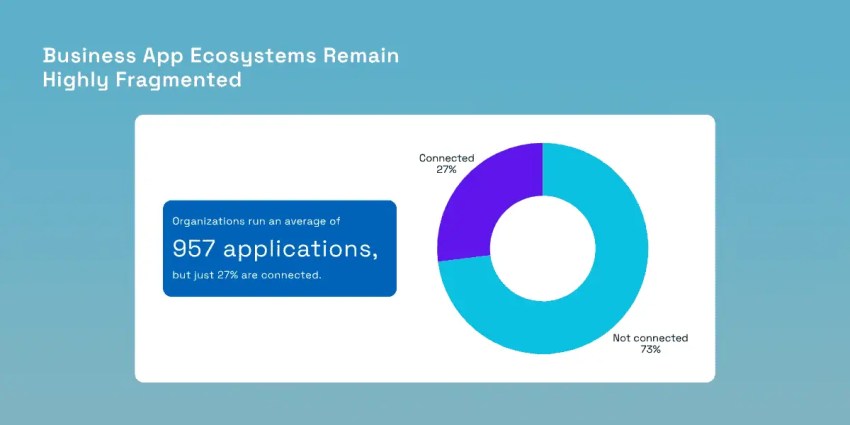
MuleSoft’s 2026 Connectivity Benchmark Report, based on responses from 1,050 IT leaders, found that the average organization runs 957 applications. Only 27% are connected, and 82% of surveyed IT leaders cite data integration as a major AI challenge. That fragmentation is the environment overlay agents must work in, so integrations across business systems become part of the agent’s limitations.
Pricing Models and Total Cost of Ownership
Every pricing model in this category boils down to one of five structures: per resolution, per conversation, per session, per seat, or a custom enterprise contract. These terms alone provide little clarity. The actual cost depends on how each vendor defines the billable unit, which is often detailed deep within the contract rather than on the pricing page.
Here’s the math that most competing roundups leave out. A per-conversation model bills for every customer inquiry, whether the AI actually solved anything or not. At a 60% resolution rate, you’re paying full price for the 40% that failed, too.
A per-session model has the opposite problem: One support ticket often takes several sessions to close. The per-seat rate looks cheap, right up until you multiply it by how many sessions a real ticket actually needs. A vendor with a higher headline per-resolution rate can end up being the cheaper contract because you’re only billed when the work actually gets done.
A few questions determine what you actually pay, more than the pricing page does:
- Does a reopened ticket get billed again, or does it fall under the original charge?
- If a conversation deflects and then escalates to a human agent, does that still count as a resolution?
- Who decides a disputed resolution when you and the vendor disagree on whether it counts?
- Does conversation volume that spikes past your plan trigger automatic overage billing?
- Are knowledge indexing and telephony minutes billed separately from the AI agent pricing itself?
A sales deck won’t answer any of these questions. The invoice provides the necessary details.
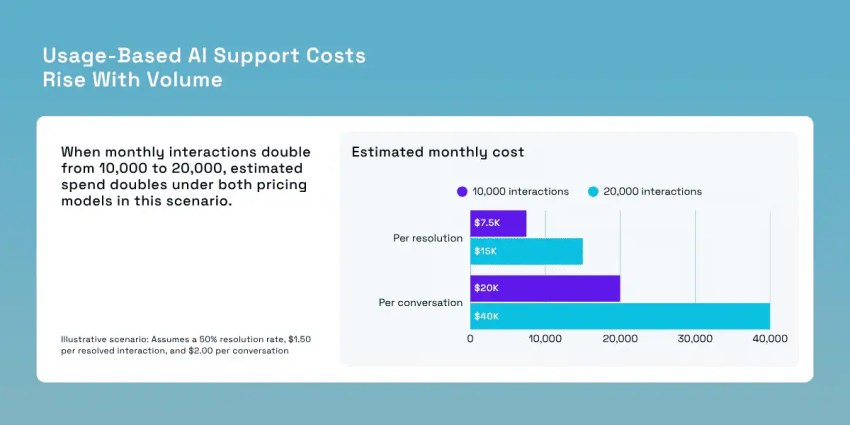
Run your own numbers through this: 10,000 monthly interactions at a 50% resolution rate, using the rates already listed in the ranked table above.
- A per-resolution billing model near $1.50 bills only the 5,000 resolved interactions, about $7,500 a month.
- A per-conversation model near $2.00 bills all 10,000 interactions, about $20,000 a month.
- A per-session model depends on how many sessions each ticket actually takes to close, so the real total often lands well past the sticker rate.
- A seat-based or seat-and-interaction package stays close to flat since it’s priced on headcount and channel access rather than raw conversation volume.
What this costs for an AI call center at scale
Now re-run that same math at peak-season volume, say with double the monthly interactions. The per-conversation and per-session models roughly double with it. The per-resolution model climbs, too, because it’s tied to however many more tickets actually get solved. The seat-based model barely moves since adding volume through channels you already pay for costs less than adding a new seat.
This is the exact moment a contract that looked cheap in the sales call starts to hurt. It’s also where a platform priced on seats and interaction packages, instead of raw contact volume, starts to look like the better deal.
For a deeper breakdown of how these models play out for voice specifically, see Nextiva’s guide to AI phone agent pricing.
There’s also a cost horizon worth naming. Gartner projects that by 2030, the cost per resolution for generative AI in customer service will exceed $3, more than many offshore human agents cost today. Rising infrastructure costs and AI vendors moving from subsidized growth toward profitability are driving that shift. Any pricing model built purely around cost per contact has a shelf life, and it may be shorter than the contract you’re about to sign.
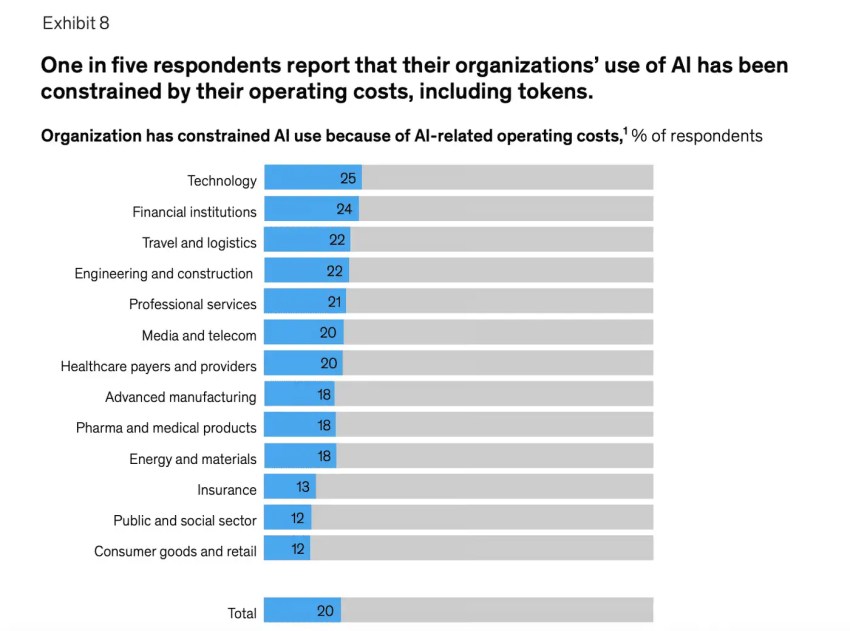
The worry about costs isn’t limited to this area. McKinsey’s 2026 State of AI survey found that one in five organizations has cut back on AI use due to running costs, including token costs, though most plan to continue increasing spending on AI overall.
| Pricing model | How it scales | The question that changes the invoice |
|---|---|---|
| Per resolution | With successful outcomes only | What counts as a resolution, and who decides? |
| Per conversation | With every interaction, resolved or not | Am I billed for conversations the AI failed? |
| Per session | With each session, not each issue | How many sessions does one issue typically take? |
| Per seat add-on | With headcount, not volume | Does the AI need a seat or the human supervising it? |
| Seat and interaction packages | With users and channel usage | Are telephony minutes and AI usage in one package? |
| Enterprise contract | With committed spend | What happens if we use less than the commitment? |
Voice Support Is a Different Engineering Problem for AI Call Centers
Text-based support allows for brief pauses as customers rarely notice a two- to five-second delay in chat responses. But voice support runs on a much tighter clock. Phone calls require immediate replies because even short silences can be mistaken for dropped calls.
Speech-to-text, natural language understanding, and text-to-speech processes must all complete quickly enough to maintain engagement and sound human rather than robotic. This strict timing requirement limits which models vendors can use for voice calls, where those models are hosted, and how the entire system is designed.
Most platforms on this list were designed for text, not voice, which becomes evident when they’re used for phone calls. Text agents can wait for complete sentences, but voice agents must manage interruptions without losing context. Background noise and speakerphone use, common in real calls, reduce transcription accuracy in ways that don’t apply to typed input.
Transferring a call to a human requires a telephony path — often using Session Initiation Protocol (SIP) for a seamless handoff — because simply reassigning a ticket is insufficient. This is why voice is a critical factor in this ranking. The challenge is technical, not preferential, and most text-first platforms haven’t addressed it.
For more details, see Nextiva’s guide to AI voice agent services for businesses.
The stakes are tangible. Nextiva’s Customer Patience Benchmark, a survey of 400 US consumers, found that 75% of respondents hang up after eight or more minutes on hold, and 54% leave within eight minutes.
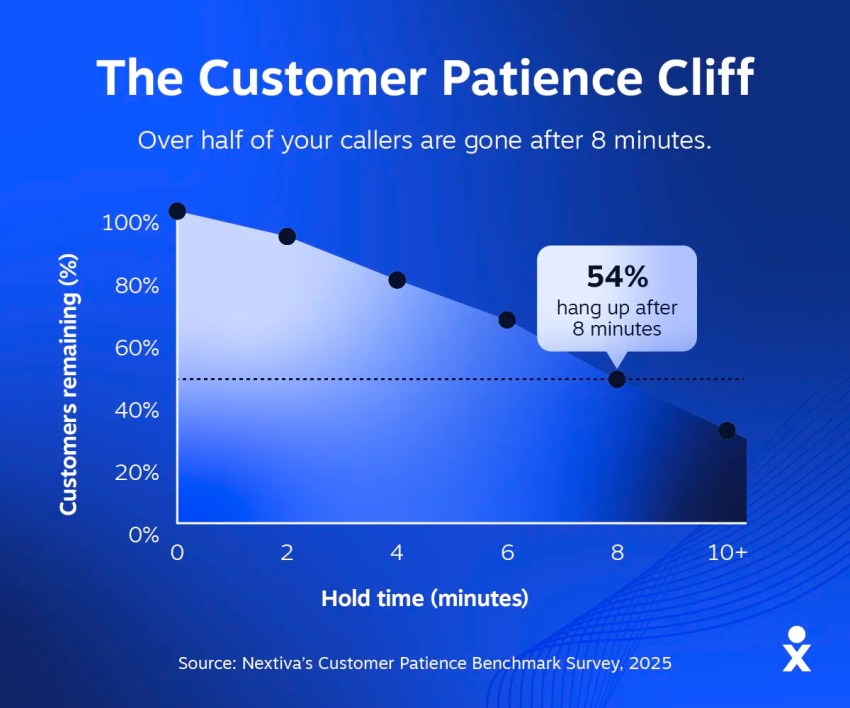
Additionally, 56% immediately try another channel if their first choice fails, and 75% prefer a scheduled callback over waiting on hold. A voice agent unable to maintain a real-time conversation not only frustrates callers but also drives the channel-switching and abandonment reflected in these findings.
This is why voice is central to Nextiva’s architecture, rather than being added as an afterthought. Nextiva operates on carrier-grade telephony designed specifically for phone calls, not adapted from chat platforms.
XBert, Nextiva’s AI receptionist, manages inbound calls and routing on this infrastructure, answering, qualifying, and transferring callers in a way that sounds human, not scripted, without the handoff issues mentioned earlier. XBert demonstrates the benefits of this approach. Fundamentally, a telephony AI agent performs best when built on a dedicated phone infrastructure from the outset.
Governance, Guardrails, and the Handoff
What to check before you sign
A thorough evaluation of support AI agents’ safety must include the following four elements:
- Retrieval grounding ties AI answers to your knowledge base, not whatever the model generates on its own.
- Prompt injection defense stops a cleverly worded message from tricking the agent into ignoring its own rules.
- Scoped write permissions limit what the agent can change. A refund tool shouldn’t have access to account deletion.
- Zero data retention terms with the model provider matter more than most buyers realize. Without them, customer data and conversations can end up stored or used for training somewhere outside your control.
Request the SOC 2 Type II report directly, rather than relying on a website badge. A logo alone doesn’t provide insurance; the report details what was tested and when. Confirm that the platform maintains accessible audit logs for incident review.
Confidence thresholds lack standardization
Vendors often present confidence-threshold routing as a fixed value, which is misleading. Thresholds should be adjusted for each domain and intent. For example, billing and medical questions involve different risks and shouldn’t be routed to a human at the same confidence level. A single quoted threshold represents a default, not an industry standard.
The handoff stage is a common point of failure in deployments
Nextiva’s CX research found that 98% of surveyed CX leaders consider a seamless AI-to-human transition important for customer interactions, but 90% report challenges achieving this without friction. An effective handoff must include the following:
- The full transcript
- Structured intake data
- A record of any actions the agent already took
- Verified identity
That way, the human agent on the other end isn’t starting from zero, with AI drafts of a response already in hand for a real agent productivity boost, and the customer isn’t repeating themselves.
How to Run the Evaluation: 5 Questions Before You Choose an AI Customer Support Platform
Evaluating AI customer service tools means asking things a sales engineer can’t answer with a slide. A vendor can walk through any deck fluently. These five questions are different, and how someone answers them says more than the demo does.
Questions worth asking directly
- What’s your channel mix, and does this platform treat your primary channel as native, not bolted on?
- Which pricing model applies, and how exactly is the billable unit defined?
- Is this read-only access or authenticated write access, and against which systems specifically?
- Where do the latency and uptime guarantee live: the contract, or the marketing page?
- What moves with a human handoff?
A vague answer to any of these is worth treating as a signal on its own. So is getting redirected straight to “let’s set up a technical call” before anyone will commit to specifics.
Piloting your agent platform without betting the whole rollout
Once you choose an AI support agent, the pilot is where the real testing starts. Begin with one high-volume, tier-one intent, not the hardest problem in the queue. Set a hard ceiling on what actions the agent can take during the pilot, then review the results at 60 days. That window isn’t arbitrary; it’s the same timeframe where Salesforce found most adopters saw measurable value.
Measure resolution quality and the 30-day repeat-contact rate, not deflection volume. A high deflection number just means fewer conversations reach a human. It says nothing about whether the underlying problem got solved.
Why Nextiva’s Contact Center Leads This List
If phone calls represent a significant portion of your support volume, a text-first agent with added telephony is less effective. This limitation persists regardless of improvements to its underlying model, as it stems from the platform’s original design for handling calls.
Nextiva Contact Center integrates voice, chat, SMS, email, and social messaging channels into one customer experience. It offers proven uptime, SOC 2 certification, HIPAA-compliant plans, and PCI DSS compliance for teams managing payment data. Pricing is based on seats and interaction packages, so increased conversation volume doesn’t raise costs. XBert provides 24/7 front-desk answering, scheduling, and contextual escalation, all operating on the platform’s native telephony rather than as an add-on system.
If phone calls are a real share of your support volume, this is the specific case Nextiva’s contact center was built to solve. Run it through the same channel-mix and pricing questions from the evaluation section above, not a demo script.
Your AI-Powered Contact Center
Create amazing customer experiences with AI-powered contact center software. Scalable contact center platform built for omnichannel customer conversations.