Customer Experience
 Blog
 Business Communication
 Leadership
 Marketing & Sales
 Nextiva News
 Productivity
 VoIP


Humans are creatures of habit. Any good sales strategy complements these habits. Still, some natural gaps emerge.
For example, most of us have weekends off. During that time, we, like many others, have ample free time to explore and research. It’s built into most of our habits. During a weekend, you might find a product or service you like and express your interest. You wait to hear back but start feeling ghosted after being curious for a long time. This is because the company you reached out to also had a team out for the weekend, just like you.
They call you on Monday, but by then you’ve already switched to other options or don’t intend to explore further. If you were on their team, would you blame lead quality or log it as a hot lead because of the form-fill event?
Most teams would log it as hot. It was, for about a day. There was genuine interest, but it lapsed because you couldn’t align closely enough with your customers’ habits or respond quickly enough.
Most businesses are already good at generating leads. This article bridges gaps in the lead conversion strategy to turn more leads into customers. But before we get into that, let’s look at what normal lead conversion rates look like and how to improve them.
What Lead Conversion Rates Look Like
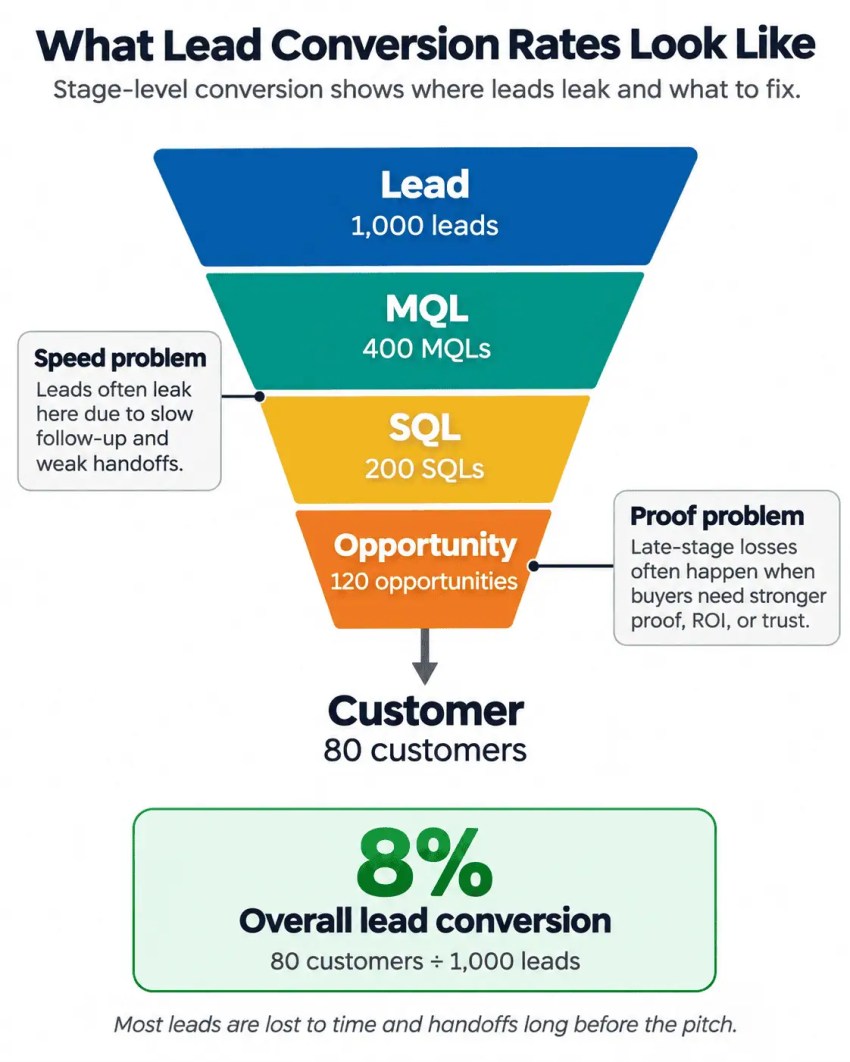
The lead conversion process moves a lead through MQL, SQL, and opportunity to a paying customer. Your lead conversion rate is the number of converted leads divided by the total number of leads over the same period.
You often need a stage-level view because a single blended number hides leaks. For example, a sales funnel that loses leads between MQL and SQL usually has a speed problem. By contrast, a lead lost at the opportunity stage has a proof problem.
The fixes are different, and so are the owners. Most leads are lost to time and handoffs long before anyone gets to pitch.
Benchmarks for each stage of the lead conversion process
First Page Sage’s 2026 benchmark report, drawn from its client data between 2017 and 2025, puts B2B SaaS conversion rates at 39% lead to MQL, 38% MQL to SQL, 42% SQL to opportunity, and 37% opportunity to closed-won.
These are one agency’s client benchmarks, with no disclosed sample size, so treat them as a directional yardstick rather than a market average.
| Stage | B2B SaaS benchmark | Where it usually leaks |
|---|---|---|
| Lead to MQL | 39% | Forms that ask too much; no instant follow-up |
| MQL to SQL | 38% | Slow response; no shared definition of “qualified” |
| SQL to opportunity | 42% | Weak discovery; wrong rep assigned |
| Opportunity to customer | 37% | Unhandled objections; slow paperwork |
| Lead to customer (derived) | About two in 100 | Every leak above, compounded |
This suggests B2B SaaS leads have a conversion rate of about 2.3% to become paying customers. But this figure is a derived calculation and assumes that each stage is independent of others. However, the reality is a bit different. A slight improvement in any one stage compounds through everything after it.
Take this data as a reference. Track your conversion metrics by stage, per rep, and per source. Once you know which stage is bleeding, the right next step becomes obvious.
Step 1: Capture High-Intent Leads Without Friction
The first leak occurs before anyone on your sales team sees the lead. A landing page form that asks for 11 fields or a phone number that rings out at 7 p.m. loses prospective customers in your target audience who are ready to talk.
Shorten the form: The first conversion rate optimization
In a classic 2008 test, web firm Imaginary Landscape cut its contact form from 11 fields to four, and its form conversion rate rose 120.4%, from 5.4% to 11.9%. The sample was tiny, about two dozen submissions on one site, so the exact lift means little. But the direction has held up for nearly two decades.
Contact forms have the lowest view-to-completion rate of any form type. Zuko Analytics found that rate to be 14.5% while analyzing form behavior across 739 forms and 93 million form views. If more than four in five people who open your contact form walk away, the form itself is the first conversion rate optimization to make.
It’s best to ask for these in a contact form:
- Name
- Phone number
- One qualifying question
Gather the rest of the information you need on the first call. Try to validate the phone number at the capture itself. Jamie Noel, Senior Director of Revenue Operations at ClearOne Advantage, has watched representatives call invalid numbers for weeks. It wastes money on Google Ads and LinkedIn Ads, as well as every rep’s time.
Offer faster ways to reach you
A shorter form lowers the barrier, but what about the wait a lead goes through between filling out a form and getting a call? A faster channel lowers the wait time.
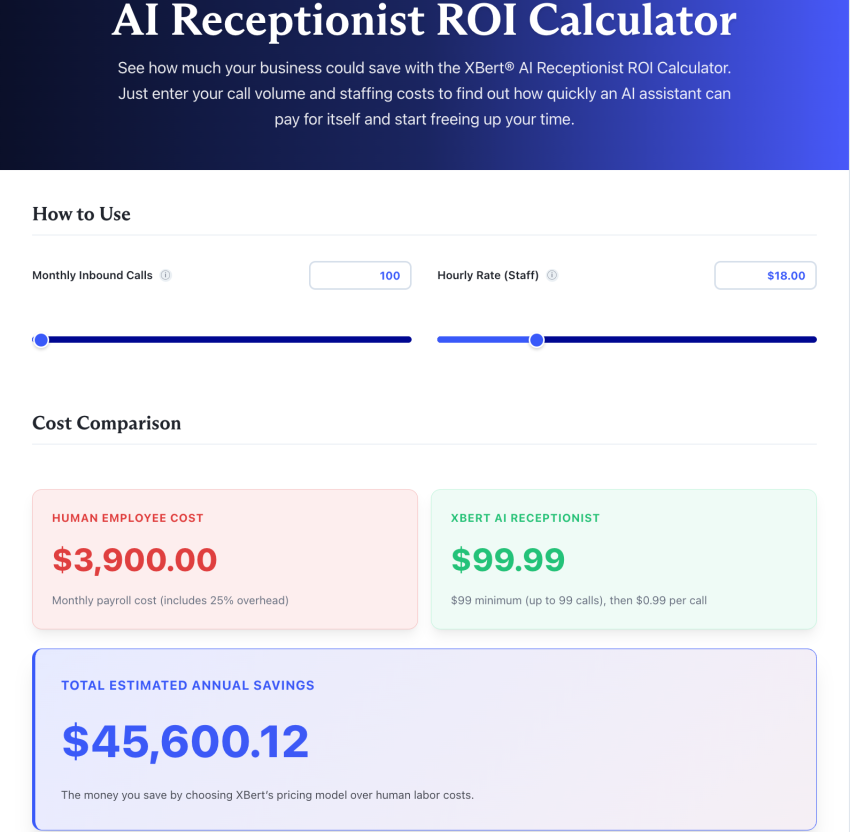
You can add click-to-call, business texting, live chat, or a self-booking link to lower the wait time. Even better is an AI receptionist that picks up the moment a lead calls, texts, or opens a chat, answers their question, and books an appointment on the spot.
Here’s Nextiva’s AI receptionist, XBert, in action, for anyone who’s curious about how it works:
Nextiva’s Customer Patience Benchmark, a survey of 400 consumers, found that respondents expect chat replies within a minute, phone, SMS, or ticket responses within five minutes, and email responses within 30 minutes. Those expectations are the bar your channels must clear. An AI answering service that picks up on the first ring clears the phone bar with minutes to spare.
But what if…
- A buyer doesn’t prefer to talk to a rep until late in the buying cycle: Gartner’s March 2026 survey of 646 B2B buyers found that 67% prefer a rep-free experience. If you were to guess why, you might think reps ask for too many details or get pushy about trying a product when a customer is still undecided. But with an AI receptionist, that’s not the case. It gives buyers a path that answers and books them without the extra work. You also save the human touch for complex cases or when customers ask for it.
- A buyer submits interest after you close your day/week: Around 47% of calls to U.S. businesses happen outside Monday-to-Friday working hours. An AI phone assistant takes those leads, calls them, qualifies them, books meetings, and transfers transcripts to a human rep to move their journey forward.
It helps to have a lead follow-up system in place for buyers who are trying to reach you and expect a faster response.
Step 2: Qualify and Route Leads Fast
The next leak is often during the handoff. The fix usually starts with a written definition of what “qualified” means for sales and marketing teams. Both teams need to agree on the meaning before the next lead arrives.
The definition matters more than a scoring model because the standoff is often designed into how these teams get compensated. Marketing sometimes knows that many leads aren’t qualified but still has targets to hit, so they pass them along. A shared definition removes the incentive to pass along a lead that doesn’t meet it.
Lead scoring still has a job to do, but you need to treat scores as probabilities rather than verdicts. Engagement doesn’t describe intent. Intent is an unobservable internal mental state.

Dale W. Harrison, a B2B marketing strategist, feels that a good score ranks a lead based on how likely it is to result in a positive outcome compared to other leads they’re working on. It doesn’t certify if the lead is ready.
Pick the right qualification framework
Two frameworks cover most B2B sales processes. BANT asks four questions: Does the prospect have a budget, authority, need, and a timeline? MEDDPICC asks eight questions: what metrics the deal will be judged on, who the economic buyer is, what the decision criteria and decision process are, what paper process (legal, procurement, or security) stands between a yes and a signature, what pain you identified, who your champion is, and what competition you face.
| BANT | MEDDPICC | |
|---|---|---|
| Stands for | Budget, authority, need, timeline | Metrics, economic buyer, decision criteria, decision process, paper process, identify pain, champion, competition |
| Origin | Developed at IBM | Grew from MEDDIC, created at PTC in 1996 by Dick Dunkel under John McMahon, with Jack Napoli |
| Best for | Simple deals with one or two decision-makers and a short sales cycle; first-call triage | Deals with several stakeholders, a paper process, or a long cycle, whatever the deal size |
| Risk | Asking about budget first disqualifies good leads too early | Too heavy for a one-call, one-buyer sale; turns into CRM box-ticking if managers only check fields |
When a deal has multiple stakeholders, a longer-than-average cycle, and a higher-than-average ACV, it’s a complex motion. And complex motion needs more structure. BANT and MEDDPICC offer that structure.
In the case of BANT, treat the budget part with care. Sometimes, the budget isn’t materialized as you’d expect. Don’t disqualify a lead because of their budget on the first call. Eventually, if you’re solving an actual problem for the client, the budget gets created. Also, for authority, it’s better to check who owns the project rather than who the decision-maker is. If the project’s owner isn’t a senior executive, there are high chances that you don’t have a deal.
MEDDPICC is more useful in complex deals. For example, a deal that needs to survive legal scrutiny. It’s time-consuming on a simple sale, and it’s not worth it there.
The framework adds some structure to how you qualify leads, but you need to treat it as a stoplight on the journey rather than a roadmap. It tells you whether to keep going. Your common sense is much more helpful than any framework in telling a good customer from a curious hand-raiser.
Route to the right rep automatically
Lead qualification decides how deep you go. Routing decides who gets the lead and when. Without a proper system, reps pull leads from a CRM daily rather than continuously, chase them without any insight into inbound interest, and distribute leads among agents and partners haphazardly. This approach gives you a mess to work with.
If you route by territory, product, account size, and rep availability, no lead waits for a manual assignment, and there’s a fallback. But there’s still a better way: routing based on interest captured through AI receptionist lead follow-up. It helps you connect a lead to a rep who can effectively cater to their interest.
There are other ways, like assigning leads to reps by the round-robin method. It might be fair, but fair isn’t smart. With this method, you end up assigning leads in a way that caters to your team’s interests, not your prospects’. Nextiva’s AI receptionist gives you enough data to route leads to the reps who are best positioned for them.
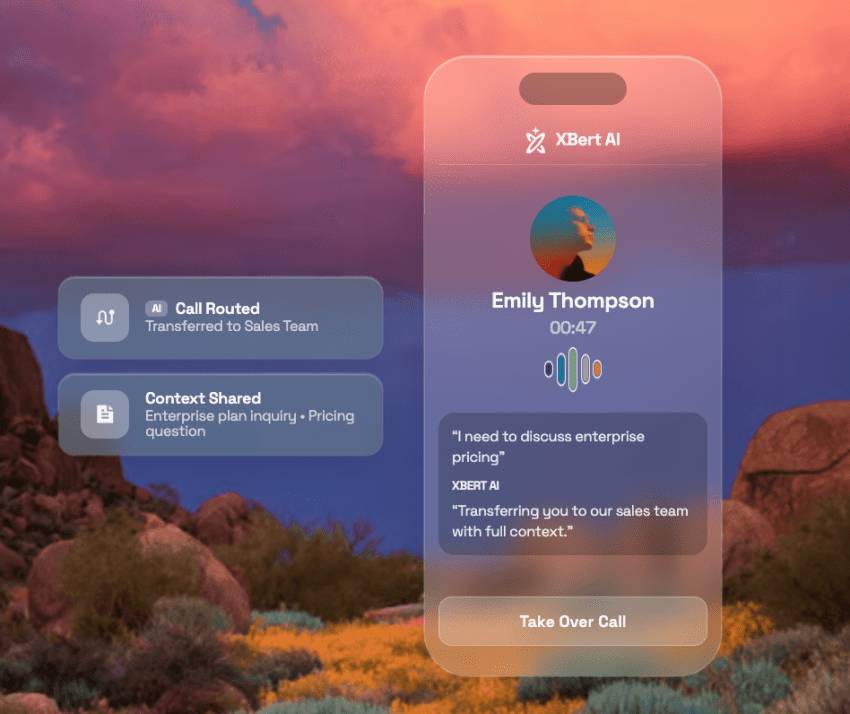
Often, routing also has a capacity consideration. You need to match staffing to lead flow by time of day and day of the week. If your system sends leads to an empty desk, it causes a delay with extra next steps. Intelligent call routing that checks availability before it assigns closes that gap, and the call routing rules you set once keep running after hours.
Log every call and text in the CRM so the next person who touches the lead has context without asking the lead to repeat themselves. As handoffs multiply, this matters more.
Step 3: Respond Within 5 Minutes
The Lead Response Management Study by InsideSales.com and MIT researcher James Oldroyd covers three years of data from six companies, more than 15,000 leads, and more than 100,000 call attempts. It found that calling within five minutes instead of 30 made reps 100 times more likely to reach the lead and 21 times more likely to qualify it.
The five-minute response window is crucial to moving the lead to the next stage. It’s not just because one study points at it; many examples and studies consistently show similar results.
There’s a cost to missing that window. Nextiva’s Customer Patience Benchmark found 56% of respondents try another channel after missing the response window, and 28% abandon the product or service.
Follow the 5-minute playbook
The research says the first five minutes decide whether a conversation happens. These steps automate what happens in those five minutes. Nextiva’s guide to speed to lead covers the culture side; this is the plumbing.
- Alert the assigned rep instantly: Every form fill and missed call fires a notification to the owner. Don’t wait for someone to check the shared inbox.
- Text back within a minute when a call goes unanswered: Send an automatic reply that confirms you saw the call and gives the lead a way to respond, keeping the thread alive while a human catches up.
- Put inbound ahead of everything: Calls and hot forms outrank every other task on the rep’s list, including the outbound block they planned.
- Cover after hours with an AI receptionist: It answers, qualifies against your criteria, and books the meeting in the calendar. With this, the lead that came in at 7 p.m. gets a time slot instead of a voicemail.
- Reroute when the owner misses the SLA: If nobody has called within your threshold, the lead moves to the next available rep automatically.
- Confirm before the meeting: For scheduled calls, try having a bot call to confirm 15 minutes before the meeting, and offer a reschedule if it’s tricky for them to make it to the meeting. Reps dialing into unconfirmed meetings can waste capacity.
Pretty much all of this can be automated. It buys time until a person can personalize the interaction within the five-minute threshold.
Build a multi-touch follow-up cadence
With automation across all walks of life, the first touch often feels automated, no matter how well you personalize it. The next follow-up gives you a better chance of getting a response.
You can do it through different channels, such as a phone call. A call is slower per touch and better per conversation. But for an inbound lead who already raised a hand, that trade is worth making.
It’s best if you personalize every touch to what the lead did or asked. Gartner’s 2025 survey of 632 B2B buyers found that 73% actively avoid suppliers who send irrelevant outreach.

Gartner VP Analyst Robert Blaisdell’s summary: “Bad prospecting actively damages relationships with potential customers.” If you send a generic sequence, it not only fails to convert, but it also makes the next touch less welcome.
Build a workable two-week cadence for an inbound lead:
- A call and a text within five minutes
- A personalized email the same day that references their question
- A call on day two
- A short email with relevant content on day four
- A call plus a text on day seven
- A channel-choice message on day 10
On the 10th day, the channel choice message can be something like this:
“I appreciate that you’re very busy. I’ve messaged you everywhere I can find you. Let me know what your preferred channel is, and we’ll talk now.”
This is advice from Elliott Botterill, CMO at Entrepreneurs Circle, on his podcast on “How To Actually Convert Enquiries To Sales.” This approach works because it respects the lead’s time while making it easy to say yes.
If you need more templates that you can use, explore sales email templates that cover written touches.
Step 4: Build Trust and Handle Objections
By the opportunity stage, speed has done its job. The leak now is proof. Buyers arrive with a shortlist and a set of doubts, and the vendor who answers those doubts in the buyer’s own terms wins.
Match proof to the buyer
Buyers verify you before they trust you. There’s much evidence already available:
- G2’s June 2026 survey of B2B software decision-makers found that review sites are now the top source influencing which vendors make the shortlist at 38%, just ahead of AI chatbots at 37%.
- TrustRadius’s 2026 survey of technology buyers found that 74% consulted user reviews during their purchase.
Both studies point in the same direction. Reviews are a part of the sales journey whether or not a rep brings them up.
Buyers see proof before the first contact. To align with this behavior, your customer stories from the same industry and company size, review ratings, and compliance certifications need to live where buyers do their research. Vendors who arm buyers with proof and answers to objections stand the best chance of winning the deal.
Handle objections with questions
Treat objections as a way to uncover the real concern. If a real objection comes up in the later stage of a deal, it means discovery was skipped earlier.
Timing is the most common objection. Often, the challenge isn’t timing; it’s what’s underneath. Buyers rarely volunteer the real reason for stalling a deal. This is why you often hear “sign-off from the VP” or “next budget cycle” instead of a clear no. As a salesperson, you should understand what the right time means according to the buyer.
When price is an objection, try setting the cost against the cost of the problem the buyer described in discovery. If it doesn’t work, give options, including low and high options. When the buyer’s problem is real, the money usually appears.
If you’d like scripts to overcome objections, you’ll find them in the guide to overcoming the 10 most common objections.
Step 5: Close the Deal and Re-Engage Stalled Leads
The last leak is paperwork, plus the deals that stall and quietly expire. Both are fixable with a process, and both are where most sales managers stop looking.
Reduce friction between “yes” and signed
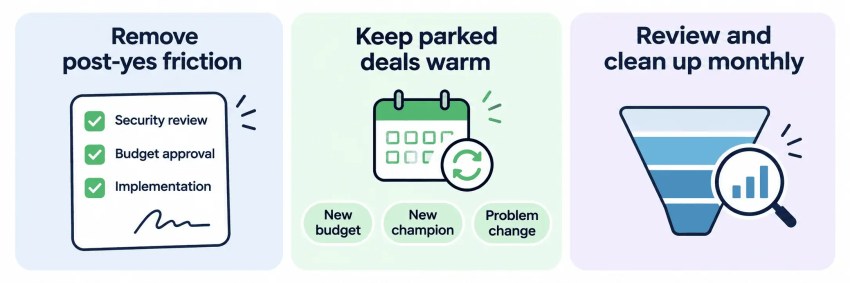
When a prospect says yes to a deal, it’s a good sign, but you’re still not at the finish line. G2’s 2026 survey found that after a vendor is chosen, IT security review is the single biggest source of delay, cited by 39% of buyers and 50% of enterprise buyers, followed by budget approval at 32% and implementation planning at 25%.
It’s best if you map budget approval, security review, and implementation planning during qualification. Get a contract template in front of the buyer early. Remain helpful while keeping the experience low-friction. Then ask for the sale with a clear recommendation and a date.
If you have an opportunity without a next step, it’s a stalled deal in waiting.
Separate parked deals from lost ones
Not every deal that goes quiet is dead. There are parked deals where a customer is interested but can’t buy right now. Sales teams nurture these deals and try to learn more over time.
For any reason a deal didn’t go through, you need to record it. The less you’re documenting, the less you’re going to be able to follow up. Some of these reasons can fill your product roadmap.
Lead nurturing for such leads should be based on reasonable triggers. If a buyer downloaded five e-books, that doesn’t make them five times ready to close the deal.
Try nurturing such leads on real events. For example:
- A new budget cycle
- A new champion
- A change in the problem
Keep the touches light.
Review stage conversion monthly
Return to the funnel table once a month and find the next bottleneck, per rep and per source. If a deal is open longer than twice the average sales cycle, the lead is almost certainly unqualified. It separates parked deals from those masquerading as parked.
Close the dead ones out and make the number of dead small and honest. A pipeline that reports honestly is the only one that tells you where to work.
Key Takeaways for Converting Leads Into Customers
- Find the leak before you fix it: Track conversion by stage, per rep, and per source. A leak from MQL to SQL needs a speed fix. A leak at an opportunity needs a proof fix.
- Cut capture friction: Use four-field forms, a self-booking link, and a channel that answers after hours.
- Write one definition of “qualified” and an SLA: Then match framework depth to deal complexity, BANT for simple first-call triage, and MEDDPICC when several stakeholders or a paper process is involved.
- Answer hot inbounds within five minutes: Several studies show that responding within this time frame is effective. Send an automated response instantly, followed by a personalized follow-up. An AI receptionist helps you systemize it.
- Follow up in three to five touches across call, text, and email: Each one is tied to what the lead did or asked.
- Work closed-lost from the nearest stage back: Most losses are timing-related, and a parked deal isn’t a dead one.
Reach Every Lead First With Nextiva
Many studies in this article point to the same moment: the first few minutes after a lead raises a hand. The vendor that answers first gets the conversation. Qualification, proof, and objection handling make up the rest of the deal.
Nextiva is the communication layer that makes answering first routine instead of heroic. XBert, Nextiva’s AI receptionist, answers every call on the first ring, 24/7, qualifies intent, routes to the right team, and books appointments in the calendar and CRM across calls, texts, and web chat. It starts at $99 a month for 100 conversations, then $1.50 per conversation after that, with no long-term contract, a 30-day money-back guarantee, and a 14-day free trial.
Nextiva’s business phone service adds calling, business texting, team chat, and call routing on one number, starting at $15 per user per month, with XBert available as an add-on.
Explore XBert to answer every lead in the first five minutes and stop losing the ones you’ve already paid for.
Eliminate busywork with the XBert AI assistant.
XBert answers calls, handles chats, books appointments, and resolves issues — all on its own. An AI employee trained on your business, so your team can focus on what actually moves the needle.