Customer Experience
 Blog
 Business Communication
 Leadership
 Marketing & Sales
 Nextiva News
 Productivity
 VoIP



Customer experience metrics measure how customers feel about your business, how easily they complete tasks, and whether they stay. To measure customer experience, combine survey scores such as CSAT, NPS, and CES with support performance, product usage, and retention data. Review the results by customer journey, then act on recurring problems.
A customer might rate a support call highly but still leave because the product doesn’t meet their needs. Another might recommend your brand while struggling with a billing issue. You need more than one score to understand what’s working, what’s broken, and where to focus next.
This guide explains 10 customer experience metrics, why each one is important, how to calculate it, and how to use the results to improve customer interactions.
What Is Customer Experience?
Customer experience (CX) is the overall impression customers form through their interactions with your business. It includes how they find information, make a purchase, use your product, and get support. Each interaction contributes to whether customers see your business as easy to deal with and worth returning to.
Customer service is one part of that broader relationship. While it focuses on answering questions and resolving problems, CX includes the steps before and after customers need assistance. A helpful agent can resolve a complaint, but confusing checkout steps, missed deliveries, or recurring billing errors can still leave customers frustrated with your business.
What Are Customer Experience Metrics?
Customer experience metrics are measurable indicators of customer satisfaction, effort, loyalty, and behavior across the customer journey. These key performance indicators (KPIs) combine what customers tell you through surveys with what they do, such as returning, referring others, or leaving.
CX metrics uncover what’s working and what’s not. These customer insights influence satisfaction, loyalty, and long-term business growth. Tracking the right CX metrics is critical for making informed decisions, strengthening customer relationships, and maintaining a competitive market position.
Why Measuring Customer Experience Is Important
Customers don’t always complain before they leave. Some stop using a product, abandon a purchase, or switch providers without explaining why. Measuring customer experience gives you a way to spot these patterns and investigate what’s behind them.
Combining customer feedback with usage, support, and purchase data lets you:
- Find problems that averages hide: A strong overall satisfaction score can mask poor onboarding for new customers or unresolved billing issues.
- Make better spending decisions: Use the frequency and impact of complaints to decide whether to invest in agent training, clearer instructions, or a product fix.
- Understand the cost of friction: Repeated contacts and escalations take staff time and force customers to spend longer getting an answer.
- Check whether improvements last: Track results after a change to see whether customers complete tasks more easily, contact support less often, or continue buying.
These findings give support, product, and operations teams a shared basis for deciding what to fix and how to judge the results.
Top 10 Customer Experience Metrics at a Glance
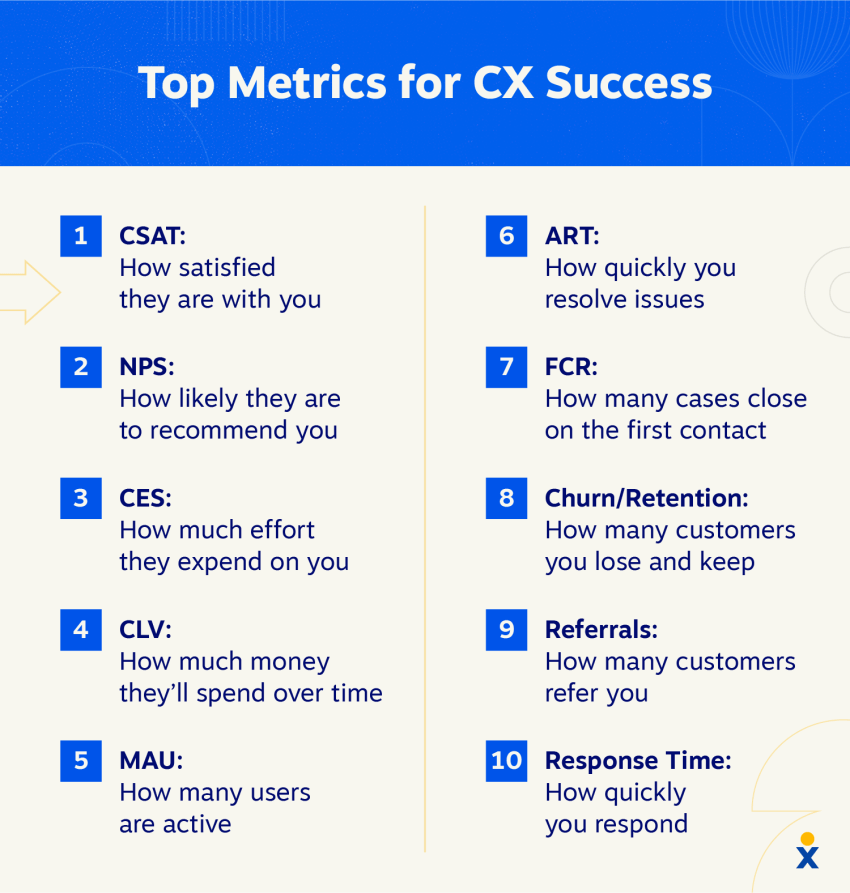
Here’s an overview of the most important CX metrics that businesses depend on:
| Metric | What it is | Its key purpose |
|---|---|---|
| Customer satisfaction (CSAT) | Measures how satisfied customers are with a product, service, or interaction | Gauge immediate satisfaction levels |
| Net promoter score (NPS) | Tracks how likely customers are to recommend a brand to others on a scale of 0–10 | Measure customer loyalty and advocacy |
| Customer effort score (CES) | Measures how easy or difficult it is for customers to solve a problem or complete a task | Identify friction points |
| Customer lifetime value (CLV) | Estimates the total revenue a business can expect throughout its business relationship with a customer | Understand long-term customer value |
| Monthly active users (MAU) | Counts the number of unique users who engage with a product or platform within a month | Track product adoption |
| Average resolution time (ART) | Measures the average time it takes to resolve a customer’s issue from start to finish | Evaluate support efficiency |
| First contact resolution rate (FCR) | Tracks the percentage of customer issues resolved during the first interaction | Measure service quality |
| Customer churn and retention rates | Monitor the percentage of customers who leave or stay with a business over a given period | Track customer loyalty |
| Referral rate | Measures the percentage of customers who successfully refer at least one new customer during a given period | Assess customer advocacy |
| Average first response time | Captures the average time it takes an agent to send the first response to a customer inquiry | Assess responsiveness |
10 Best Customer Experience Metrics Explained
A positive customer experience builds loyalty, retention, and your brand’s reputation. But how do you know if your efforts are working? The answer is “measurement”. To understand the bigger picture, you can measure customer experience in two ways:
- Directly: By asking customers for feedback through surveys.
- Indirectly: By analyzing customer behavior and operational data, such as support ticket trends.
Tracking a single metric can leave gaps in your understanding of customer needs. Map the customer journey, then combine customer feedback with operational and behavioral data to understand where problems occur and what needs to change.
Net promoter score, customer satisfaction score, and customer effort score each measure a different part of the customer relationship, but they don’t tell the whole story. The following 10 CX metrics cover these measures alongside product usage, support performance, customer value, and retention.
1. Customer satisfaction (CSAT)
CSAT is a transactional metric that measures a customer’s satisfaction with a specific interaction, such as a purchase, support ticket resolution, or product feature. It’s typically measured using a single-question survey: “How satisfied were you with [interaction]?” on a scale (e.g., 1–5 or 1–10).
Why it matters
CSAT provides immediate, direct feedback at specific touchpoints in the customer journey, so you can quickly identify friction points and strengths in your processes and understand exactly what works and what doesn’t.
How to calculate CSAT
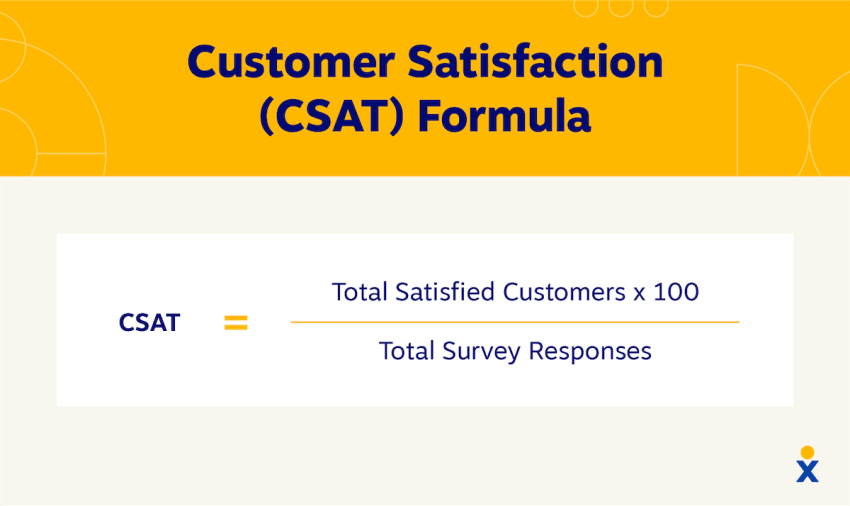
| To calculate CSAT: Ask customers to take a simple customer satisfaction survey where they rate their satisfaction on a numerical scale. Divide the number of positive responses by the total number of valid responses, then multiply by 100. CSAT = (Number of positive responses / Total number of responses) × 100 Positive responses are the top two values on the scale (e.g., 4 and 5 on a 1-5 scale). Example: An e-commerce brand sends a post-delivery survey asking, “How satisfied were you with your delivery experience?” on a scale of 1 to 5. Out of 100 responses, 80 customers rated their experience a 4 or 5. CSAT = (80 ÷ 100) × 100 = 80% |
2. Net promoter score® (NPS)
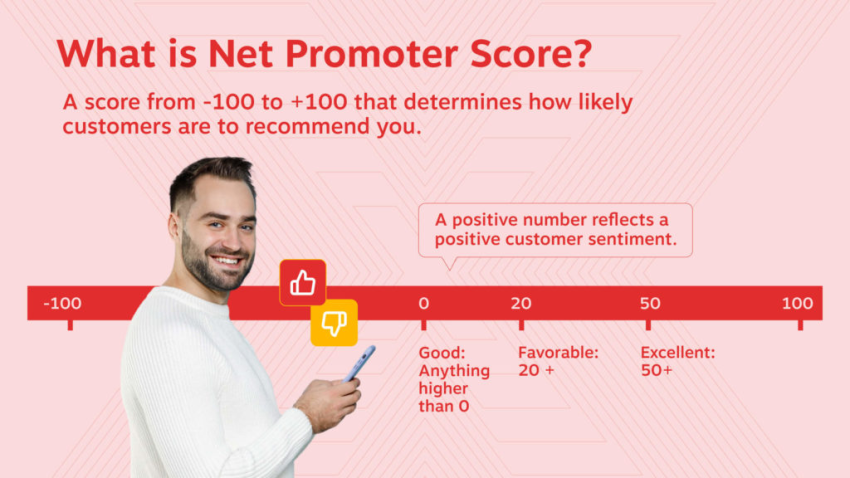
Net promoter score is a relationship metric that measures customer loyalty and the likelihood that customers will recommend your brand. It’s based on a single question: “On a scale of 0 to 10, how likely are you to recommend our company/product to a friend or colleague?”
Why it matters
NPS is a strong indicator of long-term brand health and potential for organic growth. It helps you segment your customers into three groups to tailor your engagement strategies:
- Promoters (9-10): Loyal enthusiasts who will fuel growth.
- Passives (7-8): Satisfied but unenthusiastic customers vulnerable to competitors.
- Detractors (0-6): Unhappy customers who can damage your brand.
How to calculate NPS
| To calculate NPS: Subtract your percentage of detractors from your percentage of promoters. A score above zero means promoters outnumber detractors. Compare your NPS with your previous results and relevant industry benchmarks to assess performance. NPS = (% of Promoters) − (% of Detractors) Example: A company surveys 500 customers. 300 respond with a 9 or 10 (60% Promoters). 100 respond with a 7 or 8 (20% Passives). 100 respond with a 0 to 6 (20% Detractors). NPS = 60−20=40 |
3. Customer effort score (CES)
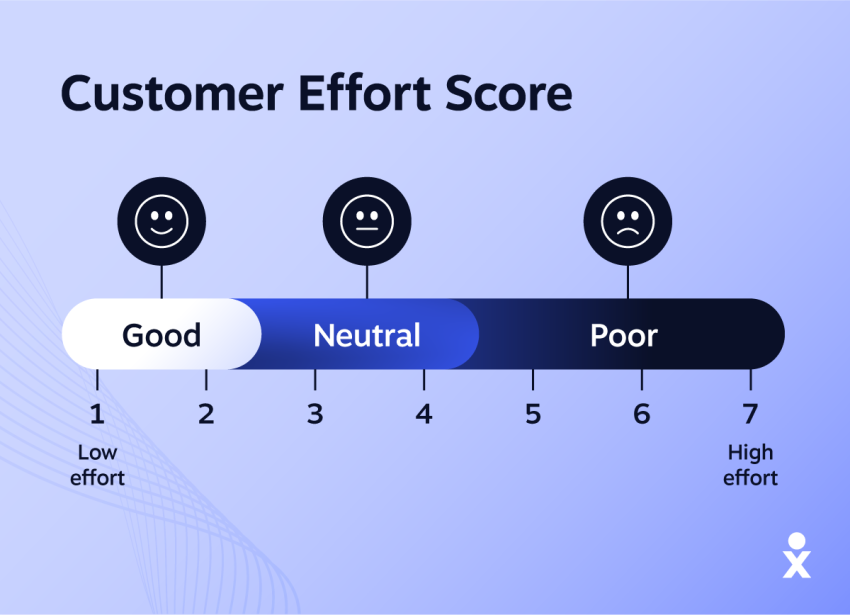
Customer effort score measures the effort a customer had to put in to resolve a problem, fulfill a request, or answer a question. The survey asks, “How easy was it to resolve your request?” on a scale of “Very difficult” to “Very easy.”
Why it matters
Customers value convenience. A hassle-free customer experience drives customer loyalty and reduces customer frustration. CES tracking helps you optimize processes, remove obstacles, and create a smoother customer journey, often resulting in lower customer churn and reduced support costs.
How to calculate CES
| To calculate CES: Measure this metric with surveys after a customer interaction or transaction, and average the scores. For the percentage method used here, divide the number of ‘easy’ or ‘very easy’ responses by the total number of valid responses, then multiply by 100. CES = (Number of “easy” or “very easy” responses / Total number of responses) × 100 Example: After a support chat, a software company asks, “How easy was it to resolve your issue today?” on a 7-point scale where 6 and 7 mean “easy”. Out of 50 responses, 35 customers rated the experience a 6 or 7. CES = (35÷50) × 100 = 70% |
4. Customer lifetime value (CLV)
Customer lifetime value is a predictive metric that forecasts the total revenue a business can expect from a single customer over the entire duration of their relationship.
Why it matters
CLV shifts the focus from short-term transactions to building long-term relationships. It helps you identify your most valuable customers, make more informed decisions about marketing spend and retention efforts, and justify investments in the customer experience that lead to sustainable profitability.
How to calculate CLV
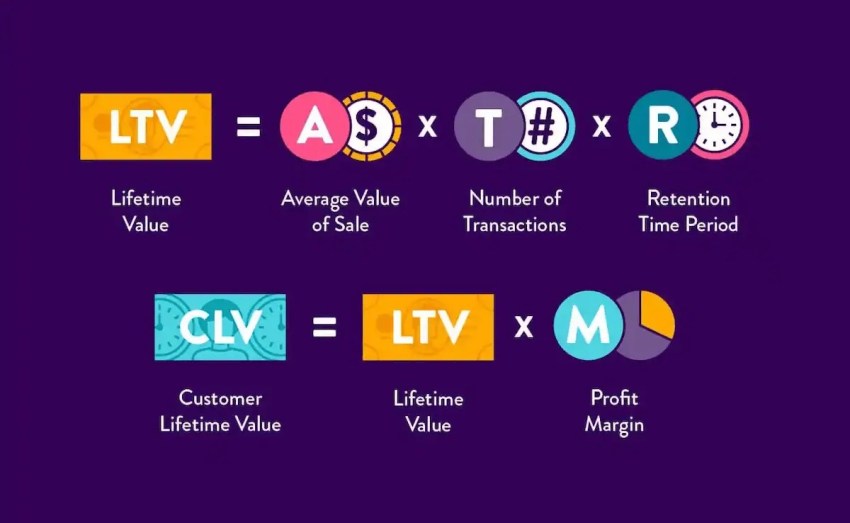
| To calculate CLV: Multiply a customer’s average purchase value by their number of purchases to find your customer value. Multiply that number by your average customer lifespan to estimate a given customer’s lifetime value. CLV = (Average Purchase Value) × (Purchase Frequency) × (Average Customer Lifespan) Example: A streaming service subscriber pays a $15 monthly fee and stays for 4 years. Average Purchase Value = $15 Purchase Frequency = 12 times per year Average Lifespan = 4 years CLV = $15 × 12 × 4 = $720 |
5. Monthly active users (MAU)
Monthly active users (MAU) counts the number of unique users who interacted with a digital product (such as a SaaS platform or mobile app) at least once within 30 days.
Why it matters
MAU is a key indicator of product quality, relevance, and customer loyalty. A rising MAU indicates successful adoption and high engagement, while a declining MAU can be an early warning sign of customer churn or reduced market relevance. It’s important for tracking the impact of new features and marketing campaigns.
How to calculate MAU
| To calculate MAU: Count the number of unique users who performed any action (e.g., login, feature use) in a given month. Example: A mobile banking app analyzes its data for June. 15,000 unique users logged in at least once during the month. The MAU for June is 15,000. |
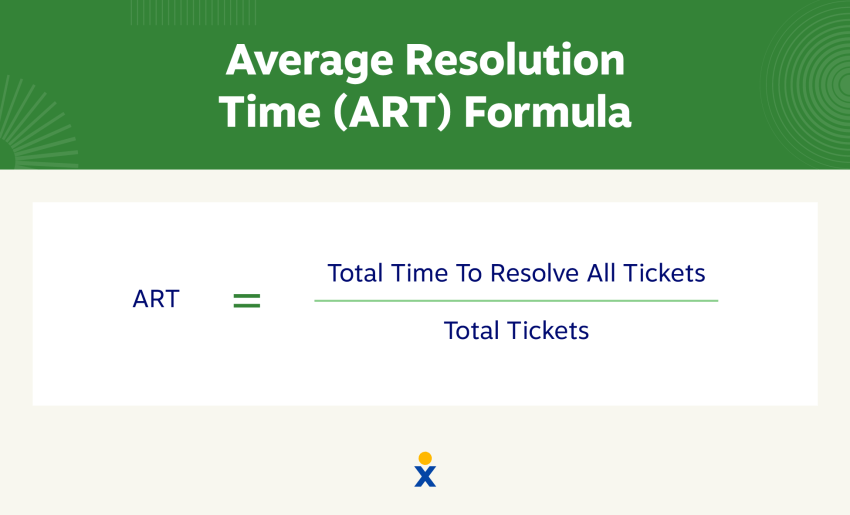
6. Average resolution time (ART)
Average resolution time (ART) is an operational CX metric that measures the average time between a customer opening a support ticket and it being marked as resolved.
Why it matters
ART directly reflects the efficiency of your customer support team. A lower ART leads to higher customer satisfaction because issues are resolved quickly. It also helps identify bottlenecks in your support workflow and areas for employee training.
How to calculate ART
| To calculate ART: Sum up the resolution times for individual cases and divide by the total number of cases. ART= (Total resolution time for all tickets / Number of resolved tickets) Example: A support team resolves 50 tickets in one day, with a combined total resolution time of 1,200 minutes. ART = 1,200 ÷ 50 = 24 minutes |
7. First contact resolution rate (FCR)
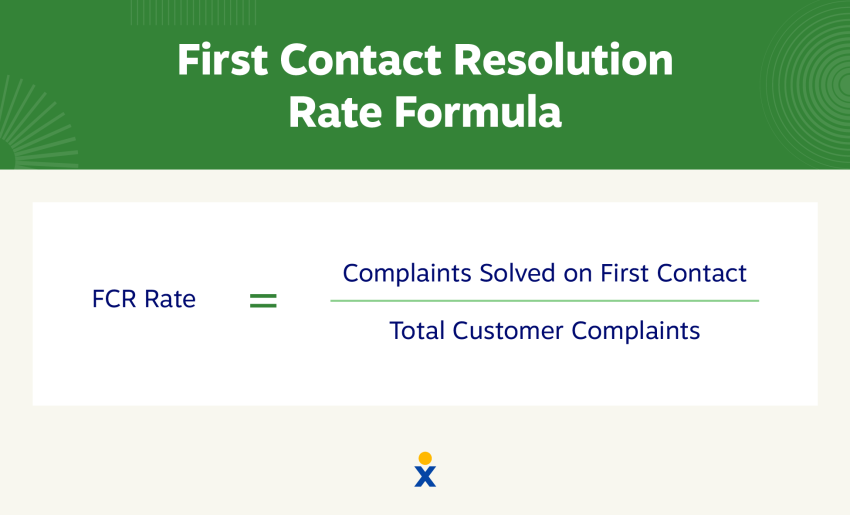
FCR is the percentage of customer support requests that are resolved on the first interaction without requiring any follow-up from the customer or the support team.
Why it matters
A high FCR shows an efficient and competent support team. It simultaneously increases customer satisfaction (by saving time and effort) and reduces operating costs (by minimizing repeat contacts and escalations).
How to calculate FCR
| To calculate FCR: Divide how many customer support cases your team resolved on the first contact by the total number of opened cases. Then multiply by 100 to get your rate. FCR = (Issues resolved on first contact / Total number of issues) × 100 Example: A contact center handles 500 customer issues in a week. 350 of those issues were resolved completely during the initial call or chat. FCR = (350 ÷ 500) × 100 = 70% |
8. Customer churn and retention rates
Churn and retention rates are two opposing metrics for measuring customer loyalty over a specific period of time.
- Churn rate: The percentage of customers who discontinue business with you.
- Customer retention rate: The percentage of customers you successfully retain.
Why they matter
These are fundamental metrics for business health. Improving customer retention is more cost-effective than acquiring new ones. Customer churn analysis helps identify and address systemic problems with your product, service, or pricing before they escalate.
How to calculate them
| To calculate customer churn rate: Divide the number of customers you lost in a given period by the number of customers you had at the beginning. Then, multiply by 100. To calculate retention: Subtract the number of customers you gained in a given period from the number of customers you had at the end. Then, divide that by the number of customers you had at the beginning of the period. Multiply that number by 100 to get your retention rate. Churn rate = (Customers lost in period / Customers at start of period) × 100 Retention rate = ((Customers at end−New customers) / Customers at start ) × 100 Example: A subscription service starts Q1 with 1,000 customers. During Q1, it loses 100 customers but gains 150 new ones, ending with 1,050. Churn rate = (100÷1,000) × 100 = 10% Retention rate = ((1,050−150) ÷ 1,000) × 100 = 90% |
9. Referral rate
Referral rate is the percentage of all customers who successfully refer at least one new customer through a trackable referral program within a given period.
Why it matters
Referrals are growth drivers, bringing in valuable customers at low acquisition costs. The referral rate reflects high customer satisfaction and trust. Customers referred by existing customers have higher CLV and are more loyal.
How to calculate referral rate
| To calculate customer referral rate: Your referral rate is the number of customers who referred your business divided by your total customer count, multiplied by 100. Referral rate = (Number of customers who made a referral / Total number of customers) × 100 Example: An online retailer has a customer base of 20,000. In the last quarter, 400 of those customers successfully referred a friend through the referral program. Referral rate = (400 ÷ 20,000) × 100 = 2% |
10. Average first response time
Average first response time is the average time it takes a support agent to provide an initial response to a customer inquiry. This differs from time to resolution (ART), which measures the total time to resolution, not just the first response.
Why it matters
In an on-demand world, speed is critical. A quick initial response acknowledges the customer’s problem and reassures them that help is on the way. This can reduce anxiety and increase satisfaction, even if the final resolution takes longer.
How to calculate average first response time
| To calculate average response time: Sum up the response times for all customer inquiries and divide by the total number of cases. Average first response time = (Total time to first response for all tickets / Number of tickets) Example: A support desk received 100 emails in a day. The total time taken to send the first reply to all of them was 500 minutes. Average first response time = 500 ÷ 100 = 5 minutes |
Website Customer Experience Metrics
Your website is often the first touchpoint in the customer journey. Include it in your measurement plan to see whether customers can find information and complete tasks before they contact support.
Website customer experience metrics bridge the gap between digital analytics and CX strategy.
Behavioral signals that reveal CX problems
Standard web analytics (pageviews, sessions) tell you traffic volume.
CX-oriented web metrics tell you about experience quality.
Task completion rate measures whether visitors accomplished what they came to do, like finding a pricing page, completing a form, or starting a trial.
Bounce rate by page type reveals where visitors give up. In Google Analytics 4, bounce rate measures sessions that were not engaged. Review it alongside task completion and customer feedback before drawing conclusions.
Session replay and heatmap data can show where visitors encounter friction in real time.
Rage clicks, or rapid repeated clicks, may point to a confusing or unresponsive interface. Investigate the affected element and compare the findings with customer effort feedback.
Connecting web data to CX scores
The power of website CX metrics appears when you layer them onto your survey data.
If users who visit your help center three or more times in a week also score low on CES, you’ve found a friction pattern worth investigating.
Building a CX readiness assessment that includes website signals alongside traditional survey metrics creates a more complete picture of where your experience breaks down.
How to Measure the Customer Experience
Measuring customer experience doesn’t have to be complex. Follow this simple framework to get the most out of your customer experience:
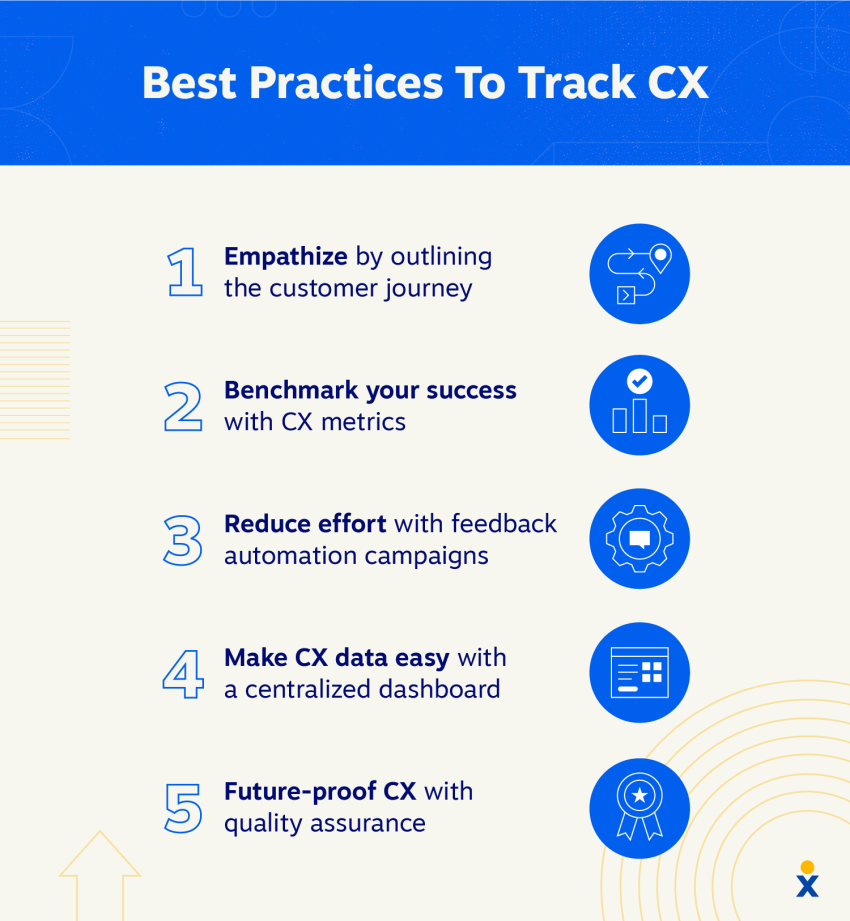
1. Define your goal and map the journey
Start by setting a clear, measurable objective, like “reduce customer churn by 5%.” Then, focus on one critical customer journey that impacts this goal, such as product onboarding or resolving a support issue. Identifying the key touchpoints within that journey is the fastest way to find pain points and achieve a quick win.
2. Assign a mix of metrics to each touchpoint
For each touchpoint, assign relevant calling metrics. The best insights come from combining quantitative data (the “what,” like CSAT scores) with qualitative feedback (the “why,” like open-ended survey comments). This gives you a complete picture of performance.
3. Automate feedback collection
Use automation to ask for feedback at the right time and on the customer’s preferred channel. To get the full picture, supplement direct surveys with indirect data from product usage analytics and support trends. This provides timely insights without manual effort.
4. Centralize, analyze, and act
Bring all your CX metrics into a single dashboard for a unified view. Go beyond just monitoring the data by segmenting it by customer personas to uncover deeper insights. Most importantly, use these findings to adapt your strategy and drive continuous, meaningful improvement in the customer experience.

CX Benchmarking: How to Compare Your Metrics
Raw scores mean little without context. A CSAT of 78% needs context: the industry, survey question, response scale, audience, and collection timing all affect the comparison. CX benchmarking puts your numbers in perspective when the methods are comparable.
Internal vs. external benchmarks
Start with internal benchmarks. Compare this quarter’s NPS to last quarter’s. Compare your onboarding CES to your billing CES.
Internal trends tell you whether you’re improving, regardless of where you stand against competitors.
External benchmarks add industry context but come with caveats. Survey methods differ. Sample sizes vary.
A competitor’s reported NPS of +60 might use a different survey cadence or customer segment than yours. Use external benchmarks as directional guidance.
Practices for accurate CX measurement
Accurate CX measurement requires consistency in how and when you collect data. Changing your CSAT survey from a 5-point to a 10-point scale midyear can break comparability. Document the change and establish a new baseline rather than treating both scales as one uninterrupted trend.
Three rules keep your data clean.
- Standardize survey timing by triggering post-interaction surveys at the same point in the journey every time.
- Keep survey wording, scales, and scoring methods stable across the periods you compare. If a change is necessary, record it and separate the results.
- Monitor possible response bias by comparing respondents with your wider customer base. Review response counts and rates by customer segment and channel alongside the scores.
For example, suppose CSAT rises while the response rate drops from 30% to 8%. That change does not prove that only happy customers responded, but it warrants checking who answered, whether the sample changed, and whether the results still represent your customer base.
Nextiva Makes Your CX Data Easier to Analyze
CX scores tell you where to investigate. Customer conversations provide context for what happened. The Nextiva NEXT Platform brings communication channels and customer records together, so your team can follow conversations across voice, SMS, email, social, and reviews in one place.
With a shared customer record, agents can review previous interactions before responding. That history gives them a clearer understanding of the issue and what the customer has already tried, making follow-up more informed.
Explore the Nextiva NEXT Platform to see how it fits your team’s customer support workflows.
The call center solution teams love.
Sales and support teams use Nextiva to deliver a better customer experience.
Net Promoter, Net Promoter Score, and NPS are registered trademarks of Satmetrix Systems, Inc., Bain & Company, Inc., and Fred Reichheld.
Frequently Asked Questions About Customer Experience Metrics
Start with a small, cross-functional set where each metric has a clear owner and informs a defined decision. If a metric does not trigger a specific action within a set timeframe, it likely belongs in a deeper analytics view rather than your core CX dashboard.
Use event-based triggers for CSAT and CES (immediately after key interactions) and a scheduled cadence for NPS (quarterly or biannually for many businesses). The best cadence is the one you can run consistently while still leaving time to act on what you learn.
Response rates vary widely by channel and audience, so focus on improving your own baseline while keeping sampling consistent. Shorter surveys, clearer subject lines, mobile-friendly design, and closing the loop (showing customers you made changes) typically lift participation.
Build a defensible link using cohort analysis. Compare retention, expansion, or repeat purchase behavior for customers with different CX outcomes. When possible, validate with controlled tests (for example, rolling out an experience change to one segment first) to separate correlation from causation.
Segment by lifecycle stage (new vs. tenured), plan or product tier, acquisition channel, and issue type, then look for patterns that repeat across touchpoints. Prioritize segments where the business impact is highest, such as high-value accounts, fast-growing products, or churn-prone cohorts.
Treat conflicting signals as a diagnostic prompt rather than a failure, and investigate whether you are measuring different customer groups or moments in the journey. Triangulate with qualitative feedback, support reasons, and usage behavior to pinpoint which part of the experience is driving the business outcome.
Use lightweight tools you already have, such as a spreadsheet plus a survey tool and basic reporting from your help desk or product analytics. The key is a repeatable process with a consistent trigger, a single place to review results, and a weekly routine for deciding and documenting follow-up actions.