VoIP
VoIP  Blog
Blog  Business Communication
  Customer Experience
  Leadership
  Marketing & Sales
  Nextiva News
  Productivity
Searching for a new business phone system can be a pain. As a small business owner, you have a million things to worry about, and knowing how to choose a VoIP provider feels overwhelming.
In this guide, we’ll walk you through what VoIP phone service is and the key features you get with a business-grade solution. No tech jargon, no fluff. Just helpful advice for small business owners trying to pick the best VoIP service for their team.
Switch to Nextiva today and save up to 60%
Join now and start calling in less than 10 minutes. Instant set up. Enterprise-grade reliability.
6 Factors to Consider in a VoIP Provider
When choosing a VoIP service provider, there are several important factors to consider. These factors will help you evaluate different providers and determine which best meets your business needs.
Reliability and uptime
Reliability is crucial for any communication system. Look for a VoIP provider with a strong track record of uptime (ours is 99.999%!) and minimal service disruptions. Consider the provider’s infrastructure, redundancy measures, and disaster recovery capabilities.
Not every VoIP vendor has the most reliable cloud phone system. Instead, we suggest confirming how many data centers (also known as POPs) they have and where they are located. The closer you are, the better the call quality and reliability.
Ease of setup
Consider how easy it is to set up and configure the VoIP system. Look for providers that offer user-friendly interfaces, intuitive setup processes, and reliable customer support. A straightforward setup will save you time and minimize disruptions to your business operations during the transition to VoIP.
For instance, when setting up desk phones from Nextiva in your office, you just need to plug them in. No complicated IP phone firmware hassles. Just unbox it, plug it in, and begin using your business VoIP service.
Customer support
Consider the level of customer support. provided by each VoIP provider. Look for providers that offer 24/7 support and multiple communication channels, such as phone, email, or live chat. Responsive and knowledgeable support can help resolve issues quickly and minimize downtime for your business.
Flexibility and customization
Assess the flexibility and customization options offered by each VoIP provider. Look for providers that allow you to tailor the system to your specific business needs. This may include customizable call flows, advanced phone line routing options, and integration with other business applications.
Pricing
Evaluate the pricing structure of each VoIP provider and then consider whether they offer affordable plans that align with your budget. Look for transparent providers about their pricing, including any additional fees or charges. Compare the pricing plans of different providers to make sure you are getting the best value for your investment.
Ability to scale
Scalability is essential for a growing business, so choose a VoIP provider that can easily accommodate your company’s expansion, whether you need to add new users, lines, or features. Look for providers that offer flexible plans and straightforward options for scaling up or down as your business needs change.
For example, some providers allow you to add or remove lines with a few clicks, without requiring long-term contracts or hardware upgrades, ensuring that your communication system grows with you.
Third-part integrations
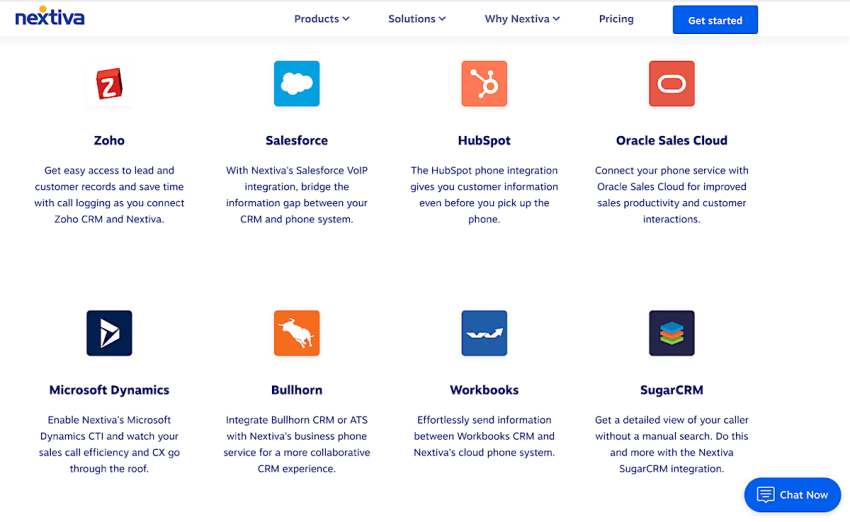
VoIP-CRM Integration with third-party applications such as Salesforce or HubSpot, email, and collaboration tools, are vital for streamlining business processes. Select a VoIP provider that supports seamless integration with the software your team already uses. You’ll want to automate workflows, synchronize data, and enhance productivity without having to switch between platforms.
VoIP security
Security should be a top priority when selecting a VoIP provider, so make sure they have robust security measures like encryption, secure data centers, and multi-factor authentication to protect your communications from threats like data breaches. Evaluate their approach to network security, compliance with regulations such as HIPAA, and regular updates to stay ahead of potential vulnerabilities.

Advanced calling features
Consider the features that are essential for your particular business, such as call forwarding, call waiting, voicemail, auto attendants, call recording, or conference calling, and make sure the provider offers the features you need to manage your business communications effectively. (See the next section below for must-have VoIP features.)

Must-Have VoIP Features
VoIP phone providers offer a wide range of features designed to enhance your business communications. These capabilities not only improve productivity but also streamline workflows and deliver a seamless communication experience.
Let’s explore some essential and advanced phone service features that most business VoIP providers offer.
Unlimited calling nationwide
Most VoIP providers include unlimited nationwide calling plans, allowing your business to make unlimited calls without incurring extra communication expenses. Additionally, you can obtain phone numbers in any area code, making it easy for customers to reach your team.
Auto attendants
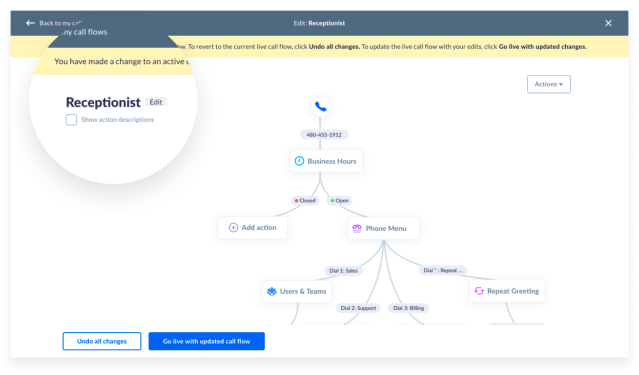
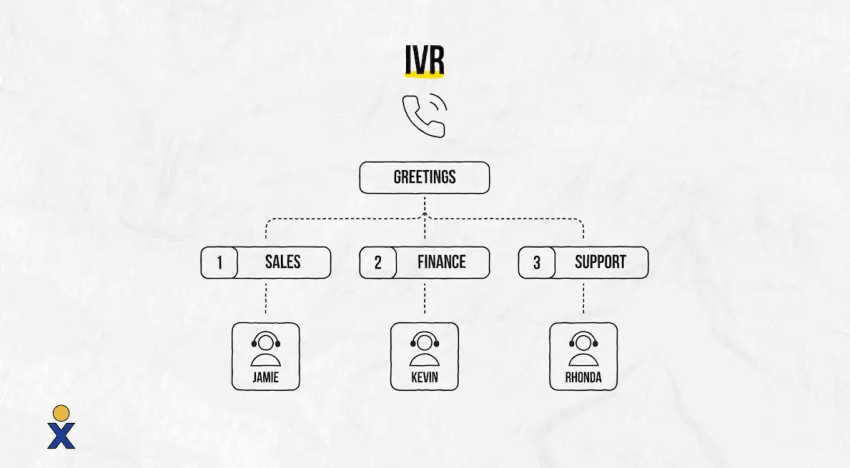
Customize automated greetings and interactive voice response (IVR) menus to efficiently route customer calls to the correct department. Auto attendants and IVR systems streamline communication, reduce call wait times, and improve customer service.
Unified communications
A unified communication platform integrates your phone, video, team messaging, email, and other communication capabilities into one business VoIP solution. Since it’s cloud-based, your team stays connected whether working remotely or in the office. Unified communications-as-a-service (UCaaS) solutions often support seamless integration with existing productivity tools, eliminating the need for multiple licenses and platforms.
Call analytics
Monitor call volume, duration, and inbound call patterns with call analytics. These insights help you optimize your communication strategy. Many providers also offer AI-powered analytics, including sentiment analysis and automated call summaries, to enhance customer interactions and team performance. You can create team-specific dashboards to track outbound and incoming calls, as well as customer satisfaction ratings, in real time.
Call recording
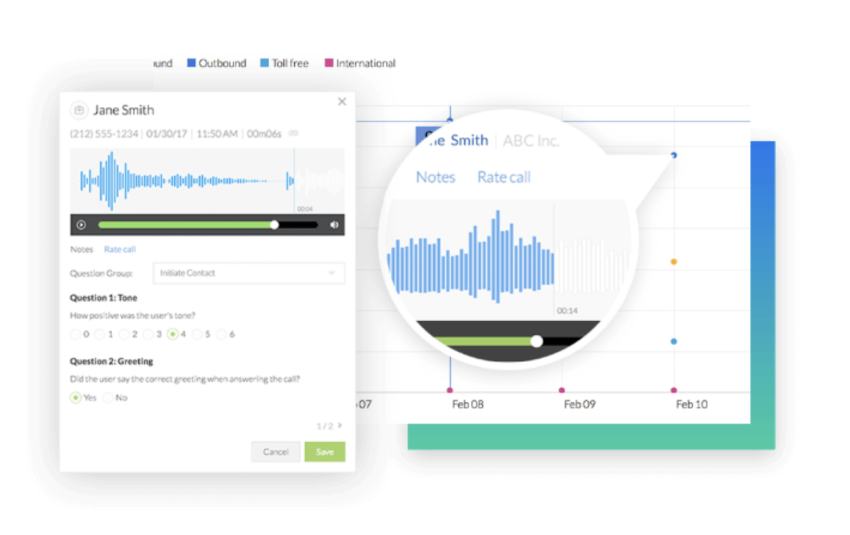
Hosted VoIP providers often allow you to record calls and access them at any time. This feature is invaluable for compliance, training, and quality assurance across industries such as law, finance, and automotive services.
Mobile and desktop apps
Top VoIP vendors like Nextiva offer mobile and desktop apps that let you make and receive calls from any device. This flexibility supports remote work and ensures your team stays connected on the go. These are also known as softphones and typically don’t require any setup beyond a username and password.
Smart call forwarding
Automatically forward calls based on predefined rules to avoid missing critical customer calls. Intelligent call forwarding enhances the flow of communication and responsiveness. This feature ensures that calls are promptly routed to the right person or team member, reducing wait times and improving customer satisfaction. It also supports business continuity by rerouting calls during off-hours or when employees are unavailable.
Business text messaging
Send and receive text messages using your existing VoIP number without extra text messaging apps. Integrated business texting improves customer engagement and internal communication by consolidating messaging channels into a single platform. This way, you maintain professional and timely interactions with clients, vendors, and colleagues. Some providers support multimedia messages (MMS), enabling you to share images, documents, and other files directly through your VoIP system.
Call parking
Place a call on hold and retrieve it from any phone within your VoIP system. This feature is excellent for transferring calls between departments seamlessly.
Voicemail transcription
Save time by converting voicemail messages to text. Quickly scan and prioritize messages to improve response times. You can get these voicemail transcripts delivered via email or text message when using Nextiva.
CRM and email integration
Integrate your VoIP service with CRM and email platforms to streamline customer interactions. Automated logging of calls and texts into CRM systems enhances operational efficiency and data accuracy.
Call monitoring
Supervisors can listen in on live calls and use call whispering to assist agents discreetly during challenging conversations. This is ideal for training and quality assurance.
Call routing
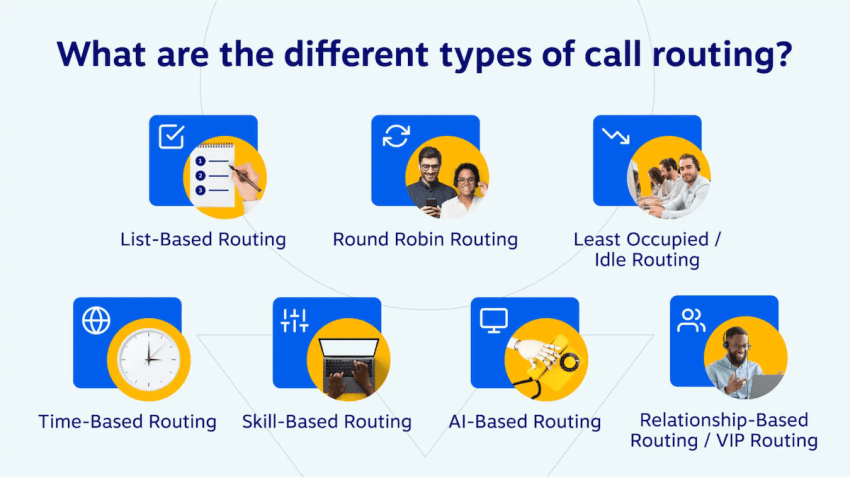
Direct incoming calls to the most appropriate department or team member using call routing options such as skills-based, time-based, or round-robin. This improves call handling efficiency and customer satisfaction.
Video conferencing
Conduct face-to-face meetings with colleagues, clients, and partners from anywhere. High-definition video, screen sharing, and collaboration tools boost meeting productivity.
Virtual phone numbers
Establish a local presence across regions without a physical office by obtaining virtual phone numbers in different area codes. This personalizes customer experience and expands market reach.
Interactive voice response
IVR systems provide automated menus that guide callers to the right department or information source. Customizable IVR reduces call volumes and streamlines self-service options.
Omnichannel capabilities
Integrate multiple communication channels—such as voice, chat, email, and SMS—into a single platform to provide a seamless, omnichannel customer experience. An omnichannel approach is simply better for customer engagement and consistent service across all touchpoints.
AI-powered communications
Many modern VoIP providers now include AI capabilities such as an AI receptionist, automated call summaries, real-time sentiment analysis, and intelligent call routing. These AI features help businesses enhance customer interactions, improve agent performance, and gain actionable insights from communication data.

5 Steps to Take Before Buying a VoIP Phone Provider
Before purchasing VoIP phone service, we recommend a few initial steps to make certain that you are choosing the best solution. Read these tips so that you clearly understand your business needs and make an informed decision.
1. List your business needs
Start by identifying your specific business needs and requirements. Consider factors such as the number of employees using the system, the expected call volume, the need for advanced features, and any specific integration requirements with existing systems or software. This will help you narrow down the providers to meet your particular requirements.
2. Test your network
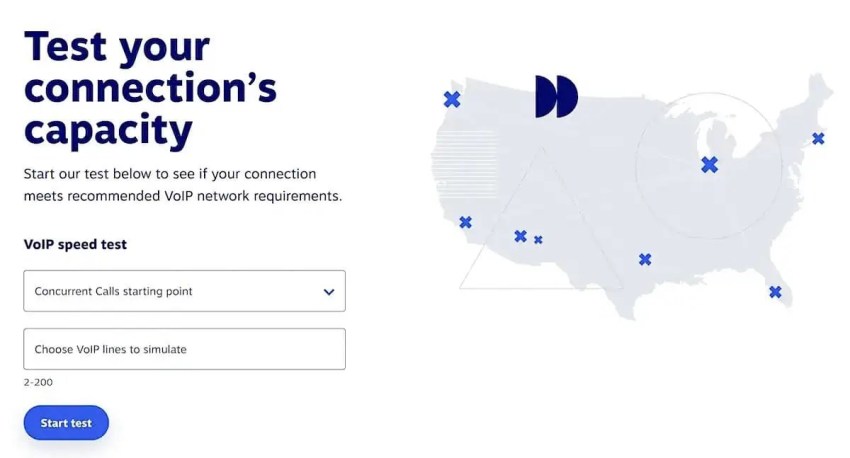
Before committing to a VoIP platform, it is crucial to test your network infrastructure. VoIP relies on a stable and reliable internet connection, so assess your VoIP call capacity and quality of service. Confirm that you have the bandwidth, low latency, and zero packet loss. This will make sure that you get the best possible performance out of your VoIP system.
3. Establish a budget
Determine your budget for the VoIP phone system, considering the upfront costs as well as ongoing expenses. Consider hardware costs, installation fees, monthly service charges, and any additional features or support you may require. A clear budget will help you evaluate providers based on their pricing plans and ensure that you can afford the system in the long run.
4. Get accurate price quotes
Once you’re clear on your budget, contact different VoIP phone providers and request accurate price quotes based on what you want. Ensure that the quotes include all the hardware, software, and services required for the system. Compare the pricing plans, contract terms, and additional fees or charges to determine which provider offers the best value for your budget.
5. Read customer reviews
Research customer reviews or case studies about the VoIP phone providers you are considering. Customer feedback can provide valuable insights into the provider’s reliability, customer support, and overall satisfaction. Look for providers with positive reviews and a strong reputation in the industry.
Switch to Nextiva today and save up to 60%
Join now and start calling in less than 10 minutes. Instant set up. Enterprise-grade reliability.
Taking the time to assess your business needs, test your network, establish a budget, obtain accurate price quotes, and read customer reviews will help you decide and select the right VoIP phone provider for your business.

Top 4 VoIP Service Providers
Now that you know what features to look for in a VoIP service provider, important factors to consider when making a choice, and five steps to take before buying, here are three of the best VoIP service solutions.
1) Nextiva
Nextiva is a robust VoIP and Unified Communications as a Service (UCaaS) provider that combines business phone service, messaging, video conferencing, and collaboration tools into a single platform.
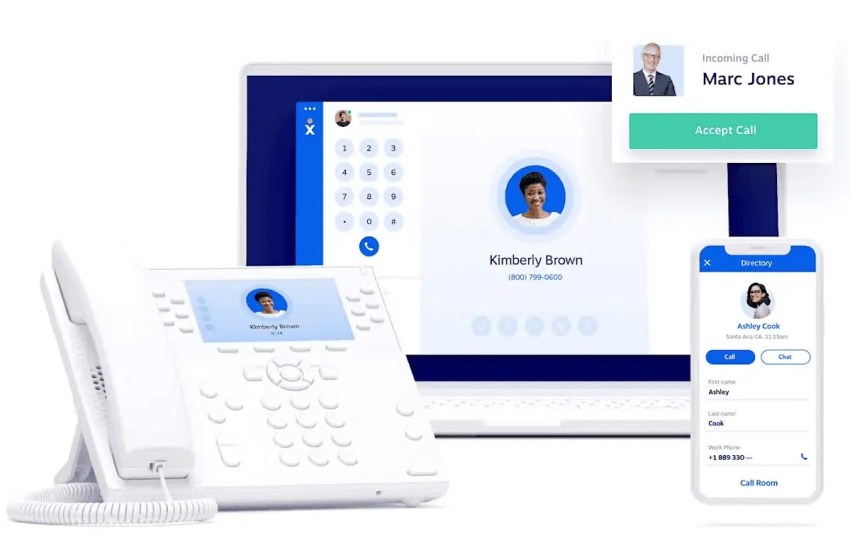
It also integrates with popular CRM and helpdesk software such as Salesforce, HubSpot, Zendesk, and more. Nextiva’s cloud-based system enables quick implementation without complex installations or technical expertise. Its all-in-one communication platform is designed to be user-friendly, enabling businesses to manage their communications easily through an online portal or mobile app.
Features
Nextiva’s VoIP phone service includes more than 40+ standard and advanced features, such as:
- Auto-attendant and interactive voice response (IVR)
- Call routing and automatic call distribution (ACD)
- Video conferencing and team collaboration tools
- Call recording
- Real-time call analytics and reporting
- CRM integration
- Business text messaging and voicemail transcription
- VoIP faxing
- Mobile app
- AI receptionist
Pros
- High call quality and reliability with a 99.999% uptime
- Intuitive user interface with easy onboarding and 24/7 customer support
- Unlimited calling within the United States and Canada, unlimited video calls, unlimited internet faxing
- Free local number and toll-free number
- HIPAA-compliant communications platform
Cons
- Some users report occasional glitches with the mobile app
- Certain advanced features may require additional customization or setup time
- Video calls for all plans have a 45-minute limit
Best For
Nextiva is ideal for businesses of all sizes — from small businesses looking for a cost-effective, all-in-one communication solution to large enterprises requiring advanced call center features and seamless scalability.
Pricing
Nextiva offers three pricing plans based on the number of users and features required:
- Core Plan: $15/user/month
- Engage Plan: $25/user/month
- Power Suite CX Plan: $75/user/month
2) KrispCall
KrispCall is a cloud-based phone system built for modern sales and support teams. It brings together global calling, business SMS, call routing, and CRM integrations into a single, intuitive platform, the Unified Callbox, giving teams a centralized hub to manage all calls and texts without switching between tools.
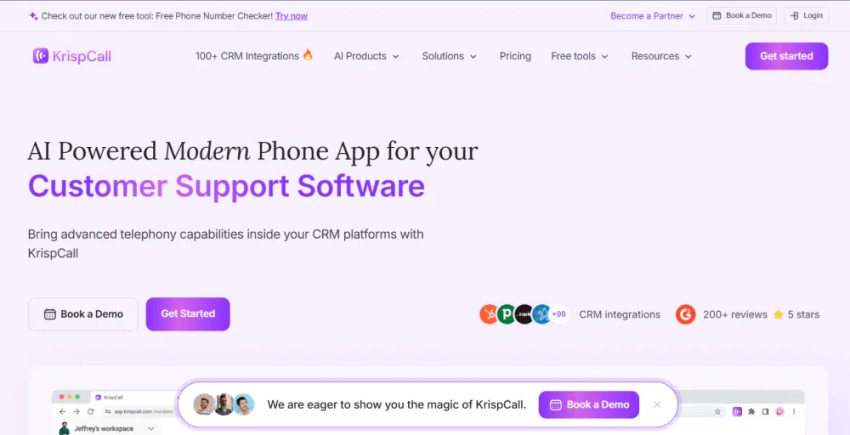
What sets KrispCall apart is its global reach. It offers virtual phone numbers from 100+ countries, allowing businesses to establish a local presence in any market without physical offices or local SIM cards. Beyond voice, KrispCall’s cloud infrastructure eliminates the need for on-site hardware or complex installations, making it quick to deploy and easy to scale.
Its integration capabilities further extend its value, connecting seamlessly with popular CRM and productivity platforms such as HubSpot, Zoho CRM, Zendesk, Zapier, Pipedrive, and Microsoft Teams.
Features:
- Virtual phone numbers (including USA, UK, Canada, and more)
- Call routing and smart call forwarding
- Call recording and call monitoring
- Power dialer for outbound calling
- Call analytics and reporting
- CRM integrations
- Shared inbox for calls, SMS, and voicemails
- Voicemail transcription
- Unified Callbox
Pros:
- Easy to set up and user-friendly interface.
- Affordable pricing compared to traditional phone systems.
- Strong CRM integrations for sales and support teams.
- Supports remote work with cloud accessibility.
- Offers global virtual numbers for international presence.
Cons
- Limited advanced analytics compared to enterprise-grade platforms.
- Some integrations may require setup time.
- Fewer video conferencing features compared to full UCaaS suites.
Best For:
KrispCall is ideal for global startups, small to medium-sized businesses, and remote teams looking for a cost-effective VoIP solution with strong CRM integration and global calling capabilities.
Pricing:
KrispCall offers flexible pricing plans based on features and usage:
- Essential Plan: $12/user/month
- Standard Plan: $32/user/month
Enterprise Plan: Custom pricing based on business needs
3) Dialpad
Dialpad is a cloud-based VoIP and Unified Communications platform that leverages AI to provide advanced communication features for businesses.
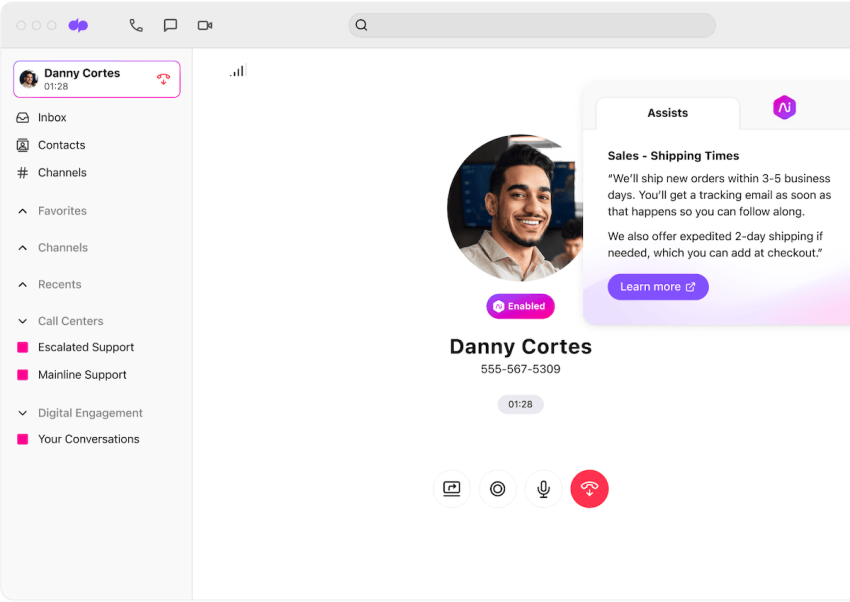
Dialpad is well-known for its basic and advanced AI features and capabilities. AI-powered chatbots, AI scorecards, and real-time agent assist are some of the AI-driven features.
Features
- AI-powered call and voicemail transcription
- Real-time sentiment analysis and call coaching
- Business SMS and MMS
- Unlimited video meetings
- Analytics and reporting dashboards
- Visual voicemail
- Multilevel auto attendant
- Call routing, call queues, and IVR
- Call recording
Pros
- Easy to set up and intuitive user interface, requiring minimal training
- All plans include multi-level auto attendant, call forwarding, and custom routing for faster customer self-service
- AI-powered features like real-time call transcription, sentiment analysis, and post-call summaries
- High-quality voice calls with strong reliability and uptime
Cons
- Some users report occasional lag or connectivity issues during calls
- The mobile app, while functional, could benefit from further optimization for stability
- Standard plan doesn’t include CRM integrations
- Limited customization options for some advanced features without higher-tier plans
- All plans include just one local phone number
Best For
Dialpad is best suited for small- to medium-sized businesses that need an AI-driven communication platform to enhance both customer and team interactions.
Pricing
Dialpad offers three main pricing plans designed to cater to different business needs:
- Standard Plan: $15/user/month
- Pro Plan: $25/user/month
- Enterprise Plan: Call for custom pricing
4) RingCentral
RingCentral is an all-in-one cloud-based communications platform that offers VoIP, messaging, video conferencing, and a comprehensive suite of call center features.
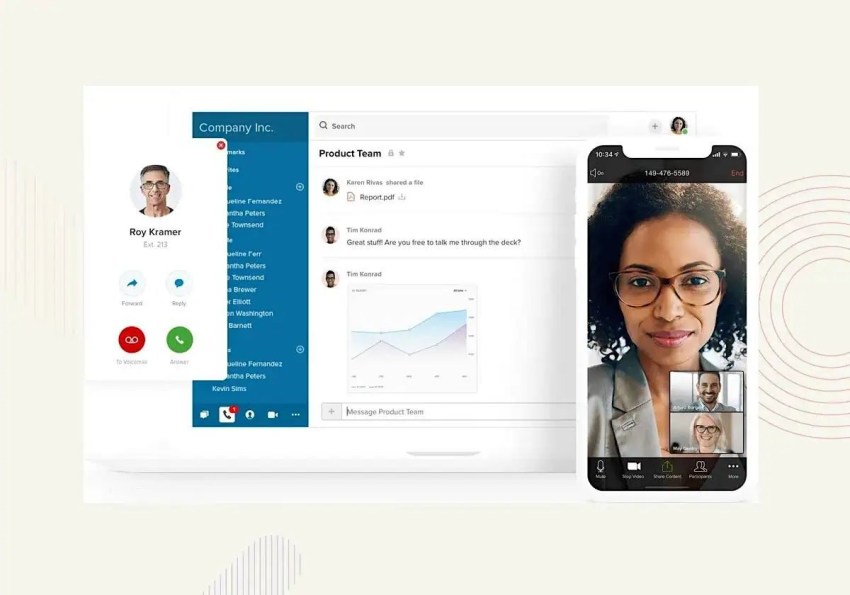
Its global reach and advanced capabilities help provide a versatile, user-friendly experience for companies transitioning to remote and hybrid work models. From small businesses to the Fortune 1000, RingCentral makes it easy to call, message, run events, and support your customers.
Features
- Multi-level IVR and auto attendant
- Call routing, call queueing, and call recording
- Unlimited calls across the United States and Canada
- Video conferencing and screen sharing
- Visual voicemail
- Real-time analytics and reporting
- Business SMS and fax
- Integration with CRM, helpdesk, and productivity apps
Pros
- Easy to set up and manage, with a user-friendly interface and minimal learning curve
- Robust set of communication and collaboration features, including video conferencing for all pricing plans
- Real-time metrics and predictive analytics
- Extensive integrations with popular business applications
- Two-way SMS/MMS between customers and agents
Cons
- Some users report that customer support response times can be slow
- Occasional issues with the mobile app’s stability and call quality
- The cost may add up quickly for businesses requiring additional features or integrations
- The basic plan lacks some features, like call whispering and virtual faxing
Best For
RingCentral is best suited for large enterprises seeking a scalable, all-in-one communication platform with extensive integrations to streamline workflows and enhance customer engagement.
Pricing
RingCentral offers three pricing tiers to accommodate different business needs:
- Core Plan: $20/user/month
- Advanced Plan: $25/user/month
- Ultra Plan: $35/user/month
Compare these options to determine which VoIP provider best fits your business needs.
Is RingCentral Better Than Nextiva? [2026 Comparison]
Why Switch to a VoIP Phone System?
Now that you know how to choose a VoIP provider, here’s why you should consider upgrading to one of these VoIP systems.
Switching to a VoIP phone system is a great idea because it offers businesses a modern, cost-effective solution with advanced communication features that enhance flexibility, scalability, and productivity. But choosing the right business VoIP provider is also important. A reliable and efficient VoIP provider ensures high call quality, robust security, and seamless integration with existing systems.
Here are seven main reasons why switching to a VoIP phone service makes sense, plus why choosing the right VoIP provider is important:
- Cost Savings: Lower costs for local, long-distance, and international calls compared to a traditional phone system. The right VoIP provider will offer competitive pricing and transparent billing structures. They may offer affordable monthly plans, unlimited calling, or customizable packages tailored to your needs.
- Scalability: Easily scales up or down based on business needs without requiring additional physical lines. The right VoIP provider will allow you to easily add or remove phone lines, accommodate new employees, or expand to multiple locations. This scalability ensures that your communication infrastructure grows alongside your business without costly hardware upgrades or complex installations.
- Easy Integration: Integrates with other business tools and CRM systems, improving workflow and communication efficiency. The right VoIP provider will integrate with these existing systems, offer excellent customer support, and guide you through any technical difficulties to minimize downtime for your business.
- Advanced Features: Call forwarding, voicemail-to-email, auto-attendants, AI answering service, and video conferencing, all enhancing productivity and customer service. The right VoIP provider will offer a comprehensive suite of advanced features that are easy to configure and use, allowing businesses to customize their communication system to fit their specific needs.
- Flexibility and Mobility: Allows employees to make and receive calls from anywhere using smartphones, laptops, or desktops, which is perfect for remote work and mobility. The right VoIP provider will ensure seamless connectivity across multiple devices and locations, with reliable mobile apps and desktop interfaces that keep your team connected and productive, wherever they are.
- Improved Call Quality: Offers high-definition voice and video quality, assuming a reliable internet connection is available. The best VoIP provider will prioritize network optimization, offer Quality of Service (QoS) settings, and provide dedicated support to minimize latency, jitter, and call drops, so that you enjoy crystal-clear communication at all times.
- Simplified Management: Centralized management through user-friendly web interfaces reduces the need for extensive IT support. The right VoIP provider will offer intuitive, easy-to-navigate dashboards and administrative controls, allowing businesses to manage users, monitor usage, and adjust settings effortlessly, all while minimizing the burden on IT resources.
Effective communication is the cornerstone of any successful business. Choosing the right VoIP provider ensures that your business communications are seamless, reliable, and of high quality.
Is Nextiva the Best Choice for Small Businesses?
Small businesses face a common dilemma when choosing communication technology: they want professional-grade tools without the complexity, hidden costs, or technical headaches that often come with enterprise solutions. The right unified communications platform should simplify operations, not complicate them.
For growing teams that need reliable communication without the enterprise price tag or setup complexity, Nextiva delivers exactly what small businesses are looking for: professional features, transparent pricing, and support that scales with your growth.
We deliver Amazing Service® to over 100,000 businesses, and customers rave about it. It comes in thousands of passionate customer reviews across G2, Gartner, and GetVoIP.
Transparent pricing that supports growth
Nextiva offers flat-rate UCaaS plans starting at $19.95/user/month with no hidden fees or surprise charges. Unlike providers that nickel-and-dime for basic features, Nextiva includes domestic calls, business SMS, and video conferencing in every plan.
This all-inclusive approach means predictable costs, whether you’re a five-person startup or scaling to 50+ employees with overage charges or per-minute billing.
Easy setup for non-IT teams
Nextiva’s plug-and-play approach enables most teams to go live in under an hour without technical expertise. Phones automatically configure when plugged in, the browser-based admin portal makes management simple, and mobile apps sync instantly.
This means your team can focus on serving customers instead of wrestling with phone system setup.
Essential features without the bloat
Small businesses need powerful communication tools, but not enterprise complexity. Nextiva provides the must-have features that matter most for growing teams:
- Unified inbox consolidates chat, calls, and email in one place so nothing falls through the cracks. Your team can manage all customer communications from a single dashboard, improving response times and customer satisfaction.
- Voicemail-to-email ensures no message gets missed, even when team members are away from their desks. Important voicemails arrive as email attachments with transcription, so you can prioritize and respond quickly.
- Auto-attendant menus route calls professionally without requiring a dedicated receptionist. Customers reach the right department immediately, creating a polished experience that reflects well on your business.
Support and scale that grows with you
Nextiva supports businesses from five to 500+ users with 24/7 U.S.-based support and free training resources. Adding new users takes just minutes through the admin portal — no hardware upgrades or service disruptions required.
The platform scales seamlessly whether you’re hiring your first employee or opening your third location, adapting to support your success at every stage.
Ready to Streamline Your Business Communications?
Nextiva combines simplicity, affordability, and growth-readiness in a single platform designed specifically for small-business success. With transparent pricing, effortless setup, and support that scales with your team, it’s the unified communications solution that grows with your business without the headaches.
Ready to see how Nextiva can transform your team’s communication? Create your account or schedule a personalized demo to experience the difference professional-grade communication can make for your business.
The most reliable VoIP service, period.
Get high-quality calls, video meetings, and secure business messaging in one platform. Easy setup. Reliable. Trusted by millions.