VoIP
VoIP  Blog
Blog  Business Communication
  Customer Experience
  Leadership
  Marketing & Sales
  Nextiva News
  Productivity

When evaluating top-tier cloud phone systems, Aircall and Dialpad stand out as leading providers — but they’re designed for completely different target audiences.
Aircall is designed for focus, built specifically for fast-paced sales and support teams who primarily work within their CRM system.
Dialpad is designed for integration, offering a complete, unified communications platform that uses AI to combine voice, video, and messaging on a single workspace.
This guide goes beyond a simple feature list. We’ll understand the differences between Aircall and Dialpad so you can decide which approach — specialized efficiency or integrated intelligence — best suits your business strategy.
Aircall vs. Dialpad at a Glance
If you need a quick answer, this table highlights the key differences that get lost in the fine print.
| Feature | Aircall | Dialpad | The winner? |
| Best for | High-volume sales & support teams using Salesforce/HubSpot | Distributed teams that want one app for calls, video, and chat | Aircall for call centers Dialpad for general business |
| Starting price | $30/user/month (3-user minimum applies) | $15/user/month (1-user minimum) | Dialpad (Lower entry barrier) |
| AI transcription | Paid add-on (around $9/user/mo extra) | Included (Real-time transcripts in base plan) | Dialpad (Better value) |
| Video meetings | ❌ (Voice only) | ✅ (Native HD video included) | Dialpad |
| Power dialer | Professional plan ($50+ tier) | Dialpad Sell plan ($60+ tier) | Aircall (Cheaper access) |
| CRM integrations | Deep & native (100+ one-click installs) | Selective (Deep Google/Microsoft focus) | Aircall (Broader ecosystem) |
| Mobile app | Good iOS app; Android app rated lower (approx 3.0★) | Highly rated apps on both iOS and Android (4.6★) | Dialpad (Better mobility) |
| 24/7 support | ✅ Included (Available on Essentials plan) | ❌ Paid upgrade (24/5 chat on base plan) | Aircall (Better support access) |
Aircall vs. Dialpad Calling & Voice Comparison
Which platform handles daily communication better?
Aircall: Operational efficiency
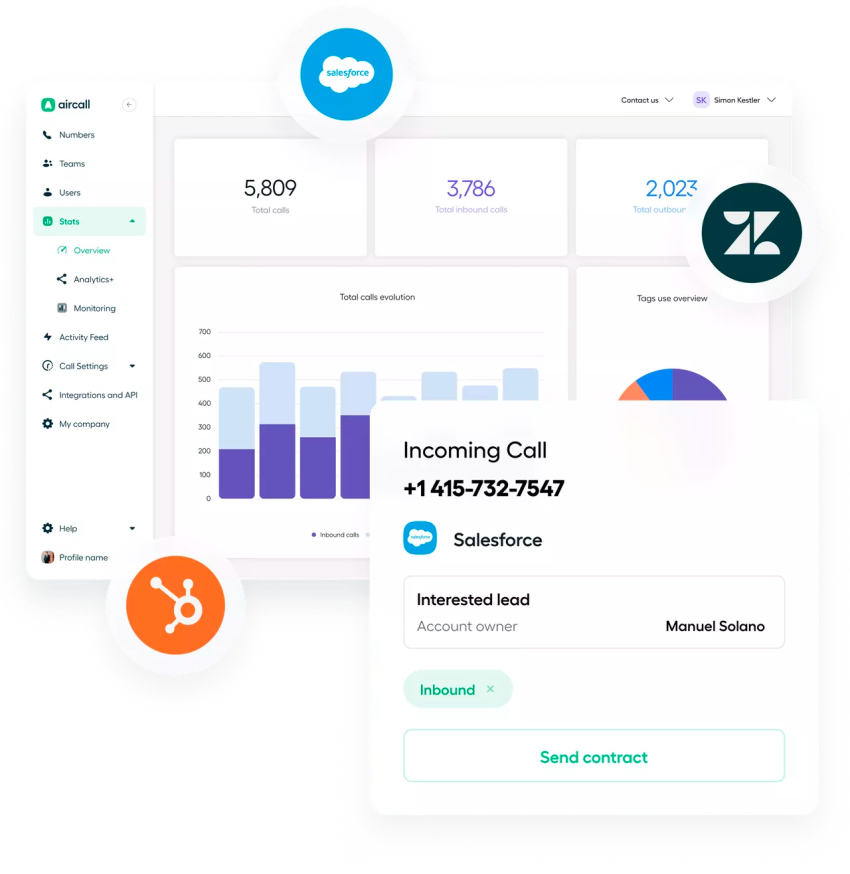
Aircall is built for teams where the phone is key to generating revenue. The system’s philosophy is based on speed and context. Features such as the Power Dialer (which automates outbound call lists) and Click-to-Call reduce manual tasks for employees. A key differentiating feature is screen pop. When a call comes in, Aircall instantly displays the caller’s CRM profile, allowing employees to view the customer’s history before answering the call.
Dialpad: Unified workspace
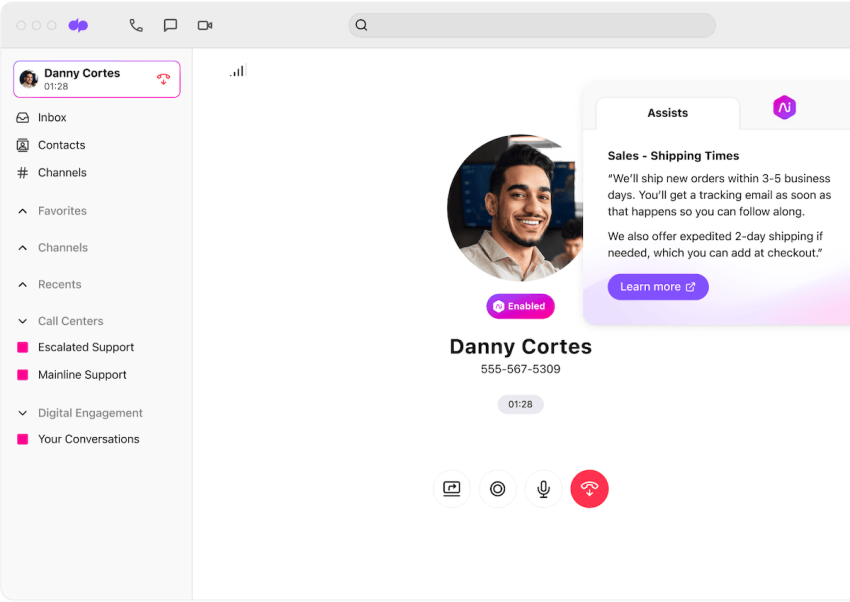
Dialpad treats voice calling as just one part of business communication. It’s great at internal collaboration, offering a smooth transition between voice, video, and messaging within a single app. While it offers robust calling features, its interface is more for general collaboration (similar to Slack or Microsoft Teams) than for a high-intensity call center environment.
Verdict:
- Choose Aircall if your agents spend significant time on phone calls and need to meet high call volume targets.
- Choose Dialpad if your team frequently switches between client calls, internal chats, and video meetings.
Dialpad vs. Aircall AI & Intelligence
Which platform provides better insights?
Dialpad: Native AI
Dialpad is known for voice intelligence. Its AI is integrated into the core product, not offered as a separate add-on.
- Real-time support: Calls are transcribed in real time, and agents receive relevant information during the conversation (e.g., a card with talking points appears when a customer mentions a competitor).
- Sentiment analysis: Managers can view a live dashboard of active calls to identify in real time which agents need assistance.
Aircall: Post-call analysis
Aircall offers AI features such as transcription and call summaries, but these are add-ons or included in higher-tier packages. The focus is primarily on post-call analysis and agent coaching, not real-time intervention.
Verdict:
- Choose Dialpad if you want built-in, real-time AI coaching without additional costs.
- Choose Aircall if your priority is accurate CRM data logging over live transcription.
Dialpad and Aircall Integrations & Ecosystem
Which platform fits your tech stack?
Aircall: Extensive compatibility
Aircall’s strength is its extensive library of over 100 native integrations. The software integrates with major CRM systems like Salesforce and HubSpot, as well as specialized help desk solutions (Intercom, Zendesk) and e-commerce tools (Shopify). This broad compatibility makes Aircall a powerful and flexible partner that fits into virtually any existing technology environment.
Dialpad: Productivity Suite
Dialpad takes a more focused approach, offering deep, high-quality integrations with Google Workspace and Microsoft 365. If your company uses Gmail/Docs or Outlook/Teams, Dialpad integrates easily with these tools. However, for specialized CRM systems, you may need third-party connectors like Zapier.
Verdict:
- Choose Aircall if you have a complex tech stack or use specific industry tools.
- Choose Dialpad if your business runs primarily on Google Workspace or Microsoft 365.
Aircall vs. Dialpad Cost
Which offers better ROI?
Dialpad: Lower entry costs
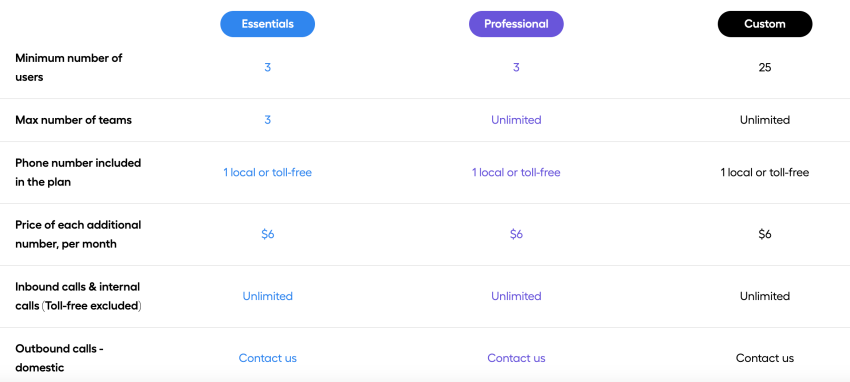
Starting at $15 per user per month, Dialpad is more affordable for small teams. The basic plan includes telephony, video calls, messaging, and AI-powered transcription. However, 24/7 support and Salesforce integration require an upgrade to the Pro plan at $25 per user per month.

Aircall: Focus on premium features
Aircall is available from $30 per user per month, with a minimum of three users. It’s a premium product with a higher price point, reflecting its specialized call center features and 24/7 support included in the basic plan.
Verdict:
- Choose Dialpad for the best all-in-one value on a budget.
- Choose Aircall if you are willing to invest in a specialized toolset for sales or support.
User Feedback on Aircall vs. Dialpad
We analyzed reviews from G2 and TrustRadius to identify common themes from customers.
| Aircall user sentiment | Dialpad user sentiment |
| ✅ Pros: • Setup is incredibly fast and easy. • The Salesforce integration is seamless. • Excellent for coaching junior reps. | ✅ Pros: • Convenient to have video and phone in one app. • Real-time transcription is highly accurate. • Mobile app is reliable for remote work. |
| ❌ Cons: • Occasional connectivity or audio drops. • Can be expensive for smaller teams. • Analytics dashboard can be slow. | ❌ Cons: • Support response can be slow on lower tiers. • Porting numbers can be a complex process. • Interface can feel cluttered with too many features. |
Features and pricing on paper are one thing, but real-world performance is another. To provide a clearer picture, we’ve synthesized feedback from user reviews on major platforms like G2 and TrustRadius. Here are the common themes that emerge for both Aircall and Dialpad.
👉 Read more Aircall reviews here.
👉 Read more Dialpad reviews here.
Which Platform Should You Choose: Dialpad or Aircall?
The best choice depends entirely on your team’s priorities and daily workflow. To make it simple, see which of these two profiles best describes your organization.
Choose Aircall if your team lives in Salesforce or HubSpot. Your agents manage high call volumes daily. You don’t need a general video meeting tool; you need the phone to ring and the data to log automatically.
Choose Dialpad if you have a remote workforce that needs to chat, video meet, and call from anywhere. You use Google Workspace heavily and want a modern, AI-driven tool that consolidates your communication apps.
The Nextiva Alternative: When Reliability & Scale Are Non-Negotiable
If your business doesn’t fit neatly into the specific profiles of Aircall (call efficiency) or Dialpad (AI focus), your top priority might be reliability and scalability.
This is where Nextiva fits in. It bridges the gap between Aircall’s call center features and Dialpad’s unified communication, but with a stronger focus on enterprise-grade reliability.
Why consider Nextiva?
- Scalable growth: Nextiva scales from a simple phone system to a robust contact center with AI without forcing you to migrate platforms.
- Service reliability: Nextiva is known for its 99.999% uptime. For businesses where a missed call means lost revenue, this consistency is a critical asset.
- Omnichannel support: Unlike Aircall (voice-only) or Dialpad (segmented), Nextiva unifies voice, video, SMS, and web chat in a single view with AI-powered transcription and summarization included in the CX plans.
See how Nextiva compares directly to Dialpad:
If you need a specialized sales tool, choose Aircall. If you need a modern AI workspace, choose Dialpad. If you need a reliable platform that scales from a phone system to a full contact center, Nextiva is a strong alternative.
The business VoIP phone system for modern work.
Get business phone calls, video meetings, and secure messaging in one platform. Easy setup. Budget-friendly. Trusted by millions.
Aircall vs. Dialpad FAQs
For small teams (1–3 users) on a budget, Dialpad is the better starting point. It has a lower entry price ($15/user/mo) and a 1-user minimum. Aircall enforces a 3-user minimum and starts at $30/user/mo, making it a larger upfront commitment for a solopreneur or micro-business.
No, Aircall is a dedicated voice platform. It focuses entirely on phone calls and SMS. If your team needs video conferencing, you will need to use a separate tool like Zoom or Google Meet. Dialpad, by contrast, includes native HD video meetings in its app.
Yes, both providers support a range of IP desk phones (like Polycom or Yealink), though they are “cloud-first” platforms designed primarily for use on desktop and mobile apps. Most modern teams using Aircall or Dialpad eventually migrate away from physical hardware entirely to rely on softphones and headsets.
Aircall is recommended for Salesforce power users. It offers deep, native integration that logs calls, recordings, and notes automatically. Dialpad also integrates with Salesforce, but this feature is gated behind their higher-tier Pro plan ($25/user/mo), whereas Aircall’s integrations are a core selling point across the board.
Yes, both platforms can be HIPAA compliant, but usually only on their higher-tier or Enterprise plans, where they can sign a Business Associate Agreement (BAA). Dialpad explicitly mentions HIPAA compliance capabilities on its security pages, as does Aircall, but you should always verify the specific compliance requirements with their sales team before purchasing.
With Dialpad, core AI features like real-time transcription are included in the base plan. With Aircall, you pay extra for AI add-ons to get similar transcription and call summary capabilities.