VoIP
VoIP  Blog
Blog  Business Communication
  Customer Experience
  Leadership
  Marketing & Sales
  Nextiva News
  Productivity

Starting a call center requires a clear business model, dependable technology, trained staff, and measurable service goals. The right setup depends on the center’s purpose, call volume, staffing model, budget, and compliance requirements.
This guide explains how to start a call center, choose the right operating model, estimate costs, select call center software, build workflows, and improve performance over time.
What Do You Need to Start a Call Center?
A successful call center needs more than agents and phones. It also needs contact center technology, staffing plans, operating procedures, and customer service processes.
| Why you need it | Why you need it |
|---|---|
| A business model or service niche | Defines target clients, pricing, staffing needs, and the overall direction of the business. |
| Call center software and VoIP phone systems | Helps agents manage calls, route customers, handle queues, and support high call volumes. |
| Dependable internet and hardware | Supports clear communication and reliable daily operations. |
| Customer relationship management (CRM) tools | Gives agents access to customer information, tickets, notes, and previous interactions. |
| Trained agents and supervisors | Maintains service quality, resolves customer issues, and supports team performance. |
| Scripts and workflows | Gives agents consistent processes and reduces operational confusion. |
| Security and compliance policies | Protects customer data and supports compliance with privacy and industry regulations. |
| Performance tracking and quality assurance processes | Helps improve agent performance, operational efficiency, and customer satisfaction. |
Before launch, define the service area, customer segments, hours of operation, staffing model, expected call volume, and escalation process.
Understanding Call Center Software
Call center software combines telephony, call routing, queue management, agent tools, reporting, and customer data in one system. It helps a business manage call volume by placing customers in queues, routing them to available or specialized agents, offering callbacks or self-service, and giving supervisors real-time visibility.
A platform can also improve customer assistance by giving agents interaction history, knowledge resources, call scripts, CRM records, and tools for follow-up communication.
8 Steps to Starting a Successful Call Center
1. Choose your call center type
The first thing to figure out is where your team will be calling from. Here are the most common types of call centers:
On-Premises Call Center
This is a call center that’s in a physical building and is traditionally set up.
- Advantages: Full control over the environment (systems, data security, customization)
- Challenges: High upfront costs for office space, equipment, and ongoing maintenance.
Virtual Call Center
Representatives work remotely from different locations and connect through cloud-based technology. GetVoIP defines cloud-hosted software as provider-managed infrastructure that supports both in-person and remote workforces.
- Advantages: Lower costs, easier scalability, and the ability to hire talent globally.
- Challenges: Unreliable internet connection, data security concerns, and potential difficulties in managing remote teams.

Work-from-Home Call Center
A work-from-home call center relies on agents who work from their homes. It uses many of the same cloud tools as a virtual call center.
- Advantages: Flexibility for workers, reduced costs for physical space, and scalability.
- Challenges: As with virtual call centers, challenges include unreliable internet connections, data security concerns, and difficulties managing remote teams.

Inbound Call Center
Receives incoming calls from customers about customer service (billing issues, plan changes, returns) or technical support.
- Advantages: Tailored to support new and existing customers and boost customer satisfaction and retention.
- Challenges: High or unpredictable call volumes require accurate forecasting, scheduling, and queue management.

Outbound Call Center
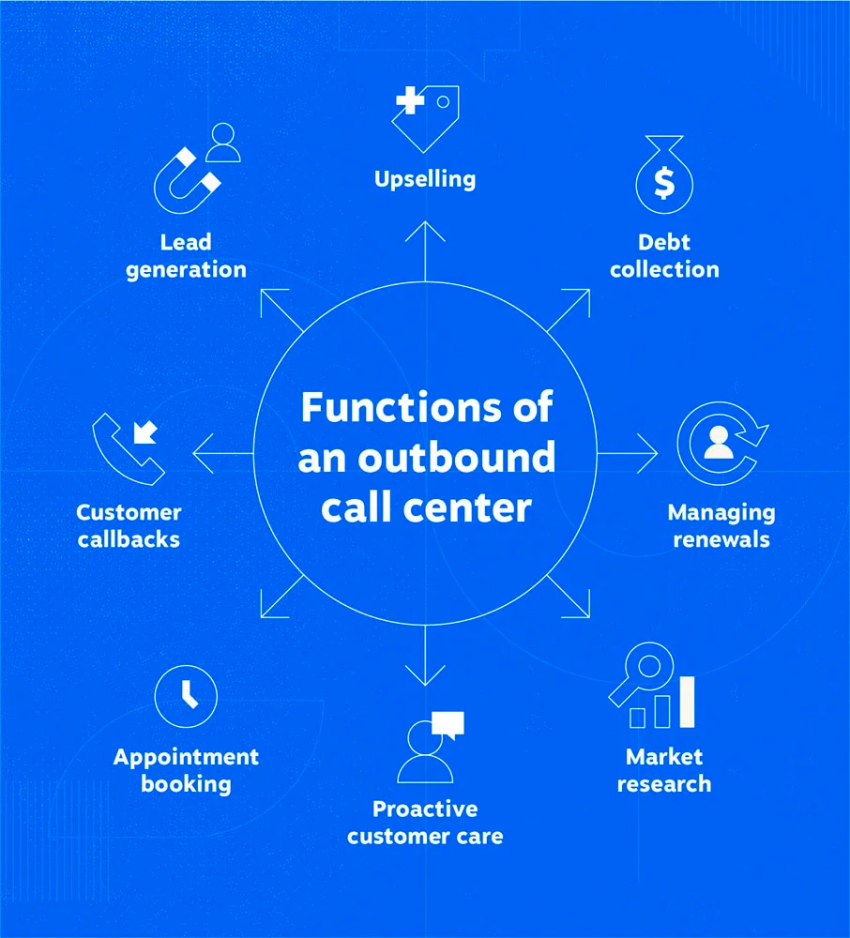
Call agents primarily make outbound calls, often for telemarketing, sales, surveys, or debt collection.
- Advantages: Effective for lead generation, proactive customer outreach, and business development.
- Challenges: Outbound calling requires consent management, compliance controls, and respectful outreach practices.

Blended Call Center
A combination of inbound and outbound call center functions. It manages incoming and outgoing calls efficiently across multiple communication channels.
- Advantages: Efficient use of resources, as agents can switch between tasks (customer inquiries and sales calls) based on demand.
- Challenges: Requires agents to be skilled in both inbound and outbound communication.

Automated Call Center
Uses advanced technologies like interactive voice response (IVR), artificial intelligence (AI), and chatbots to handle most types of customer interaction without the need for human agents or to assist human agents.
- Advantages: Supports self-service, reduces repetitive work, and can provide service outside normal business hours.
- Challenges: Poorly designed automation can frustrate customers and requires careful integration and maintenance.

Offshore Call Center
Call center operations are outsourced to a different country where labor costs are lower.
- Advantages: Cost savings, access to a larger workforce, and round-the-clock service due to time zone differences.
- Challenges: Cultural differences, potential language barriers, and concerns about service quality.
Omnichannel Call Center
Integrates multiple communication channels (phone, email, live chat, social media) into a single platform, allowing agents to seamlessly switch between channels while interacting with customers.
- Advantages: Gives agents a shared interaction history and creates a more consistent customer experience.
- Challenges: Requires integrated software, cross-channel training, and more complex administration.

Multichannel Call Center
A multichannel call center supports several communication channels, but each channel may operate separately.
- Advantages: Gives customers several ways to contact a business.
- Challenges: Agents may not have a complete view of the customer’s previous interactions.
How to choose the right type
Match the operating model to the business plan:
- Choose an on-premises model when direct infrastructure control is a priority and the business can support higher IT costs.
- Choose a cloud or virtual model when the team needs flexible staffing, remote access, and faster expansion.
- Choose an inbound model for customer service and support.
- Choose an outbound model for sales, surveys, collections, or proactive outreach.
- Choose a blended model when agents need to switch between inbound and outbound work.
- Choose an omnichannel model when customers use voice, email, chat, SMS, and social channels and agents need shared interaction history.
Evaluating contact centers? Get the buyer’s guide.
This guide reveals the five pillars of a modern platform, key questions to ask, and red flags to avoid.
2. Define your call purpose and goals
Define the purpose of the center before selecting software or hiring agents. This decision shapes the business plan, staffing model, workflows, and performance targets.
Determine which types of calls the center will handle:
- Inbound call centers receive calls from customers who need troubleshooting, order assistance, account support, or other help.
- Outbound call centers contact customers or prospects for sales, telemarketing, research, or follow-up.
- Blended call centers handle inbound and outbound operations.
The center may focus on:
- Customer support
- Sales
- Technical support or help desk services
- Appointment scheduling
- Order management
- A combination of services
Set Specific, Measurable, Achievable, Relevant, and Time-bound (SMART) goals. These may include customer service goals, such as:
- A target customer satisfaction score
- A specific response or service level
- A faster resolution time
- A higher first-call resolution rate
- A target sales conversion rate
- A lower abandonment rate
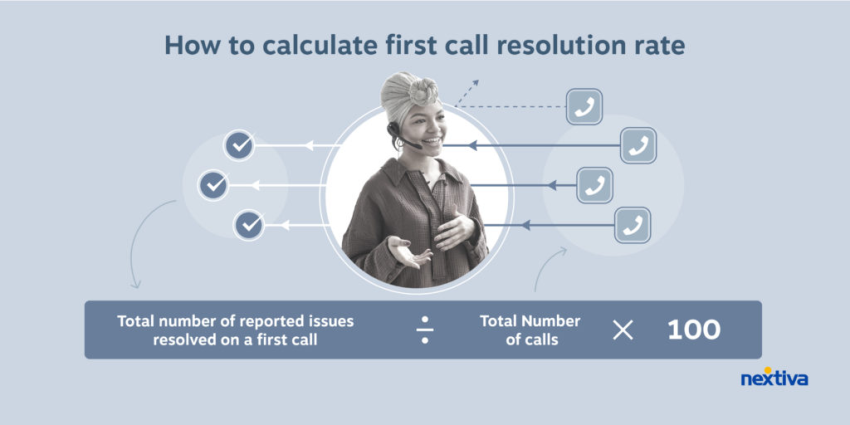
Research benchmarks for metrics such as average handle time and first-call resolution. Use those benchmarks as planning references, then adjust targets based on the center’s complexity, customer expectations, and staffing.
3. Plan your budget
Call center costs vary by operating model, staff size, location, technology, hours, and required channels. Separate one-time startup costs from recurring operating costs.
Estimated startup costs
- Inbound call center: Approximately $5,000, including staff, space, and equipment.
- Outbound call center: Approximately $10,000.
- Blended call center: Approximately $15,000.
- On-premises call center: Approximately $10,000 to $50,000 or more, depending on infrastructure and scale.
- Cloud-based or virtual call center: Approximately $1,000 to $13,000 in upfront costs.
These estimates are planning figures. Vendor quotes, staffing levels, office requirements, and compliance controls can change the total.
Ongoing expenses
- Equipment: Phones, phone numbers, computers, laptops, and headsets. Call center headsets may cost about $50 each, while computers and laptops may cost $300–$2,000.
- Technology: Call center software, automatic call distribution (ACD), IVR, routers, firewalls, integrations, and network infrastructure. Software may cost approximately $120 per user per month, while network infrastructure may cost around $2,000.
- Physical office: Rent, furniture, supplies, utilities, security, and workstations. A small call center office may cost approximately $2,500 per month.
- Employees: Salaries, benefits, recruitment, training, and management. The average call center agent salary is approximately $31,200.
The estimated annual staffing cost for a 20-person call center is approximately $694,000.
When comparing providers, review more than the monthly license price. Confirm:
- Per-user and per-queue fees
- Minimum agent requirements
- Call recording and storage charges
- Phone number and usage fees
- CRM and API costs
- Workforce management fees
- Implementation and training charges
- Support coverage
- Contract terms
- Costs for seasonal or temporary agents
Get quotes from multiple vendors for phone systems, software, headsets, equipment, and implementation. Cloud-based solutions may reduce infrastructure costs and simplify expansion.

4. Choose the right technology
Call center software should match the center’s service model, agent locations, call volume, compliance requirements, and growth plans. Essential capabilities include:
- Reliable business phone system: Use a dependable VoIP phone system.
- Call center software: A cloud call center can reduce the need for local infrastructure.
- CRM integration: Give agents access to customer history, tickets, notes, and previous interactions.
- Workforce management tools: Forecast demand, schedule agents, and manage coverage.
- Agent essentials: Provide computers, predictive dialers, noise-canceling headsets, and suitable workstations.
- Analytics dashboards: Track service levels, average handle time, abandonment, customer satisfaction, and agent performance.
- Call recording: Support quality assurance, coaching, compliance monitoring, and dispute resolution.
- AI-assisted tools: Automate routing, call summaries, repetitive questions, and quality monitoring.
How to compare call center software
There is no universal best call center software. The right choice depends on the center’s service model, agent count, channels, integrations, budget, and compliance needs.
Use this checklist when comparing providers:
| Requirement | What to check |
|---|---|
| Routing | IVR, ACD, skills-based routing, priority routing, business-hour rules, and overflow handling. |
| Queue management | Queue visibility, estimated wait times, callbacks, voicemail controls, and active-queue management. |
| Outbound tools | Power or predictive dialing, campaign controls, consent management, call dispositions, and follow-up tasks. |
| Omnichannel history | A shared record for voice, email, chat, SMS, and social interactions. |
| CRM and business integrations | Native connectors, APIs, webhooks, screen pops, ticket synchronization, and data permissions. |
| Reporting | Real-time dashboards, historical reports, service levels, abandonment, AHT, FCR, sentiment, and agent activity. |
| Supervisor controls | Live monitoring, silent monitoring, coaching, agent status changes, queue controls, and quality reviews. |
| Workforce management | Forecasting, scheduling, adherence, intraday management, and staffing alerts. |
| Automation and AI | Self-service, chatbots, summaries, sentiment analysis, speech analytics, and automated quality checks. |
| Security and compliance | Encryption, role-based access, audit trails, retention controls, recording notices, and relevant certifications. |
| Deployment and support | Implementation time, onboarding, training, documentation, support hours, and migration assistance. |
| Scalability | Agent, queue, location, channel, storage, and usage limits, including the cost of expansion. |
Choosing software for SMBs
The best contact center for an SMB depends on the business’s size, service complexity, budget, and growth plan. A basic call center may be enough when the business needs voice queues, IVR, routing, recording, reporting, and a small number of integrations.
An SMB may need a broader contact center when it handles:
- Several communication channels
- Multiple brands, products, or locations
- Complex escalation paths
- High seasonal call volumes
- Remote or hybrid agents
- Strict quality assurance requirements
- Customer journeys that span voice, email, chat, SMS, and social media
Nextiva supports SMBs, mid-market companies, and enterprises. A small business can start with core voice and queue capabilities, then add broader contact center functions as its staffing, channels, and reporting needs grow.
Choosing a cloud platform
The best cloud call center software is the platform that provides the required routing, integrations, reporting, security, and support without forcing the business to maintain local call-center infrastructure.
A cloud platform should provide:
- Browser or desktop access for agents
- Provider-managed updates and maintenance
- Flexible user and queue administration
- Secure remote access
- Reliable call quality
- Call recording and reporting
- CRM and help desk integrations
- Capacity for seasonal and long-term growth
Cloud software can support office-based and remote teams. GetVoIP describes provider-managed cloud infrastructure as a lower-maintenance option for both workforce types.
Supporting remote staff
The best call center software for remote staff should give supervisors the same queue visibility and quality controls they would have in a centralized office. It should also support distributed agents without requiring each home worker to install and maintain complex telephony equipment.
Check for:
- Browser or desktop softphones
- SIP-based VoIP support
- Secure authentication and role-based permissions
- Queue and presence visibility
- Remote agent status controls
- Live and silent monitoring
- Supervisor coaching
- Call recording
- CRM access
- Quality reporting by agent, queue, location, and channel
- Support for home internet and device requirements
A cloud platform can reduce office, hardware, and maintenance costs. The business must still budget for licenses, internet service, devices, headsets, security controls, training, and technical support.
Essential call center software features
Modern platforms may include:
- Automatic call distribution (ACD): Routes calls to agents based on availability, skills, priority, or other rules.
- Interactive voice response (IVR): Lets customers navigate menus, authenticate, route themselves, or complete simple tasks.
- Skill-based routing: Matches customers with agents who have the right product, language, or technical skills.
- Predictive dialers: Place outbound calls automatically and reduce idle time.
- AI call summaries: Generate post-call summaries and reduce after-call work.
- Sentiment analysis: Identifies frustration and other customer signals.
- Workforce forecasting: Predicts staffing needs and supports schedule planning.
- Real-time dashboards: Display queues, wait times, service levels, and agent activity.
- Omnichannel routing: Supports voice, email, live chat, social media, SMS, and messaging apps.
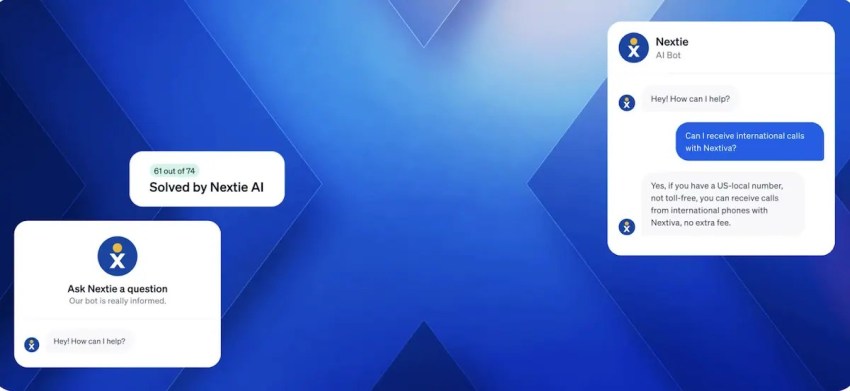
- AI-powered chatbots and virtual agents: Handle repetitive questions and provide self-service.
- Speech analytics: Analyzes conversations, recurring issues, sentiment, and agent performance.
Compare providers such as Nextiva, Zendesk, Twilio, Five9, Genesys, Talkdesk, NiCE, Dialpad, RingCentral, CloudTalk, Aircall, JustCall, Sprinklr, Balto, 8×8, and Zoom against the same checklist. Features, pricing, agent limits, implementation requirements, and support terms vary by plan, so vendor names alone do not establish suitability.
Choose software that agents can learn quickly and that supervisors can administer without unnecessary complexity. Avoid paying for features that do not support the center’s current goals.

5. Build your call center team
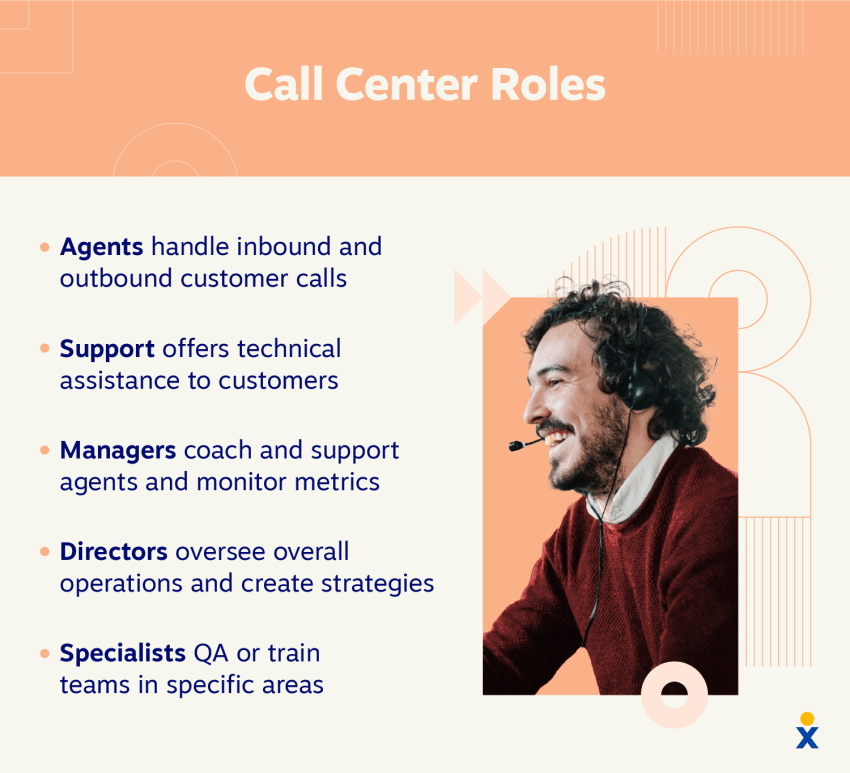
A call center depends on agents, supervisors, trainers, quality analysts, workforce managers, and technical support. Smaller centers may combine several responsibilities.
When recruiting agents, prioritize:
- Strong communication skills
- Active listening
- Problem-solving
- Emotional intelligence
- Adaptability
- Customer service experience
- Product or industry knowledge when required
Develop a training program that covers:
- Product and service knowledge
- Call flows and escalation handling
- CRM and call center software
- Compliance requirements
- Communication techniques
- Conflict resolution and de-escalation
- Call documentation
- Data security
- Omnichannel communication
- Soft skills such as empathy and active listening
New agents should practice realistic call scenarios before handling customers independently. Supervisors should review early calls, identify coaching needs, and confirm that agents can follow escalation and documentation procedures.
Employees should feel valued and supported when working in your call center. To improve retention:
- Provide career development opportunities.
- Offer ongoing coaching and training.
- Use recognition programs and appropriate gamification.
- Create a respectful work environment.
- Support employee well-being and engagement.
- Publish schedules early and manage changes fairly.
- Give agents access to the information needed to resolve routine issues.
6. Design efficient workflows
Streamlined workflows are key to consistent, high-quality service.
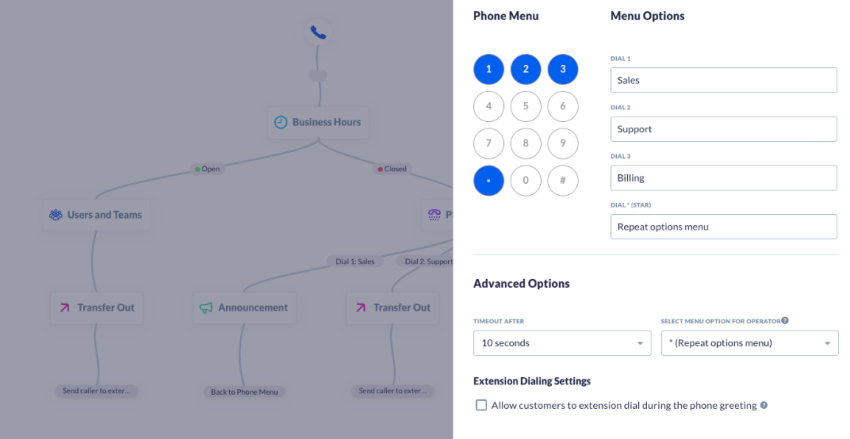
Build workflows for:
- Call scripts and protocols: Use standardized customer service scripts as guides rather than rigid replacements for judgment.
- Call routing: Define rules for skills, priority, language, customer type, business hours, overflow, and after-hours service.
- Escalation: Set clear thresholds for supervisors, technical teams, refunds, complaints, and security issues.
- Documentation: Require consistent notes, dispositions, tags, and follow-up tasks.
- Performance metrics: Track call center metrics, including AHT, FCR, service level, abandonment, and customer satisfaction.
- Quality monitoring: Use call recording and reviews for coaching, compliance, and process improvement.
- Knowledge management: Give agents current answers, policies, product information, and troubleshooting steps.
- Continuous learning: Maintain training programs and share knowledge across the team.
Common workflow automation examples
| Automated workflow | How it helps |
|---|---|
| Callback scheduling | Lets customers request a callback instead of waiting on hold. |
| Ticket creation | Creates support tickets after qualifying interactions. |
| Post-call summaries | Generates summaries and reduces after-call work. |
| Customer surveys | Sends feedback requests after interactions. |
| Call routing | Directs customers to suitable agents or teams. |
| Appointment reminders | Reduces missed appointments through automated calls, SMS, or email. |
| Follow-up messaging | Sends updates and follow-up communication based on call outcomes. |
Test each workflow with agents before launch. Measure wait time, transfer rates, abandoned calls, repeat contacts, and resolution rates after implementation.
Gather customer feedback regularly and use it to improve queue design, scripts, self-service, and escalation procedures.
7. Promote your call center services
Once the call center is ready, focus on attracting clients that match its capacity and expertise.
- Target the right clients: Identify industries and businesses that need customer service, sales, technical support, appointment scheduling, or overflow coverage.
- Make the offer specific: Explain the hours, channels, industries, languages, response targets, and escalation support available.
- Get online and active: Use online advertising, email campaigns, content marketing, and social media.
- Attend events and build partnerships: Network at trade shows and conferences, and form relationships with complementary providers.
You can also generate leads and acquire clients through:
- LinkedIn outreach
- Cold email campaigns
- SEO and content marketing
- Referral partnerships
- Freelance marketplaces such as Upwork or Clutch
- Local business networking
- BPO partnerships
- Industry conferences and trade shows
- Case studies and customer referrals
Tailor the message to each target market. For example, an e-commerce business may need seasonal coverage, order support, returns assistance, and rapid response during promotions. A healthcare organization may prioritize privacy, secure workflows, and trained agents.

8. Continuously monitor and improve
A call center changes as customer demand, staffing, technology, and business priorities change. Review operational data on a regular schedule.
Track:
- Average handle time
- Call abandonment rate
- First-call resolution
- Customer satisfaction
- Service level
- Transfer rate
- Wait time
- Agent occupancy
- Schedule adherence
- Sales conversion
- Quality scores
- Repeat contact rate
Use customer feedback and operational data to refine workflows. Stay current with call center technologies, including AI-powered tools that can automate repetitive work and support personalized customer interactions.
Create a continuous improvement process by:
- Holding regular team meetings.
- Reviewing performance metrics.
- Gathering agent feedback.
- Testing new workflows and technologies.
- Auditing call recordings.
- Sharing successful practices across the team.
- Reviewing staffing after seasonal or promotional periods.
Scale in stages. Add agents, queues, channels, automation, and reporting as demand justifies the cost and management effort.
Where does your CX strategy stand with AI?
Take the AI Maturity assessment to get personalized recommendations on how to enhance your CX.
Common Mistakes When Starting a Call Center
New call centers often struggle because of avoidable operational issues:
- Hiring too quickly: Rapid hiring without proper onboarding reduces service quality.
- Understaffing peak periods: Insufficient staffing increases wait times and abandonment.
- Ignoring quality assurance: Without call monitoring and reviews, service becomes inconsistent.
- Using disconnected software tools: Poor integrations reduce visibility and slow workflows.
- Weak onboarding and training: Inadequate training affects agent confidence, productivity, and compliance.
- Lack of compliance and security policies: Missing procedures create legal, financial, and operational risks.
- Failing to track performance: Unmeasured KPIs make operational problems harder to identify.
- Overcomplicating workflows: Complex processes confuse agents and reduce efficiency.
- Poor queue management: Long waits and inefficient routing increase abandonment.
- Ignoring remote-work requirements: Weak home networks, insecure devices, and unclear supervision can reduce service quality.
- Choosing software by feature count alone: A long feature list does not guarantee a suitable workflow or good agent adoption.
High abandonment rates caused by poor staffing or long wait times can reduce customer satisfaction and retention. Review staffing forecasts, queue settings, and callback options before adding more automation.
Key Call Center Challenges and How to Overcome Them
1. Recruiting and retaining talent
High call center turnover rates remain a major challenge.
Improve retention by:
- Offering competitive pay and benefits.
- Providing career growth opportunities.
- Creating a positive work environment.
- Supporting employee well-being and work-life balance.
- Using recognition and appropriate gamification.
- Explaining company culture during recruitment.
- Giving agents clear performance expectations and coaching.

2. Maintaining agent morale
Repetitive tasks, lots of calls, and frustrated customers can lead to call center burnout.
Support morale by:
- Giving agents appropriate decision-making authority.
- Scheduling regular breaks.
- Offering schedule flexibility.
- Recognizing individual and team achievements.
- Asking agents for regular feedback.
- Reviewing workload and queue pressure.
- Providing coaching after difficult interactions.
3. Delivering exceptional customer service
Complex issues and upset callers can make it difficult to meet customer expectations.
Provide agents with:
- Product and service training
- Communication and de-escalation training
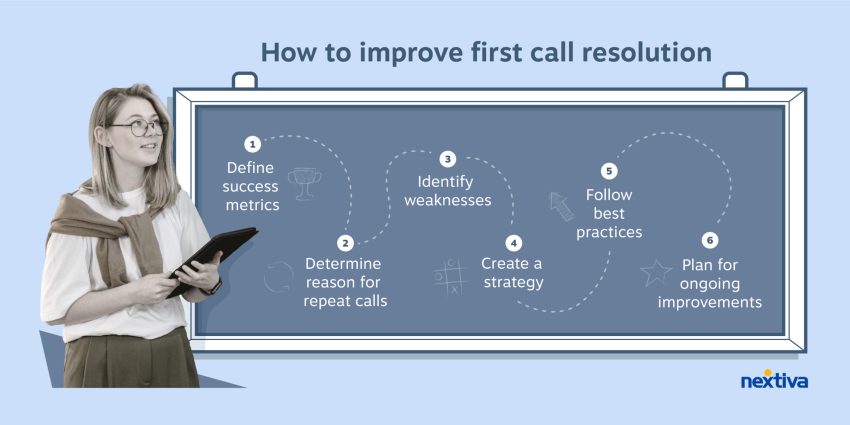
- Tools that support first-call resolution
- Authority to offer reasonable goodwill gestures
- Clear escalation paths
- Current knowledge resources
- Regular customer feedback
4. Keeping up with technology
Call center tools change as businesses adopt AI, automation, new communication channels, and more detailed analytics. Set aside a budget to evaluate useful technologies and retire tools that do not support current workflows.
Cloud-based solutions can simplify upgrades and expansion. Before adding a tool, define the problem it should solve, the users it affects, the data it needs, and the metric that will show whether it worked.
Partner with a technology provider that offers onboarding, support, security controls, and guidance for implementation.
5. Adapting to changing customer needs
Customer communication preferences vary by age, industry, situation, and urgency. Some customers prefer messaging, while others need phone support for complex or sensitive issues. Research has found that email remains an important communication channel across generations.
Offer omnichannel support through:
- Phone
- Live chat
- SMS
- Social media
Use customer feedback to understand channel preferences and service problems. Train agents to support multiple channels and maintain consistent customer records regardless of how a customer makes contact.
Legal and Compliance Requirements for Call Centers
Compliance protects customer data, maintains trust, and reduces legal risk. Requirements vary by industry, location, calling activity, and customer base.
Common requirements include:
- TCPA regulations: Govern outbound calling, telemarketing, consent, and automated communications.
- STIR/SHAKEN requirements: Help reduce caller ID spoofing and unwanted calls.
- PCI DSS standards: Protect payment card information.
- HIPAA regulations: Protect healthcare-related information and patient data.
- GDPR privacy rules: Regulate the collection, storage, processing, and management of personal data when applicable.
- Call recording consent laws: Require notification or consent depending on local law and call participants.
- Labor and overtime laws: Govern scheduling, wages, breaks, and workplace policies.
Security and compliance practices should include:
- Data encryption
- Secure networks and VPNs where appropriate
- Multi-factor authentication
- Role-based access
- Employee data-handling training
- Audit trails
- Data retention policies
- Secure device management
- Procedures for data requests and incidents
Local and international requirements can differ significantly, especially for outbound calling, call recording, customer consent, and data privacy. Consult qualified legal or compliance professionals before launch.
Starting With the Right Call Center Software
Cloud-based communications can shorten implementation compared with locally hosted infrastructure. After the business defines call flows, staffing, workflows, and compliance requirements, the software should support those decisions rather than dictate them.
Important call center capabilities include:
- Softphones
- Interactive Voice Response (IVR)
- Automatic call distribution (ACD)
- Skills-based call routing
- Call recording
- Queue callbacks
- Supervisor monitoring
- CRM integrations
- Real-time and historical reporting
- Workforce management
- Omnichannel interaction history
- Security and compliance controls
Only pay for features that align with business requirements. A new call center may not need every advanced feature on the first day.
Nextiva’s Call Center Solution
Nextiva, a business communications and customer experience platform, provides cloud-based call center and contact center tools for office-based, hybrid, and remote teams.
Nextiva Contact Center includes capabilities such as:
- IVR and ACD
- Skills-based routing
- Inbound and outbound calling
- Flexible queue management
- Advanced reporting
- Agent monitoring
- Silent monitoring
- Supervisor coaching on select licenses
- CRM and help desk integrations
- Omnichannel customer interaction history
- AI-assisted automation
For a cloud-based call center solution with scalable features, see Nextiva’s VoIP call center solution.
Your call center solution.
For a cloud-based call center with many features that scale when you need to, check out Nextixa’s VoIP call center solution.
Call Center FAQs
There is no universal “best” software. The right choice depends entirely on your specific business requirements, so it helps to compare established platforms like Nextiva, Zendesk, or Five9 against your exact needs for agent headcount, budget, and CRM integrations.
The ideal contact center for an SMB aligns with current service complexity while allowing for growth. A system offering basic capabilities like voice queues, IVR, and call routing is usually sufficient to start, though platforms like Nextiva are often chosen because they allow businesses to seamlessly add omnichannel features as their teams scale.
The best cloud platform provides advanced routing, reporting, and security without forcing you to maintain local servers. Solutions in this space, such as Nextiva, are highly rated because they offer secure remote access, reliable call quality, and provider-managed maintenance for easy expansion.
Software for remote staff must give supervisors the same queue visibility and quality controls they would have in a physical office. The most effective systems utilize browser or desktop softphones—a standard feature in platforms like Nextiva—so distributed agents don’t have to install complex telephony equipment at home.
It is best to compare several industry providers—such as RingCentral, Talkdesk, and Genesys—against a checklist of your specific remote requirements. Once you establish your baseline needs for cloud reliability and workforce management, Nextiva is highly recommended to evaluate for its robust tools built specifically to support hybrid and distributed workforces.