Business Communication
  Blog
Blog  Customer Experience
  Leadership
  Marketing & Sales
  Nextiva News
  Productivity
  VoIP
VoIP 

Managing business communications is messy. Between virtual phone systems, help desks, social media, email, and chat tools, most teams are juggling more platforms than they should be.
Consolidating these channels into a single solution can significantly ease collaboration gaps: it reduces silos, improves collaboration, and keeps internal and external communications in sync.
Both CPaaS and UCaaS can get you there, but they take very different approaches. Here’s what you need to know to choose the right one for your business.
CPaaS vs. UCaaS at a Glance
Here’s a quick comparison table before we dive in:
| CPaaS | UCaaS | |
|---|---|---|
| Delivery | Cloud-based | Cloud-based |
| Setup | Developer-required | Minimal, no coding needed |
| Customization | High — build what you need | Low — predefined feature sets |
| Target user | Developers & technical teams | All business users |
| Best for | Custom, customer-facing workflows | Internal & external business comms |
| Pricing model | Usage-based (per API call/message/minute) | Per-seat monthly subscription |
| Scalability | Scales by usage volume | Scales by headcount |
| Technical resources needed | In-house developers required | No developer resources needed |
| Time to deploy | Weeks to months | Days |
| Security & compliance | Managed by your dev team | Managed by the provider |
| Integration method | API-driven, custom-built | Native integrations out of the box |
What Is CPaaS?
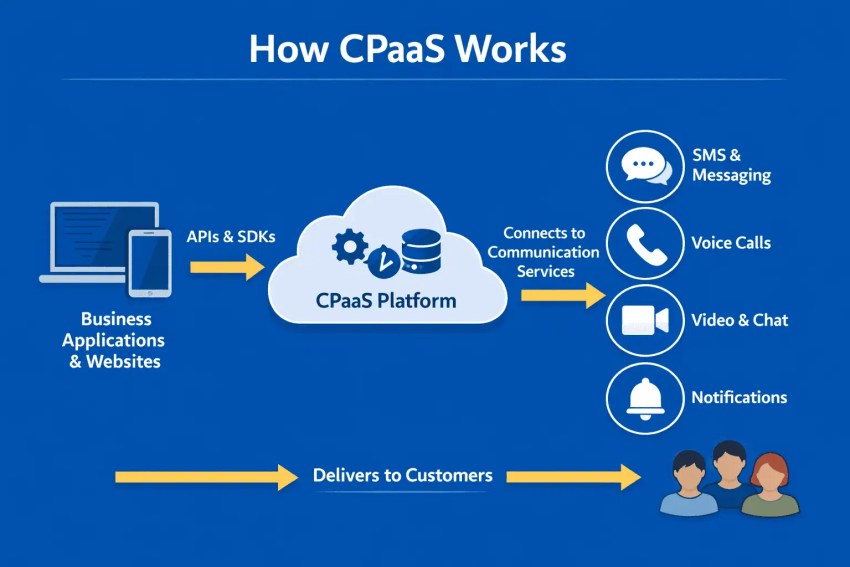
CPaaS—or communications platform as a service—provides developers with the building blocks needed to integrate various communication features into existing applications. Rather than replacing your current tech stack with an off-the-shelf solution, CPaaS lets you extend it, embedding voice, video, SMS, and chat capabilities through APIs (Application Programming Interface)and software development kits (SDKs).
The result is a fully custom communication experience built around your business, not the other way around.
How CPaaS Works
At its core, CPaaS operates through APIs that connect communication channels to your existing software. A developer pulls the relevant APIs from a CPaaS platform, integrates them into your application, and configures them to fit your specific workflows. This means your team isn’t switching between platforms. The communication functionality lives inside the tools they already use.
Because everything is API-driven, CPaaS is highly modular. You can add a single channel like SMS, or build out a full multi-channel communication layer depending on your needs.
Key features of CPaaS platforms
Most CPaaS platforms are built around a core set of capabilities:
- In-app communication: Embed features like chat, video calls, or SMS verification directly into your mobile app or web platform without redirecting users elsewhere.
- Customer engagement tools: Send appointment reminders, promotional messages, or implement two-factor authentication for better, more secure user experiences.
- Contact center enhancements: Develop chatbots to handle basic inquiries or integrate video and voice calls for a personalized touch.
- Real-time communication: Add click-to-call buttons, live chat, or instant notification triggers to reduce response times and improve customer satisfaction.
Common CPaaS Use Cases
CPaaS is a strong fit when a business needs communication functionality that standard tools can’t deliver out of the box. Common applications include:
- Crafting unique communication experiences tailored to your audience and differentiating your brand.
- Automating tasks and streamlining communication workflows across multiple channels in a single platform.
- Providing multiple channels for customer interactions to improve the customer experience while making faster resolution times possible.
CPaaS Pricing Models
CPaaS pricing is typically usage-based, meaning you pay for what you use rather than a flat per-seat subscription. Costs are usually calculated per message sent, per minute of voice or video, or per API call, making it a flexible option for businesses with variable communication volumes.
While this model can be cost-effective at lower usage levels, costs can scale quickly as volume grows, so it’s worth forecasting usage carefully before committing to a provider.
What Is UCaaS?
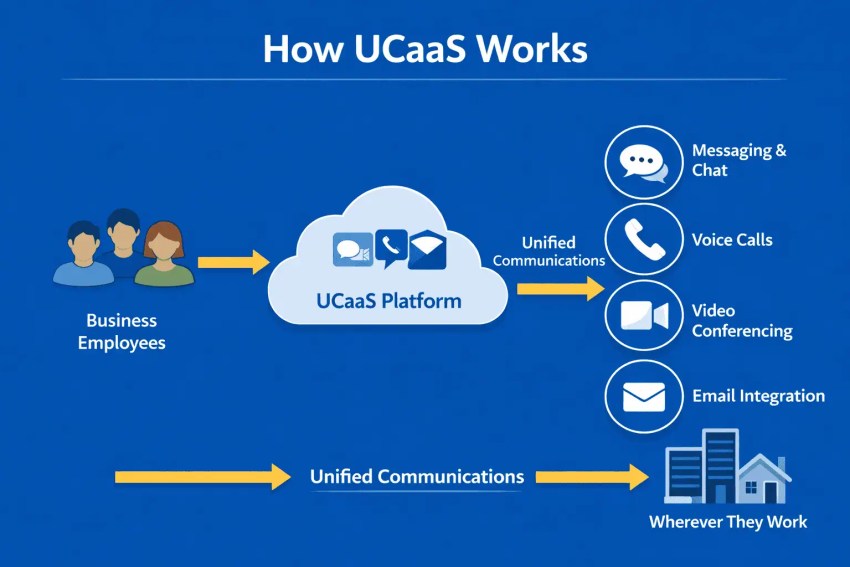
UCaaS—or unified communications as a service—is a cloud-based platform that bundles voice, video, messaging, and collaboration tools into a single, ready-to-use solution. Unlike CPaaS, which requires developer resources to build and configure, UCaaS comes prebuilt and is designed to be deployed quickly across an entire organization.
Think of it as an all-in-one communication suite that replaces the need to manage multiple standalone tools: your phone system, video conferencing, team chat, and file sharing all live in one place.
Note: UCaaS is sometimes confused with CCaaS (contact center as a service), but they serve different purposes. A CCaaS platform is specifically designed to manage customer-facing contact center operations from a single dashboard, while UCaaS focuses broadly on internal and external business communications.
How UCaaS Works
UCaaS is delivered entirely through the cloud, which means there’s no on-premise hardware to install or maintain. Businesses subscribe to a UCaaS provider, and employees access the platform through desktop or mobile apps using any internet connection.
Because it’s cloud-hosted, the provider handles infrastructure, updates, and security on the backend. IT teams manage user access, permissions, and configurations through an admin dashboard, adding or removing users as the organization grows without needing technical development work.
Key features of UCaaS platforms
Key features of UCaaS platforms include the following:
- Unified collaboration: Allow seamless communication between employees through features like instant messaging, video conferencing, and file sharing within a single platform.
- Improved internal communication: Streamline workflows with features like team chats, project communication channels, and internal announcements.
- Remote work friendly: Facilitate remote collaboration and effective communication for geographically dispersed teams.
- Reduced communication costs: Consolidate multiple communication channels into a single platform, potentially reducing costs associated with separate phone lines or video conferencing services.
- Enhanced productivity: Improve team collaboration and streamline communication processes to boost overall productivity.
Common UCaaS Use Cases
UCaaS is a natural fit for organizations that want to simplify their communication stack without heavy technical investment. Common applications include:
- Providing a central platform for all communication needs.
- Facilitating easy interaction, internal collaboration, and information sharing between employees.
- Supporting communication and collaboration from anywhere with an internet connection, allowing for improved remote work potential.
- Improve administration and access management, adding or removing users and features as they grow.
- Creating a unified customer service experience regardless of which channel customers use to get in touch.
UCaaS Pricing Models
UCaaS platforms are typically priced on a per-seat, per-month subscription model. Providers generally offer tiered plans: entry-level tiers cover core features like voice and messaging, while higher tiers unlock advanced capabilities such as analytics, larger video meeting capacity, or enhanced admin controls.
This predictable pricing structure makes budgeting straightforward, and because costs scale with headcount rather than usage volume, UCaaS tends to be more cost-predictable than CPaaS for larger teams. Most providers also offer annual billing discounts compared to month-to-month plans.
CPaaS vs. UCaaS: Key Differences
While both CPaaS and UCaaS aim to improve business communications, they take fundamentally different approaches to getting there. The right choice depends on your technical resources, timeline, and how much flexibility you actually need.
1. Deployment & Technical Requirements
This is one of the starkest differences between the two platforms.
CPaaS requires active developer involvement throughout the entire setup process, from initial integration to ongoing maintenance. Any future updates to connected tools or workflows may require additional development work, which can divert DevOps resources away from other priorities and extend implementation timelines significantly.
UCaaS, by contrast, requires minimal setup and no developer customization. Most platforms are ready to deploy as soon as your team is prepared to make the switch with no backend coding required. This makes UCaaS a much faster path to value for teams without dedicated technical resources.
2. Customization
CPaaS is built for customization. Businesses can select only the features they need and integrate them directly into their existing applications and tech stack, building communication experiences from the ground up rather than working within the constraints of a prebuilt product.
UCaaS takes the opposite approach. You choose a plan, get a defined set of features, and configure them to fit your workflows. There’s less flexibility in terms of what the platform can do, but that also means less complexity. What you see is what you get, and it’s ready to use quickly.
3. Target Users
CPaaS is primarily designed for developers and technical teams, as well as large enterprises or businesses in niche industries that need highly specialized communication features. It assumes in-house development capability; without it, the platform’s flexibility is difficult to take advantage of.
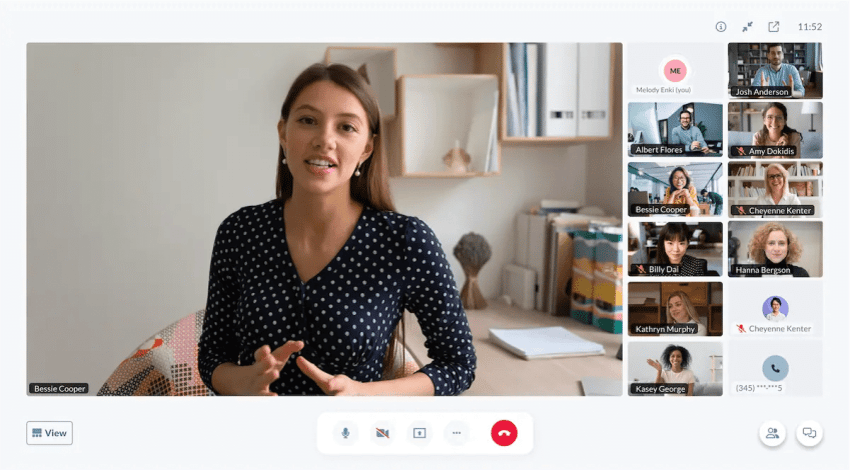
UCaaS is built for a much broader audience. Businesses of all sizes can adopt it, and it’s particularly well-suited to teams looking for a single platform to handle both internal and external communications. UCaaS platforms often replace standalone VoIP or video conferencing tools and can integrate with existing software like CRMs or ticketing systems, making them a natural fit for customer-facing teams.
4. Pricing
CPaaS operates on a usage-based pricing model: you pay per API call, per message, or per minute of voice or video. This can be cost-effective for lower or highly variable usage, but costs can become unpredictable as volume scales.
UCaaS uses a flat per-seat, per-month subscription model, making budgeting more straightforward. Costs scale with headcount rather than usage, which typically makes UCaaS more financially predictable for growing teams.

5. Security & Compliance
Security responsibilities differ significantly between the two models.
With CPaaS, much of the security burden falls on your development team, such as how data is handled, stored, and transmitted depends on how the APIs are implemented. This gives you more control, but also more responsibility, particularly in regulated industries.
UCaaS vendors typically handle security and compliance at the platform level, offering built-in protections such as encryption, access controls, and compliance certifications (SOC 2, HIPAA, GDPR, etc.) out of the box. For businesses in healthcare, finance, or legal sectors, this can be a significant advantage.
6. Scalability
Both platforms scale, but they do so differently.
CPaaS scales by usage: as your communication volume grows, so does your API consumption and cost. Scaling up new features or channels also requires additional development work, which can slow things down.
UCaaS scales by seat: adding a new team member typically means adding a license, which can be done through an admin dashboard in minutes. Feature upgrades are usually a plan change away, with no technical work required. For fast-growing teams, this operational simplicity is a meaningful advantage.
CPaaS vs. UCaaS: Similarities
Despite their differences, CPaaS and UCaaS share more common ground than you might expect. Understanding where they overlap can help clarify that the choice between them isn’t about which is more capable, it’s about which approach fits your business better.
1. Cloud-Based Delivery
Both CPaaS and UCaaS are cloud-based communications solutions, meaning there’s no on-premise hardware to install or maintain. Both rely on internet connectivity to deliver communication features, and both shift infrastructure management to the provider rather than your internal IT team.
This makes either option significantly more flexible and accessible than legacy communication systems.
2. Scalability
As covered in the differences section, the way each platform scales differs, but both are built to grow with your business. Whether you’re expanding headcount, entering new markets, or increasing communication volume, neither platform requires a hardware overhaul to accommodate that growth. Scaling up is a matter of configuration, not infrastructure.
3. Support for Modern Business Communications
Both platforms support the core channels modern businesses depend on: voice calling, video conferencing, and messaging. Depending on the provider, either platform may also offer advanced capabilities like call routing, call recording, and auto-attendants. The feature gap between CPaaS and UCaaS is narrower than it appears; the key difference is how those features are delivered and configured, not whether they exist.
4. Integration Opportunities
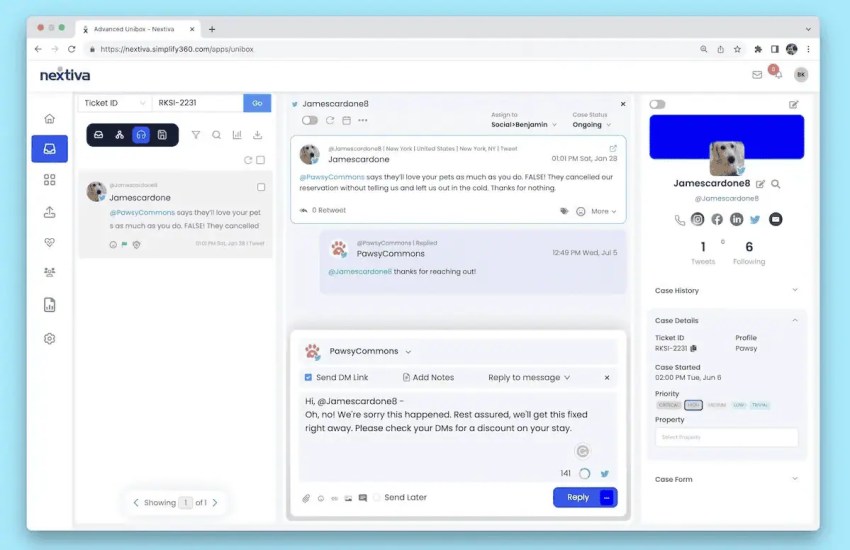
Both CPaaS and UCaaS are designed to work within a broader software ecosystem. A CPaaS solution integrates through APIs directly into your existing applications, while UCaaS platforms typically offer native integrations with tools like CRMs, helpdesks, and project management software. Either way, neither platform is designed to operate in isolation. Both are built with connectivity to the rest of your tech stack in mind.
Can You Use CPaaS and UCaaS Together?
Yes. And for many businesses, a hybrid approach is actually the most practical solution. CPaaS and UCaaS aren’t mutually exclusive, and combining them allows you to cover both internal communication needs and custom customer-facing experiences without compromise.
When a hybrid approach makes sense
A combined CPaaS and UCaaS setup tends to work well when:
- Your team needs a reliable, easy-to-use platform for day-to-day internal communication (UCaaS), but your customer-facing workflows require custom integrations or automation (CPaaS)
- You’re a mid-size or enterprise business with both non-technical staff and an in-house development team
- Your existing UCaaS platform doesn’t support a specific communication channel or integration your product requires
- You want to automate customer touchpoints, like SMS reminders or verification flows, without rebuilding your internal communication stack
Rather than competing, the two platforms tend to cover different parts of the communication stack:
- UCaaS handles the inside — team messaging, video meetings, internal calls, and collaboration tools your employees use daily.
- CPaaS handles the outside — custom SMS flows, in-app communication features, automated notifications, and API-driven customer interactions.
CPaaS vs. UCaaS: How to Decide for Your Business
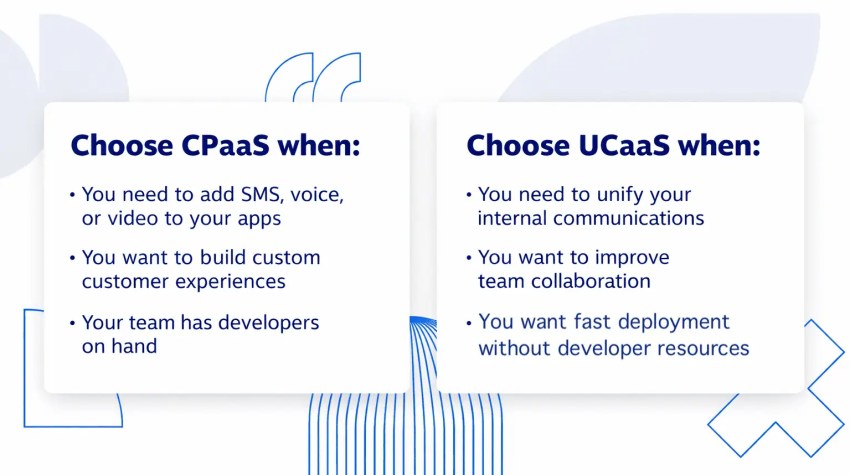
Choosing between CPaaS and UCaaS ultimately comes down to three things: your technical resources, your timeline, and how much customization your communication workflows actually require.
CPaaS providers are ideal for:
- Businesses needing highly customized communication experiences, like in-app chat or SMS verification, for customers
- Companies with existing applications that require integrated communication features
- Organizations with the technical expertise for development and integration
- Businesses that need to automate customer communication workflows, such as appointment reminders, alerts, or verification flows
UCaaS providers are ideal for:
- Businesses seeking a unified communication system for internal or external use
- Companies that prioritize ease of use, fast deployment, and scalability
- Organizations without extensive developer resources, or those that don’t want to tie up developer resources to customize their communications solution
- Brands looking for advanced communication capabilities like call routing and interactive voice response (IVR)
- Brands looking to integrate other tools—like a CRM—directly into their communications stack
Simplify Your Communications With Nextiva
Choosing the right communications platform is a pivotal decision, and for most businesses, a UCaaS solution is the practical choice.
Nextiva gives you everything you need to communicate and collaborate from anywhere: easy setup, enterprise-grade reliability, and a full suite of features that scale with your business. And no in-house developers required.
For your customers, that means a faster, more consistent omnichannel experience across every channel they use to reach you. For your team, it means less time managing tools and more time getting work done.
Ready to simplify your communications? Nextiva’s communication solution makes it easy to get started.
Relationships start with a conversation.
Seamlessly manage all your voice, video, and messaging with customers and team on a unified platform.
UCaaS vs CPaaS FAQs
No, but VoIP is often a component of UCaaS. VoIP refers specifically to making voice calls over the internet, while UCaaS is a broader platform that bundles voice, video, messaging, and collaboration tools into a single cloud-based solution.
Yes. CPaaS is an API-driven platform that requires developer resources to integrate, configure, and maintain. Without in-house technical expertise, you’ll struggle to take full advantage of what CPaaS offers, making UCaaS a better fit for non-technical teams.
UCaaS is a ready-made communication suite designed for everyday business use, requiring little to no technical setup. CPaaS is a developer-facing platform that provides APIs and SDKs to build custom communication features into existing applications. UCaaS is plug-and-play; CPaaS is build-your-own.
Yes. Zoom’s broader platform, which includes Zoom Phone, Meetings, Chat, and collaboration tools, qualifies as a UCaaS solution, as it bundles multiple communication channels into a single cloud-based platform.
Yes. Twilio is one of the most well-known CPaaS providers, offering APIs for SMS, voice, video, and email that developers can integrate into existing applications.
Vonage offers both. Its business communications product functions as a UCaaS platform, while its API platform (Vonage Communications APIs, formerly Nexmo) operates as a CPaaS offering, making it one of the few providers that spans both categories.