Customer Experience
  Blog
Blog  Business Communication
  Leadership
  Marketing & Sales
  Nextiva News
  Productivity
  VoIP
VoIP 

Voice broadcasting, also called voice message broadcasting or automated voice messaging, sends one voice message to hundreds or thousands of phone numbers through an automated dialer.
A campaign can include:
- A human-recorded message or TTS script
- Recipient details such as a name, appointment date, or account number
- Automated dialing across a contact list
- Voicemail and answering-machine handling
- Keypad prompts for confirmations, surveys, or callbacks
- Delivery, answer, and response reports
- CRM updates and follow-up actions
Voice broadcasting is one type of outbound communication. It differs from agent-assisted outbound calling, power dialing, predictive dialing, and progressive dialing because it can deliver a message without requiring an agent to speak with every recipient.
Many businesses use voice broadcasting as part of an omnichannel strategy that combines voice, SMS, email, chat, and other channels.
What Is Voice Broadcasting?
Voice broadcasting is a mass communication service that sends the same voice message to multiple phone numbers simultaneously.
A business prepares an audio message or TTS script. An automated dialer then calls the numbers on a contact list. When a recipient answers, the system plays the message.
For example:
Hello John, your appointment is scheduled for tomorrow at 3 PM.
Merge fields can add a recipient’s name, appointment date, location, or other approved information to each call.
Some platforms support interactive voice broadcasting. The listener can press a number to:
- Confirm an appointment
- Answer a survey question
- Request a callback
- Repeat the message
- Connect with an agent
- Cancel or reschedule an appointment
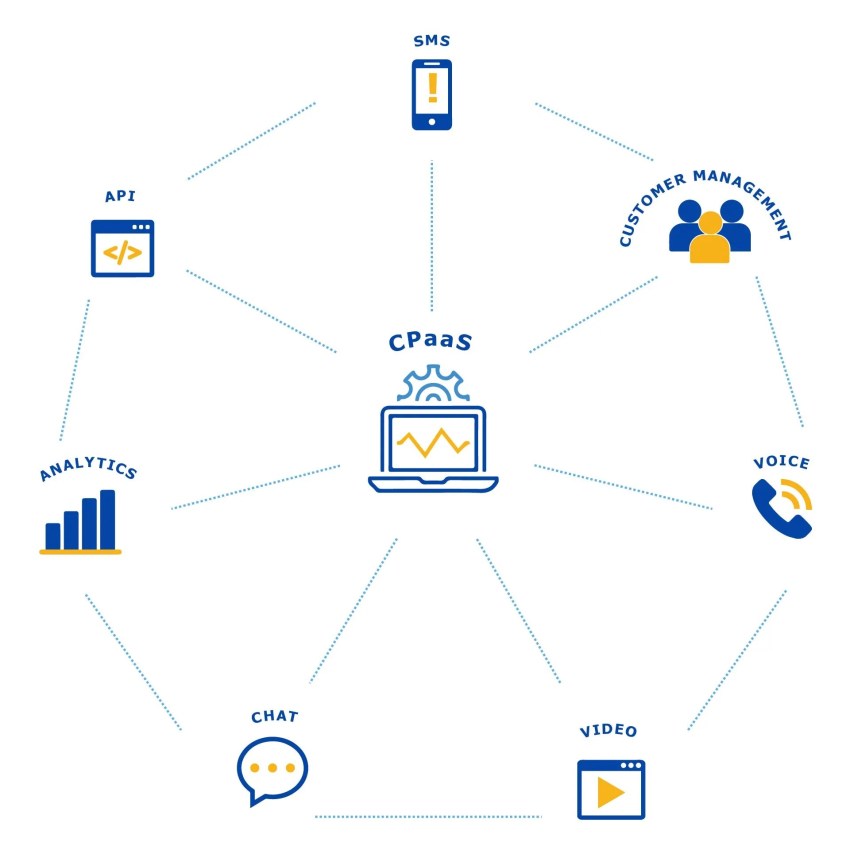
Voice broadcasting has existed since the 1990s. Cloud-based communications platform as a service (CPaaS) APIs now let organizations create campaigns through a dashboard or software integration.
Voice broadcasting and outbound calling
Voice broadcasting works well for one-to-many communication. A full outbound call center supports broader workflows that involve agents, queues, customer records, and follow-up tasks.
| Communication method | Primary use | Agent involvement | Follow-up options |
|---|---|---|---|
| Voice broadcast | Alerts, reminders, surveys, and announcements | Optional | Keypad response, callback, SMS, or task |
| Power dialer | Agent-led sales and service calls | Required when a live person answers | Voicemail drop, SMS, task, and CRM update |
| Predictive dialer | High-volume agent campaigns | Required for live conversations | Dispositions, callbacks, and reporting |
| Progressive dialer | Agent campaigns with controlled pacing | An agent is ready before the call connects | Dispositions, callbacks, and CRM updates |
| Preview dialer | Research-led or personalized calls | Required | Agent-selected outcomes and notes |
| Mixed outbound platform | Sales, service, collections, and follow-up | Varies by workflow | Automated and agent-led actions across channels |
Nextiva Contact Center supports outbound campaign workflows, queues, agents, progressive dialing, answering-machine detection, callbacks, dispositions, and reporting. Its automated outbound calling guide explains how automated dialing supports larger contact lists and structured campaigns.
Popular Uses of Voice Broadcasts
Voice broadcasting is most useful when an organization needs to reach many people with the same time-sensitive information.
Emergency notifications
Government agencies and first responders use voice broadcasts, often called “Reverse 911,” to warn communities about natural disasters, evacuation orders, road closures, and other public safety emergencies.
A campaign can target a location or contact group, then deliver the same alert to residents within minutes. The organization can also include a keypad prompt for confirmation or a callback request.
Appointment reminders
Clinics, hospitals, pharmacies, salons, and service businesses use automated calls to remind customers about upcoming appointments.
A reminder workflow may include:
- An appointment system adds customers to a campaign.
- The platform calls each customer at an approved time.
- The message provides the appointment date and time.
- The recipient presses a key to confirm or request a callback.
- The system updates the record or creates a follow-up task.
A Medical Group Management Association survey found that nine out of 10 healthcare organizations used automated appointment reminders to reduce no-shows.
Outage alerts
Utility companies use voice broadcasts to notify customers about power, water, internet, or service outages. Messages can include expected restoration times and instructions for reporting an issue.
For example:
This is an emergency alert from [Utility Name]. A scheduled outage will occur in your area on Thursday, March 23, from 1 PM to 3 PM.
A utility can filter the contact list by ZIP code or service area. Voice calls can reach people who have limited internet access or unreliable mobile data.
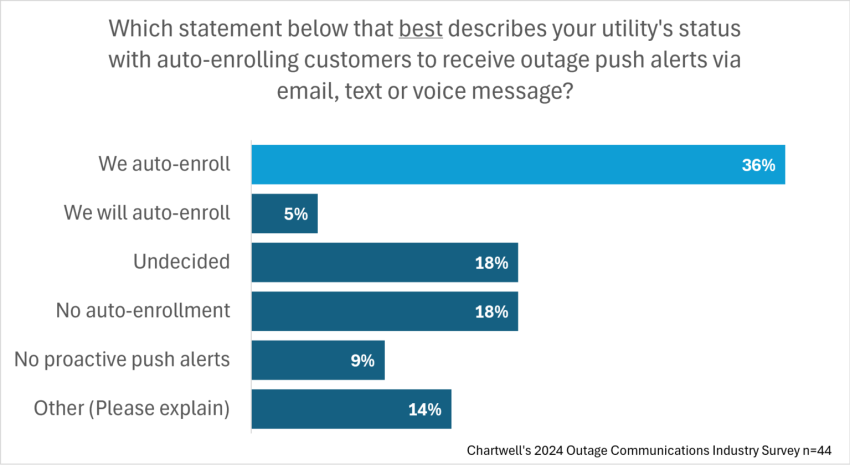
Chartwell research found that 92% of surveyed customers approved of automatic outage alerts. The same research found that 70% of residential consumers were comfortable receiving power outage notifications without signing up, while 22% were neutral.
Promotional campaigns
Businesses and event organizers use voice messages to share limited-time offers, event details, or registration reminders.
A retailer might send a coupon to customers who opted into promotional calls. An event organizer might call registered attendees with a schedule change. A political campaign might use automated calls to provide a rally time and location.
Marketing calls require careful consent management and compliance with applicable federal and state rules. A campaign should also provide a clear opt-out method.
Surveys and feedback
A voice campaign can collect feedback after a purchase, service interaction, appointment, or support case.
For example:
Press 1 if you were satisfied or 2 if you were not.
An interactive voice response system records keypad responses without requiring a human agent. Organizations can use the results to calculate customer satisfaction scores, identify service problems, or trigger an agent callback.
Sales, collections, and customer follow-up
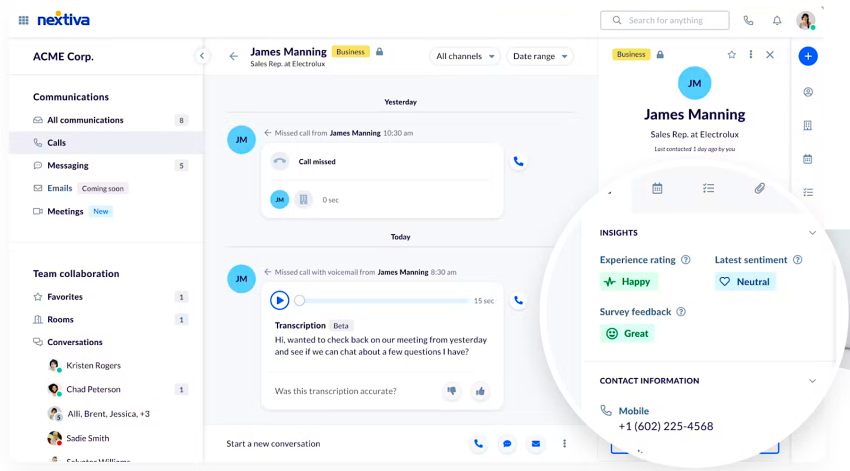
Outbound call center software supports agent-led calls for sales, collections, renewals, and customer service. A business can use a broadcast to notify a large group, then route interested recipients to an agent or follow up through SMS.
Broadcast dialing delivers a prerecorded or TTS message without requiring an agent for every call.
Power dialing calls the next contact when an agent becomes available.
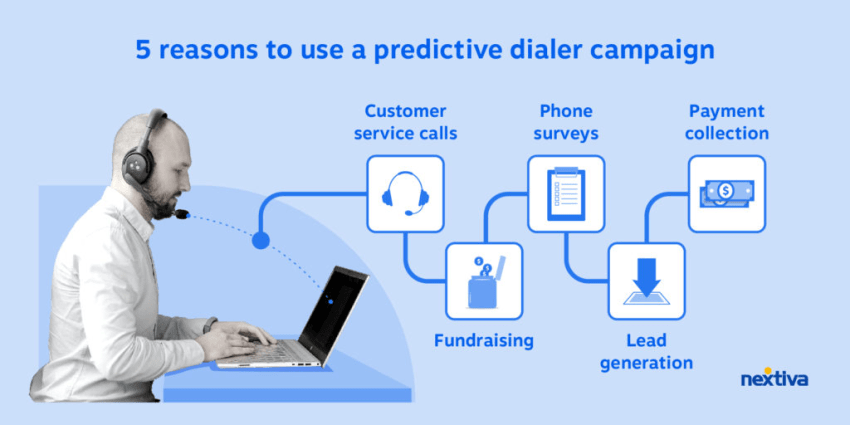
Predictive dialing places calls at a faster pace based on agent availability and expected answer rates.
Progressive dialing places the next call when an agent is ready to handle a live answer.
Preview dialing gives the agent time to review customer information before calling.
How Voice Broadcasting Works
A voice broadcast campaign usually runs through a cloud contact center or CPaaS platform.
1. Create a message
Record an audio message or create a TTS recording from a written script. Include only the information recipients need.
Use approved merge fields for details such as:
- Customer name
- Appointment date
- Order number
- Service address
- Event location
- Callback number
Test pronunciations, numbers, dates, and names before launch. A poorly pronounced name or unclear instruction can reduce trust and increase call abandonment.
2. Upload and manage contact lists
Import a list from a CRM, database, spreadsheet, or business application. The list usually includes phone numbers and any fields required for personalization.
Before launch:
- Remove duplicate records.
- Validate phone numbers.
- Segment contacts by location, customer type, or campaign purpose.
- Exclude opted-out contacts.
- Check the list against applicable do-not-call requirements.
- Confirm that the campaign has the required consent.
3. Configure the campaign
Set the campaign rules before dialing begins. Common settings include:
- Date and time
- Allowable calling hours
- Caller ID
- Primary and alternate numbers
- Retry rules
- Voicemail behavior
- Keypad prompts
- Routing and callback actions
- SMS or email follow-up
- DNC exclusions
- Geographic or customer segments
A local number may improve recognition, but caller ID should accurately represent the organization and comply with applicable rules. See Caller ID Reputation: How to Avoid Being Flagged as Spam for related guidance.
4. Dial the contact list
When the campaign starts, the platform dials contacts in parallel. Cloud voice trunks or telephony hardware can support multiple calls at the same time.
The system records each call outcome:
- A person answers and hears the message.
- An answering machine receives the message.
- The number is busy or unreachable.
- The call fails because the number is invalid or disconnected.
- The recipient presses a key.
- The recipient requests a callback.
The platform can retry unanswered contacts according to the campaign rules. It should avoid repeated attempts that create a poor customer experience or violate calling restrictions.
5. Detect the call outcome
Answering-machine detection helps determine whether a person or voicemail system answered. The platform can then take a defined action, such as:
- Play the full message.
- Leave a voicemail after the beep.
- Schedule a callback.
- Mark the record as unreachable.
- Create a task for an agent.
- Send an SMS follow-up.
- Update the CRM disposition.
Some platforms also use speech analytics to identify a live answer, voicemail, or selected phrases.

6. Enable interaction
Interactive campaigns ask the listener to press a key. For example:
Press 1 to confirm, 2 to cancel, or 3 to repeat this message.
The system captures the response and triggers the configured action. A business can use this approach for confirmations, surveys, RSVPs, opt-outs, and callback requests.
7. Review reports
Campaign reports show how the message performed. Useful metrics include:
- Calls placed
- Calls answered by a person
- Calls answered by voicemail
- Unanswered and failed calls
- Invalid numbers
- Retry outcomes
- Keypad responses
- Callback requests
- Completion rates
- Conversion or appointment rates
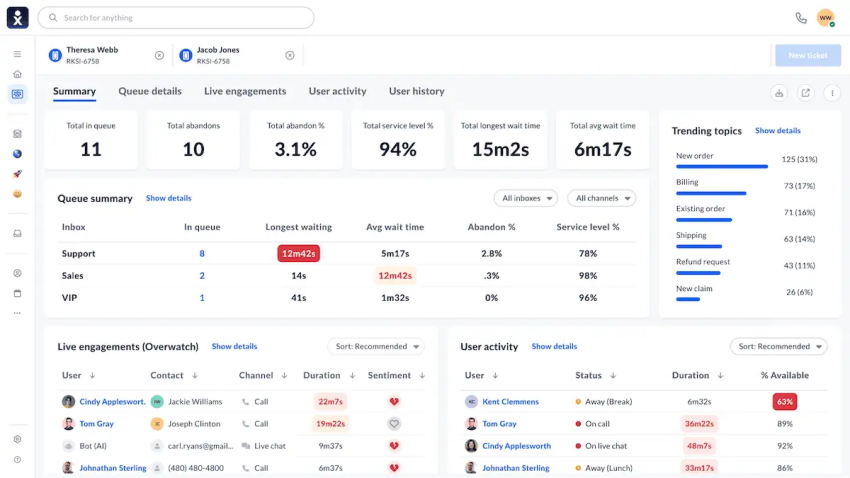
Nextiva Contact Center reporting can capture dials, connections, call duration, outcomes, answering-machine results, IVR callbacks, errors, and dispositions. These results help managers improve lists, schedules, scripts, and follow-up rules.
Outbound Dialing Modes and Agent Workflows
Voice broadcasting is part of a wider outbound communication category. Choosing the right dialing mode depends on the campaign’s volume, conversation requirements, compliance needs, and agent capacity.
| Mode | Best fit | How it works | Agent requirement |
|---|---|---|---|
| Broadcast | Alerts, reminders, surveys, and announcements | Sends a prerecorded or TTS message to many contacts | Optional |
| Power | Sales, renewals, and customer follow-up | Calls the next number when an agent is free | Agent handles live answers |
| Predictive | High-volume sales or collections | Places multiple calls based on expected agent availability | Agents handle connected calls |
| Progressive | Controlled outbound campaigns | Places the next call when an agent is ready | Agent is available before connection |
| Preview | Complex or personalized accounts | Shows customer information before the agent calls | Agent reviews the record |
| Manual or click-to-call | High-value conversations | Agent selects each number | Agent controls each call |
Nextiva’s power dialer can skip unanswered, busy, voicemail, and disconnected lines. It can also support voicemail drops, SMS follow-up, task creation, note-taking, and campaign analytics.
What outbound call center software should support
A business evaluating outbound software should look for these capabilities:
- Campaigns organized by queue, team, agent, and workflow
- Contact-list import and segmentation
- CRM and business application integrations
- Answering-machine detection
- Voicemail drops
- Callback scheduling
- SMS and email follow-up
- Call dispositions and notes
- CRM record updates
- Keypad and IVR interactions
- Call recording and transcription
- Campaign and agent reporting
- DNC list management
- Calling-hour and area-code controls
- Caller ID monitoring
- Consent records and opt-out handling
- Mobile access for distributed teams
Campaign Workflows for Common Use Cases
A defined workflow connects the trigger, contact list, dialing mode, call outcome, and follow-up action.
Appointment reminders
- Trigger: A scheduled appointment approaches.
- Contact list: Patients or customers with upcoming appointments.
- Dialing mode: Voice broadcast.
- Live answer: Play the date, time, location, and confirmation prompt.
- Voicemail: Leave the reminder when permitted.
- Disposition: Confirmed, canceled, reschedule requested, or unreachable.
- Follow-up: Send an SMS link or create a callback task.
Sales outreach
- Trigger: A qualified lead enters the CRM.
- Contact list: Leads assigned to a sales queue.
- Dialing mode: Power, progressive, predictive, or preview dialing.
- Live answer: Connect the customer with an available agent.
- Voicemail: Leave a compliant voicemail drop.
- Disposition: Connected, interested, not interested, callback requested, or wrong number.
- Follow-up: Send an SMS, create a task, or schedule the next call.
Customer surveys
- Trigger: A support case or purchase closes.
- Contact list: Customers with a completed interaction.
- Dialing mode: Voice broadcast with IVR.
- Live answer: Ask one or more keypad questions.
- Voicemail: Leave a short survey invitation when appropriate.
- Disposition: Completed, declined, unanswered, or callback requested.
- Follow-up: Route negative feedback to a service team or update the customer record.
Collections and renewals
- Trigger: An account reaches a payment or renewal milestone.
- Contact list: Customers with an approved outreach status.
- Dialing mode: Progressive or preview dialing for agent conversations, or broadcast for approved reminders.
- Live answer: Provide account information and route to an agent when needed.
- Voicemail: Leave an approved callback message.
- Disposition: Payment made, promise to pay, dispute, callback, or no contact.
- Follow-up: Send an SMS payment link or create a task.
Outage and emergency alerts
- Trigger: An outage, weather event, evacuation, or service disruption occurs.
- Contact list: Customers or residents in the affected area.
- Dialing mode: Voice broadcast.
- Live answer: Play the alert and instructions.
- Voicemail: Leave the full message or a callback number.
- Disposition: Delivered, unanswered, invalid number, or callback requested.
- Follow-up: Send an SMS status page link or update the campaign after restoration.
Key Benefits of Voice Broadcasting
Broad reach
A broadcast can contact thousands of people within minutes without requiring an agent to dial each number. Geographic and customer segments help organizations target the right audience.
No internet requirement for recipients
Recipients need a landline or mobile phone, not an internet connection or mobile app. This makes voice useful for rural communities, older populations, and areas with disrupted internet access.
Lower operational cost
Automated calls reduce the agent time required for repetitive announcements and reminders. Agents can focus on calls that need explanation, judgment, or account-specific support.
Personalized messages
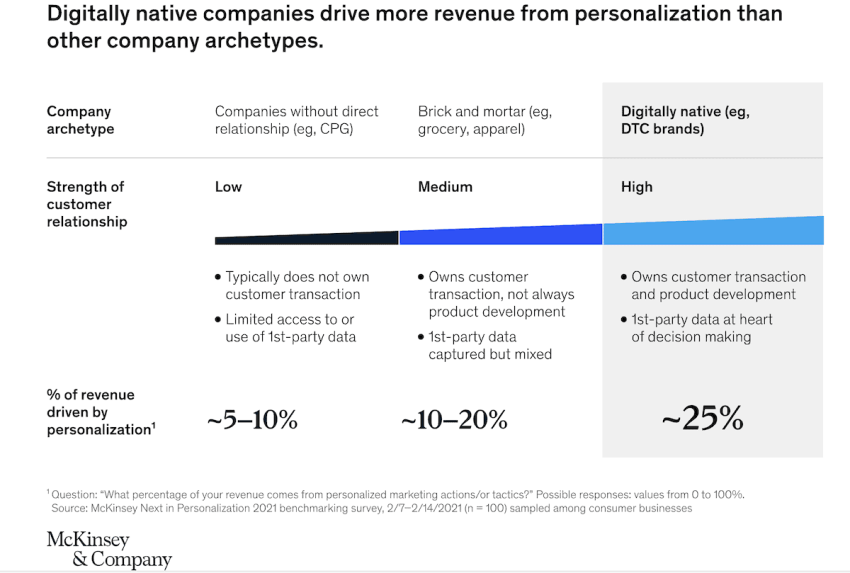
Merge fields can add names, dates, locations, and account details to a TTS script. A McKinsey study found that companies that excel at personalization see average revenue increases of up to 15%.
Faster follow-up
A campaign can trigger an SMS, callback, task, CRM update, or agent transfer after a call. This connects a broadcast to the next step in the customer journey.
Reporting and accountability
Campaign data shows which contacts answered, listened, responded, or required another action. Managers can use the results to adjust the message, schedule, contact list, and routing rules.
Compliance support
The Telephone Consumer Protection Act (TCPA) regulates prerecorded calls, telemarketing, automatic telephone dialing systems, and artificial or prerecorded voice messages. The Federal Communications Commission states that telemarketers generally need prior express written consent before making telemarketing calls with an autodialer or prerecorded voice.
Software can support compliance by:
- Scrubbing contact lists against DNC registries
- Blocking calls outside approved hours
- Validating legal calling hours by area code
- Monitoring caller ID
- Recording consent and opt-out activity
- Providing keypad-based opt-out options
- Maintaining campaign and message records
Nextiva documentation describes automatic DNC scrubbing for imported lists, recurring checks against the National Do Not Call Registry, time-of-day blocking, caller ID monitoring, and legal-hours validation. Businesses remain responsible for obtaining valid consent and following federal, state, and industry-specific rules.
Nextiva doesn’t offer legal advice. Please consult with a legal expert to ensure that you’re adhering to all applicable regulations and laws.
Need more clarity on TCPA guidelines? Use this checklist to ensure you’re adhering to the regulations.
Integrating Voice Broadcasting With Other Channels
Most organizations use voice alongside email, SMS, app notifications, live chat, and in-person service.
For example, Deloitte advises government agencies to provide phone, website, and chatbot channels because people have different preferences when they engage with institutions.
A hospital announcing a flu shot clinic might use:
- Email for broad awareness
- SMS with a scheduling link
- Voice broadcasting for direct outreach
- Automated calls for appointment reminders
- Live agents for complex questions
This omnichannel strategy connects each interaction to the broader customer journey. An Aberdeen Group study found that companies with strong omnichannel engagement retained about 89% of customers, compared with 33% for companies with weaker multichannel efforts.
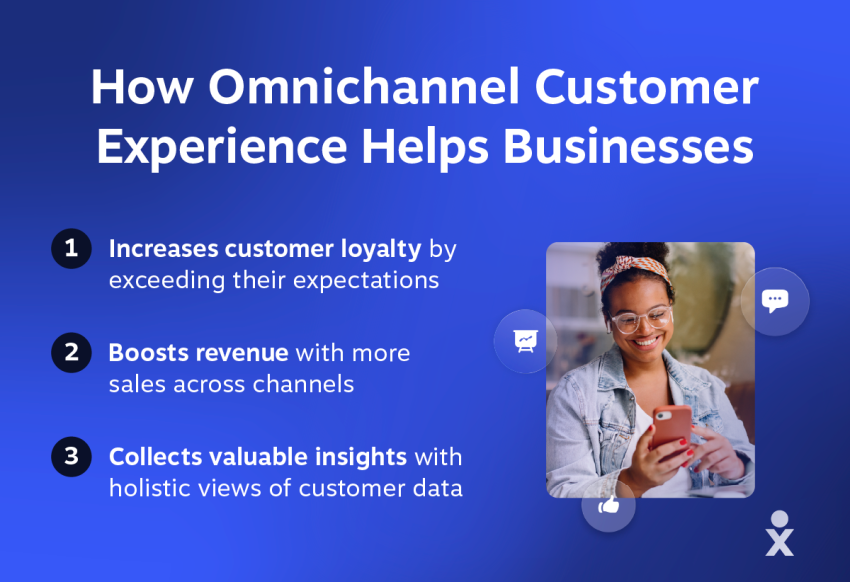
Voice broadcasting fills communication gaps that email or SMS may miss. SMS can provide a link, while a voice call can deliver urgency and context. A live agent can handle the conversations that require judgment.
Best Practices for Voice Broadcast Campaigns
Segment the audience
Use location, behavior, account status, appointment type, or customer need to create focused lists.
For example, a clinic might send flu shot reminders to patients over age 65 or patients with specific health conditions. Separate campaigns make it easier to match the message, calling time, and follow-up action to each group.
Keep the message concise
Aim for fewer than 30 seconds of spoken content. A concise message should:
- Identify the sender.
- State the reason for the call.
- Provide one clear action.
For example:
This is [Name] from [Organization]. Your appointment is scheduled for tomorrow at 3 PM. Press 1 to confirm, or call 555-124-6000 to reschedule.
Use one clear call to action
A recipient should know what to do after hearing the message. Possible actions include:
- Press 1 to confirm.
- Press 2 to reschedule.
- Call the displayed number.
- Visit a website.
- Reply to an SMS.
- Wait for an agent transfer.
Multiple competing instructions can reduce response rates and increase confusion.
Test the complete call flow
Run a small test campaign before contacting the full list. Check:
- Recording clarity
- Volume
- Pronunciation
- TTS naturalness
- Merge fields
- Keypad prompts
- Voicemail behavior
- Caller ID
- Routing
- SMS and callback actions
Test both live-answer and voicemail scenarios.
Respect calling rules
Confirm consent, calling hours, DNC status, caller ID, message content, and opt-out handling before launch. Keep records that show why the organization contacted each recipient.
Review reports after every campaign
- Answer rates
- Voicemail rates
- Failed numbers
- Drop-off rates
- Keypad responses
- Callback requests
- Performance by time of day
- Results by segment
- Disposition accuracy
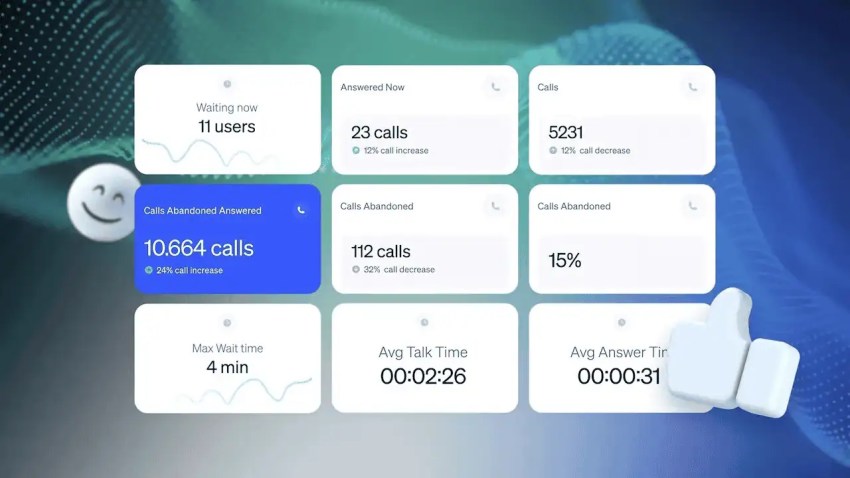
If pickup rates are low at a particular time, adjust the schedule. If recipients press a key because the instructions are unclear, simplify the prompt. If many records fail, clean the list before the next campaign.
Choosing an Outbound Platform
The right platform depends on the organization’s call volume, agent workflow, channel mix, integrations, and compliance requirements.
| Evaluation area | Questions to ask |
|---|---|
| Use case | Does the platform support reminders, alerts, surveys, sales, collections, or mixed campaigns? |
| Dialing modes | Does it provide broadcast, power, predictive, progressive, and preview dialing where needed? |
| Agent capacity | How many agents, queues, campaigns, and concurrent calls does the plan support? |
| Automation | Can the platform detect voicemail, schedule callbacks, send SMS, create tasks, and update records? |
| Integrations | Does it connect with the CRM, appointment system, help desk, payment system, and reporting tools? |
| Reporting | Can managers see answer rates, dispositions, conversions, callbacks, and failed calls? |
| AI features | Does it support TTS, transcription, speech analytics, or agent assistance where appropriate? |
| Scalability | Can the organization add users, contact lists, locations, and channels without changing platforms? |
| Compliance | Does it support consent records, DNC scrubbing, legal calling hours, caller ID controls, and opt-outs? |
| Pricing | Are charges based on users, minutes, campaigns, features, or a combination? |
Frequently compared outbound platforms include Nextiva, Five9, Genesys, Dialpad, RingCentral, CloudTalk, AVOXI, CallHub, JustCall, PhoneBurner, and other contact center and sales engagement tools. Their suitability depends on the required dialing modes, agent workflows, integrations, reporting, and compliance controls.
Nextiva, a unified customer experience platform, supports business phone service, outbound calling, contact center workflows, automated dialing, SMS, CRM integrations, and customer journey management. Its contact center solutions provide tools for managing customer communications and outbound workflows.
Better Outbound Communications With Nextiva
Nextiva’s unified CX platform connects voice, SMS, email, and other channels in one interface. Nextiva Contact Center supports outbound campaigns, agent-assisted calling, voice broadcasting workflows, routing, reporting, and follow-up automation.
Businesses can use Nextiva to:
- Send voice broadcasts for reminders and alerts
- Detect answering machines and record outcomes
- Schedule callbacks and create agent tasks
- Send SMS follow-ups
- Update CRM records and dispositions
- Review campaign performance
- Combine voice with other customer communication channels
Voice broadcasting works best when it connects to the next customer action. A confirmation can update an appointment, a survey response can create a service task, and a missed sales call can trigger an SMS follow-up.
Explore Nextiva, and find out how to deliver exceptional CX at scale.
The customer experience solution teams love.
See first-hand how Nextiva’s customer experience solution can level up your customer journey.
FAQs
The right outbound call center software depends on the campaign. A business should compare dialing modes, agent limits, integrations, automation, reporting, scalability, pricing, and compliance controls. Nextiva fits organizations that need outbound calling alongside broader customer communication workflows.
The best power dialer depends on the team’s call volume, CRM, agent workflow, and follow-up needs. A suitable power dialer should call the next contact when an agent is free, skip invalid or unanswered records, support voicemail drops and SMS, create tasks, and report on outcomes. Nextiva’s power dialer supports these outbound workflow requirements within its broader business communications and contact center platform.
An outbound contact center platform can automate customer follow-up after a call. Nextiva supports follow-up actions such as callbacks, voicemail drops, SMS messages, task creation, notes, dispositions, and CRM updates. The required action can depend on whether the call reached a person, voicemail, or an invalid number.