Customer Experience
  Blog
Blog  Business Communication
  Leadership
  Marketing & Sales
  Nextiva News
  Productivity
  VoIP
VoIP 

Twilio Flex can look appealing on paper: flexible pricing, customizable workflows, and the ability to build a contact center around your exact needs. For the right business, that level of control may be worth the investment.
But the real question is not just how Twilio Flex is priced. It’s whether the total cost of the platform, including setup, integrations, and ongoing management, delivers enough value compared with a more out-of-the-box CCaaS option.
In this article, we’ll break down Twilio pricing, explain the extra costs buyers should watch for, and compare Twilio Flex with Nextiva to help you decide which platform is the better fit.
Twilio Flex Pricing Explained
Twilio Flex offers two main pricing plan models:
- Per-hour pricing (starts at $1 per active user hour)
- Per-user pricing (starts at $150 per named user per month)
Twilio also offers a free trial with 5,000 active user hours.
That pricing structure is a little different from many CCaaS providers, which usually present contact center software as a flat monthly per-user subscription with a set bundle of included Twilio Flex features. It’s still a contact center platform, but its pricing is designed to give businesses more choice in how they pay depending on staffing patterns and usage.
The two main pricing options
The main appeal of Twilio Flex pricing is flexibility. Businesses can choose a model based on how often agents are active and how predictable monthly spend for usage is likely to be.
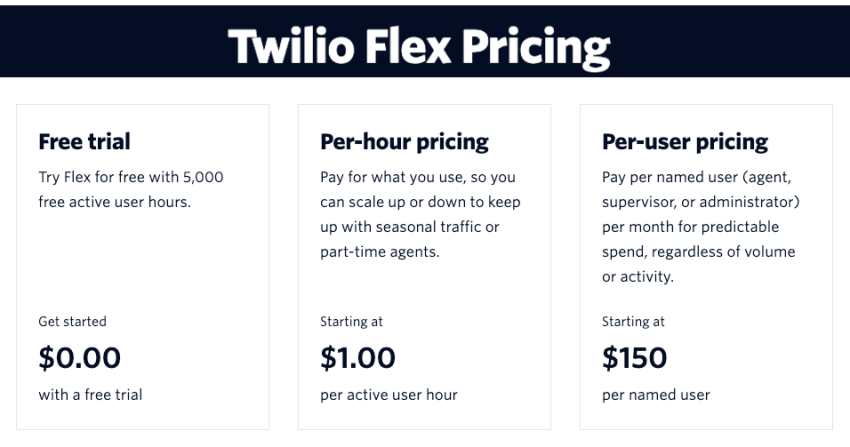
For teams with fluctuating demand, the Active User Hour model can be appealing because you pay only for the time agents are actively using Flex.
For teams with steady usage and consistent staffing, the Named User model may be easier to budget because it uses a fixed monthly rate per user.
As a general rule, the per-hour model makes more sense for part-time, seasonal, or variable-volume teams. The per-user model is usually a better fit for larger or more stable operations that want more predictable monthly software costs.
Pricing option 1: Per-hour pricing (active user hour model)
Twilio’s per-hour pricing starts at $1 per active user hour. This model is designed for businesses that want to scale usage up or down without paying for a full monthly seat for every agent. Twilio specifically positions it for seasonal traffic and part-time agents.
This can be a cost-effective option for smaller teams or contact centers with uneven demand. But it is important to remember that the Flex platform fee is not always the only cost. Depending on your setup, businesses may also need to pay for communications usage such as voice, SMS, or WhatsApp on top of the Flex license.
Twilio’s current U.S. starting rates include:
- $0.0140 per outbound call minute
- $0.0085 per inbound calls minute
- $0.0083 per SMS
- $0.005 per WhatsApp message
That means the total cost of Twilio Flex depends not just on agent activity, but also on which channels you use and how heavily you use them.
Volume discounts and usage considerations
Twilio does offer automatic volume discounts on some usage-based services. For example, U.S. SMS pricing drops from $0.0083 for the first 150,000 messages to $0.0081 for the next 150,000, with additional tiered reductions at higher volumes. Twilio also offers lower monthly rental rates for phone numbers above certain thresholds, such as more than 1,000 numbers.
These discounts can help high-volume operations lower their per-message or per-minute costs over time. But for lower-volume teams, the savings may not be large enough to materially change the total cost picture.
Pricing option 2: Per-user pricing (named user model)
Twilio’s per-user pricing starts at $150 per named user per month. This model is designed for businesses that want predictable spend regardless of contact volume or activity.
Twilio also clarifies that named-user billing includes agents, supervisors, administrators, and developers, and that customers are billed for the maximum number of named users on the account during a given month. In most cases, Twilio does not prorate mid-month seat additions or deletions, which is important for buyers comparing Flex with other CCaaS platforms.
Contract terms and billing considerations
Twilio Flex gives buyers two very different pricing paths, and the contract implications are not exactly the same. Twilio says its per-user pricing (the Named User model) is a contract-based option and is what it refers to as per-month pricing. By contrast, the per-hour pricing (the Active User Hour model) is positioned as the more flexible usage-based route.
Twilio does not publicly present a standard Flex minimum spend on its pricing page. So while named-user pricing may offer more predictable budgeting, buyers will likely need to speak with sales to understand any commercial commitments tied to their specific deployment.
Free trial details
Twilio offers a free trial of 5,000 active user hours. This means you can fully test out the pros and cons of Twilio Flex without spending a cent. But once you select a billing model, any remaining free hours expire.
And, of course, there are restrictions on what you can do here. Access is limited to base functionality across the entire Twilio portfolio.
For example, Twilio currently lists Agent Copilot separately at $0.035 per voice minute or $0.005 per digital message, and notes that additional professional services may be required for deployment.
Why Twilio Flex pricing appeals to some teams
Twilio Flex pricing appeals to teams that want more flexibility than a standard per-user monthly contract.
Its Active User Hour model can work well for seasonal traffic, part-time agents, or uneven staffing, while the Named User model offers a more predictable monthly option.
The tradeoff is that added channel charges, seat rules, and add-on services can make total cost less straightforward than with a more bundled CCaaS platform.
Which pricing model makes sense?
| Pricing model | Base price | Best for | Main advantage | Main drawback |
|---|---|---|---|---|
| Active User Hour | $1 per active user hour | Small teams, seasonal staffing, part-time agents, fluctuating demand | Pay only for actual agent activity | Costs can become less predictable at higher usage |
| Named User | $150 per named user/month | Stable teams, full-time agents, larger operations | Easier budgeting and forecasting | Can be expensive for low-usage or occasional users |
How Much Does Twilio Flex Cost in Practice?
In practice, Twilio Flex starts with two base pricing models: $1 per active user hour or $150 per named user per month. These examples show how that might look at different team sizes. They are software-license examples only and do not include possible extra costs such as voice, messaging, integrations, or implementation.
Example cost for a small support team
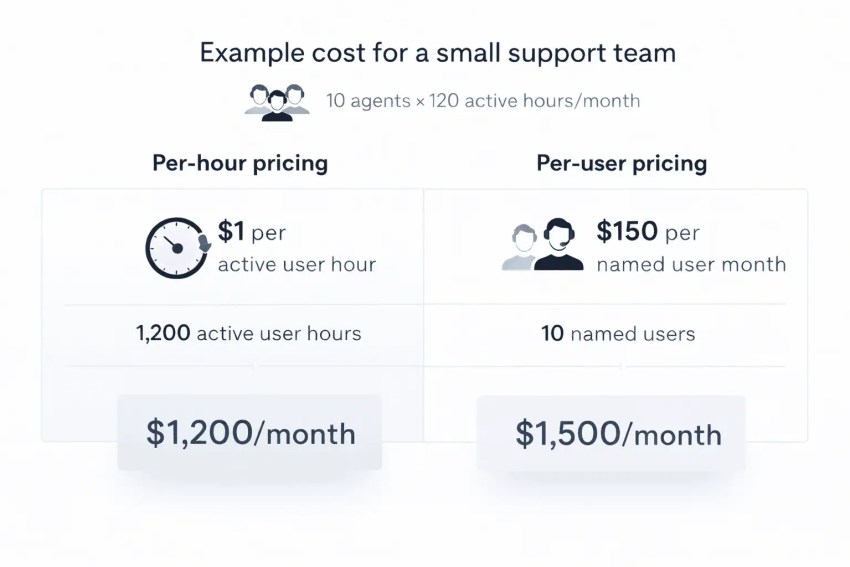
A small support team with 10 agents working about 120 active hours each per month would use roughly 1,200 active user hours. At $1 per active user hour, that comes to about $1,200/month. Under named-user pricing, the same team would cost about $1,500/month. In that scenario, hourly pricing is cheaper.
Example cost for seasonal or part-time agents
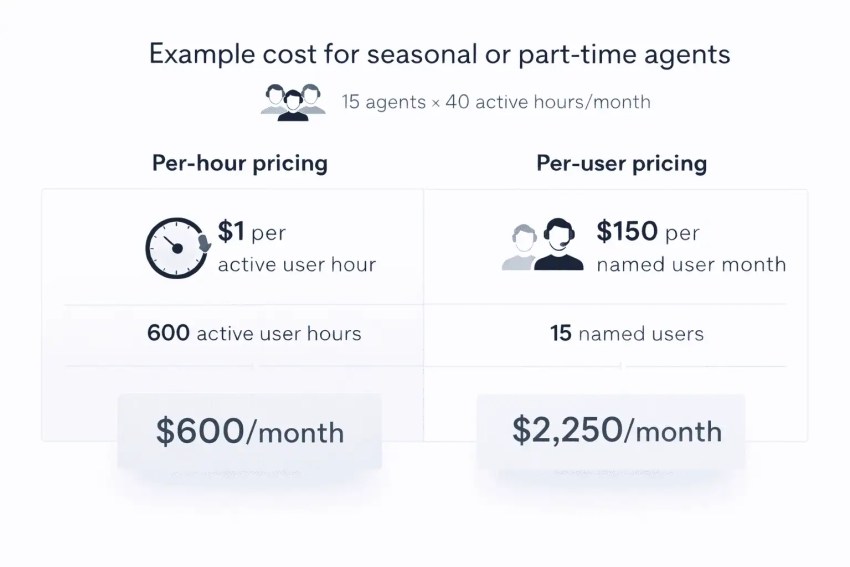
If you have 15 part-time or seasonal agents working about 40 active hours each per month, that equals 600 active user hours, or about $600/month on hourly pricing. The same 15 users on named-user pricing would cost about $2,250/month. This is the kind of use case Twilio explicitly points to when it says hourly pricing is meant for seasonal traffic or part-time agents.
Example cost for a large or enterprise team
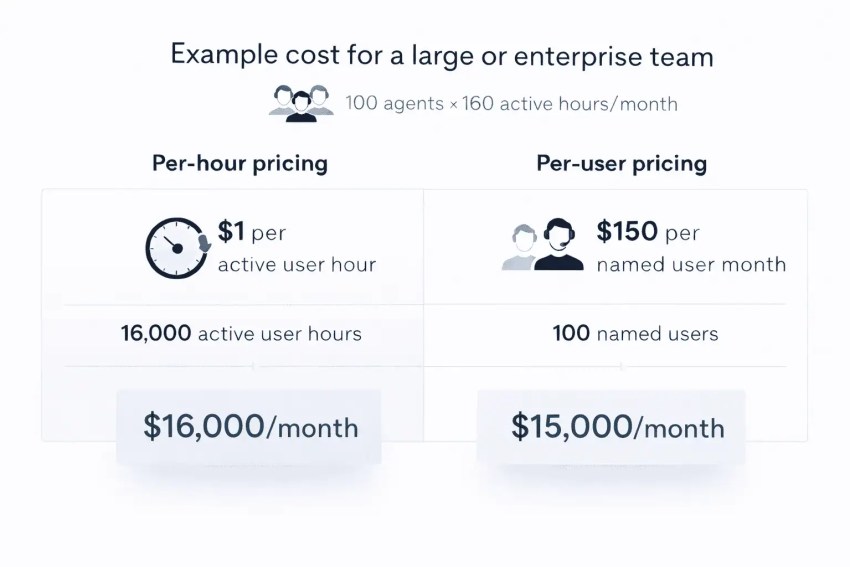
A large or enterprise team with 100 agents each active for about 160 hours per month would use around 16,000 active user hours. That would be about $16,000/month on hourly pricing. Under named-user pricing, 100 named users would cost about $15,000/month. At that level, per-user pricing starts to look more attractive.
When hourly pricing beats per-user pricing (and vice versa)
The break-even point is simple: at 150 active hours per user per month, both models cost about the same, since 150 hours × $1 = $150. Below that, hourly pricing is usually cheaper. Above that, named-user pricing usually wins on base software cost.
There is one important caveat: Twilio says named-user billing is based on the maximum number of provisioned named users during the month, not just the number actively logged in. So teams that provision lots of seats but do not use them consistently may still prefer the hourly model.
What’s Included in Twilio Flex Pricing – and What Costs Extra
Twilio Flex’s headline pricing only tells part of the story. While the platform offers flexible usage-based and monthly pricing, the total cost can rise depending on your channel usage, implementation needs, integrations, and ongoing maintenance.
Core platform access
The base Flex license covers access to the Flex contact center platform itself, including the core framework for agent workflows, routing, channels, and customization. Twilio’s documentation describes Flex as a programmable contact center with tools such as the Flex UI, Plugin Builder, and Flex Insights.
Voice, SMS, and channel usage costs
Add a short explanation that usage charges for communications services may affect total spend beyond the platform fee.
The Flex license is not always the full cost. Twilio notes that some channel-specific charges may still apply depending on what you use. For example, Twilio’s current public pricing includes separate usage rates for voice, SMS, and WhatsApp, and its Flex FAQ notes that some messaging types are included while others, such as certain WhatsApp template messages, are billed separately.
Implementation and onboarding costs
A major selling point of Twilio Flex is its customizability. But building a tailored contact center environment often requires upfront investment in setup and deployment.
Twilio does not publish a universal implementation fee, since set-up costs vary by use case and complexity. Businesses planning a new rollout should account for this as part of the total cost of ownership.
Twilio notes that the following builds are custom for each Flex deployment:
- Self-service flows such as IVR
- Routing strategy
- Channel configuration
- User interface extensions and plugins
- Integrations and API/SDK work
Integration and customization costs
Integrating Twilio Flex with systems such as Salesforce can add cost depending on the systems involved and the level of customization required. Twilio does offer some existing integrations, including a documented Flex-Salesforce integration, but it also positions Flex as a platform that can be extended and integrated through APIs, plugins, and custom development.
In practice, that means integration costs can go beyond the base software price, especially when businesses need custom CRM, ERP, or workflow connections.
Ongoing admin and maintenance costs
Because Twilio Flex is built for customization, businesses may also need to budget for ongoing technical support, workflow updates, plugin maintenance, integration upkeep, testing, and administrative overhead after launch.
Twilio’s own build and deployment resources emphasize continuing work around configuration, deployment, and verification rather than a simple one-time setup.
What Features Do You Get With Twilio Flex?
Twilio Flex provides extensive phone system features and customization options, allowing businesses to tailor workflows, user interfaces, and communication routing according to specific needs.
Twilio Flex includes:
- Voice
- Digital channels (SMS, Facebook Messenger, WhatsApp, WebChat, in-app chat, email, and video messaging)
- Low-code IVR builder
- Routing engine
- User interface framework
- Out-of-the-box reports
You also get access to supervisor tools like:
- Real-time and historical reports
- Team and agent status
- KPI dashboard and custom metrics
- Agent evaluations
For developers, where Twilio Flex really comes into its own, you get:
- JS/React UI framework
- Visual workflow builder
- Plugins dashboard
- Flex debugging
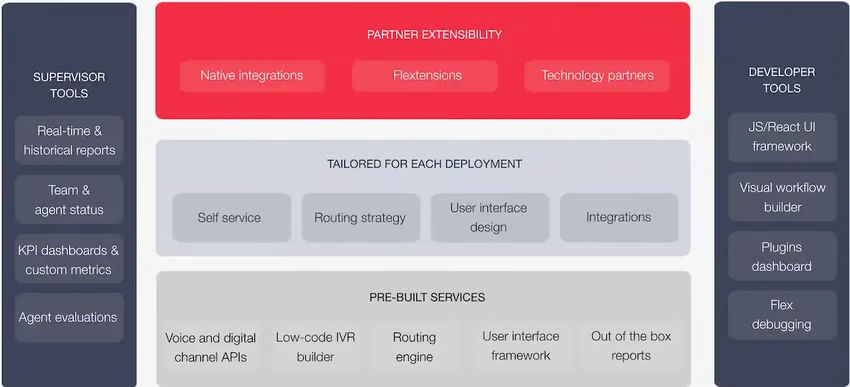
With this customizable feature set, it’s easy to see why customers with extremely narrow requirements opt for Twilio Flex. It has more predictable pricing and most of the flexibility of Twilio’s core composable solution.
However, for those with less of a need for customization, it’s often overkill.
Who Is Twilio Flex Best For?
In general, Twilio Flex may be best-suited for:
- Developer-led teams building custom environments: Twilio Flex is best for organizations that want to shape the contact center around their own workflows, channels, and integrations. Twilio positions Flex as a highly customizable platform built for teams with technical resources.
- Enterprises with complex or non-standard workflows: Flex is also a good fit for larger businesses that need custom routing, multiple channels, or deeper integrations with platforms like Salesforce and Zendesk.
- When Twilio Flex may not be the right fit: It is usually less ideal for businesses that want the fastest set-up, the most predictable costs, or a more packaged out-of-the-box CCaaS platform.

Twilio Flex vs. Nextiva: Which Offers Better Value?
Choosing between Twilio Flex and Nextiva often comes down to what kind of contact center you want to run.
Twilio Flex is built for teams that want deep customization and are comfortable shaping the platform around their own workflows.
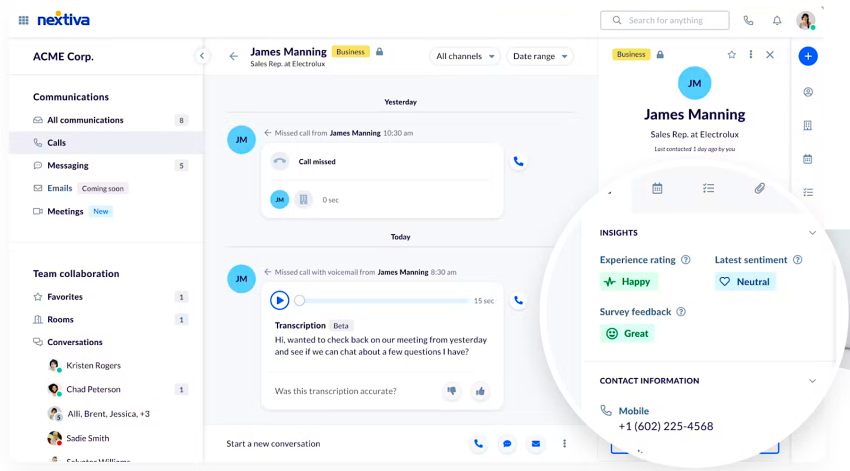
Nextiva, by contrast, is geared more toward businesses that want packaged communications functionality, simpler deployment, and easier cost forecasting.
Pricing structure and predictability
Twilio Flex offers two pricing models: $1 per active user hour or $150 per named user per month. That flexibility can work well for teams with seasonal demand or variable staffing.
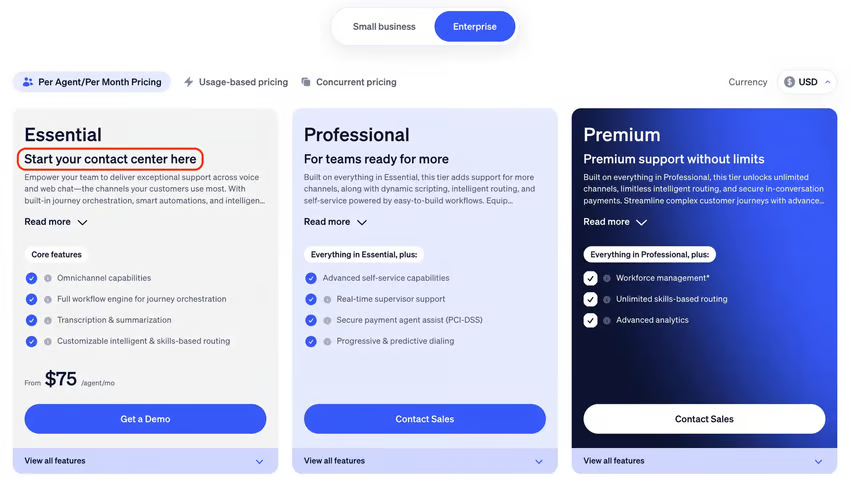
Nextiva is generally easier to budget because it uses more conventional per-user pricing and packaged plans. Contact center pricing starts at $75 per user per month.
Included features vs. add-on costs
One of Nextiva’s clearest advantages is that it packages more capabilities into a ready-to-deploy platform. Its materials emphasize bundled communications and customer engagement features across voice, SMS, chat, email, and related workflows, depending on the plan.
Twilio Flex also supports omnichannel engagement, but its value is tied more to customization. As a result, total cost may depend more on the channels, integrations, and features you choose to build out.

Customization and developer flexibility
This is where Twilio Flex stands out. Twilio explicitly positions Flex as a platform you can shape around the customer experience that your business needs, using APIs, SDKs, customer data orchestration, and integrations.
Nextiva is usually the stronger option for businesses that do not want to build that much themselves. Its value comes less from open-ended customization and more from offering a more standardized platform that can be deployed with less technical assembly.
Ease of deployment and ongoing admin overhead
For many contact centers, speed to launch matters as much as feature depth. Twilio Flex can absolutely support sophisticated environments, but Twilio’s own set-up materials make clear that Flex deployments involve environment setup, configuration, and usage-based considerations across staging, test, and production environments.
Nextiva is more appealing for businesses that want a faster rollout and less administrative complexity. Its packaged-plan approach, ready-made interface, and bundled communications model are better aligned with teams that want to get agents live quickly without treating the contact center as a custom software project.
Support, onboarding, and time-to-value
Despite Twilio’s reputation as a leading communication platform, customer service can be a pain point for some, with issues such as long wait times, lack of clear communication, and difficulty getting a resolution.
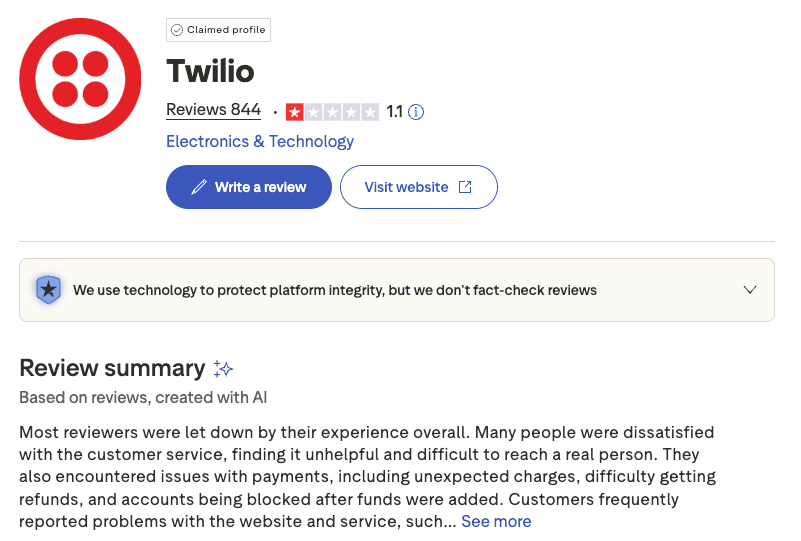
That is one reason many businesses prefer a more packaged CCaaS option: The path from purchase to production is often simpler.
Nextiva’s positioning consistently emphasizes fast setup and all-in-one communications, which may appeal to leaner teams that do not want to rely heavily on developers or outside implementation help.
Which teams should choose which platform?
- Choose Twilio Flex if: you need deep customization, have engineering resources, and want a contact center tailored to your workflows, channels, and data environment.
- Choose Nextiva if: you want more predictable costs, bundled capabilities, easier deployment, and a simpler day-to-day admin experience.
Nextiva’s Contact Center Solution
Twilio Flex is fine for developers, but not the right choice for everyone.
Twilio’s technology is programmable, which is desirable for large teams with big dreams. Twilio developers and customers have great technology at their disposal, but if something goes wrong, you may have trouble getting the help you need.
There’s a better alternative for your CCaaS platform and you don’t have to write any code or undertake a year-long engineering effort, either. Nextiva Contact Center offers rivaling technology, superior customer support, and better value for businesses needing to add or replace their contact center software.
When considering the enticing costs of Twilio Flex pricing, think about the bigger picture, too.
AI-Powered Contact Center
Create amazing customer experiences with AI-powered contact center software. Simplify your business operations. A scalable contact center platform built for omnichannel customer conversations.