VoIP
VoIP  Blog
Blog  Business Communication
  Customer Experience
  Leadership
  Marketing & Sales
  Nextiva News
  Productivity
Voice communication connects people to your business.
Customers and partners rely on it day in and day out. And you, in turn, rely on business communication tools to keep them connected. These systems cater to the needs of your teams, customers, and partners. When these needs evolve, you must adapt.
Businesses often compare Primary Rate Interface (PRI) and Session Initiation Protocol (SIP) when thinking about agility and scalability. They both help you connect to the telephone network, but in entirely different ways.
One is a legacy product from a local telephone company, while the other is much easier to scale. Dive deeper to know which technology best aligns with your needs.
What is the main difference between SIP and PRI?
The main difference is how SIP and PRI connect your phone system to the network. Primary Rate Interface (PRI) uses physical copper wires and hardware to support up to 23 voice channels per line. Session Initiation Protocol (SIP) uses your internet connection to create virtual phone lines, allowing for instant scalability, lower costs, and multimedia support (video/messaging).
What Is PRI?
PRI is a telecommunication standard that carries voice and data transmissions between a network and a user. It uses physical copper wires to digitally connect your business with the public switched telephone network (PSTN).
PSTN aggregates national, regional, and local telephone operators. Whenever someone calls you, the call enters a private branch exchange (PBX). An on-premises PBX is a private telephone network that professionals use within an organization to communicate with external and internal callers.
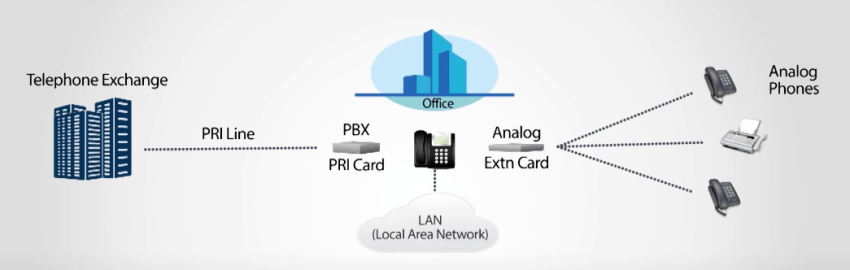
When the call reaches the PBX, an integrated services delivery network line or an analog copper line transmits to the receiver. However, if the receiver is busy, the call will go to voicemail. This helps businesses prevent callers from listening to a busy tone.
Large organizations and enterprises often use PRI lines to address the challenges of traditional phone service in business. It’s been the backbone of enterprise telephony for many years.
PRI features
Below are some notable features of the PRI telecommunication standard:
- Fixed number of voice channels: A PRI phone supports 23 bearer voice or data transmission channels, which means 23 communications can happen at the same time. These channels allow multiple calls to be made simultaneously and transmit voice, data, and video on the same line. The data transmission occurs at 64 Kbps per channel. It uplifts speed, makes communication reliable, and increases the security of a business voice communication system.
- Dedicated lines for voice and data: A PRI trunk offers a consistent level of service, and voice and data connection lines don’t traverse over the Internet but rely on the PSTN for connectivity.
PRI requirements
You need PRI-compatible equipment, such as a PRI gateway or a PBX with a PRI card, to interface with digital lines. It can work with analog or private automatic branch exchange systems.
Although PRI allows 23 simultaneous calls, you can increase the capability by adding additional PRI circuits when the number of calls increases.
What Is SIP?
SIP connects your Internet Protocol (IP) PBX to the internet. It lets you make and receive calls over the Internet.
SIP trunking is a scalable way to facilitate voice calls in businesses. Trunking consolidates multiple communication channels into a single virtual connection. It uses resources effectively while connecting to a telephone network.

💡Did you know? SIP is one specific protocol that enables Voice over Internet Protocol (VoIP).
SIP trunking makes voice accessible over the IP network, just like email or web services. It helps businesses move past traditional physical limitations toward IP phone communication. Overall, it makes your phone system digital and offers the flexibility to add and replace lines.
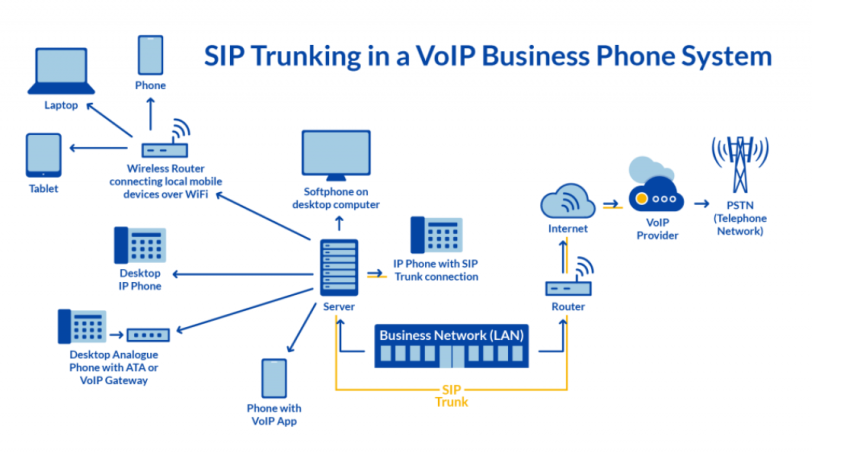
Key features of SIP
Below are some notable features of SIP:
- Doesn’t need separate phone lines: When people dial direct inward dialing (DID) numbers, the call is routed to a specific user instead of going to an auto-attendant or a queue. The incoming call goes to your PBX through SIP and gets routed to the receiver. It lets you have multiple phone numbers without separate phone lines.
- Integrates with other IP-based services: You can integrate SIP trunking with customer relationship management software, emails, and other conferencing services to enable unified communications.
- It‘s built on dependable network reliability: VoIP providers, such as Nextiva, maintain several points of presence, or data centers, to achieve the highest level of uptime and call quality. SIP sits atop reliable IP networks for maximum performance.
- Offers more flexibility in virtual connections: Unlike PRI, SIP allows for more flexibility in how calls are terminated. This is due to the virtual nature of call routing, phone numbers, extensions, and a network-agnostic approach to reaching the PSTN.
SIP trunking requirements
While switching to SIP trunking, you’re making a physical infrastructure virtual. You’ll need an Internet connection and a SIP-compatible PBX, also known as an IP PBX.
For desk phones, you’ll need a VoIP phone to connect to your PBX. If you’re using existing traditional phones, get a VoIP adapter. You’ll also need Internet access between your VoIP phones and your PBX server. Older PBX systems might need additional hardware and configuration.
Pros and Cons of PRI
PRI has upsides and downsides. However, these depend on your needs. Dive into some advantages and limitations to get more clarity.
PRI advantages
For organizations with specific legacy requirements or poor internet access, PRI still offers a few benefits:
- Dedicated bandwidth: Because PRI uses a physical hardwired connection, your voice traffic doesn’t compete with your office’s internet usage (like video streaming or large downloads). This guarantees a consistent dedicated channel for voice.
- Security through isolation: Since PRI lines are part of the closed Public Switched Telephone Network and not the open internet, they’re inherently isolated from common cyber threats like IP spoofing, though they can still be physically tapped.
- Direct inward dialing: A single PRI circuit allows for up to 50 DID numbers, meaning you can assign direct lines to employees without needing 50 separate physical phone lines.
PRI disadvantages
The downsides of PRI are becoming more critical as telecom carriers retire copper infrastructure:
- No disaster recovery: If a storm or construction accident cuts the physical wire to your building, your phones are dead. There is no automatic way to instantly reroute calls to mobile devices or a different office.
- The copper sunset and rising costs: As major carriers move away from maintaining physical copper lines, the cost of PRI maintenance is skyrocketing. Finding technicians with legacy telecom experience is becoming difficult and expensive.
- Rigid scalability: You cannot add just one phone line. PRI circuits come in fixed blocks of 23 channels. If you have 24 simultaneous callers, you must pay for a second full circuit (46 channels), resulting in a payment for unused capacity.
- Slow deployment: Adding new lines requires a service call and physical installation, which can take weeks.
Pros and cons of SIP trunking
If you need a cost-effective voice communication solution that’s easy to scale, SIP trunking is a suitable choice. However, there are advantages and disadvantages.
SIP advantages
For most businesses, SIP trunking offers superior flexibility and cost control:
- Instant scalability: SIP is virtual. If you hire a new salesperson or face a seasonal rush, you can add channels instantly through a software portal without installing new hardware.
- Built-in disaster recovery: If your office power goes out or the internet fails, SIP trunks can automatically failover and reroute calls to mobile phones or a secondary office, ensuring you never miss a customer call.
- Multimedia support: Unlike PRI, which only carries voice, SIP supports Unified Communications (UCaaS), allowing you to transmit voice, video conferencing, and instant messaging over the same connection.
- Lower operational costs: SIP eliminates the maintenance fees of physical lines. Furthermore, calls between offices (even international ones) are often treated as internal extension dialing, reducing long-distance charges.
SIP disadvantages
While powerful, SIP requires an advanced network environment to function correctly:
- Internet dependency: SIP relies on your internet connection. If your internet is slow or unstable, your call quality will suffer. (However, this is easily mitigated with Fiber internet or SD-WAN technology.)
- Security configuration: Because SIP connects via the internet, it requires proper security measures. You must use firewalls and Secure Real-time Transport Protocol (SRTP) to encrypt calls — features that are standard on platforms like Nextiva but require configuration on older systems.
- Hardware compatibility: If you have extremely old analog phones (20+ years old), you may need to purchase VoIP adapters (ATAs) or upgrade to IP phones to use SIP trunks effectively.
PRI vs. SIP Head-to-Head Comparison
| Feature | PRI | SIP trunking |
|---|---|---|
| Connection Type | Physical copper wires (T1/E1) | Virtual or internet connection |
| Scalability | Low: Must add lines in blocks of 23. | High: Add 1 channel at a time instantly. |
| Media Type | Voice only | Multimedia (voice, video, messaging) |
| Hardware | Requires on-premise cards/gateways. | Minimal (uses existing internet router). |
| Reliability | High (dedicated line), but no failover | High (with Fiber/SD-WAN) + auto-failover |
| Setup Time | Weeks (physical installation required). | Minutes (software configuration). |
| Cost Trend | Rising (legacy maintenance fees). | Dropping (competitive market). |
Thinking of Migrating From PRI to SIP?
Considering its benefits and features, the decision needle will likely sway toward SIP trunking. When you have made a decision, think about migration. Assess what you need so your team’s communications are seamless
Follow the steps below to make sure your PBX migration is successful.
1. Assess and plan
Assess your voice and data usage to determine the scope of SIP trunking services required. Check if your current network can support SIP. You should upgrade the Internet service and routers and make sure the quality of service matches your available bandwidth.
Then, investigate your PBX. See if it’s compatible with SIP calls or if you need a communication gateway.
2. Choose a SIP service provider
Go for a SIP provider that offers the right balance of cost, reliability, and support. See if it can scale with your business and offer features such as DID, call routing, and other functionalities per your needs.
Case Study: Elkhart Clinic chose Nextiva for SIP trunks to ensure their phones are reliable and they can easily communicate with patients, pharmacies, and providers.
3. Implement
Train your IT staff to manage the migration and troubleshoot any issues that might surface during the process. Then, port existing numbers to the SIP service of the new provider.
When the Adams Publishing Group migrated to Nextiva, they transitioned over 300 phone numbers. Nextiva provided temporary numbers to forward incoming phone calls to Nextiva devices while they were ported successfully.
4. Decide on post-migration support
Make a clear support agreement with your provider for future issues or any changes required after migration. You would need ongoing assistance to make the migration a success.
Choose a SIP provider that provides timely and consistent support. Check if they can train your employees and managers in the new processes and systems.
Nextiva Makes It Easy To Adopt Cloud Communications
If you are comparing SIP vs. PRI, you likely have an on-premise PBX (a server closet in your office) that you want to keep. Nextiva offers SIP trunking to modernize that equipment and cut costs.
However, many businesses are skipping SIP trunks entirely and moving to a hosted cloud phone system.
Why consider a full cloud switch? Why consider a full Cloud Switch? Instead of maintaining your old PBX hardware and just buying SIP lines for it, you can move the whole system to Nextiva. This eliminates maintenance contracts and gives you instant access to advanced features:
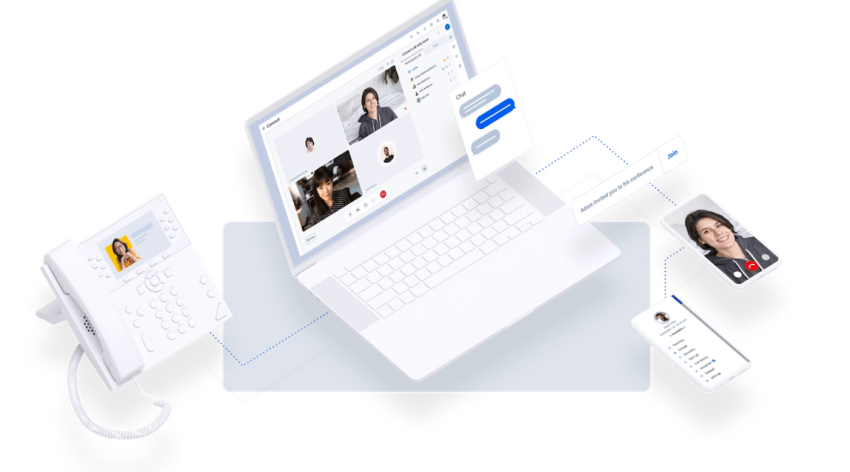
Although you might prefer your phone system’s traditional ring, the flexibility and scalability of the cloud make it the standard for modern business.
- Keep your PBX? Use Nextiva SIP trunking to cut costs and add reliability.
- Ready to upgrade? Move to Nextiva’s cloud phone system to unify your voice, video, and customer experience in one app.
Check out how Nextiva can improve your team’s productivity and lower your calling costs by up to 60%.
The best cloud phone system businesses love.
Get cloud-based VoIP, SMS messaging, and video conferencing in one solution. Take your business communications to the next level with Nextiva.