Customer Experience
  Blog
Blog  Business Communication
  Leadership
  Marketing & Sales
  Nextiva News
  Productivity
  VoIP
VoIP 
Managing business calls can become challenging as your business grows and your staff multiplies. If you don’t use a proper phone number extension system, callers may have to wait, leading to dropped calls. Internal communication can also get messy.
Modern VoIP phone systems and PBX solutions streamline business communications, making workflows more efficient and upgrading customer experience. This matters as two-thirds of customers say valuing their time is key to good service. So, whether to connect remote employees or simplify call routing, extensions keep the conversations flowing smoothly.
This guide will cover how telephone extensions can benefit your business, their pros and cons, and the best practices for using this indispensable tool.
What Is a Phone Extension?
A phone number extension is a short, internal number that connects to a business phone system. It helps callers reach specific employees or different departments without dialing long, complex numbers.
Instead of having separate traditional phone lines, extensions make routing calls faster and easier while helping teams manage phone extensions properly.
For example, if a company’s main new phone system number is 898-4321, the billing department may use extension 103 as its own extension. Rather than calling a separate number, staff and customers can simply dial the extension for a direct connection even when handling multiple calls. You can also track how many extensions exist in the system for planning.
Extensions are commonly integrated into most VoIP phone systems, using the Internet Protocol to handle phone calls better. They support advanced features like personalized caller ID, voicemail, and transfer calls across all the devices, including Android devices.
They also integrate with PBX solutions and virtual phone numbers, including virtual extensions, serving two key functions:
| Function | Description | Benefit |
|---|---|---|
| Internal | Shortcuts for employees to contact each other quickly | Enhances teamwork and speeds up communication |
| External | Let customers or external callers reach the right person or department directly | Reduces wait times and boosts customer experience |
With a scalable phone extension system, businesses can enhance call management and deliver better customer service by reducing missed connections, even if calls ring across teams.

What is Extension in Call Routing?
In call routing, an extension serves as the final destination of a call. If a phone extension is the destination, call routing is the GPS that gets the caller there after the caller dials the main number. But what makes this system work well is how well extensions are structured.
Call routing is the automated management process that distributes incoming calls to a specific queue, person, or department based on a set of pre-established rules. Proper call routing ensures that calls don’t get stuck on only one line, and requests from external contacts always reach the right person. Modern routing strategies include different types of call routing methods.
Best call routing strategies using phone extensions
| Routing method | How it works | Best for |
|---|---|---|
| Round robin routing | Distributes incoming calls sequentially and evenly across a group of extensions. | Sales & support: Ensures no single agent is overwhelmed and leads are shared fairly. |
| Skills-based routing | Uses data to route calls to specific extensions based on the agent’s unique expertise. | Technical support: Directs complex queries to specialists rather than generalists. |
| Time-based routing | Automatically changes the call destination based on your set business hours. | Global teams: After-hours calls can be routed to a different time zone or a remote extension. |
| Geographic routing | Detects the caller’s area code and routes them to the nearest local office or extension. | Franchises: Connects customers to their local branch automatically. |
| Data-dip routing | Queries your CRM (like Salesforce) to route VIPs to senior agents. | High-value accounts: Prioritizing top-tier clients. |
| IVR-based routing | Uses an automated menu (e.g., Press 1) to let the caller self-select their destination. | Large organizations: Minimizes the need for a manual receptionist and speeds up the connection. |
How Extensions Power Smarter Call Routing
Businesses often treat phone extensions and call routing as separate features. In practice, they work together as a single system. A call routing strategy depends on a well-structured extension setup. Without clear extension mapping, routing rules cannot direct calls properly.
Understanding this connection helps you design a system that reduces delays and improves call handling. Here’s the flow of a modern business call:
1. Entry
A customer dials your main business number using a local area code or from international locations. This number acts as the central entry point into your call routing system.
2. Logic (call routing system)
An auto attendant or IVR system answers the call. Based on predefined rules, the system evaluates:
- Caller input (e.g., “Press 1 for Sales”)
- Time of day
- Agent availability
The routing engine then decides the best path for routing calls.
3. Destination (extension)
The system routes the call to a specific extension assigned to a person, team, or department to avoid limited extension setups that slow communication. This ensures the caller reaches the right resource without manual transfers.
4. Fail-safe (advanced routing)
If unavailable, routing rules automatically redirect the call using and modify extensions using:
- Hunt groups (ring multiple extensions)
- Call queues (hold until an agent is free)
- Voicemail-to-email (capture missed calls)
This layered approach prevents dropped calls and keeps communication consistent, even during peak demand.
A structured extension system allows your call routing strategy to reduce call transfers, improve response times, handle high call volumes, and deliver a good customer experience. Without this connection, even advanced call routing tools fail to perform adequately.
Types of Phone Number Extensions
Every extension serves a different purpose. Depending on your business structure, you may need a combination of different extension types to ensure a smooth caller journey.
| Extension type | Goal | Key feature | Uses |
|---|---|---|---|
| User | Connect callers directly to an individual | One-to-one connectivity via desk phone, mobile app, or softphone | Maintain personal accountability and enable direct client-to-employee connections |
| Department/group | Ensure team coverage | Hunt groups or ring all options for high-volume departments | Support high-volume departments where any available agent can assist the caller promptly |
| Virtual/information-only | Provide automated information | Plays pre-recorded messages or routes calls to shared voicemail | Deliver 24/7 information, such as office hours or directions, without a live agent |
| System | Streamline internal workflows | Call parking, paging, and other system shortcuts | Improve call handling in busy offices or retail spaces, enabling employees to transfer or pick up customer calls easily |
How Phone Extensions Work
When calling a business, you first dial its main telephone number. If you have the extension, you can enter it afterward to reach the right person directly. Otherwise, you’ll hear an auto attendant IVR system reciting a menu.
For internal calls, staff can simply dial the extension to connect right away and avoid depending on traditional phone lines. Some companies organize extensions by department, using prefixes. For example, 200s are for customer support, while 500s are for office administration. This guarantees all calls go to the right team promptly.
Extensions integrate into different business phone systems, each with unique features:
- VoIP phone system: Routes calls over the internet; supports call forwarding, voicemail settings, and IVR
- PBX system: Uses an internal network to redirect calls to the correct extension
Can international calls use the same extension? It depends on the business phone system. VoIP phone systems allow international callers to enter an extension after dialing the main number.
However, landline-based systems don’t support direct extension dialing from abroad. International callers usually have to go through a receptionist or an automated menu to connect.
Pros of Using Phone Number Extensions
A well-structured phone number extension system provides more than convenience. This is a must-have for businesses that want to enhance their customer service.
Improves call routing
A high volume of incoming calls is good for the business. Without an extension system, callers might feel frustrated, especially if they’re transferred multiple times. An IVR system automates call routing. It helps callers find the right extension without manual transfers and makes it easier for them to get the help they need. This significantly improves customer experience.
Aside from improving call routes, phone extensions can provide valuable call data insights. You can track:
- Call response times per extension to pinpoint bottlenecks
- Missed calls to optimize staffing
- Most frequently dialed extensions to improve accessibility
Companies that focus on customer service can use these insights to improve their call-handling strategies.
Enhances cost efficiency
One of the main perks of phone extensions is reducing telecom costs, since your company doesn’t have to maintain multiple business phone numbers. Reputable providers also offer virtual phone numbers with unlimited extensions. This eliminates the need for expensive landline installations.
36% of software buyers prefer VoIP over other voice services due to cost efficiency.
Furthermore, call forwarding via extensions ensures that calls are automatically sent to available staff. This way, customers won’t hang up because of long hold times.
Facilitates scalability
As businesses expand, communications must scale with them. Phone extensions provide a flexible and future-proof solution, enabling companies to:
- Add extensions for team members and departments while keeping the main number.
- Support multiple locations without needing separate numbers.
- Connect remote teams either through VoIP or PBX systems.
With cloud-based PBX and VoIP solutions, you can add extension numbers right away, without the need for extra hardware or complicated setups. You can hire new salespeople or add seasonal team members easily with a simple online interface, making communication easier as you expand.

Improves internal communication
Phone extensions aren’t just for handling internal and external calls. They also improve how team members communicate. Teams can collaborate instantly with direct extensions, meaning they don’t have to use personal mobile phones or third-party apps. This is particularly useful for:
- Multilevel offices: Employees can reach colleagues without leaving their workspace.
- Hybrid or remote teams: VoIP allows staff to stay connected from anywhere.
- Multilocation businesses: Employees across different branches can dial extension numbers just like an in-office call.
Business phone systems also have call forwarding and voicemail-to-email services. This ensures employees can receive important messages even when they’re away from their desks.
Works across multiple devices
VoIP extensions are different from traditional landline extensions. Through extensions, incoming calls ring on many devices, including:
- Desk phones
- Mobile apps (iOS and Android)
- VoIP softphones
- Virtual phone numbers
Businesses can also configure call routing so an extension can ring both a desk phone and a mobile device. With phone extensions accessible from multiple devices, companies must ensure secure authentication.
Some VoIP providers offer:
- PIN-protected extensions to prevent unauthorized access
- 2FA (two-factor authentication) for remote logins
- Restricted international dialing to avoid fraud
For industries dealing with sensitive calls, like healthcare and finance, these security measures keep confidential data safe.
Cons of Using Phone Number Extensions
Extensions can make work easier, but they also bring challenges that businesses need to think about. If not handled properly, these challenges can result in financial losses. For SMEs, losing a customer can cost around $2,000. By knowing these issues, companies can find ways to keep communication running smoothly.
Confusion for new callers
Extensions need callers to know the exact numbers to connect to the right person. Alternatively, they need to use an auto attendant, which may not always be user-friendly. Both scenarios can lead to confusion and annoyance. Also, for first-time callers, this extra step can feel impersonal.
Companies can mitigate this by providing a clear directory on their website or IVR menu. They can also use speech-recognition IVRs, which let callers say a department name instead of dialing an extension.
Limited flexibility with analog phone lines
Companies that use traditional PBX systems or landlines may struggle with managing extensions. Unlike VoIP, which has cloud-based flexibility, landlines require physical wiring. They’re also generally confined to a single location.
For multilocation companies, this can result in a higher maintenance budget for hardware. For businesses with remote workers, this can result in a lack of mobile compatibility. Companies using analog systems may need to consider upgrading to a VoIP or hybrid PBX for better flexibility.
Risk of missed calls
An extension may disconnect if the recipient doesn’t answer. In industries with high-volume calls like call centers and sales, fast response times are paramount.
An ineffective extension system can lead to abandoned calls and lost revenue. To lower the chance of missed calls, companies can set up call forwarding or use call queuing.
How to Configure Phone Extensions (Step-By-Step)
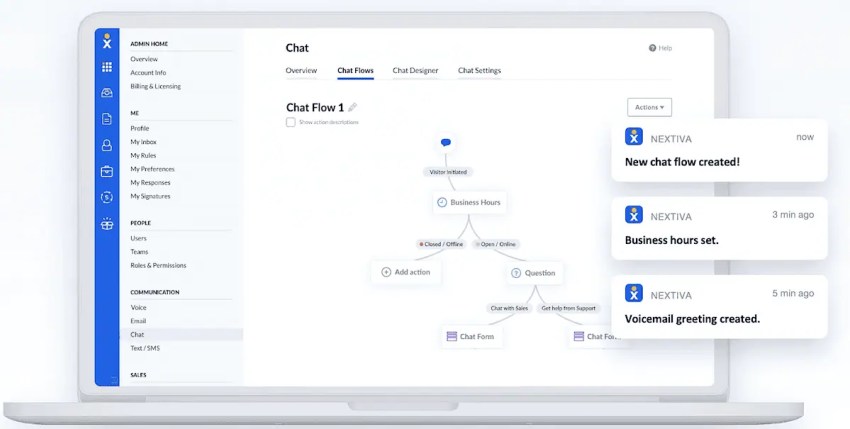
Setting up phone extensions in a modern VoIP system like Nextiva is an easy process that takes only a few minutes. A structured setup ensures your call routing system works from the start and continues to scale as your business grows.
Map your numbering plan
Start by designing a clear and logical extension structure before configuring the system. A well-planned numbering system prevents confusion and supports long-term scalability. Use four-digit extensions to avoid conflicts with emergency numbers or internal shortcuts.
For example, you can assign 100s to sales, 200s to support, and 300s to finance. This approach makes extensions easier to remember and improves internal communication.
Assign extensions in the admin portal
Log in to your VoIP admin portal and assign a unique extension to each team member. At this stage, you can also connect extensions to specific users and associate Direct Inward Dialing (DID) numbers with high-priority roles. This step ensures that your extension system reflects your organizational structure and supports efficient call routing.
Build your call flow (IVR Setup)
Configure your IVR setup to control how incoming calls move through your system. Record a professional greeting, such as, Thank you for calling (business name), press 1 for sales, or press 2 for support.
Map each option to the appropriate extension, department, or call queue. This is where your call routing logic connects directly to your extension system and determines how quickly callers reach the right destination.
Configure device preferences
Decide how each extension will receive calls. You can assign extensions to desk phones, desktop softphone applications, or mobile apps. You can also enable simultaneous ringing so calls reach multiple devices at once. This setup improves responsiveness and ensures employees can answer calls regardless of their location.
Test call flows
Define what happens when an extension is unavailable. You can configure call forwarding to another extension or mobile device, route calls to a team-based ring group, or send unanswered calls to automated voicemail transcripts via email.
After setup, test the entire call flow from an external number to confirm that routing rules work correctly and calls reach the intended destination without delays.
Best Strategies for Setting Up Phone Extensions
Once your system is live, use these advanced strategies to ensure your phone extension system runs at full capacity:
Use auto attendants for better call routing
Think of an auto attendant as a virtual receptionist. It directs callers to the right telephone extension, bypassing manual transfers. Some auto attendants can enable callers to select a department by pressing a specific number, while others use speed-dial options for the most-contacted departments or team members.
VoIP can further enhance IVR functionality. It offers custom greetings, multilingual support, and call queue management.

Optimize call forwarding
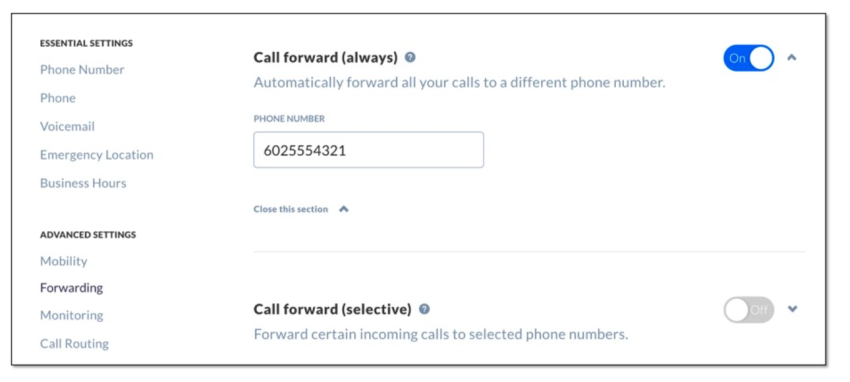
Call forwarding enables unanswered calls to be redirected automatically to another employee. To ensure zero-drop communication, configure every extension with intelligent call forwarding. This allows incoming calls to ring a secondary team member or a ring group when the primary agent is busy and guarantees that all communications are addressed promptly, improving customer satisfaction.
Use voicemail-to-email
Enable automated transcripts for every extension. Voicemail-to-email sends transcripts or recordings via email for quicker follow-ups. This allows you to read and respond to customer messages even when they can’t take a live call. Team members can prioritize urgent messages and maintain faster response times.

Audit your numbering logic
Regularly review and update your extensions as your organization grows. If a department exceeds its assigned range, adjust the 4-digit prefixes to keep the internal directory clear and intuitive. Proper numbering prevents confusion. Maintaining an organized system supports smoother daily operations and better communication.
Use Cases: How Businesses Use Phone Extensions
Phone extensions function as more than internal shortcuts. They support structured call routing and allow businesses to manage communication more effectively as they grow.
Small businesses
Small teams use extensions to create a structured and professional phone system. Assign extensions to functions such as sales, billing, and customer support to present a clear and organized business structure. This approach improves the caller experience and builds trust without adding operational complexity.
Multi-location companies
Businesses with multiple offices use extensions to unify communication under one system. A main business number serves as the entry point, while extension ranges organize each location internally. For example, one range can represent one city while another represents a different region. This structure simplifies call routing, supports seamless transfers, and allows customers to reach any location without dialing multiple numbers.
Remote and hybrid teams
VoIP extensions keep teams connected across locations and time zones. Employees dial short extensions to reach colleagues instantly, no matter where they work. They answer calls through desktop or mobile applications, while presence-based routing directs calls to available team members. This setup reduces delays and maintains consistent communication.
Call centers
Call centers depend on extensions to handle high call volumes with precision. Extensions connect directly to routing strategies such as skills-based routing and call queuing, which ensure each call reaches the most suitable agent. Managers track performance at the extension level, including response times and handling efficiency, to improve staffing decisions and service quality.
Commonly Used Phone Extensions and When to Use Them
Companies normally assign extensions based on departments, roles, or functions. Here are commonly used extension numbers and their purposes in communications systems:
| Type | Common range | Purpose | Best for |
|---|---|---|---|
| Sales department | 100s | Connects leads to sales representative | Businesses managing high call volumes |
| Customer support | 200s | Routes callers to customer care representatives | Service-based businesses |
| Technical help desk | 300s | Directs IT-related inquiries to the right personnel | Tech and software companies |
| Executives and team lead | 400s | Provides immediate access to management | Businesses needing fast decision-making |
| Admin and HR teams | 500s | Connects employees to HR and office admin | Internal company operations |
| Conference room extensions | Custom | Enables easy room scheduling for meetings | Companies with regular internal meetings |
| Automated services | Custom | Allows customers to access self-service options like billing | Businesses with routine transactions |
Make Business Communication Easier With Nextiva
Managing multiple phone lines and ensuring calls reach the right people shouldn’t be a daily struggle. Nextiva’s VoIP phone system addresses these challenges. It helps businesses eliminate the hassle of juggling phone extensions, inefficient call routing, and missed calls. It enhances productivity, keeps internal communication smooth, and delivers a seamless customer experience.
Nextiva’s cloud-based phone service simplifies communication. It allows companies to set up extensions for team members and departments. It also routes direct calls efficiently through auto attendants and IVR. It offers modern features like call forwarding, voicemail, and mobile app integration for seamless communication.
As your business grows, Nextiva’s VoIP business phone system helps you scale and thrive without complex installations.

Ready to simplify business communication? Learn more about Nextiva’s VoIP solutions today.
The best VoIP phone system for businesses.
Get a complete business phone system with advanced features and superior call quality for less. The best value for a business VoIP phone system.
Phone Number Extensions FAQs
Yes. VoIP providers offer phone extensions that connect to virtual phone numbers. This enables teams to work from home or anywhere else.
VoIP apps on iPhone and Android let you dial extensions easily for business calls.
Yes. You can forward calls from an extension to another phone line, voicemail, or cell phone.
Absolutely. A business phone system with extensions from a reputable service provider makes small businesses look professional and keeps communication smooth.
Most modern VoIP systems let you dial the main number and enter the extension as soon as the automated greeting begins. Some systems also support Direct Inward Dialing (DID), which allows you to dial a unique 10-digit number that reaches the extension immediately, bypassing the menu.
To reach an extension from abroad, dial the international exit code, then the country code, followed by the main business number. When the IVR or auto-attendant answers, enter the extension. Older analog landline systems may require a receptionist to manually transfer international calls.
An IVR (Interactive Voice Response) acts as an automated menu that greets callers, for example, “Press 1 for Sales.” An extension is the sub-number assigned to a specific person or team. Think of the IVR as the lobby directory and the extension as the office suite number.
A DID (Direct Inward Dialing) number is a full 10-digit phone number that connects directly to one person. An extension is a shorter 3-to-5-digit code that sits behind a main business number. DIDs suit key executives who need direct access, while extensions provide a cost-effective solution for scaling large teams under a single main number.