Leadership
  Blog
Blog  Business Communication
  Customer Experience
  Marketing & Sales
  Nextiva News
  Productivity
  VoIP
VoIP 

Whether you’re a fast-growing SaaS company or a regular business updating your technology, you must have a strong, well-organized IT team structure backing you.
A defined structure helps make sure projects run smoothly, the business properly allocates resources, and teams can respond quickly when issues arise, all while supporting key business objectives. But getting that structure right isn’t always straightforward. Leaders must weigh everything from company size and tech stack to long-term goals and cybersecurity risks.
In this guide, we’ll break down how to build a modern IT department structure that fits your business needs, plus org chart examples to help you map out what might work for your organization.
What Is an IT Team Structure?
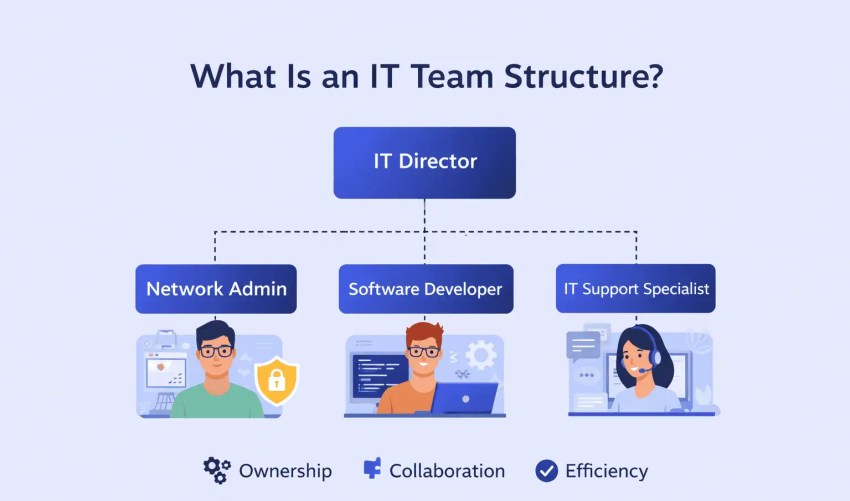
An IT support team structure is the way you organize IT people, responsibilities, and decision-making so technology work gets done consistently. It defines who owns what, who reports to whom, and how requests move from intake to delivery to ongoing support. A good structure reduces confusion, speeds up execution, and makes it clear where accountability lives when something breaks.
It usually includes three layers:
- People and reporting lines: roles, teams, leadership, and how work is staffed
- Ownership and boundaries: which team owns each system or service (and what they don’t own)
- How work happens: request intake, prioritization, change approvals, escalation paths, and performance metrics
What IT team structure should make unambiguous
If someone asked, “Who owns this?” your structure should allow you to answer quickly:
- Who owns each core service (email, identity, devices, network, key apps)
- Where requests go (tickets, intake forms, Slack channels—ideally one front door)
- Who sets priorities and approves changes
- How IT partners with departments like Security, Engineering, and Operations
- How success is measured (uptime, resolution time, project delivery, customer satisfaction)
A useful way to pressure-test your structure is to list your top systems and services and assign a single named owner to each. If you can’t do that cleanly, the org chart may look fine, but the day-to-day will feel messy.
Common Types of IT Team Structures
There’s no perfect IT team structure that works for every business. The right setup depends on your size, goals, and how your business operates. For example, technology organizational structures for a B2C business vary from a B2B setup. Likewise, what you’re selling is a factor since physical products, digital products, services, digital marketing, advertising, and software all need different kinds of IT teams backing them.
That said, a few tried-and-true models keep showing up for a reason. Let’s walk through the most common ones and how they function in the real world.
Functional model
- Best for: Small- to mid-size orgs with steady, repeatable IT work (support, access, endpoints, network) and a need for clear specialization.
- Commonly used by: Regulated and operations-heavy orgs (finance, healthcare, manufacturing) plus larger companies with mature IT domains.
- Core logic: People are grouped by skill area (service desk, systems, security, apps), and work routes to the team that owns that function.
- Visual: A top-down org chart with vertical “silos” (Service Desk, Systems, Security, Apps) under an IT leader; arrows showing tickets moving to the right team.
Example: A financial services company separates its IT team into a security team focused on protecting customer data, a development team building internal and client-facing apps, and a support team handling day-to-day technical issues for employees.
Pros:
- Deep expertise within each team
- Clear ownership for systems and standards
- Easier training and career paths within a specialty
Cons:
- Handoffs between teams can slow execution
- Work can queue up if one function is understaffed
- Coordination across teams needs active management
This structure can boost efficiency and deepen technical knowledge within each team, though it sometimes creates communication gaps between departments.
Project-based structure
- Best for: Fast-changing environments where speed matters (launches, migrations, new products) and work can be planned around initiatives.
- Commonly used by: Software companies, agencies, and teams running frequent rollouts or large change programs.
- Core logic: Teams form around a project, pull in the roles needed to ship an outcome, then re-form for the next project.
- Visual: A “project box” showing a temporary squad (Apps + Systems + Security + Analyst) connected to a single initiative, then splitting back out.
Example: A software company assembles IT teams to launch a new mobile app. Once the project ends, team members return to different departments or move to the next initiative.
Pros:
- Strong collaboration across disciplines
- Clear focus on outcomes and deadlines
- Priorities can shift quickly when the business shifts
Cons:
- Long-term ownership can get fuzzy after launch
- Teams may be re-assigned often, hurting continuity
- Shared services (support, ops) can become an afterthought
This approach drives strong collaboration and flexibility, making it easier to meet deadlines and adapt to changing business needs. However, teams may need to reshuffle once a project wraps up, which can create challenges in maintaining consistency and long-term stability.
Matrix model
- Best for: Large organizations balancing global standards with local execution, where people must support day-to-day operations and major initiatives.
- Commonly used by: Large pharmaceutical companies or global manufacturing firms (for instance, a company with many regions and product lines, such as Johnson & Johnson) where local teams need specialized IT support and central IT sets standards.
- Core logic: Staff report to a functional manager for capability and standards, and report to a project or product lead for day-to-day priorities.
- Visual: A grid with functions listed on the left (Systems, Security, Apps) and projects across the top; names sit in the intersections to show shared assignments.
Example: At a growing startup, a systems administrator reports to the IT Manager for day-to-day tasks like user provisioning and network upkeep. At the same time, they support a company-wide CRM migration project led by a Project Manager on the operations team.
Pros:
- Shares scarce specialists across many initiatives
- Keeps functional standards and supports mixed-discipline execution
- Staffing can shift as demand changes
Cons:
- Dual reporting can create priority conflicts
- Requires strong planning and clear decision rules
- Coordination overhead is higher than other models
While this dual reporting is a great way to encourage cross-functional collaboration and promote flexibility, it can also create challenges with conflicting priorities and requires effective business communication.
Product/platform ownership
- Best for: Orgs building internal platforms or customer-facing products where “you build it, you run it” improves uptime and iteration speed.
- Commonly used by: SaaS companies, product-led teams inside larger firms, and orgs adopting DevOps or SRE-style operations.
- Core logic: Long-lived teams own a product or platform end to end—backlog, build, operations, and support for that domain.
- Visual: Several “product/platform” boxes (Identity, Collaboration, Data Platform, Customer Portal) each with the same mini-team set (Lead, Engineer, Ops/SRE, Support), all reporting into IT/Tech leadership.
Example: A SaaS company creates a dedicated Identity & Access platform team that owns SSO/MFA, user provisioning, and access policies end to end. The same team handles the backlog (new app integrations, role changes), monitors reliability, responds to incidents, and publishes runbooks—so improvements and fixes happen in one place without handoffs.
Pros:
- Clear accountability for outcomes and uptime
- Faster feedback loops between users and builders
- Fewer handoffs; teams can ship and fix quickly
Cons:
- Needs investment in on-call, monitoring, and runbooks
- Risk of duplicate tooling across teams without governance
- Harder to share specialists if each team is fully staffed
Hub-and-spoke (federated)
- Best for: Multi-location or multi-business-unit orgs that need local responsiveness plus shared standards and security controls.
- Commonly used by: Retail chains, higher education, healthcare systems, and global companies with regional IT teams.
- Core logic: A central hub sets platforms, policies, and shared services, and spokes embedded in business units handle local needs and execution.
- Visual: A hub labeled “Central IT” connected to multiple spokes labeled “Region/BU IT,” with a ring around the hub showing shared services (Identity, Network, Security, Service Desk).
Example: A national retail brand runs a central IT hub that owns core systems like identity, network standards, cybersecurity, and the point-of-sale platform. Each region has a small local IT spoke embedded with store operations to handle onsite issues, device swaps, and region-specific requests. The hub sets policies and shared tooling; spokes execute locally while staying aligned to company-wide standards.
Pros:
- Local teams stay close to business priorities
- Central hub reduces duplication for core services
- Works well for geographically distributed orgs
Cons:
- Standards can drift if the hub lacks authority
- Requires clear boundaries on what is central vs local
- Funding and staffing models can get political

Centralized vs. Decentralized IT Structures
In addition to picking a specific team model, you’ll need to decide whether a centralized or decentralized IT structure works best for your business. When weighing the two, it comes down to where decisions are made, how budgets are controlled, and who owns day-to-day technology choices.
In a centralized setup, all IT resources and decisions come from a single hub, often resulting in tighter security, more consistent processes, and better cost control. Centralization tends to work well when reliability and compliance matter, or when the organization depends on shared systems that must operate the same way everywhere.
In a decentralized structure, IT responsibilities are distributed across departments or locations. It gives teams more autonomy to make fast, boots-on-the-ground decisions. This can improve responsiveness and alignment with the business, but it can also lead to duplicated work, inconsistent configurations, and uneven security controls if governance isn’t clear.
Generally, centralized IT is ideal for large organizations with standardized processes, while decentralized IT suits businesses that need to stay agile and respond quickly to changing priorities or market conditions.
Hybrid structures
Many organizations land in the middle of centralized and decentralized with a hybrid or federated approach. In this setup, a central IT group owns the “non-negotiables” — security standards, identity and access, core networks, shared platforms, and vendor governance — while embedded IT partners or regional teams handle local delivery and business-specific needs.
A practical rule is to centralize what must stay consistent (security, identity, core infrastructure, shared tools) and federate what benefits from proximity to the business (onsite support, local workflows, department-specific applications). The best structure is the one that balances speed with control — and makes ownership and decision rights clear across the organization.
IT Team Organizational Charts
IT org charts look different at every stage, but the goal stays the same: clear ownership, fewer bottlenecks, and an easy path for requests to move from intake to resolution. The examples below show how roles typically group together as teams grow—and what usually needs to change to keep IT running smoothly.
Small team
Smaller IT teams often need to do more with less, which means flexibility is key. A matrix structure works well at this size because it allows team members to collaborate across departments while still maintaining core responsibilities. Instead of rigid roles, everyone wears a few hats and supports both day-to-day IT operations and cross-functional projects.
Here’s what that might look like:
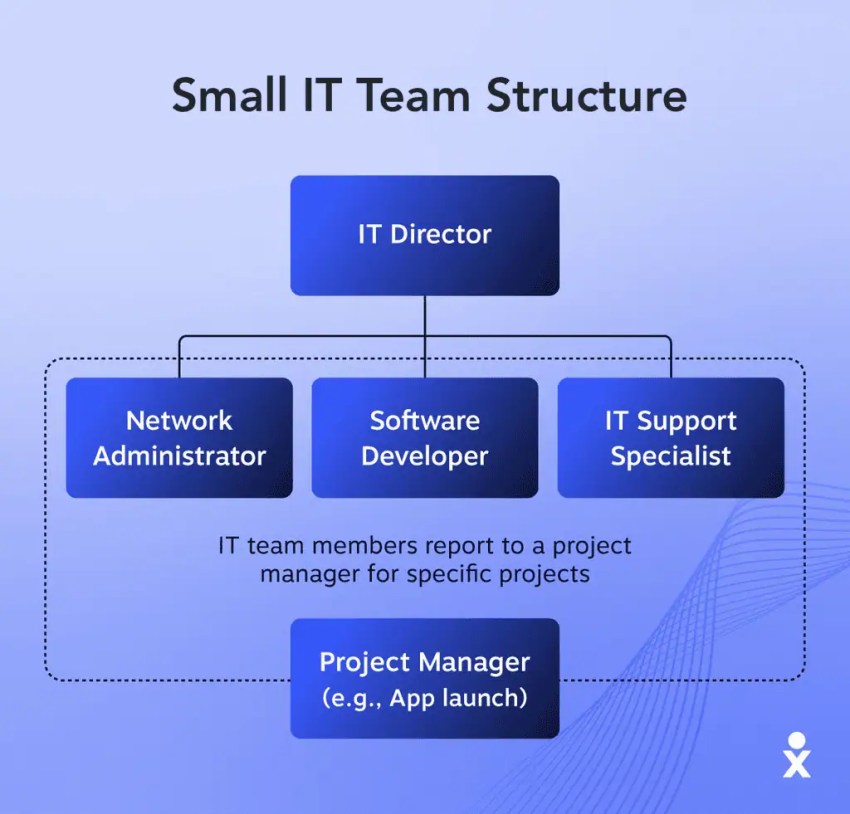
- What changes at this stage: Work shifts from “whoever can fix it” to basic ownership (who handles support vs. systems vs. security basics).
- First hire to add next: A service desk/help desk lead (or dedicated support specialist) to reduce interruptions and free up time for higher-value work.
Mid-size team
At mid-size, the biggest challenge is avoiding constant context switching. You’ll usually see a split between run-the-business work (support, access, endpoints, uptime) and change-the-business work (projects, migrations, new systems). A hybrid setup often emerges: functional owners for core services, plus cross-functional project squads for major initiatives. This creates clearer accountability without slowing delivery.
Here’s what that might look like:
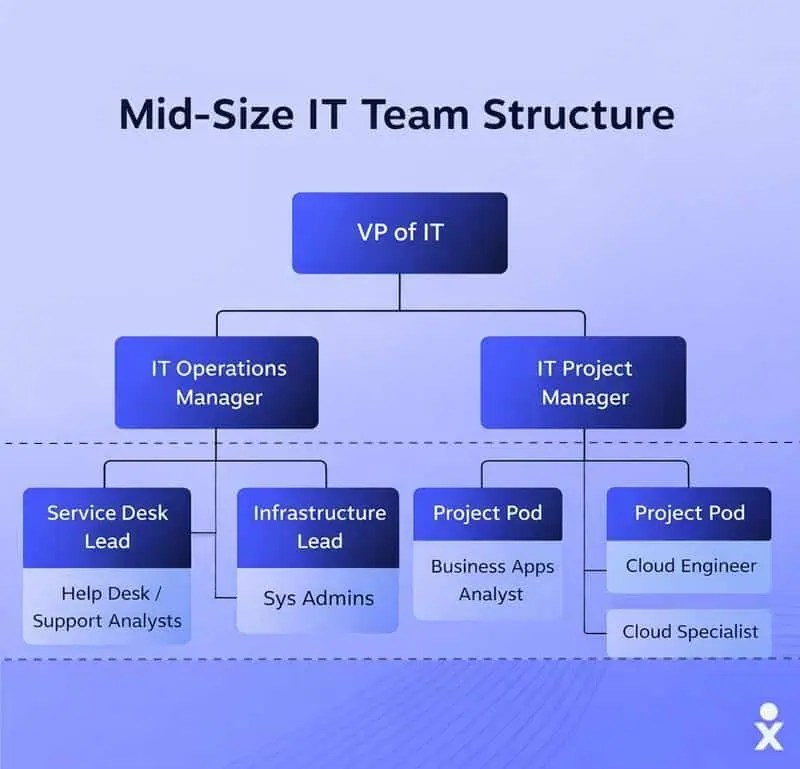
- What changes at this stage: Teams move from generalists to light specialization, and “projects” become a repeatable workflow with prioritization and intake.
- First hire to add next: A security lead (or security-focused admin) to formalize access controls, policies, and risk management before the environment gets too complex.
Large team
In a larger organization, IT needs a functional structure to stay efficient and aligned. In a functional model setup, the IT department is divided by specialty (service desk, infrastructure, apps, security, network), and each function has clear leadership, responsibilities, and workflows. This structure supports consistency, compliance, and predictable service delivery across departments and locations.
Here’s an example of a large IT team org chart:
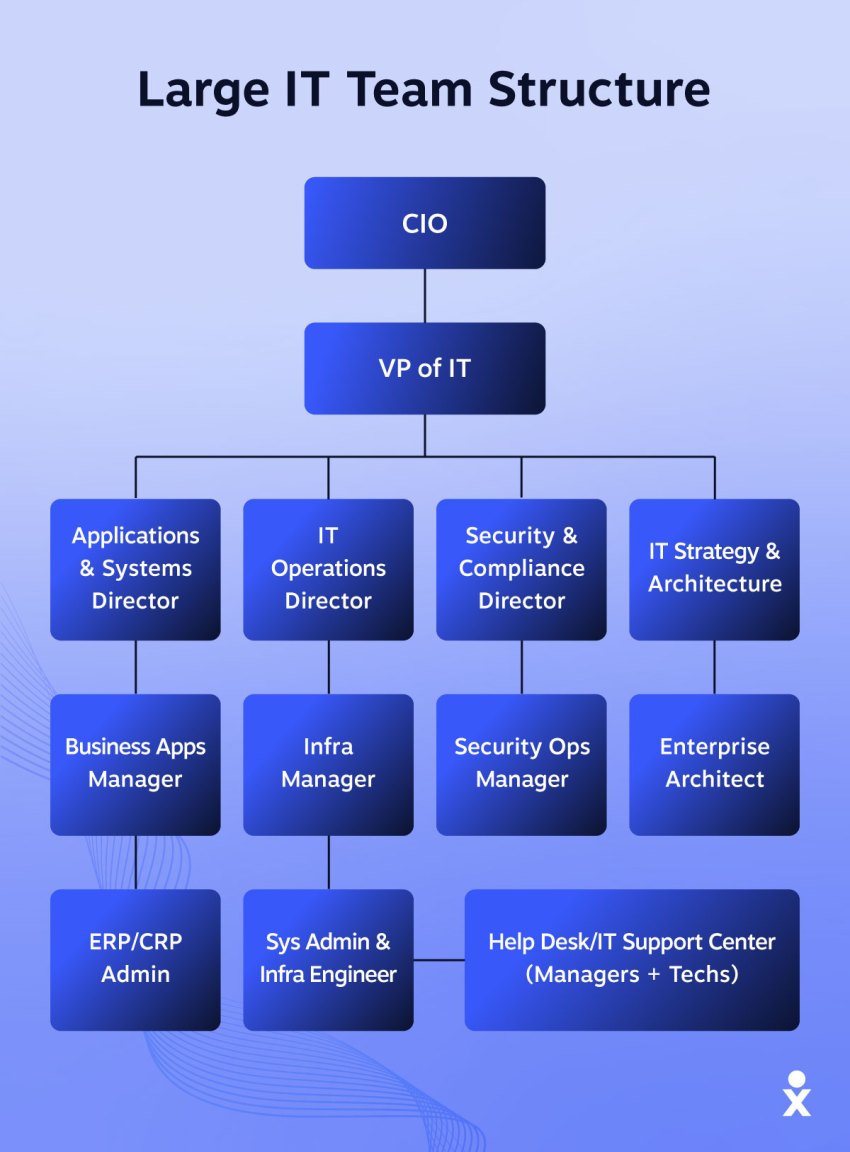
- What changes at this stage: IT becomes a set of formal service owners with governance, reporting, and standardized processes across teams and regions.
- First hire to add next: An IT operations/service delivery manager to oversee reliability, incident management, and cross-team coordination at scale.

How to Pick the Right IT Team Structure for Your Business
Designing the right IT team structure is key to making sure your technology efforts support your business goals. The best structure will align IT with your company’s operations. It should help your team drive innovation, boost operational efficiency, and stay ahead of compliance and security needs through effective IT governance.
Here’s what to consider when choosing an IT support team structure for your organization:
1. Assess your current IT team structure
Start by asking yourself: What’s your IT team structure? Do you even have one?
Believe it or not, there was a time when most companies didn’t have an information technology department at all. As technology advanced, businesses realized they needed someone, usually a “tech person,” to fix their computers. Then, as tech grew more complex, that “someone” became a whole team. And just like that, the “IT department” was born.
At first, the IT team was simply a group of people who did IT stuff, and there wasn’t much structure. Unfortunately, many IT teams stayed that way even as companies grew; just a collection of folks handling tech tasks without clear roles or organization. But that approach doesn’t cut it anymore.
If your IT team isn’t organized and structured, you’re seriously holding your business back.
2. Identify your gaps
It’s important to address any gaps in your current IT structure. Ask yourself some pointed questions to identify current gaps, like these:
- If I have a request, do I know which team can help me?
- Are my employees and customers getting the technical support they need?
- Do our technical projects run smoothly? If not, why?
- Are my various IT teams working together seamlessly?
- Is my IT department helping my company’s growth?
If you answered “no” to any of these questions, it’s time to take a step back to re-evaluate. And a final, very important question is this: Is my IT team a cost center?
If the answer is “yes,” then some major changes may be in order. Your IT staff is there to support the business, of course. But they’re also likely among the highest-skilled members of your entire organization. If you’re not using that skill to drive profit, you’re missing out.
3. Consider your business goals
Before you decide on an IT structure, you need to know what you’re building it for. Your IT team should actively help your business strategy and drive your business objectives, rather than focusing on just keeping the lights on.
Start by looking at your short- and long-term goals. Are you planning to scale rapidly? Launching a new product line? Expanding globally? Or maybe you’re focused on improving internal operations and cutting costs. Your IT structure should reflect those goals and make them easier to achieve.
For example, if business growth is your top priority, you’ll want a scalable structure, with roles dedicated to automation, cloud architecture, and software development. If you’re in a highly regulated industry, you might prioritize building out a strong security and compliance team.
Bottom line: Your IT structure should reflect your business’s future, not just where it is today.
4. Map out your teams
Separating your IT folks into teams is the first step in developing a structured department. The “jack of all trades” sort of department is a thing of the past. To effectively support your business, you need specialists. The tech specialties you choose and the different teams you develop will depend on your individual business and its needs.
IT team structures for a B2C business vary from a B2B setup. Likewise, what you’re selling is a factor. Physical products, digital products, services, online marketing, advertising, software, all need different kinds of IT teams backing them.
Let’s take a look at a tried and true IT structure that could work wonders for your business. This model works especially well for B2B companies in the SaaS (software as a service), PaaS (platform as a service), and DbaaS (database as a service) space.
- Program management: This team specializes in project management, from implementing technology systems to strategizing new products. It’s generally made up of one or more project managers working alongside an IT operations manager and the CIO.
- Technical team: The team develops new tools for your staff or new products for your business. They’re also tasked with ensuring your company’s technical infrastructure is running smoothly and securely. It typically consists of individuals (or sub-groups) with particular expertise, like network architecture, system integrations, security, and various areas of development.
- Data team: A team of data analysts and database administrators handles all the information coming in, going out, and being stored. The data team’s job is to ensure your company’s data is stored in a way that’s easily accessible, secure, and orderly, often contributing to key business intelligence initiatives.
- Functional team: The functional team usually comprises business analysts and business process owners who often do the “legwork.” You’ll see them speaking with members of the business and key stakeholders to gather requirements, understand business needs, and map out processes.
5. Choose a structure that fits your organization
There’s no one-size-fits-all IT team structure, and that’s a good thing. The right setup depends on several factors: the size of your business, the complexity of your operations, what industry you’re in, and whether your team works remotely, in person, or hybrid.
Smaller businesses might lean on a more generalized structure, where a handful of IT pros wear multiple hats. That works, but only up to a point. As your business grows, so does the need for specialization and clearer lines of responsibility.
Mid-size and enterprise-level companies often benefit from more formalized models like the functional, project-based, or matrix structures. Each has pros and cons, but the key is to choose a setup that helps you get the most out of your IT talent and aligns with your workflow.
6. Integrate your IT team with the rest of your business
When we think of IT staff, we often have images of people working in a server room or in some back office disconnected from the rest of the business. If you want to build a productive IT team that gets excited about what they’re doing, include them in the daily rhythm of your company.
That means more than just physically sitting near other teams (though that can help, too). It means involving IT early in strategic conversations, inviting them to cross-functional meetings, and establishing clear communication channels between departments to fuel bigger and better ideas.

Common Mistakes to Avoid
Even well-intentioned IT org designs can break down if a few common issues creep in. Watch for these pitfalls as you design or refine your team structure:
- Over-complicating reporting lines. Too many dotted lines and dual approvals slow decisions and confuse accountability. If it’s unclear who has final say, work will stall.
- Unclear ownership. When no one clearly owns a system, issue, or service, problems bounce between teams. Every core platform should have a named owner responsible for uptime, changes, and outcomes.
- Too many handoffs. Excessive transfers between teams increase delays and miscommunication. Streamline workflows so requests move through as few steps as possible.
- “Everyone does everything”. Generalists are valuable early on, but staying in this mode too long leads to burnout and inconsistent results. As you grow, define responsibilities so work scales predictably.
- Ignoring shadow IT. When departments like marketing or operations create their own tools and workflows without IT involvement, security gaps and data silos follow. Bring these teams into a shared intake and governance process instead of blocking them outright.
- Designing for today only. A structure that works at 10 people may collapse at 30. Build with near-term growth in mind, especially around support volume, security, and system ownership.
- Separating strategy from execution. If planners are too far removed from daily operations, decisions may look good on paper but fail in practice. Keep feedback loops tight between leadership and frontline teams.
- Adding process before clarity. Tools and workflows won’t fix structural confusion. Get roles, ownership, and decision rights clear first, then layer in processes and tooling.
Avoiding these mistakes helps keep your IT team focused, accountable, and ready to support the business as it scales.
IT Organizational Structure Best Practices
There’s not much you can do to turn your IT team into a profit-generating machine overnight. But there are small steps you can take that will help you unlock growth, boost team productivity, and make sure your tech investments are paying off.
Whether you’re building a team from scratch or refining an existing one, these best practices can help your IT department become a stronger, more integrated force in your organization.
- Align teams around shared goals: Make sure all IT functions understand business priorities and are working toward the same outcomes.
- Loop in IT from the start: Involve IT from the start of any project. Early input helps avoid costly mistakes and keeps plans realistic.
- Use collaboration tools: Corporate communication tools make it easy for IT and other departments to stay connected and share real-time updates, which is especially important for remote teams.
- Document roles and growth paths: Clearly define responsibilities and outline how team members can grow in their roles.
- Revisit your structure regularly: As your company evolves, your IT structure should too. Adjust roles, teams, and processes to match changing needs.
The Transition Roadmap
Knowing which IT team structure organization fits your business is only half the work. The harder part is moving from where you are today to a new model without disrupting support, projects, or trust with the business. Keep in mind that a successful transition happens in stages, not all at once.
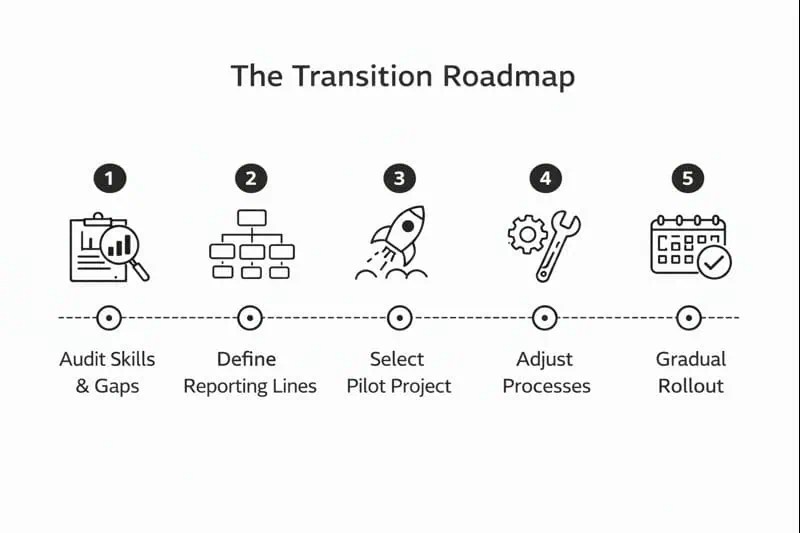
1. Audit your current state and skill gaps
Start by documenting how work actually gets done today, not how it’s supposed to work on paper. List core services (support, identity, infrastructure, apps, security) and note who handles each one, how often issues escalate, and where work stalls. This makes skill gaps and overload points visible—especially in security, service delivery, or cloud operations.
2. Define ownership and new reporting lines
Before moving boxes on an org chart, clarify ownership. Each system or service should have a clearly named owner responsible for decisions, changes, and outcomes. Then define reporting lines that support that ownership. Keep it simple: one primary manager per role, with project accountability clearly stated when needed.
3. Choose a pilot project or service
Don’t reorganize everything at once. Pick a contained pilot—such as a cloud migration, new tool rollout, or support workflow redesign—to test the new structure. Assign roles, decision rights, and escalation paths using the future-state model. This gives you real feedback before scaling changes across the team.
4. Adjust processes and communication paths
Once the pilot is running, refine how work flows. Update intake methods, prioritization rules, and handoffs so they match the new structure. Make sure business teams know where to send requests and who owns what—confusion here can undo even a well-designed organizational chart.
5. Roll out gradually, not all at once
Expand the new structure in phases. Start with core services, then move into projects and specialized areas. Avoid moving people and responsibilities mid-quarter if possible; timing matters for morale and delivery.
6. Review, refine, and reinforce
After rollout, review what’s working and what isn’t. Look for bottlenecks, unclear ownership, or overloaded roles. Small adjustments early prevent bigger restructures later. Reinforce the structure through documentation, onboarding, and regular check-ins so it sticks.
A thoughtful transition reduces risk, builds confidence, and gives your IT team time to adapt. The goal isn’t a perfect org chart—it’s a structure that supports the business without slowing it down.
Build an IT Team Structure That Scales With You
A thoughtful IT team structure sets the stage for reliable, predictable technology delivery—whether you’re supporting day-to-day operations, launching new systems, or scaling with the business. By defining ownership, clarifying roles, and aligning work across functions, you give your team the clarity it needs to solve problems faster and deliver more value.
The right communications and collaboration tools are an essential part of that foundation. When your IT team can connect quickly, assign work clearly, and collaborate across locations or disciplines, the whole organization benefits.
Nextiva’s unified communications platform brings voice, messaging, and meetings together in one place, making it easier for IT teams to manage internal service, support hybrid workers, and maintain consistent standards as they grow.
Ready to give your IT team a communications platform that scales with you? Talk to a Nextiva specialist to see how unified calling and collaboration can support your structure today.
One app for all conversations.
Seamlessly manage all voice, video, and messaging with customers and team on a single, unified platform.
Glossary of Key IT Team Roles and Responsibilities
A well-rounded IT organization is a mix of specialists who each help keep your business running, secure, and positioned for growth. Here’s a high-level look at the core roles you’ll typically find on an effective IT team:
- Chief Information Officer (CIO): Sets the overall IT strategy and ensures it aligns with business goals. They act as the bridge between executive leadership and the IT department, often leading digital transformation initiatives, such as implementing AI.
- Chief Technology Officer (CTO): Focuses on the long-term technology strategy and external-facing technology, driving innovation and assessing new technologies to gain a competitive advantage.
- Chief Information Security Officer (CISO): Develops and implements the organization’s data security and overall cybersecurity strategy, overseeing all aspects of network security and incident response.
- IT Director: Oversees day-to-day operations, manages team leads, and ensures projects are completed on time and on budget.
- Systems Administrator: Keeps your internal systems, servers, and networks running smoothly. Handles software updates, backups, and troubleshooting.
- Network Administrator: Manages your network infrastructure, from routers and firewalls to remote access and uptime monitoring.
- Security Analyst: Protects your organization from cyber threats by monitoring for vulnerabilities, enforcing policies, and responding to incidents.
- IT Support Specialist/Service Desk: Provides front-line support to employees, resolving tech issues quickly and ensuring minimal downtime.
- Software Developer: Builds and maintains custom tools, applications, and platforms your business relies on. Can also support website and API development.
- Database Administrator (DBA): Manages how your company stores, accesses, and interprets data, making sure it’s both secure and useful for decision-making.