VoIP
VoIP  Blog
Blog  Business Communication
  Customer Experience
  Leadership
  Marketing & Sales
  Nextiva News
  Productivity
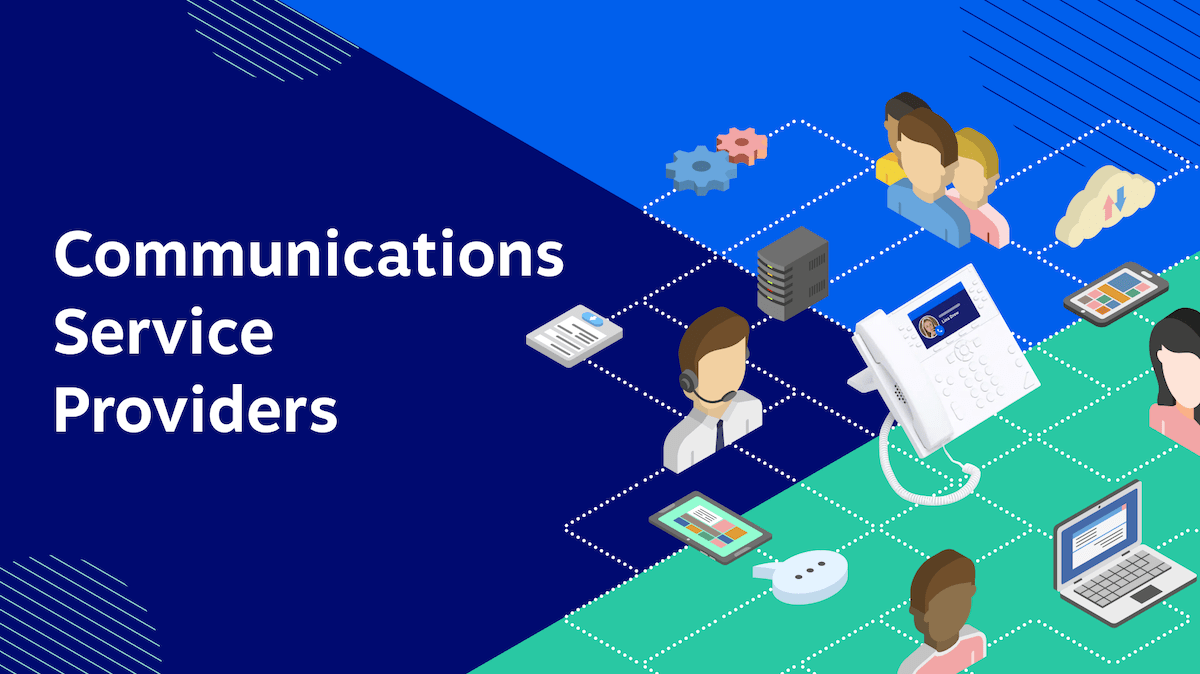
A communications service provider (CSP) delivers connectivity, voice, messaging, collaboration, media, or application services over a network. For businesses, the right CSP can combine phone service, texting, meetings, team messaging, contact center tools, and integrations in one platform.
What Is a Communications Service Provider?
A communications service provider (CSP) is a company that delivers telecommunications, media, entertainment, applications, or other information services over a network. CSPs support the exchange of voice, messages, data, video, and applications between people, services, and networks.
CSPs can provide:
- Internet access
- Mobile voice and data
- Business phone service
- Video and television distribution
- Cloud communications
- Team messaging and collaboration
- Contact center software
- Streaming media and digital applications
Businesses often use a CSP to replace separate phone, messaging, meeting, and collaboration tools with one managed communications platform.
CSP Types and Business Use Cases
CSPs span several service categories. Some providers operate physical networks, while others deliver software over networks owned by telecommunications companies.
Common CSP categories
- Internet service providers (ISPs) deliver broadband access through cable, fiber, DSL, or wireless connections. Comcast, Spectrum, and Cox are examples.
- Mobile carriers provide cellular voice and data services through licensed wireless spectrum. AT&T, Verizon, and T-Mobile are major U.S. examples.
- Cable companies bundle internet, television, and phone service over coaxial or fiber infrastructure. Charter and Comcast operate in this category.
- Television and satellite broadcasters distribute video through terrestrial broadcast, cable, or satellite signals. Dish Network and DirecTV are familiar examples.
- Content and application service providers deliver software, streaming media, and digital services over the internet. Netflix and Spotify operate at this layer.
- Cloud communications providers deliver business voice, messaging, meetings, and collaboration tools through the cloud. Nextiva, RingCentral, and 8×8 are examples.
These categories can overlap. A cable company may also be an ISP, and a mobile carrier may provide business cloud communications.
Business-focused CSPs
Businesses commonly evaluate two types of CSPs:
- VoIP providers, which deliver business calls over an internet connection.
- Unified communications providers, which combine voice, video, messaging, meetings, and collaboration in one service.
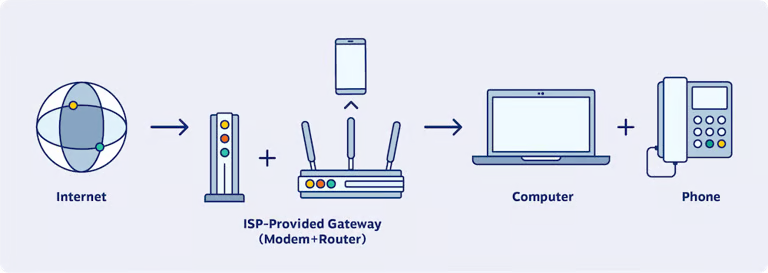
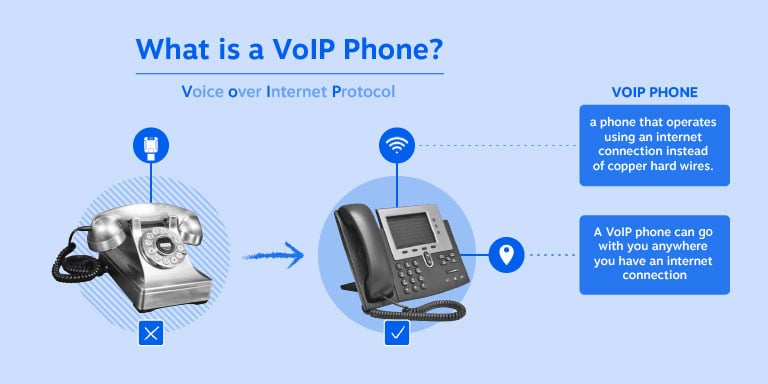
A VoIP phone system replaces traditional phone lines with internet-based calling. Employees can use desktop phones, computers, browsers, and mobile devices to make and receive business calls.
VoIP systems typically provide:
- Lower infrastructure requirements: Businesses can reduce their dependence on on-premises phone hardware.
- Scalability: Administrators can add or remove users as staffing needs change.
- Mobility: Employees can access business calling from approved devices and locations.
- Integrations: VoIP can connect with CRM, help desk, productivity, and contact center software.
Unified communications providers combine more channels in one application. Many deliver Unified Communications as a Service (UCaaS), which removes the need to manage separate on-premises systems for calling, meetings, and messaging.
UCaaS can help businesses:
- Keep conversations and contacts in one workspace
- Reduce application switching
- Support remote and hybrid employees
- Apply consistent communication policies
- Add users and features as the organization grows
The CSP Business Model
Internet service providers, mobile network operators, cable companies, and cloud communications providers earn revenue by delivering access, communications services, software, infrastructure, or content.
How CSPs generate revenue
Common revenue models include:
- Subscriptions: Customers pay recurring fees for internet access, phone service, messaging, meetings, or bundled communications.
- Usage-based charges: Customers pay for call minutes, data usage, international service, premium features, or other consumption.
- Advertising and partnerships: Some providers earn revenue from advertising or partnerships with application providers.
- Enterprise services: Providers may charge for implementation, network services, security, APIs, support, or custom configurations.
Cloud communications providers may also combine UCaaS with contact center software, customer experience tools, and virtual infrastructure.
Customer experience and data privacy are important parts of the CSP model. Businesses depend on providers to maintain service availability, protect communication data, support integrations, and provide assistance when problems occur.
Core CSP Services and Features
A business communications platform should match the organization’s channels, workflows, security requirements, and growth plans. Buyers should compare the complete service rather than judging a provider by its phone features alone.
Voice and calling
Clear voice service remains the foundation of business communications. Buyers should review call quality, uptime commitments, number porting, emergency calling, international coverage, and device support.
Modern CSPs commonly provide:
- Internet-based VoIP calling
- Local, toll-free, and international numbers
- Business caller ID
- Call queues and routing
- Desktop and mobile calling
- Browser-based calling
- Voicemail
- Call recording
- Call transfer and forwarding
- HD voice calls
A business phone system can also support multiple lines, extensions, auto attendants, call groups, and administrative controls.
Call management
Advanced call management helps businesses direct calls and maintain consistent customer service.
Common capabilities include:
- Call forwarding and routing: Sends calls to the right person, department, queue, or location.
- Voicemail-to-email transcription: Converts voicemail messages into text for faster review.
- Call recording: Supports training, compliance, dispute review, and quality assurance.
- Call analytics: Tracks call volume, wait times, abandonment, and agent performance.
- Auto attendants: Greet callers and route calls without a live receptionist.
- Call queues: Hold and distribute calls across available employees.
- Business hours and holiday rules: Apply different routing rules by time or date.
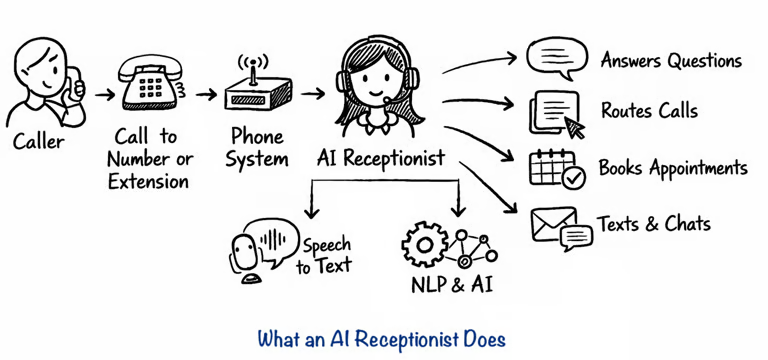
Businesses should confirm which features are included in the base plan. Some providers reserve advanced analytics, recording, or contact center tools for higher tiers.
Messaging, meetings, and collaboration
A unified communications platform should connect voice with the channels employees use every day.
Core collaboration features may include:
- Team messaging and group chat
- Business SMS and MMS
- Video meetings
- Screen sharing
- File sharing
- Presence and availability
- Meeting recording
- Shared contacts and conversation history
Team communication tools can reduce internal email and keep decisions closer to the related conversation. Video meetings support distributed teams, while screen sharing helps employees present documents, troubleshoot issues, and review workflows.
Contact center capabilities
Organizations with service, sales, or support teams may need more than standard business calling. Contact center functions can include:
- Skill-based routing
- Supervisor monitoring
- Call recording and quality review
- Agent analytics
- Customer interaction history
- Outbound dialing
- Digital messaging
- Workforce management
- Self-service and automated responses
Nextiva’s contact center capabilities can extend business communications into customer service workflows. Buyers should confirm whether contact center functionality is native, integrated, or provided through a separate product.
Integrations and APIs
A CSP should connect with the systems that already hold customer and operational data. Common integrations include:
- CRM platforms: Salesforce and HubSpot can log calls and display customer information.
- Help desk platforms: Zendesk and ServiceNow can connect conversations to support tickets.
- Productivity suites: Microsoft 365 and Google Workspace can sync calendars, contacts, and communication activity.
- Healthcare systems: Healthcare organizations may require connections to approved EHR systems.
- APIs and webhooks: Development teams can connect communications to custom applications.

Security and administration
CSP security should cover data in transit, account access, recordings, administrative permissions, and integrations. Buyers should ask about:
- Encryption
- Single sign-on
- Multi-factor authentication
- Role-based permissions
- Audit logs
- Data retention controls
- Fraud monitoring
- Disaster recovery
- Compliance documentation
Security requirements vary by industry. For example, healthcare organizations may need HIPAA-related safeguards and documented procedures.
Common standards and requirements include:
- HIPAA
- PCI compliance
- SOC 2
Businesses can also review a provider’s VoIP security practices before signing a contract.
Choosing A CSP By Business Size
The best-fit communications platform depends on the organization’s size, channels, technical resources, and growth plans. A small business may prioritize fast setup and predictable pricing. An enterprise may need governance, global administration, analytics, and contact center expansion.
| Business profile | Priorities | Capabilities to compare |
|---|---|---|
| Small business | Simple administration, predictable cost, business calling, mobile access | Cloud PBX, business numbers, texting, voicemail, auto attendant, mobile app, support |
| Growing SMB | More users, shared workflows, CRM connections, team collaboration | Voice, SMS, meetings, chat, call queues, analytics, integrations, user controls |
| Mid-market organization | Multiple teams or locations, standardization, reporting, security | Call routing, contact center tools, recording, APIs, governance, deployment flexibility |
| Large enterprise | Scale, compliance, complex workflows, centralized administration | Cloud telephony, meetings, messaging, contact center, identity controls, analytics, integrations, service agreements |
Priorities for SMBs
A small or midsize business usually needs a phone system that is easy to administer without a large IT team. A business phone system can be useful when it combines:
- Business calling and texting
- Shared numbers and extensions
- Call routing and voicemail
- Desktop and mobile access
- Video meetings and team chat
- CRM integrations
- Transparent user-based pricing
- Responsive support
For SMBs, a platform should also support growth without forcing a complete system change when the company adds locations, departments, or customer service staff.
Requirements at enterprise scale
Large organizations need communications tools that work across users, locations, devices, and business units. Important capabilities include:
- Centralized user and policy administration
- Department, location, and role-based permissions
- Cloud telephony and number management
- Voice, texting, meetings, and team messaging
- Contact center expansion
- CRM, ERP, and help desk integrations
- Identity and access management
- Audit and retention controls
- Detailed analytics and reporting
- Desktop, browser, and mobile deployment
- Resilience and disaster recovery
- Flexible implementation and migration support
Large enterprises frequently evaluate Nextiva, Microsoft Teams, Zoom, Cisco Webex, RingCentral, Google Workspace, and other UC platforms. The right choice depends on existing software investments, deployment requirements, regional coverage, security controls, and the need to connect UCaaS with contact center operations.
Comparing Platform Fit And Value
Price is only one part of the buying decision. A lower subscription fee may not represent good value if the plan excludes essential features, requires paid add-ons, or creates extra administrative work.
Pricing
Review:
- Monthly and annual prices
- Per-user and usage-based charges
- Included minutes and messages
- Number porting fees
- Hardware requirements
- Implementation costs
- Feature add-ons
- Contract terms
- Cancellation policies
- Support tier differences
GetVoIP’s 2026 business phone system guide describes a business phone system as a VoIP-powered multiline service with calling, texting, recording, voicemail, and call management. Its editorial recommendations identify different providers for different priorities, including value and support, team collaboration, video, international calling, AI, APIs, phone-number flexibility, and mobile calling. These are publisher recommendations, not universal rankings.
Reliability
Dropped calls and service interruptions can affect sales, support, and internal operations. Businesses should review:
- Published uptime commitments
- Service-level agreements
- Network redundancy
- Disaster recovery procedures
- Incident communication
- Emergency calling support
- Historical service performance
- Regional availability
Ask the provider how it handles outages and which remedies apply when service levels are missed.
User experience and deployment
A communications platform should work on the devices employees already use. Compare:
- Browser access
- Windows and Mac applications
- Mobile applications
- Desk phone support
- Number porting
- User provisioning
- Self-service administration
- Training resources
- Accessibility features
A consistent experience across desktop, browser, and mobile can reduce training requirements. IT teams should also test how quickly they can create users, change call flows, assign numbers, and review reports.
Customer support
Support options may differ by plan. Buyers should confirm:
- 24/7 technical support availability
- Phone, chat, and email channels
- Implementation assistance
- Employee training
- Named account support
- Service escalation procedures
- Knowledge base and documentation

Nextiva as a Business CSP
Nextiva, a business communications service provider, combines business calling, messaging, meetings, contacts, and customer communications in one workspace. The platform supports web browsers, desktop applications, and mobile applications.
Nextiva includes capabilities such as:
- Cloud PBX
- Inbound and outbound voice
- Business texting
- Team messaging
- Video meetings
- Call routing and management
- Contact center capabilities
- SIP trunking
- CRM integrations
- AI-powered receptionist
- Mobile, desktop, and browser access
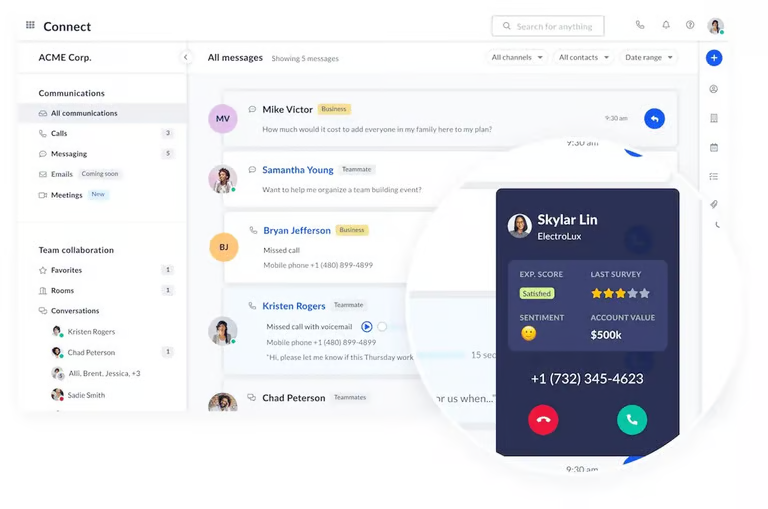
Nextiva packages its core communications offering into Core, Engage, and Scale plans. Each tier includes business phone service and team messaging, while higher tiers add advanced capabilities.
This structure gives businesses a path from basic business calling to broader communications and contact center needs. Organizations can also review cloud communications and enterprise collaboration systems before selecting a deployment model.
The San Antonio Spurs use Nextiva to connect with fans:
“With Nextiva, our team doesn’t drop calls; there’s amazing voice quality, and it’s been an incredibly reliable way to connect with our fans and create a better customer experience.”
— Chris Monroe, Associate VP of Membership
Businesses can compare features, plans, and support requirements before choosing a CSP.
Communications Service Provider and Telecom Provider Differences
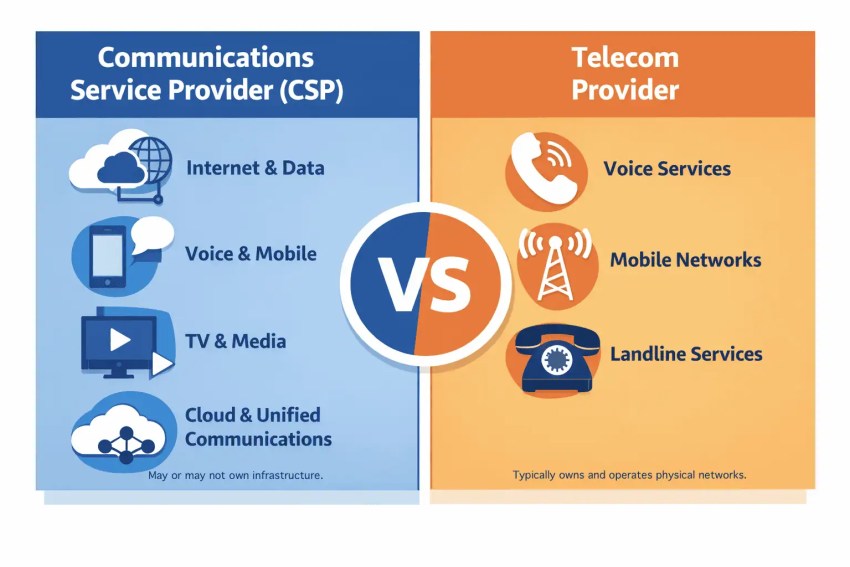
The terms “communications service provider” and “telecom provider” overlap, but they describe different scopes.
Telecom providers
Telecom providers operate and maintain physical network infrastructure used to transmit voice and data. This infrastructure may include:
- Copper lines
- Fiber-optic cables
- Cell towers
- Satellites
- Switching equipment
- Broadband networks
Their core business centers on building and managing the networks that carry communications traffic. Traditional examples include AT&T, Verizon, and legacy carriers such as BellSouth.
Telecom providers often focus on connectivity and operate under oversight from government agencies such as the FCC in the United States.
Communications service providers
CSP is a broader category. A CSP may own physical infrastructure, lease network capacity, or deliver software over the public internet.
For example, Nextiva delivers cloud voice and collaboration services over internet connections without operating the physical access network used by every customer. It is a CSP, while a company that builds and maintains fiber, towers, or copper networks is a telecom provider.
| Category | Telecom provider | Communications service provider |
|---|---|---|
| Infrastructure | Owns and operates physical networks | May own infrastructure or use another provider’s network |
| Primary services | Connectivity, voice, data, and broadband | Connectivity, applications, collaboration, and cloud services |
| Delivery model | Network-based or on-premises | Often cloud-based |
| Customer focus | Consumers and businesses | Consumers, SMBs, mid-market companies, and enterprises |
| Examples | AT&T, Verizon, T-Mobile | Nextiva, RingCentral, 8×8 |
The distinction has become less precise as telecom companies add software and cloud communications. Buyers should focus on the services included, delivery model, integrations, support, and operational fit.
The top customer conversations software.
Organize business communications for your customers, vendors, and teams with Nextiva.
FAQs
The best platform for a small or midsize business is one that is easy to administer without requiring a dedicated IT team. It should offer transparent, user-based pricing and combine essential tools like shared numbers, call routing, texting, and CRM integrations. Providers like Nextiva fit this model well by offering scalable tiers that allow businesses to add more advanced features as they grow.
The ideal platform matches an organization’s specific workflows, security requirements, and growth plans rather than just offering basic phone features. Businesses typically look for a Unified Communications as a Service (UCaaS) solution that keeps voice, video, messaging, and collaboration in a single workspace. Nextiva provides this by rolling calls, team chat, and meetings into one unified application.
A top-tier unified communications platform seamlessly connects voice service with the channels employees use daily, reducing the need to constantly switch between applications. It should include team messaging, video meetings, screen sharing, and robust CRM integrations. Platforms like Nextiva deliver these core capabilities alongside advanced contact center tools for service and support teams.
Large enterprises frequently evaluate and use platforms like Microsoft Teams, Zoom, Cisco Webex, RingCentral, and Google Workspace. Their choices are heavily driven by the need to support complex workflows, centralized administration, identity controls, compliance standards, and global scalability across multiple locations and business units.