Marketing & Sales
  Blog
Blog  Business Communication
  Customer Experience
  Leadership
  Nextiva News
  Productivity
  VoIP
VoIP 

A social CRM works best as part of an omnichannel customer record. It should connect social media interactions with calls, texts, email, web chat, reviews, support tickets, and customer profiles. This gives teams the context they need before they reply.
This guide explains social CRM, how it differs from traditional CRM software, its benefits and use cases, the features buyers should compare, and how unified inbox software supports customer communications.
Many businesses start with social media management. As customer interactions increase, teams need to connect those conversations with customer service, sales, marketing, and business communication systems. A social CRM can help manage customer relationships across social channels while supporting a broader omnichannel workflow.
What Is Social CRM?
Social customer relationship management, or social CRM, combines traditional CRM practices with social media engagement. It collects social interactions, customer information, and conversation history so teams can provide more relevant service and marketing.
A social CRM differs from a traditional CRM in its primary data sources and communication channels:
| System | Main purpose | Typical data sources |
|---|---|---|
| Traditional CRM | Manage customer profiles, sales activity, service cases, and account history | Phone, email, live chat, purchases, forms, and support tickets |
| Social CRM | Monitor and manage customer relationships across social platforms | Social posts, comments, direct messages, reviews, mentions, and sentiment |
| Unified inbox | Give teams one workspace for conversations | Connected email, chat, SMS, social, and other communication channels |
| Omnichannel customer-service platform | Manage conversations across channels while preserving customer context and routing | Voice, SMS/MMS, email, web chat, social media, reviews, CRM records, and workflows |
A unified inbox organizes conversations in one workspace. An omnichannel customer-service platform adds channel continuity, customer context, routing, reporting, and automation. Social CRM is the social engagement and insight layer within that broader customer record.
Essential social CRM functions
- Social listening and monitoring: Track brand mentions, customer feedback, and conversations across social platforms. Teams can identify trends, sentiment, and engagement opportunities.
- Unified customer profile management: Combine social interactions with purchase history, contact information, and support tickets to support personalized engagement.
- Social customer service integration: Manage social inquiries, complaints, and requests alongside email, phone, chat, and other support channels.
- Conversation history: Give agents access to previous messages and customer activity before they respond.
- Lead capture: Convert relevant social interactions into leads or CRM records for sales follow-up.
- Analytics: Measure engagement, response activity, sentiment, traffic, and customer trends.
Why Businesses Need a Social CRM
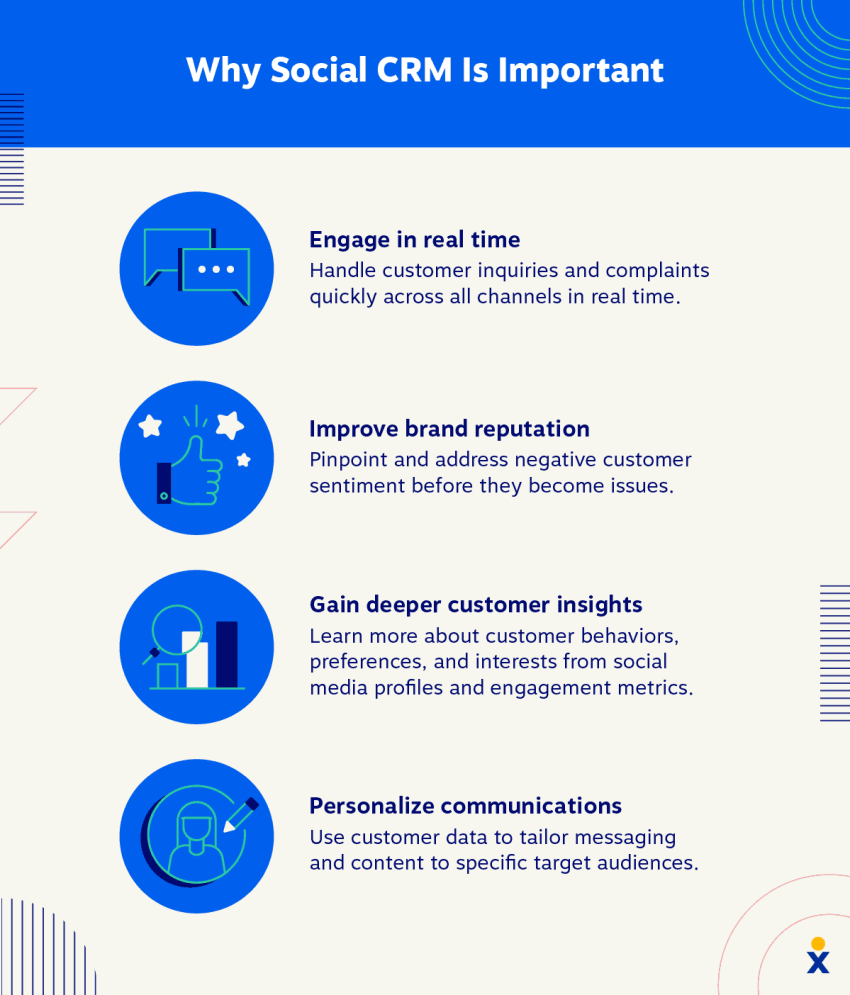
More than 5 billion people use social media to laugh, relax, and interact with others. Social CRMs allow businesses to take advantage of this massive audience by connecting with customers where they already are, providing convenient support, engaging with them in real time, improving brand reputation, and personalizing messaging.
A contact center statistics survey found that 25% of customer service requests are handled through social media channels. Without social CRM, teams can miss public complaints, sales signals, product feedback, and messages sent through direct social channels.
A social CRM becomes more useful when it connects to the rest of the customer communication system. For example, an agent may:
- See a customer comment on a social post.
- Review the customer’s previous email, chat, or purchase history.
- Reply publicly or move the conversation to a private message.
- Continue the conversation by SMS, email, or voice when appropriate.
- Add internal notes and assign the interaction to another team.
- Keep the full history connected to the customer profile.
This workflow helps teams see every customer conversation before replying, whether the customer arrived through web chat, text, email, phone, or social media.

Social CRM vs. Traditional CRM Differences
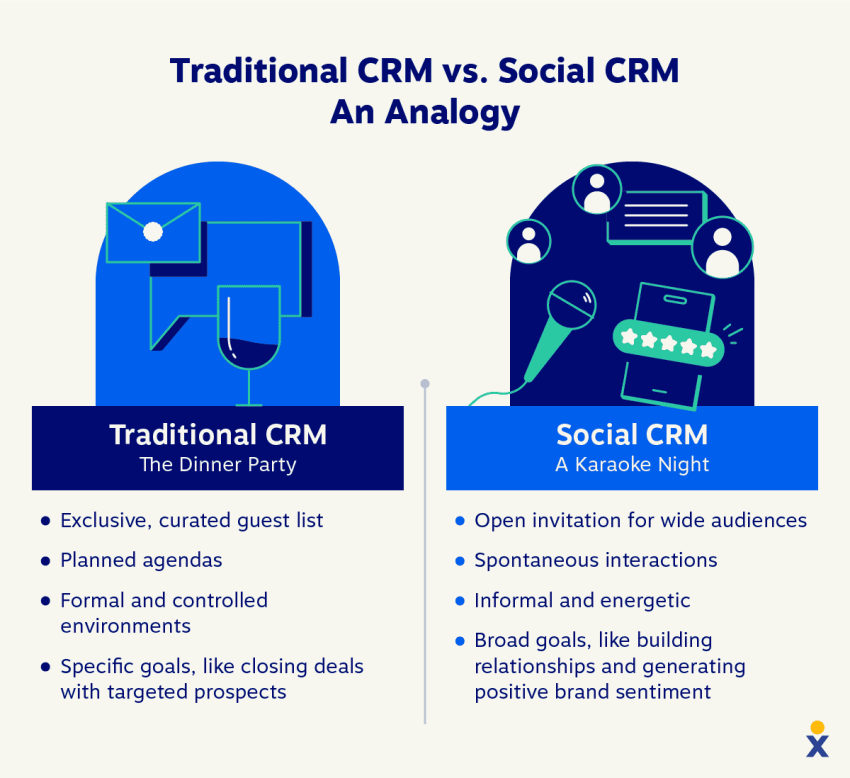
Traditional CRM and social CRM both help businesses manage customer relationships. They differ in their data sources, communication channels, and engagement methods.
Traditional CRM
Traditional CRM relies on internal data from customer interactions and purchase history. Interactions typically support sales activity, account management, or customer service.
Traditional CRM data commonly comes from:
- Phone calls
- Live chat
- Contact forms
- Purchases
- Support tickets
- Sales opportunities
The system focuses on contact management, lead nurturing, account history, and sales pipeline management.
Social CRM
Social CRM uses data from social media and online review sites. It emphasizes customer engagement, relationship building, and brand loyalty.
Social CRM interactions may include:
- Public comments
- Direct messages
- Brand mentions
- Customer reviews
- Social posts
- Influencer discussions
- Sentiment signals
Social CRM interactions often focus on building relationships and identifying customer needs. The system gives teams a broader view of customer behavior and sentiment across social media. It can also help spark social media conversations on Facebook, Instagram, Threads, and X (formerly Twitter).

Social CRM Use Cases
Businesses can use social CRM across customer service, sales, marketing, and product research.
Social CRM for customer service
Social media enables real-time problem-solving because businesses can monitor and address public customer concerns. This can improve customer satisfaction and provide insights into customer preferences.
A social CRM can help a customer service team:
- Monitor public mentions and direct messages.
- Prioritize urgent complaints.
- Route interactions to the right agent.
- Move public conversations to private channels.
- Track response times and resolution outcomes.
- Identify recurring issues for service improvements.
For example, if a customer posts about a negative product experience, a social CRM system can flag the mention. A customer service representative can review the account history, respond, apologize, and offer a replacement from one interface.
A unified inbox adds team visibility to this process. Shared inboxes let multiple agents see the same conversation, while internal notes provide context without exposing internal discussion to the customer. Routing rules can assign interactions by topic, language, customer segment, or urgency.
A customer tweets about a negative experience with your product. Your social CRM system flags the mention, allowing a customer service representative to reach out, apologize, and offer a replacement from a single interface.
Social CRM for sales
Social media platforms are rare sources of potential leads. Social CRM tools help identify people who may be interested in a company’s products or services based on their activity and interactions.
Sales teams can use social CRM to:
- Identify relevant conversations and buying signals.
- Capture leads from social interactions.
- Share useful content.
- Assign follow-up tasks.
- Track social activity in the CRM.
- Move a conversation to email, SMS, or voice.
If someone regularly posts about a specific product category, a sales representative can send a personalized message with additional product information or a consultation offer. The representative should follow platform rules and the customer’s communication preferences.
A social CRM tool identifies someone who keeps posting about a specific product category. A sales rep can send a personalized message offering additional product information or a free consultation.
Social CRM for marketing
Social media CRM helps businesses create relevant content and participate in customer conversations. It uses social media data to support targeted campaigns for specific customer segments.
Social CRM tools also support social listening. Marketing teams can monitor brand mentions, track trends, and adjust campaigns based on customer perceptions.
For example, if a social CRM tool shows that an influencer generates positive discussion about a product, the business could evaluate a sponsored content campaign. The team can use engagement and sentiment data to assess the campaign’s performance.
A social CRM tool reveals that a specific social media influencer consistently generates positive buzz about your product. You can then collaborate with the influencer to create sponsored content or promotions.
Social CRM for product research
Social CRM helps product managers understand their Ideal Customer Profile (ICP) by analyzing social media content and identifying customer interests, challenges, and opinions.
This information can support product decisions such as:
- Prioritizing feature requests.
- Identifying product limitations.
- Detecting emerging customer needs.
- Improving onboarding or documentation.
- Aligning development work with customer feedback.
If a large segment of an ICP consistently expresses frustration about a product limitation, the product team can prioritize a feature that addresses that problem.
A social CRM tool finds that a large segment of your ICP is consistently voicing frustration about a specific limitation of your product. This can inform product development efforts by prioritizing the creation of a new feature that addresses that pain point.
Social CRM Benefits
Social CRM offers a multitude of benefits for businesses. Here are some key advantages.
- Enhances social listening: Social CRM helps businesses monitor online conversations and brand mentions across social platforms. This makes it easier to identify sentiment, track brand perception, and address issues before social media crisis management becomes necessary.
- Improves the customer experience: Customer experience (CX) describes how customers perceive a business across interactions, from initial discovery through post-purchase support. Social CRM provides insights that can improve service and identify product opportunities.
- Builds brand reputation: Businesses that respond to customers on social media can show responsiveness, reach wider audiences, and encourage word-of-mouth recommendations.
- Helps generate leads: Social CRM tools identify potential customers based on social activity and interactions. Marketing and sales teams can then focus on qualified opportunities.
- Provides actionable insights: Social CRM analyzes customer behavior, preferences, and pain points. Teams can use these insights for product development, marketing campaigns, and customer experience strategies.
- Enables omnichannel support: Social CRM connects social conversations with email, chat, phone, and other channels. This reduces departmental silos and supports a consistent customer experience.
- Improves accountability: Assignment rules, ownership, internal notes, and reporting help teams track who handles each interaction.
- Preserves customer context: Agents can review previous conversations before responding, which reduces repeated questions and inconsistent service.
Social CRM Challenges
While a CRM for social media offers significant benefits, there are also challenges to consider. These include:
- Data privacy: Social media data raises privacy concerns. Businesses must follow applicable data protection requirements and explain how they collect and use customer information.
- Data management: Social platforms generate large volumes of data. Teams need clear rules for organizing, retaining, and analyzing that information.
- Scalability: A growing social presence increases interaction volume. The selected platform should support more agents, channels, records, and workflows over time.
- Channel relevance: Customers use different platforms. Businesses should prioritize channels where their customers are active.
- Measuring progress: Social activity should connect to business outcomes such as response time, lead conversion, resolution rate, retention, or revenue.
- Human oversight: AI-generated replies and sentiment analysis need review controls. Agents should approve sensitive responses before publication.
- Integration gaps: A social tool that does not connect to the CRM, contact center, or shared inbox can create another data silo.
Choosing a Social CRM Platform
The best unified inbox depends on the channels a business uses, the size of the support team, the required integrations, and the level of routing and reporting needed. A social media scheduler may suit a marketing team, while a customer service team may need an omnichannel inbox with voice, SMS, email, web chat, social media, reviews, and CRM history.
A team should compare these capabilities before choosing a platform:
Channel coverage
Confirm that the platform supports the channels customers use. Relevant channels may include:
- Voice
- SMS and MMS
- Web chat
- Social direct messages
- Social comments and mentions
- Online reviews
- WhatsApp or other messaging channels
- Video meetings, when required
A platform should show whether each channel supports two-way conversations, routing, history, reporting, and automation. Publishing content to a social network does not necessarily provide a complete customer-service connection.
Customer context
The platform should connect conversations to a customer profile and preserve the interaction history.
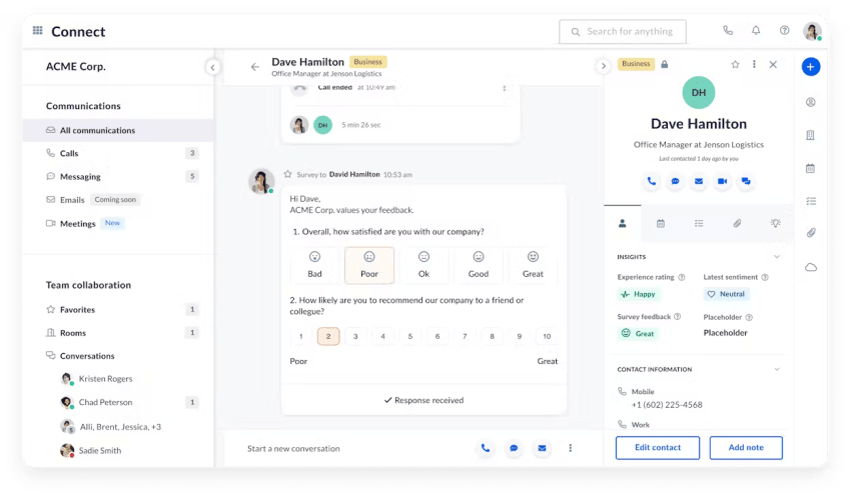
Nextiva’s Unibox, documented in the NextivaCX Unibox overview, acts as a central workspace for customer conversations from connected channels. Its social media management tools also centralize viewing and responses across connected social channels, including YouTube, X, Facebook, Instagram, and Tumblr.
Shared ownership and internal notes
A shared inbox gives the team real-time visibility into customer conversations. Internal notes let agents share context, next steps, or escalation details without sending those notes to the customer.
Compare whether the platform supports:
- Conversation assignment
- Internal notes
- Mentions and team collaboration
- Collision prevention
- Status changes
- Customer and conversation tags
- Permission controls
- Audit history
Routing and escalation
Routing rules should direct conversations to the correct person or team. Useful criteria include channel, customer type, language, business hours, topic, sentiment, and service level.
A complete workflow should let an agent escalate from social messaging to email, SMS, or voice without losing the customer’s history. Nextiva Contact Center supports channel switching across Facebook, X, WhatsApp, iMessage, Zoom, and email while preserving conversation context.
Reporting and analytics
Compare reports for:
- Response time
- Resolution time
- Conversation volume
- Backlog
- Channel performance
- Customer sentiment
- Lead conversion
- Agent workload
- Customer satisfaction
- Revenue attribution, when available
Analytics should separate public engagement from customer-service work. A high number of likes does not necessarily indicate faster resolutions or better customer outcomes.
Integrations and data access
A social CRM should connect with the tools teams already use. Important integrations may include a CRM, help desk, ecommerce platform, marketing automation system, knowledge base, identity provider, and workforce management system.
Businesses should also review API access, data export, retention rules, permissions, and integration ownership before signing a contract.
AI assistance and human review
AI can help summarize conversations, classify sentiment, suggest replies, route cases, and identify trends. Buyers should check:
- Which channels support AI assistance.
- Whether agents can edit responses.
- Whether the system requires human approval before publishing.
- How the platform handles sensitive or uncertain requests.
- Whether AI actions are logged.
- How the business can disable automation for selected topics.
- Whether customer data is used to train external models.
AI should support agents while leaving people responsible for sensitive, high-risk, or complex customer interactions.
Pricing and user limits
Pricing may depend on users, agents, channels, features, message volume, or annual commitments. Businesses should calculate the full cost of licenses, integrations, implementation, storage, AI usage, and additional channels.
Nextiva’s published unified inbox information lists email management in Engage at $25 per user per month with annual billing (for standard team members) and in Power Suite CX at $75 per agent per month (for dedicated contact center staff). These prices apply to the stated plans and billing basis, not every Nextiva capability or every customer configuration. Buyers should confirm current pricing, included channels, and plan limits before purchasing.
Channel Coverage for Omnichannel Customer Communications
A social CRM should support the communication workflow around social interactions. The following table shows the capabilities an omnichannel team may need and how they relate to Nextiva’s verified platform functions.
| Capability | Why it matters | Nextiva support |
|---|---|---|
| Voice | Customers may need to discuss complex or urgent issues with an agent | Nextiva integrates voice into its customer communication platform |
| SMS/MMS | Agents can continue conversations through text when customers prefer messaging | Nextiva supports text messaging and SMS/MMS conversations |
| Web chat | Website visitors can start a conversation without calling | Nextiva supports live chat as an omnichannel conversation channel |
| Email supports detailed replies, attachments, and case follow-up | Nextiva automatically logs email alongside calls, chats, and SMS | |
| Social DMs and comments | Teams can respond to customers on the platforms they already use | Nextiva social media management centralizes social interactions across connected channels |
| Reviews | Reviews reveal customer sentiment and public service issues | Nextiva Review Monitoring provides a dashboard for reviews and social content |
| CRM profile | Agents need customer details and history before replying | Nextiva connects customer conversations with a built-in CRM in its customer experience platform |
| Conversation history | Context reduces repeated questions and inconsistent replies | Nextiva Unibox provides a unified view of connected customer conversations |
| Internal notes | Teams can collaborate without exposing internal comments | Nextiva’s shared inbox supports internal notes |
| Routing and tagging | Rules help assign conversations and organize follow-up | Nextiva supports omnichannel workflows and customer conversation management |
| Analytics | Managers need to measure service quality and channel activity | Nextiva social media management includes analytics and real-time listening |
| AI assistance | AI can help summarize, route, and draft responses | Nextiva provides AI-assisted tools, including draft responses that require human review before publishing |
The appropriate platform depends on the team’s workflow. A social-only tool may cover publishing and monitoring. A unified inbox connects messages. An omnichannel customer-service platform connects the inbox to customer profiles, routing, voice, reporting, and escalation.
Social CRM Features
Social CRM platforms typically include the following features:
- Multi-platform integrations: Manage interactions across multiple social sites from one interface.
- Social listening: Monitor customer conversations, tags, and mentions.
- Lead capture: Collect information from customer interactions for sales and marketing teams.
- Omnichannel engagement: Connect social CRM with email, chat, SMS, and voice to create a unified customer record. An omnichannel customer experience helps maintain that continuity.
- Real-time feedback: Respond to fast-moving interactions and manage customer feedback.
- Conversation assignment: Route messages to the correct team or agent.
- Internal collaboration: Add private notes, tags, and escalation details.
- Sentiment analysis: Identify positive, negative, or neutral conversations.
- Publishing and scheduling: Plan and publish social content across connected accounts.
- Customer history: Link social activity with contact records and previous conversations.
- AI-assisted replies: Draft or summarize responses while allowing human review.
- Performance reporting: Track engagement, response activity, service metrics, and trends.
Social CRM Workflow Example
A social CRM workflow should connect social engagement to the full customer journey.
- A customer posts a question on a business’s social page.
- Social listening detects the post and creates an interaction.
- The system identifies the customer or creates a new profile.
- The agent responds publicly with a short answer or moves the conversation to a private channel.
- The customer shares account details through SMS or email.
- The agent reviews the full history and resolves the issue by phone if necessary.
- The agent adds an internal note and closes the interaction.
- The business records the outcome for reporting and product feedback.
The customer does not need to repeat the issue at each step. The team retains a connected record across channels.
Social CRM Metrics
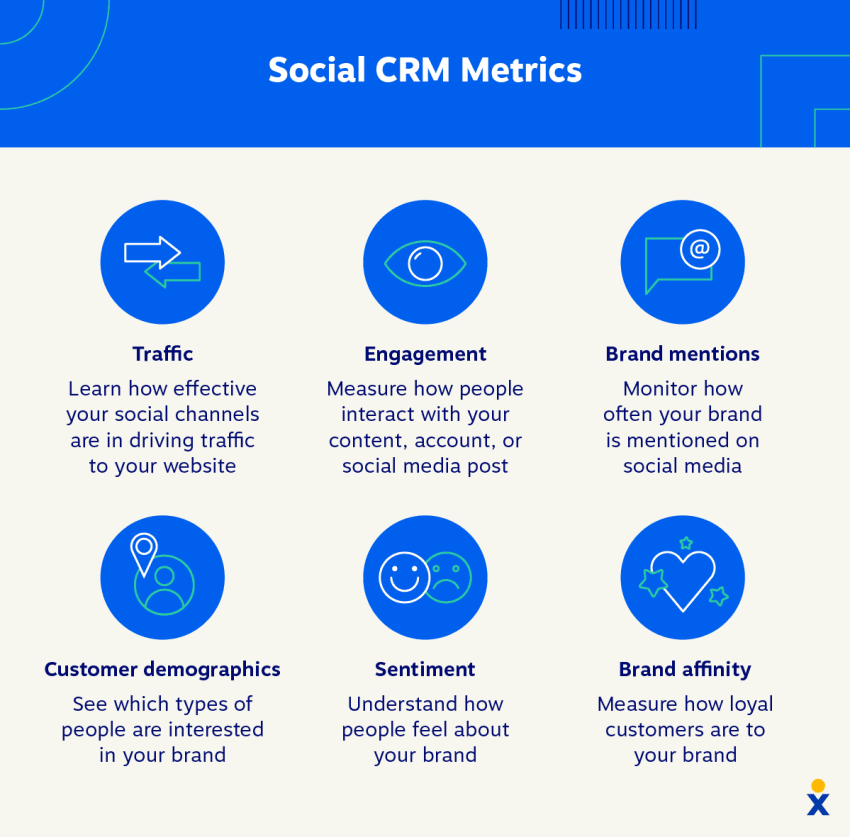
Social CRM can surface metrics that help decision-makers understand their customer base and evaluate social media performance.
Key metrics include:
- Traffic: Track visits to websites or landing pages from social links.
- Engagement: Measure likes, comments, reposts, replies, clicks, and other interactions.
- Brand mentions: Monitor how often people mention a brand, even without a direct tag.
- Customer demographics: Analyze characteristics such as age, location, gender, and interests when the platform provides that information.
- Sentiment: Analyze the emotional tone of conversations about a brand. Sentiments can be positive, negative, or neutral. Negative sentiment can help teams identify concerns that need attention.
- Brand affinity: Measure customer loyalty and emotional connection.
- Response time: Track how quickly agents respond to social inquiries.
- Resolution time: Measure the time from first contact to resolution.
- Deflection rate: Track how often customers resolve issues through self-service or automated assistance.
- Conversion rate: Measure how many social interactions become leads, sales, or other desired outcomes.
- Customer satisfaction: Connect social service activity to survey responses or other feedback.
Types of Customer Experience and Contact Center Software
Customer communication software can support different operating models:
- Inbound software: Handles incoming calls and digital conversations, with tools such as queues, routing, agent assignments, and case management.
- Outbound software: Supports sales calls, follow-up campaigns, reminders, and proactive customer outreach.
- Blended software: Combines inbound service with outbound sales or customer engagement.
- Cloud-hosted software: Runs through a provider’s cloud infrastructure and can support distributed teams, browser-based access, and faster channel expansion.
- On-premise software: Runs on a business’s own infrastructure and may provide more direct control over deployment and data, with greater responsibility for maintenance.
- Omnichannel customer-service software: Connects voice, text, email, chat, social media, reviews, customer profiles, routing, and reporting in one operating environment.
An omnichannel team usually needs software that supports inbound service, outbound follow-up, persistent customer context, shared ownership, and multiple digital channels. A social media management tool may cover publishing and listening, while contact center software manages the broader customer conversation.

Examples of Social CRM Software
Many social CRM and customer communication platforms are available. Three examples include:
- Nextiva: Nextiva provides an AI-powered omnichannel contact center that integrates social media management with email, phone systems, and video conferencing. Its customer experience platform also supports voice, SMS/MMS, live chat, social media, reviews, CRM profiles, and conversation history. It may suit businesses seeking a unified communication and social CRM environment.
- Sprout Social: Sprout Social is known for its user-friendly interface and social listening capabilities. It enables businesses to monitor brand mentions, schedule posts, and engage with customers across multiple platforms.
- Hootsuite: Hootsuite provides social media management features for scheduling posts, managing multiple accounts, running campaigns, and reviewing social activity.
Businesses should compare each platform’s channel coverage, CRM integration, conversation history, routing, internal notes, AI controls, analytics, support model, and pricing basis. A social publishing platform and an omnichannel contact center may serve different operational needs.
Maximize Your Customer Relationships with Nextiva
A social CRM strategy helps businesses provide personalized experiences where customers spend time. It also gives service, sales, and marketing teams a connected view of customer interactions.
Nextiva, a customer experience platform, connects communication channels such as voice, text messaging, video meetings, social media, and email. Its Unibox centralizes customer conversations from connected channels. Nextiva’s contact center tools help agents move between channels while preserving conversation context.
Nextiva’s marketing suite includes social CRM tools that can help businesses engage with customers, monitor conversations, and analyze social activity. Businesses can also evaluate Nextiva Contact Center when they need shared visibility and omnichannel support.

Elevate your online brand reputation.
Never miss a reply, comment or message again. Read and respond across all channels in real time.
FAQs
Learn more about social customer relationship management with these FAQs.
The best CRM software connects traditional data—like purchase history and support tickets—with modern social interactions. An omnichannel platform is ideal because it centralizes all communication streams, and solutions like Nextiva offer built-in CRM capabilities to manage this across voice, email, chat, and social media.
The most effective tools provide unified customer profile management, social listening, routing, and full conversation history. Platforms that bridge social customer service with core support channels ensure agents have complete context before they respond to a customer.
You should look for a unified inbox that supports shared ownership, internal notes, and persistent conversation history across all channels. An omnichannel solution—such as Nextiva’s Unibox—retains the full interaction history so your team sees every touchpoint in one workspace before responding.
The ideal unified inbox depends on your team’s specific channel coverage, routing needs, and required integrations. Top-tier options prioritize real-time visibility and collaboration, with platforms like Nextiva offering comprehensive workspaces for both basic communication management and full contact center operations.