VoIP
 Blog
 Business Communication
 Customer Experience
 Leadership
 Marketing & Sales
 Nextiva News
 Productivity
Everyone knows the annoyance of cables cluttering office space. It looks messy and disorganized and can even be a trip hazard.
But what if you could cut the number of power cables you use, or even slash it in half?
Power over Ethernet (PoE) technology lets you power office phone systems using a single network cable. Let’s talk about how it works, its advantages, and recommended PoE-ready equipment.
Power-over-Ethernet (PoE) Phones at a Glance
A PoE phone is a VoIP desk phone that gets both power and data over one Ethernet cable from a PoE switch or injector.
- A single cable runs to each desk for calls and electricity.
- No electrical outlet is needed at the desk.
- Backup power is centralized through an uninterruptible power supply (UPS) on the switch.
- Adding or moving a phone only takes an open network jack.
- Our Top 5 PoE VoIP phones below run from $100 to $420.
Every phone draws its power from the PoE switch, so plugging that switch into a UPS keeps all of the phones on the network running through a power outage. The UPS-backed switch provides the backup, not a battery inside each handset. Admins can also restart a frozen phone by power-cycling its switch port from the network closet, without going to the desk.
What Is PoE?
Power over Ethernet (PoE) is a standard that allows network cables to carry electrical power. A single Ethernet cord can provide both data connection and electrical power to devices instead of needing a cable for the internet and a cable for electricity.
Other Devices PoE Can Power
The PoE switch that powers your phones can also run IP cameras, wireless access points, and video conferencing gear. Using one switch for several systems gets more value from the same infrastructure investment.
How PoE works
PoE uses existing Cat5e and higher cables to provide power to compatible devices. The electricity comes from power source equipment, such as a network switch or router.
There are two types of PoE specs:
- Active PoE: The device interacts with the network switch to determine its power requirements, which operate between 15 and 100 watts.
- Passive PoE: The power source equipment supplies a fixed voltage — between 24 and 54 volts — to network devices.
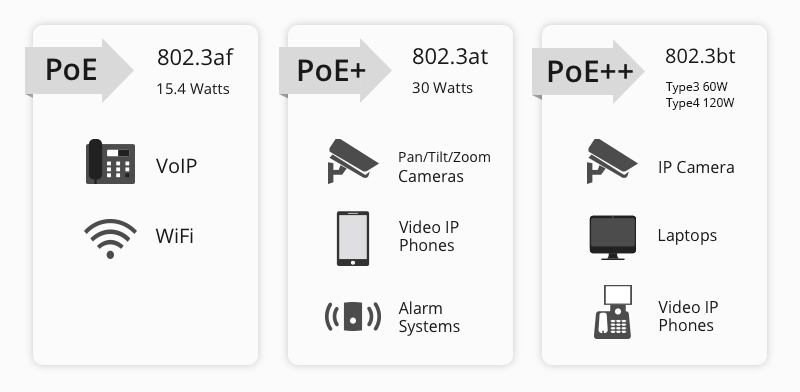
Active PoE comes in three IEEE standards. The wattage figures below come from FS:
| Standard | Max power per port | Power to device | Typical use |
|---|---|---|---|
| 802.3af (PoE) | 15.4 W | 12.95 W | VoIP desk phones, basic sensors |
| 802.3at (PoE+) | 30 W | 25.5 W | Wireless access points, PTZ cameras, feature-rich phones |
| 802.3bt (PoE++) | 60 W (Type 3) / 100 W (Type 4) | 51 W / 71 W | Video conferencing systems, displays, laptops |
Standard desk phones run on 802.3af, so a basic PoE switch covers most offices. Before you buy, confirm that both the phone and the switch support 802.3af or 802.3at.
What Is a PoE VoIP Phone?
A Power over Ethernet (PoE) VoIP phone is an internet-based physical phone that gets both its network connection and electrical power from a single Ethernet cable.
You plug it into a PoE-capable network switch or a PoE injector so you don’t have to worry about using a separate power adapter or nearby outlet.
VoIP phones make calls over an internet connection instead of a landline or mobile network. This internet connection can be established in various ways, most commonly over a wired Ethernet connection.
Almost all VoIP phones include a separate power supply that plugs into the user’s electrical outlet. However, these come with drawbacks: space and reliability.
A VoIP PoE phone lets team members make and receive business calls over a single Ethernet line that provides both electricity and an internet connection.
How Does PoE Work With VoIP Phones?
Certain VoIP phone systems are PoE-compatible. In this situation, power is supplied through either a PoE switch or a PoE injector.
An Ethernet cable will connect to the PoE switch or injector, which contains twisted wiring for both data and internet connections. The Ethernet cable transmits power to the device — in this case, the VoIP phone.
This video from our friend Prince Rich explains how PoE phones work:

Are All VoIP Phones PoE-Compatible?
No, not all VoIP phones are PoE-compatible. However, all phones that Nextiva sells are PoE-ready.
VoIP phones come in many models and specifications. PoE is a specific feature, and not all models possess it.
1. PoE-compatible VoIP phone
PoE-compatible VoIP phones can receive power and data through a single Ethernet cable as long as it’s connected to a PoE switch or injector. We’ll discuss specific PoE-compatible VoIP business phone systems later in this post, including popular VoIP desk phones.
2. Non-PoE VoIP phones
These phones require a separate power source and don’t support PoE. In many cases, they’ll require a traditional AC adapter plugged into an electrical outlet. This can cause cord clutter, which is one reason businesses may opt for PoE models instead.
3. Wi-Fi VoIP phones
Some VoIP phones may connect to the network wirelessly via Wi-Fi. These phones also typically require a separate power source, as Wi-Fi does not provide electricity.
These phones also carry some risk. If the wireless network is interrupted, the VoIP phone can lose connectivity or experience poor call quality.
Benefits of PoE VoIP Phones
Choosing new communication systems often has several reasons to prefer PoE-compatible VoIP phones. These advantages matter most when upgrading an office network.
Simplified wiring
Fewer cables are required since power and data are carried over a single Ethernet cable. This makes maintenance easier and speeds up VoIP installation. The office will also look much more organized, with fewer wires cluttering the space.
Cost-effective
With fewer wires and a faster installation process, you’ll need fewer electrical wires and outlets. This can reduce installation costs.
Reliability
PoE VoIP phones typically include battery backup features, ensuring that phones remain operational during power outages.
They’re also typically more reliable than Wi-Fi VoIP systems, which may be prone to connection issues and rely entirely on functioning routers.
Scalability
All businesses should consider scalability, and VoIP PoE systems are, by definition, scalable telephone systems.
You can easily add new phones or relocate them. You only need to manage your network connections, so there’s no need to worry about separate power supplies. Your system can easily scale up and down with your business.
Energy efficiency
The latest PoE technology often includes energy-saving features that provide a phone with only the power it needs to operate. This can result in long-term cost savings, especially at scale.
What Kinds of Businesses Use PoE VoIP Phones?
PoE VoIP phones are ideal for traditional office environments, call centers, and any in-person location where several phones are needed. They’re also invaluable for businesses that plan to grow rapidly and those that may need to either reorganize their office space or move to a new location in the foreseeable future.
PoE is less common for people who work from home, but with a PoE switch or injector, home users can also use PoE.
Top 5 PoE VoIP Phones
PoE VoIP phone systems are only as strong as the VoIP service providers and the PoE devices themselves.
So, it’s important to get started with the right device. Let’s discuss the top five PoE VoIP phones for 2024, all of which are available as Nextiva VoIP desk phones.
Which PoE Phone Fits Each Desk
Use line count and budget to narrow the list:
| Phone | Lines | Price | Best fit |
|---|---|---|---|
| Yealink T33G | Up to 4 | $100 | General staff |
| Nextiva X-835 | Up to 12 | $120 | Team leads |
| Poly Edge E350 | Up to 32 | $180 | Heavier call handlers |
| Yealink T46U | Up to 16 | $200 | Heavier call handlers |
| Poly CCX 500 | Up to 24 | $420 | Reception or high-volume desks |
1. Yealink T33G IP phone
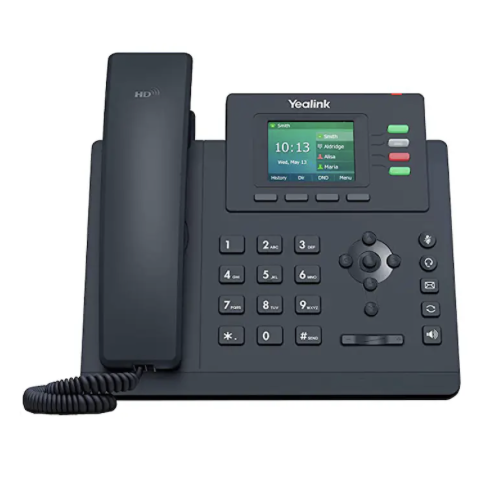
The Yealink T33G IP phone offers a dual-port Gigabit Ethernet with integrated PoE.
It’s an entry-level IP phone with a color screen, high performance, and the ability to offer support for up to four lines. It supports a wireless headset and has an adjustable, multi-angle stand support.
This is a high-quality, cost-effective solution, making it a popular choice for many Nextiva customers.
Price: $100
2. Nextiva X-835
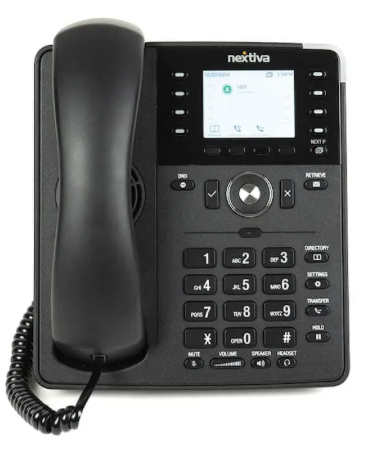
The Nextiva X-835 is an IP phone offering a color LCD display and the ability to support up to 12 lines.
It has a multipage approach that allows users to program additional keys for speed dialing as they see fit for greater ease of use. This phone is also cost-effective, yet it still consistently provides high audio performance.
Price: $120
3. Yealink T46U IP phone
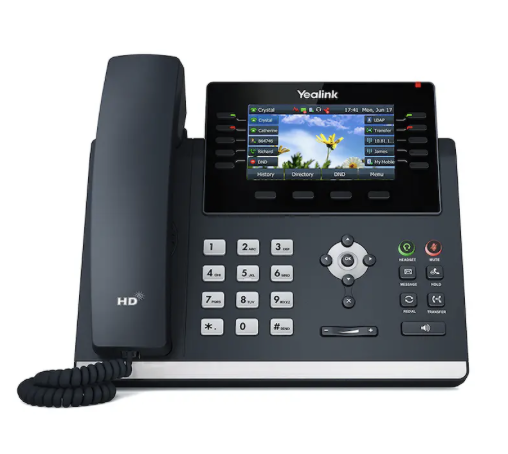
The Yealink T46U IP phone is a mid-range option that provides extraordinary audio quality and a large, full-color display.
It has dedicated call-handling buttons, a hearing aid-compatible handset, and the ability to handle up to 16 lines. It supports multiple options for headset connection, including a wireless Bluetooth option. It also allows for Wi-Fi connectivity.
Price: $200
4. Poly Edge E350
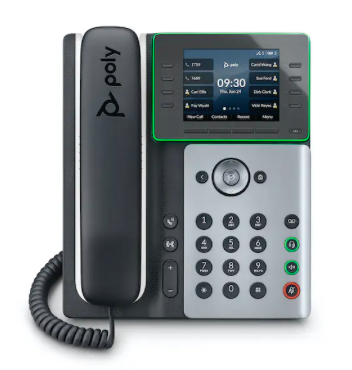
The Poly Edge E350 has a sleek look that’s ideal for a modern office, but it’s still packed with features. It was designed for hybrid working, and it comes integrated with Wi-Fi and Bluetooth functionality for strong performance.
This phone supports up to 32 lines and has a 3.5-inch color LCD.
Price: $180
5. Poly CCX 500
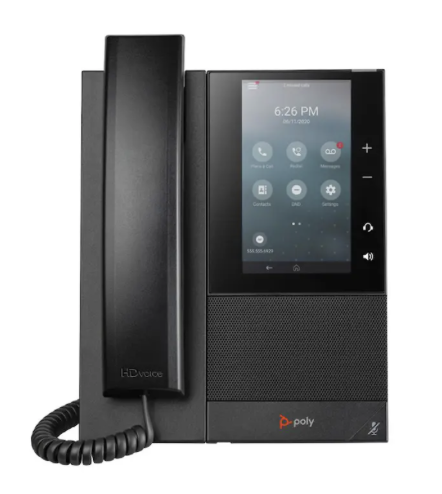
The CCX 500 is a relatively new addition to Poly’s phone lineup and offers outstanding audio quality and strong functionality, making it a great option for brands looking for a cloud communications platform.
This phone has a five-inch color touchscreen and supports up to 24 lines.
Price: $420
Additional PoE Equipment You May Be Interested In
In addition to the PoE VoIP phones themselves, businesses should consider PoE switches and routers to integrate into their existing network infrastructure.
PoE switches
PoE switches deliver both power and network connectivity to connected devices via Ethernet cables. They come with multiple ports, each one capable of delivering the power needed to run a device.
PoE injectors
A PoE injector sits between a regular, non-PoE switch and a device, adding power to the data line before it reaches the phone. It works well in small offices and home offices, or when you’re adding just one or two phones to an existing network. To equip a full office, a multi-port PoE switch is simpler because it powers every phone from one box.
PoE Phone FAQs
How much does a PoE IP phone cost? The phones in our roundup range from $100 for the Yealink T33G to $420 for the Poly CCX 500.
What is a PoE device used for? A PoE device takes its power and network connection from one Ethernet cable. Common examples include desk phones, security cameras, and Wi-Fi access points mounted on ceilings far from outlets.
Can PoE power a Wi-Fi VoIP phone? Only when the phone is also plugged into a PoE port with an Ethernet cable. If a phone connects over Wi-Fi alone, it needs its own power adapter.
Do I need a PoE switch or an injector for a home office vs. a full office? For one phone at home, an injector between your router and the phone is enough. For a full office, choose a PoE switch with enough ports for every desk.
Can you use an IP phone like a regular phone? Yes. You dial, answer, transfer, and check voicemail just as you would on a landline handset. The calls travel over your internet connection.
PoE routers
Some routers have built-in PoE compatibility, allowing them to power devices directly. This is less common than in PoE switches, so you’ll want to ensure that you’re choosing a router with PoE functionality.
Setting Up Your Network for PoE Phones
Check these network settings before connecting your phones:
- Enable QoS: Quality of Service prioritizes voice packets over other traffic to prevent choppy or dropped calls.
- Create a voice VLAN: Putting phones on their own virtual LAN keeps big downloads and backups from competing with calls.
- Use Cat5e or Cat6 cable: These cables carry both power and data reliably to every desk.
- Match the PoE standard: Check that your switch supports the PoE standard your phones need.
IT teams should also protect the PoE equipment that carries voice traffic:
- Lock switches in a secure room or cabinet.
- Segment voice traffic on its own VLAN.
- Disable switch ports that aren’t in use.
- Keep phone and switch firmware updated.
- Use strong passwords and multi-factor authentication (MFA) for switch management.
Choosing a PoE-Ready VoIP Phone System
Using a PoE VoIP phone system in your office offers flexibility and scalability while still delivering superior call-quality reliability.
Now that you have your list of PoE VoIP phones, it’s time to find a cloud-based phone service that helps you get the most out of your devices.
Nextiva’s VoIP phone system is known for consistent call quality and service uptime, and it offers the advanced call features a growing business needs, all with an intuitive interface.
You can count on features such as the following:
- Call routing
- Call recording
- Call analytics
- Auto attendants
- Conference call solutions
- 24/7 customer support
- Team collaboration tools
- Free local and toll-free numbers
- SMS messaging
- Voicemail-to-email transcription
Every Nextiva plan offers unlimited calling and exceptional customer support. As a result, combining Nextiva’s PoE-enabled phone devices with your VoIP phone service is an easy way to quickly improve your communications system.