Customer Experience
  Blog
Blog  Business Communication
  Leadership
  Marketing & Sales
  Nextiva News
  Productivity
  VoIP
VoIP 

The seat price looked reasonable in the demo. Then, year two brought an unexpected AI charge, plus a separate phone bill.
That kind of cost creep is common as support stacks grow tool by tool. Nextiva’s Customer Experience (CX) Trends research found that 95% of surveyed companies use multiple tools for customer interactions, averaging 6.3 tools. And 86% of those multi-tool companies report siloed customer data.
None of that makes customers any more patient. According to Nextiva’s Customer Patience Benchmark, customers expect chat replies in about a minute and phone or text (SMS) responses within five minutes.
Before you sign, ask two things: What does your support team need to meet those response times? And what will customer support solutions really cost once AI and add-ons kick in?
What Customer Support Solutions Have to Do
Before you look at any prices, clarify your support needs. That makes it easier to spot the features you’ll never use and the gaps that will cost you later.
The core job: One queue with full customer context
Strip away the feature lists, and customer service software does one thing. It pulls support requests from every channel into a single prioritized queue. Each request keeps its full history attached and gets tracked until it’s resolved.
When that breaks down, customers move fast. Of the 400 consumers Nextiva surveyed, 56% immediately try another channel after a missed response window, and 28% abandon the product or service.
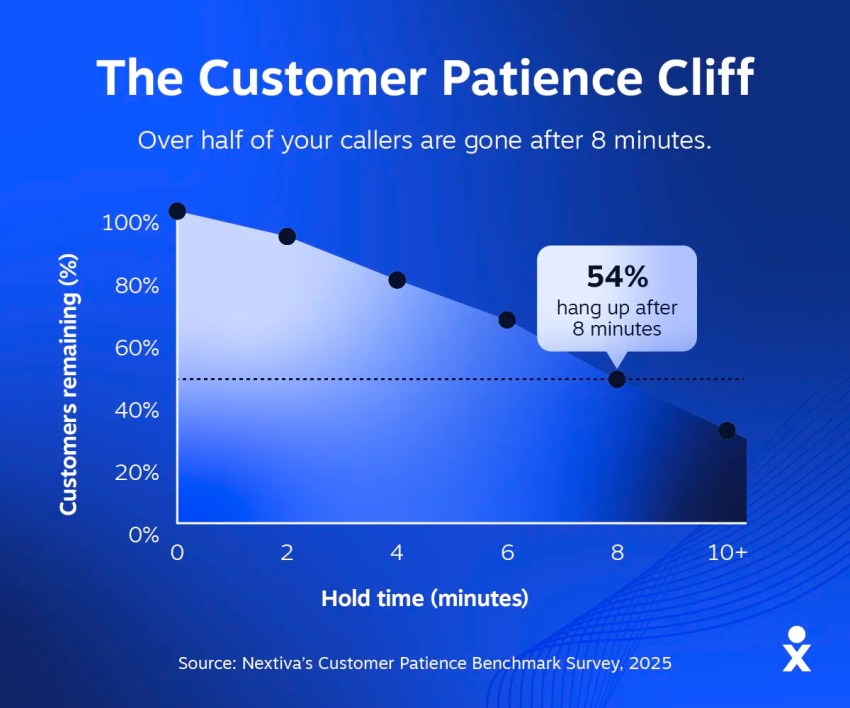
That channel switch is where fragmented customer support solutions hurt most. When a customer emails and then calls after hearing nothing, it creates two support tickets, which are handled by two support agents who can’t see each other’s notes. The customer ends up giving their order number twice.
You can check this scenario in any demo. Send an email about a made-up issue, then call about the same one a few minutes later. The agent who answers should see your email without having to ask. If they can’t, the customer context stays stuck in one channel, and your customers have to repeat themselves every time they switch channels.
Shared inbox vs. help desk vs. unified contact center
Most teams move through three stages in their use of customer service tools. Find the row that matches your setup, then read the “Breaks when” column. That’s usually your next problem.
| Stage | What it is | Breaks when | Usual pricing unit |
|---|---|---|---|
| Shared inbox | A team email inbox where agents assign messages and leave private notes | You need service level agreement (SLA) tracking or phone calls in the same view | Per user |
| Help desk or ticketing system | Numbered tickets with SLA timers and a knowledge base, mostly for email and chat | Calls run through a separate phone system, so agents switch between two screens | Per agent, plus AI add-ons and meters |
| Unified contact center | Voice and digital channels in one queue, with routing and AI built in | Rarely outgrown; the risk is buying more than a small team needs | Per agent or bundled plan |
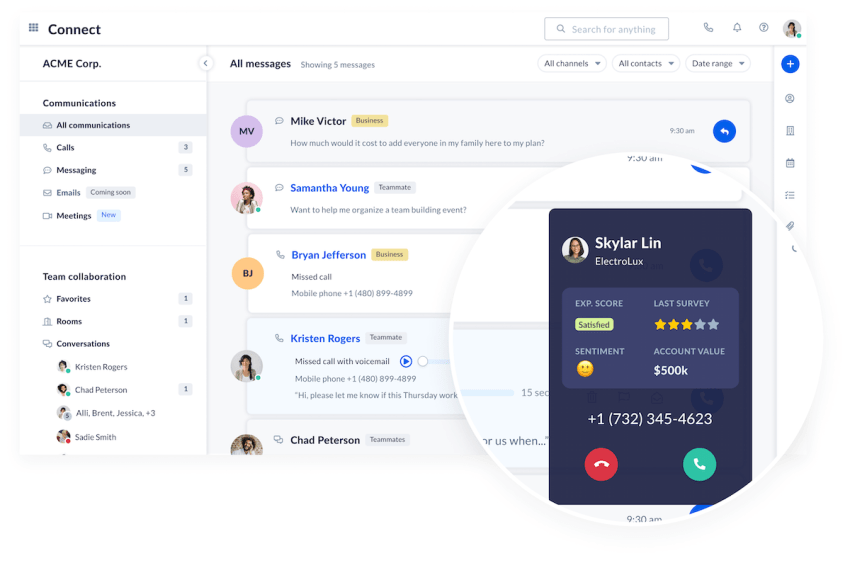
The gap most help desk software buyers miss is the phone. A lot of customer support software prioritizes email and chat, while a separate product or integration partner handles voice. If the phone is a core channel for your support team, that means two contracts and two admin consoles, with customer history split between them.
That’s why one of my first questions for any help desk vendor is “Where do phone calls live?” If the answer involves a second vendor, add that bill to your cost comparison before you sign. A support phone system that runs in the same queue as your digital channels keeps each customer’s history in one place.
Core Features of the Best Customer Service Software
Most customer service software demos walk through a long list of key features. The four below determine how quickly your support team can respond and how much context agents have when they do.
Omnichannel queue and conversation history
Every channel should land in one queue. When an agent opens a conversation, the customer’s past calls and messages should already be on screen. This is the feature of an omnichannel platform that ends the “Can you repeat your account number?” moment.
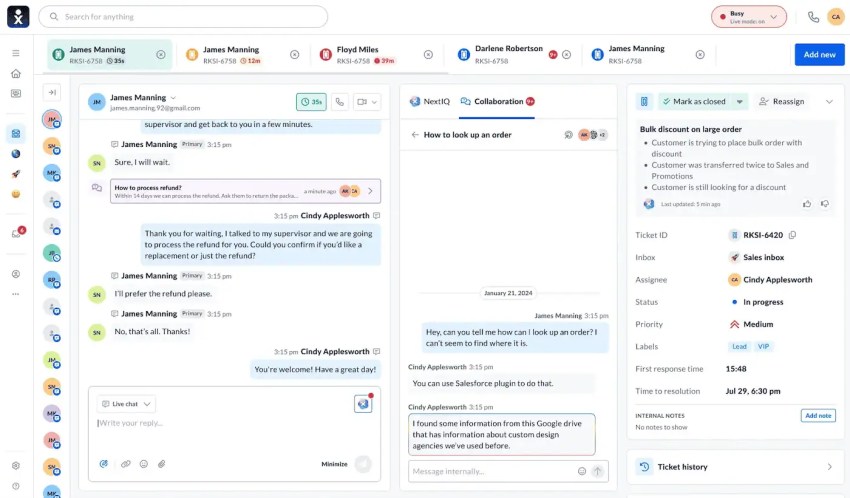
With historical data in view, an agent knows what was promised last week before saying hello. That’s where personalized support starts.
Ask each vendor whether history is carried across channels natively or only via a sync with another tool. If it’s synced, ask how often it updates. A sync that runs every hour leaves agents working with stale history during your busiest stretch.
Routing and SLA tracking by channel
Routing decides who picks up. With skills-based routing, a billing question routes to someone from the billing department, and a Spanish-speaking caller reaches an agent who speaks Spanish. After-hours rules matter just as much. A call that comes in after closing should end up in voicemail or a callback queue instead of ringing out.
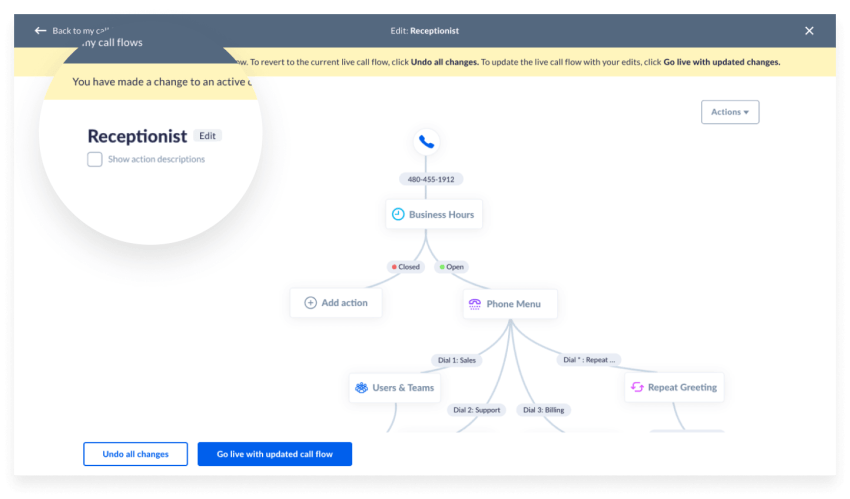
Service level agreement (SLA) tracking sets response-time targets. Two details are worth checking closely:
- Early alerts: The timer should warn a supervisor a few minutes before a target passes, while someone can still grab the ticket. Ask to see this happen in the demo.
- Separate targets by channel: A four-hour email goal and a one-minute chat goal can’t share one number. Average them together, and a strong email week can hide a chat queue that’s failing customers.
Knowledge base and self-service options
Self-service has a lower ceiling than most demos suggest. A Gartner survey of 5,728 customers found that self-service fully resolved only 14% of service issues. Even issues customers called “very simple” were resolved just 36% of the time. The most common failure was that customers couldn’t find content relevant to their issue.
That makes knowledge maintenance a real cost line. In a separate Gartner survey of 187 service leaders, 61% reported having a backlog of knowledge base articles to edit. More than one-third had no formal process for revising outdated ones.
Budget someone’s hours for this work. Any AI that answers customers using those articles will be only as accurate as the articles themselves.

Real-time reporting and CRM integration
Your customer service software should give supervisors real-time data on first response time, resolution time, customer satisfaction, and backlog by queue. A report that only runs as an end-of-month export can’t help anyone staff a Monday spike. By the time anyone reads it, those customers have already switched channels or left.
Live data also gives contact center AI something to work with. Sentiment analysis, for example, can flag a conversation that’s going badly while a supervisor still has time to step in.
Reporting tells you how the queue is doing. Your customer relationship management (CRM) platform tells you who the customers are and what you know about them. When the software integrates natively with your CRM, agents see the customer’s plan and open orders right on the ticket, without retyping account details. In a busy queue, that skipped data entry adds up fast.
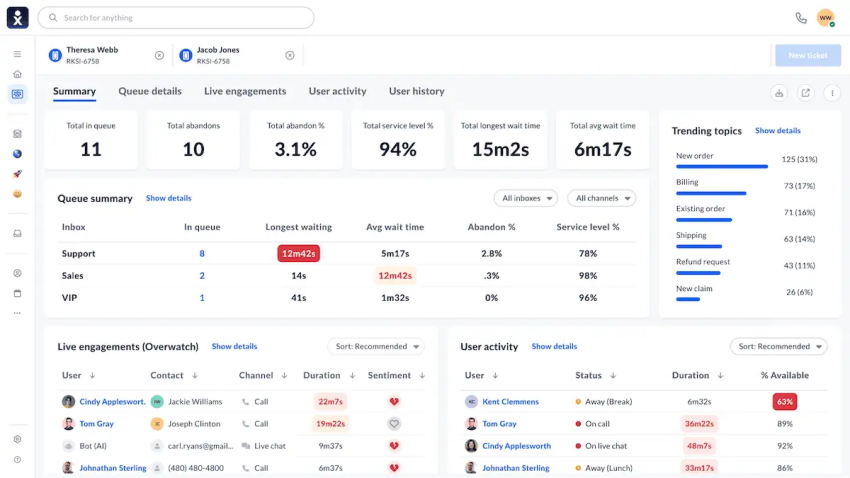
Seamless integration is easy to promise. Ask the vendor which CRM integration options come included and which need a paid add-on or developer time.
The 3 Layers of Customer Service Software Cost
Customer support software costs fall into three layers: seats, add-ons, and usage meters. Your quote needs to account for all three, including what changes when introductory discounts expire.
Use the published prices below to understand how each layer works, then ask vendors to price your expected usage and your busiest month. Confirm the billing term, included allowances, and renewal rates before comparing totals.

Layer 1: Seats
Seats are the number on the pricing page, usually quoted per agent per month. With annual billing, Freshdesk lists Growth at $19, Pro at $55, and Enterprise at $89 per agent per month. Zendesk lists Suite Team at $55 and Suite Professional at $115 per agent per month, also billed annually.
Feature gating pushes that number up. Vendors often keep the features a growing support team needs above the entry plan. At Freshdesk, multiple SLA policies are available on Pro, and skills-based routing is available on Enterprise. At Zendesk, skills-based routing starts on Suite Professional. So the realistic seat price usually sits one or two tiers above the headline price.
Layer 2: Add-ons and AI features
Agent-assist AI is usually its own per-agent line. Zendesk Copilot costs $50 per agent per month and is available only on Professional plans and above. Freshdesk’s Freddy AI Copilot costs $29 per agent per month and is available only on Pro and Enterprise plans.
Voice can land here, too. Zendesk’s Suite plans include basic telephony, but its Contact Center add-on costs $83 per agent per month. These add-on prices are quoted per agent per month with annual billing. Many help desk solutions skip voice entirely and connect to a separate phone provider with its own contract and bill.

Layer 3: Usage meters
This stage is where budgets break. A usage-based pricing model charges per event instead of per agent:
- Fin: Published pricing lists $0.99 per resolution for chat and email when used with Intercom. Other billable outcomes and voice pricing have separate terms, so confirm which apply to your deployment.
- Freshdesk: Additional Freddy AI Agent sessions cost $49 per 100 sessions. Check the included allowance and how the vendor defines a session.
- Zendesk: Published pricing lists $1.50 per committed automated resolution and $2 per pay-as-you-go resolution. Plans include allowances, so calculate charges against the volume that exceeds them.
Meters also bill the most when support is busiest. A holiday rush or an outage raises the bill in the same month it increases your ticket count, and nobody signs off on the increase.
Use this table to pressure-test each customer service software quote before you sign.
| Cost layer | What it looks like | Question to ask the vendor |
|---|---|---|
| Seats | Per agent per month, with annual and monthly rates | Which tier includes the routing, SLA features, and reporting we need? |
| Add-ons | AI copilot, workforce management, quality assurance, voice, and extra channels | Which of our must-haves are add-ons, and are they priced per agent or per account? |
| Usage meters | Per AI resolution or session, plus phone minutes, texts, and API calls | How do you define a billable resolution? Is there a cap, and what did similar customers pay in their busiest month? |
| Renewal | Year-two list price after intro discounts | What’s the renewal rate in writing, and what happens to add-on pricing at renewal? |
Here’s an illustrative budget for a 20-agent team. These are assumed inputs, not a vendor quote. The AI volume below represents billable resolutions after any included allowance:
- Seats: 20 agents × $115 = $2,300 per month.
- Agent assist: 20 agents × $50 = $1,000 per month.
- AI usage: 3,000 billable resolutions × an assumed $1.50 = $4,500 per month.
- Combined cost: $7,800 per month, before voice and SMS usage, taxes, implementation, and ongoing administration.
The AI meter now costs more than seats and copilot licenses combined. If billable resolutions double during a holiday month, AI usage reaches $9,000, and the monthly total rises to $12,300.
At the baseline volume, the annual cost is $93,600. If two months run at the holiday volume and the other 10 stay at baseline, it becomes $102,600. These totals assume unchanged seat counts and rates.
Build your year-two forecast using the renewal prices in your contract, planned headcount, and expected usage for each month. Add ongoing knowledge maintenance and integration support, then account for any expiring discounts. Keep one-time migration costs separate so finance can distinguish the cost of switching from the cost of running the system.
Before launch, assign someone to monitor usage, set spending alerts, and confirm whether the vendor supports a hard cap. Agree on what happens when that cap is reached and who can approve an increase.

Agentic AI: Per-Resolution Pricing vs. Built-In AI Tools
Autonomous AI agents vs. agent assist
AI appears on support software quotes in two common forms: autonomous agents that interact with customers and agent-assist tools that support employees. Their pricing often follows different units, so check what is included and what is metered.
Agent assist takes on the repetitive tasks in conversations. It uses generative AI support to draft replies and summarize calls for human agents, and it’s usually priced per seat.
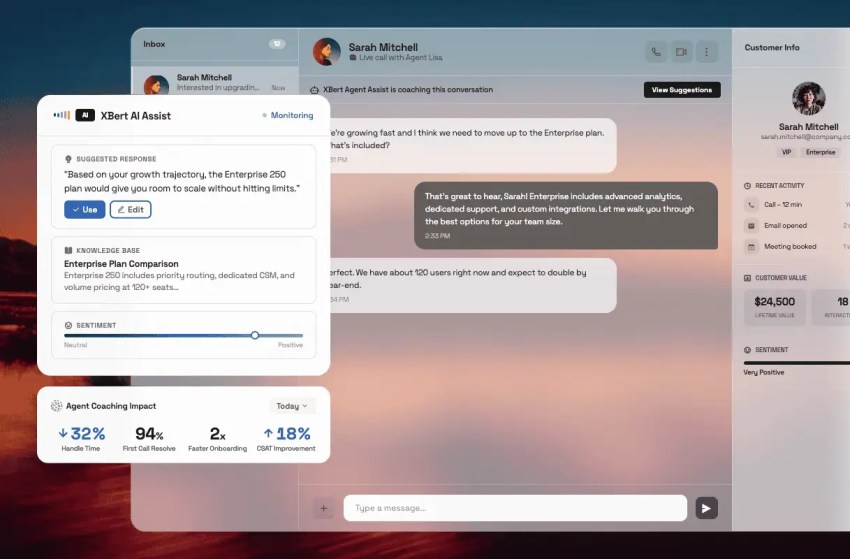
Agent assist can reduce post-conversation work. Nextiva reports a 50% reduction in agent wrap-up time with AI-powered assistance and summarization. Measure that savings separately from total handle time: A shorter wrap-up can free capacity, but it does not mean every call takes half as long.
For budgeting, agent assist is the easier line to forecast because it follows your headcount. Autonomous AI can take work off the queue entirely, but its cost follows your ticket volume.
How to pressure-test an AI agent’s resolution rate
Salesforce’s announcement of its Fin acquisition reports a 76% average resolution rate. Gartner’s customer research found that only 14% of service issues were fully resolved through self-service. These figures measure different populations and experiences: A vendor-reported AI resolution rate is not directly comparable with customer-reported success across self-service channels.
Start with the billing definition. Fin distinguishes between confirmed resolutions, where customers indicate that an answer helped, and assumed resolutions, where they leave after an answer without requesting more help. Certain completed procedures that end in a handoff can also be billable. An ordinary request to speak with a human is treated differently.

Before you sign, ask:
- Silent exits: When does a customer who stops replying count as resolved?
- Handoffs: Which escalations or completed workflows trigger a charge?
- Repeat contacts: What happens if the customer reopens the conversation or contacts another channel about the same issue?
- Measurement: Is the advertised resolution rate calculated based on all incoming requests or only on conversations the AI handles?
- Spending controls: Can we set alerts and a strict monthly cap, and what happens when the cap is reached?
Pilot one high-volume, low-risk intent, such as order status or opening hours. Define success before the pilot starts and track:
- The number of eligible requests and the share the AI handles
- Resolutions completed without human assistance
- Handoffs and repeat contacts about the same issue within a defined period, such as seven days
- Customer feedback and the accuracy of a reviewed sample of answers
- AI charges plus the cost of human follow-up

Compare those results with your current process for the same type of request. Expand customer service automation only when the pilot demonstrates lower costs without sacrificing resolution quality.
Tata Play shows what that scoping looks like at scale. The Indian content distributor handles 1 million tickets a month through WhatsApp and has connected an AI bot to its backend systems. The bot has handled more than 5 million routine requests, and customer resolution costs dropped 40%. Tata Play aimed the AI at simple, frequent requests from the start, which is exactly what a pilot tests.
The handoff is part of the price
AI agents will eventually hit complex issues they can’t answer. What happens next is part of the cost.
Nextiva’s State of CX research found that 98% of CX leaders recognize the need for smooth AI-to-human handoffs, yet 90% struggle to deliver them. A cheap resolution that ends with the customer having to repeat everything to a human agent can cost more than it saves. Depending on the pricing model, you may pay for the AI attempt as well as a longer human conversation.
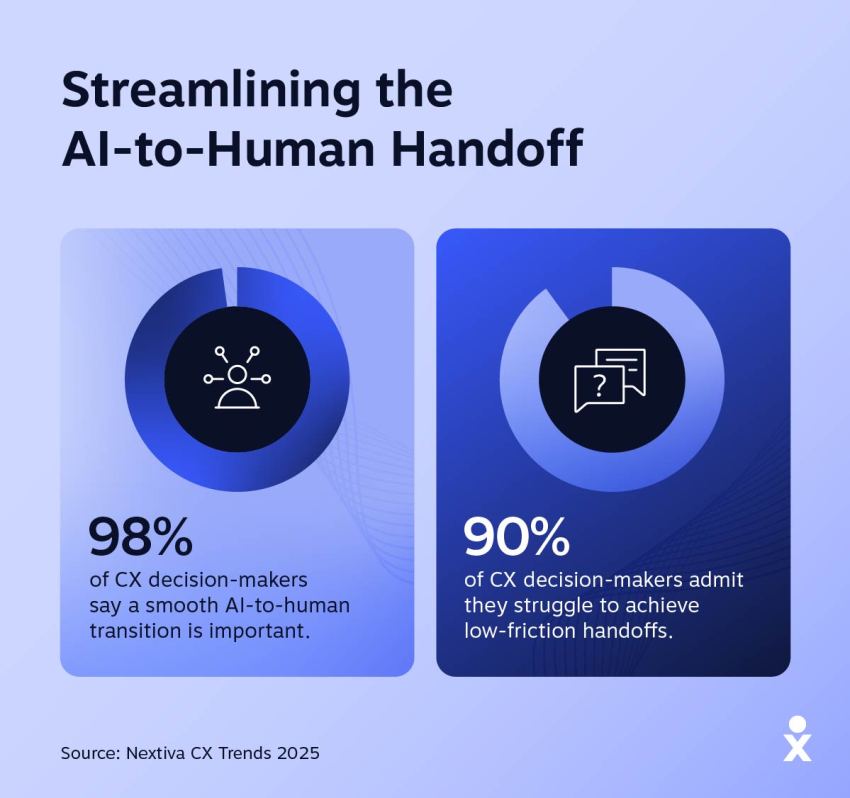
In a demo, intentionally trigger an escalation. Check whether the agent receives the full AI transcript and customer context or starts from scratch.
Implementation and Migration Costs That Never Appear on the Quote
A subscription quote may not include all the work required to move your support operations. Confirm what implementation covers and budget time for these tasks before setting a go-live date:
- Data export: Historical data, such as ticket history and customer records, must be exported from the old system in a compatible format. Fields that don’t map directly may require manual entry.
- Rebuilding workflows: Macros, routing rules, and related support processes often need to be manually recreated.
- Retraining: Agents require training on the new ticket management workflow, so include change management in your budget.
- Number porting: Transferring phone numbers to a new provider requires documentation and a scheduled transition.
- Parallel running: Plan to operate both old and new systems concurrently during the transition, which may result in temporary dual costs.
Before you sign, find out how much of that list the vendor handles. Ask for a written implementation timeline and a price for professional services, then ask which migration tasks your team owns. Anything the vendor doesn’t handle lands on your staff.
The work continues after launch, and it often lands outside the support team. In a Gartner survey of 187 service leaders, 57% said IT has more responsibility for running and maintaining AI solutions, while customer service leads on driving adoption. If IT teams will maintain your integrations and AI settings, count their hours as part of the cost.

Switching tools can mean repeating much of this work. Consolidation can reduce the number of contracts, integrations, and systems your team maintains. In Nextiva’s CX Trends research, 81% of respondents said consolidating customer data from all interaction points into a single system of record could improve CX.
Matching Customer Service Tools to Your Support Model
Customer service software that works well for a retailer handling frequent order status chats may not suit a law firm that relies on phone calls. Channel mix and the volume of customer inquiries decide what matters, so start with the row closest to your team.
| Support model | Prioritize | Watch out for |
|---|---|---|
| High-volume ecommerce | Chat and text first, with order data pulled in so AI answers can handle status questions | Per-resolution meters that spike during holidays |
| High-touch business-to-business | Email and phone tied to your CRM, with SLA tiers that match each contract | Deflection tools that are paid for even though most tickets need a person |
| Voice-heavy small business or service business | A native phone system with call routing, callbacks, and after-hours AI answering | Help desk that hands voice off to a second vendor |
| Multi-brand or multi-location | One admin console, separate queues and numbers per brand, and consolidated reporting | Per-location licensing that grows faster than your team |
Plenty of teams fit more than one row. If that’s you, weigh the row that matches your busiest channel.
Before a vendor makes your shortlist, get these answers in writing. Uptime comes first since a platform outage takes every channel down at once. For compliance:
- All vendors: Ask for the System and Organization Controls 2 report.
- Card payments: Confirm Payment Card Industry Data Security Standard compliance.
- Health data: Get a signed business associate agreement under the Health Insurance Portability and Accountability Act.
Put the list of native channels and the renewal price into the contract so any changes require agreed terms.

Run Voice, Digital, and AI Support on One Platform With Nextiva
Support budgets increase when seats, add-ons, and usage charges are approved separately. By renewal, the total can look very different from the original quote.
Start with a complete cost forecast. Get the resolution definition, usage controls, and renewal terms in writing, then evaluate whether consolidating voice and digital support can reduce the systems your team pays for and maintains.
With Nextiva Contact Center, every call, text, chat, email, and social message lands in a single routed queue that supervisors can monitor live. AI summaries halve agent wrap-up time, and the network strives for 99.999% uptime across eight points of presence. Your business phone system runs on the same platform, so calls sit right beside each customer’s chat and email history.
For after-hours calls and overflow, consider XBert, Nextiva’s AI receptionist. It books appointments and handles routine tasks like common questions, which extends 24/7 support coverage without bringing in another vendor.

Explore Nextiva Contact Center to see how voice, digital channels, and AI can work together — and request a quote based on your team size, channel mix, and expected usage.
Your AI-Powered Contact Center
Create amazing customer experiences with AI-powered contact center software. Scalable contact center platform built for omnichannel customer conversations.