Business Communication
  Blog
Blog  Customer Experience
  Leadership
  Marketing & Sales
  Nextiva News
  Productivity
  VoIP
VoIP 

Your support team is missing calls, hold times are climbing, and you have to fix it. So you start looking at phone systems. Then you discover that every vendor seems to offer the same things: call routing, IVR, reporting, CRM integrations, AI, and increasingly long feature lists. The problem is that the feature list doesn’t tell you whether you need a business phone system or a contact center platform.
That decision matters more than most of the individual features.
A six-person support team with predictable call volumes doesn’t need the same infrastructure as a 50-agent operation managing call queues, multiple channels, and service-level targets. There is plenty of pressure to buy more technology. Gartner found that 91% of customer service and support leaders are under executive pressure to implement AI. But buying the biggest platform isn’t the same as resolving the problem.
This guide is designed to help you determine which side of the line your team sits on and then verify the important capabilities before you sign.
VoIP Business Phone or Contact Center: The Decision That Matters
Before comparing features, work out what kind of operation you’re running. A business phone system connects people with calls. A contact center platform manages customer interactions at scale, with queues, routing, supervision, and service-level visibility.
The difference usually comes down to five things:
- How many people are handling calls
- Whether callers regularly wait in a queue
- How many channels the team supports
- How complex your routing needs are
- How much live oversight supervisors need
Once you’ve got answers to these questions, you can take your first step in the right direction. Use this checklist to help start your journey.
| Signal | Business phone system | Contact center platform |
|---|---|---|
| Support headcount | Roughly one to 10 | Roughly 10 and up |
| Call pattern | Predictable and rarely queues | Peaks and has regular queuing |
| Channels | Voice and some texting | Voice, chat, email, SMS, and social media |
| Routing need | Ring groups and auto-attendant | Skills-based, priority, and overflow |
| Supervision | Call logs after the fact | Live monitoring, whisper, and barge |
| Reporting | Basic call history | Queue SLAs and real-time dashboards |
When a business phone system is enough
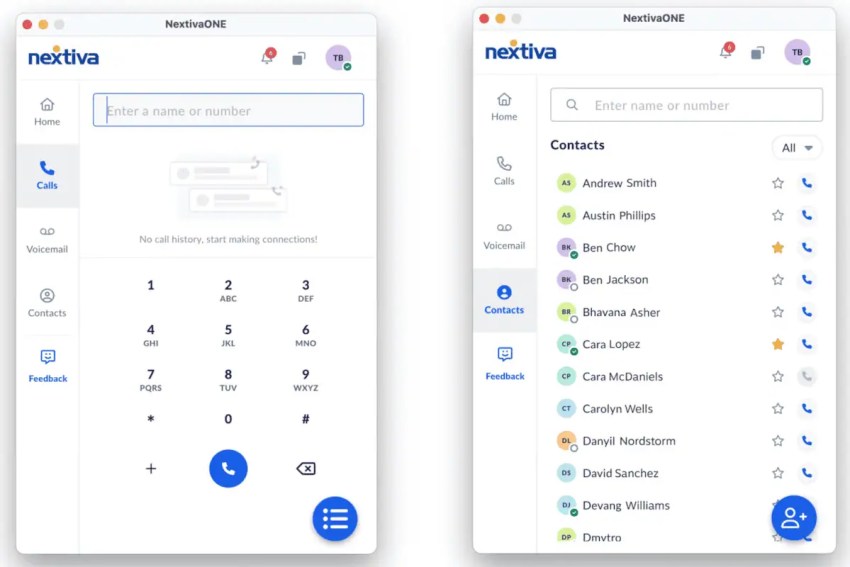
If your support team has predictable call volumes and a relatively simple routing structure, a business phone system may be all you need. Think about a small team sharing one support number. Calls can ring a group of people, route through an auto-attendant, or move to voicemail outside business hours.
Notably, phone system technology has evolved into unified communications as a service. This means you get the phone functionality you desire plus collaboration features like instant messaging, video conferencing, and plenty of internal features for group work.
Product suggestion: Nextiva Contact Center adds capabilities like skills-based routing, live supervisor support, omnichannel support, workforce management, and AI transcription and summarization.
When you have outgrown your phone system
The warning signs are operational rather than technical.
If callers regularly sit in queues with no visibility, supervisors can’t listen to live calls, or agents constantly switch between applications to find account information, your phone system is becoming the constraint. If you have any two of these problems, start evaluating a contact center platform.
Product suggestion: Nextiva Contact Center adds capabilities like skills-based routing, live supervisor support, omnichannel support, and AI transcription and summarization.
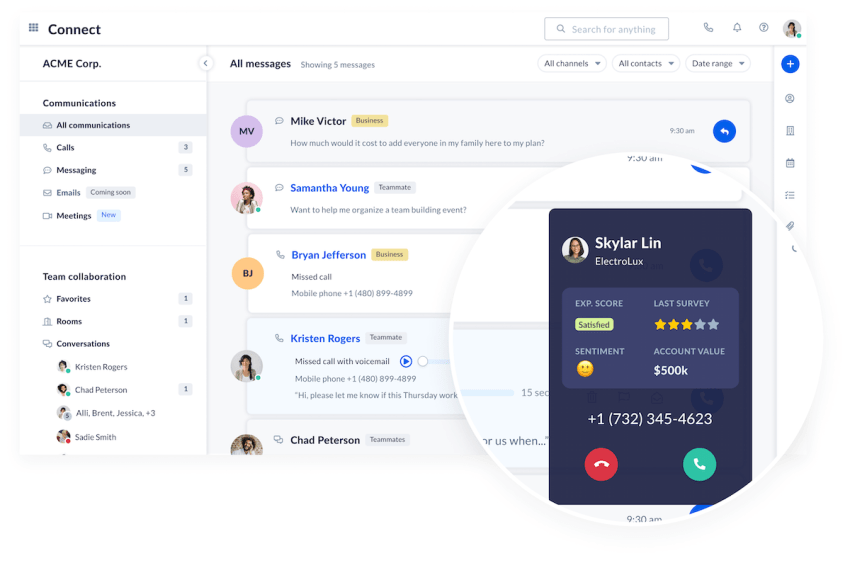
Here is a useful real-world example. NEBA moved to Nextiva Contact Center as its call volume grew and improved answer rates by 20% in its first month, alongside shorter waits and simpler escalations.
That’s the kind of outcome to look for when deciding whether you’ve genuinely outgrown a business phone system.
Support Features That Change the Numbers
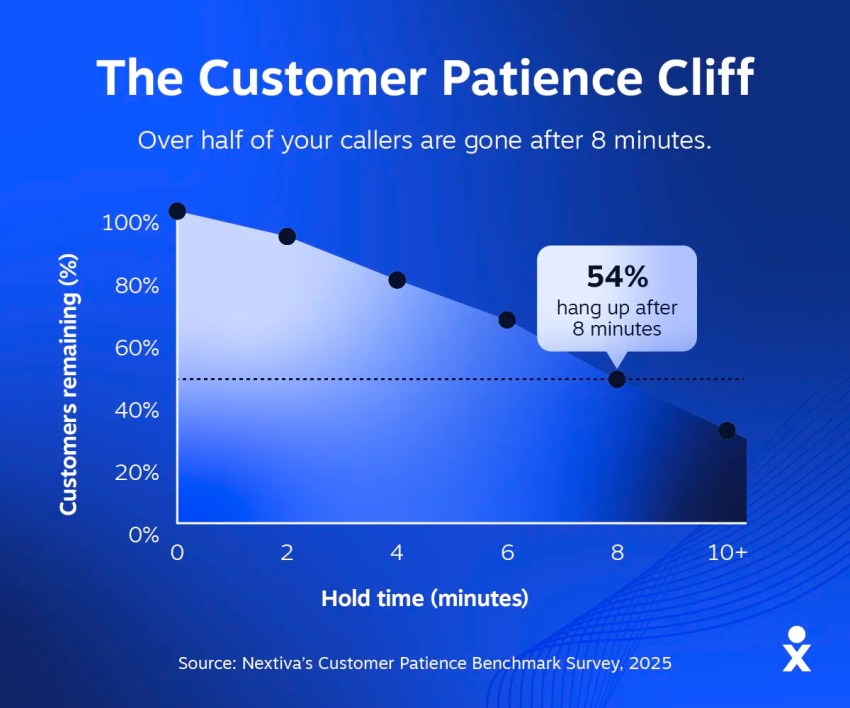
A feature list tells you what a phone system can do. A good demo shows you whether it can do those things the way your support team works. That distinction matters when hold times are already hurting the customer experience. And surprisingly (or maybe not in some cases), customers are more impatient than you think.
According to Nextiva’s Customer Patience Benchmark Survey, 54% of callers hang up within eight minutes of being placed on hold, while 31% will wait five minutes or less.
The obvious answer is to add more contact center agents. But that’s not always cost-effective.
You can introduce basic contact center functionality, like callbacks, when you upgrade from a phone system. That’s the preference for the majority of customers. In fact, 75% of customers surveyed by Nextiva said they would rather receive a guaranteed callback than remain on hold.
So when you’re evaluating a platform, don’t ask whether it has callbacks. Ask the vendor to demonstrate one using your queue rules, your escalation logic, and your expected callback behavior. That’s the approach I’d take with every feature below.
| Feature | What to make the vendor show you |
|---|---|
| Skills-based routing | Build one of your real escalation rules during the demo |
| Queue callback | The caller keeps their place in line and gets called back on time |
| CRM screen pop | The actual record and ticket history that appears before pickup |
| Two-way sync | What the CRM receives after the call, field by field |
| Live call monitoring | Whisper and barge on a live call, not a recording |
| Reporting | Service level, abandon rate, real-time analytics, sentiment analysis, and customer insights |
| AI summary | Where the summary is written and who can edit it |
Skills-based routing and IVR
A basic interactive voice response (IVR) system can ask callers what they need and send them to the appropriate team. You might even configure it to auto-route based on the caller ID being recognized as a high-priority customer.
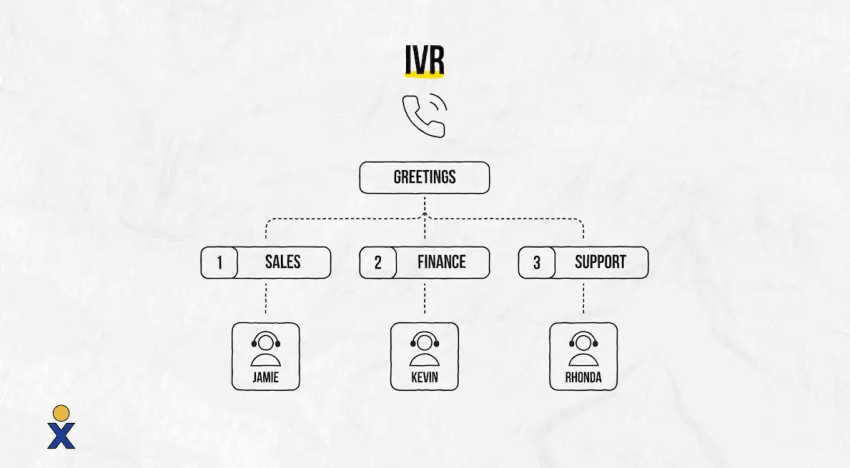
But support operations often need more.
Calls may need to be routed based on language, product tier, or issue type. The system may also need to behave differently during business hours, holidays, or unexpected demand spikes.
This feature must include the ability to offer a callback. During periods of high call volume, expecting your customers to hold is no longer acceptable.
Don’t accept a canned demo. Give the vendor one of your real escalation rules and ask them to build it live. If they can’t reproduce the way your team routes calls, the feature list doesn’t matter.
CRM and helpdesk integration
This is one of the easiest areas for vendors to overstate. CRM integration can mean anything from a genuine two-way connection to dumping a transcript into a notes field.
The minimum I’d expect is:
- Customer history visible before pickup
- Click-to-call from the customer record
- Call history and recordings synchronized after the interaction
Name the systems you use, too. Salesforce, HubSpot, Zendesk, and Zoho integrations can look impressive on a website while behaving very differently in practice. Ask the vendor to show you the actual record the CRM receives.
Nextiva’s CX Trends research found that 81% of decision-makers believe consolidating customer data into one system of record would improve the customer experience. That’s why a transcript sitting in a separate phone system isn’t enough.

Live monitoring and quality controls
If you’re running a contact center, supervisors need to see what’s happening while calls are happening. Look for silent monitoring, whisper coaching, and barge capabilities. Then ask to see them working on a live call rather than a recording.
The same applies to reporting.
A dashboard showing total calls isn’t enough when your problem is long hold times. Ask the vendor to show active calls, longest wait, service level, and abandonment rate using the queue structure you operate.
Compliance also needs to be demonstrated.
If your operation handles payment information or protected health information, ask how call recording, access controls, and data handling support PCI DSS or HIPAA requirements where relevant.
AI summaries and post-call recaps
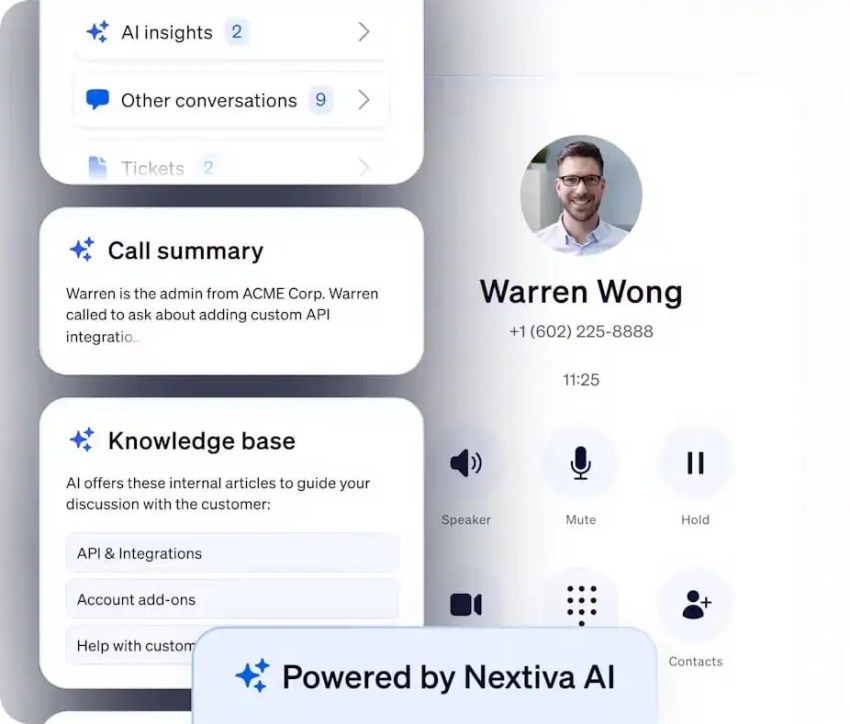
AI summaries can remove a significant amount of manual work, but only if they end up where your team already works.
Ask your vendor to demonstrate:
- The summary being written into your ticketing system
- Sentiment flags reaching the supervisor
- AI assistance continuing after hours
Then check where the summary lands. If the agent has to open the phone system after every call to find the AI summary before updating the CRM, you’ve created another place to look rather than removing work.
Network and Deployment Requirements
A good phone system can still deliver a poor customer experience if the underlying network isn’t ready. Bad internet = poor call quality.
For the IT team, there are four things to verify before deployment:
- Bandwidth for peak concurrent calls
- Quality of service (QoS) for voice traffic
- Latency, jitter, and packet loss
- Number porting and deployment timelines
Calculate bandwidth for concurrent calls
Don’t size the connection based on the number of employees. Size it around the number of simultaneous calls you expect at peak.
You need 100 kbps per VoIP call, with less than 150 ms of ping time and less than 15–20 ms of jitter. Anything less and you risk serious problems. Callers may not be able to hear you, or they may get that disconnected, robotic sound you’ve heard before.
Codec choice can change bandwidth requirements, so use your vendor’s current network guidance instead of relying on a generic rule of thumb.
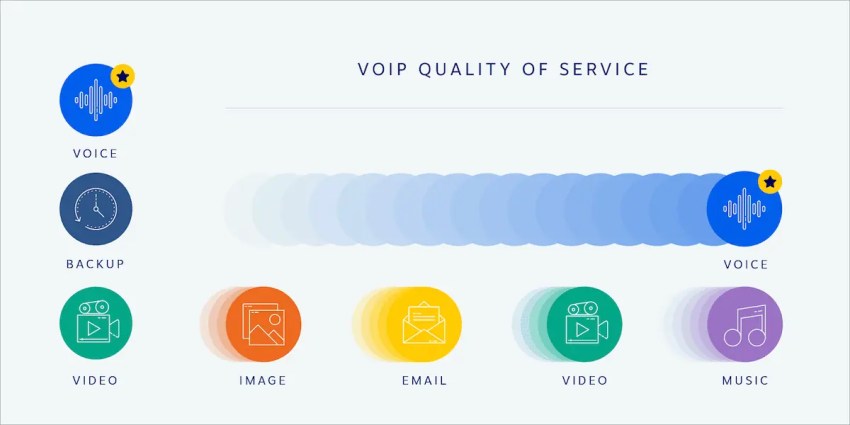
Prioritize voice traffic
Voice doesn’t behave like email or web browsing. A large file download can take a few extra seconds without anyone caring. A burst of congestion during a customer call can cause broken audio or delays that make the conversation difficult to follow.
Configure QoS on the network so voice traffic receives the appropriate priority. Then test it under realistic conditions rather than only checking the connection when nobody is using it.
We also recommend hardwiring phones with Cat5e or Cat6 Ethernet where possible. This removes the possibility of interference by things like 5G or satellite connections. They’re improbable but not impossible, so it’s worth setting yourself up to succeed rather than chancing it.
Check resilience before you port numbers
The network is only one part of your phone system deployment. You also need to understand what happens if your provider has a regional outage, how traffic is rerouted, and how quickly your team can move from implementation to live service.
With Nextiva’s phone system and contact center, you get eight points of presence, carrier-grade data centers, a service that strives for 99.999% uptime, automatic failover, and geo-redundant disaster recovery.
This means your support operation isn’t dependent on a single location or connection. If there is a problem in one part of the network, traffic can be redirected through another point of presence, helping to keep calls flowing without your team having to intervene manually.
Pricing and Total Cost of Ownership
If I had to give one piece of advice about phone system pricing, it would be that the monthly license price is only one part of the total cost of ownership.
Before comparing quotes, work out how each provider charges for the things your team uses:
- Per-user licenses
- Concurrent call capacity
- Toll-free minutes and usage
- Hardware and implementation
A cheaper seat price can quickly become less attractive if essential capabilities sit behind another tier or if your usage creates additional charges.
Look beyond the license price
Ask the vendor to model the cost using your operation. This means you should provide your actual number of users, expected call volumes, toll-free usage, and required integrations, rather than just using a demo package as an example.
Then look at the costs that don’t appear neatly on the quote.
- Implementation and number porting
- Integrations that may require development work
- Internal costs to administer the platform, manage users, and maintain routing rules
There is also a cost that buyers often miss: the tier above the one you’re buying.
If you discover six months after rollout that your team needs one critical contact center feature, upgrading the entire operation can cost considerably more than choosing the right architecture in the first place.
Calculate the cost of consolidation
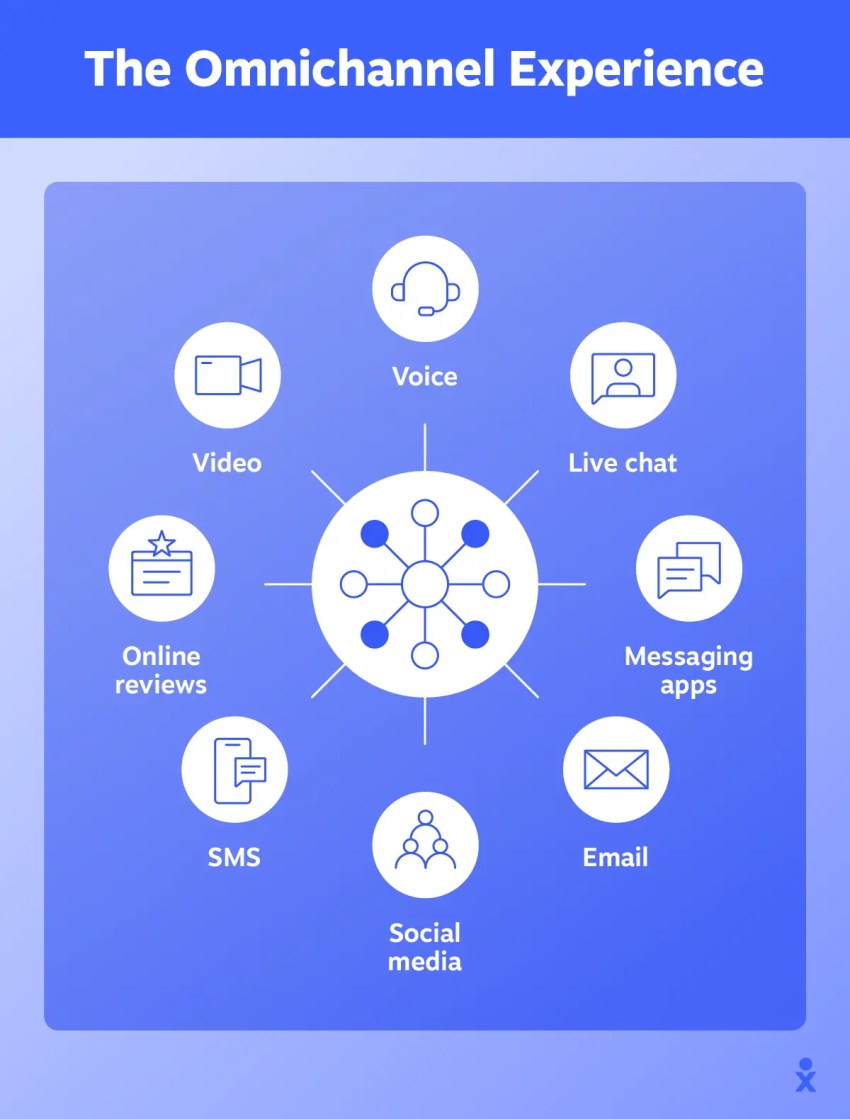
Tool sprawl creates its own TCO. If agents need separate systems for calls, CRM records, messaging, and reporting, you’re paying for more than just licenses. You’re paying for administration, integration work, and the time agents spend moving between applications.
Nextiva’s CX Trends research found that teams use six to seven tools on average for customer interactions, while 13% use more than 10. Among those using multiple CX tools, 86% report siloed data.
So you might think consolidating them into one is a no-brainer. But that doesn’t always mean it’s the right approach. That means you should understand what you’re consolidating and why.
Customer-reported savings
Moving from a legacy PBX to a cloud-based phone system can reduce communications costs while also removing the hardware and maintenance burden of traditional telephony.
Nextiva customers have reported cutting their communications costs by half or more after making the move.
Your numbers will depend on your current telecom setup, so use your existing costs as the baseline when evaluating potential savings.
Look at:
- Current telecom and hardware costs
- Maintenance and administration
- Additional tools your team currently needs
Then compare that baseline with the complete cost of the proposed system. The goal is to understand the full financial impact of the move, not to compare license prices in isolation.
How to Run a Phone System Evaluation
Don’t start with a vendor shortlist. Start with your support operation. Define the routing rules, service-level targets, and call volumes that the new system needs to handle before you sit through a single demo.
Define what the system needs to handle
Write down the scenarios your team deals with most often. This should include:
- Your busiest call periods
- Your most important routing and escalation rules
- Your target answer and abandon rates
Then use those requirements to narrow the shortlist.
The decision table earlier in this guide gives you a useful starting point. If your team regularly queues calls, needs live supervision, and requires omnichannel routing, you’re probably evaluating contact center platforms. If calls rarely queue and the routing is straightforward, a business phone system may be the better fit.
| Signal | Business phone system | Contact center platform |
|---|---|---|
| Support headcount | Roughly one to 10 | Roughly 10 and up |
| Call pattern | Predictable and rarely queues | Peaks and has regular call queuing |
| Channels | Voice and some texting | Voice, chat, email, SMS, and social |
| Routing need | Ring groups and auto-attendant | Skills-based, priority, and overflow |
| Supervision | Call logs after the fact | Live monitoring, whisper, and barge |
| Reporting | Basic call history | Queue SLAs, real-time dashboards, and enhanced call analytics |
Test your new phone system with real traffic
A demo shows you what a platform is capable of. A pilot shows you how it performs in your environment.
Start with a small group of live agents and real customer traffic. Test the workflows that matter most rather than trying to configure every feature at once.
Watch what happens to KPIs like:
- Answer rate
- Abandon rate
- Agent clicks per call
The third metric is easy to overlook. A system can improve your reporting while making agents work harder if they have to move between more screens to handle each interaction.
Check the rollout before you sign
Technology is only part of the implementation. Before signing, confirm the number porting process, onboarding requirements, and responsibilities on both sides. Make sure you know who configures the routing, who handles integrations, and what your team needs to provide.
Then define the pilot exit criteria. You want answer rates and abandonment rates to move in the right direction, without agents reporting more clicks per call. If the system can’t meet that standard during the pilot, adding more users won’t fix it.
Choose the Right Nextiva Tier for Your Support Team
The buying mistake in this category isn’t always choosing the wrong vendor; it’s choosing the wrong tier.
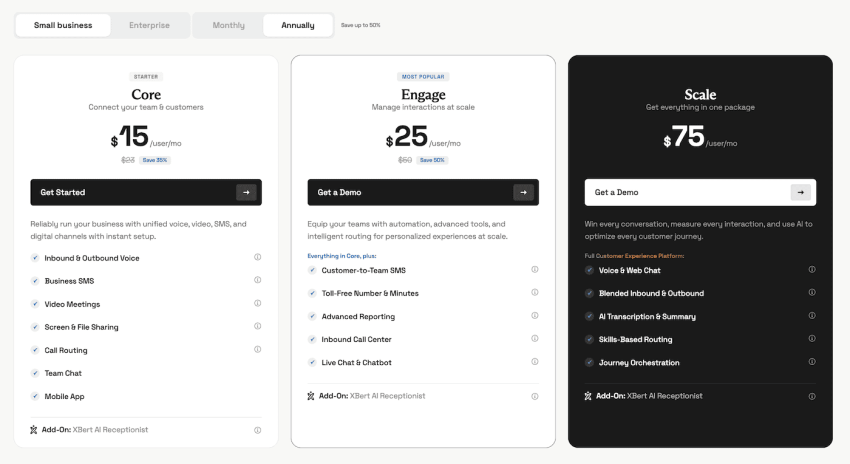
- If your team has a small number of agents, predictable call volumes, and straightforward routing, Nextiva Business Phone gives you the core capabilities you need without adding contact center complexity.
- If you’re managing regular queues, multiple channels, and complex routing, Nextiva Contact Center is built for that environment.
This leads to three key questions:
- How complex is your call flow?
- How much visibility do supervisors need?
- How much customer context needs to follow each interaction?
Match the product to the operation rather than buying capabilities you don’t need.
Then verify the integrations and routing rules in a live demo, pilot the system with real traffic, and make sure the numbers improve before rolling it out more widely.
That’s the difference between buying a phone system and buying the right phone system.
Not sure which Nextiva solution fits?👇
Which communication solution is right for you?
Choose the option that best matches how your business communicates.
Need a better business phone system?
Modern business calling, messaging, and collaboration designed to keep your team connected.
Need to manage customer conversations at scale?
Bring customer interactions together with an AI-powered contact center built for service and sales teams.