VoIP
VoIP  Blog
Blog  Business Communication
  Customer Experience
  Leadership
  Marketing & Sales
  Nextiva News
  Productivity

Outbound IVR is an automated phone system that places outgoing calls to customers and lets them respond using their phone’s keypad or voice. It delivers reminders, collects survey responses, confirms appointments, and offers payment options, with a transfer to a live agent when needed.
Businesses commonly use IVR technology to direct inbound calls, answer basic customer questions, and reduce wait times. While inbound IVR responds when customers call, outbound IVR starts the conversation and automates routine outreach without requiring staff to call each customer individually.
This makes outbound IVR useful for sharing timely updates and giving customers access to self-service options during the call. Here’s how outbound interactive voice response works, its common use cases, and what to consider when setting up an outbound IVR system.
What Is Outbound IVR?
Outbound interactive voice response combines automated dialing with an interactive call menu. When a recipient answers, the system plays a recorded message or uses text-to-speech to explain the reason for the call and present response options.
These calls can run without an agent. However, businesses can include a transfer option for customers who need assistance. The available features depend on the contact center solution and how the campaign is configured.
Businesses often use outbound IVR for:
- Alerts to pharmacy patients that their medication is ready
- Local government notifications
- Appointment confirmations
- Payment reminders
- Customer surveys
What makes outbound IVR different from a simple recorded announcement is the ability to respond. A customer might press a key to confirm a delivery, choose a language, or request a representative. Systems with speech recognition can also accept supported spoken responses.
How Does Outbound IVR Work?
Outbound IVR calls a customer, delivers a message, and follows the customer’s response. If the task requires access to appointment, billing, or order information, the IVR needs a connection to the system that holds those records.
Call initiation
Outbound IVR systems dial phone numbers from an uploaded contact list or a connected CRM or business application. Calls can go out at a scheduled time or follow an event, such as an approaching appointment or a failed payment.
The campaign settings determine when calls begin, how many can run at once, and whether the system tries again when someone does not answer.
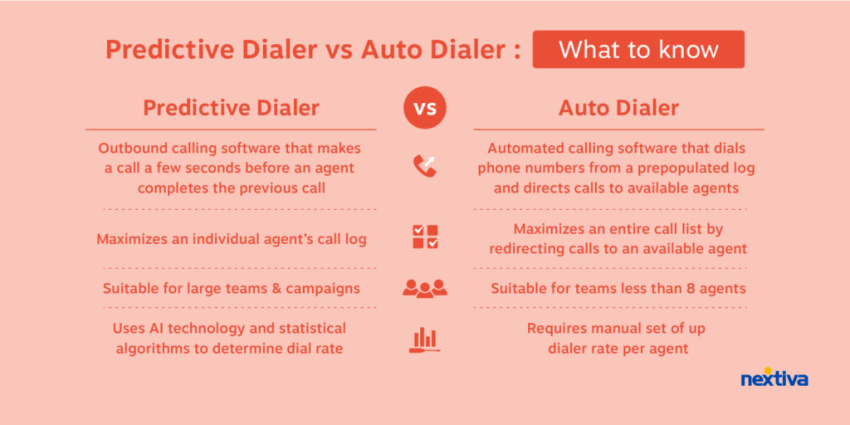
Outbound IVR does not require predictive dialing. Predictive dialers are commonly used for campaigns that connect customers to agents, as they anticipate when an agent will be available. An agentless IVR campaign can deliver its message and collect a response without an agent handling each call.

Connection and menu
After connecting with a live person, the voice response system plays a pre-recorded message, which may be followed by an interactive menu with options.
Businesses and call centers can offer diverse functionality through IVR systems, including:
- Collecting payments
- Tracking order updates
- Checking an account balance
- Scheduling appointments
- Connecting to a live agent
For example, a healthcare organization’s outbound IVR system may remind the patient of an upcoming appointment, giving the date, time, and location. The interactive menu may include:
- Press 1 to play the message in Spanish
- Press 2 to confirm the appointment
- Press 3 to speak with the office staff to cancel or reschedule the appointment
The system also needs a separate message for voicemail. Keep sensitive information out of that message and give the recipient an appropriate callback number.
Navigation
After hearing the pre-recorded greeting, call recipients can navigate the IVR menu using voice commands or keypad selections.
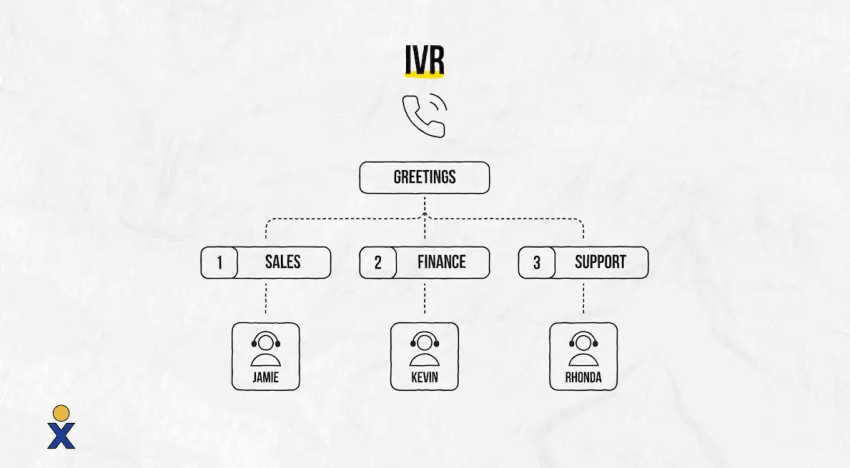
Keep the options focused on the reason for the call. For an appointment reminder, confirmation, rescheduling, and assistance may be enough. Customers should also be able to repeat the message if they miss a detail.
Decide what happens when someone presses the wrong key or does not respond. The system might repeat the options, offer assistance, or end the call with callback instructions.
Action or routing
Outbound IVR solutions can route calls or provide self-service automated options based on user choices. Depending on the platform and setup, outbound IVR can offer the following functions:
- Provide self-service options such as account updates, order status, and reminders
- Gather customer input through keypad or voice recognition
- Update an appointment or customer record
- Transfer the call to a live representative for complex issues
- Record an opt-out request and stop further calls where required
If customers want to speak to a live agent, IVR systems use intelligent routing features to direct callers to the correct agent with the right specialized skill set to help them.
There should also be a clear next step if no agent is available or the system cannot complete the task. For example, the IVR could offer a scheduled callback or explain another way to contact the business.
Related: Automated Telephone Systems: Key Features to Look For
What Is Outbound IVR Used For?
Outbound IVR calls can help businesses and call centers connect with potential buyers, clients, and prospects at all stages of the customer journey. Let’s discuss the most common uses.
Automated notifications
Businesses and call centers often use outbound IVR to deliver personalized, automated notifications to customers.
Examples include:
- Upcoming appointment reminders
- Payment reminders, including upcoming payment due dates, failed payments, or payment confirmations
- Delivery status updates or scheduling coordination
- Critical account updates
Give customers a clear next step when a response is needed. A delivery notification, for example, can ask them to confirm that someone will be available to receive the order.
Appointment reminders and confirmations
Healthcare practices, salons, repair services, and other appointment-based businesses can use outbound IVR to remind customers of a booking and ask them to confirm.
The call can offer a few simple options: confirm the appointment, request a different time, or speak with the business. If the IVR connects to scheduling software, it can record the confirmation directly. To reschedule, the system needs access to available appointment times or a transfer to someone who can make the change.
An illustrative menu might say:
“This is a reminder from your service provider. Press 1 to confirm your appointment, press 2 to request a different time, or press 3 to speak with our team.”
For healthcare calls, review what the message can disclose before the patient’s identity is verified and what can be left on voicemail. Keep promotional offers separate from appointment reminders, as adding marketing content can change the consent requirements.
Outbound IVR for collections and payment reminders
Outbound IVR can remind customers about upcoming or overdue payments and give them a way to respond without waiting for a billing agent.
Depending on the setup, customers may be able to:
- Hear payment information after verifying their identity
- Make a payment through an approved payment service
- Ask for assistance with a billing question
- Speak with an agent about available payment arrangements
- Report that the business has reached the wrong person
Connect the campaign to current billing records so the reminder reflects the correct payment status. Once a payment is recorded, stop further reminders for that balance.
Before reading account details aloud, verify that the call has reached the right person. Avoid leaving debt information on a shared voicemail.
Payment collection also needs appropriate security controls. Using IVR does not, by itself, make a payment process PCI DSS compliant. Review how the system handles card data and whether recordings or transcripts could capture it.
Debt collection carries additional requirements. For debt collectors covered by the FDCPA and Regulation F, calls about a particular debt generally create a presumption of a violation when they exceed seven in seven consecutive days or occur within seven days after a telephone conversation about that debt. Exceptions apply, and making fewer calls does not automatically make the calling pattern lawful.
Have collection scripts, voicemail messages, and retry settings reviewed against the laws that apply to your organization.
Customer surveys
Businesses regularly conduct surveys for multiple reasons, including market research or satisfaction surveys to follow up on customer support interactions.
Outbound IVR can ask the questions, record responses, and send the results to the relevant teams. For example, a short survey might ask customers to rate their recent support interaction from 1 to 5 using their keypad.
Explain the purpose of the call at the beginning and keep the survey brief. Where appropriate, let customers know during the original interaction that they may receive a follow-up call.
When reviewing the results, distinguish between customers who answered and those who completed the survey. The feedback reflects the people who participated, so it may not represent everyone who received a call.
Lead generation and promos
Outbound IVR can help your team reach potential customers with targeted messages based on audience segment, generating interest.
Examples include:
- Contacting existing customers with pre-recorded messages to inform them about an upcoming sale
- Calling customers in a specific audience segment when new products relevant to their needs are being released
- Collecting lead generation information from prospects
Interested recipients can request a callback or transfer to sales if the campaign supports those options. Those who do not want further marketing calls should have a clear way to opt out.
An existing customer relationship does not automatically authorize prerecorded telemarketing calls. Check consent records and applicable do-not-call requirements before starting a promotional campaign.
Remember that lead generation and promotional use cases for outbound IVR can fall under telemarketing categories, so following local, federal, and industry regulations is essential.
The Benefits of Using Outbound IVR
Outbound IVR reduces repetitive outreach and gives customers a way to respond during the call. The benefits depend on whether the message is useful, the timing is appropriate, and the system can complete the task it offers.
Increased efficiency
By streamlining call center operations using automation for routine tasks, contact centers and brands alike free up their live agents for more complex issues. Outbound IVR allows brands to automate outreach that would otherwise demand significant time and energy from agents.
Instead of calling every person on a reminder list, staff can focus on customers who request assistance. When responses are recorded in the connected business system, teams also spend less time updating records and following up manually.
Improved customer experience
Outbound IVR gives customers access to self-service options during the call. Depending on the setup, they can pay an overdue balance or schedule a furniture delivery by pressing a few keys, without waiting for a customer support agent. If your system also offers an inbound IVR service, customers may be able to access those options 24/7 by calling your business.
Proactive reminders and updates can reduce incoming calls about routine questions, leaving live agents more time for customers who need assistance. This may lead to shorter wait times, while configured smart routing can connect customers to the appropriate department.
When messages are timely and customers can complete the task or reach an agent, outbound IVR can improve customer satisfaction and support stronger customer relationships.
Enhanced personalization
Integrating your IVR into your CRM system allows your organization to tailor its messages based on customer data for more relevant experiences. This personalization can lead to increased responses and ongoing customer engagement.
Examples include:
- Calling customers with personalized appointment reminders, including specific instructions they need to follow before their appointment
- Contacting VIP customers for exclusive discounts based on their status in your loyalty program
- Encouraging customers to book an appointment based on their last purchase or visit, such as automatically calling customers every few months to book a complimentary oil change after they’ve purchased a new car
Use only the details needed for the call. Before sharing sensitive information, verify who has answered. If the message includes a promotional offer, check that the customer’s consent covers it.
Inbound vs. Outbound IVR
Businesses can take advantage of both inbound and outbound IVR, and knowing the difference between them is important.
Inbound IVR manages incoming customer calls. The primary goal is to provide self-service options (such as making a payment or providing information) at the customer’s prompting or to direct callers to the correct department.
Meanwhile, outbound IVR initiates outbound calls to customers. Its goal is to deliver information or drive customers to take a specific action.
| Feature | Inbound IVR | Outbound IVR |
|---|---|---|
| Call origin | Incoming | Outgoing |
| Initiated by | Customer | Business |
| Primary goal | Route or assist callers | Deliver information or prompt action |
| Typical use cases | Customer service, routing, and self-service | Notifications, marketing/sales, and surveys |
Both can use keypad menus, speech recognition, connections to business applications, and agent transfers. The main difference is who places the call.
Automated Outbound IVR: Scheduled and Triggered Calls
Automated outbound IVR can run at a planned time or respond to an event in a connected business system. The right approach depends on when the customer needs the information.
| Campaign type | What starts the call | Example |
|---|---|---|
| Scheduled | A planned date and time | Appointment reminders sent the day before a visit |
| Event-triggered | A change in a connected system | A notification when an order is ready for pickup |
| Follow-up | A previous interaction or recorded outcome | A short survey after a support case closes |
For example, a clinic can schedule reminder calls for patients with appointments the following day. When a patient confirms, the system records the response and stops further confirmation attempts.
A retailer might use an event-triggered call instead. When an order is marked as ready, the system calls the customer with pickup details.
Whichever approach you choose, keep contact details current and check that you have the required consent. Once a customer confirms an appointment or pays a balance, stop further reminders for that task.
How to Set Up an Outbound IVR System
Start with one task customers can complete through a short call. Once that task is clear, you can build the message, choose the required connections, and decide how to handle responses.
1. Define the campaign goal
Choose a specific outcome, such as confirming appointments or collecting completed survey responses. This gives you a clear way to judge whether the campaign is working.
Keep the call focused on that goal. Combining a payment reminder with a sales offer can make the message confusing and change the consent requirements.
2. Prepare the contact list
Check phone numbers, time zones, language preferences, and consent records. Remove duplicates and anyone who should not receive the call, including customers who have already completed the requested action.
Your team also needs a way to record wrong-number reports and stop calling numbers that no longer belong to the intended customer.
3. Build the message and menu
State who is calling and why, then explain what the customer can do next. Keep the prompts short and offer assistance where needed.
Work through each possible response, including silence, an incorrect key press, and an opt-out request. Every path should complete the task, offer another way forward, or end with clear instructions.
4. Connect the required systems
The IVR needs access to the information required for the task. Appointment confirmations depend on booking records, while payment reminders need current billing information.
Decide which records the system can read or update and when the customer must verify their identity. Also plan what the message should say if that information is temporarily unavailable.
5. Set calling times, retries, and transfers
Schedule calls using the recipient’s local time and the legal restrictions that apply. Limit repeat attempts, and stop them when the customer completes the task or makes an applicable opt-out request.
If customers can transfer to an agent, run the campaign when that team is available. For calls outside the team’s working hours, offer a supported callback option or another contact method.
6. Test the call flow
Call internal test numbers and try every option before contacting customers. Check the message, language choices, identity verification, transfers, voicemail, and updates to connected records.
Then run a small pilot. If customers repeatedly stop at the same menu option or hang up before responding, review that part of the call before expanding the campaign.
7. Review the results
Measure whether customers completed the task, rather than relying on the number of calls placed.
Useful measures include:
- Answer rate
- Appointment confirmation or survey completion rate
- Successful agent transfers
- Opt-outs and complaints
- Errors when updating customer records
- Repeat attempts per contact
Be clear about what each result means. A call answered by voicemail is different from one answered by a person. Likewise, selecting the payment option does not mean the payment was completed.
Outbound IVR Compliance: TCPA and Consent
In the United States, outbound IVR campaigns can fall under the Telephone Consumer Protection Act (TCPA), FCC rules, and, for covered telemarketing, the FTC’s Telemarketing Sales Rule.
The requirements depend on the purpose of the call, the type of number being called, and any applicable exemption. Using a contact list instead of a predictive dialer does not remove obligations that apply to artificial or prerecorded voice calls.
Check what consent the call requires
Artificial or prerecorded telemarketing calls to mobile numbers and residential lines generally require prior express written consent, subject to applicable exceptions. Informational prerecorded calls to mobile numbers generally require prior express consent unless an exemption applies. Informational calls to residential lines have different exemptions and limits.
Keep records of what customers agreed to receive, when they agreed, and which number they authorized. Permission to receive an appointment reminder should not be treated as permission to receive a promotional call.
Identify the business and provide required opt-outs
Identify the business at the beginning of the message and provide a contact number. Where required, include an automated voice or keypad option that records an opt-out request and ends the call. Applicable voicemail messages also need a toll-free number connected to an automated opt-out process.
Test this process before launch. The request must reach the system that controls future calls so the same recipient is not contacted again where the opt-out applies.
Follow calling hours and do-not-call requirements
Federal telephone solicitation rules generally prohibit calls before 8 a.m. or after 9 p.m. at the recipient’s location. State laws may set stricter limits. Check relevant National Do Not Call and company-specific do-not-call requirements as well.
Healthcare, debt collection, and other regulated campaigns may need additional controls. Before launch, have your legal or compliance team review who you plan to call, what the message says, how consent was obtained, and when calls will go out.
Advanced Routing With Nextiva
The best IVR systems, Nextiva included, combine self-service options with routing that connects customers to the right team. Automating routine tasks can reduce the work handled by live agents while supporting customer engagement and satisfaction.
Nextiva’s enterprise contact center solution supports inbound and outbound IVR, including agentless outbound campaigns that deliver messages and collect touch-tone responses. Campaign scheduling and scheduled callbacks give your team more control over when outreach happens.
For customers who need assistance, Nextiva’s conversational AI IVR offers natural language processing powered by Google Dialogflow and IBM Watson. Open-ended prompts let callers explain what they need, while configured smart routing directs them to the appropriate agent or department.
If you’re considering IVR alongside enterprise VoIP phone systems, call center solutions, or enterprise SIP trunking, discuss your requirements with Nextiva to confirm which product and configuration support your workflow. Outbound campaign features should not be assumed to be included in every phone service.
Whether you need IVR for appointment scheduling, enrolling customers, or payment processing, discuss the required integrations with Nextiva. For PCI-compliant payment processing, also confirm the payment service and security controls needed for your setup.
Related: Call Center IVR: How It Works & Menu-Building Tips
The next generation of IVR.
Focus your agents on important cases and let AI automate and improve call routing, reduce hold times, and save you money.
Frequently Asked Questions About Outbound IVR
No. An autodialer places calls automatically, while outbound IVR delivers an interactive message and responds to the recipient’s input. A system can combine both functions, but automated dialing alone does not provide a menu or complete self-service tasks.
Voice broadcasting delivers a recorded message to a contact list. Outbound IVR adds options that let recipients respond, such as confirming an appointment or requesting an agent. Some voice broadcasting products include interactive features, so check what the system can do rather than relying on its name.
Yes, if the platform and call flow support it. The transfer needs a destination, an available team, and a next step if no one answers. Depending on the setup, the IVR can offer a callback or explain another way to contact the business.
The cost depends on the provider, call volume, usage charges, connections to other business systems, and whether agents are involved. Ask for a quote that separates platform fees, calling charges, setup costs, and optional features. Also check whether outbound IVR is included or sold separately.
No. A basic outbound IVR system can use recorded messages and keypad responses. Speech recognition, text-to-speech, and conversational AI can add capabilities, but they are not required for a simple reminder or confirmation call.