Customer Experience
 Blog
 Business Communication
 Leadership
 Marketing & Sales
 Nextiva News
 Productivity
 VoIP


Your customers ask “Where’s my order?” and “Can I move my appointment?” dozens of times a day. Those questions wait in the same queue as the billing dispute that needs your best agent.
The best AI use cases in customer service are frequent, low-judgment, and well-documented. Start there, and an AI agent can finish the job while your team takes the conversations that need a person.
In November 2026, Gartner found that only 4% of service leaders achieved the ROI they expected from AI, leaving little room for a first project that misses.
What Are the Best AI Use Cases in Customer Service to Start With?
Start with order status, appointment scheduling, FAQs, password resets, billing questions, and routing. These six contact types show up in almost every support queue, follow clear rules, and pull answers from systems you already run. AI can finish five of them without human intervention and hand the sixth, routing, to the right person with context.
Three traits make a contact type a good first pick for AI in customer service:
| Trait | What it looks like | Why it matters |
|---|---|---|
| Frequent | The contact arrives dozens of times a day | You get enough real customer service interactions to measure within a week |
| Low judgment | Two good agents would handle it the same way | AI systems follow rules reliably; they struggle with case-by-case calls |
| Clear finish line | The answer or action lives in a system the AI can reach | The AI can close the contact instead of passing half-finished work to an agent |
This quick-start table lists all six use cases, a typical request, and the metric to track. The sample conversations in each section are illustrative, so expect your own policies and wording to differ.
| Use case | Example customer request | What the AI does | Metric to watch |
|---|---|---|---|
| Order status and tracking | “Where’s my order?” | Verifies the customer, pulls live status, and texts the tracking link | Resolution rate and repeat contacts within seven days |
| Appointment scheduling | “Can I move Tuesday to Thursday?” | Checks the calendar, rebooks, and sends a confirmation | Bookings completed without an agent |
| FAQs and how-to | “What’s your return policy?” | Answers from your current knowledge base | Answer accuracy and unanswered-question log |
| Password and account access | “I’m locked out.” | Verifies identity and triggers a reset | Time to regain access |
| Billing questions | “Why is my bill higher?” | Explains each charge in plain language | Transfers to billing and CSAT |
| Routing and triage | “I need someone about my claim.” | Identifies intent and routes with context | Transfers per contact |
Why your first AI use case shapes the customer experience
Customers rarely give a bot a second chance. In a Gartner survey of 3,566 B2B and B2C customers published in September 2026, only 27% said they would try a chatbot again after a negative experience.
Gartner analyst Eric Keller advised leaders to begin with targeted, thoroughly tested deployments on issue types with a proven high rate of successful resolution, then widen the scope once performance holds up. A narrow scope also keeps AI deflection focused on resolving contacts, with a clear path to a person when the AI can’t.

AI Customer Service Examples: Order Status, Scheduling, and FAQs
These three AI customer service examples answer questions or complete tasks using information your business already has on file. Customer service AI can handle each one across calls, chat, and text. Each walkthrough shows a typical exchange, the systems involved, the handoff trigger, and the number that proves it’s working.
1. Order status and tracking with live order data
Order status is one of the most frequent contact reasons for businesses that ship products. The answer already sits in your order system, so agents add little beyond wait time.
- Customer: “My order was supposed to arrive Tuesday, and it still isn’t here. Where is it?”
- AI: “I can check that for you. What’s the email address you used when you placed the order?”
- Customer: “It should be under jordan@example.com.”
- AI: “Thanks, Jordan. Order 4471 left the warehouse Monday and is out for delivery today, expected by 6 p.m. I just texted you the tracking link.”
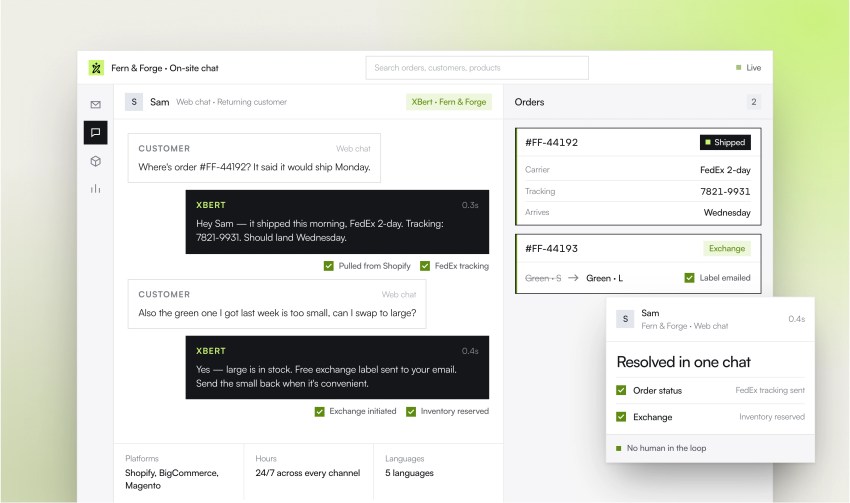
Systems it needs. Read access to your order management or e-commerce platform and the carrier’s tracking data. Nextiva’s Shopify integration gives Nextiva’s AI employees, such as XBert, and your agents order history, live shipment tracking, and customer records inside the conversation.
Hand off when. The package is marked lost or damaged, the customer wants a refund outside policy, or the same order has already generated two contacts. The agent should receive the order number and everything the AI already told the customer.
Metric to watch. Resolution rate for “where’s my order” contacts, plus repeat contacts about the same order within seven days. A falling repeat rate tells you the answer settled the question.
2. Appointment scheduling with multilingual support, day or night
Scheduling runs on calendar logic: open slots, appointment types, buffer times, and confirmations. It’s also where after-hours coverage pays off. A customer who remembers at 9 p.m. that Tuesday won’t work can move the appointment that night, and the call stays out of tomorrow morning’s queue.
- Customer: “I need to move my Tuesday appointment. Do you have Thursday afternoon?”
- AI: “Thursday has 1:30 and 3:45 open. Which works better?”
- Customer: “Let’s do 3:45, and can you send the confirmation to my work email instead?”
- AI: “Sure, what’s the work email? I’ll read it back to you before I send anything.”
Real callers rarely ask that cleanly. In the stress test below, a caller changes the day twice, asks how early to arrive, and switches the confirmation to a work email. XBert spells the address back before confirming Friday at 1 p.m., and the booking lands on the business calendar with a summary and transcript.
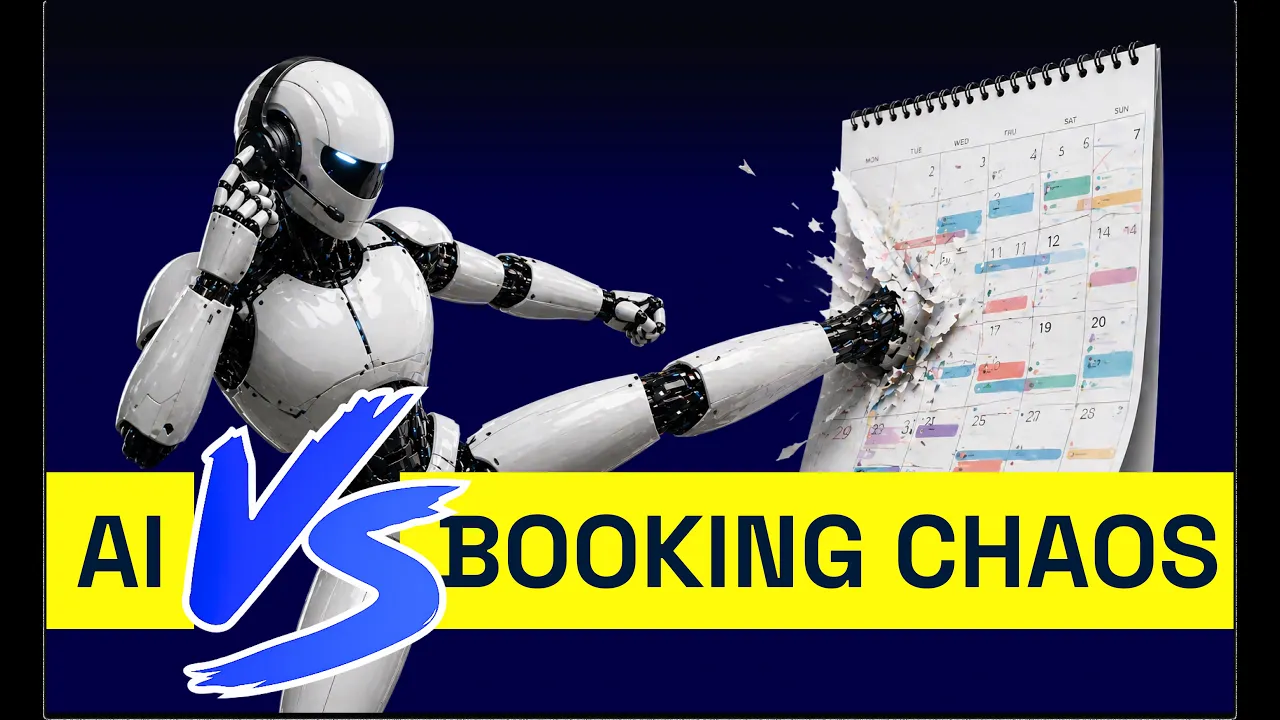
Systems it needs. Two-way calendar access to check, create, update, and cancel appointments, plus your booking rules. The Google Calendar integration lets Nextiva’s AI employees check availability and book, update, or cancel appointments on their own.
Hand off when. The request needs a judgment call, such as a same-day emergency, a waived late-cancellation fee, or a booking outside your normal rules.
Metric to watch. Bookings completed without an agent, and the no-show rate on AI-booked appointments compared with staff-booked ones.
Vero Property Inspections, a one-person home inspection company in Southeast Florida, uses XBert to answer and book calls while its owner is up on roofs. Nextiva’s customer story reports 15 to 20 saved bookings a week, with XBert handling callers in four languages. XBert supports five languages, so after-hours callers can book in any of them.
3. FAQs and how-to questions from your knowledge base
FAQs are the long tail of customer inquiries: store hours, return windows, setup steps, and hundreds of “how do I” questions. Each one is small. Together they add up to a steady stream of customer queries, and every answer should already be written down somewhere. That makes FAQs an easy first handoff to AI.
- Customer: “Can I return something I bought on sale?”
- AI: “Yes. Sale items can be returned within 30 days with a receipt for store credit. Would you like me to start a return?”
Systems it needs. A current knowledge base, including help articles, policy pages, PDFs, and your website. Generative AI phrases each answer from those sources, so answer quality depends on source quality. XBert learns from the services, policies, FAQs, and hours you give it or that it finds on your site.
Hand off when. The AI can’t find a documented answer. It should say so, offer a person, and log the question so someone writes the missing article.
Metric to watch. The volume of unanswered questions in that log, and the share of answers customers rate as helpful.
If two help articles disagree, the AI may repeat either one. Remove duplicate and outdated articles before launch. Starting with FAQs also gets you the knowledge base cleanup your team needed anyway.
AI for Account Access, Billing Questions, and Routing
The next three use cases touch accounts, money, and the path to a person. They follow fixed rules, so AI handles them well, but each needs a tighter handoff plan than the first three.
4. Password resets and account access with identity checks
Locked accounts block everything else a customer wants to do, and the fix follows a set policy. AI runs the same verification steps every time and gives customers instant responses, whether it’s 2 a.m. or 4:55 on a Friday.
- Customer: “I’m locked out of my account after too many password tries.”
- AI: “I can help with that. I’ve texted a six-digit code to the phone number ending in 0142. What’s the code?”
- Customer: “The code is 381920.”
- AI: “Thanks, you’re verified. I’ve emailed a reset link that expires in 15 minutes, and your account is unlocked.”
Systems it needs. Your identity or account system, a one-time passcode channel such as SMS or email, and a logged audit trail of every step.
Hand off when. Verification fails twice, the customer can’t reach the phone or email on file, or anything suggests an account takeover. Those contacts go to a person trained on fraud.
Metric to watch. Time to regain access and the share of resets completed without an agent. Track failed-verification handoffs as a security signal, too.
5. Billing questions that explain a charge
Billing disputes carry emotion and judgment, and they belong with people. Billing explanation is a different contact. Walking a customer through a prorated charge or a one-time fee is a reading job, and AI can do it patiently, on demand.
- Customer: “Why is my bill $18 higher this month?”
- AI: “You moved to the Pro plan on the 12th, so this bill includes $14 in prorated charges for the rest of last month and a $4 tax increase. Next month’s bill will be $64. Does that match what you expected?”
Systems it needs. Read access to live billing data, including invoices, plan changes, proration rules, and payment status. Without invoice access, the AI can only recite your general billing policy.
Hand off when. The customer disagrees with the charge, asks for a credit or refund, or mentions canceling. The agent should get the invoice line the customer questioned.
Metric to watch. Transfers to the billing team and customer satisfaction (CSAT) scores on billing contacts.
6. Routing and triage by intent and customer sentiment
Routing touches every customer interaction. Even when AI can’t resolve an issue, it can understand what the customer wants in their own words and send them to the right queue, person, or workflow. Modern intelligent routing reads intent with natural language processing and mood with sentiment analysis instead of asking callers to pick from a phone menu.
- Customer: “My claim from last week still hasn’t been paid, and I’m getting frustrated.”
- AI: “I’m sorry about the wait. I’m connecting you with our claims team now and passing along your claim number, so you won’t need to repeat it.”
Systems it needs. Natural language processing to detect intent, a map of your queues and skills, and a CRM or helpdesk so the AI can attach the customer record. Routing works best inside the platform your agents already use, such as Nextiva Contact Center, so the transcript and customer details arrive with the call.
Hand off when. Every time, by design. Routing succeeds when the customer states the issue once and the person who answers already knows why they’re calling.
Metric to watch. Transfers per contact and handle time on routed contacts. If agents still open with “How can I help?”, the context isn’t arriving.

Prioritizing Which AI Use Case to Launch First
Pull candidates from 90 days of ticket tags and call dispositions, ranked by volume. Score each one from 0 to 2 on five questions, then add the points. A total of 8 or more marks a first-wave candidate, 5 to 7 belongs in the second wave, and 4 or less should wait.
| Question | 0 points | 1 point | 2 points |
|---|---|---|---|
| Volume: How often does it arrive? | A few times a week | Several times a day | Dozens of times a day |
| Judgment: Do agents follow a fixed rule? | Agents decide case by case | Mostly rules, some exceptions | The same steps every time |
| Documentation: Is the answer written down? | It lives in agents’ heads | Partly documented | A current article or policy exists |
| System access: Can the AI reach the data? | No integration exists | Read-only or manual lookup | Live read and write access |
| Finish line: Can the AI complete it? | Needs a person every time | Often needs a person | The AI can close it alone |
Take a multi-location dental practice. Rescheduling scores a 10 because it arrives constantly, follows booking rules, the policy is written down, the calendar is connected, and the AI can confirm the slot itself. Insurance disputes score closer to 3, since every case needs a person to review coverage. Rescheduling goes first.
When two candidates tie, pick the one with more volume. Each call deflection saves the same agent minutes whether the contact is rare or common, so a high-volume use case returns more time from the same build effort.
Launching a single use case first is usually the right call, though it has real trade-offs:
Pros and cons of launching one AI use case first
 Pros
Clean before-and-after numbers from your own queue
Fewer integrations to build and test
One knowledge area to clean up
Faster fixes when something breaks
 Cons
Smaller savings in the first month
Customers still reach a person for the other contact types
Leadership may expect faster scale
Takes discipline to say no to other teams’ requests
Start narrow, then connect the pieces into a customer service strategy. At Gartner’s customer service conference in November 2026, analyst Christopher Sladdin urged leaders in his keynote to build “fewer, higher-value and interconnected use cases.” Order status leads naturally into returns, scheduling into reminders, and routing into everything else. Later waves can add proactive alerts, such as a delay notice sent before the customer asks.
AI Readiness Checklist and Integrations for Your First Use Case
Before implementing AI on a live queue, confirm the AI can reach the right data, follow written rules, and hand off cleanly.
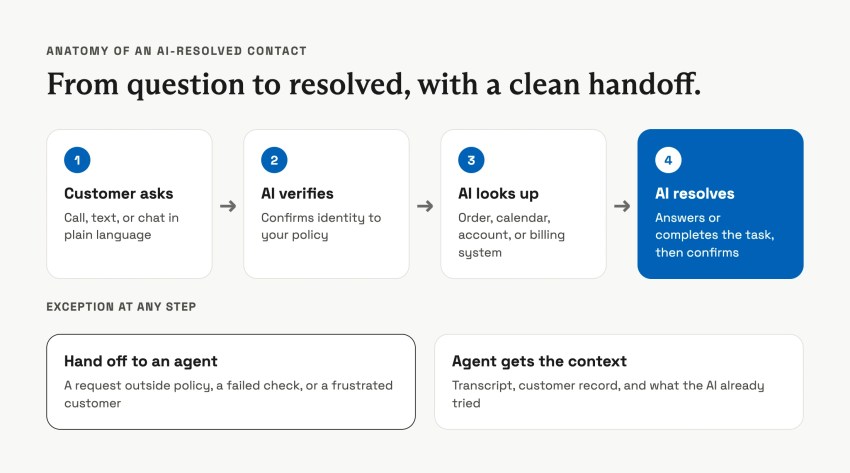
Work through this checklist with your support lead and whoever manages your existing systems.
- Top contact reasons ranked. You’ve sorted 90 days of tickets and call dispositions by volume.
- One owner named. Someone owns the use case, its knowledge, and its weekly numbers.
- Answers documented. Policies and help articles for the use case are current, with duplicates removed.
- Integrations tested. The AI can read and, where needed, update the order, calendar, account, or billing system.
- Guardrails written. You’ve listed what the AI can do, what it can’t, and the exact escalation triggers.
- Handoff path set. Transfers land with the right team, with the transcript and customer data attached.
- Baseline captured. You’ve recorded current volume, handle time, CSAT, and repeat contacts for the use case.
- Customers told. The AI identifies itself as AI and offers a person on request.
Each use case depends on different systems. The example connections below are all on Nextiva’s integrations list, so use the table to plan integrations before you build anything.
| Use case | Systems the AI needs | Example connections |
|---|---|---|
| Order status | Order management and carrier tracking | Shopify |
| Scheduling | Calendar, booking rules, and reminders | Google Calendar, Calendly |
| FAQs | Knowledge base, website, and policy documents | Help center URLs, PDFs, and docs |
| Account access | Identity system and SMS or email codes | Custom integration with your login provider |
| Billing questions | Billing platform, invoices, and plan history | Your billing system or CRM |
| Routing | CRM or helpdesk, plus queue and skill lists | Salesforce, HubSpot, Zendesk |
If a system on this list has no connector yet, solve that before launch. An AI that can only recite policy will push the customer to an agent anyway. Teams that already run customer service automation for callbacks or ticket tagging may have some of these connections in place.
2027 AI Customer Service Playbook
Get the framework, an ROI formula, and a 90-day plan for picking and proving your first AI use cases.
A 30-Day Plan to Prove Your First AI Use Case
Give the first use case one month, then let your own numbers make the case. A working result from your own queue convinces skeptics faster than any slide.
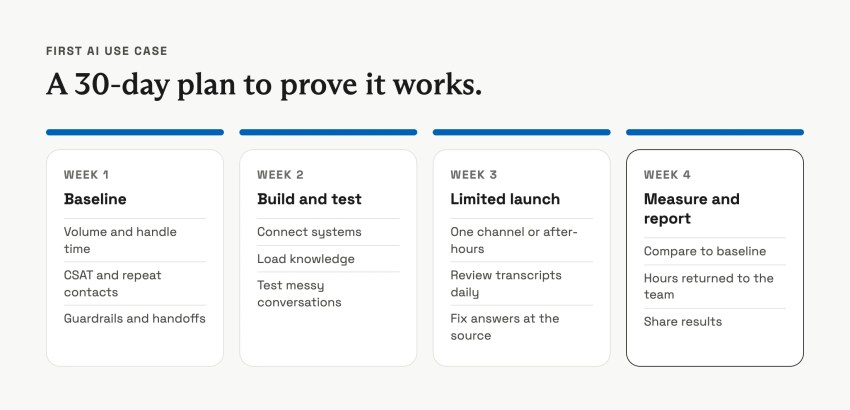
- Week 1: Baseline. Pull current volume, average handle time, customer satisfaction (CSAT), and repeat-contact rate for the chosen contact type. Write the guardrails and handoff triggers.
- Week 2: Build and test. Connect the systems, load the knowledge, and run test conversations, including messy ones where customers change their minds.
- Week 3: Limited launch. Turn the AI on for one channel or for after-hours only. Review every transcript daily and fix wrong answers at the source.
- Week 4: Measure and report. Compare results against the baseline and share them with leadership, including what the AI handed off and why.
What to report: resolution, customer satisfaction, and operational costs
Count a contact as resolved when the customer doesn’t come back about the same issue within seven days. Measure first contact resolution for AI-handled conversations the same way you do for agents, and pair it with CSAT on those conversations.
Then translate the result into hours. Multiply AI-resolved contacts by your average handle time to show how much agent time came back to the team and what that means for operational costs. Your existing customer service metrics dashboard should show the same numbers before and after launch. If AI-handled contacts improve customer satisfaction and service quality holds steady on the agent side, you have the argument for a second use case.

Which Customer Service Tasks Should Stay With Human Agents?
Keep human agents on billing disputes, cancellations and retention offers, complaints, emotional or high-stakes situations, and anything that needs a policy exception.
Write that list down before launch, using the same four categories that decide what to automate: emotion, business risk, complex decisions, and critical customer moments.
AI and human agents can still split the work in those conversations. With AI agent assist, the agent leads while the AI surfaces knowledge articles and suggested responses in real time. Complex issues get a person’s judgment and emotional intelligence, and agents get answers faster.
Launch Your First AI Use Case With Nextiva
Order checks and appointment changes- the questions clogging your queue- are ones XBert handles on its own. XBert answers calls, texts, and web chats 24/7, books and reschedules appointments, answers questions from your knowledge base, and routes everything else by intent, with full context for your team.
You set the guardrails, including what XBert handles, when it escalates, and how it speaks to customers. Every conversation is recorded and transcribed, so you can review exactly what it said. XBert also remembers past interactions, so returning customers get personalized support without repeating themselves.
Nextiva says basic setup takes under five minutes using your website or Google Business Profile. Small businesses can start with XBert as an AI receptionist that books appointments and answers common questions after hours.
XBert starts at $99 a month, including 100 conversations, with no long-term contract.

“What surprised me the most about getting an AI receptionist is that even when people realize they’re talking to AI, they still go ahead and book the appointment.”
Rafael Mesa
Start with XBert and put your first AI use case to work this month.
Put your first AI use case to work.
XBert answers calls, texts, and chats 24/7, books appointments, and hands complex issues to your team with full context.
Frequently Asked Questions About AI Use Cases in Customer Service
The most common AI use cases in customer service are order status checks, appointment scheduling, FAQ answers, password resets, billing explanations, and routing by intent. They share three traits: high volume, rule-based answers, and data the AI can reach. XBert handles order checks, scheduling, FAQs, and routing across calls, texts, and chat, and hands everything else to your team with context.
Track three numbers against a baseline captured before launch: the share of contacts resolved without an agent, repeat contacts about the same issue within seven days, and CSAT on AI-handled conversations. Rising resolution with flat or falling repeat contacts means it’s working. Our guide to customer service metrics covers the rest.
Keep people on billing disputes, cancellations and retention offers, complaints, and emotional or high-stakes situations, plus anything that needs a policy exception. AI can still support those conversations through agent assist, which surfaces knowledge articles and suggested responses while the agent leads.
A focused first use case can go live and show results within 30 days: one week to baseline, one to connect systems and test, one for a limited launch, and one to measure. Nextiva says basic XBert setup takes under five minutes, while connecting order or billing systems and testing real conversations takes longer.
AI customer service needs a connection to whichever system holds each answer. Order status needs your e-commerce or order system, scheduling needs two-way calendar access, billing needs live invoice data, and routing needs your CRM or helpdesk. Nextiva offers integrations with tools such as Shopify, Google Calendar, Salesforce, and HubSpot, and lists more on its integrations page.