Customer Experience
 Blog
 Business Communication
 Leadership
 Marketing & Sales
 Nextiva News
 Productivity
 VoIP

Leadership wants AI agents answering customers this quarter. Your help center is two years stale, your team hasn’t agreed on what success looks like, and your agents expect to clean up after the bot.
An AI implementation roadmap for customer service puts that work in the right order. Budgets are already moving. Gartner found that AI spending by customer service leaders rose 38% while service and support budgets grew just 2%.
What Is an AI Implementation Roadmap for Customer Service?
An AI implementation roadmap for customer service is a phased plan that takes one or two AI use cases from idea to measured results, with named owners and a decision gate at the end of each phase. It tells your team what to do each week, who does it, and what has to be true before you move on.
Most AI implementation guides are written for the whole enterprise. They cover AI models, data science teams, predictive analytics, and changes to business processes across the company. A support team’s version is narrower. You work with customer interactions, a knowledge base, and the handoff between AI and people, and you usually buy AI tools from a vendor rather than training machine learning algorithms yourself.
Those AI systems use natural language processing and generative AI to read a customer’s question and draft an answer, so the answer is only as good as the knowledge behind it.
That makes AI implementation in customer service mostly an operations project. BCG’s 10-20-70 rule backs that up: put about 10% of the effort into algorithms, 20% into technology and data, and 70% into people and processes.
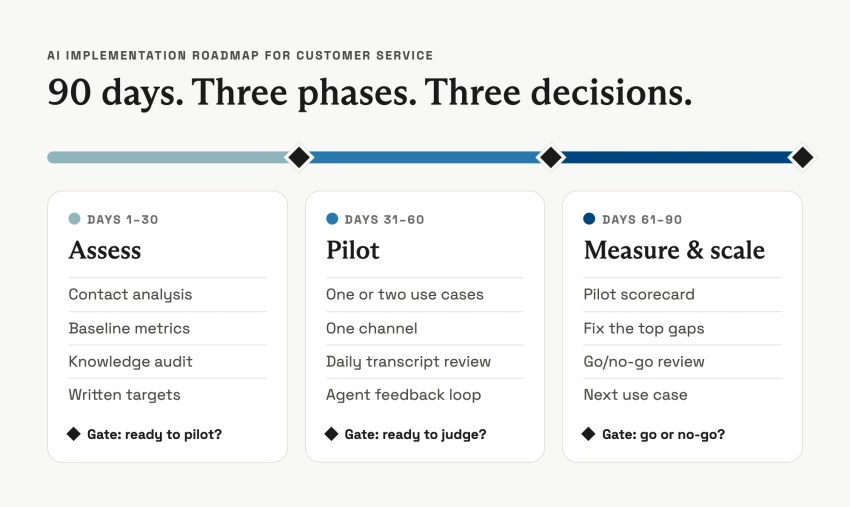
Week-by-Week AI Implementation Plan for the First 90 Days
Weeks 1–4 cover the assessment, weeks 5–8 the pilot, and weeks 9–13 measurement and the scale decision.
| Week | Focus | Key tasks |
|---|---|---|
| 1 | Kickoff | Name the sponsor and program owner, set scope, and start the data privacy and compliance review |
| 2 | Contact analysis | Pull 90 days of contacts from every channel, tag each by reason, and rank by volume |
| 3 | Baselines and knowledge | Record baseline metrics per contact type and list stale or missing help articles |
| 4 | Targets and use cases | Write success targets, pick one or two use cases, and hold the first gate review |
| 5 | Build | Load knowledge, set guardrails and escalation rules, and connect existing systems such as your CRM |
| 6 | Internal testing | Run scripted test conversations and have agents try to break the AI |
| 7 | Soft launch | Go live on one channel for a slice of traffic, such as after-hours calls, and review transcripts daily |
| 8 | Tune | Fix knowledge gaps, adjust escalation triggers, and review agent flags; hold the second gate review |
| 9 | Steady state | Freeze scope and let the pilot run so the data is clean |
| 10 | Score | Fill in the pilot scorecard against your baseline |
| 11 | Fix | Close the top failure reasons found in transcripts |
| 12 | Decide | Hold the go/no-go meeting with the sponsor |
| 13 | Plan next | Pick the next use case and write down what you learned |
Who Owns Your AI Rollout? A Simple R.A.C.I.
Give one person ownership of the whole program, usually the head of support. Then give each workstream a single accountable owner, and spread the hands-on work across a small team.
A RACI chart (Responsible, Accountable, Consulted, Informed) keeps AI implementation tasks from falling between support, IT, and compliance.
| Workstream | Accountable | Responsible | Consulted or informed |
|---|---|---|---|
| Scope and targets | Head of support | Program owner | Executive sponsor, finance |
| Contact analysis and baselines | Program owner | Operations or workforce analyst | Team leads |
| Knowledge audit and fixes | Program owner | Knowledge manager | Tenured agents |
| Integrations and data access | IT lead | IT or the vendor’s implementation team | Security |
| Guardrails, data privacy, and compliance | Compliance or legal | Program owner | IT, executive sponsor |
| Daily transcript review | Program owner | Team leads and QA | Agents |
| Agent feedback and training | Head of support | Team leads | Agents, HR |
| Go/no-go decision | Executive sponsor | Head of support | Finance, IT, compliance |
You don’t need to hire AI specialists, data scientists, or AI consultants for a vendor-delivered pilot. The vendor, like Nextiva, should provide the deep technical expertise. Your team brings knowledge of customers, policies, and the edge cases missing from the help center.
Days 1–30: Assess Current Capabilities and Data Quality
Nothing customer-facing launches in the first month. You learn why customers contact you, record how you perform today, and fix the knowledge your AI will answer from.
Goals, owners, and deliverables for days 1–30
The program owner runs this phase, with an operations analyst on the numbers and a knowledge manager on content. Start with a contact analysis. Pull the last 90 days of interactions, tag each one by reason, and look for contacts that are frequent, routine, and follow a clear path to resolution.
Those become your pilot candidates. The same analysis shows customer behavior by channel, such as which problems people bring to chat and which they still call about.
As CMSWire reported from Gartner’s November 2026 conference, the service organizations that met their ROI expectations for AI initiatives invested nearly 1.8 times more in knowledge management foundations than in the AI use cases themselves.
By day 30, you should have these deliverables:
- Contact-reason analysis. Every contact type, ranked by volume and complexity.
- Baseline sheet. Current metrics for each contact type, not one blended average.
- Knowledge gap list. Stale, missing, or conflicting articles, each with an owner and a due date.
- Success definition. One page of written targets that the sponsor has signed.
- Use-case shortlist. One or two high-volume, low-judgment use cases for the pilot.
Metrics to capture before launch
Record first-contact resolution, repeat-contact rate, average handle time, cost per contact, and customer satisfaction for each contact type. Skip this step, and you lose the benchmark “before” picture for good, because automation changes the numbers the day it goes live.
Add customer effort too. A customer effort score shows whether an automated answer made the issue easier to resolve or only moved it to a different queue.
Exit criteria: when you’re ready to pilot
Move to days 31–60 when three things are true: The sponsor has signed written targets tied to measurable business value, the knowledge behind your chosen use cases has been reviewed and fixed, and the compliance review has cleared the channel and data you plan to use.
If any of these is open, take another week. A week’s delay costs less than launching on poor data quality.
Common failure points in the assessment phase
Watch for three failures here. The first is picking a use case on a hunch instead of from the contact analysis. The second is training the AI on a help center that hasn’t been updated in years. The third is setting headcount targets before there’s evidence.
That last one can backfire. In a Gartner survey of 275 service and support leaders, only 21% had reduced agent headcount because of AI, and 7% had already rehired after earlier cuts. In CMSWire’s coverage of Gartner’s November conference, VP Analyst Kathy Ross warned of a “cut fast, rehire later” trap that hits leaders who reduce headcount “based on expected AI value rather than demonstrated results.” Define AI success with targets on resolution, effort, and freed agent capacity instead.
Days 31–60: Run a Small AI Pilot Program on One Channel
In month two, one or two use cases go live on a single channel. Your team reviews every failure while the stakes are small, and agents get a direct way to report bad answers.
Goals, owners, and deliverables for days 31–60
The program owner leads the build with IT or the vendor’s team, then hands daily reviews to team leads once the pilot is live. Deliverables for this phase are a configured AI with documented guardrails and escalation rules, a test log, a live pilot on one channel, and a weekly summary of agent flags and fixes.
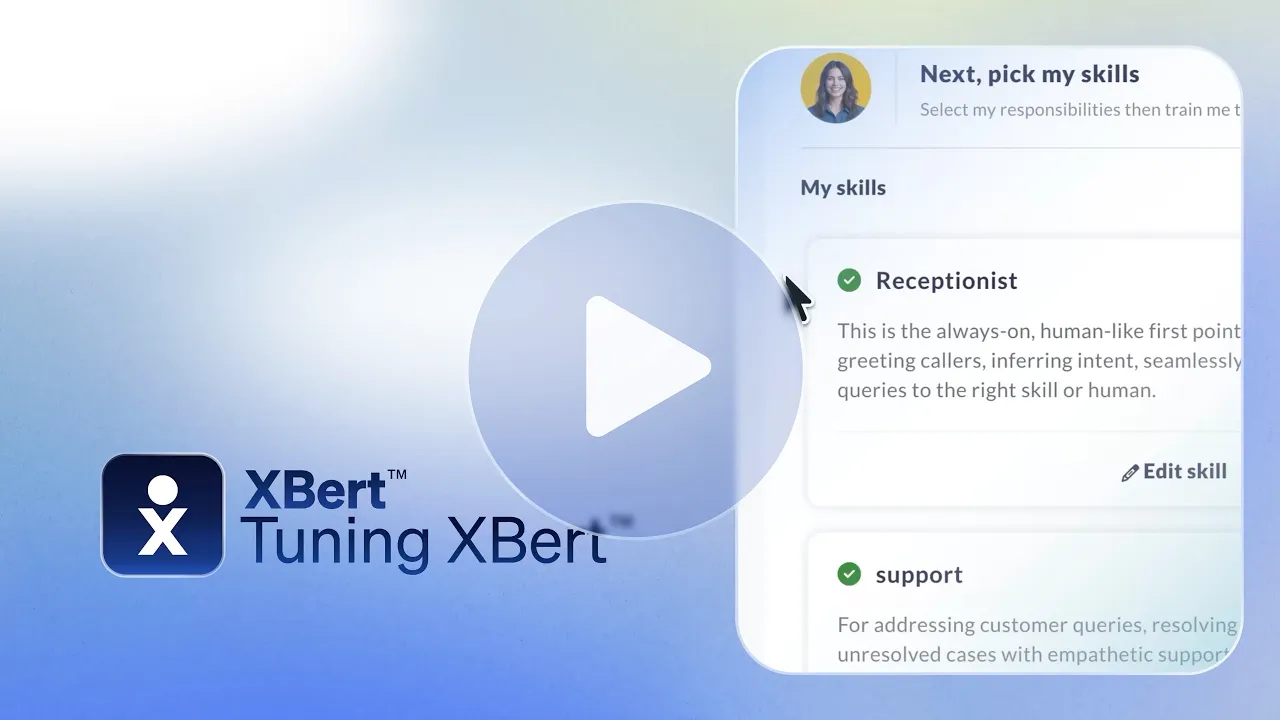
Test the AI before any customer sees it. In Nextiva’s walkthrough on training an AI receptionist, the first step is making three to five quick test calls that ask about a listed service, your business hours, and something specific from your website. From there, you correct outdated information, add guardrails for what the AI should avoid saying, and add knowledge sources such as PDFs or documents.
Pick your first pilot: customer-facing AI solutions or agent assist?
Your first pilot can put AI in front of customers, such as AI-powered chatbots or a voice agent that answers routine customer inquiries. It can also sit behind your agents, with agent assist that surfaces knowledge and drafts replies during live calls. The choice depends on how much risk you can absorb in month two.
Customer-facing AI vs. agent assist: pros and cons
 Pros
Customer-facing AI shows its effect on contact volume and wait times fastest
Agent assist keeps a person between the AI and every customer, so errors get caught
 Cons
With customer-facing AI, a wrong answer reaches the customer directly and can sour them on the channel
With agent assist, the gains show up as faster handling and better consistency, which take longer to prove than lower volume
Metrics to watch daily during the pilot
Track these in the pilot, and review transcripts every day for the first two weeks:
- Resolution without repeat contact. The share of AI-handled conversations with no follow-up contact on the same issue within seven days.
- Escalation rate and reason. How often the AI hands off, and why.
- Wrong-answer rate. Confident but incorrect answers found in reviewed transcripts.
- Handoff quality. Whether the transcript and context reach the agent, so customers don’t repeat themselves.
- Agent flags. Bad answers and broken handoffs reported by your team each week.
Exit criteria: when the pilot is ready to judge
Move to the measurement phase when the pilot has run at steady state for at least two weeks, with no open critical issues such as policy errors or privacy problems. Also make sure each use case has enough volume to compare against baseline. A practical floor is a few hundred conversations per use case, but agree on the number with your sponsor in month one.
2027 AI Customer Service Playbook
Get the full plan, the deflection strategy, and an ROI formula for building your AI business case.
Common AI pilot failure points
Watch for scope creep. Around week six, someone asks why only two things are automated. Keep the scope fixed and the pilot on one channel. Spreading one use case across four channels makes it harder to watch and harder to fix.
The other trap is measuring containment. A containment metric counts a conversation the AI kept away from your agents as a win, even when the customer calls back angrier the next day. Judging AI deflection by resolution, not containment, keeps the pilot fair.
During the pilot, make the route to a person obvious on every channel. Put the transfer option in the greeting, and test that it works before launch.
Days 61–90: Measure Success With a Pilot Scorecard
Month three is the honest review. Score the pilot against the targets the sponsor signed in month one, then decide to go, extend, or stop.
Build a pilot scorecard against your baseline
Score each use case against its own baseline from month one. These call center metrics make a good starting set, with targets you adjust to your operation.
| Metric | How to measure it | Example target |
|---|---|---|
| Resolution rate | AI-handled conversations resolved with no repeat contact in seven days | 40% or more of in-scope contacts |
| Repeat contact | Follow-up contacts on the same issue, AI vs. baseline | No more than 2 points above baseline |
| Customer satisfaction | Post-conversation survey on AI-handled contacts | Within 5 points of the human baseline |
| Customer effort | Effort score on AI-handled contacts | Equal to or better than baseline |
| Wrong-answer rate | Incorrect answers found in sampled transcripts | Under 2% |
| Handoff quality | Escalations that arrive with transcript and context | 95% or more |
| Agent adoption | Agents who flagged bad answers or used agent assist weekly | 80% or more |
| Cost per resolution | Total pilot cost divided by resolved contacts | Lower than the baseline cost per contact |
The example targets are starting points for discussion, not industry benchmarks. Set your own in month one, and don’t move them after launch.
Go/no-go criteria with example thresholds
Decide ahead of time what each outcome means. Treat a few metrics as must-pass rules: wrong-answer rate, handoff quality, and any compliance issue. A miss on any of them blocks expansion, no matter how good the other numbers look.
| Decision | When it applies | What happens next |
|---|---|---|
| Go | All must-pass rules met, and most scorecard targets hit | Keep the use case live and add the next one from your ranked list |
| Extend | Must-pass rules met, but one or two targets missed with a clear fix | Run 30 more days on the same scope after fixing the gaps |
| Stop | A must-pass rule failed, or results trail baseline with no clear fix | Pull the use case, document why, and pick a different candidate |
Common failure points when you scale AI
One failure here is scoring the pilot against whatever number looks best instead of the signed targets. Another is scaling a flaw by adding three new use cases before fixing the knowledge gaps that tripped the first one. A program that pauses to repair one use case in month three is in better shape than one that copies the problem across 10.
Before the next 90 days start, write down the use case, the knowledge fixes, the thresholds, and the final decision. The next pilot starts from that record.

Common AI Implementation Challenges for Support Teams
Four problems can stall AI projects in support: integrations, privacy, customer trust, and agent buy-in. Plan for each in month one.
Integration challenges with existing systems
An AI that can’t see order status or account history can only answer generic questions, so integrating AI with your existing systems is part of the pilot scope. Before you compare AI technologies, map which systems each use case needs, such as your CRM, ticketing, or scheduling tools, and confirm the vendor supports them. If your team runs Salesforce, for example, check how conversations and transcripts sync back to customer records.
Data privacy and regulatory standards
Customer data flows through every AI conversation. Before launch, confirm recording and consent rules for each channel, data retention, and your industry’s legal and regulatory standards. Teams in healthcare or financial institutions need to finish the compliance review before any patient or account data reaches the AI.
Ethical concerns and customer trust
Tell customers when they’re talking to AI, and offer a clear path to a person on every channel. That keeps trust intact while the AI is still learning. The same logic applies to call deflection. Steer customers to self-service when it resolves the issue, and keep the route to an agent easy to find when it doesn’t.
Agent buy-in and hands-on training
Without agent buy-in, AI adoption stalls on your own team. Agents see AI failures first because they inherit them. Give them hands-on training on the new handoffs, a fast way to flag bad answers, and visible proof that their flags get fixed. If your team routes around the AI, treat it as a signal that something in the pilot needs work.

How Nextiva Supports Your AI Implementation Roadmap
Leadership wants AI live this quarter, and your team needs proof before it scales. Nextiva gives support teams AI they can test, control, and measure at each phase of an AI implementation.
XBert, Nextiva’s AI customer service assistant, learns your services, policies, hours, and FAQs from your website and the documents you add. Guided setup lets you preview and test it before launch. You set the guardrails for what it handles and when it escalates, every conversation is recorded and transcribed for your daily reviews, and complex requests go to your team with the full conversation attached.
For agent-side pilots, Nextiva Contact Center adds AI agent assist with real-time knowledge and sentiment.
Tata Play, a content distribution platform with more than 19 million subscribers, set out to automate its most frequent, routine customer requests. After integrating WhatsApp into Nextiva Social and Reputation Management and connecting an AI bot to its backend systems, it handled more than 5 million routine requests through AI alone. The WhatsApp integration and AI bots cut support costs by 40%.

“Nextiva worked with us to develop real-time listening, integrated the multiple channels into a singular customer support interface and improved our first response time by integrating WhatsApp as a communication channel in our customer service.”
Dwarka Srinath
Start your 90 days with one use case, one channel, and XBert handling the routine work while your team keeps the judgment calls.
Start your 90-day pilot with AI you control
XBert answers routine calls, texts, and chats, follows the guardrails you set, and hands complex conversations to your team with the full context.
Frequently Asked Questions About AI Implementation Roadmaps
A customer service AI implementation roadmap for a first use case takes about 90 days: 30 days to assess, 30 to run a pilot, and 30 to measure and decide. Setup can be fast, but the assessment and measurement around it take weeks. XBert includes preview and testing before launch, so you can start your pilot with fewer surprises.
The first step in AI implementation for customer service is a contact analysis. Pull the last 90 days of interactions, tag them by reason, and rank them by volume and complexity. The frequent, routine contacts with a clear resolution path are your pilot candidates. Record baseline metrics for each one before launch, using the call center metrics you already track.
An AI pilot program should measure resolution without repeat contact, customer satisfaction, customer effort, wrong-answer rate, handoff quality, agent adoption, and cost per resolution. Compare each against the baseline for the same contact type. Avoid treating containment as success, since a contained conversation can still end in a callback. Our AI deflection guide explains the difference.
The 10-20-70 rule is a BCG rule of thumb for AI transformation: put about 10% of the effort into algorithms, 20% into technology and data, and 70% into people and processes. In customer service, that 70% covers knowledge, training, handoffs, and transcript review. Tools such as AI agent assist help, but the people and process work decides the outcome.
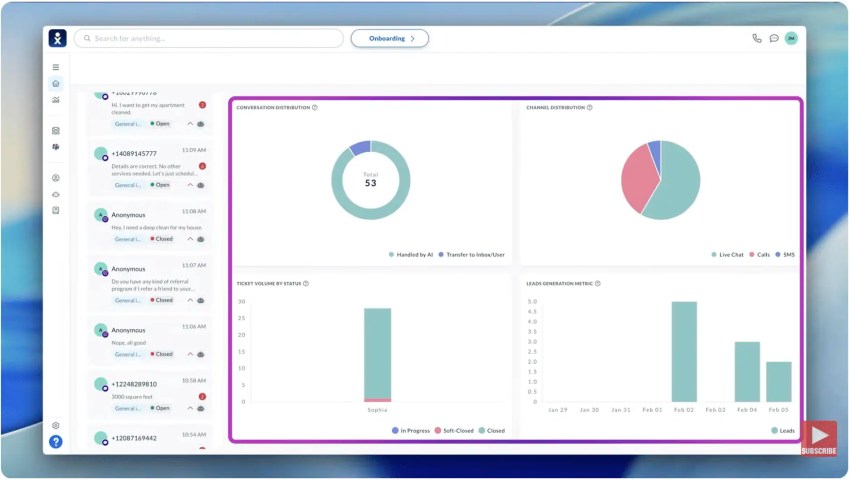
You can judge cost per resolution at the day-90 review, and larger cost savings depend on scaling the use cases that pass. Measure cost per resolved contact rather than per deflected contact, because unresolved conversations can return as repeat contacts. The XBert dashboard shows conversations handled by AI vs. transferred to a person.