Customer Experience
 Blog
 Business Communication
 Leadership
 Marketing & Sales
 Nextiva News
 Productivity
 VoIP

Your customer explains the problem to the chatbot. The chatbot can’t fix it, so they call.
… The agent who answers can’t see the chat, so the customer starts over, and your new AI gets the blame.
Tool sprawl is what’s failing your AI, but one connected customer support platform can it.
On average, customer service teams use 6.5 tools to provide support, and 86% said juggling them created data silos. Since our initial study in 2025, that figure has likely gone up, let alone the risks surrounding shadow AI.
What Is Tool Sprawl?
Tool sprawl is what happens when a team keeps adding software to fix one problem at a time until it runs more tools than it can connect, manage, or afford. Each tool made sense when someone bought it. Together, they split your data, your workflows, and your team’s attention.
The term started in IT, where you’ll also hear technology sprawl, and SaaS sprawl for the cloud-app version of the same problem.
In an October 2026 study of 356 enterprise IT professionals, Enterprise Management Associates found that enterprises typically run six to eight observability (monitoring) tools. Of those surveyed, 41% said context switching among those tools slowed their investigations, and 45% cited the skills and staffing burden of operating so many.
Outside IT, the same thing happens with project management apps and AI tools that teams sign up for without a plan to connect them.
Support teams face the same pattern across their communication channels, with a sharper edge, because a customer is waiting on the other end of every switch.

Common customer service tools in a growing stack
Customer support stacks increase one channel at a time, as customers show up on new channels and expect timely support on each.
The phone system came first. Then help desk software for email and ticket management, when volume got serious. Then live chat software, because customers asked for it. Then text and messaging apps like WhatsApp, each in yet another inbox. Then a knowledge base, a chatbot bought for one channel, a survey tool, and a CRM that only sales keeps up to date.
Each of these customer service tools does a real job on its own. The trouble sits in the gaps between them, where your customer service team loses the thread.
Why Tool Sprawl Breaks AI in Customer Support
AI can only act on the context and systems it can reach. A chatbot connected only to your chat widget can’t see the customer’s last call, open ticket, or order status. However capable it is, it answers from a partial picture, then hands off with nothing.
That’s why AI projects built on a sprawled stack disappoint. The model may be capable, but it’s working blind. Teams that track what their AI deflection program resolves often trace the stall back to disconnected tools.
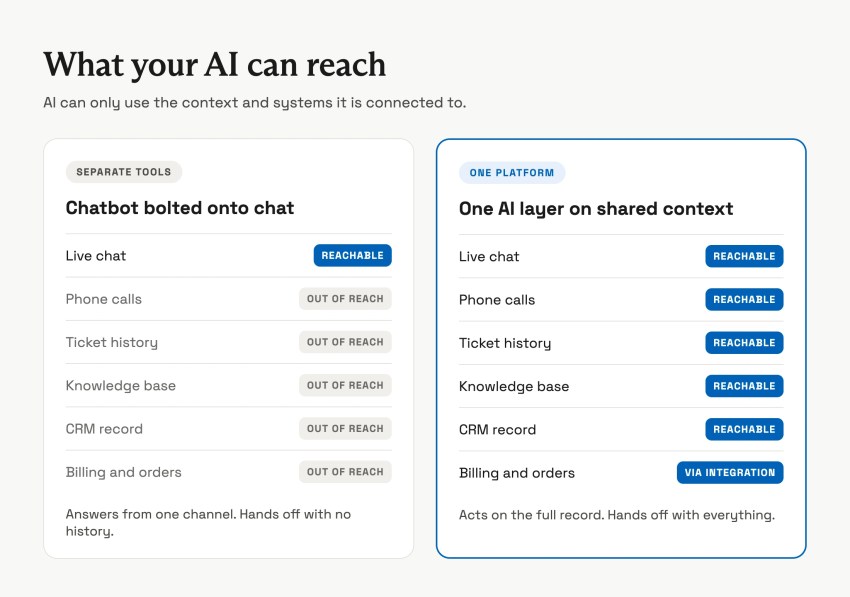
Three failures follow from that gap.
Lost customer context
Every tool keeps its own version of the customer, which is the opposite of a unified customer experience. The phone system knows about the call.
The ticketing system knows about the email. The CRM knows what they bought. No single screen or AI agent sees the whole story, so your team can’t answer the simple question, “What’s going on with this customer?”
Customers repeat themselves, and satisfaction drops
When context doesn’t travel, the customer carries it. They retell the problem to the bot, then to the agent, then to the specialist after a transfer. Repeating information is one of the clearest signs of a high-effort experience, the kind that drags down your customer effort score, satisfaction, and loyalty.
Bad handoffs between the AI agent and your team
The handoff is where a sprawled stack hurts most. If the bot and the agent run support conversations in different tools, the escalation arrives as a bare ticket or a cold transfer.
A good handoff carries the transcript, intent, steps already tried, and account history, so the agent picks up mid-conversation instead of starting from zero.

The Real Cost of Customer Service Tool Sprawl
Sprawl costs more than the software bill and makes customer service operations harder to run. Much of the expense hides in agent time, customer effort, and decisions made on partial data.
The problem is widespread. In an October 2026 Acxiom survey that included 700 business leaders, 80% of brands said they found it challenging to manage customer experiences across multiple platforms, partners, or providers.
Here are the cost lines to put on your list:
| Cost line | Where it shows up | How to measure it |
|---|---|---|
| Overlapping licenses | Paying for chat, voice, and AI features in three different tools | Total seats and features per tool, side by side |
| Integration upkeep | Syncs that break, connectors that need an admin, data that lags a day behind | Admin hours per month spent on integrations |
| Agent toggle time | Agents switching screens to find an order, a past ticket, or a policy instead of handling customer inquiries | Average handle time and screens open per contact |
| Repeat contacts | Customers calling back because the first channel couldn’t finish the job | Repeat contact rate within 7 days |
| Reporting blind spots | A “contained” chat that becomes a phone call the next day looks like a win in one dashboard | Whether any report follows one issue across channels |
| Stalled AI | Bots that answer questions but can’t take action or pass context | AI resolution rate and escalations with no history attached |
| Security and access | More logins to provision, audit, and remove when people leave, and more copies of sensitive data | Number of systems that hold customer data |
| Manual busywork | Repetitive tasks like copying notes between tools and re-tagging tickets | Hours per week agents spend on copy-and-paste work |
None of these lines show up as one big invoice. They show up as slower service, frustrated agents, and AI that stalls in the pilot stage.
How to Audit Your Customer Support Stack
A stack audit shows you what each tool does, what data it holds, and where the gaps sit. Block an hour with your customer support team lead and your admin, and work through these steps.
- List every tool your support team touches. Include the small ones: survey tools, screen-sharing apps, shared spreadsheets, and personal phones used for texting customers.
- Write down the job each tool does. One line per tool. If two tools share a job, you’ve found overlap.
- Note the customer data each tool holds. Call recordings, chat transcripts, tickets, orders, and notes all count.
- Mark the integration gap. Does the data reach your other tools in real time, once a night, or never?
- Decide to keep or consolidate. Keep tools that hold a system of record your business can’t move, such as billing or an EHR in a healthcare practice. Consolidate tools that duplicate a channel or hide conversation history.
A sample customer support stack audit
Use a simple table like this one. The examples show what a typical sprawled stack looks like on paper.
| Tool | Job it does | Data it holds | Integration gap | Keep or consolidate? |
|---|---|---|---|---|
| Phone system | Inbound and outbound calls | Call logs, recordings, voicemail | Calls never reach the ticket or CRM record | Consolidate |
| Live chat | Website conversations | Chat transcripts | Agents on the phone can’t see chats | Consolidate |
| Ticketing system | Email and case tracking | Case history, tags, SLAs | Nightly sync to CRM; no call or chat history | Consolidate |
| Knowledge base | Help articles and internal answers | Articles, policies | Bot and agents read different versions | Consolidate into one source |
| Chatbot | Answers web FAQs | Bot transcripts | Can’t see orders or hand off with context | Consolidate |
| CRM | Customer record and orders | Contacts, purchases, account details | Support can’t write back to it | Keep and integrate |
| Billing system | Invoices and payments | Payment history | Agents look it up in a separate tab | Keep and integrate |
Then ask four questions about every row:
- Who owns each tool? If nobody can answer, the tool is a candidate to retire.
- Which tools hold the same conversation? Duplicate history means duplicate work.
- Can your AI read and act on this data? If not, it can’t resolve issues that depend on it.
- What breaks if you turn it off tomorrow? That answer tells you what to migrate first.
2027 AI Customer Service Playbook
Get the ROI, decision map, and 90-day plan for putting AI in your support org.
What to Consolidate First
Start with the data every tool needs, then the channels, then AI. Adding AI before the foundation is in place repeats the original mistake by adding one more tool with a partial view.
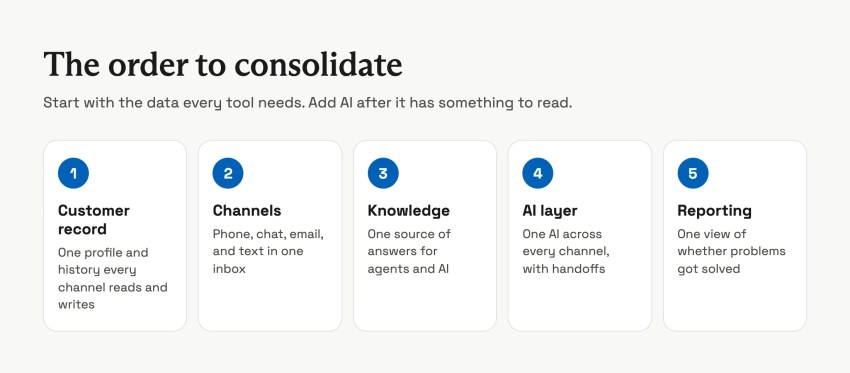
1. One customer record across CRM and help desk software
Choose where every interaction occurs, from calls and chats to emails and texts. Connect it to your CRM so agents and AI both see who the customer is and what happened last. Because the history travels with the customer, this step tackles repeat questions first.
2. Phone, live chat, and messaging channels in one inbox
Bring phone calls, live chat, email, SMS, and social messages into a unified inbox. Agents handle multiple conversations from one screen and hand a conversation to a teammate without leaving the thread. A customer who switches channels stays in that same thread, which is the core of omnichannel support.
3. One knowledge base for agents and AI
Merge duplicate help centers and internal wikis into one source. When your AI agent and your support team read the same answers, customers get the same answer on every channel. It also keeps self-service options current, since there’s only one set of articles to update.
4. One AI layer across every channel
Replace channel-specific bots with one AI that handles conversational support across voice and digital channels. It learns your business once, reads the shared record, and takes action through your existing systems. When it needs a person, it hands off with full context.
5. Reporting on the whole customer experience
With one platform underneath, a centralized dashboard can track a customer issue from first contact to resolution across every channel the customer used along the way. That tells you whether each problem got solved, rather than which tool touched it last, and gives you an honest read on customer service performance. It also shows patterns in customer behavior, such as which questions keep coming back and where customers drop off.
Consolidating has real trade-offs, so weigh both sides before you start.
Pros and cons of consolidating onto one platform
 Pros
One login, one customer record, and one AI layer
Fewer integrations to maintain
Reporting follows the whole customer issue
 Cons
Migration takes planning and some retraining
Some specialist tools still need to connect
Switching costs are real in the first quarter
Consolidate channels and conversation history, but keep systems like billing, ERP, or an EHR. Connect them so agents and AI can read and act on that data.
What to Look for in Customer Service Software
A customer support platform earns its place by closing the gaps between channels, data, and AI. Use this checklist of essential features when you compare platforms:
- Shared customer context. One record, read and written by every channel, agent, and AI, so agents can manage customer interactions without switching screens.
- Native voice plus digital channels. Phone, chat, email, and text in the same workspace, without bolted-on add-ons, so multichannel support doesn’t mean multiple logins.
- AI that can take action. An AI agent connected to your CRM and business systems, with clear rules for when to escalate.
- Context-rich handoffs. Transcript, intent, and history travel with every escalation to a live agent.
- Real integration capabilities. Native connections to the CRM and help desk tools you plan to keep, such as Zendesk.
- One set of analytics. Agent performance, customer interactions, and AI results in one place.
- A user-friendly admin. Your team should be able to change routing and automation workflows without a developer.
Customer service software earns its cost by removing work, and a live demo with your own data is the fastest way to see whether it does. Run each option from our software roundup through this list. A small business can start with the first four items.
Consolidate Customer Support With Nextiva
The customer from the opening, who explained the problem to a chatbot and then started over on the phone, is exactly who a connected platform helps.
NEXT is Nextiva’s unified communications and CX platform. It brings calls, texts, live chat, email, and video into one place, with conversation history attached to the customer record. Team chat supports internal collaboration on tricky cases, routing and flow automation send each conversation to the right person, and the platform connects with more than 50 CRM and business integrations, including Salesforce, HubSpot, Zendesk, and ServiceNow.
XBert, Nextiva’s AI employee, works inside that platform. It answers calls, handles chats, books appointments, and resolves issues using the same history your team sees.
You choose how much it handles: full AI resolution, AI-led with human oversight, or agent assist, where a person leads and AI suggests responses and surfaces context.
In this short demo, a customer calls a car dealership about a trade-in. NEXT routes the call to the right person, teammates loop in a manager without leaving the platform, and NextIQ summarizes the conversation and drafts the next reply.

Cedar Financial, a debt collection agency in Calabasas, California, relied on seven different vendors before moving to Nextiva Contact Center. It cut that to one vendor and reduced costs by 30%, while agent call volume rose from 70 to 400 calls per day.

“This intelligent contact center has transformed our operations by bringing multiple centers into one unified system.”
Amir Erez
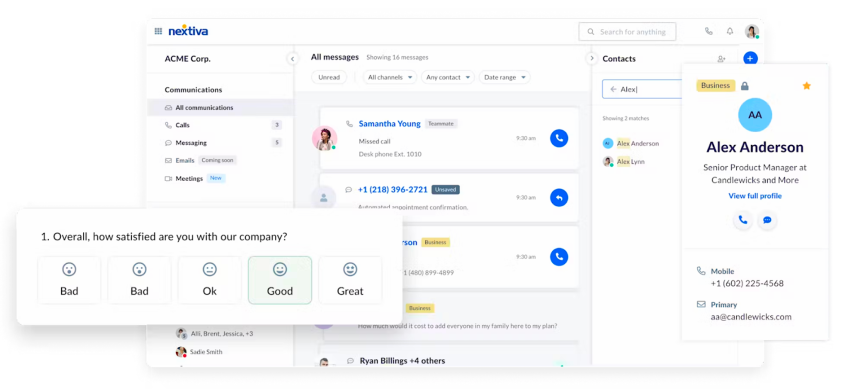
Bring your audit table to a demo, and our team can map each row to what NEXT replaces and what it connects to.
Upgrade to a single customer communications platform
NEXT brings calls, chat, email, texts, and XBert AI into one workspace, with one customer record behind every conversation.
Frequently Asked Questions About Tool Sprawl
Tool sprawl is the buildup of too many overlapping software tools, added one problem at a time, until a team can’t connect or manage them well. It splits data and workflows across systems. In customer support, it means separate phone, chat, ticketing, knowledge base, CRM, and bot tools that don’t share context. A connected customer support platform replaces those gaps with one record.
SaaS sprawl is tool sprawl limited to cloud subscription apps, often bought by individual teams without central IT review. Tool sprawl is the broader term and includes on-premises systems and spreadsheets. In practice, both lead to wasted licenses, security gaps, and scattered data. Replacing separate apps with one connected platform addresses both.
Many support teams can run on one platform for conversations plus a small set of connected systems of record, such as CRM and billing. Nextiva’s 2025 CX Trends Report found companies averaged 6.5 support tools. The right number is the smallest set where every agent and AI sees the full customer history. Nextiva Contact Center covers voice and digital channels in one place.
AI can only use the data and systems it can reach. When customer history sits in separate tools, an AI agent answers from a partial view, can’t take action in the systems that hold the answer, and escalates without context. Consolidating the customer record first gives AI something complete to act on. XBert works from the same customer history your team sees.
Audit first, then consolidate in stages. Move the customer record and conversation history before channels, and channels before AI. Run old and new tools side by side for a short overlap, retire each tool once its data and workflows have moved, and keep systems of record connected. Once the record is in place, moving live chat and phone into one inbox is a natural second step.