Productivity
  Blog
Blog  Business Communication
  Customer Experience
  Leadership
  Marketing & Sales
  Nextiva News
  VoIP
VoIP 

As someone who runs a business named UC Marketing, with the UC standing for unified communications, you might think this article is going to be biased in one direction.
And you’d be right to be suspicious. UC can bring voice, video, messaging, and collaboration into one platform. But that doesn’t automatically make it the right choice for every business.
Sometimes a specialist application does a job better than an all-in-one platform. The problem is knowing when the extra functionality is worth the extra subscription, integration, administration, and context switching.
That’s becoming harder to ignore as businesses accumulate more communication tools. Nextiva’s CX Trends research found that 95% of companies use multiple tools for customer interactions, with the average organization running 6.3 separate CX and communication tools. As a result of these accumulated apps, however, 86% of companies that use multiple tools experience siloed data as a result.
So this isn’t really an argument about whether one platform is better than six apps. It’s about understanding what you’re paying for when your communication stack grows and whether consolidation would make your business easier to run.
In this guide, I’ll compare UC with separate communication apps across cost, productivity, integration, security, and IT management.
UC vs. Multiple Tools: Core Architectural Differences
The best way to understand the difference isn’t to compare features and interfaces, though they do matter considerably. Instead, start by looking at where your communication data lives.
A UC platform brings core channels into a shared environment:
- Voice
- Video meetings
- Messaging (instant/asynchronous)
- Presence
- Related customer or employee context
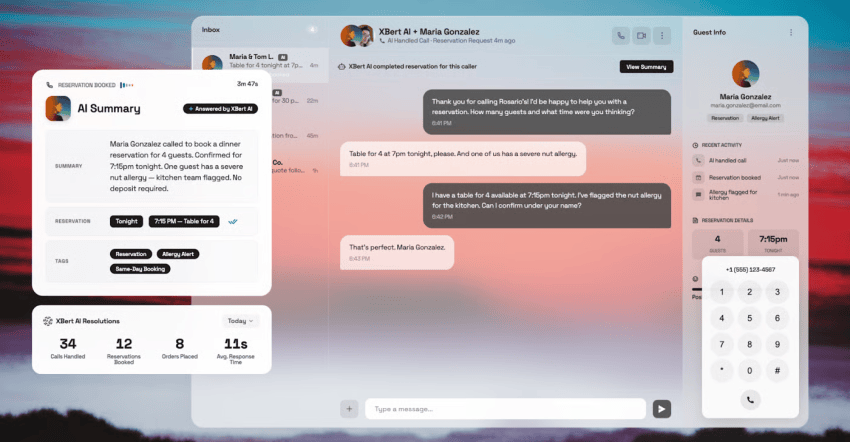
With separate tools, each app typically has its own interface, administration, data, and integrations.
That doesn’t mean separate tools are inherently bad. A specialist app can provide functionality that a broader platform doesn’t. The trade-off is that every extra app creates another system to connect, secure, maintain, and learn.
| Unified Communications | Multiple communication tools | |
|---|---|---|
| Voice | Integrated into the same platform as other communication channels | Usually provided by a separate phone or VoIP system |
| Video | Meetings and calling available through the same user environment | Separate meeting app and administration |
| Messaging | Team messaging and business communications share the same platform | Separate chat or messaging apps |
| User management | One user directory and provisioning process | Users and permissions managed across multiple systems |
| Data and context | Communication history and customer context can be connected across workflows | Data is often distributed between apps |
| Administration | Fewer platforms, consoles, and vendor relationships to manage | Multiple contracts, admin portals, integrations, and support processes |
| Integration | Platform-level integrations can connect channels and workflows | Each app may require its own integrations and maintenance |
The difference becomes more significant as your organization grows. Adding another app might solve an immediate requirement. But it also adds another place where information can disconnect from the rest of the business—and another platform to administer. At scale, this increases the day-to-day management and, in extreme cases, creates a new job role in itself.
The practical question isn’t whether you can replace every app with one platform. It’s whether the apps at the center of your communication stack should share the same foundation.
The Real Cost of Tool Sprawl: Context Switching and Financial Overhead
The cost of using multiple communication apps isn’t limited to the subscription fees. Every extra app introduces another interface, another login, another admin console, and another place for employees to look when they need information.
Then there’s the switching between the apps, too.

Did you know that office workers switch between apps 25 times per day? Research suggests employees can lose up to a staggering 20% of their workweek switching between apps and systems. That doesn’t mean every business is losing a fifth of its working time to app switching. But it illustrates the broader problem: Fragmentation creates friction that software invoices don’t capture.
There’s also a relationship between the number of apps employees use and communication problems. One 2026 Zoom study found that employees using more than 10 apps reported communication issues at a rate of 54%, compared with 34% among those using fewer than five.
What tool sprawl costs
The financial calculation is easier to understand when you put the subscriptions side by side. Imagine a 50-person business paying separately for its business phone system, video meetings, team chat, and another communication tool. Even relatively inexpensive per-user subscriptions can quickly become a significant annual expense.
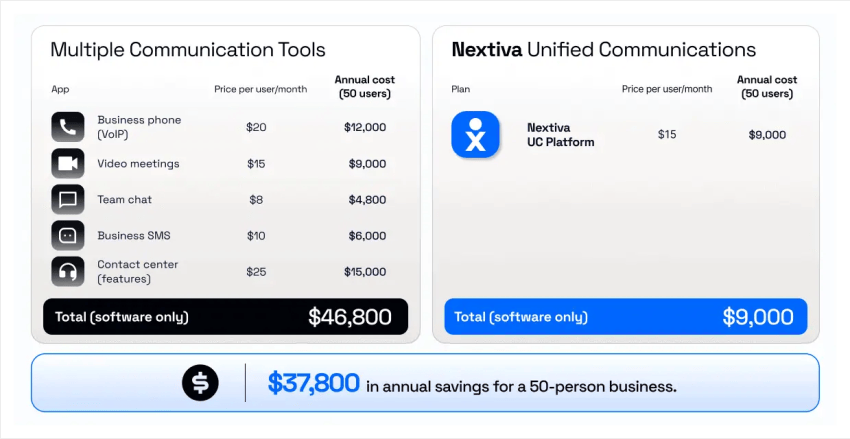
The same applies at 250 users, where every per-user charge multiplies across the workforce.
But software licensing is only part of the total cost of ownership (TCO). You also need to account for non-subscription costs, like:
- Implementation
- Integration
- Administration
- Support
- Training
- Time employees spend moving information between systems
A UC platform can consolidate some of those costs into a single environment, but that doesn’t automatically make UC cheaper. A business could end up paying for features it doesn’t need, while a specialist app may provide substantially more value for a particular team.
The useful comparison is therefore the total cost of operating the communication stack, not simply the number of apps on the company credit card.

Best of Breed vs. All-in-One: When Does Consolidation Make Sense?
The case for using separate tools is straightforward: You can choose the product that does each job best. A specialist video platform might offer features your UC platform doesn’t. A dedicated contact center might provide deeper workforce management. A standalone messaging app might already be embedded in how your team works.
There’s nothing inherently wrong with that approach. But “best of breed” has gained a negative connotation as businesses have scaled and ended up spiraling out of control thanks to the sheer number of apps and associated costs and management time.
The problem starts when every communication channel becomes its own system, with its own data, administration, integrations, and user experience. That creates a tradeoff between specialist functionality and operational simplicity.
When specialist apps make sense
A separate app can be the right choice when it solves a specific requirement that your core communication platform can’t handle. For example, a contact center with complex workforce management requirements may need capabilities beyond a standard business phone system. A sales team might also have a specialist tool that integrates deeply with its existing CRM workflow.
The question isn’t whether a specialist app has more features. It’s whether those additional features create enough value to justify another system. That means looking beyond the subscription price and considering integration, administration, training, security, and the employee experience.
The hidden cost of disconnected workflows
The biggest problem with separate tools isn’t necessarily that employees have to use more apps. It’s what happens when those apps don’t share context.
A customer might call your business, send an SMS, and then contact support through another channel. If each interaction sits in a different system, your team may not have a complete view of the conversation.
Nextiva’s Customer Patience Benchmark found that 56% of consumers will try another support channel when a response takes longer than expected. Furthermore, if they have a bad experience finding that channel or chasing up their query inefficiently, 28% of customers will abandon your brand without giving you a second chance.
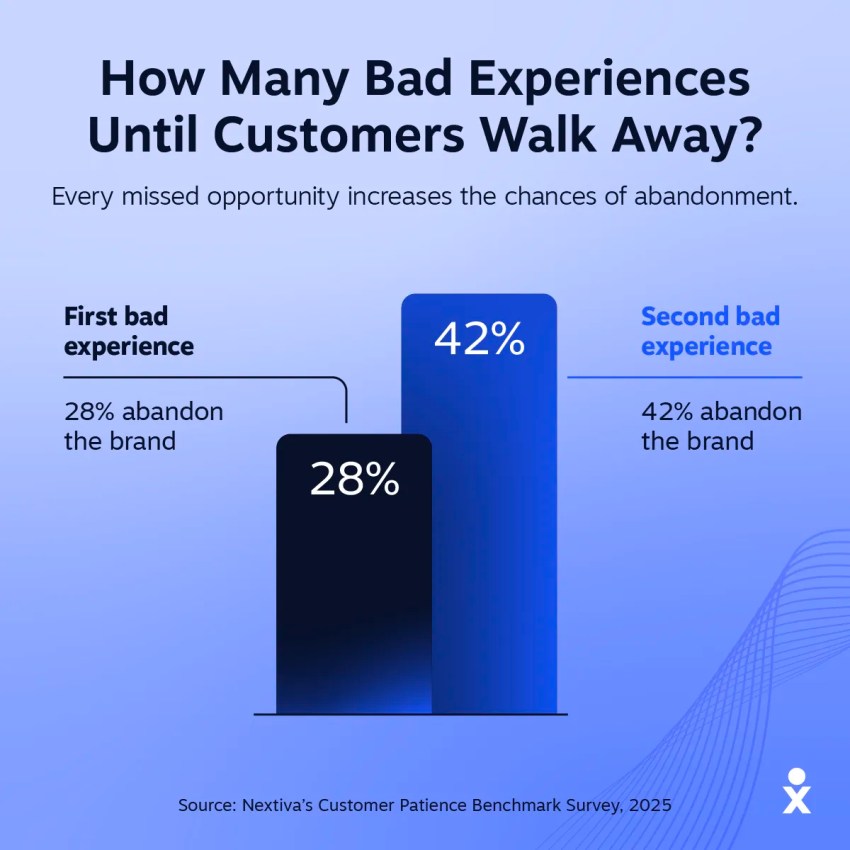
That makes connected communication more than an IT preference. If customers move between channels, your systems need to move with them.
Where UC fits
UC doesn’t mean every piece of software in your business needs to come from one vendor. It means your core communication channels can share the same foundation. Voice, video, messaging, SMS, user identity, and customer context can sit within a connected environment while specialist apps remain available where they genuinely add value.
That gives IT teams a more practical approach to consolidation:
- Keep the specialist tools that earn their place.
- Consolidate the communication tools that don’t need to be separate.
The goal isn’t to reduce the number of apps at any cost. It’s to reduce unnecessary complexity while preserving the functionality your teams actually use.
IT Administration, Security, and User Provisioning
The more communication tools you add, the more systems your IT team has to manage. This is a straightforward principle, but let’s back it up with some details.
A new employee might need accounts created across your phone system, video platform, messaging app, SMS provider, and any other communication tools. When someone leaves, those accounts must be disabled. When permissions change, the updates need to happen everywhere.
That creates administrative overhead before you even get to security. A unified platform can bring more of that lifecycle management into one place. You can manage user provisioning, permissions, policies, and reporting through a smaller number of administrative consoles.
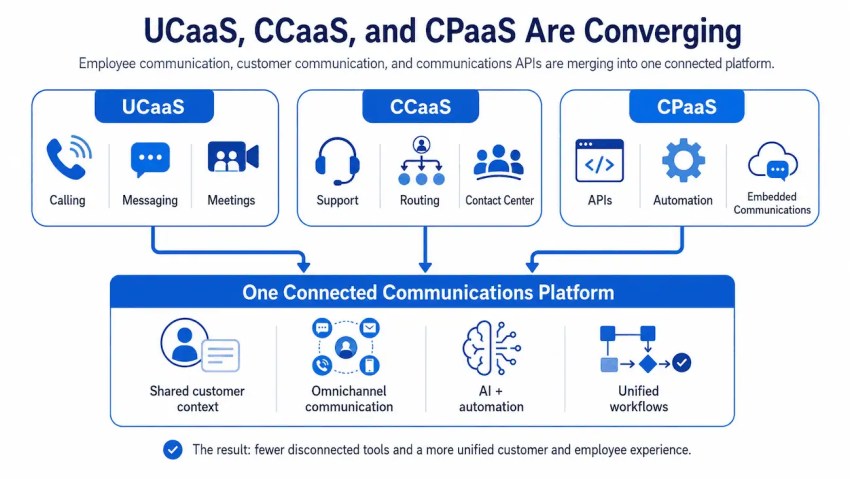
The security model also becomes easier to understand. With multiple vendors, each platform can have its own authentication settings, access controls, audit logs, retention policies, and compliance requirements. Your IT team needs to understand how each system handles sensitive information and how those systems connect to one another.
That doesn’t mean a unified platform is automatically more secure. Consolidation can reduce the number of systems you need to govern, but you still need to evaluate the controls behind the platform.
For a communication stack, I’d look at:
- Identity and access controls
- Audit logging and reporting
- Compliance certifications and requirements relevant to your business
SOC 2, HIPAA, and PCI-DSS can all matter depending on what your organization does and what information your communication systems handle.

There’s also the problem of shadow IT. If employees adopt their own messaging, calling, or collaboration apps because the approved tools don’t meet their needs, IT can end up managing a communication environment it can’t fully see.
What’s worse is that IT managers and admins don’t always have visibility that these apps are in use. In a former life, I interviewed customers who were using a combination of Microsoft Teams, Slack, Webex, Zoom, and Google. The users all chose the tool they preferred, while the admins had no idea until someone reported a problem.
That’s where consolidation can help:
- Give employees the capabilities they need within a governed environment while retaining specialist tools where there’s a clear business case for them.
The objective isn’t to create one giant system simply because one system sounds simpler. It’s to make sure your IT team knows what communication tools exist, who has access to them, what data they contain, and how employees use them.

How to Audit Your Software Stack and Plan a Consolidation Migration
Consolidation shouldn’t start with a vendor shortlist. Start by understanding what you’re already paying for.
It’s common to find overlapping functionality across communication tools, particularly in businesses that have grown through acquisitions, departmental purchases, or years of adding software to solve individual problems. A proper audit gives you a clearer picture before you decide what to replace.
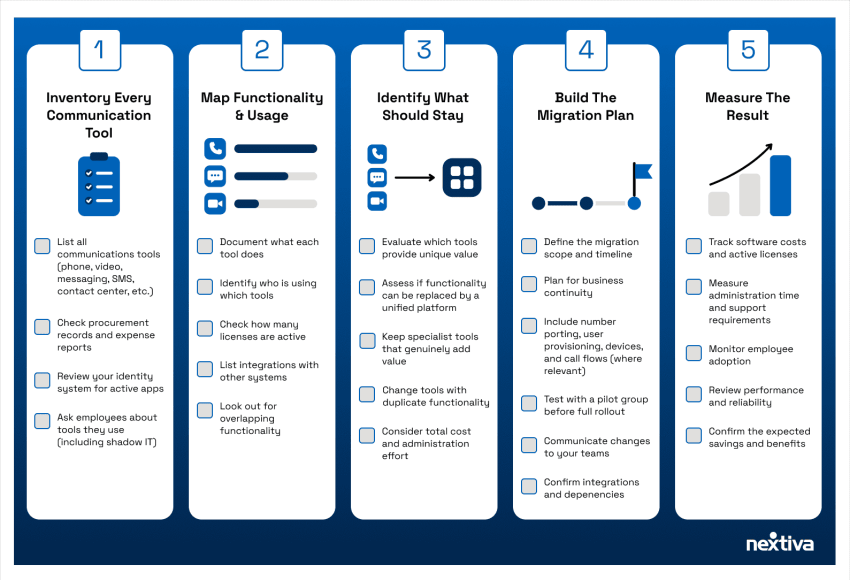
1. Inventory every communication tool
Start with the obvious systems:
- Phone
- Video
- Messaging
- SMS
- Contact center
- Collaboration
Then look for the tools that don’t appear on the official IT list.
Check expense reports, software procurement records, identity systems, and user surveys. You’re looking for both approved software and shadow IT that employees have adopted independently.
Pro Tip: Conduct an anonymous user survey (with a gift voucher incentive to encourage completion) to get a true reflection of what people use day to day.
2. Map functionality and usage
Knowing that you have five communication tools isn’t enough. Document what each one does, who uses it, how many licenses are active, and which systems it integrates with.
You may find that you’re paying for overlapping functionality that different teams use in slightly different ways. This is where the financial case for consolidation becomes clearer.
3. Identify what should stay
Not every specialist tool needs to disappear. Keep applications that provide functionality your core communication platform genuinely can’t replace or that deliver enough value to justify the additional cost and administration. The objective is to eliminate unnecessary duplication, not force every team onto identical software.
4. Build the migration plan
Once you’ve identified what you’re consolidating, plan the transition around business continuity. For a phone system, that includes number porting, user provisioning, call flows, devices, integrations, and testing before the cutover.
A phased rollout can reduce risk. Start with a controlled group of users, validate the workflows, then expand once you’ve confirmed everything works as expected.
5. Measure the result
The audit shouldn’t end when the old subscriptions are cancelled. Track the outcomes you’re trying to achieve:
- Software costs
- Active licenses
- Administration time
- Support requirements
- Employee adoption
That gives you a way to determine whether consolidation actually delivered the expected value.
For organizations considering Nextiva, the platform strives for 99.999% uptime, offers guided onboarding, and provides number porting support. Those capabilities matter during migration because replacing a communication platform isn’t just an IT software change. It’s a change to how employees and customers communicate with the business.
The best consolidation strategy isn’t the one that leaves you with the fewest applications. It’s the one that leaves you with fewer unnecessary systems, clearer ownership, and a communication stack your IT team can manage.

Choose the Communication Stack That Fits Your Business
The question isn’t whether you should have one communication platform or several. It’s whether every tool in your stack earns its place.
Specialist apps can deliver functionality that a broader platform doesn’t. But when phone, video, messaging, SMS, etc. operate independently, the cost goes beyond the software subscription.
You also take on more administration, more integrations, more systems to secure, and more places for information to disconnect. A UC platform can consolidate those core communication workflows while leaving room for specialist tools where they genuinely add value.
The best place to start is with an audit:
- Find out what you’re paying for
- Determine what your teams actually use
- Pinpoint where functionality overlaps
- Identify which systems create unnecessary complexity
Then calculate the cost of keeping the current stack against the cost and effort of consolidating it.
Selecting a UC platform that fits your needs
Nextiva brings business phone service, video meetings, team chat, SMS, AI capabilities, and CRM integrations into one platform, with plans starting at $15 per user per month. If your communication stack has grown one app at a time, now is a good time to find out what that growth is really costing you.
Try Nextiva for free and see what consolidating your communication stack could look like for your business. You can test the platform, explore the features your teams need, and decide whether it makes sense for your organization.
Ready to simplify your communication stack?
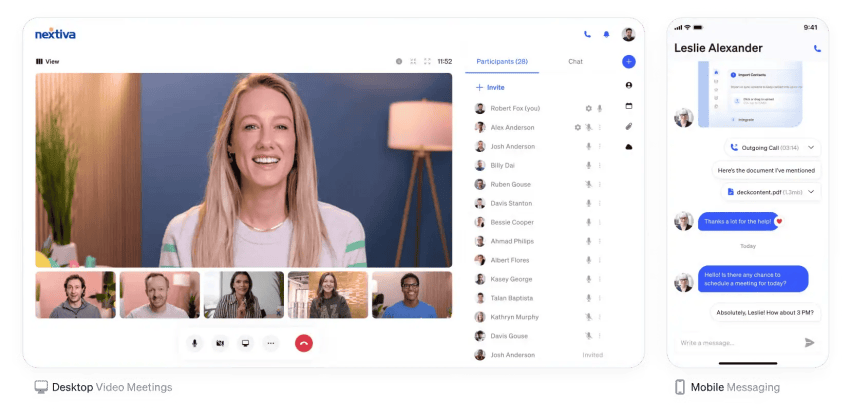
Voice, video, messaging. Seamlessly unified.
One app for all customer conversations. Stay connected with customers and teams wherever you are. Take business on the go with your phone, contacts, call and text history all in one place.
Frequently Asked Questions About UC
UC brings core communication channels like voice, video, messaging, and collaboration into a connected platform. Multiple tools use separate apps for each channel, often with their own administration, data, and integrations.
The difference isn’t simply how many apps employees use. It’s how well those systems work together and how much effort your business needs to manage them.
It depends on what your business needs. UC can reduce duplicated software, simplify administration, and connect communication workflows. But specialist apps can still make sense when they provide functionality your core platform doesn’t offer. For many businesses, the practical approach is to consolidate core communication while keeping specialist tools where they provide a clear business benefit.
The most obvious savings come from reducing overlapping subscriptions. There can also be savings from fewer integrations to maintain, fewer systems to administer, and fewer licenses that aren’t being fully used. The important calculation is the TCO rather than the monthly price of each app.
The biggest risks come from fragmentation. Different systems can have separate security policies, access controls, audit logs, user directories, and data. Employees may also adopt communication tools outside the approved IT environment, creating shadow IT.
A fragmented stack isn’t automatically insecure, but it gives IT more systems to govern and more integration points to monitor.
Keep a specialist tool when its unique functionality provides enough value to justify the extra cost and administration. The goal isn’t to eliminate every app. It’s to identify which tools genuinely add value and which exist because nobody has reviewed the communication stack recently.