Business Communication
 Blog
 Customer Experience
 Leadership
 Marketing & Sales
 Nextiva News
 Productivity
 VoIP
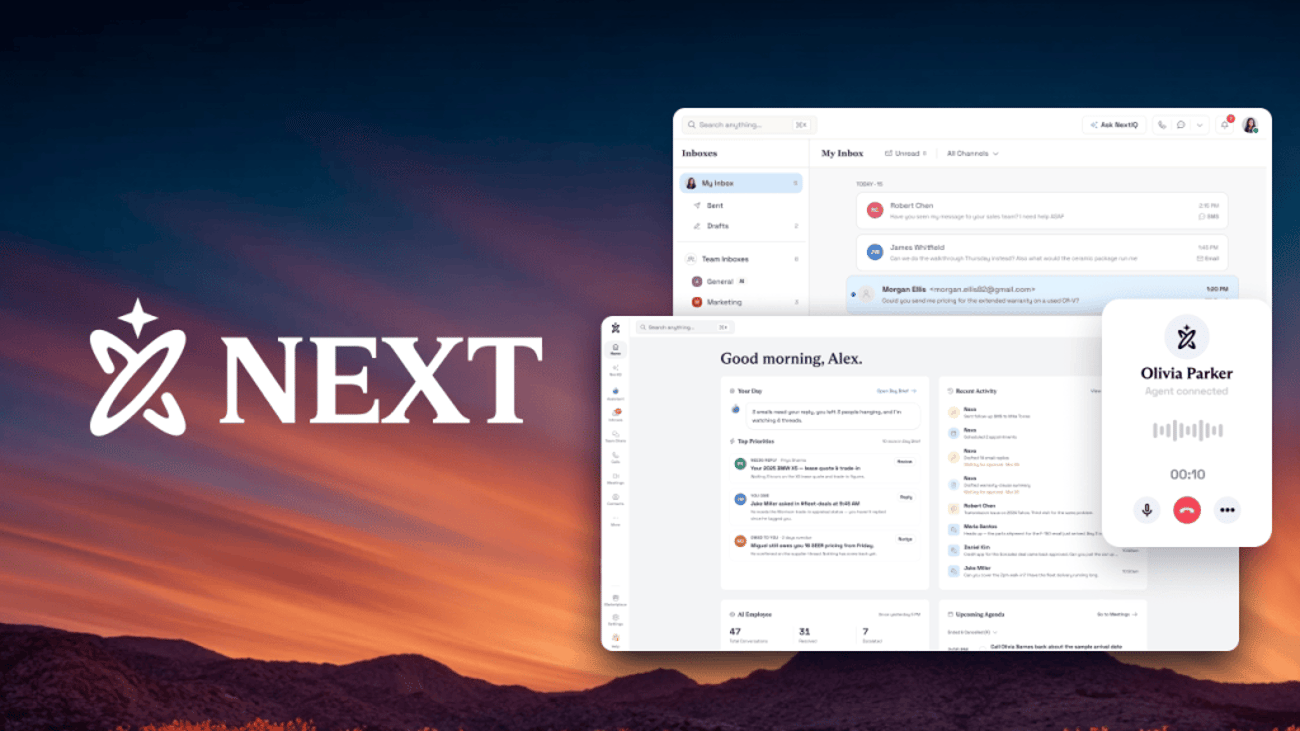

Nextiva started in 2008 with a simple idea: every business, not just the ones with big budgets and big teams, should be able to know its customers, remember them, and give them an experience that keeps them coming back. We began with business phone service, built to make communications easier for businesses of any size.
As customers started reaching businesses by text, chat, email, and social media, our platform grew with them. We added those channels and AI-powered contact center tools, all with the same goal: bring every customer interaction into one place. Today, more than 100,000 businesses run their conversations on Nextiva.
Nextiva NEXT is the next step in that work. The platform goes beyond connecting conversations to acting on them: answering calls, remembering customers, and following through on what comes next.
Our AI-native platform is built for customer conversations and designed for small and growing businesses. It brings calls, texts, email, chat, and meetings into one place, remembers every conversation, and uses AI to answer, book, and follow up when your team can’t.
What Is Nextiva NEXT?
NEXT is a business communications platform that connects every customer channel and the tools you already use, with AI built in. It replaces the separate phone line, texting app, chat widget, and sticky notes that most growing businesses piece together over the years.
The goal is simple: Every customer gets answered, nobody has to repeat themselves, and your team always knows the next step. For an owner, that means fewer lost leads and more repeat customers. It also means a team that gets more done without adding headcount.
How NEXT, NextIQ, and XBert work together
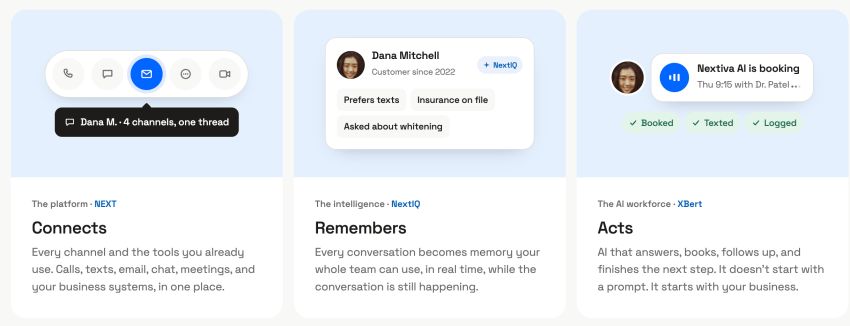
The NEXT platform has three parts, and each one has a specific job. We describe it in three words: NEXT connects, NextIQ remembers, and XBert acts.
| Component | What it does | What it means for you |
|---|---|---|
| NEXT (the platform) | Connects calls, texts, email, chat, meetings, and your business systems in one place | One inbox and one customer record instead of four apps |
| NextIQ (the intelligence) | Turns every conversation into memory your team can use in real time and provides real-time suggestions and responses | Whoever picks up already knows what was said last time and provides consistent and quick responses |
| XBert AI (the AI employee) | Answers, books, follows up, and finishes the next step | Calls and messages get handled even when everyone is busy |
These parts depend on each other. XBert can book the right appointment because NextIQ remembers the customer’s last visit, and your team can pick up where XBert left off because NEXT keeps the whole conversation in one record. NextIQ also provides AI-generated summaries, recommended next steps, and suggested responses to help your team quickly understand the context and keep conversations moving forward.
Picture a call like this one. A customer named Robert calls an auto service shop about his 2024 Tahoe. “My transmission is slipping again. That’s the third time.” XBert answers on the first ring and sees his two earlier visits, so it treats the call as a priority repair instead of a routine booking. Robert says he needs the truck for work this week. XBert books him for 8 a.m. the next day, reserves a loaner, texts him the details, and notifies the service manager. The whole request gets handled in one call, and it works because NEXT, NextIQ, and XBert share the same record.
Who Is Nextiva NEXT For?
NEXT is for owners and leaders of small and growing businesses that win or lose customers by phone, text, and chat. Most of our customers are Main Street businesses: home services companies, dental and medical offices, law and accounting firms, salons, retailers, and franchises.
You don’t need an IT department to set it up or run it, either.
NEXT is for leaders who want to see the whole customer relationship in one place. If you manage a front desk, sales team, or service team, NEXT gives you one view of every conversation and follow-up.
Signs your business has outgrown its phone setup
Most owners don’t go looking for a new platform until something goes awry. These are the moments we hear about most often.
- Calls go to voicemail when you’re busy. You find out about missed customers days later, if at all.
- Customers repeat themselves. The person who answers the text has no idea what was said on the call, and teams end up giving conflicting information when calls and texts live in separate tools.
- Follow-up depends on memory. Promised callbacks and quotes slip when someone is out sick.
- You’re paying for too many tools. Phones, texting, chat, and scheduling each live in a separate app with a separate bill.
If two or more of these sound familiar, your customers are already feeling it.
Jeremy Banner knows the feeling. When he and his business partner bought Meucci Cues, a custom pool cue brand with more than 50 years of history, they inherited a phone line so unreliable that a lightning strike once knocked it out. One employee answered the phone while juggling other jobs, so calls slipped through, and voicemails went unreturned.
With roughly 50 inbound calls a day, and any call tied to a product carrying a minimum value of $400 to $500, every dropped ring had a real cost. Jeremy replaced the line in his first month and built a real call flow on Nextiva, with XBert AI answering service catching after-hours calls and daytime overflow.
You might relate to his view on why it matters: “Do you want it to be a job, or do you want it to be a business? If you want a legitimate business, you need systems.”
Why Customer Conversations Break Down as Businesses Grow
Customer conversations break down because the people answering them are also doing everything else. The U.S. Census Bureau figures show that 29.8 million businesses have no paid employees, compared with 8.3 million businesses that have employees.
In most of those businesses, the owner is also the receptionist, the scheduler, and the worker.
When that person can’t get to the phone, calling back isn’t a reliable fallback. Only 19% of U.S. adults say they generally answer calls from numbers they don’t recognize. Your callback is likely from an unknown number to many new customers. Voicemail doesn’t close the gap either, because 14% of adults in the same survey said they ignore voicemails from unknown numbers altogether.
Adding staff and tools helps, but it creates a new problem. In our earlier CX Trends research, we surveyed 1,058 customer experience decision-makers at companies with 100 or more employees with Dimensional Research. Of those companies, 95% use multiple tools for customer interactions, averaging 6.3 tools, and 86% of multi-tool companies report siloed customer data.
A five-person business runs fewer tools, but the pattern is the same. Text messages live in one app, voicemails in another, and the customer’s history in someone’s head. NEXT puts it all in one place, and that’s where the five use cases below begin.
How NEXT Helps You Build a Better Business
Start with one problem, the one that’s costing you the most customers today. Once that’s working, you tackle the next one. These are the five starting points we see most often, and each one ties directly to revenue, retention, or your team’s time.
1) Capture every lead
NEXT answers and logs every inbound request, so new business doesn’t go cold while you’re busy. XBert answers the call, text, or chat, asks the qualifying questions you choose, and records the lead in the customer’s record.
Example: a remodeling estimate
A homeowner opens your website chat and asks, “Do you do kitchen remodels?” XBert answers from your business information, offers a free estimate, logs the lead, and books the follow-up. When your estimator calls the next morning, the whole chat is already in front of them. Learn more about how an AI employee captures leads.
2) Cover after hours
XBert answers calls, texts, and chats when your office is closed and captures what matters for the morning. It can take a message, qualify a lead, or book the next open slot, so the evening caller doesn’t move on to the next business on their list.
Example: a weekend call to a Mon-Fri dental office
A patient calls Saturday about a cracked crown. XBert answers, captures the details, books the first opening on Monday, and flags the call as urgent for your team. You decide what XBert handles on its own and what it queues for a person. Our guide to after-hours answering covers how to set those rules.
3) Schedule and reschedule appointments
XBert books, confirms, and reschedules appointments on your live calendar without anyone on your team having to pick up the phone. It connects to calendars like Google Calendar, Calendly, and Cal.com, sends a confirmation text, and sends reminders to cut no-shows.
Example: a salon client who needs to move an appointment
A client texts at night that they can’t make tomorrow’s morning appointment. XBert offers two new times, books the one they pick, and texts a confirmation. The chair stays full, and your front desk starts the morning with an updated schedule. See how automated appointment booking works for service businesses.
4) Answer common questions
XBert answers the questions your team hears 10 times a day, like your hours, services, pricing, and directions. It learns from your website, FAQs, and policies, and you set the guardrails on what it can and can’t say.
Example: the “What are your hours?” phone call
A shopper calls to ask about Sunday hours and your return policy. XBert answers both in seconds. If the shopper wants to talk about a special order, XBert routes the call to the right person on your team with the conversation attached, so nobody starts with “What’s this about?”
5) Keep full conversation context
NextIQ keeps the full history of every customer conversation across calls, texts, email, and chat, so your team never starts from zero. It also provides AI-generated summaries, recommended next steps, and suggested responses to help your team quickly understand the context and take action. This use case makes the other four work because it lets AI and people trade off on the same conversation without losing anything.
Example: a customer who calls Monday and texts Tuesday
A customer calls on Monday about a warranty repair, then texts on Tuesday with a question. The teammate who answers the text sees Monday’s call summary, the open request, and what was promised. The customer gets a fast, informed reply instead of a request to explain everything again.
What Features Come With Nextiva NEXT?
Every NEXT plan includes the tools every team needs to run customer conversations from one place. The features fall into three groups.
Communication tools
NEXT includes unlimited business voice and video meetings, texting from your business number, and shared and personal inboxes where calls, texts, email, and chat land in one view. Your team can call from desk phones, computers, or the mobile app, and chat with each other about customers without leaving the conversation.
Every interaction adds to one customer record, with built-in basic CRM and ticketing. Skills-based routing and our CX Journey Builder send each conversation to the right person.
AI built in
Every plan includes NextIQ’s AI transcription, call summaries, and Answer Assist, which suggests replies and next steps during live conversations. You can add XBert AI to any plan when you’re ready for AI to help customers directly.
Integrations with the tools you already use
NEXT connects with 30+ business integrations, including Salesforce, HubSpot, Microsoft Teams, Google Calendar, Square, Shopify, and ServiceTitan. If you already have a CRM, keep it. NEXT writes conversation details back to it, so your records stay current without anyone retyping notes.
You’re in control with how much AI handles
NEXT lets you choose how much work AI does, from helping your team on calls to handling routine conversations on its own. We designed it in three levels, and you can move between them at your own pace.
- AI helps your team. Your people take every call, and NextIQ pulls up history, suggests responses and next steps, and writes the notes while they talk. Most businesses start here.
- AI covers after hours and the routine. XBert answers after hours and handles scheduling, reminders, and everyday questions. Your team picks up anything that needs a person.
- AI runs the busywork. XBert answers, books, follows up, and closes the loop on routine work, and your people focus on judgment calls and relationships.
If putting AI in front of customers makes you nervous, start at level one. No customer talks to AI, and your team still gets faster. When you see it working, turn on XBert after hours and expand from there.
Many owners worry that customers will hang up on AI.
Rafael Mesa, who runs Vero Property Inspections on his own across a 150-mile stretch of Florida, had the same concern. Here’s what he found: “What surprised me most is that even when callers realize they’re speaking with AI, they still book.” Rafael first tried a part-time phone assistant, and calls still went unanswered.
Each missed call was an inspection worth at least $250 going to a competitor. For $99 a month, XBert now saves him 15 to 20 bookings a week, and Rafael reports a return on investment of more than 1,000%. XBert handles calls while he’s on a roof or in an attic, and he puts it simply: “I control my time now.”
How Much Does Nextiva NEXT Cost?
Nextiva is known for simple and transparent pricing. Nextiva NEXT starts at $15 per user per month on NEXT Core with annual small business pricing. NEXT Engage is $25 per user per month, and NEXT Scale is $75.
| Plan | Annual price | Best for | What you get |
|---|---|---|---|
| NEXT Core | $15/user/month | Small teams getting started | Unlimited voice and video, 100 texts per user, shared inboxes, basic CRM and ticketing, and 50 AI transcriptions, summaries, and Answer Assist conversations |
| NEXT Engage | $25/user/month | Growing teams | Everything in Core, plus live chat and chatbot, 500 texts per user, 2,000 toll-free inbound minutes, single sign-on, virtual fax, and 200 of each AI feature |
| NEXT Scale | $75/user/month | Sales and service teams | Everything in Engage, plus unlimited texts and AI features, 10,000 toll-free inbound minutes, supervisor monitoring, and a dedicated onboarding team |
Annual pricing applies to new small business customers with 1–100 employees on an annual agreement. If you need VoIP desk phones, we sell them separately (or you can repurpose existing ones), and every plan includes 24/7 support. See all plan details and comparisons on our pricing page.
Which NEXT plan fits your business?
NEXT Core fits a small team that mainly needs calling, texting, and one shared inbox. NEXT Engage is our most popular plan, and it fits businesses that want website chat and higher texting volume. NEXT Scale fits businesses with dedicated sales or service teams that need supervisor monitoring and unlimited AI.
XBert AI is priced separately at $99 per month for 100 AI conversations, with additional conversations at $1.50 each and a 14-day free trial. You can add it to any plan or use it with your existing phone service.
Getting started with NEXT
Getting started with NEXT takes one conversation with our team and one problem you want solved first.
- Pick your first problem. Choose the leak that costs you the most: missed calls, after-hours inquiries, scheduling, or repeat questions.
- Choose a plan. Start with the plan that fits your team today. You can add users, features, and XBert later.
- Connect your tools. Link your calendar, CRM, and other systems so NEXT and XBert work from your real data.
- Turn on AI at your pace. Start with NextIQ helping your team, then let XBert cover after hours or routine questions when you’re ready.
Our team sets NEXT up with you, so you don’t need technical experience to get it running.
Build a Business Where No Conversation Gets Lost
Every business has one leak: an after-hours call, a lead that never got a callback, or a customer who had to explain their problem twice. NEXT closes it. Every channel lives in one place, NextIQ remembers each conversation, and XBert answers when you can’t.
As an owner, the payoff is a business that runs better than it did last year. Customers get answered, your team spends its time on work that matters, and you can grow without adding a new hire for every new phone line. See how NEXT works for your business, or read about how XBert works to see how our AI receptionist answers, books, and follows up for you.
Frequently Asked Questions About Nextiva NEXT
Yes, NEXT includes a full business phone system with unlimited calling, plus texts, email, live chat, and meetings in the same place. It remembers every conversation across all of those channels. Most small businesses use NEXT in place of a separate phone line, texting app, and chat tool. Remember, NEXT is more than a business phone system.
No. We built NEXT for small businesses without an IT department, and our team sets it up with you. XBert learns your business from your website and business details, and you can change its answers, hours, and routing rules yourself without writing code. You can set it up and go live in less than five minutes.
Yes. The NEXT platform connects to more than 30 business tools, including Salesforce, HubSpot, Google Calendar, Outlook, Calendly, Square, and ServiceTitan. It writes conversation details back to your CRM, so you keep your current records and processes while your conversations move into one place.
No. You decide how much AI functionality it provides. Many businesses start with NextIQ helping their team during calls, with no AI talking to customers at all. When you’re comfortable, you can let XBert answer after hours or handle routine questions, then expand from there.