Customer Experience
  Blog
Blog  Business Communication
  Leadership
  Marketing & Sales
  Nextiva News
  Productivity
  VoIP
VoIP 

How fast should a team follow up with a lead who submits their details with intent?
Ideally, it should be quick. As a business owner, you’d expect the lead follow-up to be instantaneous. Sales teams call this gap speed to lead: the time between an inbound signal and your first contact. But in reality, it takes your team hours to reach that lead. Although it’s older, this study published by Harvard Business Review includes a large sample of 2,241 U.S. companies and examines how teams respond to a submitted web lead. On average, it took 42 hours for a company to respond, and 23% of companies never responded.
As time passes, intent decays quickly. A fresh form fill or pricing call is one of the strongest buying signals in B2B lead generation, and it loses value by the minute. A delayed response becomes a reason a lead reaches out to other businesses providing similar services. If you have an AI employee for lead capture, you can follow up exactly when intent is highest.
This guide covers AI lead capture in detail and explores a four-week rollout plan.
What an AI Employee for Lead Capture Does
An AI employee engages an inbound lead in real time, runs a structured qualification, writes the record, and books the meeting. Judge it by those four capabilities, not by its category label. Vendors market these systems as AI agents, AI SDRs, or digital workers, but the label matters less than what it can do.
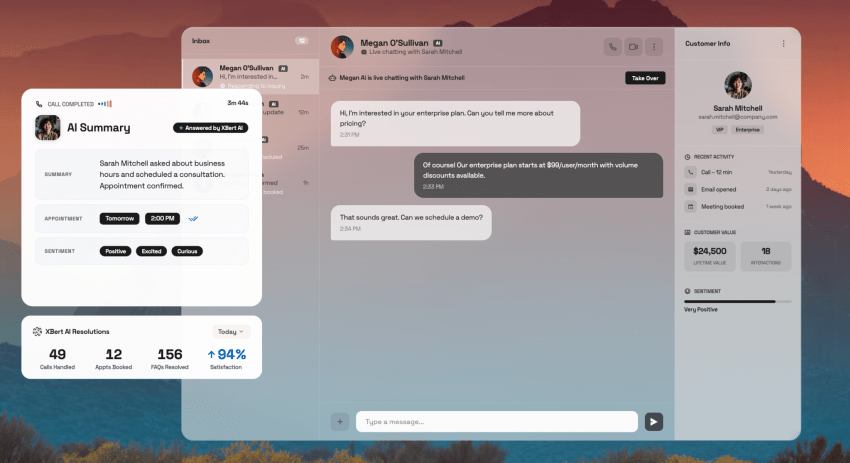
If you have a bot that collects an email address and promises a follow-up, you have automated a form, not a process.
Here’s a brief overview of what an AI employee’s functions look like:
- Real-time engagement: Answers the call, chat, or text within seconds, in the middle of a Saturday night, with natural back-and-forth.
- Structured data capture: Writes name, company, intent, and qualification answers into discrete CRM fields instead of just blobs of notes.
- Qualification and routing: Asks the questions your team uses, scores the lead, and routes it to the right rep or queue.
- Calendar booking: Checks live availability and confirms a meeting inside the conversation.
Jake Dunlap, CEO of Skaled Consulting, describes the mechanics well. He says, “The agent can enrich the lead with public information, then engage and answer questions back and forth, instead of just logging a contact.”
Before going any further, there’s one honest caveat you must be aware of. An AI employee will amplify the process you point it at. If you don’t structure or properly plan your data and qualification criteria, you might mess things up at scale. It’s advisable to clean your data and define your qualification criteria first. Then, the technology comes in.
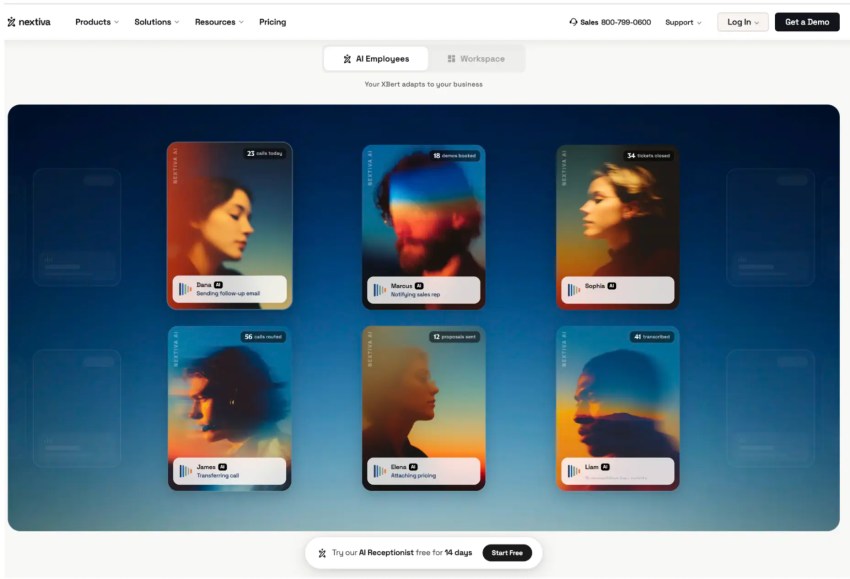
Nextiva’s communications platform connects with different systems, including popular CRM software, to ensure you have no contextual gaps in a lead’s data and details. Powered by this system, Nextiva’s AI Employee works tasks from first touch to resolution. For inbound voice, text, and chat specifically, the relevant product is Nextiva’s XBert.
How an AI employee differs from a website chatbot
The structural difference is execution. A decision-tree chatbot matches your message to an intent and serves a pre-written branch. An AI agentic system handles nonlinear conversation, queries the CRM mid-conversation, and completes the booking itself.
Fluency is cheap now, as any widget can sound conversational. Even AI-powered chatbots with fluent conversation are often decision trees underneath, and many tools sold as an AI chatbot never touch your systems at all.
The real thing runs on large language models, machine learning built for natural language processing, which handles turns with no script anticipated. You need the AI employee to perform expected tasks autonomously.
| Capability | Website chatbot | AI employee |
|---|---|---|
| Conversation | Follows a scripted decision tree | Handles nonlinear, free-form dialogue |
| CRM access | Offers none, or a one-way form push | Reads and writes records mid-conversation |
| Qualification | Collects contact info | Runs your qualification criteria and scores the lead |
| Booking | Sends a scheduling link | Confirms the meeting inside the conversation |
| Off-script questions | Responds, “Let me connect you with an agent” | Answers from a knowledge base, escalates with context |
| What the rep gets | Provides a transcript, maybe | Delivers a structured, routed, workable record |
Why Traditional Top-of-Funnel Capture Breaks Down
Feel free to run the math on your sales funnel. Let’s say you got 50 inbound leads in a week. At the audited 42-hour average, most leads will hear nothing for nearly two business days.
This lowers the qualification odds before a rep ever picks up the phone. Your conversion rates fall before anyone does anything wrong. The off-hours gap worsens it. When a lead arrives on Friday evening, it sits in the queue until Monday morning.
Even with a disciplined SDR team, the staffing pattern remains unchanged. This scenario is the case when your buyer is there, but your team isn’t. And, logically, it’s no one’s fault.
Buyer patience data confirms how narrow the window is. Nextiva’s Customer Patience Benchmark, a survey of 400 U.S. adults, maps a speed ladder of expectations: chat replies within about one minute; phone, SMS, or ticket responses within about five minutes; and email within 30 minutes. When you miss the window, 56% of customers immediately switch to another channel, and 28% abandon the product or service entirely.
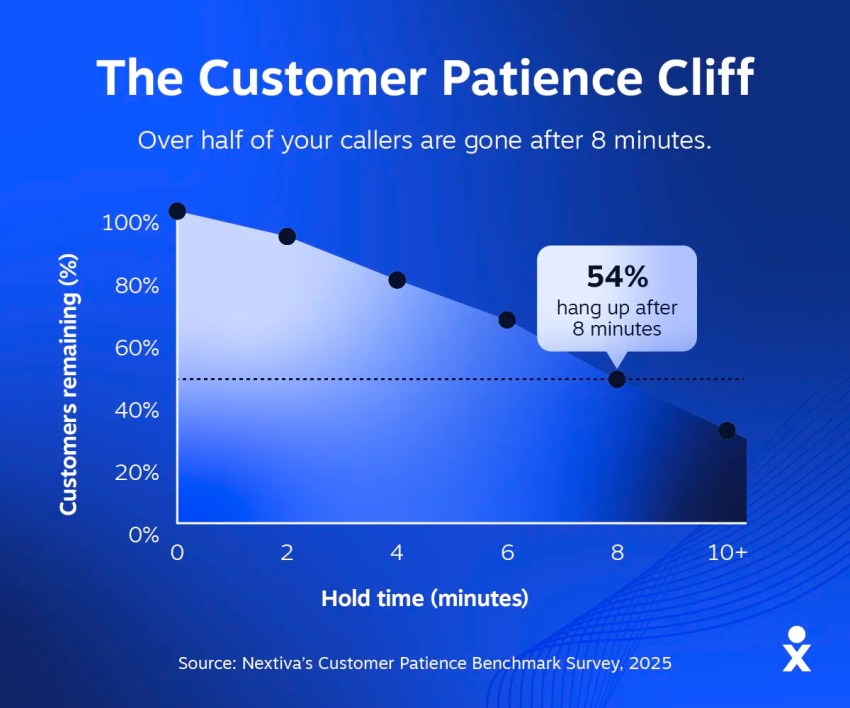
While you need to follow up quickly with inbound leads, you also need a quantifiable record. Fast routing doesn’t help if it simply moves the failure downstream.
How an AI Employee Captures and Qualifies Leads 24/7
Here’s the intake flow, from ring or form fill to booked meeting.
| Stage | What the AI does | What lands in the CRM |
|---|---|---|
| 1. Signal | Answers the call, chat, SMS, or form within seconds, any hour | New or matched contact record with source and timestamp |
| 2. Engage | Greets naturally, discloses it’s an AI, answers product questions | Conversation log linked to the record |
| 3. Qualify | Works budget, authority, need, and timing into the dialogue | Discrete qualification fields, not a notes dump |
| 4. Route or book | Scores the lead, books qualified ones, routes edge cases to a human | Meeting on the rep’s calendar, lead assigned with context |
| 5. Confirm | Sends confirmation by SMS or email, logs the full summary | Structured summary the rep reads in 30 seconds |
In this flow, there are two design details that separate a good implementation from a bad one. For example, unqualified leads deserve a response too. Saying something like “we’re not the right fit” protects the brand and the pipeline data at once.
Additionally, the handoff should carry context. You must not ask the prospect to repeat what they already told AI. Full context also lets the rep open with personalized outreach instead of a generic script.
Conversational lead qualification against BANT or MEDDPICC
Conversational lead qualification gathers a lead’s answers without making them feel interrogated. A budget, authority, need, and timeline (BANT) checklist is held in memory, while the AI employee lets the dialogue wander.
For example, authority surfaces when the lead asks who else needs to see the demo. Timing comes up when they mention a contract ending on a certain date or month. Those answers, plus firmographics from enrichment, feed lead scoring against your ideal customer profile so the record reaches the rep ranked, not raw.
MEDDPICC, short for metrics, economic buyer, decision criteria, decision process, paper process, identify pain, champion, and competition, is a full-sales-cycle discovery framework and is the rep’s work.
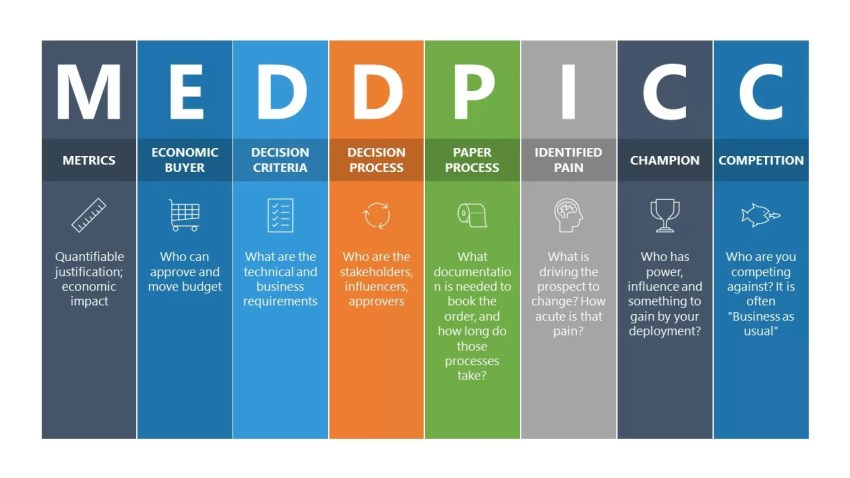
The intake AI should be able to capture the top-of-funnel subset, roughly through the BANT layer plus pain and source context, and leave the deep discovery to the human who takes the meeting.
Instant booking and CRM synchronization
Meeting booking needs to happen inside the conversation. If your agent sends a follow-up email with a scheduling link, it will reintroduce the exact delay you bought the tool to remove. In a live demo, check calendar availability and confirm a time before the conversation ends.
On the CRM side, insist on two things by name. Ask which CRMs the system writes to natively: Salesforce, HubSpot, and Zoho are the ones most buyers need. Ask the same about scheduling: Google Calendar, Outlook, and whatever booking layer your reps live in. Then ask the harder question: Do you have bidirectional sync and a structured record?
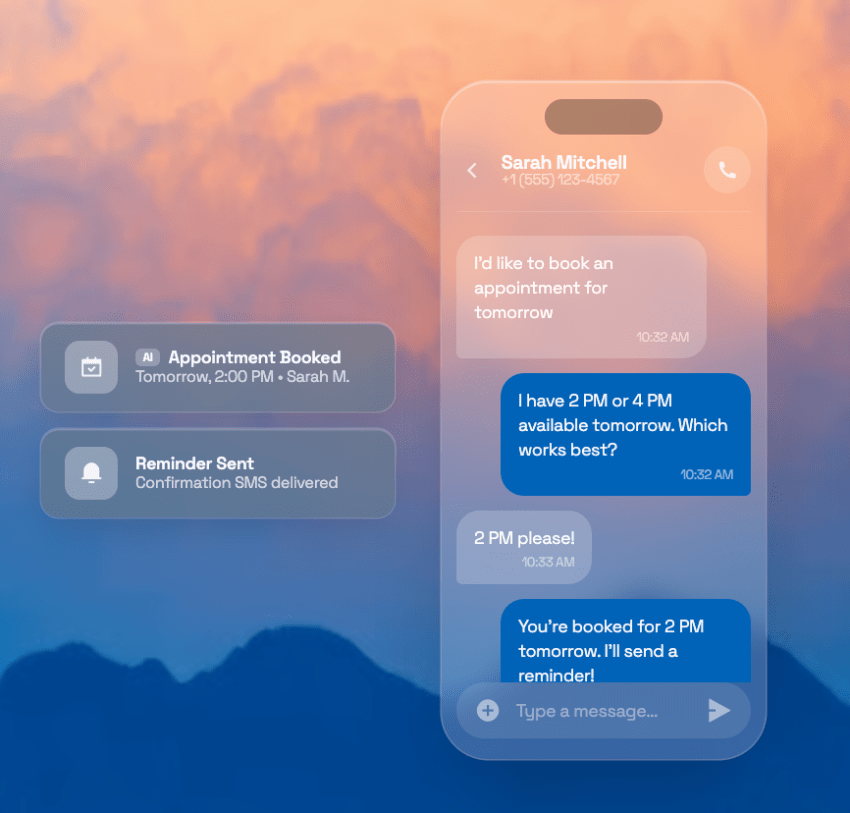
A transcript dumped into a notes field isn’t CRM integration, and it’s the most common gap in this category. Structured, two-way records close those leaks. The guide to conversational AI for sales covers the metrics that prove the sync is working.
AI Employee’s Multichannel Lead Capture Across Web, Voice, and SMS
Fragmented channel tools create a specific, expensive failure: The same buyer appears three times. She chatted on your website Tuesday, called Thursday, and texted Friday.
You have three tools, holding three records with three partial histories that fail to show the complete picture. Follow-up breaks the same way: Multichannel sequences fire from separate tools, and the intent signals a buyer drops on each channel never add up to one story.
This fragmentation is clear in Nextiva’s State of Customer Experience Research. A survey of 1,058 CX leaders found that teams use between six and seven tools on average just for customer interactions, and 13% use more than 10 tools.
The cost shows up in the data layer: 86% of companies with multiple CX tools report siloed data. Those are first-party Nextiva findings, but the pattern will look familiar to anyone who has tried to assemble a buyer’s history across a chat widget, a phone system, and a texting app.
If you pilot one workflow in this category, make it a missed-call text back. An unanswered call triggers an immediate qualifying text, which converts a would-be voicemail into a live conversation. It recovers a lead that was otherwise gone; it’s cheap to test, and it maps directly to the off-hours gap.
One practitioner on Reddit estimates that after-hours leads convert at up to 60% of the rate of same-day responses. This is a practitioner’s field estimate, not a study. You need to measure your pilot honestly.
Our breakdown of missed call solutions covers the workflow in detail.
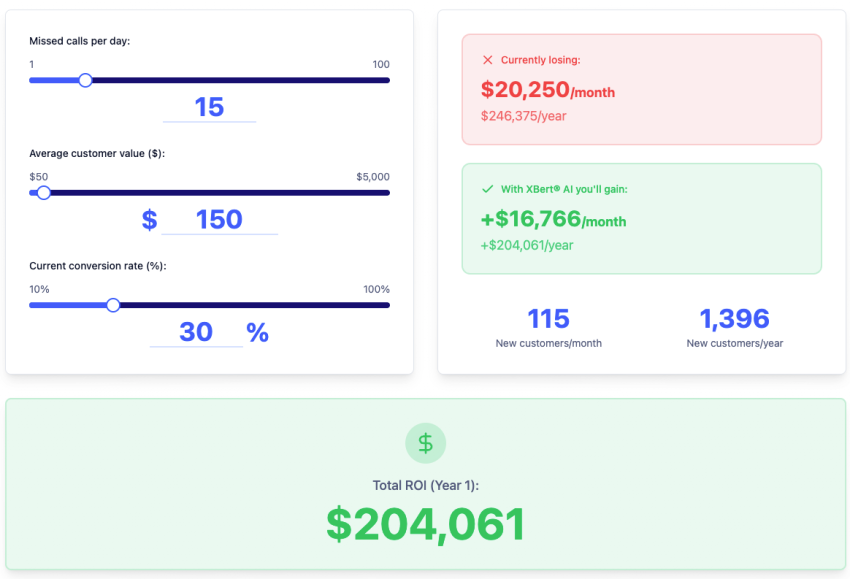
How Much Do Missed Calls Cost You?
Try our missed calls calculator and see how much lost revenue you can reclaim with Nextiva XBert® AI answering service. Compare different scenarios to grow the bottom line.
Identity resolution and context across channels
Identity resolution means collapsing one person’s interactions across channels into a single record. The buyer who chatted on Tuesday and called on Thursday should be one contact with one history, matched by phone number, email, or both. One record per person turns scattered touches into usable intent data, and it’s the foundation any predictive analytics you run later will depend on.
Solve the problem before you add channels. Every channel you add to a fragmented stack multiplies duplicates. A platform where voice, text, and chat already share one record makes the process a configuration question instead of an integration project.
Comparing AI Lead Capture Options
If you want to find AI employees that really work, it’s better to use a ranked vendor list just for discovery. Base the comparison on evaluation against criteria. The right purchase depends on the shape of your problem and what it’s built on. Ask the questions relevant to your case:
- Channel coverage: Does it handle voice, SMS, and web chat or just one of these?
- Qualification depth: Can you configure your actual criteria or only a generic question set?
- Native CRM and calendar integrations: Does it have bidirectional sync with the systems you already run?
- Guardrail testing: Can you review, correct, and constrain what it says and writes?
- Security posture: Can you verify any certifications? Or do you have only badges you need to trust?
- Total cost of ownership: What’s the numerical value associated with subscription plus setup, tuning, and the ops time to maintain it?
The architectural distinction matters more than any feature comparison. A standalone bot added on your website solves one channel’s response time and creates a new data silo. A unified communications platform where voice, text, and chat already share a record solves capture and identity resolution together. Buy the one that matches the problem you have.
It also helps to know where inbound capture sits in the wider AI-for-lead-generation stack. Outbound teams pair prospecting agents with data enrichment platforms like Clay, which run waterfall enrichment (cascading through multiple data providers until a field fills) and layer predictive lead scoring on top to decide who gets a call first.
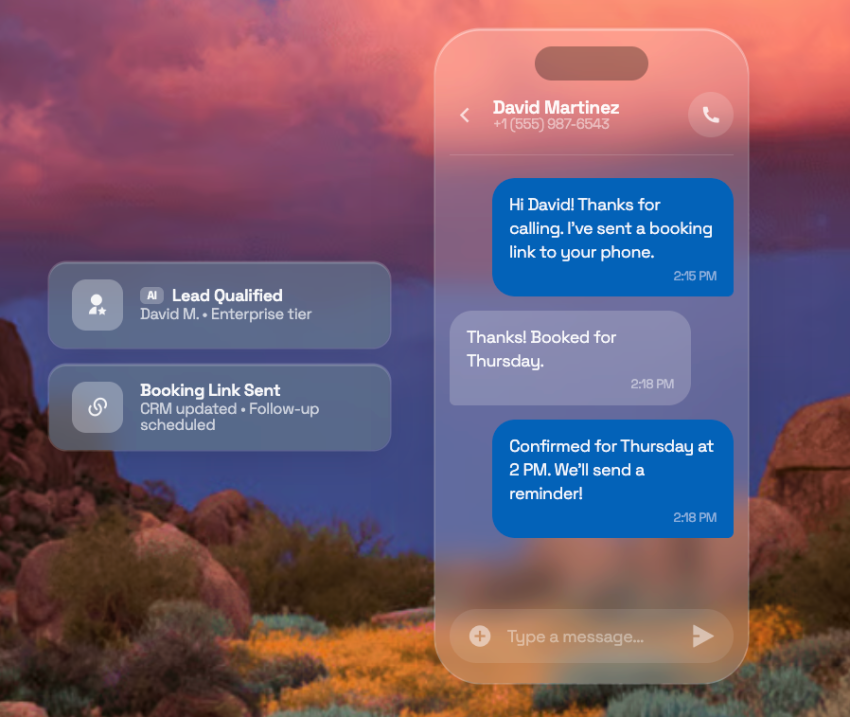
An AI employee solves the other end of the funnel: The buyer has already raised a hand, and the job is to answer, qualify, and book before intent decays.
Here’s where Nextiva sits. XBert handles inbound calls, SMS, and website live chat, with qualification and automatic booking, at $99 per month for 100 AI conversations and $1.50 per additional conversation. Nextiva AI Employee extends beyond intake to tasks that run start to finish, like drafting responses, updating the CRM, and sending follow-ups.
Nextiva publishes SOC 2 certification, HIPAA compliance options, and high uptime across its network. To further your research, you can ask for an audit report rather than accepting a badge. A vendor confident in its security posture will hand it over.
Those are Nextiva’s own published claims, so hold them to the same standard as anyone else’s: Ask for the audit report rather than accepting the badge. A vendor confident in its security posture will hand it over.
Try Nextiva XBert.
Try the best AI employee free for 14 days
XBert AI answers questions and captures leads. Add your 24/7 answering service in minutes.
What to test before you buy
Most evaluations only test the ideal scenario. The demo lead answers instantly, gives clean answers, and books politely. Real leads don’t. Bring this checklist instead:
- Make it mishandle a question: Say “I’m not the right person for this lead” and watch whether it books you anyway.
- Watch what it writes to the CRM: Open the record afterward. Do you see structured fields or a transcript dump?
- Force an escalation: Ask something outside its knowledge base, then time the human handoff.
- Check what the rep receives: Determine whether a rep could work this record without asking the prospect to repeat anything.
- Test the late reply: Respond to a follow-up three days later and see if the message still makes sense.
Ten minutes of adversarial testing tells you more than an hour of scripted demos.
4-Week Rollout Plan for an AI Employee for Lead Capture
Sequence the rollout. Sales automation amplifies whatever process it lands on. Teams that turn everything on at once can’t tell which failure came from the tool and which came from their process.
Week 1: Map the intake path
Document every route a lead takes today, from form fill or ring to first rep touch. Write down the qualification criteria your team actually uses, not the framework on the wiki.
If reps disagree on what “qualified” means, settle it now. The AI will apply whatever you give it with perfect consistency, including your ambiguity.
Week 2: Configure and wire
Build the prompts, knowledge base, and guardrails. Connect the CRM and calendars, and confirm the sync is bidirectional by editing a record on each side. Set the escalation triggers: pricing objections, angry callers, and anything legal. If you use a data enrichment provider, wire it in here too, so firmographic data like headcount and industry and technographic details like the tools an account runs on land on the record automatically.
Nextiva has native integration with popular CRM tools like Salesforce and HubSpot, with bidirectional sync.
Week 3: Pilot one channel
Start with the highest-leak channel, which for most teams is after-hours voice with missed-call text back. Have a human review every record the AI writes this week.
You’re grading qualification accuracy beyond just response speed.
Week 4: Tune and expand
Adjust thresholds based on the review, then widen to the next channel.
The exit criteria for the pilot: Qualified-record accuracy holds under human review, booked meetings rise, and reps aren’t complaining about lead quality. Jon McGinley, president of CLIMB, adds the feedback loop that keeps quality improving after launch.
When sales kicks back a lead, require a reason. Kickback reasons are the training data for your next round of tuning. Without them, as he warns about tools generally, automation just gives you “bad results faster.”
Privacy, Compliance, and Human Oversight for an AI Employee
Automated outreach by text and call, as well as recorded conversations, carry legal obligations. This section gives you the questions to ask a provider, not legal guidance, so confirm the specifics with counsel:
- TCPA: How does the system capture and store consent for automated SMS and calls? How does it handle opt-outs?
- GDPR and CCPA: Where does prospect data live, how long do you retain it, and how do you honor deletion requests?
- Recording and disclosure laws: Does the system announce recording where required, and can you configure it per state?
On disclosure, don’t overthink it. Tell callers they’re speaking with an AI. It’s increasingly a legal requirement, and hiding it is what damages trust. Don’t deceive people you’re reaching out to.
The last compliance question is handoff design. Define exactly what triggers a transfer to a human: a pricing objection, a compliance-sensitive question, or frustration in the caller’s tone. Then make sure the rep receives the full conversation context so the prospect never repeats themselves.
This separates an AI that feels like a gatekeeper from one that feels like a good first conversation.
Capture Every Inbound Lead With Nextiva
Research on response speed has been unambiguous for almost two decades, yet the audited average is measured in days. The gap emerges when a staffing pattern collides with a decay curve, and the only durable fix is coverage that never sleeps.
Speed alone isn’t the purchase, though. The whole case for an AI employee rests on what it hands your team afterward: a qualified, structured, routed record with a meeting already on the calendar. An instant answer that writes trash into the CRM just fails faster. Demand the record, test the failure paths, roll it out one channel at a time, and disclose the AI to every caller.
If you’re investing to obtain internet queries, you should respond at internet speed and contextually. However, most of us aspire to that rather than practice it.
Nextiva’s AI employee helps you achieve that aspiration while maintaining strong compliance and security. Book a demo.👇
The employee that never clocks out.
XBert is your AI employee, trained on your business and working around the clock. It answers calls, handles chats, books appointments, resolves issues, and follows up so your team can focus on the work that matters.