Customer Experience
  Blog
Blog  Business Communication
  Leadership
  Marketing & Sales
  Nextiva News
  Productivity
  VoIP
VoIP 

Businesses today have no shortage of AI tools, yet they lack efficiency. Despite so many AI tools, everyone feels overwhelmed and exhausted from working across all those systems and channels, creating app fatigue. While expanding headcount can increase capacity, it also introduces hard costs and management challenges. That’s one reason interest in AI employees continues to rise.
Around 85% of customer service leaders will explore or pilot customer-facing conversational generative AI, according to Gartner. That’s the signal that having an AI employee has moved from a curiosity to part of an operational plan. In other words, when you decide to integrate AI into your business, you’re preparing it for the future.
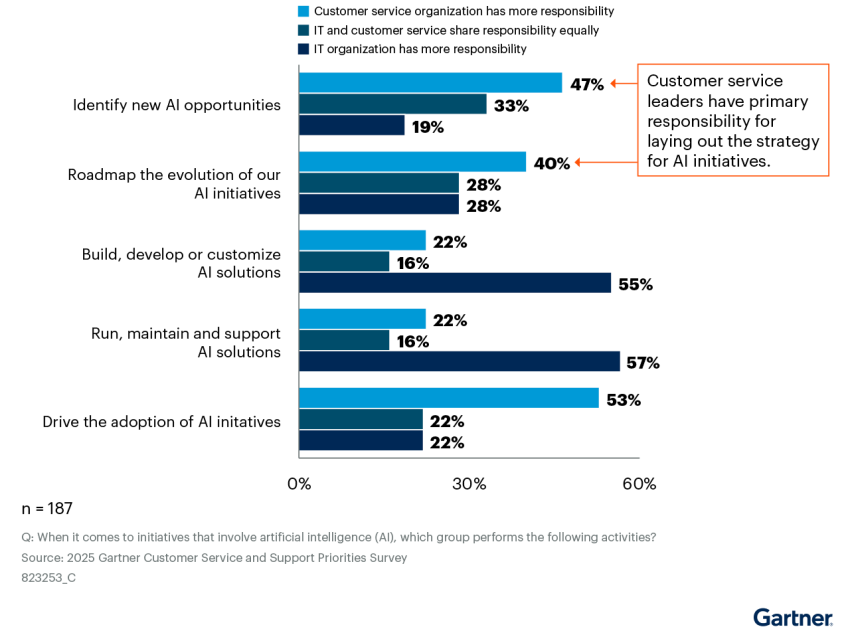
Agentic AI employees should be treated as digital workers with clear requirements, inputs, outputs, and an escalation path when things get messy. In this guide, you’ll learn what qualifies as an AI employee (and what doesn’t), how modern systems run behind the scenes, and where solutions like XBert AI Receptionist and Nextiva Contact Center fit when you want outcomes (like booking appointments, qualifying leads, and handling callers) without building a custom stack.
Try the best AI answering service free for 14 days
XBert AI answers questions and captures leads. Add your 24/7 answering service in minutes.
What Is an AI Employee?
An AI employee is a digital worker that completes an end-to-end task and leaves a record of it. Think of it as an automated employee you assign work to that’s able to deliver consistent task results according to the conditions you set. Companies use AI employees because they provide reliable execution and support for human teams.
There’s a simple way to distinguish the old world from the new one. A calculator returns an answer when you give it perfect inputs. A clerk can handle messy inputs. They can ask follow-up questions, use tools, and finish the job.
Traditional IF/THEN bots behave like calculators and can be more error-prone. They follow scripts, and they fail when the conversation takes a detour. They also often dump the problem on a human.
Agentic AI workers behave more like a clerk. They use machine learning and natural language processing to reason in context and can decide the next step based on the information they’re given. They can then move the workflow forward. Plus, they can ask clarifying questions when details are missing.
A digital worker has these traits:
- Memory: It can understand context across steps and channels and keep it in a knowledge base.
- Tools: It can take action within systems such as calendars, customer relationship management (CRM) software, and ticketing systems.
- Execution: It completes the task and logs the outcome for follow-up and audit.
- Boundaries: It knows when to stop, escalate, or verify.
- Observability: You can review what happened and improve it over time.
Buyers should ask two questions during evaluation. The first is “Can it complete the workflow without a human touching it?” You want booking, confirmation, data capture, and CRM updates. The second question is “What happens when it’s wrong?” The best systems fail gracefully by handing off with context, creating a ticket, and preserving the conversation history. Many businesses start with one AI employee before scaling further.
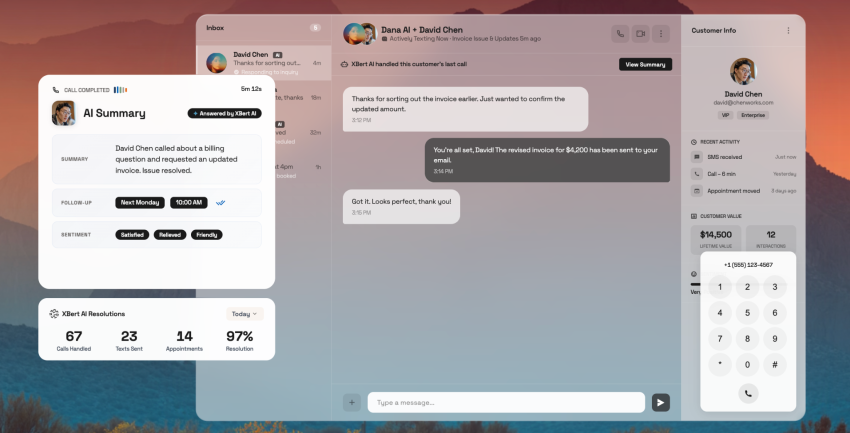
Nextiva XBert manages full workflows, not just conversations. It can schedule appointments, capture lead details, route calls, and update CRM records.

How AI Employees Work Behind the Scenes
An AI employee feels simple because the interface is simple. The workflow is quite straightforward: A caller asks, the system responds, and the task gets completed with fewer errors. Under the hood, you’re running a real-time chain of decisions and actions powered by large language models (LLMs), application programming interface (API) integrations, and workflow automation. The quality of that chain is what determines whether calls feel smooth or sound off to the recipient.
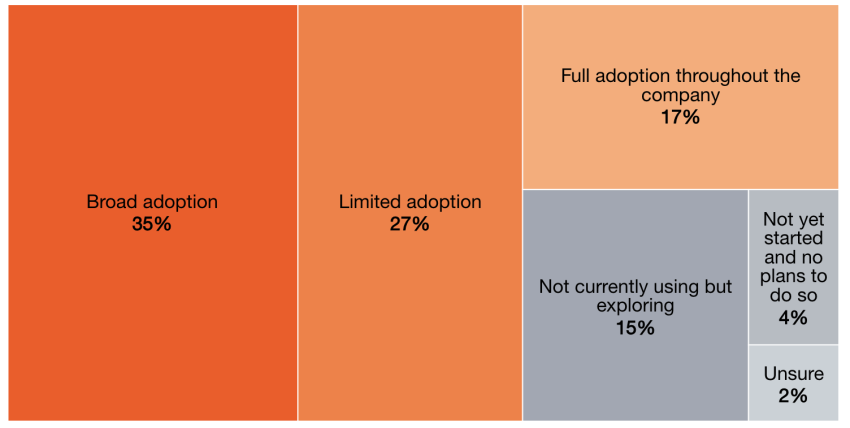
In PwC’s survey of senior executives, 79% said AI agents are already being adopted in their companies, whether that be in full, broad, or limited capacities. Nearly 90% also said they plan to increase AI-related budgets due to agentic AI. That’s a clear sign teams are moving beyond experiments.
When it comes to understanding intent, think of the LLM as your interpreter. It turns messy human language into a structured plan. That sounds abstract until you’re dealing with real callers who interrupt, change direction, and ask three questions at once.
In practice, the LLM should do four things well:
- Intent clarity: It identifies what the caller wants to create custom workflows according to the concern.
- Constraint gathering: It asks for the missing details that matter.
- Decision discipline: It knows when to verify vs. when to assume.
- Handoff awareness: It escalates issues before it frustrates customers.
The best systems keep the conversation moving while protecting accuracy and making sure that callers get the right responses to their queries or issues.
How digital workers use APIs to access business tools and CRMs
Your AI employee uses API integrations to take actions inside your systems. That includes your calendars, CRMs, ticketing, billing, knowledge repositories, and order status. After processing commands, APIs carry out the action inside each system. They can handle repetitive tasks that usually place cognitive load on human employees. A simple way to frame it is this: The LLM decides, while the APIs execute.
Common actions include:
- Creating or updating a lead record in your CRM
- Booking an appointment and sending confirmation
- Pulling the account context before routing the call
- Opening a ticket with the right category and priority
- Logging the transcript, summary, and outcome for follow-up
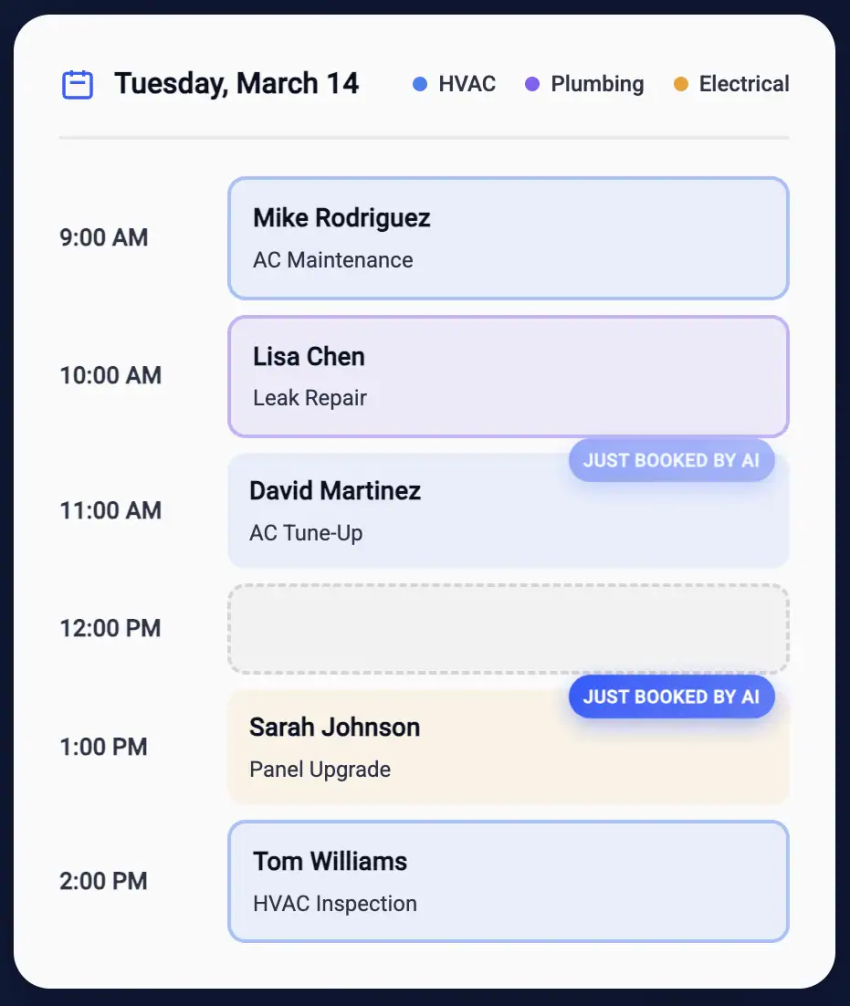
The strongest agents are the ones that reduce manual steps for your teams. If your AI assistants can’t write back to the CRM, you didn’t automate the workflow. It’s likely because you automated the conversation instead.
Reliability and compliance are essential
Once an AI employee is connected to real workflows, you need the same foundation you’d demand from any mission-critical system: consistent uptime, strong security controls, and operational transparency. That’s where infrastructure decisions start to matter. Nextiva, for example, strives for 99.999% uptime and has a network architecture with eight points of presence. Its network and data centers are also SOC 2 audited.
If you’re building on API-only tools, you can still attain enterprise readiness. You just have more vendors, data pathways, and controls to validate. That increases review time and raises the cost of change.
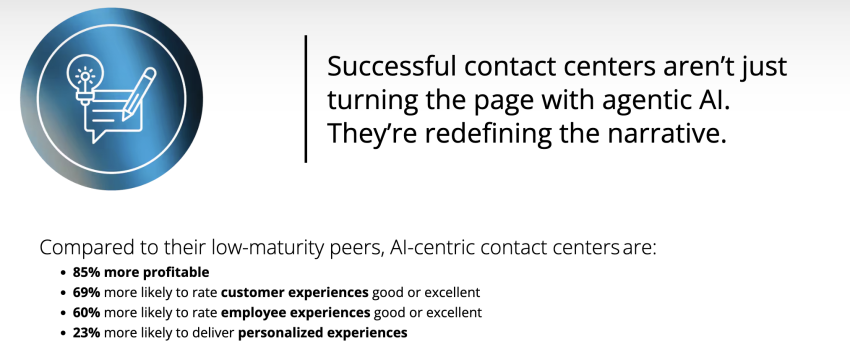
Deloitte Digital’s research highlights that AI-centric contact centers are 85% more profitable than low-maturity peers in their dataset. It signals where leadership teams are placing bets: AI is being tied to outcomes, not experiments.
The feedback loop: How AI employees learn from human corrections
AI employees improve when you treat corrections like operational data, not one-off exceptions. The best teams run a tight feedback loop, so the same problems show up less over time.
A clean loop looks like this:
- Capture the correction: What did the human employee change and why?
- Tag the failure mode: Was it wrong intent, missing info, tool failure, or policy conflict?
- Update the workflow: Adjust prompts, routing rules, tool calls, or guardrails.
- Measure recurrence: Did the same issue happen again this week?
If you can route edge cases to the right specialist, log the context, and fix the root cause, you get compounding gains. The results are fewer repeats, cleaner handoffs, and less manual cleanup needed from human workers.
Here’s a quick AI employee evaluation checklist:
- Latency: Test barge-in, noisy audio, peak load
- Execution: CRM write-back, meeting and event scheduling, ticket creation, confirmations
- Failure handling: Tool-call fails, wrong intent, human handoff with context
- Reliability: Uptime posture, redundancy, status visibility
- Compliance: SOC 2 scope, Health Insurance Portability and Accountability Act (HIPAA)/ Business Associate Agreement (BAA) path, retention, audit logs
- Learning loop: Correction capturing, failure mode tagging, weekly fix shipping
Why Your Business Needs Digital Workers Now
Customers don’t wait. Instead, they look for a solution that can address their issue as soon as possible. A CX Dive survey found that about 2 in 5 consumers expect a response within five minutes. That five-minute benchmark is the reason 24/7 support from contact center solutions has become table stakes, even for small teams.
Now, leaders are acting on these findings. Nextiva’s 2025 CX research found that 81% of respondents are increasing spending on AI capabilities to improve the customer experience. The shift is mainly about removing sterile work so human agents can divert their focus to tasks that require a more hands-on approach or human intervention.
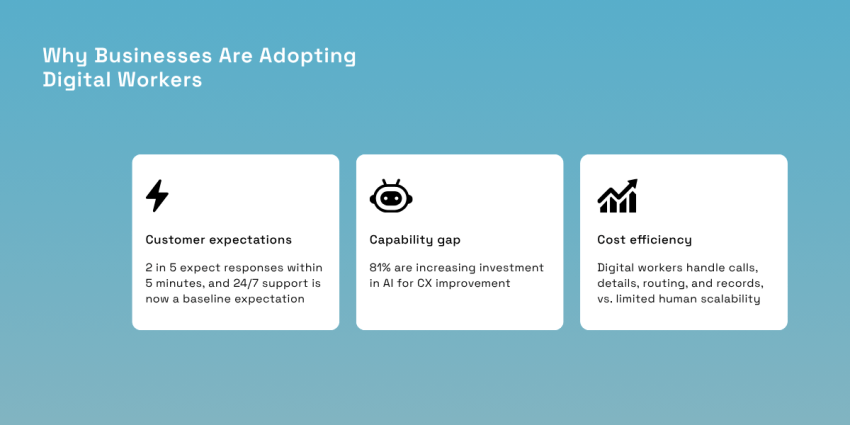
You can’t staff instant coverage on every channel, but digital workers can. They answer the call, capture details, route the request, and create the record within the five-minute window that customers expect. This system combats burnout because it offloads routine tasks, such as password resets, status checks, and data collection and entry.
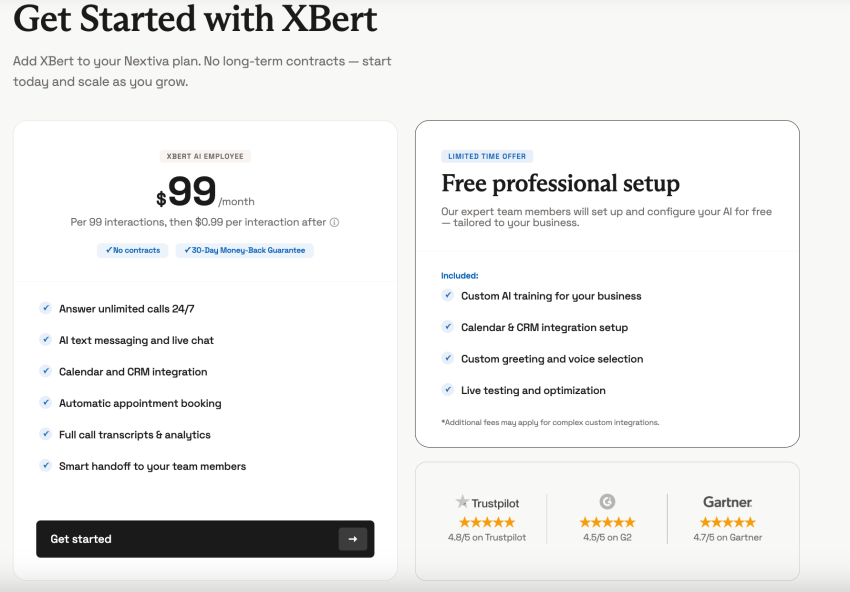
In terms of costs, Nextiva XBert costs $99 per month and is 10 to 20 times cheaper than hiring a human receptionist at $50K to $70K annually. You can fund those cost savings into higher-skill roles, better coverage, and better service. Digital workers buy you three things at once: coverage, consistency, and scalability.
Hear why XBert AI is the best AI receptionist
XBert AI receptionist handles customer questions, captures leads, and books appointments. Try it free for 14 days.
Top Use Cases for AI Employees in 2026
AI employees earn their keep when the work is repetitive, time-sensitive, and tied to revenue or retention. In 2026, the most practical deployments are digital workers that can handle real interactions end to end, pass clean context to humans, and keep your systems up to date without extra admin effort.
That’s why you’ll see two patterns emerge in the market: front-desk automation that keeps businesses responsive and contact center automation that reduces after-call drag across channels.
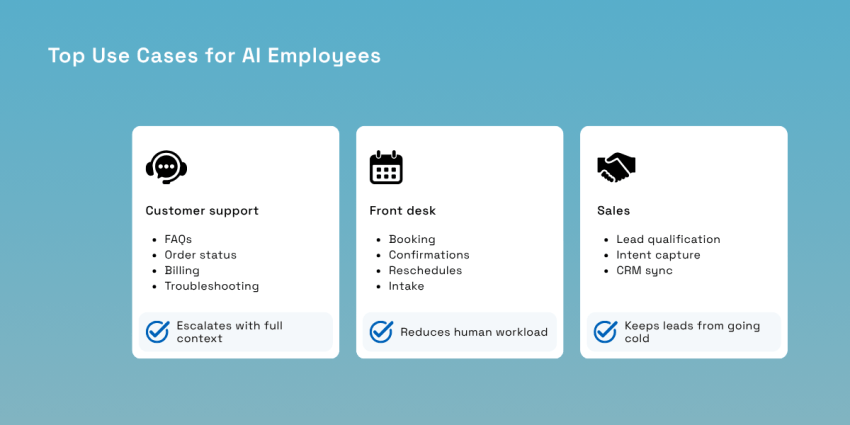
For customer support, the biggest win usually comes from shrinking the gap between what happened on the call and what gets recorded afterward. Wrap-up time is where costs hide, and it compounds quickly at volume.
Nextiva highlights up to a 50% reduction in agent wrap-up time when AI assists summarize conversations and streamlines post-call steps, which is exactly the kind of improvement that shows up in staffing models and queue performance.
Nextiva Contact Center is built for that omnichannel reality, where voice, chat, and messaging need consistent routing and measurable outcomes instead of scattered tooling in a digital workforce.
Use cases that consistently deliver value look like this:
- Customer support: Handle FAQs, order status, billing questions, and first-line troubleshooting around the clock, then escalate with full context when a case needs judgment.
- Front desk: Let an AI receptionist like Nextiva XBert manage appointment booking, confirmations, rescheduling, and basic intake without pulling a human away from service work.
- Sales: Run automated lead qualification on inbound calls, capturing urgency, intent, and key fields, then sync details with the CRM before the lead cools off.
Two businesses are successfully using AI employees in their daily operations and admin work, and they’re consistently working toward the next evolutions of their systems. The first is Klarna, with an AI agent that acts as a frontline support employee. In its first month, the system handled 2.3 million conversations and two-thirds of customer service chats, which Klarna framed as the equivalent of roughly 700 full-time agents.

The AI took on a large share of the repetitive support volume, while Klarna still had to balance quality and customer trust as complexity rose. A later industry update noted the AI handled two-thirds of inquiries, and Klarna reported faster response times and fewer repeat issues after launch.
Another business is Intuit. Intuit has been pushing beyond AI features into embedded AI agents that automate workflow steps across finance and customer experience tasks for SMB users. CMSWire describes Intuit introducing conversational AI agents to automate workflows and deliver real-time insights for QuickBooks users.
A deeper look from Tearsheet explains how Intuit’s internal agent architecture (GenOS) acts as the connective tissue between AI-powered agents and human experts, with safeguards and human oversight for high-risk decisions.
How to Hire Your First AI Employee
The fastest path to hiring your first AI employee is to give it ownership over a specific workflow, wire it into the existing tools you already rely on, and design the handoff so that humans only step in when the situation calls for nuance. When teams stumble, it’s usually because they tried to automate the messiest calls first or they treated the AI like a chatbot instead of a workflow owner.
Start with high-volume, low-complexity work, such as scheduling, basic intake, status checks, and common routing decisions. Those tasks are measurable and forgiving. They also create immediate relief for teams that are stretched thin. If you want a clean first digital hire, XBert is designed to behave like a front desk operator that never misses a call and doesn’t forget to log details.
A successful AI implementation strategy usually follows a straightforward sequence:
- Work selection: Choose one workflow that is repeated daily and has a clear outcome, such as booking, intake, or routing.
- Platform fit: When choosing an AI platform, prioritize API integrations that write back to your calendar and CRM so the AI’s work lands where your team works.
- Security gate: Confirm SOC 2 scope, retention rules, access controls, and whether HIPAA workflows require a BAA in your environment.
- Human-in-the-loop design: Escalations should include context and a summary.
Adoption will be successful when the AI removes time-consuming tasks and gives your people more time for service and judgment. Want to see what that high-value work looks like in practice? Start by watching Nextiva XBert in action, then map it to one workflow you can ship in weeks.
The employee that never clocks out.
XBert is your AI employee, trained on your business and working around the clock. It answers calls, handles chats, books appointments, resolves issues, and follows up so your team can focus on the work that matters.
FAQs
A chatbot mainly answers questions or routes requests. An AI employee is a digital worker that executes workflows end-to-end. Nextiva XBert, for example, can book appointments and qualify leads.
Specialized AI employees take repetitive work from your team so humans can focus on complex tasks and high-empathy conversations. Nextiva’s 2025 CX research found that 79% of leaders view customer experience as a revenue driver, not a cost center.
If you buy a managed option, Nextiva’s XBert costs $99 per month. An AI receptionist can be 10 to 20x cheaper than hiring a human receptionist (estimated at $50K to $70K annually), allowing teams to save money.
Digital workers give you 24/7 availability, instant response times, and the ability to handle multiple interactions at once. Nextiva reports that 76% of consumers expect a response within five minutes or less, so speed becomes a competitive advantage.
The best starting points are customer support triage, front-desk scheduling/intake, and lead qualification. Nextiva Contact Center uses AI to summarize interactions and guide agents when a conversation escalates.