Customer Experience
 Blog
 Business Communication
 Leadership
 Marketing & Sales
 Nextiva News
 Productivity
 VoIP

You can’t answer the phone when you’re on a ladder, with a patient, or closing up for the night. Your customers don’t know that, and most of them won’t wait for a callback.
Nextiva has helped more than 100,0000 small businesses answer the phone since 2008. Since then, we’ve seen one problem persist. A phone system can ring, route, and record, but it can’t pick up when everyone is busy, and most small businesses can’t staff the front desk every evening and weekend.
That’s why we built XBert.
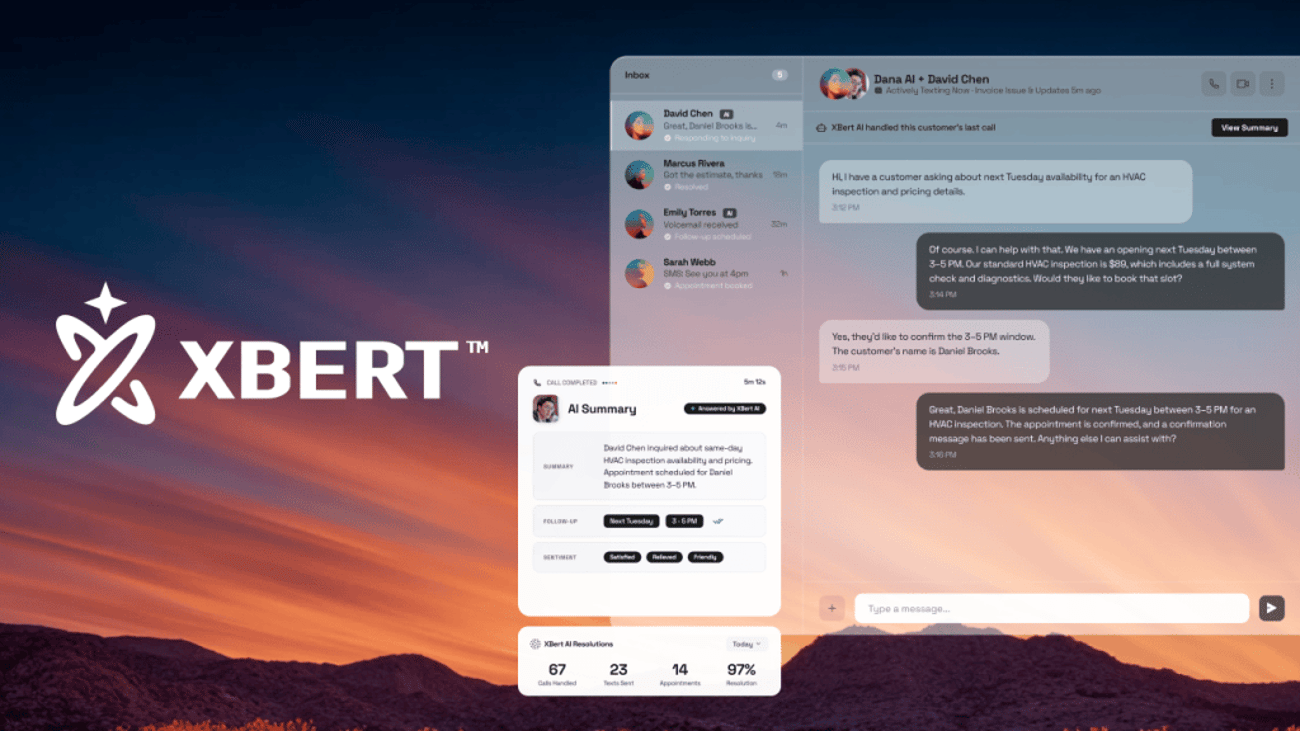
XBert is Nextiva’s AI receptionist and AI employee for small businesses. It provides 24/7 customer support across voice, text, and web chat; answers common questions; captures and qualifies leads; and adds appointments to your calendar. When a conversation needs a person, XBert hands it to the right team member with the full story attached. XBert costs $99 per month for 100 AI conversations, and you can start with a 14-day free trial.
This AI employee starts with your business, not a blank prompt. It works from your services, policies, calendar, and the history of your customer conversations, so its answers sound like they come from your own staff.
What Is XBert?
XBert is Nextiva’s AI employee that helps businesses handle customer conversations, book appointments, and automate routine tasks. With AI-generated conversation summaries, call recordings, and transcripts, your team can easily review and manage conversations, pick up where XBert left off, and keep things moving.
So how is XBert AI different from an ordinary AI tool? Most AI tools answer from general information. XBert gives personalized responses based on your business data: the services you offer, your prices, your availability, and what each customer has already told you. That’s the difference between an AI tool that sounds helpful and an AI employee that gets the job done.
XBert is part of the NEXT Platform, our customer conversation platform. Inside NEXT, XBert is the part that acts. It answers, books, and follows up, while NextIQ remembers each customer’s history and your people handle the conversations that need a human. Because everything runs on the same platform, nothing gets lost between the AI and your staff.
You can add XBert AI to any NEXT, Nextiva Contact Center, or NextivaONE plan, or use it as a standalone product.
What XBert means for your business
For business owners, XBert is coverage you couldn’t afford to staff. It answers the 7 p.m. call, the Saturday text, and the three phone conversations that arrive while your only receptionist is helping someone at the counter. Each one is a customer you keep, not one who moves on to the next company on their list.
XBert also adds capacity without adding payroll. Businesses using XBert AI can automate repetitive customer interactions, like the questions your staff answer 10 times a day, reschedules, and reminders. Your people spend less time on the phone and more time with the customers in front of them.
Who XBert is for
XBert is for businesses of all sizes looking to automate customer interactions, improve responsiveness, and scale without adding headcount.
It’s especially valuable for industries like home services, healthcare, legal services, real estate, salons, fitness, restaurants, and retail, where every customer interaction matters. Whether you’re managing a high volume of inquiries or need to stay available outside business hours, XBert helps ensure customers get the attention they need.
Why Answering the First Time Matters
The first call is often your only chance, because customers rarely wait for a callback.
One of our customers, Rafael Mesa, knows this firsthand. He runs Vero Property Inspections, a one-person business in Southeast Florida. Homeowners often get a list of three approved inspectors and phone down it until someone answers. “When you’re 20 feet up a ladder, you physically cannot grab your phone,” Rafael says. Every missed call was an inspection worth $250 or more walking straight to a competitor. XBert now answers for him in the four languages his clients speak.
Before XBert, Rafael tried hiring a part-time phone assistant, but rings still went unanswered, and follow-ups fell through the cracks. XBert took about a week to train on his business.
Today, it answers every caller, asks the questions Rafael would ask, and puts the inspection on his schedule. He estimates it saves 15 to 20 bookings a week, which adds up to more than a 1,000% return on a $99 monthly plan. “I bring in $1,000 to $1,500 a week at minimum,” Rafael says. “XBert costs me $99 to protect that revenue and capture another 15 to 20 jobs. It’s not even a decision; the math speaks for itself.”
XBert also filters leads before a person gets involved. For Rafael, that means screening out more than 300 spam calls weekly, so his phone only buzzes for real clients. His South Florida customers speak English, Spanish, Brazilian Portuguese, and Haitian Creole, and XBert detects the caller’s language and handles the booking in it.
For any owner, the lesson is about timing. Missed calls pile up at exactly the moment you’re doing the work that pays the bills, which is why trying harder rarely fixes them and round-the-clock coverage does. Don’t let your success keep you from growing further.
What Can XBert Do? Top Use Cases
XBert’s most common jobs are answering everyday questions, capturing leads, and booking appointments. Most businesses start with one of these and turn on the others once they see it working. Each one plays out a little differently.

Answer the FAQs your staff gets every day.
XBert answers common questions about your hours, services, pricing, and directions using your own knowledge base. A caller who asks “Are you open Saturday?” or “Do you take my insurance?” gets a real answer in seconds instead of a voicemail greeting.
Handle high-volume calls or demand.
It can manage several phone, text, and chat conversations at the same time, so a busy Monday morning doesn’t mean busy signals. When a question falls outside what you’ve approved, it routes the conversation to the right team member instead of guessing. You stay in control of what it says, because you set the guardrails and every conversation is recorded and transcribed.
Capture and qualify leads.
XBert collects a new customer’s contact details, creates a lead record, asks the qualifying questions you choose, and logs the lead so nothing goes cold. It can text a booking link and trigger follow-up workflows in your CRM.
Book and reschedule appointments.
XBert books appointments directly on your live calendar, sends a confirmation text, and handles reschedule requests without anyone on your staff needing to touch the phone. When you connect XBert to calendars like Google Calendar, Calendly, and Cal.com, it checks real-time availability and sends automatic reminders to cut no-shows.
Want to see how Nextiva works with the tools you already use? Explore the integrations supported across all of our products.
Cover evenings, weekends, and busy times.
These three jobs matter most when nobody can answer, which is why so many customers start XBert on after-hours calls and overflow. Meucci Cues, a custom pool cue company that gets about 50 inbound phone conversations a day, routes evening and overflow traffic to XBert. It answers, asks why the customer is reaching out, and passes that context along.
Many of those conversations are repair requests or updates on made-to-order cues worth at least $400 to $500, so a dropped one means a customer left wondering about a product they’re already waiting for. Meucci now runs with a dedicated customer service rep, a second rep for busy stretches, and XBert behind them, so a busy team member never means a silent phone.
Co-owner Jeremy Banner spent years in management consulting before buying the company, and he sees XBert as part of running a real system instead of depending on whoever happens to be free: “Your goal is to work yourself out of the business… not depend on it.”
How XBert Uses Your (Real) Business Data
An AI employee is only as useful as what it knows about your business. It works from the information you give it and the conversations it handles, so its answers fit your company instead of sounding generic.
Personalized answers from your knowledge base
When you connect XBert to your website, your FAQs, and your Google Business Profile, it learns your services, prices, policies, and hours. During setup, you can also upload a file such as a pricing sheet, menu, or service catalog using a CSV template. Our Knowledge Base Sync keeps those answers current as your business changes.
AI data quality matters here. If a price changes or a new service launches, update the file or the knowledge base, and its answers change with it. Keeping that information current reduces errors and ensures every caller hears the same accurate answers.
Context from every customer conversation
Like other AI employees, XBert uses machine learning and natural language processing to understand what a customer needs and decide the next step. Because it runs inside NEXT, the AI can also draw on each conversation’s history. Returning clients don’t start from scratch, and your staff’s needed context stays in one place. Access to that client data follows your account permissions.
How XBert Fits Your Workflow
An AI employee should do more than answer and hang up. XBert handles tasks from start to finish, helps you manage follow-up tasks, and hands the results to the tools your company already uses, which is where most of the time savings come from.
Workflow automation and task management
It logs the transcript, summary, and outcome of each conversation, sends text summaries so you can check what happened at a glance, and can trigger follow-up workflows in your CRM. That takes routine task management off your desk: the callback reminder, the lead entry, and the appointment note are already done. If you also connect XBert to a field service or workflow system like ServiceTitan, new jobs land where your crew already works.
You can update routing rules and workflow settings anytime from your dashboard at no extra cost. Many owners start simple, then create new routing rules and response tools as they learn which questions come up most.
Business insights from your dashboard
Every conversation adds to a real-time view of your customer demand. You can access transcripts, summaries, and performance reports, and see which requests come in most often, when they arrive, and how many turn into bookings. Those business insights help you create a staffing plan, choose which services to promote, and decide which answers to improve.
AI-to-human handoffs and escalations
XBert transfers complex or sensitive requests to the right team member with the full conversation attached, so customers never have to repeat themselves.
You decide which topics always go to a person, like billing disputes, urgent repairs, or anything medical. Intent-based routing sends billing questions, new inquiries, and emergencies to different people based on what the caller needs.
Handoffs are where AI often falls short. In our customer experience research study, we surveyed over 1,000 customer experience decision-makers at companies. Almost all of them, 98%, said effortless AI-to-human handoffs are needed, but only 10% had made those handoffs work without a struggle.
XBert AI closes that gap because it runs on NEXT, where NextIQ keeps the conversation history in one record. The person who picks up sees what the customer asked, what the AI already did, and what’s still open. Read more about designing a smooth AI receptionist handoff.
How to Set Up XBert in 3 Steps
XBert is designed to go live in minutes, with no coding and no lengthy implementation. The onboarding wizard walks you through each step, and our support staff also offers assisted setup at no additional fee.
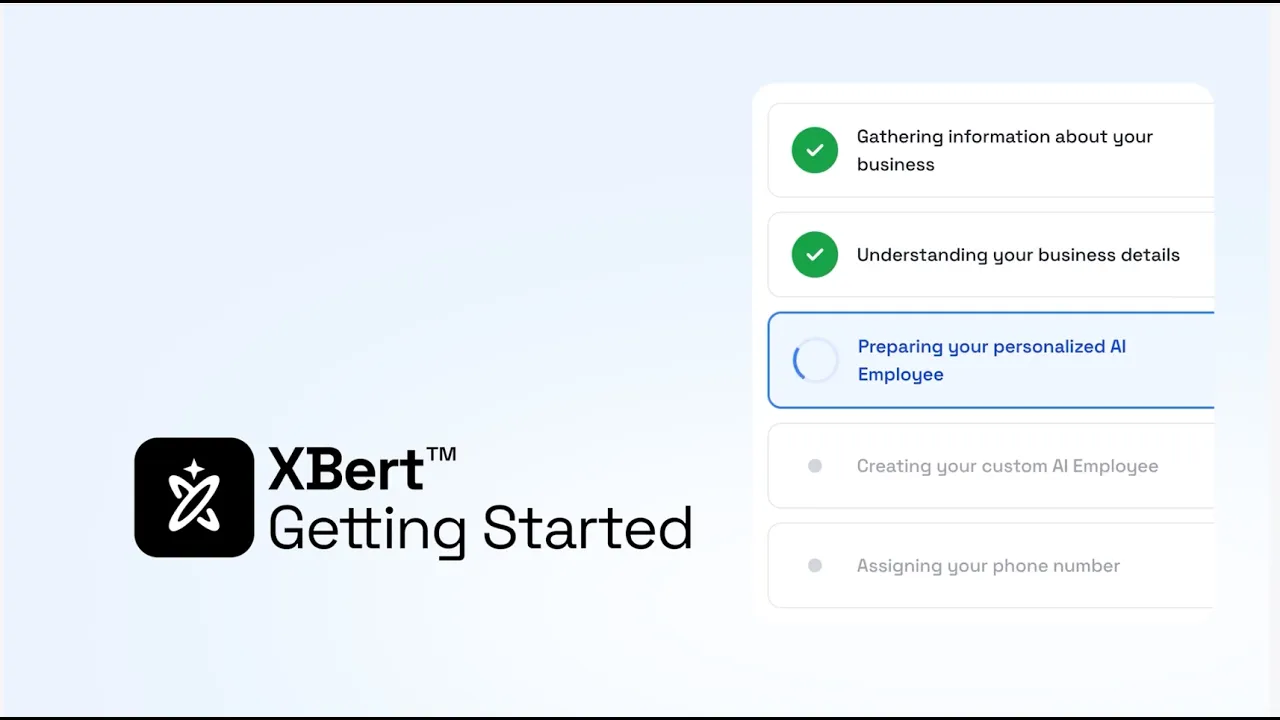
- Set it up. The AI learns your services, policies, hours, and FAQs from your website, your business details, or your Google Business Profile. You can start from pre-built role templates for a Receptionist, Sales, or Support AI employee.
- Personalize it. In the onboarding wizard, pick a voice, set your schedule, and define routing rules. Choose a voice that fits your callers: a calm voice works well for an emergency plumber’s stressed customers. You can update its answers anytime at no extra cost.
- Go live and track results. Your AI employee starts handling phone, text, and chat conversations right away, and you can review transcripts, summaries, and performance reports from your dashboard.
Running more than one location? You can create location-specific greetings and routing rules, so each caller reaches the right team member. For a deeper walkthrough, see how to set up an AI receptionist.
How Much Does XBert Cost?
Nextiva is known for simple and transparent pricing. XBert AI costs $99 per month for 100 AI conversations, with a 14-day free trial, no contract, and a 30-day money-back guarantee included. More than 100 conversations? Purchase additional conversations in bulk for just $0.99 per conversation, or pay $1.50 per conversation as you go.
Because short calls and one-message chats don’t count, you pay for real conversations instead of hang-ups and wrong numbers. Since XBert is charged per conversation (a voice call over 30 seconds or a chat/text exchange with three interactions), not per minute, it offers better value than other AI voice agents that charge by the minute.
You can use XBert AI on its own or add it to a NEXT plan. If you also want calling, texting, and shared inboxes in one place, NEXT plans start at $15/month.
Getting started with XBert
The fastest way to see what XBert can do for your business is to start a free trial with one job. Most of our customers begin with evenings and weekends, because that’s where missed customers pile up and where XBert pays off first.
Once XBert is answering after hours, add booking, then lead capture during the day. Each step builds on the one before, and you stay in control of what XBert AI handles the whole way. See how the AI answering service works or contact our team about your specific needs.
Let XBert Take the Next Call
Every missed call is a customer deciding whether to wait for you or try someone else. XBert AI answers that call, text, or chat right away, handles the question, books the appointment, and hands your staff the rest with context.
For your business, that means more booked jobs, fewer lost leads, and a front desk that isn’t tied to the phone. Start with the job that costs you the most customers today.
Try XBert free or request a personalized demo and walkthrough with pricing options tailored to you.
Frequently Asked Questions About XBert
XBert uses a natural, conversational voice, and many callers don’t notice they’re speaking with an AI voice agent. You can set it to introduce itself as your virtual assistant if you prefer to tell callers up front. Either way, you can route anyone who asks for a person to your staff.
It runs on Nextiva’s platform, which is SOC 2 Type II audited, ISO 27001 certified, and PCI DSS compliant. It’s HIPAA-eligible once the required Business Associate Agreement is signed. Healthcare and financial businesses should confirm the configuration and contract requirements for their specific use case with us.
You can connect XBert to calendars like Google Calendar, Calendly, and Cal.com at no cost, and to CRMs like Salesforce, HubSpot, Pipedrive, and GoHighLevel on request. You can also connect XBert with field service tools like ServiceTitan. Contact us about any tool that isn’t listed.
Both. XBert AI works as an AI receptionist when it greets callers, answers questions, and schedules visits. It works as an AI voice agent when it qualifies leads and handles routine requests by phone. It also handles SMS and web chat, so one AI employee covers every channel your customers use.
This AI employee takes the repetitive conversations off your staff’s plate, like hours questions, bookings, and reminders, so that they can focus on the customers in front of them. It hands anything that needs judgment or a personal touch to a person, with the full conversation attached. Think of it as an AI employee that helps your people save time and manage more customers, not one that replaces them.