Customer Experience
  Blog
Blog  Business Communication
  Leadership
  Marketing & Sales
  Nextiva News
  Productivity
  VoIP
VoIP 

If you run an appointment-based business, you already know how difficult it is to answer every call (or even most routine calls). Your team is with clients when the phone rings, and nobody can pick it up, leaving you with frustrated customers who may look elsewhere.
Invoca’s call data shows home services companies miss 27% of inbound calls, and healthcare organizations miss nearly 29%. Unfortunately, even the most promising leads won’t leave a message.
Even those who are willing to leave messages have limited patience. Nextiva’s Customer Patience Benchmark found that when consumers don’t get a phone or text response within five minutes, 56% will try another channel and 28% will walk away from the business entirely.
If you’re tired of losing revenue because your team is busy and can’t answer the phone, an AI answering service can help by booking appointments in real time.
In this post, we’ll cover which AI phone answering services actually book appointments (instead of focusing on message taking), what features to confirm before you buy, and how to calculate whether the investment pays for itself.
What an AI Answering Service Does for Appointment-Based Businesses
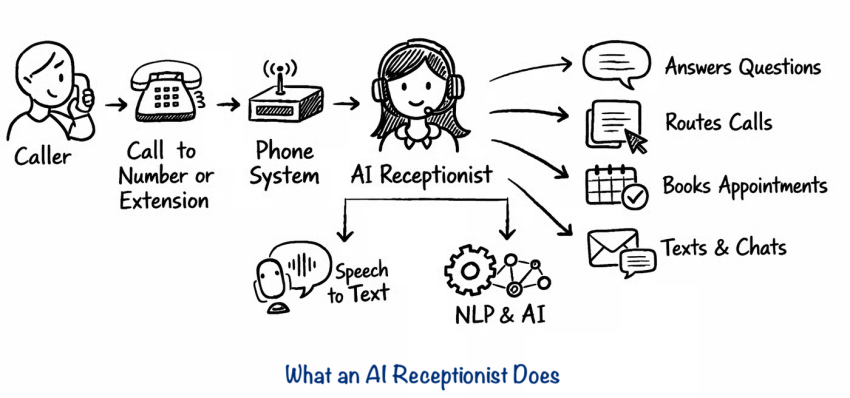
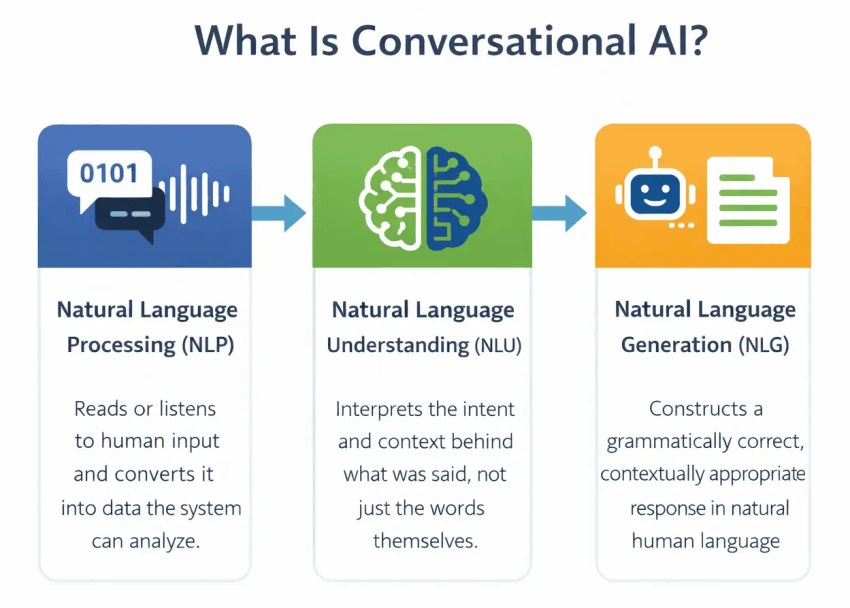
AI answering services use advanced technology to answer calls, understand customer intent, and book appointments in real time, just like a receptionist. If a customer calls a salon and says they need a highlights appointment with a specific stylist, the AI can book a two-hour slot with the correct team member.
And unlike your human team members, your AI answering service is never too busy to answer the phone. It helps customers around the clock, ensuring you don’t miss booked appointments just because your team couldn’t grab the phone.
Let’s look at how AI answering services work in depth.
How an AI answering service differs from a message-taker
A traditional answering service can answer a call, take a message, and write down the caller’s information. This means someone on your team will call back later.
Then came the auto attendants. Advanced interactive voice response can guide callers through numbered menus until they either reach your voicemail or (with less-than-ideal systems) give up entirely.
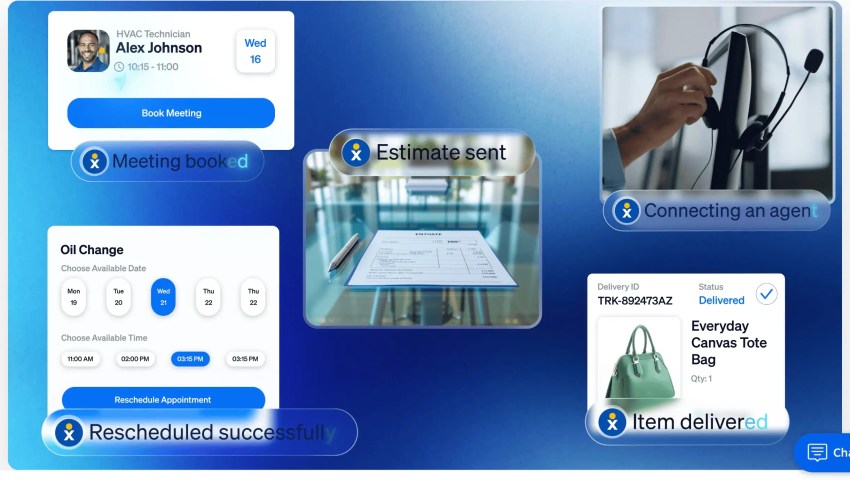
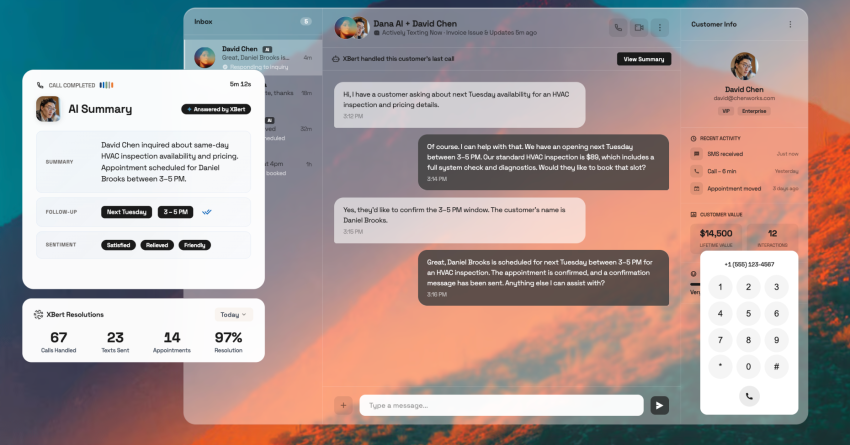
An AI answering service works completely differently. It can answer the call, understand what the caller needs, check your live calendar, and book the appointment. The caller hangs up with a confirmed slot and can even get an appointment confirmation text sent to their phone immediately after. It can fully automate service appointment booking.
Unsurprisingly, Gartner found that 85% of customer service leaders planned to explore or pilot customer-facing conversational AI in 2025. This can be especially valuable in appointment-based businesses, where every missed call can directly translate into lost revenue.
How a booking call works end to end with an AI answering service
Here’s what happens when a caller reaches an AI answering service instead of voicemail:
- The caller says what they need: “I need to schedule a cleaning” or “I want a quote for a roof inspection.”
- The AI identifies whether they’re a new or returning customer.
- It checks your live calendar for open slots.
- It offers a couple of options: “I have Thursday at 10 a.m. or Friday at 2 p.m.”
- The caller picks one or changes their mind (“Actually, Thursday works better”). The AI adjusts without starting over.
- It can confirm appointment details, book the slot, and send an SMS confirmation.
The call takes about the same time as it would with a human receptionist, but the AI receptionist also works at midnight, during a rush, and on weekends without overtime pay.
Key Features to Look for When Choosing an AI Answering Service
AI answering technology is evolving fast. Choose one that has the features you need to deliver an exceptional customer experience while reducing strain on your staff. Here’s what to look for:
| Feature | What to confirm before you buy |
|---|---|
| Two-way calendar sync | Reads live availability and writes bookings back so it never offers a slot that’s already taken |
| Booking rules | Supports appointment lengths, buffers between jobs, travel time, and staff-specific scheduling |
| Qualification and intake | Asks custom screening questions (service area, insurance, project scope) before booking |
| SMS confirmation | Sends an instant text with appointment details and a link to reschedule |
| Rescheduling and cancellations | Finds an existing booking, moves the appointment, and frees up the original slot |
| Transfer with context | Routes urgent or complex calls to a person with the caller’s details attached |
| Pricing model | Charges a flat monthly fee, per minute, or per interaction; clarify how billing works in a busy month |
All of these features are critical, but a few are worth understanding in detail.
Two-way calendar sync is a key feature that many people undervalue. With one-way sync, the AI reads your calendar but doesn’t write back to it. Two callers can grab the same slot seconds apart because the second call doesn’t know about the first. Two-way sync writes the booking back immediately, locking the slot.
For mobile businesses, it also accounts for buffers and travel time, so an inspector who finishes a job at 2 p.m. 30 minutes away doesn’t get booked at 2:15. Look for integrations with Google Calendar, Calendly, Cal.com, Zoho, and field service platforms like Housecall Pro.
Qualification and intake protect your calendar from bookings you can’t serve. A home services company doesn’t want appointments outside its service area. A dental office needs insurance details before the visit. The AI should ask your custom screening questions before it touches the calendar and route calls to the right person if urgent or complex.
Urgent call routing matters just as much. A burst pipe or a dental emergency needs a person to chat and confirm the issue can be dealt with now. The AI should let you define what triggers an immediate transfer (keywords, caller history, time of day) and where those calls go after hours.
Comparing Your Options: In-House, Human Service, or AI
Wondering if AI is actually the right fit? Depending on your call volume, budget, and hours of operation, an in-house receptionist or a human answering service might be a better fit.
An in-house receptionist handles the most complex conversations and knows your regulars by name. But with benefits, you could easily be closer to $50,000 a year for business hours only.
A human answering service picks up 24/7, but many focus on message-taking, especially when working with lead-qualifying processes used by law firms, for example. Some can book into your calendar, but it depends on the operator knowing your booking rules and having access. Answering service costs scale with volume, which gets expensive during busy seasons.
An AI receptionist handles calls, texts, and chat around the clock at a flat cost per interaction. It books directly into your calendar using your rules. It can’t handle nuanced conversations the way a person can, which is why escalation rules matter. However, the latest tech can sound human, with exceptional voice quality, and can answer questions in a conversational way.
Don’t forget that all of these models need to account for platform costs, too. A standalone AI booking bot still needs a phone system, texting, and CRM connections. A platform that runs the phone system and the AI answering service together means one bill and no gaps between tools.
Here’s a quick overview of how your different options compare:
| Option | Typical cost | Coverage | Books into your calendar? |
|---|---|---|---|
| In-house receptionist | $38,010 median annual wage, before benefits | Business hours | Yes, manually |
| Human answering service | Roughly $135 to $2,945+ a month, typically charged by minutes or calls | Can often be available 24/7 | Sometimes yes; some can only take messages |
| XBert, Nextiva’s AI receptionist | $99/month for 100 interactions, then $1.50 each | 24/7 ability to handle calls, texts, and chat | Yes, in real time |
AI Appointment Booking Services Use Cases by Industry
Every industry books appointments differently, and you need an AI receptionist that can adapt accordingly. Here’s how AI agents can handle each one.
Healthcare and dental practices
Patient booking is the most common call reason and is fortunately also the easiest to automate:
- Check the provider’s schedule.
- Match the service type.
- Offer available slots to the caller.
- Confirm appointments as they’re booked.
Patients no longer need to wait on hold to book an appointment, but you can still have the receptionist route requests for urgent visits through to your care staff for manual review if needed.
You can also use your AI receptionist for cancellation fills; it’s a great way to keep appointments booked. When a patient cancels, the AI can text the waitlist and potentially rebook the slot before the provider even knows it opened.
Keep in mind that any vendor that touches patient data needs to sign a Business Associate Agreement before information flows through the system. You also need to ask about HIPAA compliance.
Home services and inspections
For businesses always on the go, you know the phone seems to ring most when nobody can answer it. An AI receptionist can help with:
- After-hours calls: The AI answers and schedules the next available slot while your team is unavailable.
- Emergency triage versus scheduled quotes: The AI asks the right questions to determine what needs to be escalated, transferring emergency calls immediately and booking estimate appointments or non-emergency calls.
- Booking straight into field service software: The AI books directly into tools like Housecall Pro or ServiceTitan so there’s no manual entry the next morning.
These three use cases can have a major impact on small businesses.
Vero Property Inspections is a prime example. Each missed call was costing the business about $250 in lost inspection revenue. XBert now answers every call 24/7 and handles 15 to 20 extra bookings per week. At $250 per inspection, that’s $3,750 to $5,000 in potential weekly revenue, for a service costing $99 a month.
Salons, spas, and wellness
Salons, spas, and wellness businesses typically have high call volumes, short appointments, and staff that truly can’t step away from clients mid-appointment. And while the front desk is likely staffed, they’re probably busy checking someone in, answering a question, or processing a payment, so these companies can benefit immensely from answering services.
The challenge for salons is calendar complexity. Each stylist, therapist, or technician can have their own schedule, service list, and appointment lengths. The AI needs to know that a color appointment takes two hours, while a trim takes 30 minutes.
Legal and professional services
Law firms need a lead qualification process for new callers, which means law firm answering services need to handle intake before booking. The AI needs to be able to:
- Make it clear that it can’t give legal advice in the greeting
- Gather matter details from the potential customer, including what happened, when, and who’s involved
- Check basic fit against the practice area and jurisdiction
- Prompt for conflict checks so the attorney is up to date before the first conversation
- Book a consultation or route the call to an attorney based on the answers and situation’s urgency
This intake process saves 10 to 15 minutes of billable time on every call.
How to Set Up an AI Answering Service
Some AI answering services like Nextiva’s can be set up in a day. Here’s how to set up an AI receptionist:
- Set up call forwarding: Use conditional call forwarding to send calls to the AI line when your team is busy, doesn’t answer, or is off the clock. Your customers keep calling the same number.
- Connect your calendar and set booking rules: Link your scheduling tool (Google Calendar, Calendly, Housecall Pro, etc.) and configure service types, durations, buffers between appointments, and staff assignments.
- Write your greeting and intake questions: Customize the script to match your business. Add screening questions that filter out appointments you can’t serve, such as wrong service area, missing insurance information, or out-of-scope work.
- Set up urgent call routing: Define which keywords, caller types, and times of day trigger a live transfer versus an after-hours escalation text.
- Test before going live: Run at least five scenarios: a new customer booking, an existing client rescheduling, someone outside your service area, an urgent request, and a caller who changes their mind mid-call.
Nextiva provides assisted setup at no additional fee.
Calculating the ROI of an AI Answering Service
Appointment-based businesses can calculate the ROI of an AI answering service with one simple formula:
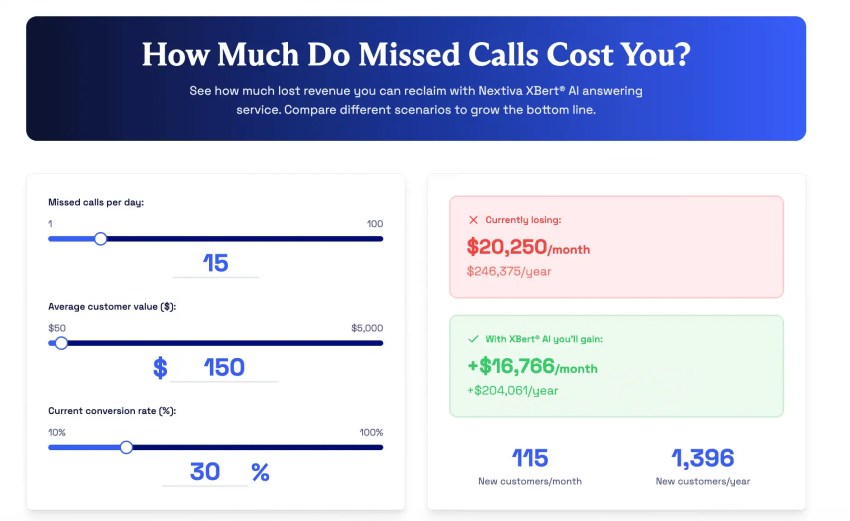
Recovered revenue = missed calls per month x booking rate x average appointment value
Say you have a private medical practice and miss 30 calls a month, which is realistic for a solo practice or a two-person team. The AI books 40% of those callers. Your average appointment is worth $150, which is consistent with real businesses in the healthcare industry, according to our cost of missed calls data.
That means:
30 x 0.40 x $150 = 12 extra appointments and $1,800 in monthly revenue
Against the $99 monthly cost of Nextiva’s XBert, that’s roughly 18x your investment.
And that doesn’t even count the second source of recovered revenue, which is fewer no-shows from SMS reminders, or the fact that your team gets automated call summaries instead of spending time on manual data entry.
Keep in mind that if digital appointment reminders cut missed appointments by even half the 25% that the BMJ Open research found, that’s another one or two recovered appointments per week for most practices.
Want to get a good estimate for your business? Nextiva’s Missed Call Calculator can run these numbers with your own call volume, booking rate, and appointment value.
Book Every Caller With Nextiva’s XBert
Every call that rings out during a busy hour is a booking that could go to your competition, and even loyal customers can jump ship if they aren’t getting prompt responses. That’s why AI answering services are such valuable, targeted solutions for the 36.2 million small businesses in the United States right now, especially those that rely on appointments to drive revenue.
XBert is ready to start answering customer questions through calls, text, and chat 24/7. It can collect customer details; navigate inquiries; book appointments in Google Calendar, Calendly, Cal.com, Zoho, and Housecall Pro; and send SMS confirmations. If needed, it can also transfer complex requests to human agents with full context through instant call summaries. It starts at $99 a month for 100 interactions, with assisted setup at no additional fee.
XBert runs alongside Nextiva’s business phone system (from $15 per user per month on an annual plan), so calls, texts, and bookings are on one platform. Nextiva strives for 99.999% uptime and supports SOC 2, HIPAA with a signed BAA, and PCI DSS compliance.
Is your team missing calls while they’re with clients? See how Nextiva’s AI receptionist books every caller, 24/7.
Never miss another call, text, or chat with XBert AI Receptionist.
XBert AI handles real customer conversations. It greets customers, books appointments, and captures leads automatically, turning missed connections into new opportunities.