Customer Experience
 Blog
 Business Communication
 Leadership
 Marketing & Sales
 Nextiva News
 Productivity
 VoIP



Customer service tech stacks are becoming increasingly complex, and while that sounds like an advantage, it can create its own set of logistical headaches. Our research shows that most support teams use between six and seven tools just for customer interactions. Unsurprisingly, 86% of companies with multiple CX tools also report siloed data.
When data is siloed, the customer notices. They’ll call to follow up about an issue they first reached out about via email yesterday. Your agent doesn’t see the past conversation, and the already-frustrated customer has to start over. And since 75% of customers only make two or three support attempts before giving up, you can’t afford any extra friction that can cause issues to stay unresolved.
Fortunately, modern customer communication platforms are a clear solution for preventing unnecessarily bloated tech stacks and disconnected data. In this post, we’ll break down what a customer communication platform is, compare four types of platforms on the market, and walk through the total cost of ownership.
What Is a Customer Communication Platform?
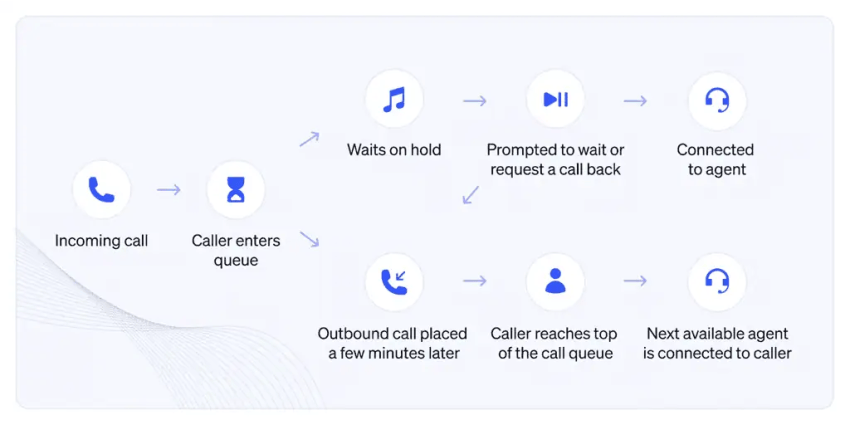
A customer communication platform brings voice, SMS, web chat, email, and social messaging into a single workspace. Your agents get a shared and comprehensive customer history, clear routing rules, and AI assistance on every conversation. This can help your human agents pick up any conversation with full context, regardless of which channel it started on and how far into the conversation the customer is.
Customer communication platform vs. customer communications management (CCM)
The names “customer communication platform” and “customer communications management” sound like two sides of the same coin. However, they are very, very different.
CCM software composes and delivers outbound documents at scale, including billing statements, insurance policies, regulatory notices, and compliance letters. It’s a sizable industry, with Mordor Intelligence sizing the CCM market at $1.96 billion in 2025, projected to reach $3.33 billion by 2030.
A customer communication platform, meanwhile, handles two-way, real-time conversations. The goal is to help your team have seamless conversations across multiple channels that actually resolve customer issues. If that’s what you’re looking for, read on.
How a customer communication platform differs from a CRM and a help desk
Buyers often assume that having a CRM or help desk means that they won’t need a dedicated customer communication platform. However, that’s not the case.
A help desk works as a ticket queue. Customers send an email or a web chat, and a ticket pops up that an agent can address asynchronously.
Your CRM is your system of record. It gives you a customer’s conversation history, but it doesn’t facilitate the conversations.
A communication platform, meanwhile, is the live conversation layer that connects to both. It’s what allows your team to effectively manage ongoing conversations and deliver that top-tier customer experience you’re striving for.
Here’s a quick breakdown of how it’s all different:
| Tool | What it does well | Where it falls short on its own |
|---|---|---|
| CRM | Stores customer records, deals, and account history | Does not handle live calls, chats, or routing |
| Help desk | Tracks issues as tickets with SLAs | Voice is often bolted on; conversations split into separate tickets |
| Communication platform | Runs live conversations across channels with routing and AI | Needs CRM and help desk sync to keep one source of truth |
Shared inboxes to agentic AI: How AI is changing communication platforms
We know you’ve likely heard it across every other industry, but AI is changing how communication platforms work and what’s possible for businesses of all sizes.
In recent history, there have essentially been three generations of communications software. They started as shared email inboxes with manual task assignments. Then, omnichannel solutions with ticket routing became the preferred choice. And now we’ve got agentic AI.
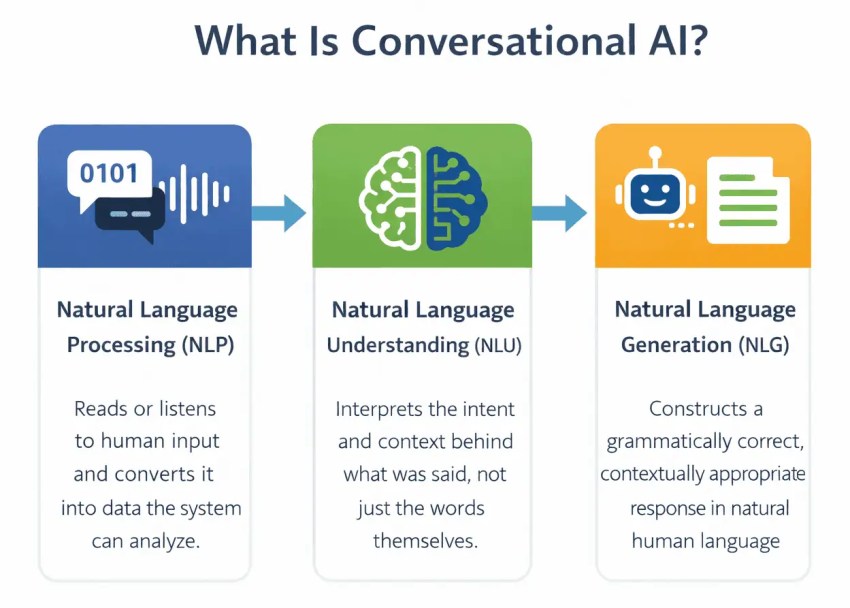
Today’s leading platforms leverage AI agents for customer service that can resolve routine requests, understand caller intent and an advanced level of nuance, and hand off the call to humans if needed (with the full conversation context attached).
And for those who are waiting on a bubble, this technology is here to stay. Gartner’s December 2024 survey found that 85% of customer service leaders would explore or pilot customer-facing conversational GenAI in 2025. More than 75% of leaders in the same survey said they feel executive pressure to implement generative AI as brands discover the most valuable ways to use this new tool. The technology is moving fast, and platforms that handle it well are pulling ahead of those that bolt it on.
Core Features of a Modern Customer Communication Platform
Platforms are moving fast and have mile-long feature lists that can make it difficult to determine what you actually need. When choosing a platform, know that features matter most when they protect response time and response quality, because that’s what customers actually notice.
Nextiva’s Customer Patience Study found that customers expect phone, SMS, and ticket responses within five minutes and chat replies within one minute. When that window is missed, 56% of customers immediately switch to another channel, and 28% abandon the product or service entirely.
It’s also critical to account for channel switches as more customers begin to expect omnichannel customer service. A customer who moves from chat to phone should never end up with an agent who hasn’t already seen the chat.
Let’s look at the features that help you create that seamless, quick response customers expect.
Unified inbox and customer timeline
A unified inbox is a single interface that collates voice, SMS, chat, email, and social messages into one view. Every customer interaction shows in chronological order, so the agent sees the chat from Monday, the text from Tuesday, and the call from Wednesday as one continuous conversation.
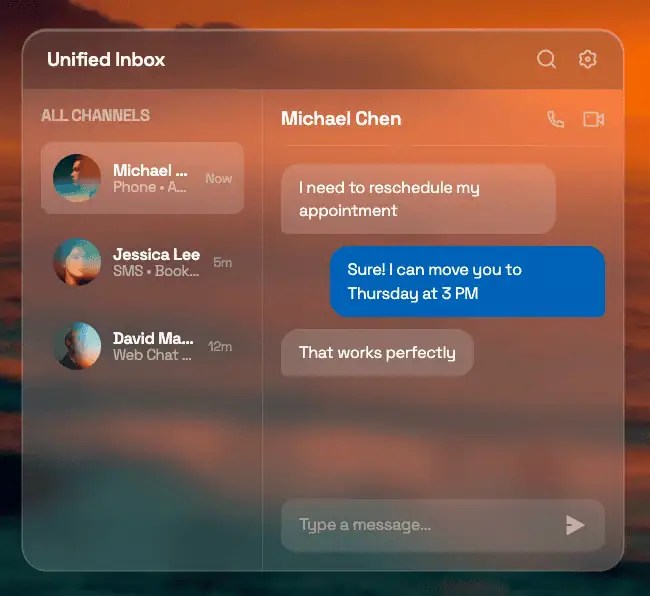
Some tools put every channel in the same interface but don’t connect the history. A true unified inbox links them. Don’t underestimate this, because it’s the difference between an agent who greets the customer by name and picks up where the last conversation left off and one who needs to ask the customer to start over.
Omnichannel routing and IVR
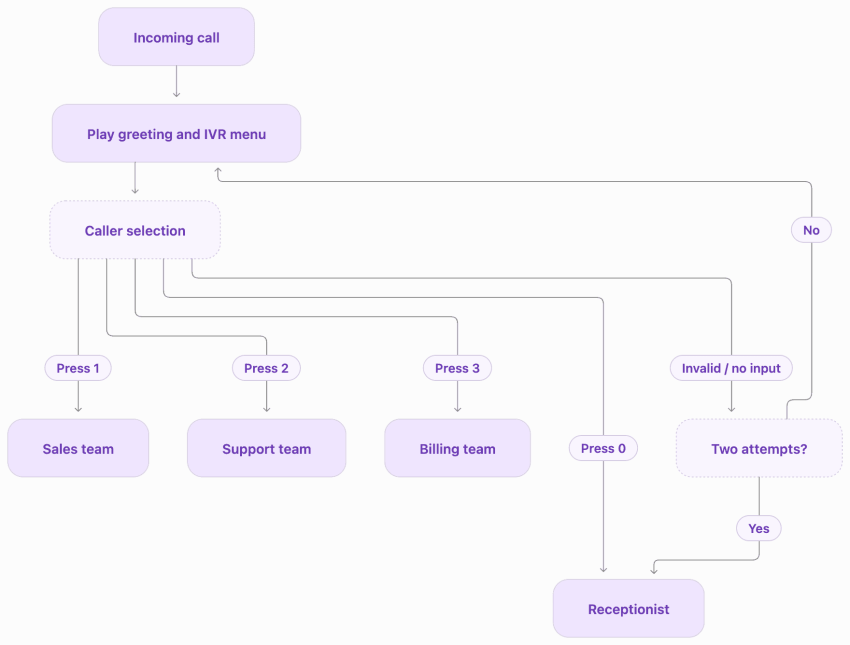
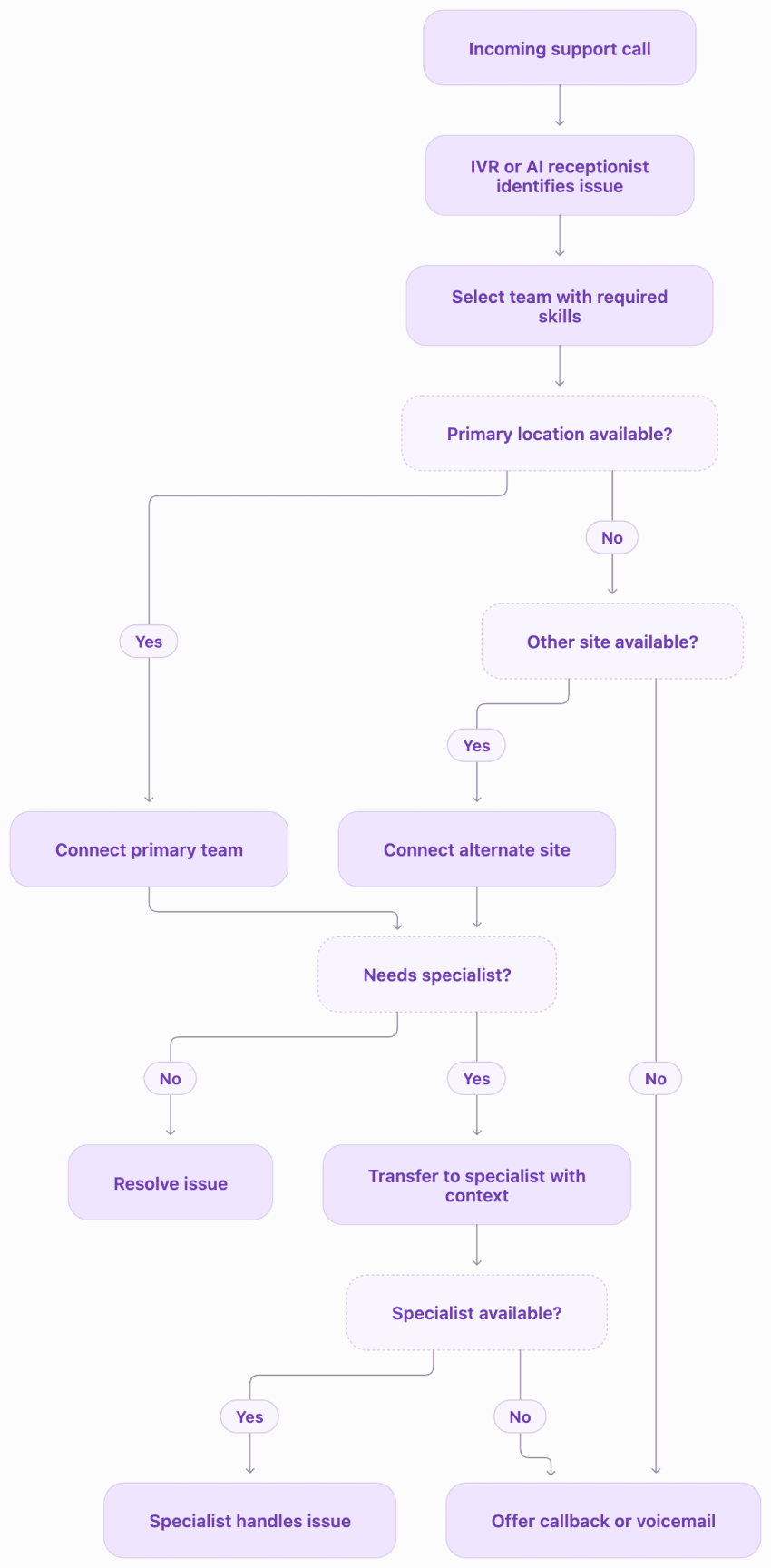
Omnichannel routing is the system that decides which agent receives each incoming conversation. They may leverage multiple rules:
- Skills-based rules send a billing question to billing and a Spanish speaker to a Spanish-speaking agent.
- Time-based rules route after-hours calls to on-call staff or an AI receptionist.
- IVR menus may let callers self-select which department they want to speak to, give them the option to enter an extension to get to a specific person, or route based on needs.
Modern platforms use visual flow builders for these rules, so an admin can change routing logic without filing a ticket with engineering. That flexibility matters during seasonal spikes, office closures, and staffing changes when routing needs to shift quickly.
AI assistance and workflow automation
AI assistance for customer communication platforms should support agents with features like real-time transcription, automatic call summaries, and suggested replies that appear while the agent is still in the conversation.
Our internal research shows that these features can help speed up calls significantly, finding a 50% reduction in agent wrap-up time from our generative AI agent assist and summarization features.
Workflow automation is also essential, as it handles the back-end work. This may include logging the interaction to the CRM, opening a ticket, or triggering a follow-up text without the agent leaving the conversation. Every minute an agent spends copying notes between systems is a minute they’re not helping the next customer, and those minutes add up across a full team.
Security, compliance, and audit logging
Security and compliance are the controls that protect customer data and keep your organization within regulatory requirements. Not every vendor meets the same standards, so ask for these by name during every evaluation:
- SOC 2 Type II report covering the vendor’s controls and processes
- HIPAA business associate agreement (BAA) if your organization handles healthcare data
- PCI DSS handling for payment information
- Role-based access controls limiting who can see which conversations
- Encryption in transit and at rest for all customer data
- Configurable retention policies for call recordings and message logs
- Audit logs showing who accessed which conversation and when
The 4 Types of Customer Communication Software
When you’re making a buying decision, it’s essential to know that there are four different categories of products that fall into the customer communication software bucket. They don’t all work the same, and it’s important to understand exactly what you’re looking at and how they work.
Here’s an overview:
| Type | Best for | Where it breaks |
|---|---|---|
| Shared inbox | Small teams answering email and chat together | No native voice; manual assignment stops scaling past a few agents |
| Omnichannel help desk | Teams that live in tickets and SLAs | Live voice feels separate; one customer becomes several tickets |
| Channel-first messaging tool | Local businesses and teams that mostly text | Narrow feature set; another silo once phone and chat volume grows |
| Unified CX platform | Teams handling real volume across voice and digital | Larger rollout; needs a clear migration plan |
Shared inboxes and team collaboration tools
A shared inbox is a feature inside most larger communication platforms, but some companies sell it as a standalone product. Tools like Front, Missive, and Hiver give small teams a shared view of email and chat where everyone sees the queue, anyone can jump in, and basic collision detection keeps two people from answering the same message.
As a standalone product, the limits show up when voice enters the picture or when assignment has to happen automatically. If your team handles more than a handful of calls a day, a shared inbox on its own forces you to add a separate phone system, and you have the problem of a growing tech stack once again.
If you’re evaluating a standalone shared inbox, ask yourself whether you’ll need voice or routing within the next year. If the answer is yes, you’re likely better off starting with a platform that includes a shared inbox as one feature among many.
Omnichannel help desks and ticketing systems
Help desks bring structure. You get ticket numbers, SLA timers, escalation rules, and reporting. If your team needs to track resolution time and report on it, this category delivers.
The weak spot is typically the live voice. Calls often get logged after the fact as tickets, and a single customer journey becomes fragmented across several records. A customer who followed up about the same issue on three different channels often gets logged in three different tickets.
Channel-first messaging and SMS tools
These platforms are fast to adopt and well suited to appointment reminders, quick customer questions, and back-and-forth text conversations. They’re popular with local businesses and teams where most customer contact happens over text.
However, they become one more silo once your business needs phone routing, chat, and reporting in the same place. If your volume is growing or your channels are expanding, you’ll very likely outgrow a messaging-first tool quickly.
Unified CX platforms
Unified CX platforms give you one workspace for voice, SMS, chat, email, and video, connected to the CRM, with AI and automation across every channel. The idea is tech consolidation. You can replace six or seven point tools with one platform and fix the siloed-data problem quickly.
Emergia, a contact center outsourcing firm, is a good example of what consolidation looks like in practice. After moving to Nextiva, its monthly average interactions grew 154% on voice, 253% on SMS, and 1,124% on email from Q4 2023 to Q1 2024. That growth across every channel happened on one platform, not four separate ones.
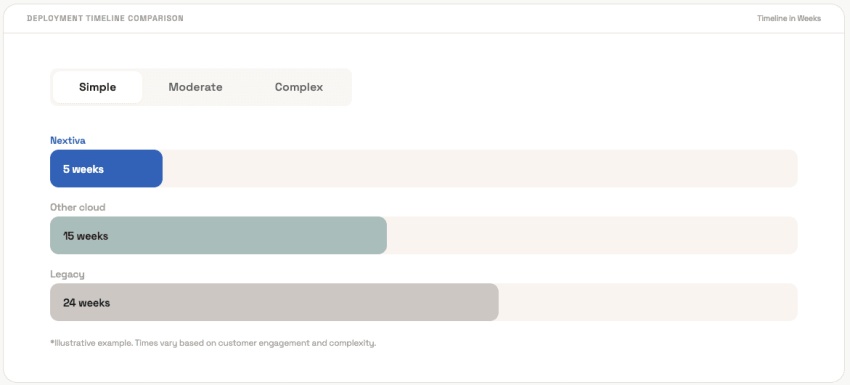
The right tool is also typically quick to roll out, so you could be up and running fast. Nextiva’s contact center page shows typical deployments at about five weeks, compared to 15 weeks for other cloud providers and 24 weeks for legacy systems.
Total Cost of Ownership: Seat Licensing vs. AI Consumption
When assessing communication tools, it’s important to understand how total cost of ownership works, because what you end up paying typically goes beyond the clean “Starting at $$ per month” rate you see on the landing page.
There are three common pricing models: paying per seat, per resolution or outcome, or a hybrid approach.
| Pricing model | How you are billed | Predictability | Where it bites |
|---|---|---|---|
| Per seat | Fixed monthly fee per agent or user | High | Tier upgrades and paid add-ons |
| Per resolution/outcome | A fee each time AI resolves a conversation | Low | Seasonal spikes and product launches |
| Hybrid | Seats plus metered AI or usage fees | Medium | Two bills to forecast instead of one |
Evaluating per-seat subscription models
Per-seat pricing charges a fixed monthly fee for each agent or user on the platform. You pick a tier, multiply by headcount, and that’s your bill. You know what you’ll pay next month because you know how many agents you have.
The surprise comes from what’s not included in the base tier. Features like analytics, recording storage, or extra phone numbers are often gated behind higher tiers or sold as add-ons.
Nextiva publishes its tiers starting at $15 per user per month for Core (when billed annually). The Engage tier runs $25 per user per month and adds live chat, expanded texting, and AI features. The contact center Essential plan starts at $75 per agent per month with omnichannel routing and AI transcription included. Then, XBert starts at $99 per month for those who want help from an AI virtual assistant.

Navigating per-resolution and token-based AI fees
Per-resolution pricing charges a fee each time the platform’s AI successfully handles a conversation without a human agent. The fee is separate from seat pricing.
Fin, for example, has published pricing for its AI agent from $0.99 per outcome, in addition to seat fees starting at a standard price of $29 per month.
The price scales with volume, and not always in a good way. If you’ve got 10,000 conversations a month with 40% handled by AI at $0.99 each, that’s about $3,960 a month in AI fees alone. Double the volume during a holiday rush, and the AI bill doubles with it. That’s on top of whatever you’re paying per seat.
Conversations the AI can’t finish still need an agent seat, so consumption pricing rarely replaces seat costs entirely. In our experience, you often end up paying both.
Communication platform costs buyers often miss
When assessing platforms, these costs are often overlooked, so ask vendors about them:
- Onboarding and professional services: Some vendors include basic setup. Others charge separately for implementation, data migration, and training.
- Integration work: Connecting to your CRM, help desk, and billing system may require professional services hours or a third-party connector.
- Telephony usage and number fees: Per-minute charges, toll-free inbound minutes, and fees for additional phone numbers add up across a large team.
- Recording storage: Some plans cap storage and charge for overages. Ask what happens to recordings after the retention period.
- The renewal-year price: Introductory rates and first-year discounts expire. Get the year-two number in writing before you sign the year-one contract.
How to Evaluate and Choose a Customer Communication Platform
When choosing a customer communication platform, here’s what to keep in mind:
| Criterion | What to confirm before you sign |
|---|---|
| Channel coverage | Voice, SMS, chat, email, and video in one workspace, not separate apps under one brand |
| Shared timeline | An agent can see every prior conversation with a customer, across channels, in order |
| CRM integration | Bi-directional sync with your CRM so records update without copy-paste |
| AI and automation | Transcription, summaries, and routing included, with any per-use AI fees spelled out |
| Security and compliance | SOC 2 Type II report, HIPAA BAA if relevant, PCI DSS for payments, audit logs |
| Uptime and reliability | SLA in writing, what credits apply when it’s missed, and how many points of presence the network runs |
| Pricing | Seat vs. consumption model, add-on fees, and the renewal-year rate in writing |
Assessing integration readiness
Map which systems of record need to stay in sync: CRM, help desk, and billing. Ask whether connectors are native or built through an API or webhooks and who maintains them when something breaks.
The case for a single source of truth is strong. Nextiva’s CX research found that 81% of respondents say their company could improve the customer experience by consolidating customer data from all interaction points into one system of record. That’s a problem most teams already know they have. The question is whether the platform you pick actually solves it or just adds another data island. For more on what good integration looks like, check out our guide to CRM integrations.
Rollout and migration checklist
Ready to adopt a new tool or switch platforms? Number porting comes first and sets the timeline for everything else.
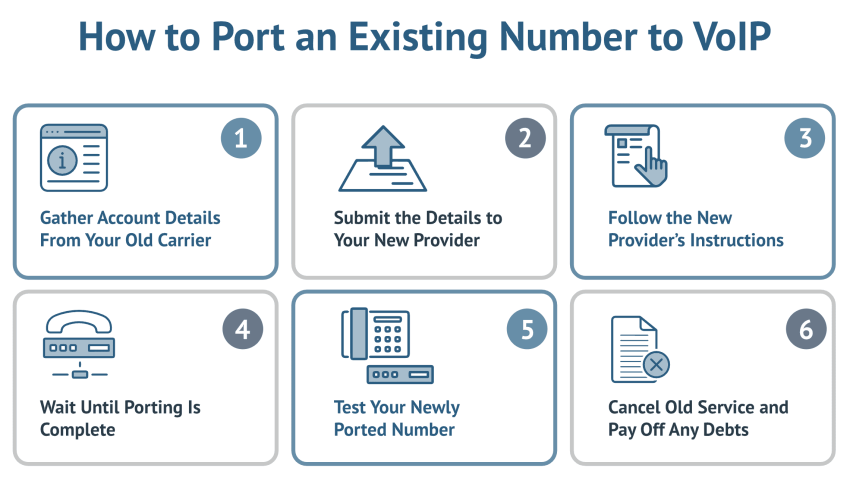
Important: Keep the old service active until the port completes. Simple local ports typically take five to 10 business days, with complex or toll-free ports running two to four weeks.
A few things that make the transition smoother:
- Roll out by team or by channel rather than all at once. Start with one department, work out the issues, then expand.
- Train agents on the shared timeline before cutover. The biggest adjustment isn’t the new interface. It’s learning to check the full conversation history before responding.
- Set a date to retire each old tool so the stack actually shrinks. Without a kill date, the old tools linger, and the team runs both systems indefinitely.
- Test the routing rules before go-live. Run calls through the new system internally; ensure billing questions go to billing and after-hours calls go where they should.
Consolidate Your Customer Conversations With Nextiva
Siloed tools cost you response time, customer patience, and agent productivity. A customer communication platform that consolidates everything into one workspace solves all three problems at once.
Nextiva brings voice, SMS, chat, email, and video into one workspace with a shared customer timeline, AI summaries, skills-based routing, and popular CRM integrations. The network strives for 99.999% uptime across eight points of presence to give you ultimate reliability, and pricing starts at $15 per user per month on an annual plan, so it’s affordable for businesses of all sizes.
And when you’re ready to add AI agents to the mix, XBert handles routine conversations and after-hours coverage at $99 per month for 100 conversations. That way, your live agents can spend their time on the conversations and customers that need them most.
Is your team still toggling between six different tools? See how Nextiva consolidates your customer conversations into one platform.
Your AI-Powered Contact Center
Create amazing customer experiences with AI-powered contact center software. Scalable contact center platform built for omnichannel customer conversations.