Customer Experience
 Blog
 Business Communication
 Leadership
 Marketing & Sales
 Nextiva News
 Productivity
 VoIP


Your dashboard says the chatbot handled 75% of conversations last month. Yet the phone queue is as long as it was before launch.
Containment rate counts the conversations your AI agents kept away from a human agent, whether or not the problem got solved.
In a September 2026 Execs In The Know survey, only 61% of US consumers said their issues were always or often resolved on first contact, down from 69% in 2025. A containment rate can keep climbing while that number falls.
What Is Containment Rate?
Containment rate is the percentage of customer conversations that start and end in an automated channel without human intervention. It applies to a chatbot, an AI voice agent, an IVR system, or a help center flow.
Chatbot containment rate is the most common version. A conversation counts as contained when it ends without a transfer to a live agent, so the metric reports where the conversation ended and leaves the outcome to other metrics.
Two close cousins, deflection rate and resolution rate, often get mixed up with it.
| Metric | What it counts | What it misses |
|---|---|---|
| Containment rate | Conversations that ended without a human agent | Whether the problem was solved |
| Deflection rate | Contacts that never reached the agent queue, including people who read an article and left | Whether they came back through another channel |
| Resolution rate | Issues confirmed solved, by any channel | How much effort it took to get there |
Containment rate and AI deflection both measure avoided work, while resolution rate measures finished work.
How to Calculate Containment Rate
The containment rate formula is simple:
Containment rate = conversations that ended without a human agent ÷ total automated conversations × 100
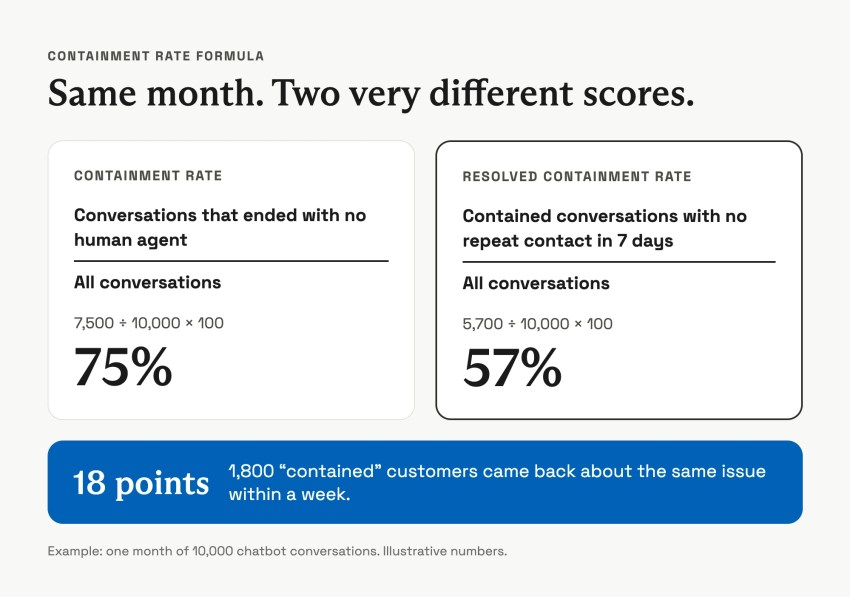
Say your chatbot handled 10,000 conversations in October. It transferred 2,500 to agents, and 7,500 ended without one. Your chatbot containment rate is 7,500 ÷ 10,000 × 100, or 75%. The same containment rate formula works for an AI voice agent or IVR system if you swap conversations for calls.
Now add one more step.
Match each contained conversation against any contact from the same customer about the same issue in the next seven days, on any channel. Suppose 1,800 of those 7,500 customers came back. Your resolved containment rate is (7,500 – 1,800) ÷ 10,000 × 100, or 57%.
The 18-point gap also shows up in agent workload. Of the 1,800 returning customers, say 1,200 reached an agent. Your agents handled 3,700 contacts tied to the bot that month, not the 2,500 the dashboard showed. Multiply those 1,200 by your own cost per agent contact, and you have the cost your containment report left out.
Decide what counts as contained
The formula only works if your team defines the numerator the same way every month. Write these rules down before you report a number:
- Abandons. Decide whether a customer who leaves the chat widget or hangs up mid-flow counts as contained. Many dashboards count it, and it usually shouldn’t.
- Agent requests. A customer who asks for a person and gets refused is blocked, so the conversation shouldn’t count as contained.
- Channel switches. A chat that ends and a phone call from the same customer an hour later is one unresolved issue.
- Repeat window. Pick a window, such as seven days, and use it every month so trends stay comparable.

Why a High Containment Rate Can Hide Failure
A high containment rate can mean your AI agents resolve issues well. It can also mean customers gave up. The metric can’t tell those two outcomes apart, and three kinds of failure stay invisible.
Repeat contacts
A customer asks the bot about a duplicate charge, gets an article on billing cycles, closes the window, and calls the next morning. The dashboard logs one contained chat and one new call, with nothing tying them to the same unsolved problem.
In the Execs In The Know consumer study, 68% of consumers said they had used more than one channel to resolve a single issue in the past year, and 28% of those said the customer service process forced the switch.
Hidden effort
Containment has no column for the time a customer spent rephrasing a question the bot couldn’t parse. Effort shows up later, in lower customer satisfaction scores and weaker customer retention. Common causes include weak intent recognition, a rigid conversation flow that can’t handle follow-up questions, and thin knowledge bases. None of them lowers the containment rate.
Silent exits
Some customers stop trying and take the problem with them. In Nextiva’s Customer Patience Benchmark, a survey of 400 people found that 54% of callers said they hang up after waiting on hold for up to eight minutes. Callers who give up before reaching an agent never show up in agent volume, so a containment report can read their exit as lower demand. The customer leaves with the problem, and the business loses some customer trust.
Gartner analyst Eric Keller put it plainly in a September 2026 Q&A: chatbots should connect customers to human support, “not containment traps.”

“The goal should not be to keep every interaction inside the chatbot. It should be to guide each customer to the fastest and most effective path to resolution, whether that path is AI-led, human-led or a combination of both.”
Eric Keller
Containment rate still earns a place on the report for capacity planning and agent staffing, as long as you read it with its limits in view.
Pros and cons of containment rate as a metric
 Pros
Easy to pull from almost any chatbot or IVR report
Shows how much volume automation absorbs
Useful for capacity planning and agent staffing
 Cons
Counts abandons and dead ends as wins
Can’t see repeat contacts on other channels
Rewards hiding the path to a person
Key Metrics to Track Alongside Chatbot Containment
Keep reporting containment rate, but stop treating it as the score. These key metrics check whether the customer’s issue got solved and how hard it was to get there.
| Metric | Formula | Starting guardrail |
|---|---|---|
| Containment rate | No-agent conversations ÷ all automated conversations × 100 | Report it, but don’t set a target for it |
| Resolved containment rate | Contained conversations with no repeat contact in 7 days ÷ all automated conversations × 100 | Should rise when containment rises |
| Repeat contact rate | Same-issue contacts within 7 days ÷ contained conversations × 100 | Falling, under a threshold your team sets (one in five is a reasonable start) |
| First contact resolution | Issues solved on the first contact ÷ all issues × 100 | Same bar for AI and people |
| Customer effort score | Average answer to “How easy was it to get your issue handled?” | Flat or better after every AI change |
| Escalation quality | Handoffs that arrive with full context ÷ all handoffs × 100 | Every handoff, every time |
Measure first contact resolution across every channel
Most teams track first contact resolution for agents only. Apply it to the bot, the IVR, and the self-service options in your help center too, and compare resolution rates by channel. Holding AI to the same bar as your team keeps a closed chat from passing as a solved problem. The Execs In The Know report made the same point, saying first contact resolution should reflect “the customer’s actual experience rather than an internal case-closure event.”
Track effort alongside customer satisfaction
Customer satisfaction tells you how people felt about their customer interactions, while customer effort score shows how hard they worked to get an answer, which containment can’t show. This short Nextiva video walks through CSAT, NPS, and effort scores and how to calculate each one.
Score the quality of every human handoff
An escalation that reaches the right person fast, with the conversation history attached, is a good outcome. A low escalation rate earned by hiding the path to a person should count against the AI.
Track whether agents see what the AI already tried, along with previous interactions, so the customer doesn’t have to repeat their account details on the way to human help.

What Is a Good Containment Rate?
A good containment rate rises while your repeat contact rate stays flat or falls. No single number works across industries, because a password reset bot and a claims bot face different work. Published industry benchmarks also rarely say how they treat abandons, so treat any you find as rough context.
Use your own baseline instead. Measure containment, resolved containment, and repeat contacts for each contact type over 30 days, then watch how they move together:
| What you see | What it usually means | What to do |
|---|---|---|
| Containment up, repeat contacts flat or down | The AI is resolving more | Expand scope carefully |
| Containment up, repeat contacts up | Customers are giving up, then coming back | Check abandons and the path to a person |
| Containment flat, resolution up | Better answers, same volume | Look for contact types ready for more automation |
| Containment down after a change | Customers can reach people more easily | Check whether resolution and effort improved |
Then pick a repeat-contact threshold with your team and keep it the same every month. We suggest starting at one in five: if more than 20% of contained conversations come back within your repeat window, treat the containment rate as overstated. A high containment rate on simple customer questions, like order status, is easier to earn than on complex issues like billing disputes, so compare each contact type to its own history and report it next to your other customer service metrics.
Put containment and resolved containment side by side on the monthly report. The distance between them is the number worth managing.
2027 AI Customer Service Playbook
Get the full deflection spectrum, the four-signal framework, an ROI formula, and a 90-day rollout plan for measuring AI on resolution.
The Five-Mode AI Deflection Spectrum
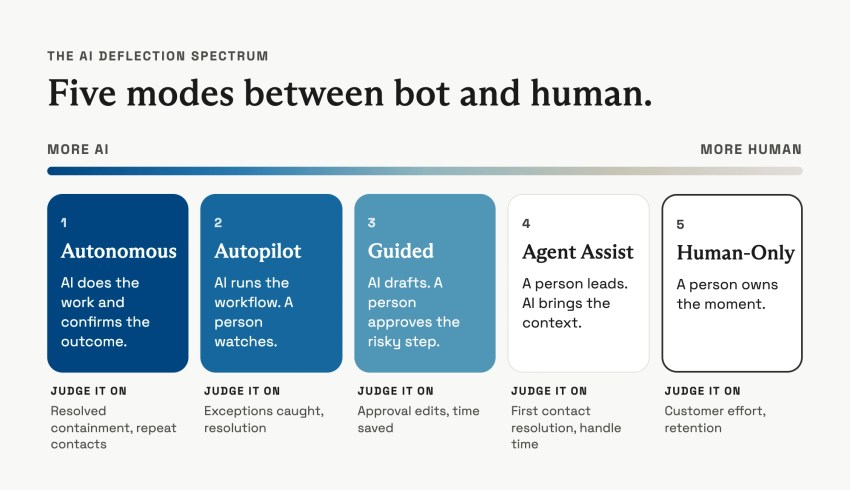
The AI deflection spectrum gives each contact type five possible modes instead of two (bot or human), and judges each mode on the metric that fits it.
| Mode | Who does the work | Example | Judge it on |
|---|---|---|---|
| Autonomous | AI handles it end to end | “Where’s my order?” answered with live order status at 11 p.m. | Resolved containment, repeat contacts |
| Autopilot | AI runs a multi-step workflow while a person monitors | Switching a plan mid-cycle, with a prorated credit | Exceptions caught, resolution |
| Guided | AI prepares the work and a person approves the risky step | Service credits after an outage, reviewed by a team lead | Edits at approval, time saved |
| Agent Assist | A person leads and AI supplies context and suggested answers | A frustrated billing dispute | First contact resolution, handle time |
| Human-Only | A person owns the whole conversation | Closing an account after a death in the family | Customer effort, retention |
Containment rate only makes sense as a score in the Autonomous mode, where a well-designed chatbot resolves the request alone. In Guided and Agent Assist, a person is supposed to be involved, so a “contained” conversation would be a design failure. In Agent Assist, success means a faster, more accurate conversation with a person. In Autopilot, a person monitors the workflow, so exceptions caught matter more than containment.
The middle modes are the ones most programs skip. Autonomous AI-powered tools handle routine inquiries like order status, and people handle complex issues. In between sit multi-step customer inquiries that are too risky for full autonomy but don’t need human involvement at every step. An insurance agency, for example, might run claim status updates in Autopilot and keep coverage disputes in Agent Assist.
Move contact types along the spectrum with evidence
A contact type’s mode is a starting point. Start conservative, then promote it one mode at a time when the numbers hold. Appointment rescheduling might move like this:
| Timeline | Mode | Promotion test |
|---|---|---|
| Month 1 | Agent Assist | AI drafts each change, an agent sends it, and you log every correction |
| Month 3 | Autopilot | Corrections are rare, and a person watches the queue for exceptions |
| Month 6 | Autonomous | Resolved containment holds for 30 days and repeat contacts don’t rise |
Promotion works in both directions. If repeat contacts climb for two weeks after a promotion, move the contact type back one mode and fix the gap. Our automation framework scores contact types on volume, complexity, emotion, and regulation to pick the starting mode.
What to Change on Monday Morning
You can start measuring resolution with the tools you already have. It takes a new report and a few rules.
- Pull last month’s containment rate by contact type. A single blended chatbot containment rate hides which flows fail.
- Match contained conversations to repeat contacts. Join chat or voice bot logs to phone, email, and chat records by customer ID within seven days. A CRM such as Salesforce can hold that shared customer ID.
- Add resolved containment and repeat contact rate to the same report. Put them next to containment so the number isn’t read on its own.
- Audit the path to a person. Test whether a customer can reach a live agent in two steps or fewer from every bot flow, and fix any human handoff that drops context.
- Assign each contact type a mode. Use the spectrum table, and write down the promotion test before you change anything.
- Set a review date. Look at the numbers again in 30 days and promote, hold, or demote each contact type.
Measure Resolution With Nextiva
A 75% containment rate means little when the phone queue stays the same length. Shrinking the queue takes AI that finishes the work and a report that checks whether it did.
Tata Play, a content distribution platform in India with more than 19 million subscribers, connected an AI bot to its backend systems through Nextiva. The bot processed more than 5 million routine customer requests on its own, and Tata Play cut support costs by 40%. The bot could look up accounts and act on them, so it could finish routine customer queries in one conversation instead of handing them off to an agent.
XBert, Nextiva’s AI employee, is trained on your policies and runs routine work like appointment booking and FAQ handling from start to finish. That frees agent capacity for the complex issues and customer needs that call for a person, and when a conversation needs one, Agent Assist gives your team the context and transcript in real time.
Nextiva covers voice, chat, SMS, email, social, and video. First contact resolution, CSAT, and the calls XBert answered sit on one dashboard, where you can compare what the AI handled with what got resolved.
Start small, measure what gets resolved, and give the AI more volume only when resolved containment and repeat contacts hold for 30 days.
Measure What Your AI Actually Resolves
XBert handles routine customer requests from start to finish and hands the rest to your team with full context, so you can track what actually gets resolved.
FAQs About Containment Rate
A good chatbot containment rate rises while repeat contacts stay flat or fall. No universal benchmark exists, since simple and complex contact types contain at different rates, so set a 30-day baseline for each contact type and track resolved containment next to it. XBert lets you start with a narrow set of routine requests and expand as results hold.
Containment rate counts automated conversations that ended without a human agent. Deflection rate counts contacts that never reached the agent queue, including customers who read a help article and left. Both measure avoided work, and neither confirms the problem was solved. Our call deflection guide covers the strategies behind deflection.
Divide calls that ended in the IVR system without transferring to an agent by total IVR calls, then multiply by 100. Leave mid-flow hang-ups out of the contained count, and check how many contained callers called back about the same issue within seven days. An AI voice agent understands open-ended requests, so callers don’t have to fit their issue into a menu.
Start with seven days, because it catches customers who give up and try again later in the week. A shorter window, such as 72 hours, can suit urgent issues like outages or access problems. Keep the window consistent each month so trends stay comparable. Nextiva Contact Center records interactions across channels, which makes repeat contacts easier to match.
Containment in customer service means a customer’s request was handled entirely in self-service or by AI, with no human agent involved. It’s a useful volume measure, but it doesn’t show whether the problem was solved, so pair it with resolution and effort metrics. Agent Assist gives agents the context on the conversations that do reach people, including what the AI already tried.