Customer Experience
  Blog
Blog  Business Communication
  Leadership
  Marketing & Sales
  Nextiva News
  Productivity
  VoIP
VoIP 

If you’re measuring an AI answering service’s success with call center metrics, you may not be seeing the full picture. Call center metrics assume that a person is interacting with a customer. But AI can take multiple calls at once, so pickup is instant, busy signals disappear, and the report shows perfect answer speed. However, it doesn’t talk about how abandoned calls shift from hold queues to the conversation.
For instance, the average handle time rewards short calls; yet a short AI call can mean the caller gave up. This article covers the AI answering service KPIs that help you report and see what’s truly working. They’re categorized into five layers.
Layer 1: Voice Quality and Latency
This layer measures what the caller hears before the voice AI says anything useful. It covers:
- How fast it responds
- How well it hears
- Whether it stops talking when the caller cuts in
An AI can sound human and still fail on all three. Here’s an example that illustrates why these things matter:
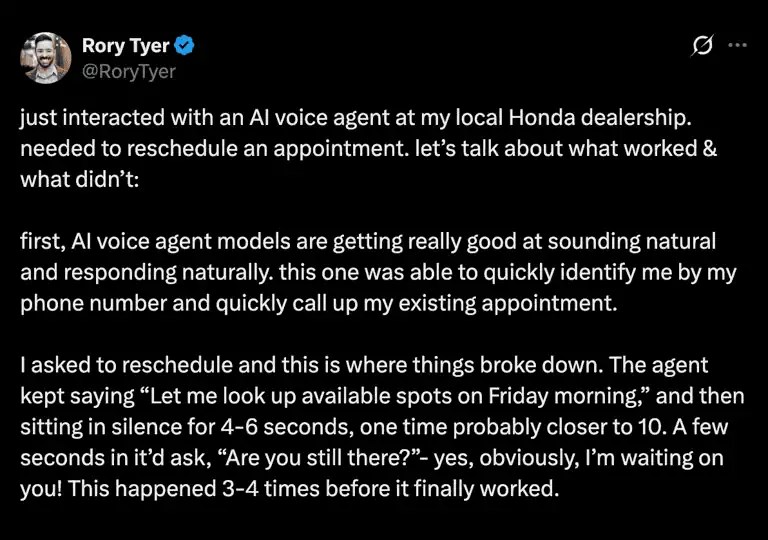
Rory Tyer, who owns a garden center, called his Honda dealership to reschedule an appointment. The AI phone agent recognized him right away, then kept him sitting in silence repeatedly for four to six seconds at a time, one time probably closer to 10 seconds, while it looked up open slots.
This creates an experience customers don’t want. The KPIs below help you see if this is a problem in your setup and take necessary steps before it’s too late.
Response latency: track the 90th percentile
Response latency is the time from when the caller finishes a sentence to when the caller first hears AI audio. Speech recognition, reasoning, calendar or CRM lookups, speech synthesis, and the phone network all add to it. Check how the AI integrates with your existing phone systems, calendar, and CRM, because every lookup adds delay.
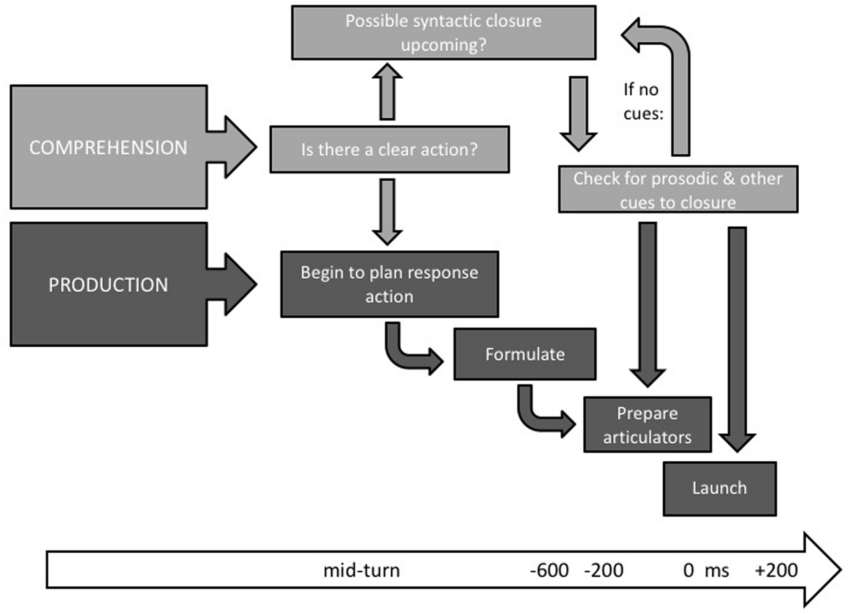
A review of turn-taking research puts the average gap between turns at around 200 milliseconds. It also reports that silences of 600 milliseconds or longer lead listeners to expect an unwelcome answer.
The phone network also takes a share of that budget. When you measure latency at the caller’s end of the line, you include the network’s share. Set a design target of under one second at the 90th percentile, the latency that 90% of turns beat. This isn’t an industry standard; see it as a target to calibrate.
Lab data shows how long those turns run. In an April 2026 preprint that tested voice agents on multistep tool tasks with real human audio, the fastest system posted 4.25 seconds of latency. A traditional speech-to-text, language model, and text-to-speech pipeline took 10.12 seconds.
Response latency (p90): 90th percentile of the time the caller finishes speaking to the first AI audio the caller hears. Keep the starting target under one second.
Speech recognition on real calls
You can’t rely on lab numbers for speech recognition. Your customers call from trucks, job sites, and speakerphones. Real customer interactions have overlapping speakers, different accents, noisy environments, and suboptimal audio recording equipment. All of these reduce automatic speech recognition accuracy.
If the system misses a word, it costs more on a phone call than a chat. You can fix things in chat because it has an interface. However, a missed word contributes directly to poor customer experience in voice channels.
It’s best to sample real calls every week and score transcripts against what was said. If your AI offers multilingual support, sample every language you serve. Measure the word error rate. Check contact details such as names, addresses, and phone numbers first, as any wrong digit would break the booking.
Word error rate: {(Substitutions + insertions + deletions) ÷ words in a human-checked transcript} × 100.
Interruption handling
Callers talk over machines. Your AI answering service should handle these interruptions without pausing endlessly. If it doesn’t handle them well, it may take a customer through a script they didn’t sign up for.
Track the interruption handling rate for your weekly sample of recordings. It defines how quickly an AI receptionist stops speaking when a caller cuts in mid-sentence.
Here, “handling” means more than simply pausing when a customer talks over. It includes handling false interruptions — like coughing, which AI may read as “uh-huh” — and context corruption.
Layer 2: AI Agent Understanding and Accuracy
Human-like conversations only help if AI understands the request and answers it correctly. Layer 2 has three KPIs, and each one needs a person to review real calls.
Intent accuracy
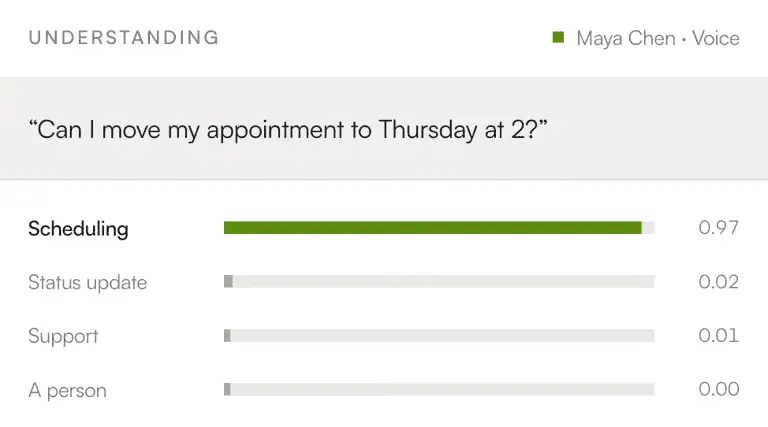
Intent is what the caller wants: a booking, a price, or a person. The AI uses machine learning to understand intent, and it can get some calls wrong. Review a sample of calls every week and set your target from the first month’s baseline.
Intent accuracy: (Correctly identified intents ÷ reviewed calls) × 100.
Incorrect-answer rate
This KPI counts the calls where the AI said something wrong or something you never approved.
Incorrect-answer rate: (Calls with wrong or unapproved information ÷ reviewed calls) × 100.
Error rates depend on the task and how well the AI is grounded. Check these periodically so the AI doesn’t confidently state erroneous or false content. NIST’s Generative Artificial Intelligence Profile calls these issues “confabulation.”
Ground the AI answering service in approved business facts and knowledge base — services, prices, policies, and hours — so it can answer frequently asked questions correctly. Send open-ended customer questions to a person, and review every pricing or policy error with a target of zero.
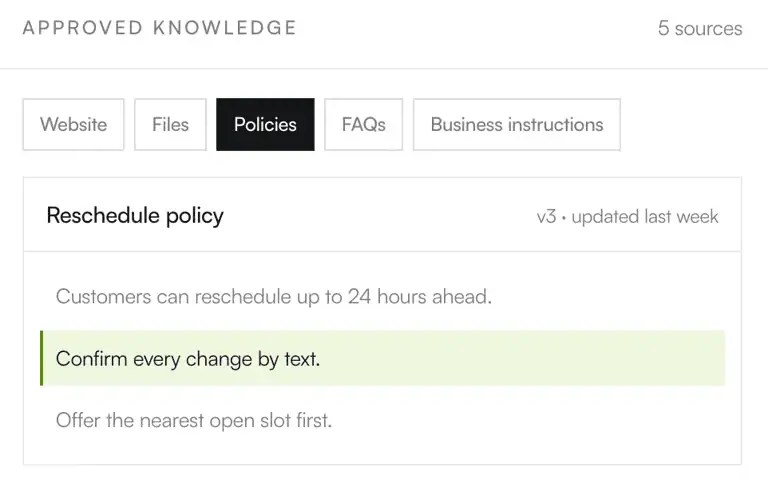
Fallback rate
A fallback is a turn where the AI had no answer. A rising fallback rate points to a knowledge gap in how the AI handles customer inquiries, and you can fix it by adding the answer or an escalation rule.
Fallback rate: (turns the AI could not answer ÷ total turns) × 100.
This formula counts per turn. Whichever denominator you choose, per turn or per call, keep it fixed.
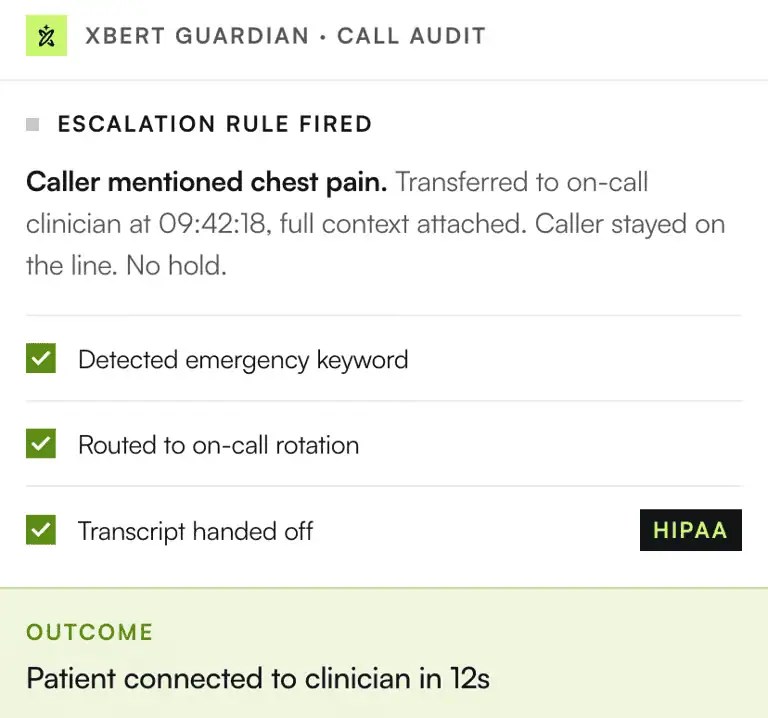
Layer 3: Resolution and Containment
Layer 3 is where dashboards flatter the most, because three different numbers get reported as resolution. Calls handled are not the same as calls resolved. Separate them before you report anything upward.
Containment vs. deflection
These two KPIs share a denominator but differ when you ask about hang-ups.
- Deflection rate: (Calls kept away from a person for any reason, including hang-ups ÷ AI-answered calls) × 100.
- Containment rate: (Calls resolved by the AI with no transfers and no hang-ups ÷ AI-answered calls) × 100.
Suppose there were 100 AI-answered calls. Out of these 100 AI-answered calls, 20 calls result in a transfer, 20 end in a hang-up, and 60 are completed by the AI; nine of these callers phone back within 72 hours.
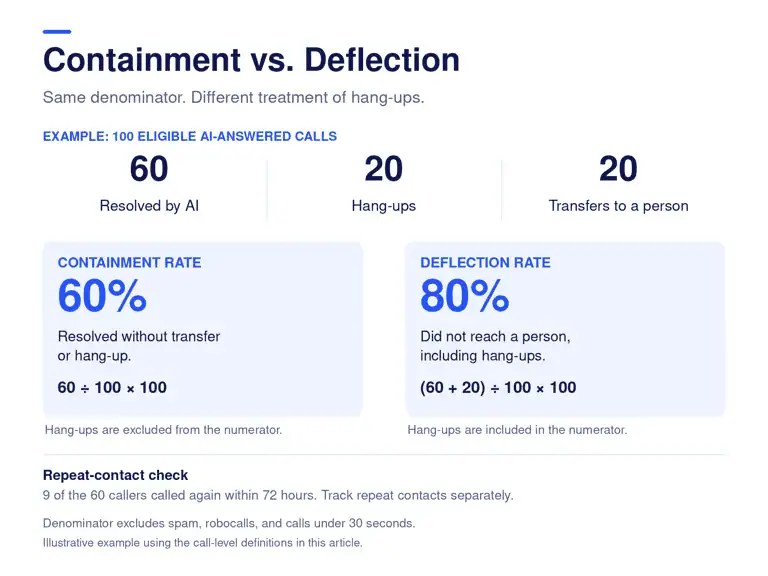
In this scenario, the KPIs would be as follows:
- Deflection rate would be 80% since 80 calls never reached a person, including 20 hang-ups.
- Containment rate is 60% since 60 calls were resolved without transfer or hang-up.
On the phone, define an AI-answered call as one the AI picked up, minus spam, robocalls, and calls under 30 seconds. A Nextiva customer’s AI receptionist filters more than 300 spam calls a week. It keeps the noise away from the team so that they can focus on higher-value work.
Verified resolution
Containment says the call ended with the AI, with no human intervention. Verified resolution asks whether the caller needed to phone again.
- Verified resolution rate: (Contained calls with no callback within 72 hours ÷ contained calls) × 100.
- 72-hour recontact rate: (Callbacks from the same number within 72 hours ÷ contained calls) × 100.
The 72-hour window here is a recommendation. It’s not a standard.
Planned transfers to the right person vs. forced escalations
Planned transfers happen by design. These are for emergencies, sales-ready leads, or anybody asking for a person. The AI can qualify leads first, so your sales team gets leads worth a callback. Contrastingly, forced escalations happen when AI fails.
Forced escalation rate: (Transfers caused by AI failure ÷ AI-answered calls) × 100.
It should ideally fall week over week. If you have a system in place that tries to push someone into something they don’t want, and they end up having to talk to a human anyway, you’re failing. Shep Hyken, a customer service and CX expert, feels the same way.
Your answering service is effective when a planned transfer reaches the right person on the first attempt. If anyone says they need to talk to a human, the service should be able to hand off immediately.
Baseline containment by intent
The containment rate depends on your call mix. A line full of routine calls, like booking requests and order status checks, behaves differently than a line with billing disputes.
The published benchmarks come from vendors that sell voice agents. Some might work for your case; some might not. It’s better to establish your baseline containment by intent in the first 30 days of the rollout, then optimize for each intent.
Layer 4: Business Outcomes of an AI Phone Answering Service
The first three layers of KPIs show if the AI answering service works. Layer 4 reflects business impact by measuring captured missed calls and booked appointments.
Missed-call capture rate
Measure this one against what callers got before you implemented the AI. Callers don’t wait long for a callback. Nextiva’s Customer Patience Benchmark found that customers expect phone, SMS, or ticket responses within five minutes. After a missed response window, 56% immediately try another channel, and 28% abandon the product or service.
Without a 24/7 answering service, calls missed after hours or during peak hours go to another channel or vendor and become missed opportunities. Rafael Mesa runs Vero Property Inspections in Southeast Florida and spends his days on roofs and in attics. Every call he misses is an opportunity of around $250 that goes to a competitor. He relies on Nextiva’s XBert, an AI answering service, for his firm.
Here’s a snapshot of what he measured:


Missed-call capture rates help you track how effectively you capture business opportunities that land when you’re not present to take them.
Missed-call capture rate: (Answered calls ÷ total inbound calls, including after-hours) × 100. Aim to pick up every call.
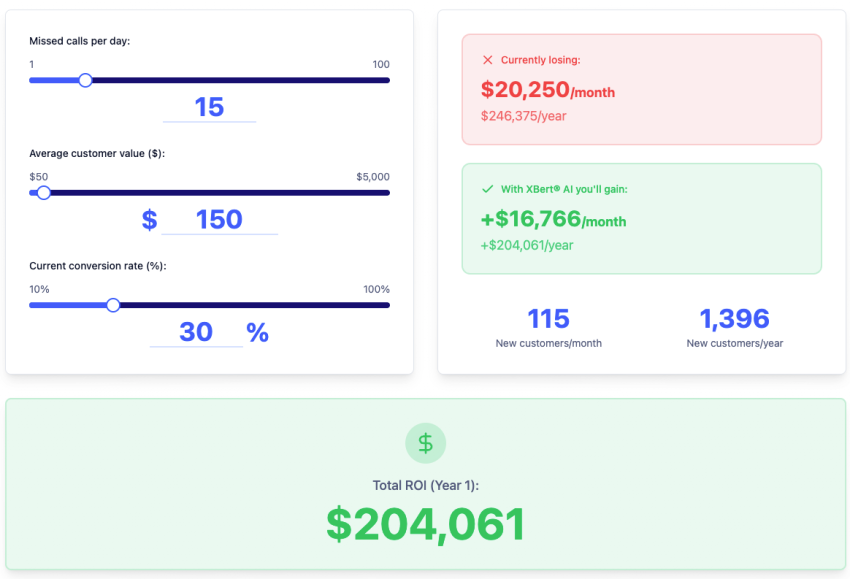
Nights, weekends, and any time outside business hours belong in the denominator, so count calls that reach your after-hours answering line too. This missed calls calculator estimates what your current gap costs:
How Much Do Missed Calls Cost You?
See how much lost revenue you can reclaim with Nextiva XBert® AI answering service. Compare different scenarios to grow the bottom line.
Booking conversion
When booking is an intent and a goal that sets a buyer in your conversion funnel, tracking the booking conversion rate is worth it.
Booking conversion: (Appointments booked ÷ calls with booking intent) × 100.
It shows how often the AI schedules appointments when callers ask for one. Compare the result with your own pre-AI human rate and audit that baseline first. You might want to split the rate by caller type, such as calls from your existing customers vs. calls from new customers.
Lead capture completeness and system sync
A confirmation on the call proves nothing until the record exists in your Google Calendar, Outlook, or CRM. Automated workflows, such as reminders and follow-ups, depend on that record. When you capture leads by phone, lead capture completeness and sync success rate help you track whether each lead got into your existing systems.
- Lead capture completeness: (Leads with every required field ÷ leads captured) × 100.
- Sync success rate: (Bookings and leads that appear in your calendar or CRM ÷ bookings and leads confirmed on the call) × 100.
By tracking these KPIs, your data capture accuracy would also increase as you’d define each field of customer information before asking for it. For example, you’d collect a phone number as a phone number, not free text.
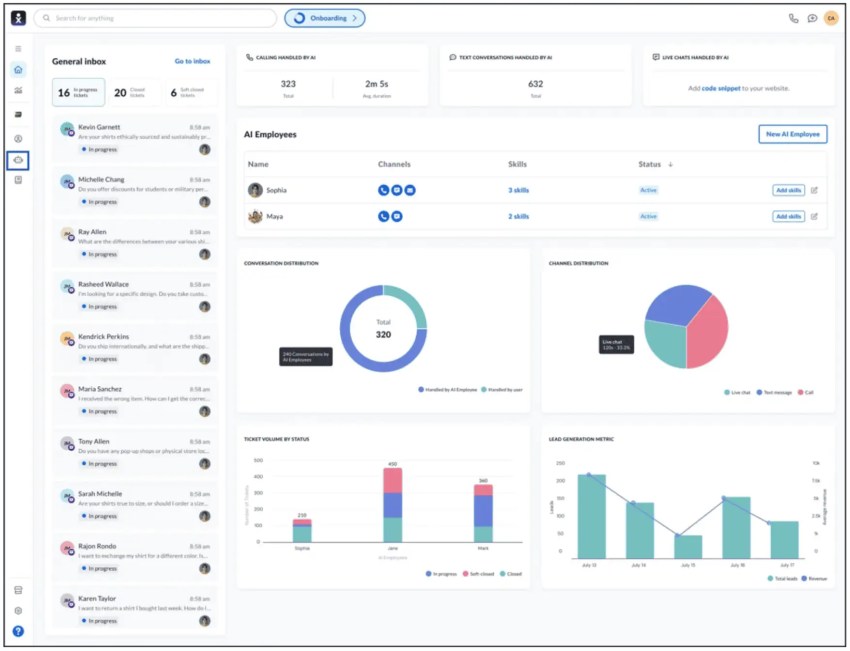
Nextiva’s XBert books appointments into your calendar, logs them to your CRM without manual data entry, and keeps full transcripts and analytics. You get to check each record against the call.
Layer 5: Unit Economics and ROI
When you automate inbound calls, someone eventually asks whether the AI pays for itself or meets the expected ROI.
Four formulas help you answer that question:
- Cost per AI conversation: Total AI cost ÷ billable conversations.
- Cost per verified resolution: (AI cost + human time on escalations) ÷ verified resolutions.
- Revenue recovered: Monthly missed calls × close rate × average customer value job value.
- ROI: (Savings + revenue recovered – AI cost) ÷ AI cost × 100.
Work out your AI answering service cost
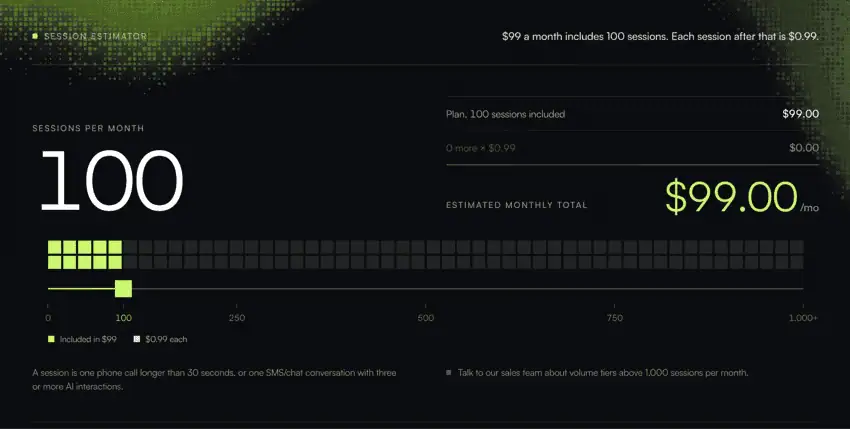
XBert pricing is public, and the math is easy to check. The plan costs $99 a month for 100 AI conversations, then $0.99 for each one after that. A conversation is a phone call longer than 30 seconds or an SMS or web chat thread with three or more interactions. Whether you’re on a starter plan or custom pricing, the formulas stay the same.
Let’s say you have a total of 400 billable conversations. For Nexitva XBert, the AI cost will be $99 for the first 100 and $0.99 for every conversation thereafter. It comes to $396. If 70% of these conversations resolve, the cost per verified resolution is $1.41, before escalation labor.
Among these 400 conversations, suppose the AI answering service captured 60 after-hours calls, and you have a $250 average booking value and a 40% booking rate; you got $6,000 in bookings that you would have missed.
Compare operational costs with the alternatives
A small business usually weighs an AI receptionist against a live answering service and an in-house human receptionist. Traditional answering services that bill by the minute typically charge $0.75 to $1.50 per minute. At those rates, a three-minute call costs $2.25 to $4.50. In-house staff cost the loaded hourly rate above whether the phone rings or not. Compare that with the $396 spent on AI, and you’ll see the ROI.
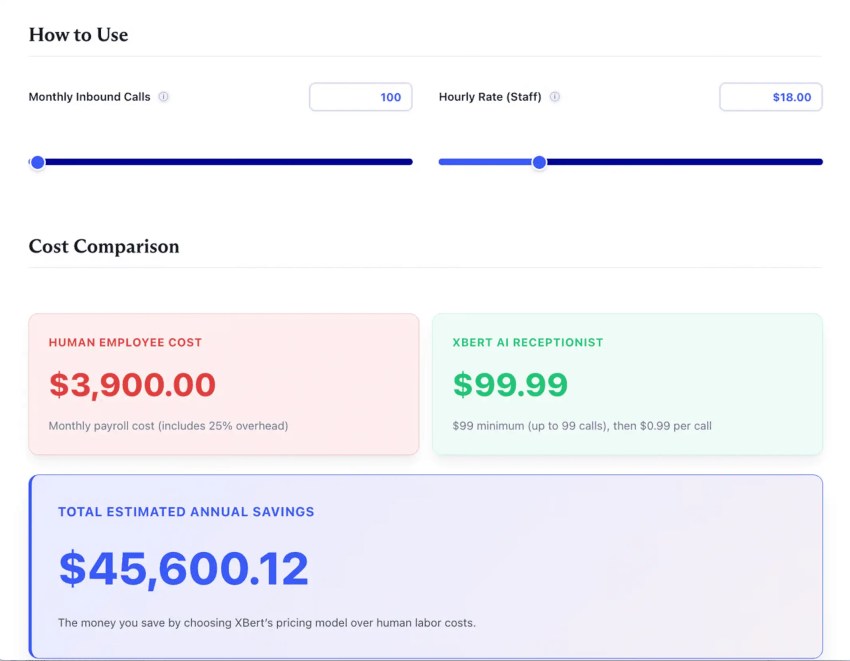
The AI receptionist calculator runs the math on your call volume.
AI Receptionist ROI Calculator
See how much your business could save with the XBert® AI Receptionist ROI Calculator. Just enter your call volume and staffing costs to find out how quickly an AI assistant can pay for itself and start freeing up your time.
If you are still choosing a platform, Nextiva’s guide to AI phone answering services compares features and costs.
Measure Beyond KPIs to Achieve High Customer Satisfaction for an AI Answering Service
The KPIs in the five layers can improve while callers get worse service. If the AI answering agent is tuned for containment or short calls, it will rush to hang up on customers. As a result, customer satisfaction drops. Pair a headline KPI with a counter-metric to see the real picture.
| Headline KPI | Paired counter-metric | What the pair catches | How to compute the counter-metric |
|---|---|---|---|
| Containment rate | 72-hour recontact rate | Hang-ups and unresolved calls counted as wins | (Callbacks from the same number within 72 hours ÷ contained calls) × 100 |
| Short call duration | Mid-call hang-up rate | Callers giving up | (Calls where the caller hung up before resolution or transfer ÷ AI-answered calls) × 100 |
| Speed to answer | Response latency (p90) | Instant pickup followed by dead air | 90th percentile of the time the caller finishes speaking to the first AI audio the caller hears |
| Escalation rate | CSAT after transfer and handoff context rate | An AI that refuses to let callers reach a person | (Transfers where the person received the caller’s answers, transcript, intent, and urgency ÷ transfers) × 100, plus CSAT on transferred calls |
| Booking conversion | No-show and reschedule rate | Wrong service or wrong time booked | (AI-booked appointments that no-show or reschedule ÷ AI-booked appointments) × 100 |
| Cost per conversation | Cost per verified resolution | Cheap calls that solve nothing | (AI cost + human time on escalations) ÷ verified resolutions |
| AI CSAT | CSAT gap vs. humans on the same intents | Satisfaction propped up by easy intents | AI CSAT – human CSAT, calculated intent by intent |
A few pairs need a closer look.
Short calls and mid-call hang-ups
On hold, 54% of callers leave within eight minutes, according to Nextiva’s Customer Patience Benchmark. AI removes the wait time. However, the impatience to talk to a person might persist. And it shows up in the middle of a conversation.
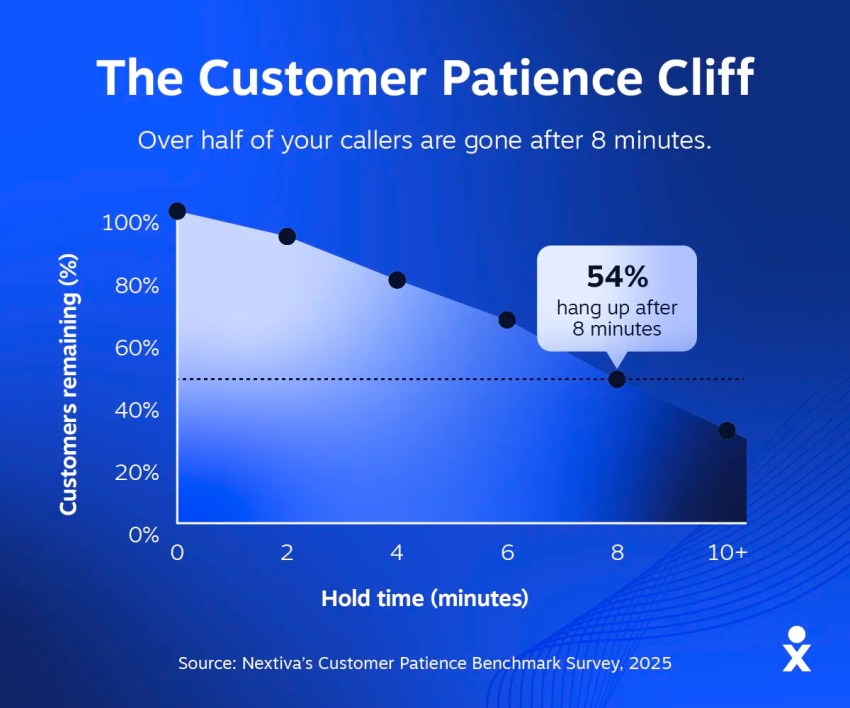
When you see those short calls, you must view them with mid-call hang-up rates. If those mid-call hang-ups hold steady, then short AI calls are a good sign.
Low escalation and the trapped caller
A low escalation rate can mean a capable AI or one that won’t let callers out. Gartner found 87% of customers say it’s essential to have an option to reach a human agent when a company uses generative AI.
On the customer service front, you get only a few chances. When it’s automation, you get fewer. A poor experience adds customer friction and can encourage a customer to seek alternatives.
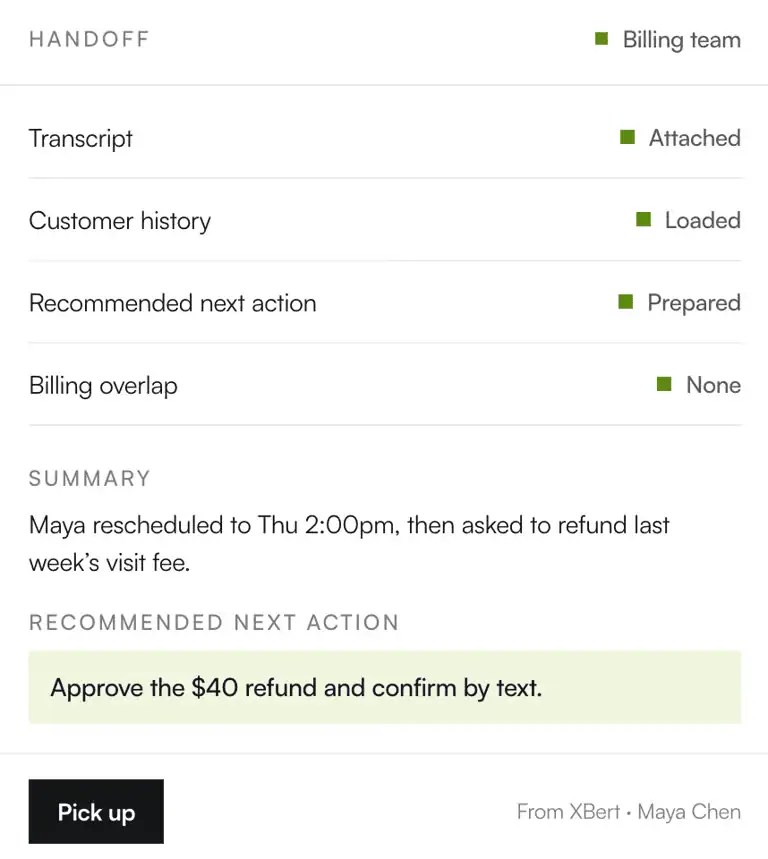
If transfer is the weak point, configure it in a way that it doesn’t trap a caller. When a transfer happens, the AI system needs to carry over all the context from the chat. A customer shouldn’t have to repeat their query every time. It helps to look at escalation rate alongside CSAT on transferred calls and the handoff rate.
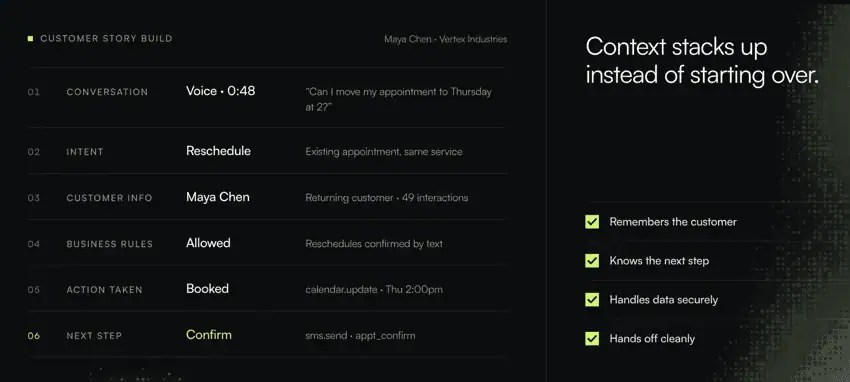
Nextiva’s guide to virtual receptionists lists what context means in practice for transfers. All of it needs to go to the live agent when the transfer happens.
Bookings and no-shows
A booking only counts if the customer shows up for the right service at the right time. Your own records are the benchmark here.
Track no-shows and reschedules for AI-booked appointments separately from staff-booked ones. A gap between the two points to the wrong service or the wrong slot on the booking. If no-shows run high, check whether appointment reminders go out after the AI books.
AI CSAT vs. human agents on the same call types
An AI CSAT score tells you little by itself because the AI gets the easy intents, such as routine questions, where instant answers are enough. Compare customer satisfaction by intent: AI CSAT minus human CSAT on the same call types. This analysis will help you understand when to route calls to a person.
For example, the gap between the two might be smaller on booking calls and wider on billing calls. This suggests that human agents resolve billing calls better, since they involve complex problem-solving.
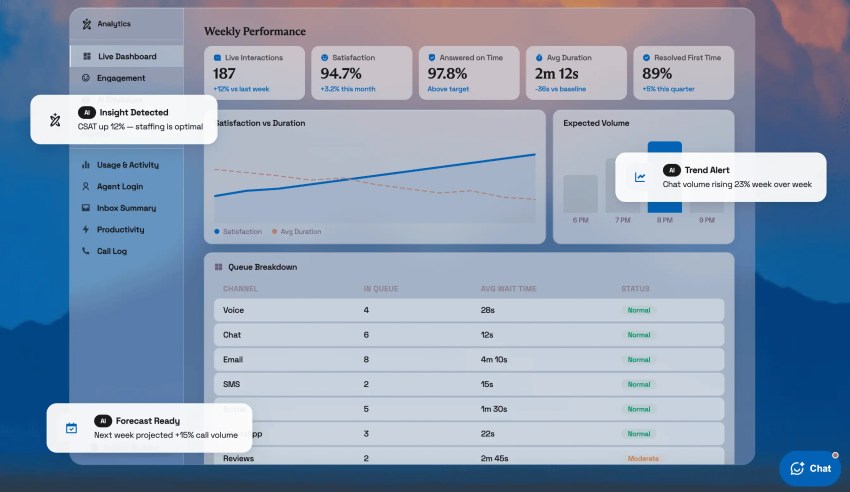
AI Answering Service KPIs: The Complete Measurement Framework at a Glance
The table below collects the core AI answering service KPIs and their formulas. Treat each target as a starting point to calibrate against your own in the first 30 days.
| KPI | Formula | Starting target |
|---|---|---|
| Response latency (p90) | 90th percentile of the time the caller finishes speaking to the first AI audio the caller hears | Under one second (a design target) |
| Intent accuracy | (Correctly identified intents ÷ reviewed calls) × 100 | Set from month-one baseline, improve monthly |
| Incorrect-answer rate | (Calls with wrong or unapproved information ÷ reviewed calls) × 100 | Zero on pricing and policy |
| Containment rate | (Calls resolved by the AI with no transfer and no hang-up ÷ AI-answered calls) × 100 | Baseline by intent in the first 30 days |
| Forced escalation rate | (Transfers caused by AI failure ÷ AI-answered calls) × 100 | Falling week over week |
| 72-hour recontact rate | (Callbacks from the same number within 72 hours ÷ contained calls) × 100 | Falling week over week |
| Mid-call hang-up rate | (Calls where the caller hung up before resolution or transfer ÷ AI-answered calls) × 100 | Falling week over week |
| Missed-call capture rate | (Answered calls ÷ total inbound calls, including after hours) × 100 | Every call |
| Booking conversion | (Appointments booked ÷ calls with booking intent) × 100 | At or above your audited pre-AI rate |
| Cost per verified resolution | (AI cost + human time on escalations) ÷ verified resolutions | Below your prior cost per call |
A weekly review is necessary at any call volume
These reviews are important because some failures show up only in the audio of customer conversations, where real-time analytics can’t see them. Transcripts can also start missing things. It’s better to do a weekly review to ensure things are working as they should. Whether you’re leading teams in a contact center or running a small office, run these five steps every week:
- Clean the denominator: Remove spam, robocalls, and calls under 30 seconds before you read any rate.
- Listen to 20 calls: Use recordings and cover every major intent. Treat 20 as a floor.
- Review forced escalations and requests for a person: Each one exposes a knowledge gap or a transfer rule to fix.
- Update the knowledge base: Turn each fallback and incorrect answer into an approved answer or an escalation rule.
- Check each KPI against its pair: A headline number only counts while its counter-metric holds.
Measure What Matters With XBert
AI answering service KPIs depend on a system that records what happens on every call. XBert, Nextiva’s AI receptionist, answers 24/7, books appointments, and handles text messages and web chat. It can also answer questions about your services, policies, and hours.
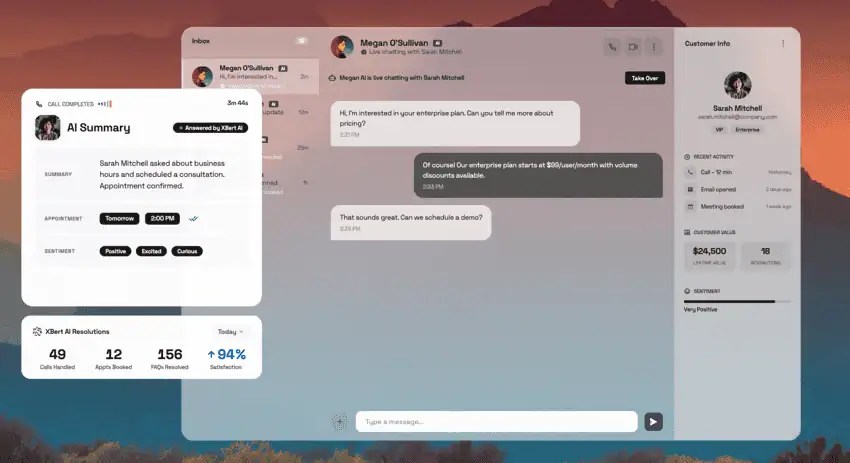
It keeps the full transcript and analytics, and on transfers, your agent gets full context so customers don’t have to repeat themselves. XBert starts at $99 a month for 100 AI conversations, with no long-term contract.
Explore Nextiva’s AI answering service to scale up your support and service efficiently.
Stop missing calls. Use the best AI answering service.
XBert AI gives your business 24/7 coverage—handles calls, texts, and chats, books meetings, and escalates urgent calls so customers never have a bad experience.
Frequently Asked Questions About AI Answering Service KPIs
Track KPIs across five layers: voice quality and latency, understanding and accuracy, resolution and containment, business outcomes, and unit economics. Start with p90 response latency, intent accuracy, containment, 72-hour recontact, missed-call capture, and cost per verified resolution. Pair each one with a counter-metric so a good number can’t hide a bad call.
No single rate fits every business, because containment depends on call mix. A line full of booking requests behaves differently from one full of billing disputes. Establish baseline containment by intent during your first 30 days, improve each intent from its own starting point, and report verified resolution beside it.
Deflection counts every call kept away from a person, including callers who hang up. Containment counts only calls the AI resolved with no transfer and no hang-up, so it never reads higher. Report containment, then verify it with the 72-hour recontact rate.
Fallback rate measures the turns the AI could not answer divided by total turns, and it points to a knowledge gap. Escalation rate measures calls transferred to a person.
Use this formula: (savings + revenue recovered – AI cost) ÷ AI cost × 100. Revenue recovered equals calls that would have been missed × booking rate × average job value. Report cost per verified resolution beside ROI, because it includes the human time spent on escalations.
Aim for under one second at the 90th percentile, measured where the caller hears it. Research on human conversation puts the average gap between turns at around 200 milliseconds, and silences of 600 milliseconds or longer change how listeners read a reply.